The right dental practice management software depends on which of four jobs is costing you most: chair and clinician scheduling, tracking treatment plans to completion, instalments and collections, or clinical modules such as charting, imaging and insurance claims. If your losses sit in the first three, a clinic management platform is often enough. If your clinical day runs on a tooth chart, a live imaging link and insurance claims, you need a dental-specific system. A solo dentist doing simple work may need little more than a calendar with reminders. Count where patients and money go missing first, and then compare products.
This dental practice management software guide is for dentists and practice managers who are close to buying and want to make a decision they will not regret in month six. We are a vendor ourselves, so we will not hand you a ranking or pretend to be neutral. What we will do is give you a way to read any proposal on equal terms, including ours, and we will spell out when Welda CRM is the wrong choice. Because dental rules vary so widely from country to country, treat every regulatory point below as a question to confirm locally, not as legal advice.
Four jobs hiding under one product name
Ask ten dentists why they want new software and you will hear different complaints. Appointments collide. A root canal patient never came back for the crown. Nobody can say who still owes what without opening three places. The dentist is drawing on paper charts and typing notes afterwards. All four are real problems, but they belong to different layers of the practice, and no product is equally deep in all of them.
Scheduling manages the time of chairs, clinicians and assistants. Treatment tracking follows clinical work from the proposal to the final visit. Payments reveal the gap between work completed and money received. Clinical modules support the dentist's own work: charting, imaging, lab cases and insurance.
The layers also have different owners. Scheduling and collections are the front desk and the manager's daily pain, whereas charting belongs to the clinician. That is why purchases go wrong in a familiar way: the principal dentist falls in love with the chart during the demo, and six months later the front desk is keeping a second calendar because the first one is too slow. Get both groups in the room, and have them name the layer that hurts.
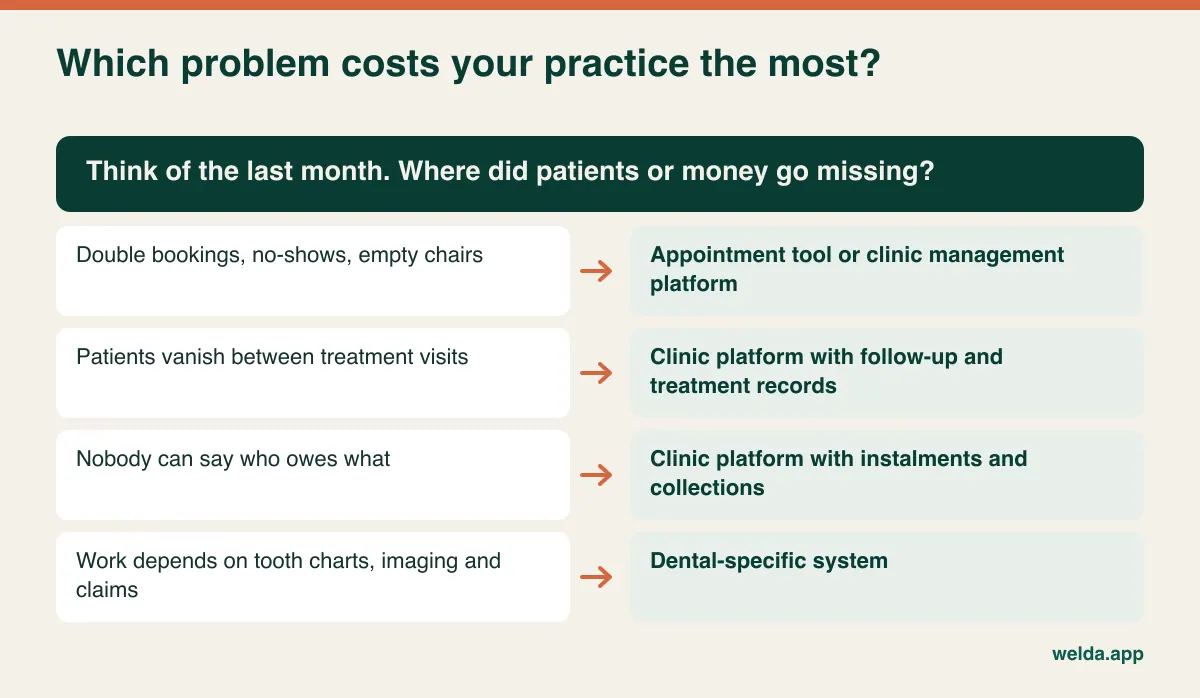
Here is a cheap way to find out. For one week, keep a tally at the front desk. Every time someone cannot find information, has to phone a patient twice, or has to ask a clinician what happens next, make a mark and note the layer. At the end of the week you will have a better requirements document than any feature grid, and an honest first sentence for every vendor conversation.
Three kinds of product, one search result
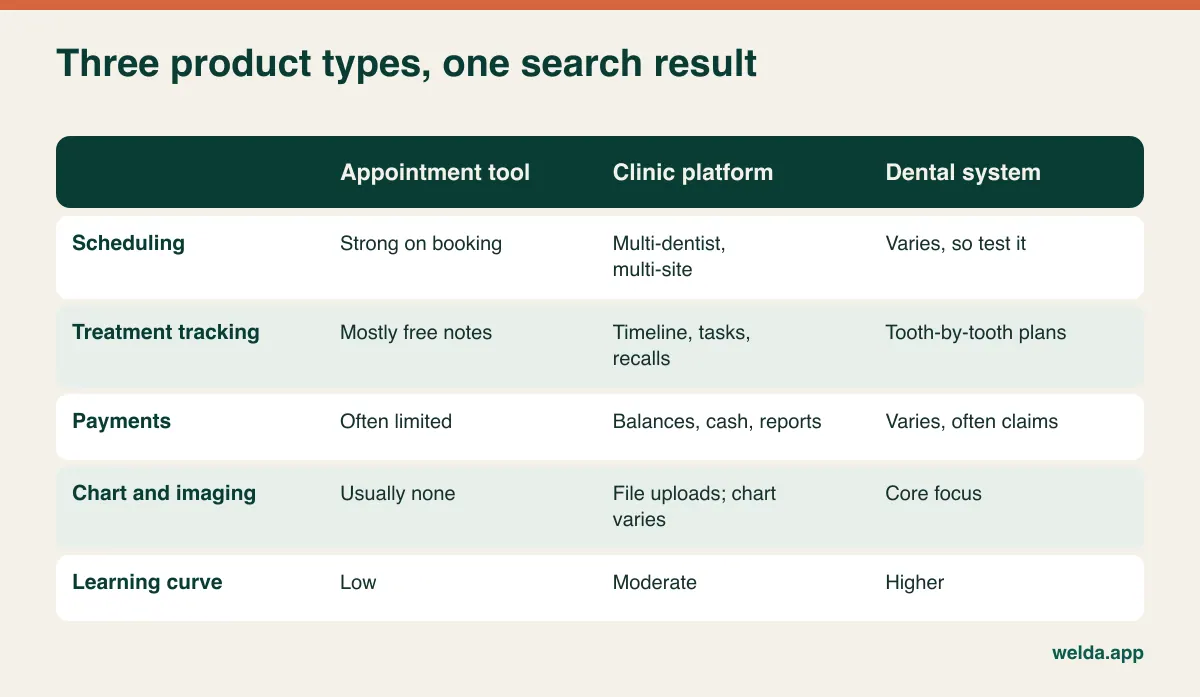
Search results mix very different products, and the labels are not reliable. "Practice management" can describe a booking widget or a complete clinical system. It helps to think in three categories, while accepting that the borders blur and that each product must be checked on its own.
An appointment tool does online booking, calendars and reminders well, and usually stops there. It is quick to adopt, but it thins out as treatment becomes multi-visit. A clinic management platform covers calendar, patient records, reminders, payments, staff, stock and reporting for many kinds of clinic. It is strong on operations and may need workarounds for dentistry's clinical detail. A dental-specific system is built around the tooth chart, treatment coding, imaging and often insurance. It is strong clinically and usually asks more of your team in training and data entry.
There is a fourth option worth mentioning: combining. Some practices keep a clinical or imaging system for the dentist and run a separate platform for front-desk work and patient communication. That can work well, but only if you are clear about which system is the record for what, because duplicated patient data is a problem of its own. Ask how the two would stay in sync, and be prepared for the answer to be "they don't."
Your country's payer rules can end the comparison early
Before you weigh up anything else, answer this: who pays for dentistry in your practice? This single question eliminates more products than any feature comparison, and it is specific to dentistry and to your market.
If you bill a national system or insurers routinely, your software may need to handle procedure coding, electronic claims, pre-authorisation and remittance matching in a format that is specific to your country. In the United States, for example, dental offices commonly deal with procedure codes and claims clearing. In the UK, a practice with NHS work has its own reporting path, quite distinct from private care. Many other markets have their own arrangements. A general clinic platform is unlikely to cover these, and even a dental system built for another country may not. "We have insurance billing" is not an answer until the vendor shows you your payer, your code set and a real claim.
If your patients mostly pay directly, the picture changes. Claims modules become irrelevant, and treatment acceptance, instalments and patient communication move to the top of the list. Cosmetic-led practices, private clinics and practices serving international patients often fall into this group. They can reasonably consider a broader range of products, including clinic platforms.
A mixed practice should work out the share of its work that goes through payers, then decide whether a claims function is a must-have or something that could stay in a separate portal. Write this down before the first demo. If claims are essential, make that your first filter and save everybody's time.
Scheduling when one appointment ties up five things
In most businesses, an appointment takes up one person's time. In a dental practice, a single surgical appointment can tie up a dentist, a chair, an assistant, a shared imaging room and a sterilised kit. A calendar that only knows about the dentist will show a free slot that does not exist in reality.
Consider an example. Two dentists, three chairs, one implant kit. Thursday afternoon both dentists have implant placements. Each dentist's column looks fine, yet there is only one kit and one trained assistant, and the first person to find out is the patient sitting in the waiting room. In a demo, set up exactly this situation and see what the software shows.
Then look at these points:
- Procedure-based durations. Choosing "crown fit" should suggest a sensible length. Being able to vary this by clinician matters, because two dentists rarely take the same time.
- Request-and-confirm online booking. A patient who types "filling" may need a root canal assessment. For this reason many practices will prefer a patient request that staff confirm, rather than an instant booking of any slot.
- Waiting lists. When a long appointment cancels, a chair can sit empty for hours. A list of patients who want an earlier slot makes it far easier to fill.
- Careful reminders. They should be automatic and they should not mention the treatment. Family members see phone screens, and the date and time are enough.
For more on reminders and no-shows, see our guide on how to choose clinic appointment software. The question for dentistry is not whether the calendar can take a booking, but whether it can see everything that booking ties up.
A treatment plan is a promise with a sequence
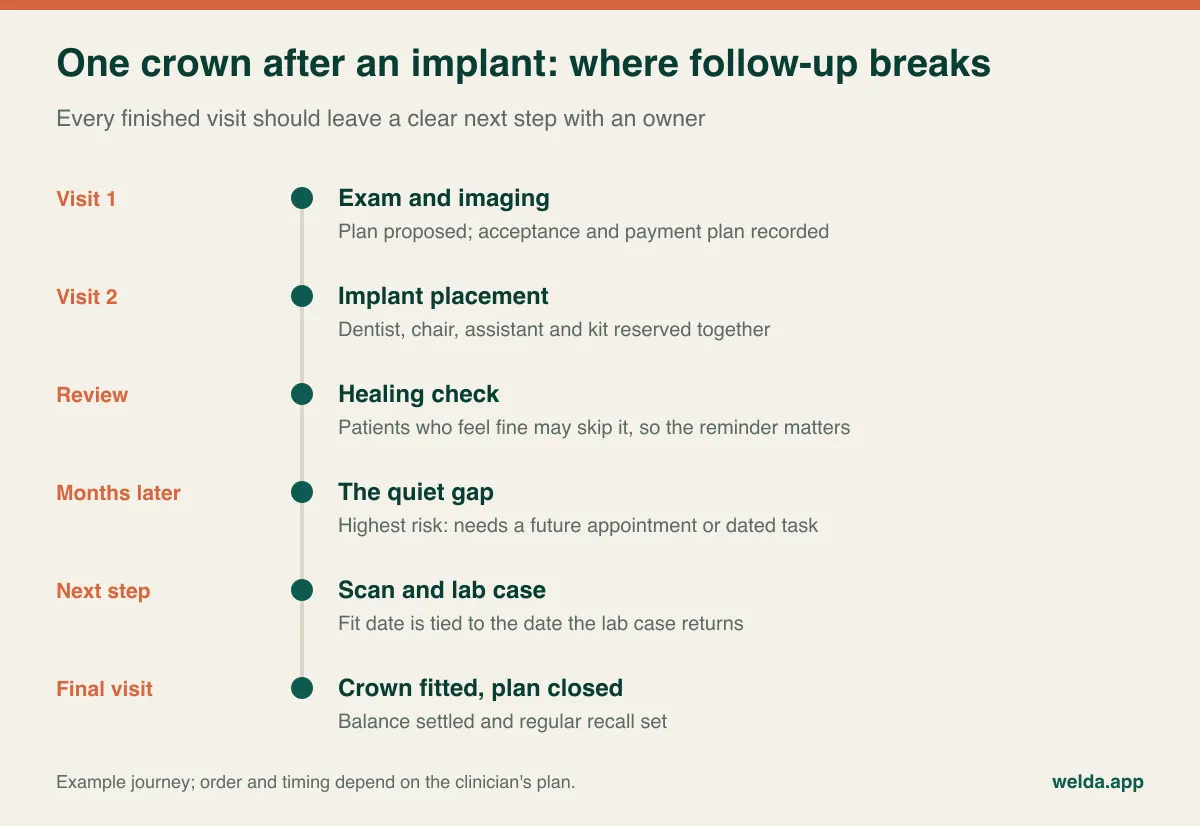
The most valuable work in dentistry is spread over multiple visits. When a haircut ends, the job is done. When today's dental appointment ends, the root filling may be complete but the crown is still to come. If the patient feels fine and never calls back, the treatment stays unfinished, the tooth is at risk, and the practice has lost track of work it started. Nobody complains. The patient simply does not appear.
So the question to ask is not "can it store treatment notes?" Instead, ask: who gives me the list of patients with an accepted plan and no next appointment? This is the most useful report in a dental practice, and few demos volunteer it. If the system produces it directly, excellent. If not, see whether tasks, follow-up queues or recalls can get you to the same result without someone working through files by hand.
Test three awkward situations with real names removed:
- Handover. One dentist does the root canal and another does the crown. Can the second one see the previous note, what was done and what the patient was told at a glance?
- Plan change. Two fillings were proposed, and one turned into a root canal on the day. Can the old plan stay visible beside the new one, and where does the price difference go?
- Declined treatment. The patient says not now to a recommended crown. Does this stay on record? Knowing what was proposed and refused is useful for follow-up, and it can matter if there is ever a dispute.
Be honest about how much structure you need. A chronological record of notes, documents and future appointments on one patient profile works for many smaller practices, provided clinicians actually write the notes. A structured, tooth-by-tooth plan with status, fee and consent per step is what heavily restorative, implant or orthodontic practices often need. Structure costs clinician time at every step, so buy it only if you will use it. Our article on patient records systems goes deeper on what a usable record looks like.
Lab cases: the third party in your diary
Crowns, bridges, dentures and aligners tie your calendar to an external delivery date. The impression or scan goes out, a try-in comes back, it may go out again, and then it is fitted. If a lab case is late and no one has noticed, the patient arrives to an appointment with nothing to fit. Few other appointment-based businesses have this dependency, and many general tools were not designed around it.
Dental systems often include lab case tracking. If yours does not, a process will do at low volumes: add a note to the patient profile on the day the case goes out, create a reminder task for the day before it is due back, and book the fit only against that date. Count your open lab cases at any given moment. If the number is small enough to manage from a task list, do not switch systems for a lab module. If several cases move every day, or you need lab costs per clinician or per case, put it on your must-have list.
Instalments: whose money, whose risk?
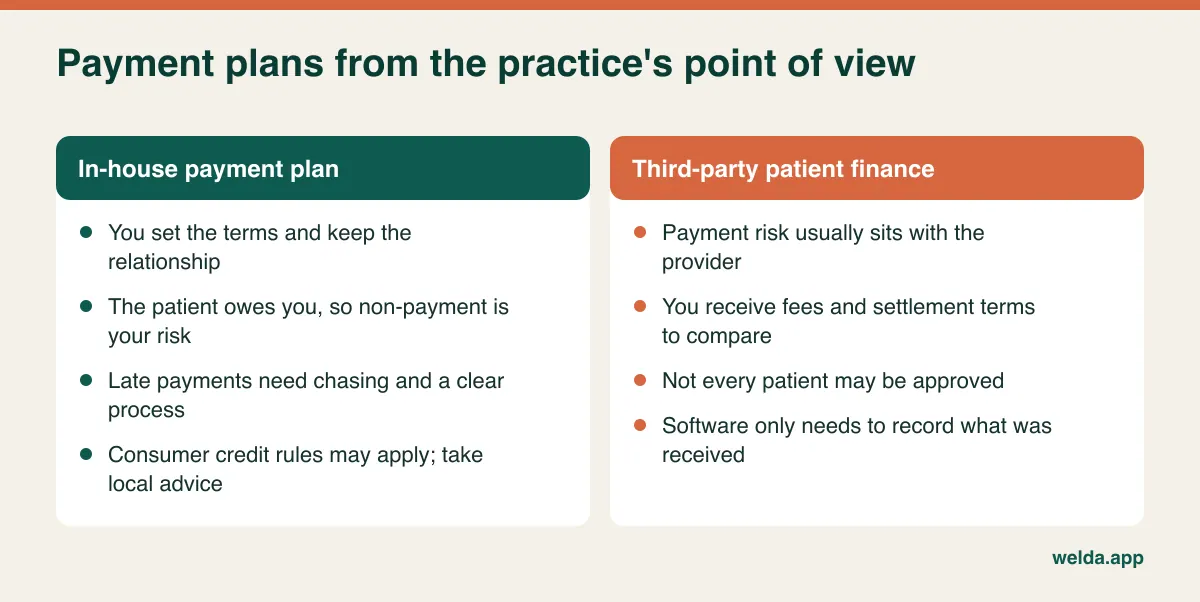
"Do you offer payment plans?" sounds like one question, yet it covers arrangements that behave very differently in your books. With a third-party finance provider or a card plan, the payment risk usually sits with that provider, and your concern is fees and settlement. With an in-house plan, the patient owes you directly, and chasing late payments is your job. Local consumer credit rules may also apply to in-house plans, so take advice before you formalise one.
The real problem is that the payment schedule and the clinical schedule drift apart. A patient may have received most of their treatment while having paid for little of it, or the reverse. Your software should show the balance beside the value of the work completed. The worked example below uses abstract units so that the logic stays in focus.
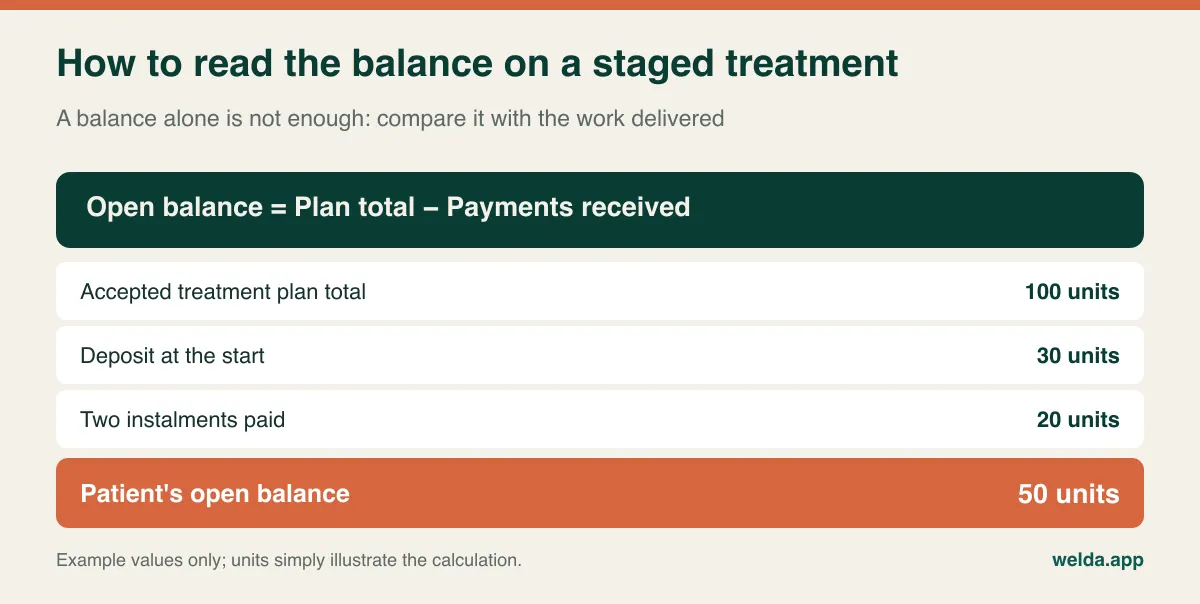
The open balance is 50 units. What matters next is how much of the plan has been delivered. If it is 40 units, the patient has paid ahead and, should they stop treatment, a refund discussion may follow. If it is 70 units, the practice is carrying the risk, and you may be chasing money for completed work. If the software cannot show both figures together, someone will build a spreadsheet to answer the question, and that spreadsheet will gradually fall out of date.
This layer also drives clinician pay. Is an associate's share calculated on collections or on production? Are lab and implant costs deducted first? When a patient pays in instalments, does the share follow each instalment? Write down your actual rule, then ask the vendor to calculate it on one patient during the demo. If that fails, your commission sheet stays in Excel no matter what you buy.
Charting and imaging: test what the words really mean
Clinical modules look the most impressive in a demo and are the least frequently audited afterwards. For each one, ask who will use it and how many times a day. Then ask whether a simpler alternative would do.
| Module | When you really need it | What often works instead |
|---|---|---|
| Tooth chart | Clinicians plan on the chart, and frequent handovers require per-tooth history | Disciplined notes using a standard tooth notation |
| Imaging link | Images must flow from the device to the record so that clinicians can compare them | Imaging software stays separate, with key images uploaded as files |
| Lab tracking | Many open cases at once, and lab costs tracked per case | Patient note plus a dated reminder task |
| Insurance claims | A significant share of work is billed through payers | The payer's own portal, if volumes are low |
| Orthodontic tracking | High volume of long courses with regular intervals and staged payments | Repeat appointments, notes and instalment tracking |
"Stores X-rays" is the phrase to pin down. It can mean that a file is uploaded to the patient profile, or that the system connects directly to your device or imaging software. Upload is good for keeping things together, but diagnostic viewing tools stay in your imaging software. Get it in writing which one is meant, and give the vendor your exact device make and model.
Patient data when your software crosses borders
Dental records are health data almost from the first page: medical history, images, notes, photographs. Rules differ by jurisdiction. GDPR applies across the EU and has a UK counterpart, HIPAA applies to covered entities in the US, and many other countries have their own laws. Software cannot make you compliant by itself, but it can make compliance easier or harder, and you remain responsible for confirming your own obligations with a local adviser.
A few questions are useful wherever you are. Where is the data hosted, and who are the subprocessors? Is there a data processing agreement or its local equivalent? Can consent be recorded with the version of the wording that the patient agreed to? Can the front desk take payments without seeing clinical notes? Is there a log of who opened which record? How long must you keep records in your country, and can you do that after leaving this vendor? Our piece on patient data security in clinics covers this ground further.
Messaging deserves its own check. A plain appointment reminder and a whitening promotion are not the same thing in many legal systems, and marketing often requires separate consent. Whichever channel you use, keep reminders free of clinical detail.
Your demo script, based on one awkward week
Vendor demo data always runs smoothly. So take the second half of the demo for yourself. Pick last week's messiest day, change the names, and ask the salesperson to work through it on screen while your receptionist and a clinician watch. Each of them will notice different things.
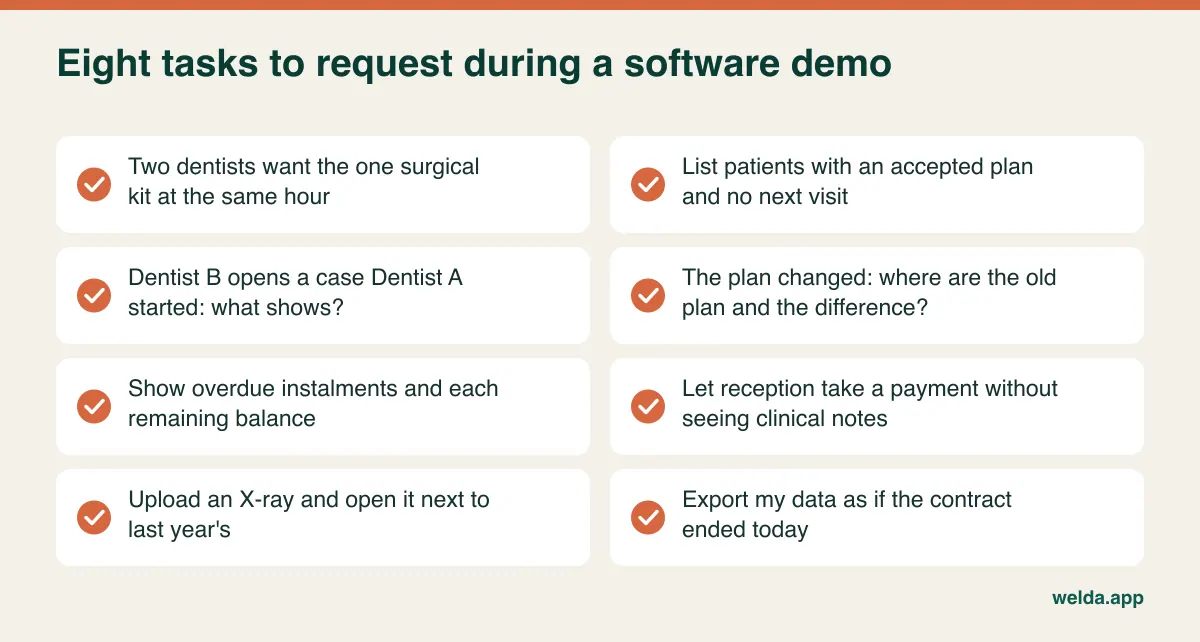
Listen for four phrases: "we can customise that", "that's on the roadmap", "that's in another package" and "your integrator handles that". None of them is a bad answer, but each describes something you do not have today. Ask for the date, the cost and the responsible party in writing. And if a trial is available, run one full real day in it. How many clicks does a new patient take during a busy hour? Does a clinician really have time to write a note chairside? You only learn these things through use.
Reading proposals on equal terms
A headline monthly figure tells you little. Fill in one table for every proposal, using the same assumptions for clinicians, front-desk users, sites and monthly reminders. Include these lines: how users are counted, including part-time associates; image storage as the archive grows; message costs at your volume; fees for any invoicing or payment provider; what is included in setup, data migration and training for new staff; how an added module is charged; and the format and cost of getting your data out when you leave. Then add your internal costs, such as parallel running, chairs blocked for training and the staff time spent cleaning data. That last line on exit is the one most often skipped, even though dental records may need to stay accessible for years.
Switching: move open treatment first
The classic migration mistake is treating all data as equally urgent. In dentistry the priority is clear. Active treatment plans, open balances and future appointments must be correct on day one, because those are the patients who will walk in on Monday. The paper card of someone with one filling ten years ago can be scanned later.
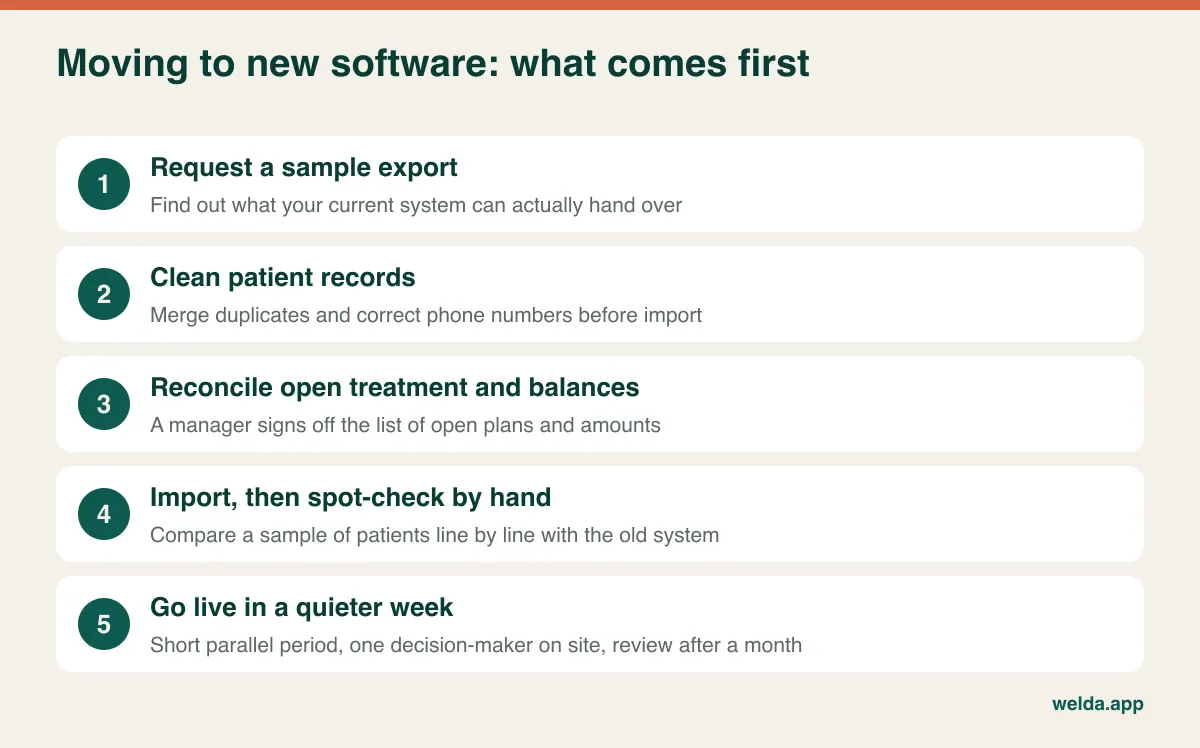
Most bad purchases come down to process rather than technology: buying on the clinician's enthusiasm alone, leaving the front desk out of the demo, requesting quotes before the pay rules are written down, paying for an all-in-one package and leaving half of it unused, or going live in the busiest month of the year.
When Welda CRM belongs on your shortlist, and when it doesn't
Our dental clinic software is a clinic management and patient relationship platform, built for the first three layers. Every dentist's calendar sits on one screen with clash prevention. Patients can leave online booking requests for you to approve, and when someone cancels, the next person on the waiting list is notified. Reminders go out automatically by WhatsApp, with message templates in English, Turkish and German. Treatment notes and documents are stored chronologically on the patient profile, alongside an encrypted health record with allergy and contraindication warnings. Instalments, open balances, cash, bank and POS movements, supplies, commission calculations and per-dentist reports are in the same place. Role-based permissions, consent management and an audit log are included. It runs in a browser on computers and tablets, with no local installation.
Now the other side. X-rays and documents are uploaded as files, and there is no direct integration with imaging devices. Our product pages do not list a tooth chart, a dedicated lab module or insurance claims, so if any of these is essential, raise it in the first conversation and assume nothing that is not stated. Multi-step treatment runs through the calendar and notes, so a team expecting a structured tooth-by-tooth plan should test this against its own scenario. Invoicing connects through a chosen integrator, and the available options should be confirmed for your country. We also list KVKK and GDPR support; if you need another framework, such as HIPAA, please ask rather than assume.
So if your clinical day runs on a chart, a live imaging link and claims, a dental-specific system is likely to suit you better. If your real losses are empty chairs, patients who vanish mid-treatment, scattered notes and instalments nobody can see, Welda CRM deserves a place on the list. To put this dental practice management software guide to work on real screens, you can try every module free for 7 days on our dental practice management software page. Setup, moving your existing patient and appointment data and team training are included. Pricing depends on your sites, users, message volume and modules, so the most useful next step is a free consultation. Tell us how your practice runs and we will work out the right plan with you, and we will tell you if we are not the right fit.
Frequently asked questions
Does a solo dentist need practice management software?
Not always. With few patients a day, short treatments and payment on the spot, a calendar with reminders and a tidy records system can last a long time. Dedicated software starts to pay off when you can no longer quickly answer "who hasn't come back, and why?"
Can I run a dental practice without a digital tooth chart?
That depends on how you work. If clinicians plan on a chart and patients often move between them, a chart is a real requirement. If disciplined notes using standard tooth notation work for your team, stronger scheduling and collections may help you more. Decide this with your clinicians rather than for them.
Do I need software that handles insurance claims?
Only if payers account for a meaningful share of your work. Check it against your actual payer and code set, because claims functionality is highly market-specific. Predominantly private practices can often leave it off the list.
What is the difference between a CRM and practice management software?
The terms overlap. A CRM traditionally focuses on the relationship: enquiries, follow-up, messages and reviews. Practice management software traditionally focuses on running the clinic: calendar, records and billing. Welda CRM combines appointments, patient records, communication and payments, but it does not include insurance claims or a live imaging link according to our current product pages.
Can my existing data be moved?
Patient and appointment lists usually transfer more easily than treatment history, and the result depends on what your current system can export. Ask for a sample export early. With Welda CRM, moving existing patient and appointment data is part of setup, and we can review your treatment history and documents together in the consultation.
Is it safe to use WhatsApp for reminders?
It depends on your jurisdiction, the consent you hold and what the message says. As a general rule, stick to date and time and leave out clinical details. Record patients' communication preferences and treat promotional messages separately. Your legal adviser can confirm the exact position for your practice.
How long should selecting software take?
There is no fixed answer. The time goes on the preparation rather than the demos: a week of tallying problems, an afternoon writing down your pay and payment rules, and then two or three candidates tested with the same scenario. Watching more demos rarely makes the choice any clearer.