The right multi-location clinic software is the one that passes three tests with your own rota on the screen: it stops a clinician being double-booked across sites, it keeps each employee's access inside the site they work at, and it reports every site using the same definitions. A "locations" dropdown does none of that on its own. If a product can only show you separate calendars with a site name attached, you are buying several small systems under one login, and you will be rebuilding the group picture in a spreadsheet before long.
This guide is for owners who have opened, or are about to open, a second or third site and want one view of the business without standing in every waiting room. It applies whether you run aesthetic, dental, dermatology, physiotherapy or multi-specialty clinics. If you are still deciding whether to expand at all, read our piece on opening a second location first. Healthcare and data protection rules differ by country, so treat what follows as general orientation and confirm specifics with your own adviser.
The week your second site opens: what actually goes wrong
A single-site clinic hides its software gaps because people fill them. The receptionist who has been there for six years knows which patient hates early mornings, which package has three sessions left and which balance you agreed to defer. You walk the corridor and sense how busy the day is. Much of what you think of as your system is really the fact that everyone works in the same building.
A second address splits that invisible layer in two, and the failures are small and specific. A clinician now spends Thursdays at the new site, but the original front desk still treats Thursday as open and books her anyway. A patient says she bought a course at the other branch, and nobody can see how many sessions remain. The new site's takings arrive as a photo in a group chat. At the end of the month, two spreadsheets produce two occupancy figures, and the meeting is spent arguing about which is right rather than what to do about it.
So before you open a single vendor website, spend two weeks writing down every moment one site needs something the other site knows. Phone calls between desks, screenshots requested over messaging apps, questions parked until tomorrow. That list is your real requirements document, and it will serve you far better than any feature grid a vendor prepares for you.
One patient database or one per site? Decide this first
This single architectural choice shapes almost everything that follows, and it is easy to leave it to whatever the software happens to do. Neither answer is universally correct.
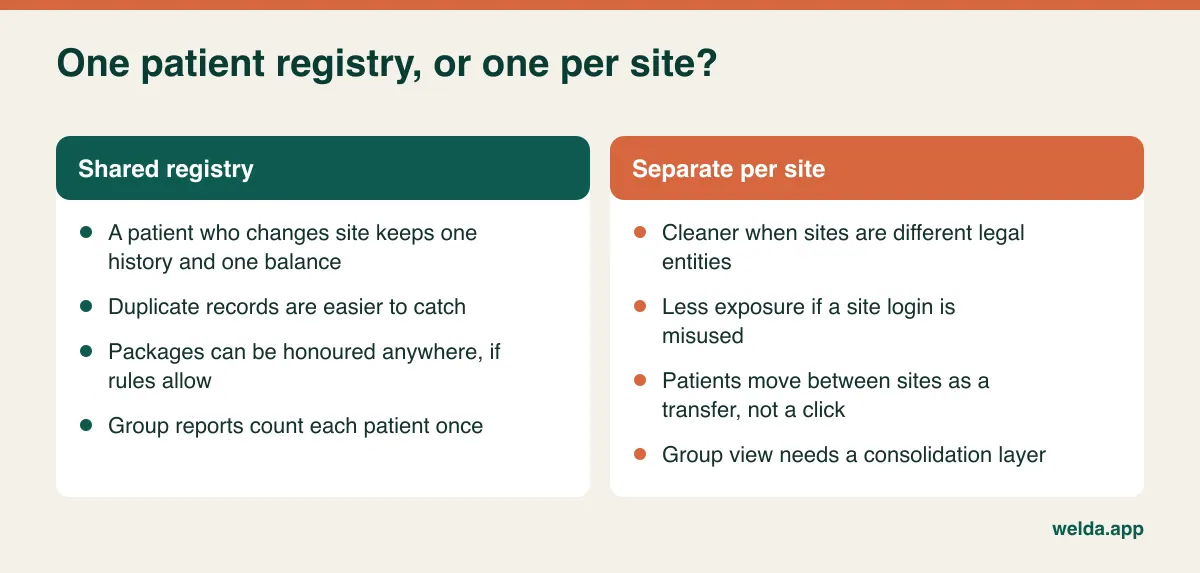
For a group owned by one company, a shared registry is usually the better starting point. Patients think of you as one clinic, duplicates are easier to prevent and the group report counts a person once. The price is that permissions have to work properly, because a shared registry with weak access control means every receptionist can browse every patient.
Once the patient is shared, four business rules need an owner. Can a course bought at one site be redeemed at another? If so, which site gets the revenue: the one that sold it or the one that delivered the session? Can a balance owed at site A be collected at site B? And when the same person was registered twice under slightly different spellings, who merges the records, and how is that merge undone if it was wrong? Write the answers down before the demo. A vendor can only show you how their product handles your rule if you have one.
The package question deserves particular attention. If revenue credit is unclear, site managers may start steering patients to stay local, and the flexibility you introduced for patients turns into internal friction.
The roaming clinician test
Many per-site calendars look flawless while each site is considered alone. The trouble starts when one resource is shared between two, which is often unavoidable in a young group. You cannot hire a second copy of your sought-after dermatologist or implant specialist, so you split her week.
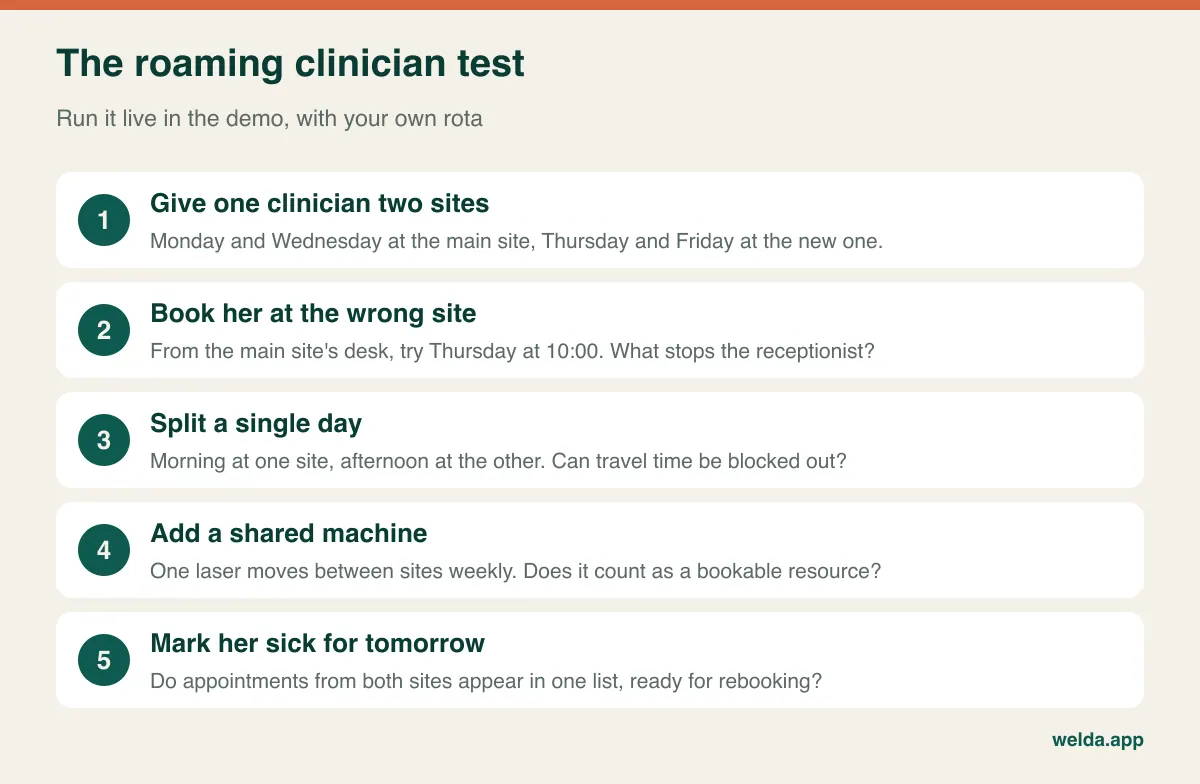
Step two is the heart of it. There are three possible outcomes. In the good one, the receptionist sees that the clinician is at the other site that day, and the booking is blocked. In the middling one, the system warns but lets the booking through, which on a busy morning means it gets through. In the bad one, each site treats her as a separate resource and the clash is discovered by the patient, standing at reception.
Travel time is the detail that catches people out. If someone works mornings at one site and afternoons at another, you need a block between them. The software does not have to calculate traffic, but you should be able to set up that block as a recurring rule without re-entering it weekly. Ask to see it done.
Shared equipment follows the same logic. A laser, ultrasound unit or panoramic X-ray is often too expensive to duplicate straight away, so it moves. If the calendar cannot treat a machine as a bookable resource that changes location, the front desk ends up phoning the other site to ask where it is. For a group built around one device-heavy treatment line, this may matter more than any other single criterion on your list.
Permissions that stop at the site boundary
The central view an owner wants can quietly become an everyone-sees-everything view. In a single clinic, three roles might be enough. In a group, each role has two dimensions: what data it can see, and at which sites. A permission system without that second dimension can hand a new receptionist the full patient list and takings of a site she has never set foot in.
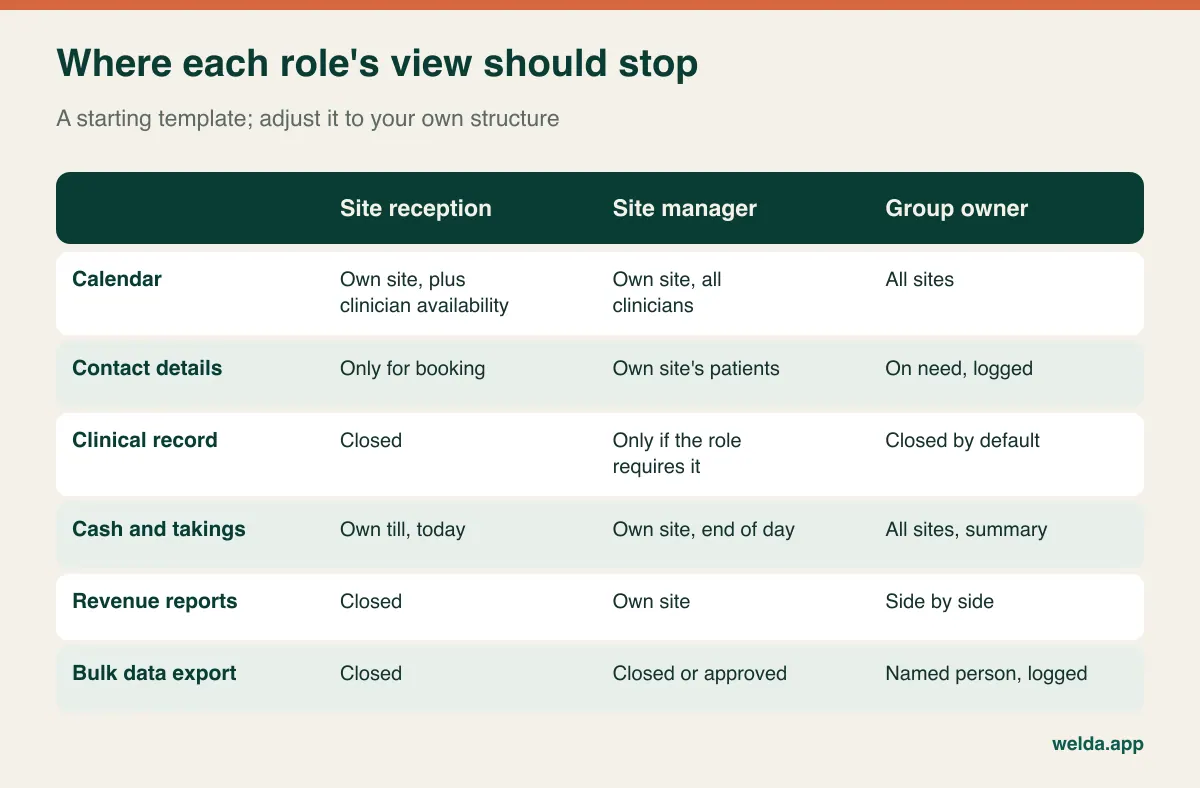
The two rows that deserve the most thought are clinical records and data export. Owning a clinic group is not automatically a reason to read clinical notes, particularly if you have non-clinical investors or partners; settle that early. Export is where a departing employee could walk away with your patient list, so restrict it to very few named people and make sure each use is logged.
Test this through an incident rather than a settings page. Log in as the new site's receptionist and search for a patient from the other site. Try to open the revenue report. Then pretend she has resigned today: close her access and confirm that her past actions remain visible in the audit trail. You also need a rule for regional managers and roaming clinicians, whose access spans some sites but not all. Ask whether the software supports that middle ground, or whether every person is forced to choose between one site and the whole group. Our article on patient data security gives more background on why access limits matter.
A group report is only as honest as its definitions
Comparing sites only means something if each measures the same thing in the same way. If one site deletes no-show appointments while the other marks them as missed, the first will report a no-show rate of zero. If one calls a service "anti-wrinkle injection" and another "toxin treatment", your service report has two lines for one product. Group reporting therefore starts with a shared vocabulary rather than a dashboard.
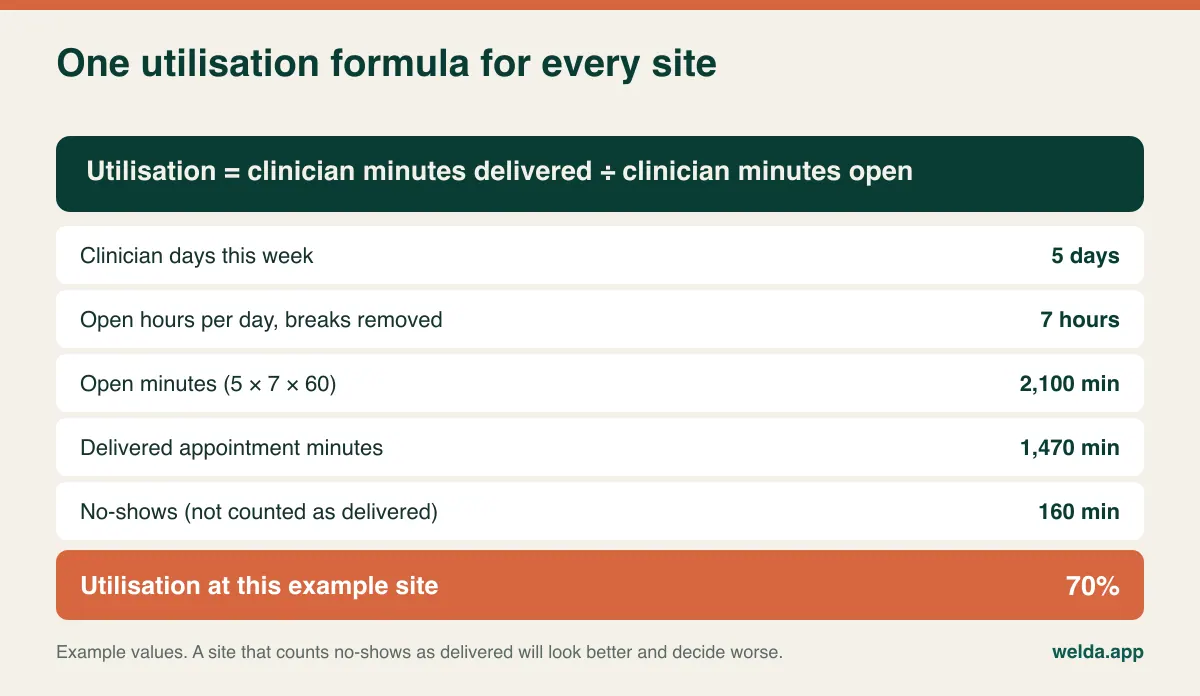
The minimum shared vocabulary covers service names and standard durations, the definition of a no-show versus a late cancellation, the denominator for utilisation, whether package revenue is recognised at sale or at session, and what counts as a new patient. That last one can catch you out. Is a patient who moves from your original site to your new one a new patient there? If you allocate marketing spend by site, the answer changes your numbers.
With definitions settled, read the rows and not the total. A group average is a comforting number that can easily hide the one thing you need to act on.
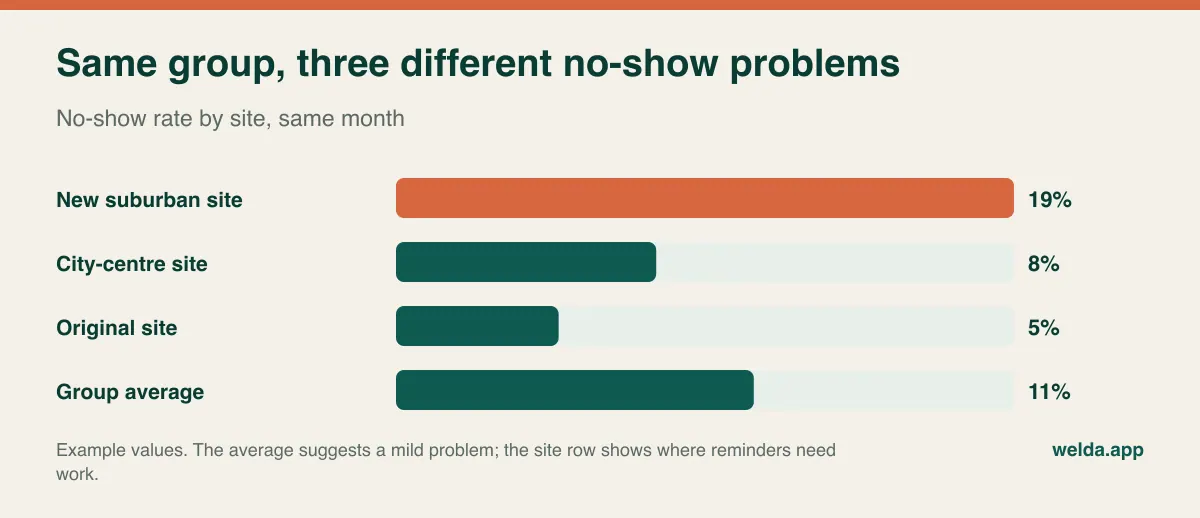
A practical standard is the Monday morning test. In five minutes, without exporting anything, can you say which site has empty clinician days this week, where no-shows rose last week, whether takings match the documents issued, and which site's open balances are growing? If any answer requires downloading two files and merging them, you have centralised your data but not your view of it.
Match the software to the shape of your group
"Multi-location" describes very different businesses, and they need different things first. It is also worth admitting that some of them do not need this category of software yet.
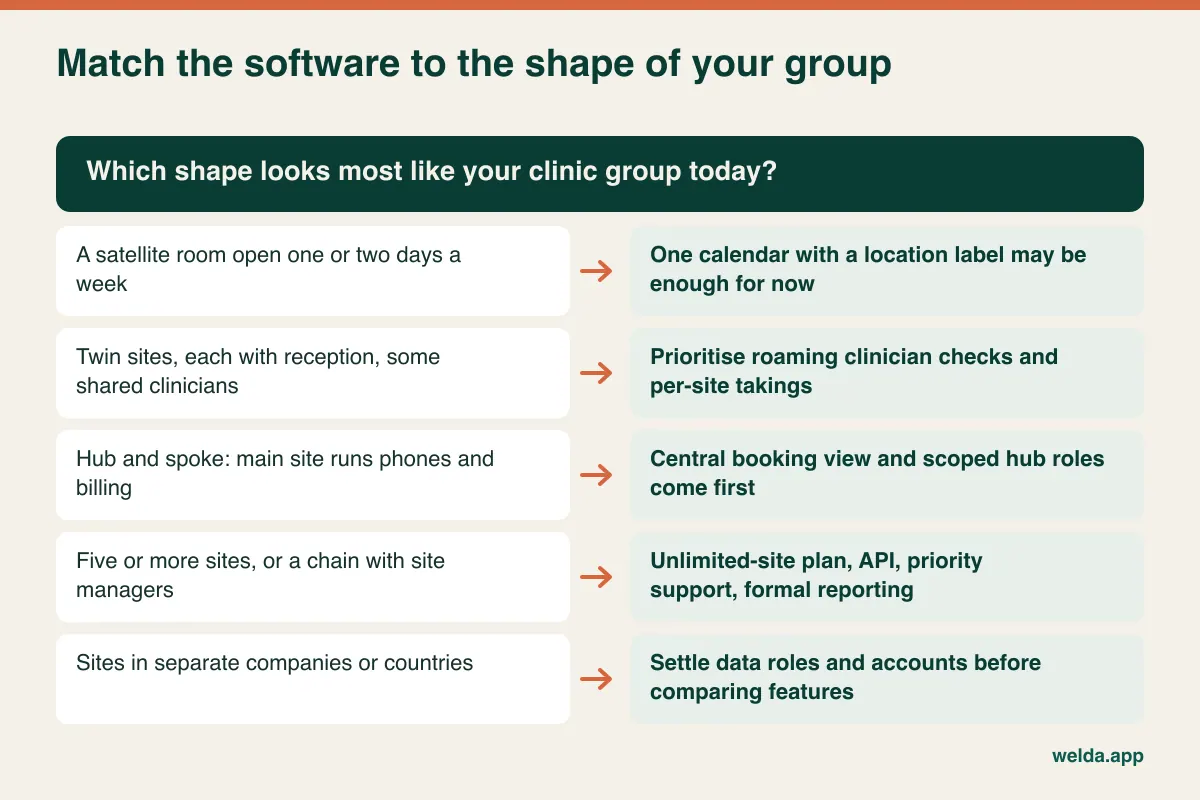
The satellite room. If your second address is a rented room you staff one or two days a week with the same team, one calendar with a clear location label may genuinely be enough. Paying for structure you do not use only adds clicks.
Twin sites. Two reasonably equal clinics, each with a front desk, sharing some clinicians. This is where roaming checks and separate takings become your first two criteria.
Hub and spoke. The main site runs phones, billing and scheduling, while smaller sites deliver care. Here the critical screen is a central booking view that shows availability across sites for a chosen service. A coordinator who has to click through sites one at a time will keep patients waiting on the line. Also check that a booking records which channel and person created it, or you will never learn what your central desk actually contributes.
The growing chain. With five or more sites and managers at each, formal reporting, API access and support response times begin to matter as much as the calendar. Your needs start to resemble those of a small enterprise.
There is also a case for looking outside this category altogether. If insurance billing, laboratory orders and imaging workflows sit at the centre of your day, you probably need an electronic health record or hospital-grade system, with appointment and operations software alongside it at most. Our guide to multi-specialty clinic management software explains how to name that product class before you compare anything.
When sites sit in different companies or countries
Not every group is one company. A partner buys into the new site through a separate entity, or a clinician owns her own practice under your brand, or a franchise arrangement appears. Some groups cross a border. These facts rarely appear in a software brief, yet they can change the answer more than any feature.
Separate legal entities. Under frameworks such as the EU's GDPR, each company may be its own data controller, so one seeing another's patient records may count as a disclosure that needs a lawful basis and a written arrangement. A shared registry that is harmless inside one company can become a compliance question between two. Take legal advice before you enable it. Commercially, ask whether one account can hold several invoicing identities, or whether each company needs its own account with a consolidated view above it.
Separate countries. Consider where data is hosted and whether that is acceptable in each jurisdiction, which privacy regime applies (GDPR, HIPAA in the US, and national health-data rules elsewhere), what electronic invoicing is mandatory locally, and how currency and time zones are handled in group reports. A vendor's statement of "compliant" means little until you know which regime and which part of the product it refers to. Ask for the data processing agreement and read it.
Licensing. In many countries a healthcare licence, registration or responsible person attaches to a specific premises. Software will not solve that, but it does tell you something useful: each responsible person needs a role that sees their own site fully and clearly.
Language. In international cities and cross-border groups, staff and patients do not always share a language. Check interface languages and message templates separately, because one being translated does not guarantee the other is.
What to put in front of every vendor
Multi-site costs grow along different lines than single-site ones, so laying monthly figures side by side tells you little. Give each vendor the same written scenario: number of sites today and in two years, users including part-time clinicians and relief staff, monthly reminder volume, stored photos and documents. Then read the replies against these cost drivers.
| Cost driver | Question to ask | Why it grows with sites |
|---|---|---|
| Site limit | Which plan does the next site push us into? | A step up can change the cost of the whole account |
| User count | Do part-time clinicians and relief staff count as users? | Every site adds its own desk and clinicians |
| Message volume | What happens when we pass the quota? | Rises directly with appointments |
| Storage | What fills the quota, and what happens then? | Before-and-after photos accumulate at each site |
| Modules | Which plan unlocks tills, stock and commissions? | Per-site cash and clinician pay become essential |
| Onboarding | Is a future site's setup and training charged again? | The first setup may be included while later ones are not |
| Third parties | Who provides payment terminals and e-invoicing? | These sit outside the software quote |
| Exit | In what format do we get all sites' data back? | Leaving gets harder as data grows |
User count is the easiest line to underestimate. Picture three sites with one receptionist and two clinicians each: that is nine logins before you add yourself or a bookkeeper. An owner who picks a plan by site count alone may hit the user ceiling first. For a wider method of comparing quotes, see clinic management software cost.
Bring your busiest receptionist to the demo. Owners tend to evaluate reports; she will notice how many clicks it takes to find a free slot at the other site with a patient on the phone. Then ask each vendor to walk through the same three scripts: the roaming clinician, the resigning receptionist and the Monday morning report. Identical scripts make differences visible in a way that polished sales decks do not.
Cutover: site by site, with the calendar open
Opening a new site looks like the natural moment to change software, yet putting two major changes in one week makes it hard to tell which one caused a problem. Where you can, move the existing site several weeks before opening. The team learns the system on familiar ground, and experienced colleagues can support the new site on day one.
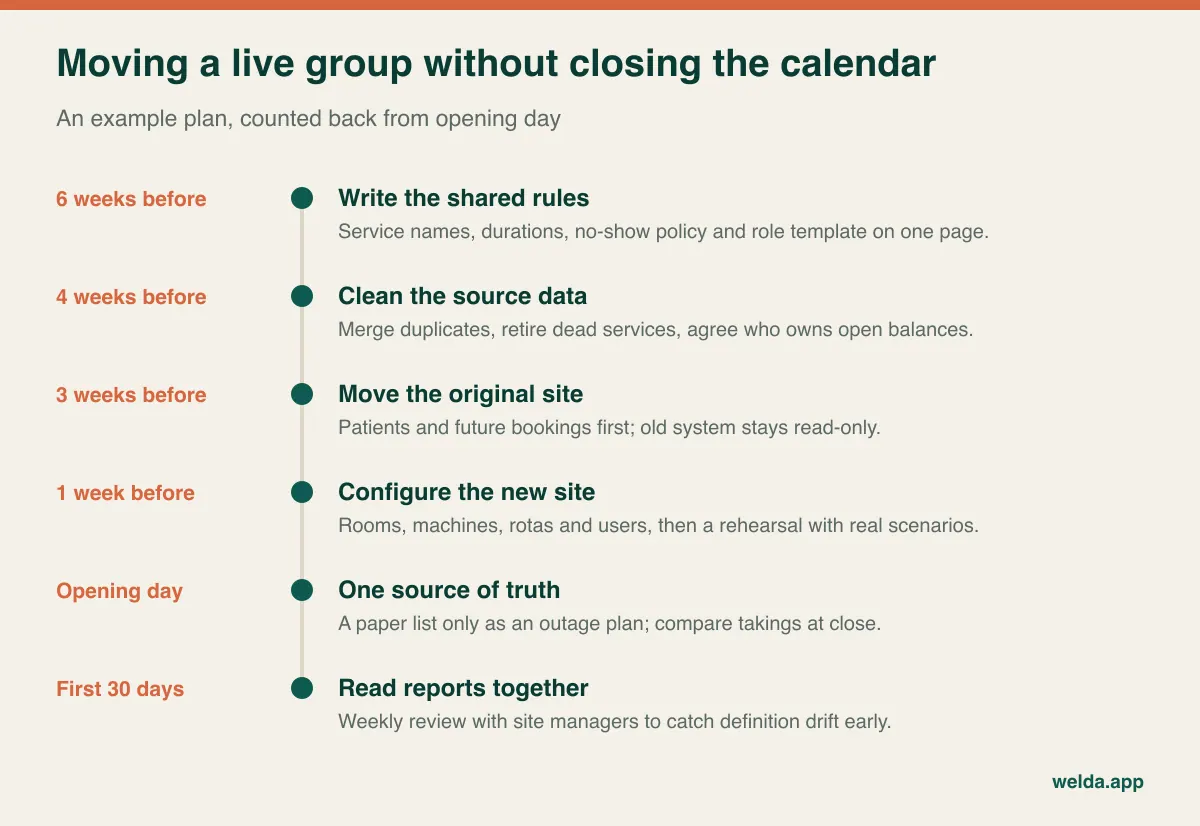
The riskiest item is future appointments. A booking left behind in the old system appears as a free slot in the new one, and a second patient gets booked into it. Choose a quiet day for the move, close new bookings in the old system straight after, and keep it read-only for a period. Check retention obligations for medical records before you switch anything off for good.
A few mistakes are worth avoiding. Migrating without cleaning the service list simply copies old chaos into a new product. Training only managers can send reception back to paper within weeks. Giving the new site its own rules because "it's different" breaks your reports from month one. And the shared login created "just for now" can easily become permanent, which removes any answer to the question of who did what.
Where Welda CRM fits, and what to verify
Welda CRM is web-based software for appointment-led businesses, and choosing the clinic sector sets the starting modules and on-screen terms accordingly. Branches are run from one account, each with its own calendar and reports. The calendar has staff, room and branch views and prevents clashes; online requests are confirmed by you, and a waiting list notifies the next person after a cancellation. It includes role-based permissions, versioned consent records and an audit log, along with occupancy, revenue and staff performance reports that can be compared by branch. You can see how this comes together on our page about multi-location clinic software with Welda CRM.
Applying our own table to ourselves: Starter covers one branch and 3 users, Pro covers up to three branches and 10 users, and Enterprise has no limit on either. Tills, stock, expenses and commissions start at Pro. As noted above, at three sites your user count may decide the plan before your branch count does. Setup, data migration and training are included, and the interface and message templates are available in English, German and Turkish.
Some things we should state plainly. Welda CRM is not positioned as an electronic health record or hospital system, and we make no promise here about insurance billing, e-prescribing, or laboratory and imaging integrations. We also do not make compliance claims for regimes such as HIPAA in this article. On roaming-clinician conflicts between branches, narrowing permissions to a single branch, redeeming packages across branches, revenue sharing between entities, multi-currency reporting and hosting location, we would rather test your scenario with you in a consultation than offer a general "yes". Please run the tests in this article on us too.
Questions owners ask before signing
What makes clinic software truly multi-location?
Calendars, permissions, takings and reports are separated by site, while an owner can compare them all in one place. A shared clinician or machine should not be able to clash across sites. Adding a location name to a calendar does not meet that standard.
Can I just run a separate system at each site?
For a while, if clinicians and patients never move between sites. Once they do, you take on duplicate records, clashes and monthly consolidation. If a third site is in your plans, starting with a single structure is usually less work.
Should site managers see each other's numbers?
Usually not revenue, though some groups share a ranking to encourage healthy competition. Whatever you choose, build it into the role definition rather than handling it case by case. Sharing rates such as utilisation rather than amounts is a reasonable compromise.
Can patients book online across all sites?
Some systems offer this, but look at the order of the choices: does the patient pick the site first, or the service? Also check that the reminder carries the correct address, because a patient arriving at the wrong branch is an entirely avoidable failure.
Is it better to switch before or after opening the new site?
Before, where possible. Allowing several weeks on the existing site means staff arrive at opening week already confident, and any problems that appear are easier to trace to their cause.
What drives the cost for a clinic group?
Branches, users, message volume, storage and modules. With Welda CRM, pricing is agreed in a free consultation based on those needs, and a 7-day free trial unlocks all modules so that you can judge which plan fits using your own data.
Send us your site plan, your clinicians' weekly pattern and how you handle bookings today, and we will try that scenario together on screen in a free consultation. Explore Welda CRM as multi-location clinic software and make the decision against the way you actually work.