A useful clinic software buying checklist covers four things the demo will not show you: what the contract commits you to, how you get your data back when you leave, who is responsible for patient privacy, and who answers when the system fails on a busy morning. Get written answers on those four before you compare features. Most clinic systems can book an appointment. They differ far more in what happens when something goes wrong or when you want out.
This guide is for the clinic manager with vendor demos in the diary. It gives you questions you can paste into an email, explains how to tell a solid answer from a vague one, and shows you how to score vendors so the decision does not simply go to the best presenter. Rules differ by country, so the privacy section is general orientation rather than legal advice.
Make the vendor run your cases, not its script
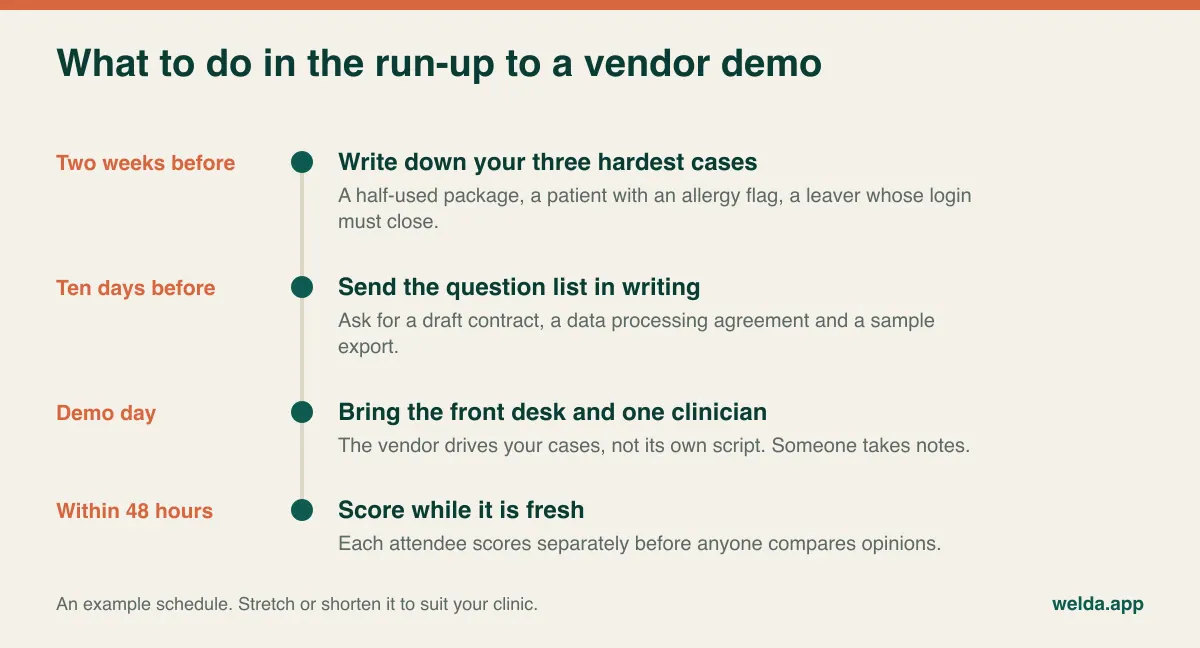
A vendor demo is a rehearsed walk through a clinic where nothing goes wrong. Patients arrive on time, packages get paid in full and every slot is free. You will learn more in ten minutes of your own awkward cases than in an hour of that tour. Send three of them a few days ahead and ask the vendor to work through them live.
- The half-used package. A patient is on session six of ten, is paying the balance in two instalments and wants the next session at your other location. Do the remaining sessions and the balance show correctly at both sites?
- The allergy flag. A new practitioner opens a booking for a patient with an allergy on file. Who sees the warning, on which screen, and is it recorded when somebody clicks past it?
- The leaver. A receptionist left today. How do you close the login, and can you see which patient records that person opened last month?
If a vendor can't do one of these, that isn't automatically fatal. What you are really testing is how they respond. A vendor who says "we don't handle that, here is how clinics work around it" is telling you something valuable. A vendor who says "let's come back to that" three times is telling you something too.
Bring the people who will live with the choice. The front desk will ask how many clicks it takes to book while a caller waits on the line. A clinician will ask whether a patient's history opens quickly on a tablet in the treatment room. Your bookkeeper will want to know what the month-end report looks like. Those questions rarely occur to the person who usually runs the purchase.
Learn to hear the difference between a claim and an answer
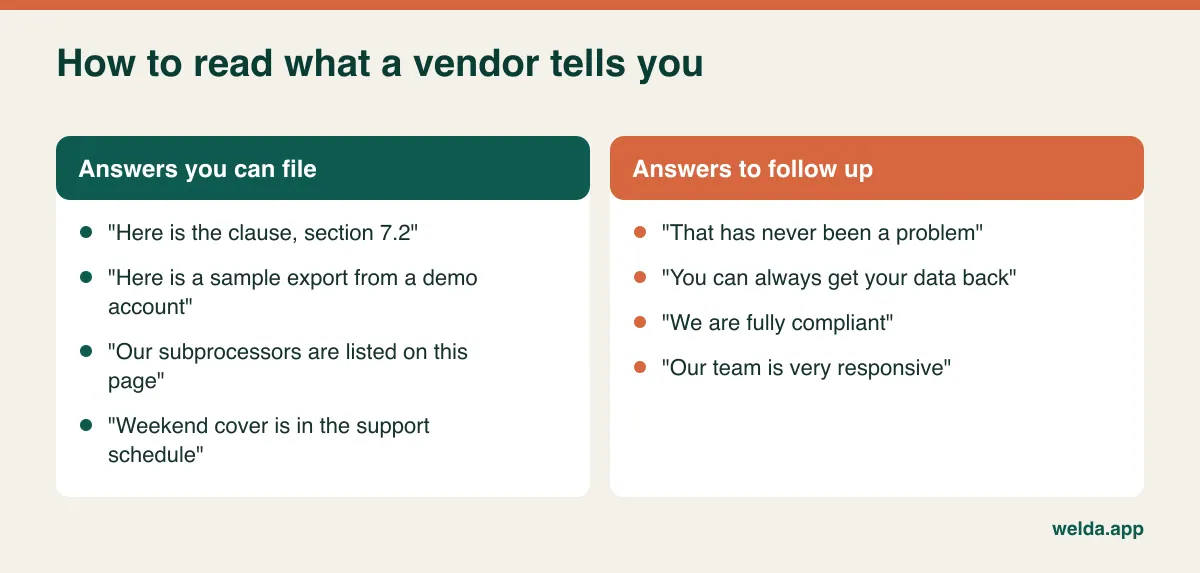
Sales conversations are full of sentences that sound like commitments and aren't. You don't need to be suspicious, you just need to notice whether a statement could be checked later. "We're very responsive" can't be checked. "Support is open until 7pm on weekdays and 2pm on Saturdays, and it's in the service schedule" can.
When you hear something uncheckable, there is a polite follow-up that nearly always works: "That's great, where would I find that in writing?" A good vendor will point you to a clause, a page or a sample file. If the honest answer is that it isn't written down anywhere, ask them to put it in the order form. Most reasonable vendors will, at least for the things they actually do. Keep a simple log during each call with three columns: what was said, who said it and where it is documented. An empty third column after a demo is your follow-up email.
Send the deal-breaker email before you book anyone's time
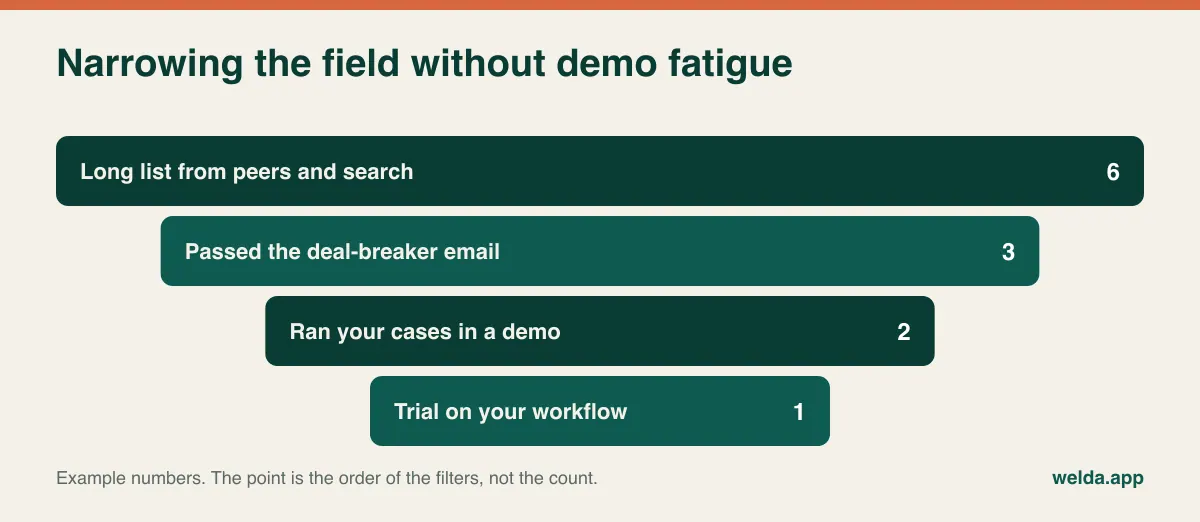
Demos are expensive for a clinic. Each one takes your front desk lead and a clinician away from patients. So cut the list first with a short email containing only your non-negotiables. These are yes-or-no questions, and any "no" ends the conversation politely on both sides. What belongs on the list depends on your clinic, but common examples are:
- Can you share your data processing agreement, or business associate agreement where relevant, before we sign?
- Can we export our patient records in a common, readable format, and can you show us a sample?
- Do you connect to the insurer claims system or lab provider we must use? If that is central to your work, it decides the matter by itself.
- Does your support cover our opening hours, including evenings and Saturdays if we work them?
- Is the interface available in the language our team works in?
The reply tells you more than its content. A vendor who answers clearly within a couple of days has shown you how they handle a direct question. A vendor who replies only with "let's jump on a call" has shown you that too.
The contract: read it while you still have leverage
Software agreements usually arrive late, labelled "standard terms", when everyone is keen to get going. Ask for the draft before the demo instead, while you are still a prospect rather than a signature away. What you pay is a separate calculation, and we go through it in how to budget for clinic management software. Here the concern is the terms around the price.
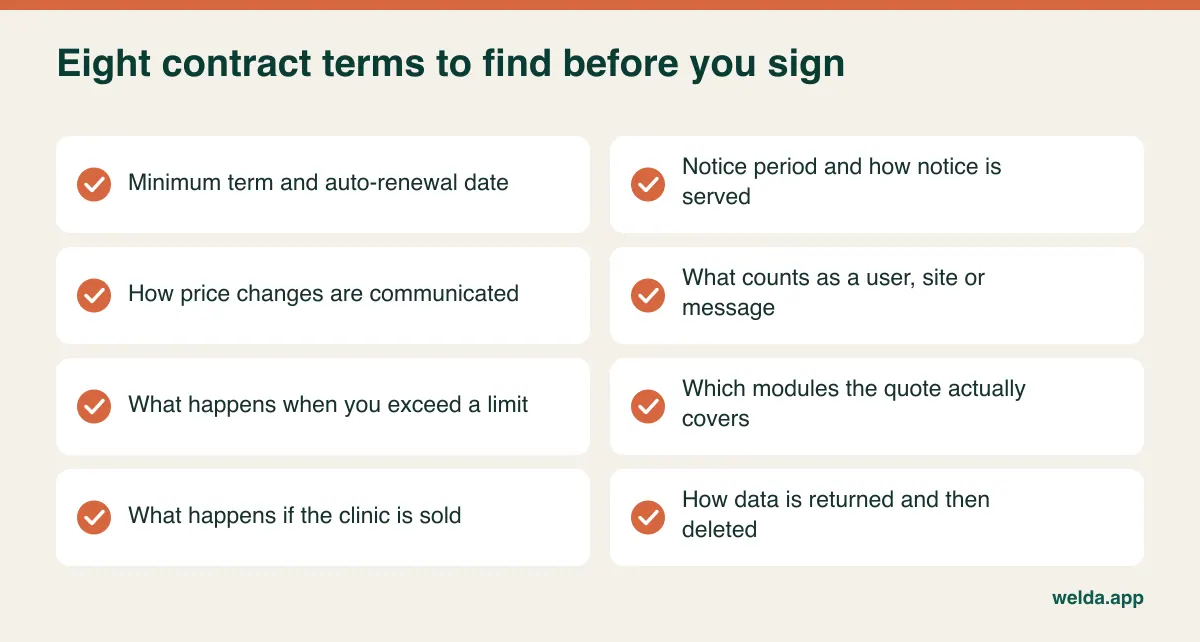
Term and renewal. Is there a minimum commitment? Does the agreement renew automatically, and for how long? How much notice is required, and does it have to be served in a particular way? Put the last date for giving notice in your calendar the day you sign. Missing it can mean another full term on a system you already decided to leave.
Definitions. Is a "user" a named account or a concurrent login? Do two receptionists who share shifts count as one or two? Does a visiting practitioner who comes in once a week need a paid seat? Is a "site" a legal entity, a building or simply another calendar? Clinics change shape often, and undefined words tend to get interpreted by whoever sends the invoice.
Limits. What happens if you run past your allowance for messages or for photo storage? Does sending stop, does an overage appear, or are you moved to a bigger plan? A clinic that discovers in its busiest week that reminders have stopped has a bigger problem than the cost of the overage.
Scope and changes. Are the modules in your quote listed in the agreement, or only in a slide deck? How, and how far ahead, are price changes announced at renewal? Can features you rely on be moved to a higher tier?
Change of ownership. Partners retire, practices merge and groups buy independents. Can the agreement transfer to a new owner? What happens to the patient data in that process? It's an easy question today, and much harder in the middle of a sale.
Run an exit test while you are still happy
Nobody buys software planning to leave, which is exactly why this gets skipped. Yet how easily you can leave shapes how fairly you are treated for as long as you stay. A clinic whose data is hard to move has less room to negotiate at each renewal.
Ask these questions, and keep the answers:
- Which record types can be exported? Patient profiles, appointment history, treatment notes, packages, payments, photos, documents and consent records should all be on your list.
- In what format? CSV or spreadsheet files, a structured database dump, PDFs of each record, or a backup only the vendor's software can read?
- Can you do it yourself, or does it need a support ticket? How long does it take?
- Is there a charge, and when does it apply?
- After the contract ends, how long does access last? When is your data deleted, and do you get written confirmation?
Then test it. Create a few fictional patients on a demo or trial account and give them some complexity: a part-paid package, a before-and-after photo, a signed consent and notes from two practitioners. Export them, then open the files somewhere other than the vendor's system. You don't need technical skills for this. You only need to ask whether someone at another software company could rebuild that patient from what you are holding.
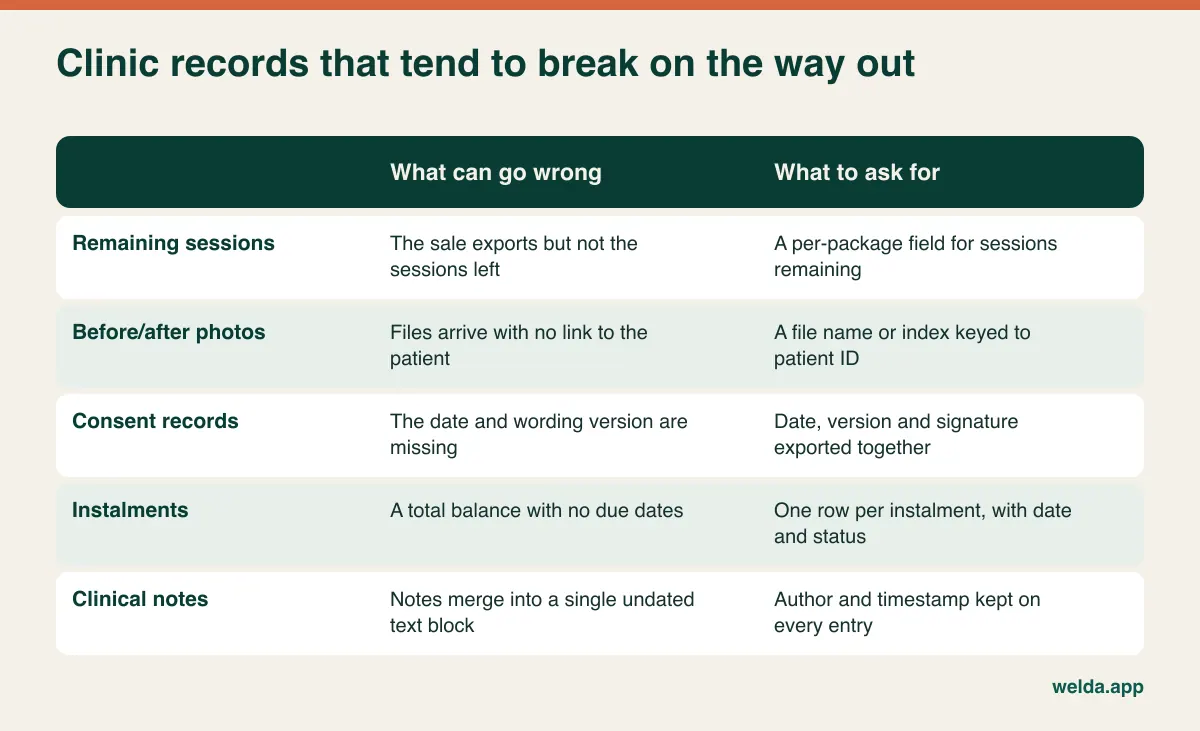
Remember that your legal obligations may outlast the contract. In many countries, medical records have to be kept for years after treatment ends, and the period varies with the record type and jurisdiction. Find out what applies to you, then make sure you know where those records will sit if you stop paying this vendor.
Patient records don't move like a customer list
When a retailer switches systems it moves a product list and a few balances. A clinic moves treatment in progress. The practitioner seeing someone next Tuesday needs to see what happened last time and what was flagged. That is why "we'll migrate your data" deserves follow-up questions, whatever a vendor says about its process.
Which fields come across and which get left behind? What happens to free-text notes from the old system? Do open packages arrive as live packages that can still be used, or as historic sales that someone must re-enter? If session and package tracking matters to your revenue, get this one answered precisely, because a wrong balance becomes an awkward conversation with a patient at your front desk.
You can test the quality of a migration without a big project:
- Define the scope. Separate recently active patients and those mid-treatment from your older archive. They may not all need the same depth, but you must know where the archive will live.
- Ask for a sample migration. Pick twenty records and make them difficult: a long history, an unpaid balance, an open package, photos attached. Check how the vendor's team would handle real data under your agreement before anything leaves your current system.
- Compare side by side. Open both systems and go through those records field by field. Twenty careful checks will reveal most systematic problems.
- Set a cut-over date. Announce the day after which new entries go only in the new system. Avoid your busiest period and any week with a large part of the team on leave.
- Keep the old system readable. If your current agreement allows it, keep view-only access for a while after you switch.
Moving from spreadsheets or paper? Clean up first. The same patient entered twice with two phone numbers will simply become two patients in the new system. Our guide to patient records systems explains what a tidy record should look like.
Privacy: the right questions depend on where you are
This section is general information, not legal advice. Health data gets stricter treatment than ordinary customer data in most privacy regimes, but the paperwork differs from place to place, so start by working out which regime you fall under.
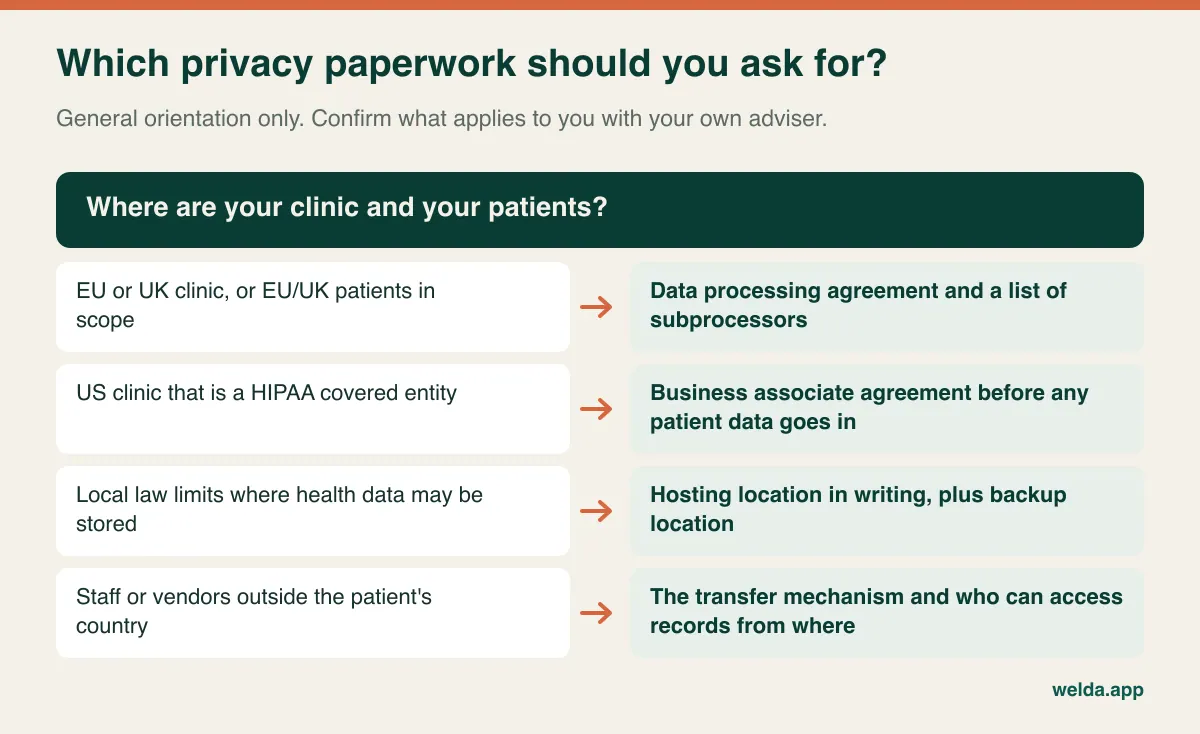
Whatever the regime, one thing tends to catch clinic managers out: buying a compliant-looking product doesn't make the clinic compliant. In most frameworks the clinic stays responsible for its own patients' data. Your privacy notices, lawful basis, staff access decisions and retention plan remain your job, however good the software is.
"Are you GDPR compliant?" and "Are you HIPAA compliant?" don't produce much information, because the answer is nearly always a confident yes. These do better:
- Where is the data hosted, and where are the backups?
- Which third parties process our data, for example for messaging, email or analytics? Are we told when that list changes?
- Can vendor staff see patient records? When and how is that logged?
- How quickly would you tell us about a suspected breach, and what information would you give us so we can meet our own deadlines?
- Are consents stored with the date and the exact wording version?
- How do you handle deletion when a retention period ends?
Then check on screen. Ask the vendor to log in as a receptionist. Can that role see clinical notes or before-and-after photos? Can it download the entire patient list? Where do you see who opened a given record? In day-to-day clinic life, over-broad access is a more common risk than anything dramatic. There is more on this in our guide to patient data security in clinics.
Look at message content as well. A reminder that says "your appointment is tomorrow at 2pm" reveals far less than one naming the treatment. Check whether templates are editable, and whether promotional messages can be kept apart from service reminders, as they often have different consent requirements.
If your patients come from more than one country
Plenty of clinics, particularly in aesthetics and dentistry, treat people who travel for care or who are more comfortable in another language. That brings up checks a purely local clinic would never think of, and most demos skip them.
Language in two places. Staff screens and patient-facing messages are separate questions. Can a reminder go out in the patient's language while your front desk works in its own? Who writes and approves those translations?
Consent the patient understood. A consent form signed in a language the patient doesn't read may be of limited value. Ask whether you can hold consent wordings in several languages and record which version someone signed.
Whose rules apply. The law of your clinic's country usually comes first, but a patient's home country may matter too, especially if you actively market there. This is one to take to an adviser. For the software, ask about time zones in reminders, international phone numbers and how the system deals with names in other scripts. These sound minor until a reminder goes out at the wrong hour or a duplicate record gets created.
Invoices. If your country requires e-invoicing or certified fiscal devices, ask whether the software does it, connects to a provider with its own contract and fees, or merely records the payment. Your accountant, rather than the salesperson, should make the call on what is enough.
Support: test it against your opening hours
A vendor's support desk tends to keep office hours. Clinics often don't. So rather than asking whether support is included, describe an incident: "It's 9am on Saturday, our front desk can't log in and we have a full list. What happens next?"
- Who picks up? Which channels are open at that moment? Is there a route for urgent problems, or does everything join the same queue?
- What do you do in the meantime? How can you see today's appointments during an outage? With any web-based product, it's worth agreeing a simple fallback with your team anyway, such as a printed or downloaded list for the day.
- What's promised? Is a critical fault defined, with a response target, in the contract? Or does this only appear in the sales material?
- What happens afterwards? Which reminders were missed? How do you enter what was written on paper? Do you get a written explanation of the cause?
- Who trains the next person? Your initial training is easy to arrange. Ask how a receptionist who starts eighteen months from now learns the system.
- How do updates arrive? Are interface changes announced ahead of time? Is maintenance scheduled outside your hours?
During a trial, try the support line with a real question, such as how to change a role's permissions. Note how long it took and whether the problem got solved. If the vendor can connect you with a similar clinic, don't ask whether they're happy. Ask what happened the last time something went wrong.
Score vendors separately, then compare
After two or three demos, memories blur and the last presenter tends to win. A scorecard prevents that, but only if it exists before the first call. Choose four or five themes, weight them to add up to 100, and give each vendor a score from 1 to 5 on each theme. Multiply, add up and compare.
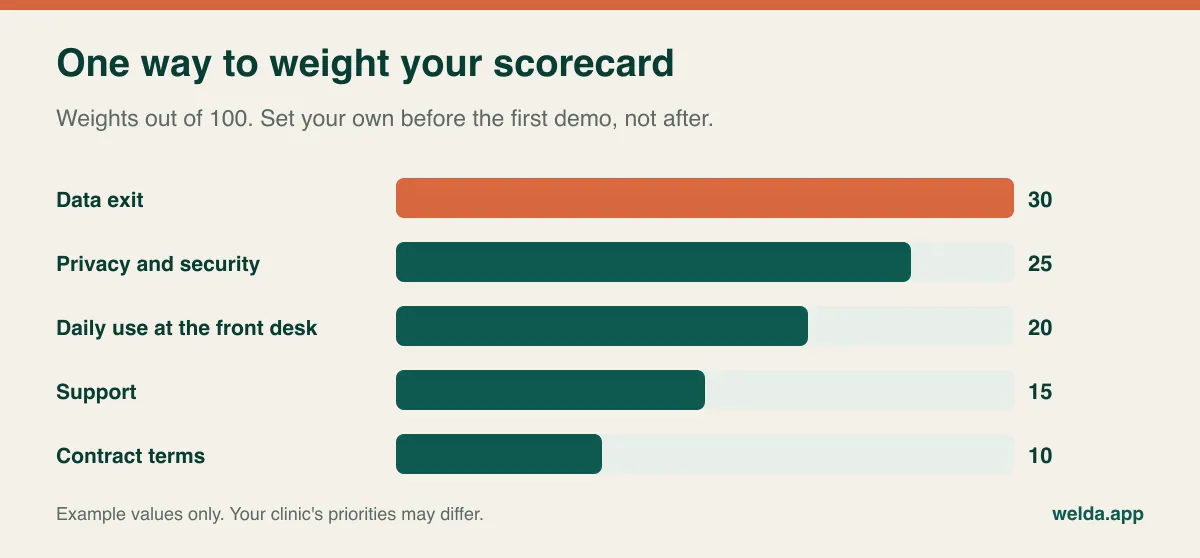
Using those example weights, a vendor scoring 3 on data exit, 4 on privacy, 5 on daily use, 2 on support and 3 on contract terms gets 90 + 100 + 100 + 30 + 30, or 350 out of 500. Don't stop at the total. That 2 on support could matter more than the overall figure if you work Saturdays and the vendor doesn't. Ask each attendee to score alone, straight after the call, before anybody shares an opinion. Otherwise the scorecard tends to record the view of the most senior person in the room.
If a trial is available, plan it instead of wandering around the menus. Use made-up patients only, since you shouldn't load real records into a system whose data agreement you haven't reviewed. Set up the calendar and two practitioners first, have the front desk book for a day and note where they get stuck, re-run your three cases yourself, test the permissions, run the export and ask support something real. Update the scorecard at the end.
When this checklist should stop you buying
A good process sometimes ends with "not now" or "not this kind of product".
- You run inpatient care or heavy insurance billing. With wards, pharmacy, labs and claims at the centre of your operation, you are probably looking for a hospital or practice system built around those. An appointment and patient-relationship product won't cover that alone.
- Nobody owns the rollout. If no named person will manage migration and training, new software can easily end up running alongside the old paper diary.
- You don't know your current exit date. Find that out first, so that you plan any overlap rather than discover it.
- You're switching for one feature. If reminders are the only problem, ask your current vendor before moving every record you own.
How Welda CRM stands up to this list
It would be odd to publish this and leave ourselves out, so please put Welda CRM through this clinic software buying checklist as you would anyone else. Here's what our product pages state clearly:
- Scope: staff, room and branch calendar views, conflict detection, patient profiles, encrypted health records with allergy and contraindication alerts, multi-session package tracking, WhatsApp reminders, payments, instalments and reports. NPS surveys and review requests are there as well.
- Privacy tools: encrypted records, KVKK/GDPR consent management, role-based permissions and an audit log of who accessed what. These support your obligations, but they don't replace your clinic's own compliance work.
- Moving and support: there is no separate setup fee, and setup, migration of existing client and appointment data, team training, updates and support are included in every plan. Enterprise adds priority support.
- Languages: interface and message templates in English, German and Turkish.
- Commitment: a monthly subscription you can change or cancel. When the trial ends your data isn't deleted; the account becomes read-only until you pick a plan. Open API access comes with Pro and Enterprise.
- Invoices: e-invoicing runs through integration with your chosen provider, so that side needs its own check.
There are also things you won't find there. Our product pages don't list insurance claims, lab integrations or HIPAA-specific commitments. They also don't spell out export file formats, post-contract access periods, hosting location or support hours. Ask us those exact questions and ask for the answers in writing. If one of them is a deal-breaker for you, we would rather you found out early.
Frequently asked questions
What should a clinic software buying checklist include?
At minimum: contract term and renewal, data export and deletion, privacy documents and access controls, support hours and incident handling, migration of live treatments and packages, and invoicing boundaries. Add your own deal-breakers, such as insurer or lab connections.
How far ahead should I send my questions?
A few days is generally enough for simple questions. Allow about a week if you are asking for a draft contract and a sample export, since these may need someone other than the salesperson.
How many vendors should I demo?
There's no correct number, but filtering by email first and watching two or three demos is enough for most clinics to make a real comparison. Beyond that, demos start to run together.
Does compliant software make my clinic compliant?
No. Software can provide encryption, permissions and audit logs. Privacy notices, lawful basis, staff access decisions and retention remain the clinic's responsibility. Take advice for your own situation.
What happens to my data when a contract ends?
That depends entirely on the vendor and the agreement, so don't assume. Get the access period, export format, deletion date and deletion confirmation in writing before signing.
How is Welda CRM priced?
Welda CRM is a monthly subscription. The amount depends on your branches, users, message volume and modules, and it's agreed in a free consultation. It helps to come with your branch and user numbers, your rough daily appointment volume and what you use now.
Can I try Welda CRM before deciding?
Yes. There's a 7-day free trial with all modules open, which is long enough to run your three cases and check permissions using made-up patient records.
Ready to test us? Bring your clinic software buying checklist to a free Welda CRM consultation. Send your questions ahead and we'll work through your own cases together. If something comes up that we don't do, we'll tell you so.