Clinic management software cost comes down to five lines: the subscription, the number of people who log in, the modules you switch on, moving your data, and the level of support. No single price means much until those five are filled in for your clinic. If you need sign-off from partners or a board, the figure to bring is the total of those lines over three years, because that is the commitment they are really approving.
Vendors in this market quote in different currencies, on different models, and often only after a call. Rather than repeat list prices that date within months, the worked examples below use neutral "units". Swap in the amounts from your own quotes and the method holds. The units are invented to show the arithmetic and do not describe any vendor.
First work out how you are being charged
Two quotes can look impossible to compare simply because they meter different things. Before you compare amounts, identify the model. Most clinic software falls into one of four, or a blend of them.
Per practitioner pricing charges for each doctor, dentist or therapist with a diary, and often lets support staff in free or cheaply. It suits a clinic with a stable clinical team and a large front office. Per user pricing charges for each login, so a clinic with many part-time staff pays for a head count that may be busy only one day a week. Per location pricing is simple until you open a second site. Tiered plans bundle limits on users, branches, messages and storage, and the cost jumps when you cross one of them.
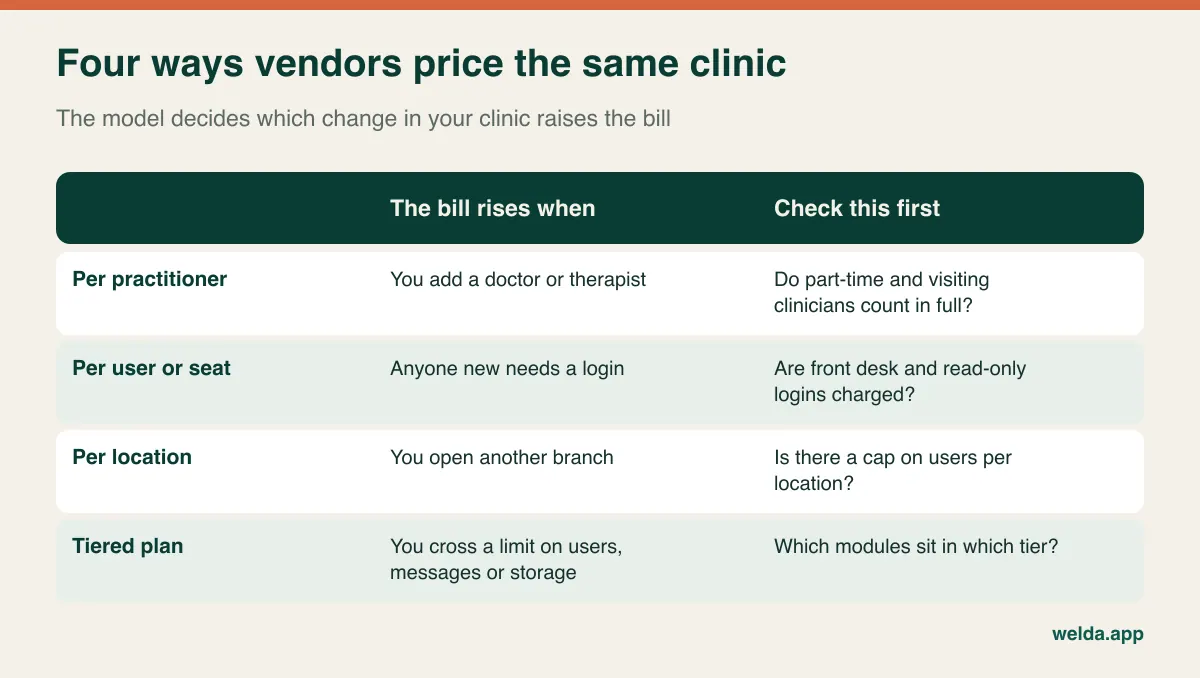
The practical test is to ask what your next two years look like. A clinic planning to add a dermatologist next spring should distrust a per-practitioner quote that looks cheap for today's team. A clinic that will stay at one site with three clinicians but has eight administrative staff should look hard at per-user pricing. There is no universally cheapest model. There is only the one that fits what you are about to do.
Count logins from the rota, not the staff list
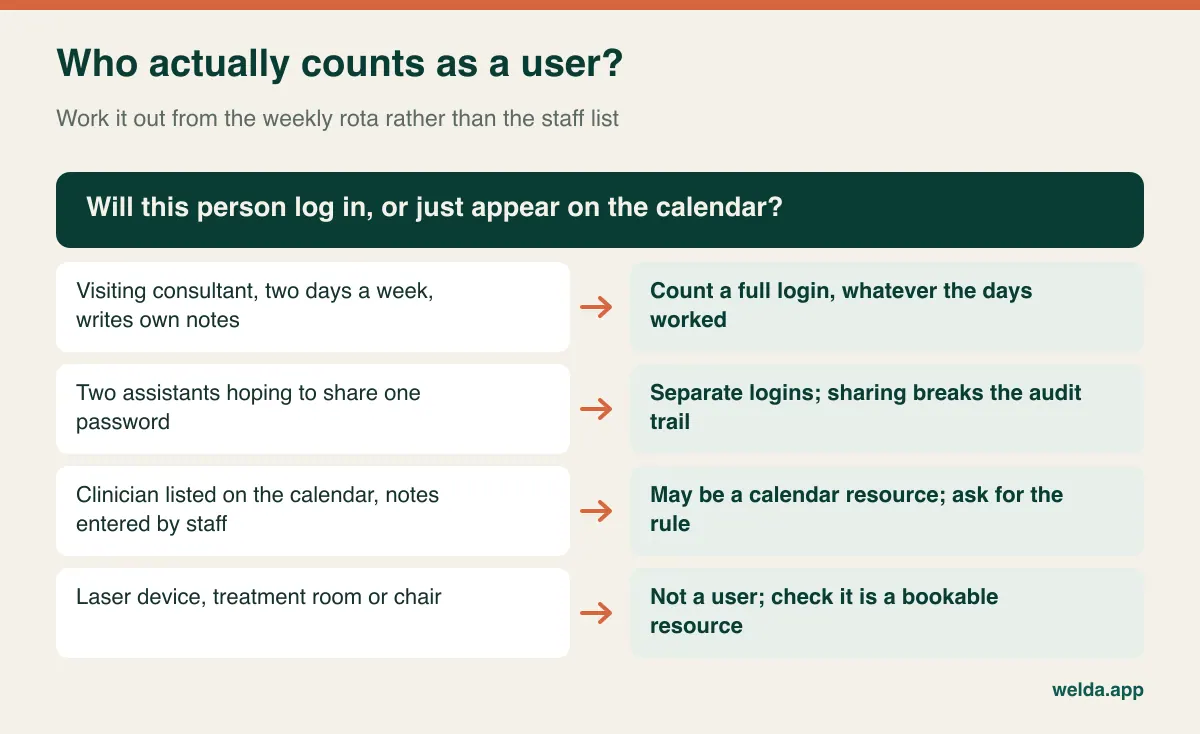
Clinics differ from most small businesses in one awkward way: their staff list and their working week do not match. A visiting consultant comes on Tuesdays and Thursdays. A nurse works mornings. A partner only opens the system at month end to read reports. An owner counting people from memory will usually undercount, and the shortfall appears as a surprise on the first invoice.
Take a blank week and write down who opens the software each day: reception, each clinician, assistants, nurses, whoever handles payments, management. Then ask two questions of each person. Do they enter their own notes, or does someone do it for them? Should they see something different from their colleagues? The answer to the second is almost always yes. Reception may not need full clinical notes, and a visiting consultant has no reason to see the clinic's revenue report.
It is tempting to save on seats by sharing a password among assistants. Don't budget that way. When a clinical record changes and nobody can say who changed it, you have a problem with your own internal checks and a much bigger one if a patient complains. Separate logins are a cost of running a clinic, not an optional extra.
The five lines that belong in your budget
Quotes rarely present these in the same order or under the same names. Your job is to redistribute what each vendor wrote into the same five lines. If a line does not appear at all, mark it "unknown" rather than assuming it is included.
Subscription
Check the billing period, the minimum term and what happens if you leave early. Annual prepayment can bring a discount, but it also moves the risk of poor adoption onto you. Check the renewal clause: a fee fixed for twelve months and then "at current list price" is not the same as one with a stated cap. If the quote is in a foreign currency, write down that exposure too, and put VAT or sales tax on the same basis for every quote. Whether you can recover that tax depends on your country and on how your services are treated, so confirm it with your accountant.
Users
Use the number from your rota exercise, then ask for a second quote at the number you expect in eighteen months. If you sit one user below a tier limit today, you want to see the next step before you sign, not after.
Modules
Calendars and patient records are nearly universal. The differences usually sit in stock, cash desk and card terminals, staff commission, automated message flows and API access. A vendor saying a feature "exists" does not mean it is in the plan on your quote. Ask for the module list against the named plan, in writing.
Data migration
This word covers very different services. One vendor imports names and phone numbers. Another brings appointment history as well. A third expects you to fill in its template and calls that migration. Pin down which record types move, up to what quantity, and whose hands do the work.
Support
Which channels, which hours, which languages? A clinic open on Saturdays with a vendor closed on Saturdays will be alone on its busiest day. Put training here as well. Initial training may be included while training for someone you hire in two years is not.
Moving patient records is a clinical job
If a coffee shop loses its loyalty list, that's annoying. If a clinic moves an allergy note into the wrong field, or shows the wrong number of remaining sessions, it is a patient safety issue or a billing dispute. That is why migration deserves more attention here than in other sectors, and why the type of record matters more to the cost than the number of records.
| Record type | Why it matters | What to ask |
|---|---|---|
| Demographics and contact details | Reminders and recalls depend on them | Who resolves duplicates? |
| Future bookings | A lost booking means a patient arriving unexpected | Are future appointments imported, or re-entered by hand? |
| Allergies, contraindications, clinical notes | Directly affect clinical decisions | How is free text handled? Who checks it? |
| Open packages and remaining sessions | A wrong count turns into an argument at reception | Do they arrive as live balances or as a text note? |
| Instalments and outstanding balances | Money goes missing if these stay behind | How are opening balances entered? |
| Before-and-after photos and documents | Drive storage limits and migration time | Are they in scope? What is the storage allowance? |
Then add the labour you won't see on any invoice. Even when a vendor migrates for free, somebody on your team cleans the source data and checks the test import. In a clinic running on one messy spreadsheet and two paper diaries, that can take days, and your receptionist can't do it while answering the phone. Plan it for a quiet period or bring in temporary cover. Our guide to going digital with patient records goes further into that clean-up.
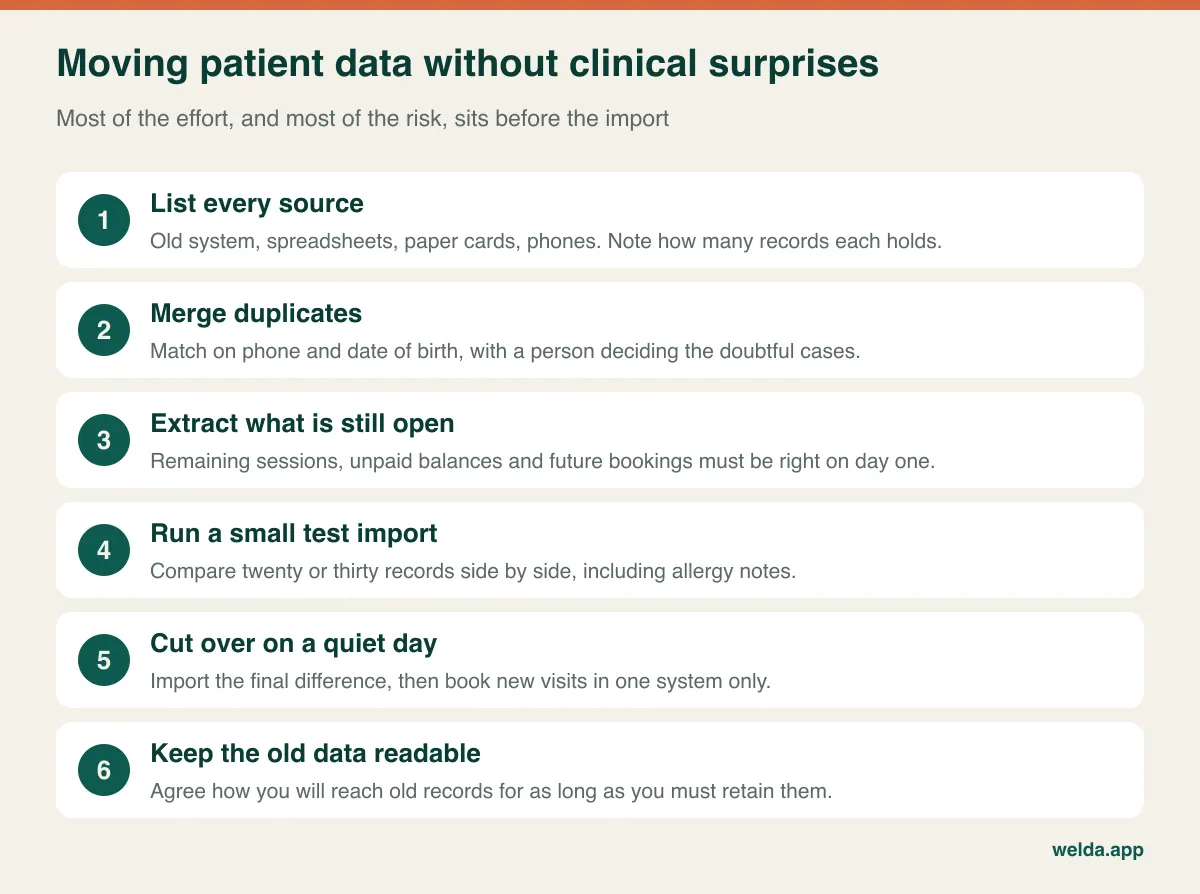
The last step is the one most budgets miss. When the old licence lapses, how will you reach old records? Many jurisdictions require clinical records to be retained for years, so you may need a readable archive of what didn't move. Ask your current vendor now in what format you can get your data out, and whether that request carries a fee. That cost belongs to the old system, but it lands in the same budget.
Messaging: the line that grows with your diary
Reminder messages tend to sit in a quote as a small allowance. They deserve a calculation, because they scale with your appointment book rather than your team.
Take an example clinic with 30 appointments a day, open 26 days a month. That is about 780 appointments. Send one reminder and one aftercare or follow-up message per visit, and you need around 1,560 messages a month, before any recall campaign. An allowance of a few hundred will not cover that. So ask what happens at the limit: do messages stop, or do overage charges begin? And ask how the vendor treats different channels, because SMS and WhatsApp can be metered differently and rates can vary by destination country. For clinics treating patients from abroad this matters more than for a neighbourhood practice.
Some specialties push this line harder than others. A physiotherapy clinic whose patients come several times a month sends far more reminders per patient than a clinic seeing people twice a year. Aesthetic and dermatology clinics feel storage first, because every session may add before-and-after photos. Dental practices feel the instalments and commission lines, since long treatment plans run alongside staged payments and per-dentist earnings. If you sell courses of treatment, read our piece on session and package tracking before you decide which plan you need. Write the line that dominates your specialty at the top of your request for a quote.
A worked example: two quotes, one clinic
Here is the whole method on a sample clinic with one location, four practitioners, three front-desk staff and one manager, so eight logins. Both quotes below are fictional.
Quote X charges 6 units a month per practitioner, with admin logins free: 24 units a month, which looks modest. Then come message credits at 4 units a month, a payments module at 3 and premium support at 3. Onboarding is a one-off 100 units and migration a one-off 150.
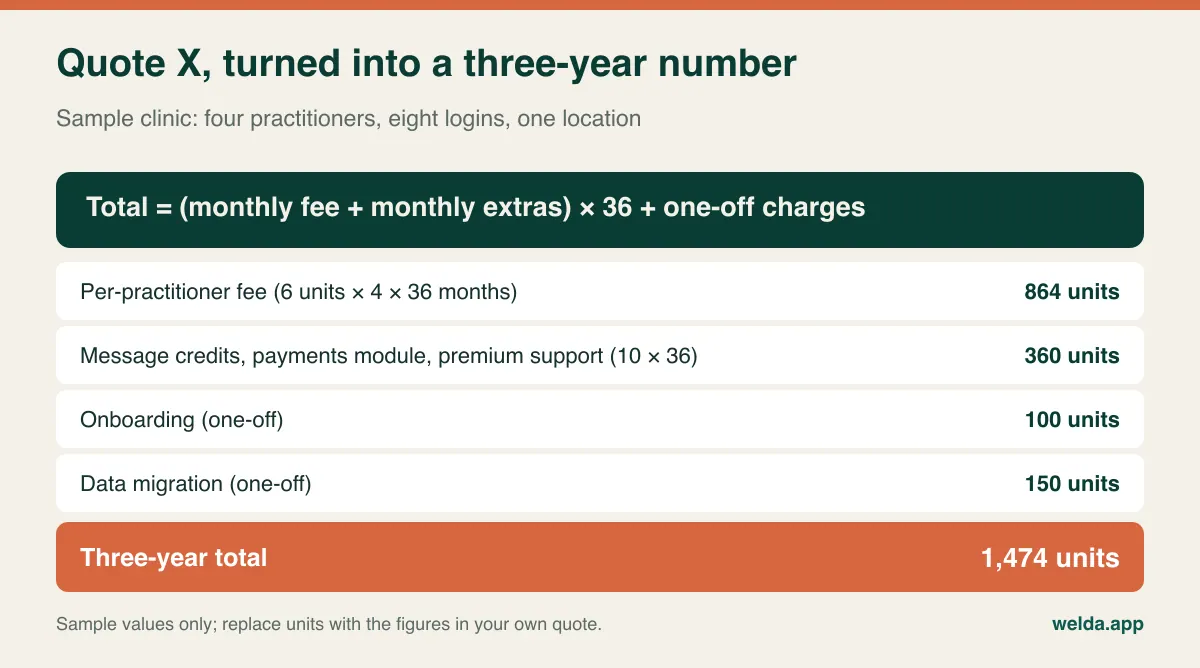
Quote Y is a flat 38 units a month on a tier that covers up to ten users, with messages, support, onboarding and migration stated as included. Over 36 months it comes to 1,368 units.
On the headline, X looks far cheaper at 24 against 38. Over three years, Y is slightly cheaper. Now change one assumption: the clinic hires two more clinicians from month 13. Quote X gains 12 units a month for 24 months, which adds 288 units and takes it to 1,762. Quote Y stays at 1,368 as long as the tier's limits hold.
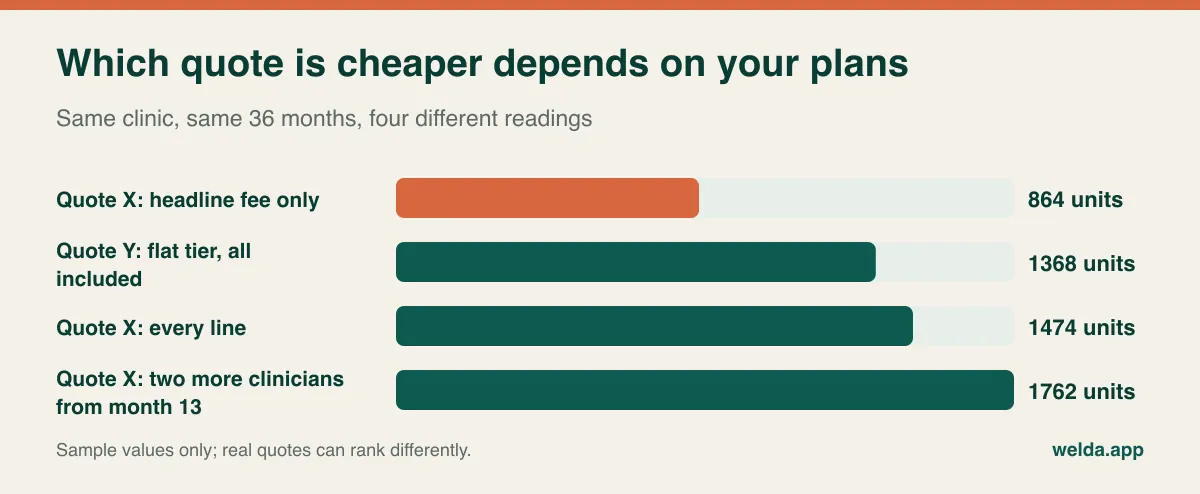
This doesn't show that flat pricing always wins. If the same clinic sent no messages, skipped the payments module and used standard support, Quote X would fall to 864 plus the 250 in one-off charges, or 1,114 units, and would comfortably beat Y. Honest counting of your real usage saves more than haggling does.
Two things sit outside this sum, and you should say so when you present it. Renewal increases: if the fee in month 13 is not fixed in the contract, tell your partners this total is at today's rates. And your own staff time: if migration means your team fills in a template, count those hours against that quote. When your own numbers are ready, send every vendor the same one-page brief with locations, logins, monthly appointments, data to move and modules needed. It's also the simplest way to request clinic management software cost details for your setup, from us or from anyone else.
Making the case without promising a return
When a partner asks whether this is really necessary, "it pays for itself" won't persuade anyone who has heard it before. A sturdier argument is a break-even threshold: divide the monthly cost by what one protected appointment contributes to the clinic. The answer tells you what level of improvement would justify the spend. It doesn't promise that improvement.
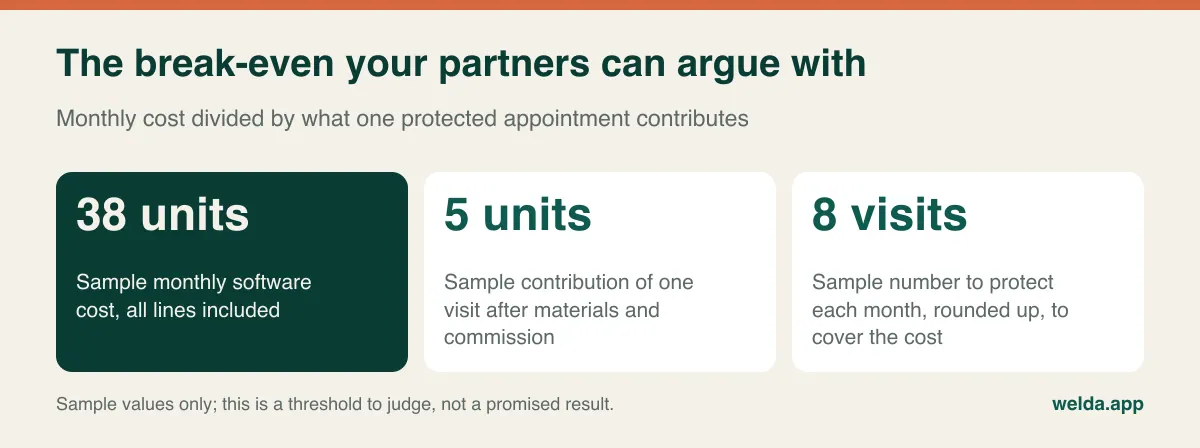
Use contribution, not revenue: what remains after consumables and any commission. Then go to your own records. How many appointments went unfilled without notice last month? How many patients missed a follow-up nobody chased? How many course sessions were paid for but never booked? If you can't answer, that is the first finding for your paper: the clinic currently cannot measure what it loses.
List the non-financial cost as well. Reminder calls made by hand at the end of the day. Minutes spent checking how many sessions a patient has left. Hours at month end reconciling commission across files. You needn't convert these into money, but they should be visible on the page. Close with a name: who owns this project, and how many hours a week they get for it. Software with no internal owner becomes a subscription nobody uses, whichever quote you picked.
Compliance questions that change the quote
This section is general information rather than legal advice. Rules vary by country and change over time, so check with your own adviser. Still, a few issues directly affect what you should budget.
Health data gets stricter treatment than ordinary customer data in most privacy regimes. In the EU and UK, GDPR and UK GDPR treat it as a special category and generally expect a data processing agreement with your software vendor. In the US, clinics that are covered entities under HIPAA will usually need a business associate agreement. Elsewhere, local law may add rules on where data is stored. For budgeting, the questions are concrete. Are role-based access, consent records, audit logs and encryption in the plan you are quoting, or sold as a security add-on? Where are servers located? How often are backups taken, and how do you get your data back at the end of the contract? Our guide to patient data security in clinics goes through these in more detail.
Think about message content too. A reminder can usually say only the time and place, without naming the treatment. Check the same for local invoicing rules: if your country requires e-invoicing or certified fiscal devices, ask whether the software handles that itself, connects to a provider with its own contract and fees, or simply records the payment. A cost that sits with a third party won't appear on the software quote, so add it yourself.
When this type of software isn't the right spend
Not every clinic should buy clinic management software now, and not every clinic should buy this kind of it.
If insurance claims and payer billing are the core of your revenue, make sure any shortlisted system offers that for your country, because a scheduling and patient-management product may not. If lab interfaces, imaging or inpatient workflows are the backbone of your day, you are probably looking for an electronic health record or hospital system. If you work alone with a modest patient list, sell no packages and your diary never lets you down, a tidy calendar may be enough for now. Our piece on what a solo practice really needs helps you draw that line.
Software in this category tends to suit the opposite profile: private clinics with several diaries sharing a front desk, packages or courses to track, reminders eating up staff time, and an owner who cannot get a straight answer on occupancy or outstanding balances.
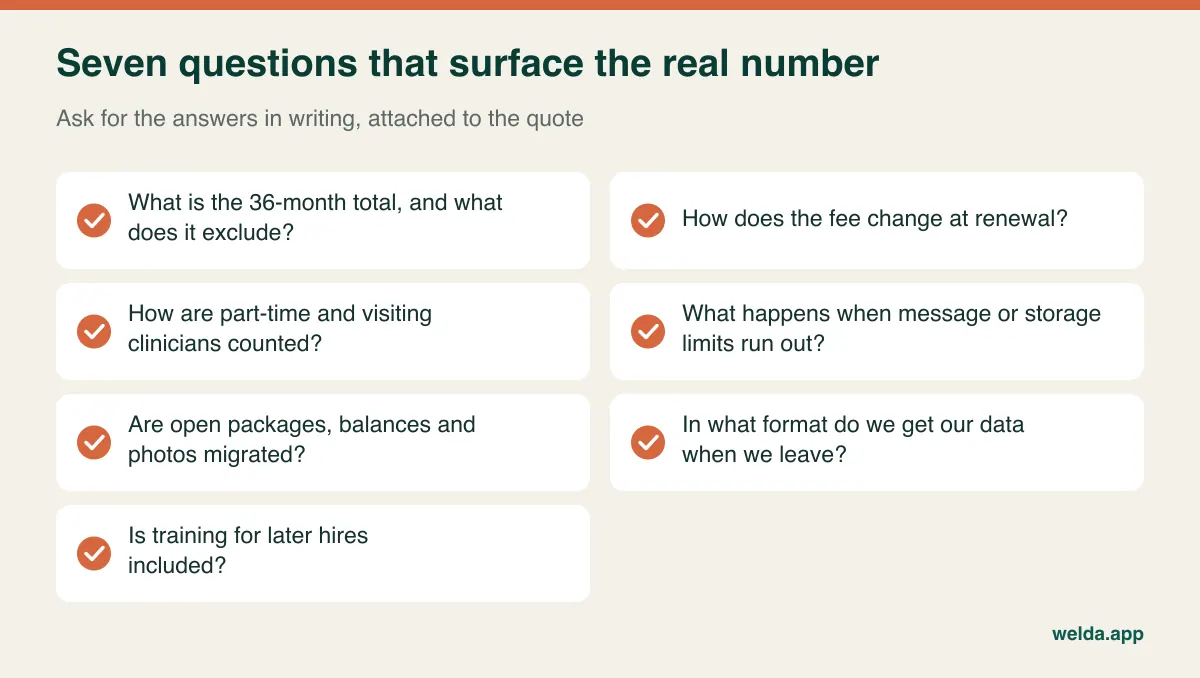
Treat the demo the same way. Rather than watching a tour, make the vendor run your hard cases: cancel the third session of a six-session package and move it to another clinician, take the second instalment on a treatment plan, book a patient with an allergy flag. "That would need an additional module" is a sentence best heard before you sign. And invite the receptionist, who will use the system more than anyone at the decision meeting.
Where Welda CRM fits in this calculation
Here is our own product on the same five lines. Welda CRM is a monthly subscription with three plans: Starter, Pro and Enterprise. The amount is agreed in a free consultation based on your branches, users, message volume and modules, which is why you won't see a figure on this page.
- Branches and users: Starter covers 1 branch and 3 users, Pro up to 3 branches and 10 users, Enterprise unlimited branches and users.
- Messages and storage: 500, 5,000 or 50,000 WhatsApp messages a month, and 1, 10 or 100 GB for photos and documents. Ask us in the consultation how going over a limit is handled.
- Modules: Appointments, online booking, waiting list, patient records, packages, health records, payments and invoicing are in Starter. Stock, expenses, quotes, automation flows, cash desk and POS, staff commissions and open API access arrive with Pro.
- Setup and migration: There is no separate setup fee. Account and calendar setup, migration of existing client and appointment data, and hands-on team training are included in every plan. If you have a photo archive or unusual record formats, raise that when we talk.
- Support and compliance: Updates and support are included, with priority support on Enterprise. There is KVKK/GDPR consent management, encrypted records and an audit log. The interface comes in Turkish, English and German, which can help clinics that treat international patients.
The limits matter too. Our product pages don't list insurance claims, lab integrations or HIPAA-specific commitments, so if you need any of these, ask us directly and treat the answer as part of your evaluation. Welda CRM is designed for appointment-based private clinics in areas such as aesthetics, dentistry, dermatology, physiotherapy and multi-specialty outpatient care.
To test your sums on your own data, the 7-day free trial has all modules unlocked. When it ends the account goes read-only and your data isn't deleted. To discuss clinic management software cost in a free consultation, tell us your branches, users, daily appointment load and how you keep records today. We'll agree the right plan and price together, and you can put that figure into the table above on the same terms as every other quote.
Frequently asked questions
Why does clinic management software cost vary so much between vendors?
Because quotes with the same label cover different things. They count users differently, include different modules, and set different allowances for messages and storage, migration and support. Converting each one to the same clinic over 36 months removes most of the apparent gap, or reveals where it is real.
Is per-practitioner pricing better than per-user pricing?
It depends on your staffing mix. Per-practitioner usually suits a clinic with a small clinical team and a large front office. Per-user can suit a clinic with many clinicians and few administrators. Model both against your rota and your hiring plan.
Should we pay annually or monthly?
Annual prepayment can lower the fee but leaves you carrying adoption risk. If this is your first system, starting with a trial and monthly billing lets you confirm that the team really uses it before committing. Get the refund terms in writing either way.
If migration is free, is there still a cost?
Yes, your own team's time. Cleaning duplicates, listing open packages and checking the test import usually fall to clinic staff. Getting data out of your old system may also carry a charge, so ask your current vendor early.
How many quotes should go in the budget paper?
Two or three, gathered on the same brief, are enough. More adds time without adding clarity. For each, show the 36-month total, any lines still unknown and your reasoning for the recommendation, all on one page.
Do we need to prepare anything before asking for a quote?
Locations, the login count from your rota, monthly appointments, whether you sell packages or courses, and where your records live now. A vendor with those five facts can give you a realistic answer in the first conversation.
How should a multi-location clinic budget differently?
Add branch-level reporting and permissions to your requirements, and check how a new location changes the plan. Quote at your current size and at your planned size, because per-location pricing and tier limits often move together.