Solo practice management software should cover five jobs well: a clash-free schedule, one patient record the doctor can read at a glance, automatic reminders, payment and invoice tracking, and permissions that separate what the assistant and the physician see. If you do not admit patients, run a lab or coordinate several departments, you should not be paying for those modules. What decides your budget is less the size of the vendor's feature list and more the number of logins, your monthly message volume, how many images you store and which billing or insurance connections you are obliged to use.
The important catch comes early: a lot of software sold to single doctors is built around one country's insurance system, and a lot of it is not. Sorting that out before you look at any screen will save you the most time, so that is where we begin.
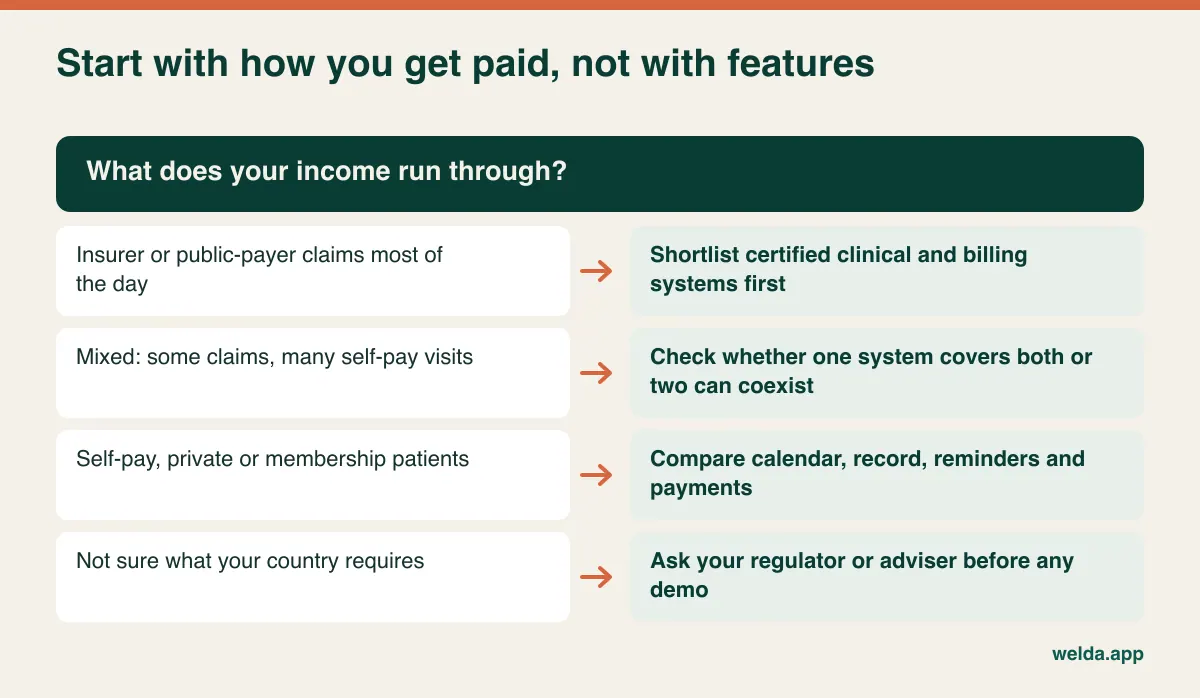
First question: does your income run through insurance claims?
Two solo doctors in the same building can need completely different products. One bills insurers or a public payer all day; the other sees self-paying patients, with an invoice or card payment at the end of the visit. For the first doctor, claims handling, coding, payer rules and often a certified electronic record are the actual product, and the appointment calendar is a side feature. For the second, the calendar, the record and reminders are the product, and an elaborate claims engine is expensive furniture.
Many requirements here are national. In the United States, participating in certain federal programs can bring certified EHR expectations, and HIPAA shapes how vendors handle patient data. In the UK and much of Europe, GDPR applies alongside national medical record rules, and public-system work usually runs on approved clinical systems. Elsewhere, national rules on e-prescribing and electronic records vary a great deal. None of this is legal advice, and rules change, so confirm your own position with your regulator, professional body or adviser.
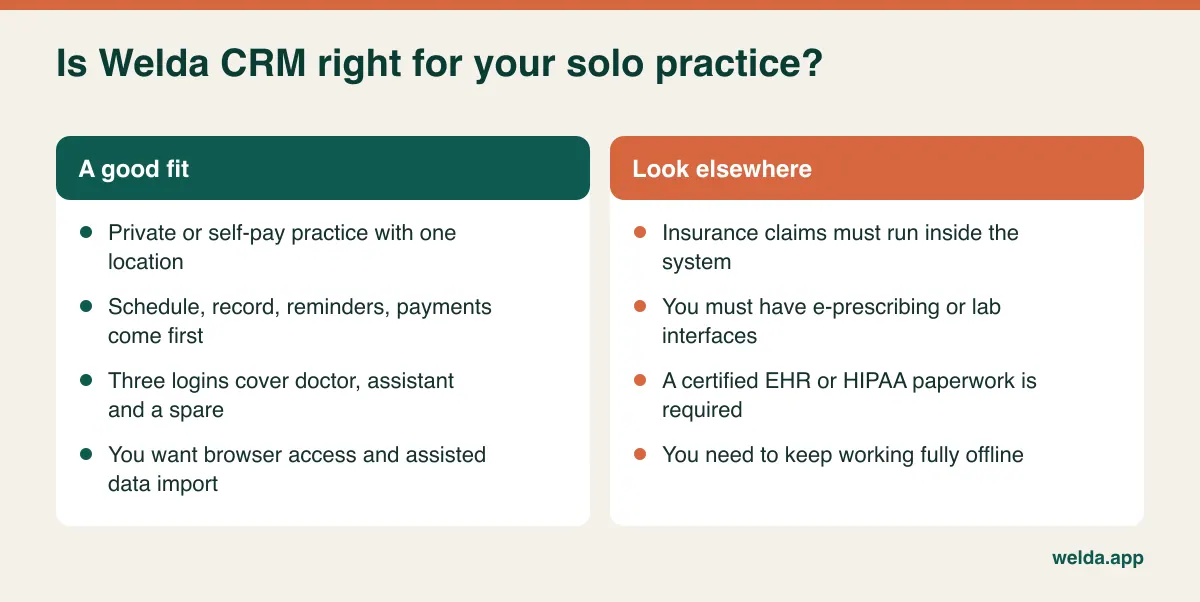
Where Welda fits matters here, so we will say it plainly. Welda CRM is scheduling, patient records, communication and payments software. Our product pages do not list insurance claim submission, coding engines, e-prescribing, lab interfaces or certified EHR status. They also describe KVKK and GDPR support, not HIPAA. If any of those are mandatory for you, Welda CRM should not be your core system, and you will want a certified clinical product instead. If you run a cash-pay, private or concierge-style practice, keep reading.
What actually happens in a two-person practice
Enterprise demos picture a separate front desk, billing office and practice manager. In your practice, one medical assistant holds all three jobs at once. Picture an ordinary morning (an illustrative scene, not a real case). The phone rings while a new patient waits at the desk, the patient leaving wants to pay part of a bill, and the doctor leans out to ask for last month's blood results.
That scene is your real evaluation criterion. Can the assistant find a patient from a few letters with the phone on their shoulder? Can they see the next free slot and book it in a few clicks? Can they take a partial payment without leaving the patient's record? When this path is slow, a paper diary reappears on the desk within weeks, and from that moment the software and the true schedule begin to drift apart. Solo practices rarely abandon software for missing a module. They abandon it because it gets in the way during the busiest ten minutes of the day.
The doctor's needs are narrower and just as specific. Today's list, a summary of the next patient, somewhere to write a note. All of it on the consulting room computer, with little enough clicking that you can still face the patient. Revenue reports matter a couple of times a month, not between appointments. A good setup gives two people two windows onto the same data.
A minimum feature set, with a test for each item
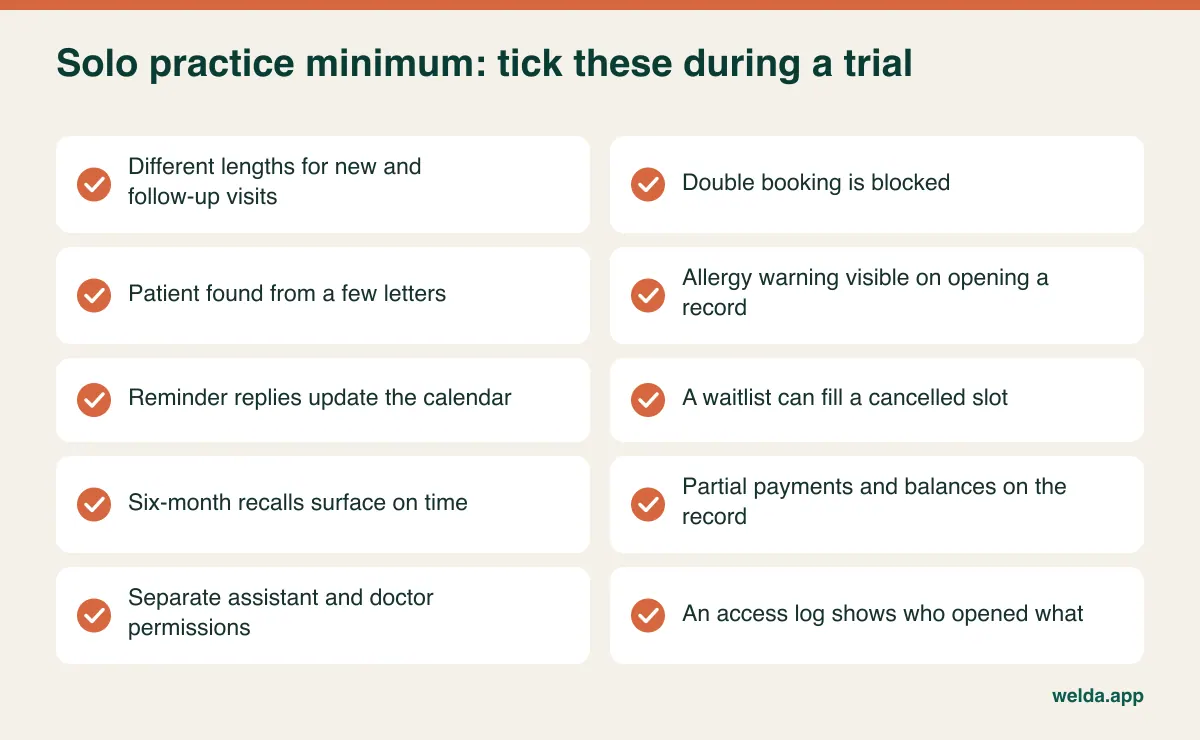
A checkbox on a pricing page proves little. Here is what to require, and how to verify each item during a trial using your own diary.
Scheduling. New patient visits and follow-ups take different amounts of time. Set up both lengths and book them back to back. Try to book over an existing appointment; the system should stop you. Block your lunch hour and your half day once and confirm it sticks. For a fuller checklist on this piece alone, see how to choose clinic appointment software.
Patient record. Your assistant should be able to find a patient in seconds, and duplicates should be hard to create or easy to notice. For the doctor, the crucial test is whether an allergy warning is impossible to miss when the record opens and whether earlier notes read in clean date order. Our guide to moving patient records to a digital system goes deeper.
Reminders. Reminder calls are usually the easiest hours to win back from your assistant's week. But sending is only half the job. Who sees the reply? What happens to the calendar when a patient cancels? A waitlist matters more in a one-doctor calendar than in a large clinic, because no second doctor can absorb the gap. See our practical piece on reducing no-shows.
Recall. A patient due back in six months does not book today, and in a small practice these patients quietly vanish. You need a task or follow-up list that surfaces them at the right moment.
Payments and documents. At closing time you want one screen answering three questions: who paid, who still owes, and has the invoice gone out? Instalment balances should sit on the patient's record, not in a separate notebook.
Permissions. The assistant may need appointments and payments but not clinical notes. Check that you can define this, and that you can see who opened what.
Access. Checking tomorrow's list from your phone during a conference is a small benefit you will use constantly. Browser-based tools manage this without any installation.
What you can safely strip out
Hospital and group-practice systems are not bad software. They solve a different problem: getting departments that cannot see each other to coordinate. Your departments share a corridor. Treat the table below as a starting point and adjust it to your own setup.
| Module | In a solo practice | When it starts to matter |
|---|---|---|
| Inpatient, ward or theatre planning | Not needed | A different type of organisation, and usually a different product |
| Inter-department referrals | Not needed | A colleague from another specialty joins you |
| Shift rostering | Rarely needed | You hire a second assistant |
| Commission and revenue split | Not needed | An associate joins on a percentage |
| Stock and consumables | Depends on specialty | Vaccines, injectables or other traceable items |
| Sales pipeline and quotes | Rarely needed | Elective work with quotes and follow-up |
| Multiple locations | Not needed | A second site is confirmed, not imagined |
Stripping something out today should not mean a painful migration later, since a colleague may join you in three years. Do not pay now for growth you may never need. Just confirm that the path remains open, and how much it costs to take it.
Three failure points that only exist when there is one doctor
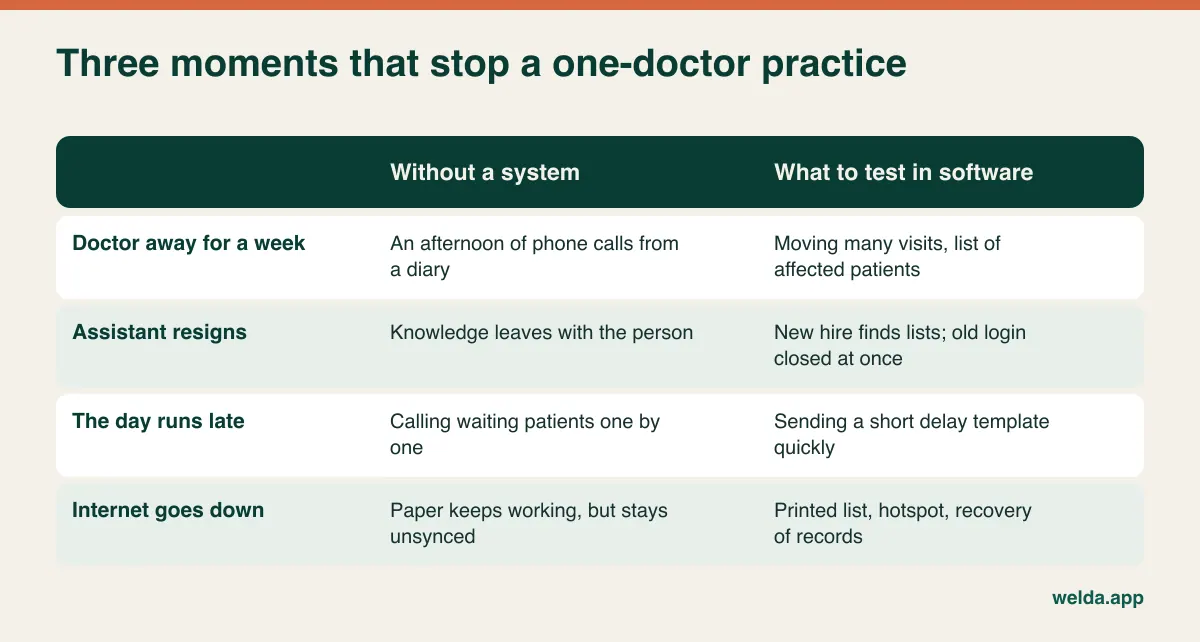
A multi-doctor clinic bends when someone is away. A solo practice stops. Test your shortlist against these three situations, because they are where software earns its fee.
The doctor is away for a week
A conference, an illness, a family emergency: a whole week needs moving. On paper, that is an afternoon on the phone. In software, test two things: how fast can you move many appointments, and can you see every affected patient in one list? Bulk rescheduling and bulk messaging are not solved the same way everywhere, so ask every vendor to demonstrate them live, Welda included.
The assistant resigns
In many practices, the assistant is the institutional memory. They know who pays late, who needs a morning slot and who was meant to be called back. When they leave, that knowledge can leave with them. A quiet benefit of software is that it moves this knowledge from a person into a record. So test it: could a new hire with no handover find tomorrow's list, the open balances and the people to call? And can you close the departing person's login in one step?
The day runs late
An urgent case or a delivery throws off the afternoon. The waiting room fills while your assistant calls people one at a time. Message templates that let you send a short delay notice help here. An internet outage belongs to the same family of problems: web-based systems do not work without a connection. With Welda CRM, access pauses during an outage and records are intact once you are back online. A phone hotspot and a printed day list are unglamorous, sensible backups.
How your specialty changes the shortlist
"Solo practice" is not one workflow. The table below is not a rule; it simply shows which question to bring to a demo. Specialty templates and device links vary widely between products, so never assume them. Ask to see your own use case running.
| Specialty | The pressure on your software | What to test |
|---|---|---|
| Family or internal medicine | Long histories, lab and letter documents | Clicks from the record to an old result |
| Obstetrics and gynaecology | Serial visits, unplanned departures | Booking a series, same-day rescheduling |
| Paediatrics | Parents as contacts, siblings on one phone | Whether one number keeps two children apart |
| Dermatology | Photo archives, multi-session treatments | Storage limits, remaining-session view |
| ENT, ophthalmology | Short visits, dense daily lists | Booking speed on your busiest day |
| Psychiatry, therapy | Fixed slots, heightened privacy | Note visibility, plain message wording |
That last row deserves a moment. A reminder that lights up a patient's phone can reveal which kind of doctor they are seeing. Make sure you can reduce the template to something neutral, such as "your appointment tomorrow at 3 pm".
Patients who speak other languages are worth checking too, especially in international cities. Welda CRM's interface and message templates are available in English, German and Turkish; if you need other languages, test how far templates can be edited before relying on them.
Reading a quote like someone who has been burned before
The question "how much does it cost?" has no honest single answer, because two quotes with the same monthly line can differ sharply in what they include. Compare one full year of use, not one month's subscription.
| Line item | What to ask |
|---|---|
| Subscription basis | Per user, per provider or per practice? Annual commitment? |
| Setup and training | Separately charged? Hands-on for the assistant? |
| Data migration | Included? From spreadsheets as well as old software? |
| Messages | How many included? What happens above the allowance? |
| Billing or invoicing connection | Separate contract with a third party? |
| Storage | How many GB? What happens at the limit? |
| Add-on modules | Which features in the demo are actually in your quoted plan? |
| Leaving | In what format do you get your data back, and at what cost? |
That second-to-last row catches more buyers than any other. Demos often run on the top plan. Ask the vendor to mark, on screen, which features belong to the plan they have quoted.
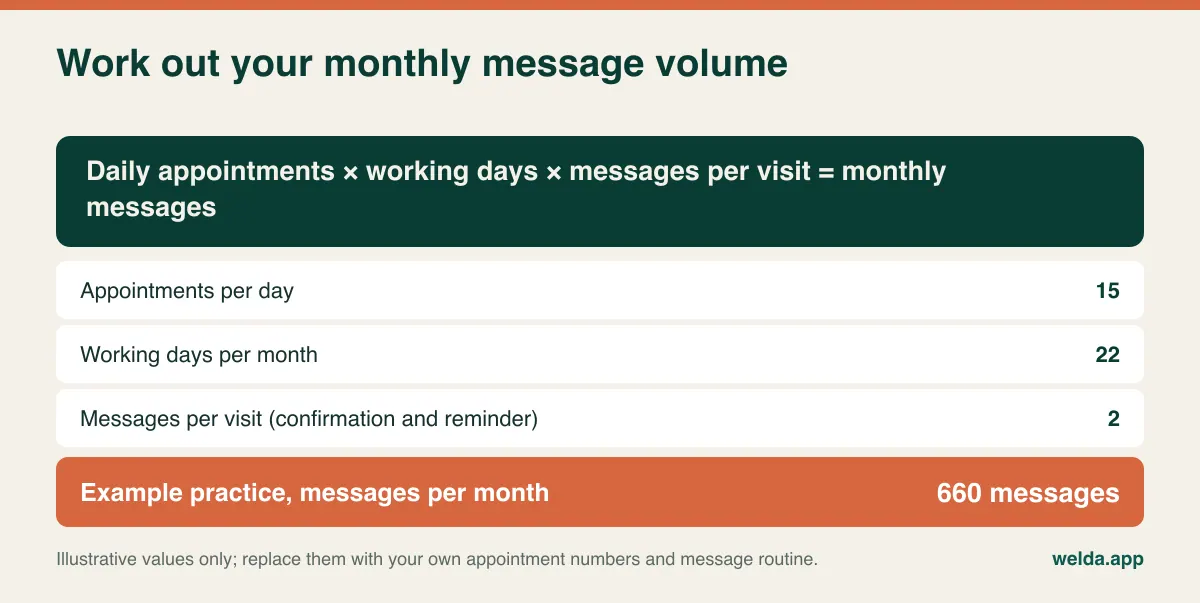
Message volume is also commonly underestimated, because small practices assume they are small on every measure. A doctor with short visits can see many patients a day. Run your own numbers: in the example below, 15 appointments a day over 22 working days with two messages each comes to 660 messages a month. Those numbers are illustrative only. For comparison, Welda CRM's Starter plan includes 500 WhatsApp/messages a month and Pro includes 5,000, so one reminder per appointment and two reminders per appointment could lead this example practice to different plans.
Also spend one normal week logging how long your assistant spends on reminder calls, chasing balances and month-end summaries. Use that as your baseline. It is a far sounder base for comparison than a vendor's promises, ours included.
Data protection when your assistant is your whole admin team
Small practices often feel that data protection is a big-organisation problem. In fact, the risks are more personal: a shared login on the front desk computer, patient details in the assistant's personal messaging app, a spreadsheet on a home laptop. Software cannot fix those habits by itself, but it can remove the excuse for them.
Whichever law applies to you, whether GDPR, HIPAA or a national equivalent, ask vendors the same basic questions. Is health data encrypted? Does each person have their own login? Can you see an access log? Where is data hosted? Will the vendor sign the required agreement, such as a data processing agreement or a business associate agreement? How do you export or delete data when a retention period ends? Consent and retention duties stay with you as the practice, whichever product you choose. Our guide to patient data security in clinics covers the practical side.
As for Welda: records are stored encrypted, each user gets role-based permissions, consents are recorded by version and access to records is logged. Our pages describe KVKK and GDPR requirements. Hosting location and any agreement you need should be confirmed directly with us before you commit, rather than assumed from this article. WhatsApp reminders also deserve a thought in your jurisdiction: check that using them, and what they contain, fits your local rules and your patients' consent.
Where Welda CRM fits, and where it does not
The fit is clearest for a private or self-pay practice. The Starter plan, designed for single-location businesses, includes 1 location and 3 users, so a doctor, an assistant and a spare login are covered. It includes the appointment calendar, online booking and waitlist, patient records, health records, payments and invoicing. When you choose the clinic sector, screens say "patient", and modules can be switched on or off, so a sales pipeline you do not need can stay out of your way. Health records include allergy and contraindication warnings, and there is a before/after photo archive for specialties that use one.
Watch the plan boundary, though. Stock, expenses, automated message flows and the cash desk/POS sit in Pro. A doctor who tracks injectables may not be content with Starter. Our page on solo practice management software and polyclinic management describes the calendar, permission and reporting side; it is written for bigger, multi-specialty setups, but a single doctor uses a simpler configuration of the same product.
It is the wrong tool if you need insurance claims, e-prescribing, lab integration or a certified EHR inside one system. We would rather you find that out now.
A demo script based on a real Tuesday
Do not sit through a standard presentation. Ask the vendor to run your scenario, and bring your assistant if you can, since they will notice friction first.
- A new patient calls. Create the record, book a long first visit, show the confirmation. Time it.
- The patient mentions an allergy. Enter it, then open the record from the doctor's login. Does the warning catch your eye?
- The patient pays part of the bill at the desk. Record it, then show the balance and the invoice status.
- Create a six-month follow-up. Who sees it in six months, and on which screen?
- The doctor is away on Wednesday. Move Wednesday's appointments and notify those patients.
- Log in as the assistant. Are clinical notes visible? Change that setting.
- Month end: pull revenue and open balances, and show what you would hand to your accountant.
- Contract ends: how do you get all patient data out? Ask us this too.
Speed alone does not decide it. What decides it is your assistant saying, "I could do this alone tomorrow."
Moving off paper without closing for a week
No solo practice has a spare week for a migration project, so small, reversible steps beat a dramatic go-live day. Start by choosing what to bring. Active patients from the last few years, future appointments and open balances are usually enough. Keep older files archived in line with your retention obligations; trying to digitise everything at once is the classic way to stall.
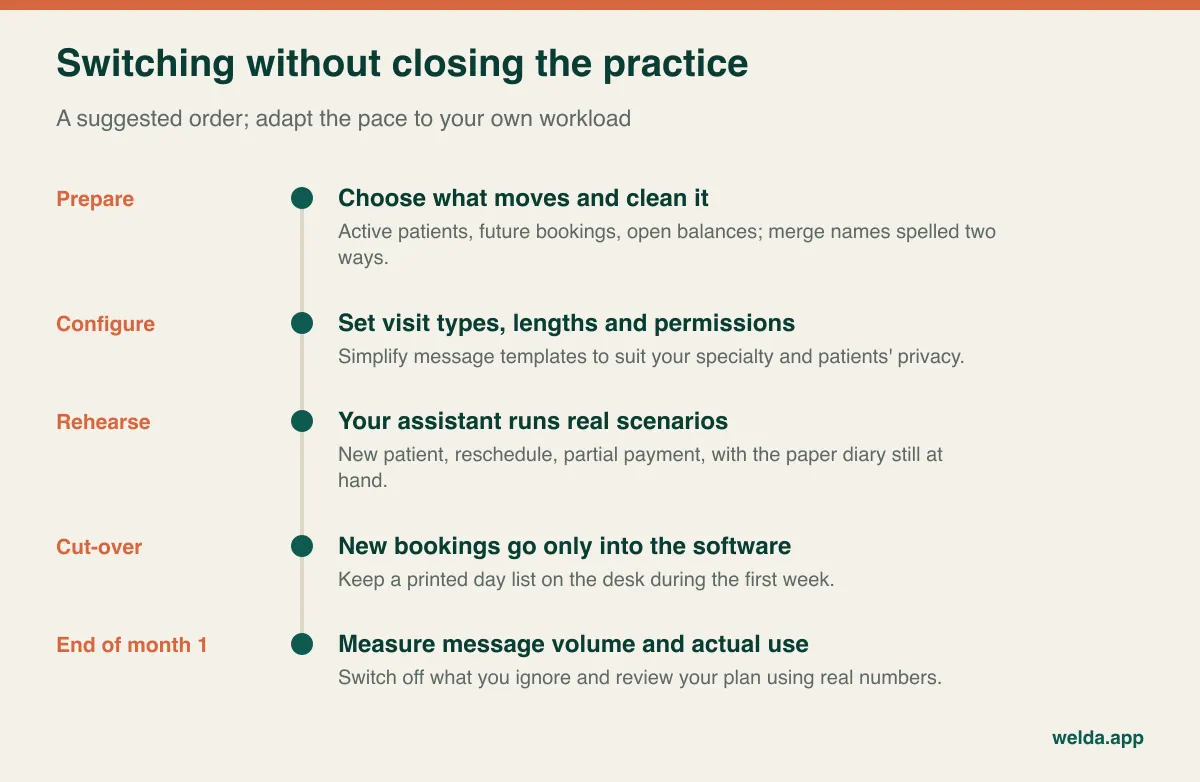
Next, keep the parallel period short. When a diary and a system both run for months, both end up incomplete. Pick a firm date after which all new appointments go only into the software. A printed daily list can be your safety net for the first week. Finally, tell patients if the number or format of your reminders will change, and use their first visit after the switch to refresh contact details and consent where needed.
With Welda, our team handles setup and imports existing patient and appointment data, and hands-on training for your assistant is part of that. Cleaning the source is still worth your time: the same patient spelled two ways is the easiest error to fix before import and among the most annoying to fix afterwards.
Frequently asked questions
Is practice management software the same as an EHR?
Not necessarily. Practice management software traditionally handles scheduling, patients and billing, while an EHR focuses on clinical documentation and often carries certification requirements. Some products combine both. Welda CRM has patient and health records but is not presented as a certified EHR, so check what your jurisdiction requires.
Can I just keep using a spreadsheet and a calendar app?
With very few patients, for a while. But neither sends tied-in reminders, tracks balances against a patient or shows who accessed what, and health data in a general-purpose file creates its own security problem.
Should patients be able to book online with a single doctor?
It depends on your specialty. In Welda CRM, online booking works as a request: the patient asks for an available time and you confirm. That extra step helps a solo doctor who wants to control visit length. Keep the phone route open for anything urgent.
Should my assistant see clinical notes?
Decide this as a matter of job need before you touch any settings. Welda CRM gives each user role-based permissions, so front-desk work and clinical notes can be kept apart.
What should I test during a free trial?
A real week rather than sample data. Welda CRM offers a 7-day free trial with all modules open. Data is kept when the trial ends and the account becomes read-only until you pick a plan. Rerun the demo script with your assistant and count your messages.
How do I find out what it costs?
Welda CRM is a monthly subscription with no separate setup fee; setup, data migration and training are included. The price depends on users, messages and modules, and is agreed in a free consultation.
If you run a private practice and want a straight answer on whether this fits, talk to us about solo practice management software in a free consultation. Bring your daily appointment count and your billing setup, and if something you need is not there, we will tell you.