The right multi-specialty clinic management software is the one that can hold your real rota: doctors who attend on different days, services with different lengths, shared rooms and machines, and one patient moving between specialties on the same visit. It also has to separate what reception, clinicians and owners can see, and report by specialty and physician without a month-end spreadsheet. If a system passes those three tests with your own data in the demo, it deserves a place on the shortlist. If it only passes with the vendor's sample clinic, it does not.
This guide is written for practice managers and owners who are moving past the single-doctor model and now run several specialties under one roof, whether you call it a polyclinic, a multi-specialty clinic or a medical centre. It explains what to test, what to write down before you speak to anyone, and when you should be looking at a different class of product altogether. Rules on health data, billing and record keeping differ widely between countries, so treat regulatory remarks here as general prompts rather than legal advice. You can see how Welda sets this up on our multi-specialty clinic management software page; the criteria below apply to whichever vendor you evaluate.
Start by naming the product class, because vendors will not do it for you
"Clinic software" covers at least three different products, and most disappointing purchases come from buying one when you needed another. An EHR or EMR is built around the clinical record: charting, orders, results, prescribing, sometimes coding. A billing or revenue cycle system is built around getting paid by insurers: eligibility, claims, denials and remittance. A practice management layer is built around running the day: front desk, diaries, reminders, staff, payments and owner reporting. Some suites cover all three to differing depths; many cover one well and the others thinly.
Your payment mix usually tells you where to begin. A clinic that lives on insurance claims in a market such as the United States needs claim handling to be right before anything else, and a calendar-first product will not rescue it. A clinic that is mainly self-pay, or that bills private insurers and corporate accounts in a simpler way, often feels the most pain in scheduling and visibility. That clinic can overpay for a heavy clinical suite and then ask the front desk to work around it.
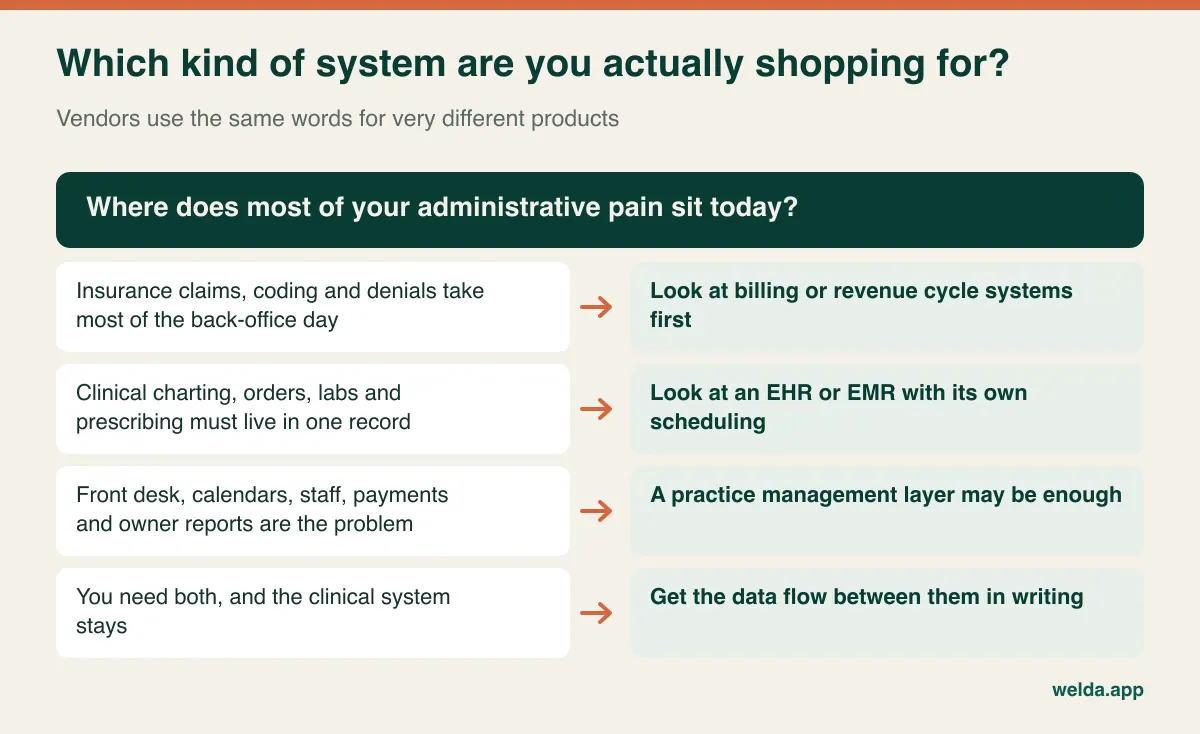
Be honest about what you already own. If doctors are happy charting in an existing EHR and it is not going anywhere, the question becomes how a management layer sits beside it. Ask the plain version: will reception have to type this patient into two systems? If yes, how many times a day, and who catches mismatches? An integration slide does not answer that. A written description of which data moves, in which direction and how often does.
What actually breaks when you add a third specialty
A single-doctor practice can run on memory and goodwill. Around the third specialty, informal rules stop scaling, and the problems tend to appear in a predictable place: the front desk. Consider a clinic with cardiology on Tuesdays and Thursdays, a general physician all week, a visiting ENT consultant every second Wednesday and a dermatologist who wants 15-minute follow-ups but 40-minute new patients. None of that is unusual. All of it lives in the head of your best receptionist, until the day that person is on leave.
The calendar in multi-specialty clinic software has to replace that memory. A slot is available only if several things are true at once: the doctor is in the building, the service fits the slot length, the room is free, any shared equipment is free, and the assistant needed for the procedure is on shift. A system that only checks the doctor will show a clean diary and still produce a queue outside the ultrasound room.
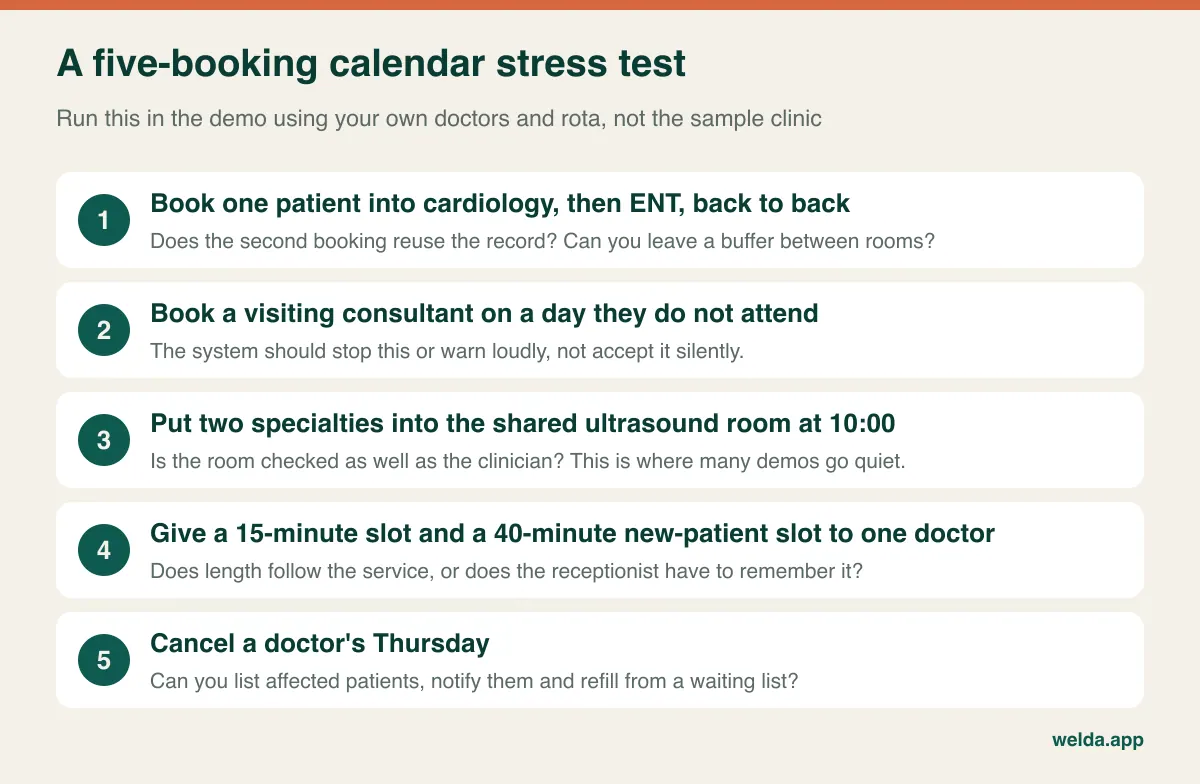
Pay particular attention to exceptions, because a rota is mostly exceptions. Can a recurring schedule carry a one-off change without rebuilding the week? Does a doctor's holiday flag existing bookings, or just block new ones? Can you see, in one list, every patient affected if Thursday's clinic is cancelled? Could you then contact them and offer the gaps to a waiting list? These are ordinary events in a clinic with ten doctors, and they consume more staff time than routine booking does. For wider scheduling criteria, our guide on how to choose clinic appointment software goes further, and clinic staff and shift management covers the rota side.
One patient, four specialties: the record question nobody asks early enough
Duplicate patients are a slow, quiet cost in multi-specialty clinics. Someone rang last year for dermatology; today they ring for cardiology, the receptionist is busy and a new card appears. Now there are two balances, two consent histories and two sets of contact preferences. Your "new patients this month" figure is inflated, and a doctor may not see an allergy recorded under the other card.
Ask three practical questions. Does the system warn on likely duplicates when a new record is opened? Can two records be merged later, keeping appointments, payments and consents intact? What happens when a parent's mobile number is shared by three children? Products that treat a phone number as a unique identifier look neat in a demo and cause daily friction at a paediatric desk.
The harder question is visibility across specialties. A single record is good for safety: every clinician should see allergies and contraindications. It does not follow that every clinician should read everything. A mental health note and a dermatology note carry different sensitivities, and a clinic's own policy, professional rules and local law may all have something to say. Good software lets you express that policy rather than forcing you to pick between "everyone sees it" and "nobody does". Our piece on the patient records system looks at the record itself in more depth.
Role permissions only prove themselves on a bad day
"Role-based access" appears on every feature sheet, so the phrase alone tells you nothing. What matters is how finely the roles divide and how they behave when something goes wrong. Sketch your own matrix before the first demo. It forces decisions that are otherwise made by default, usually by whoever sets up the account on a busy afternoon.
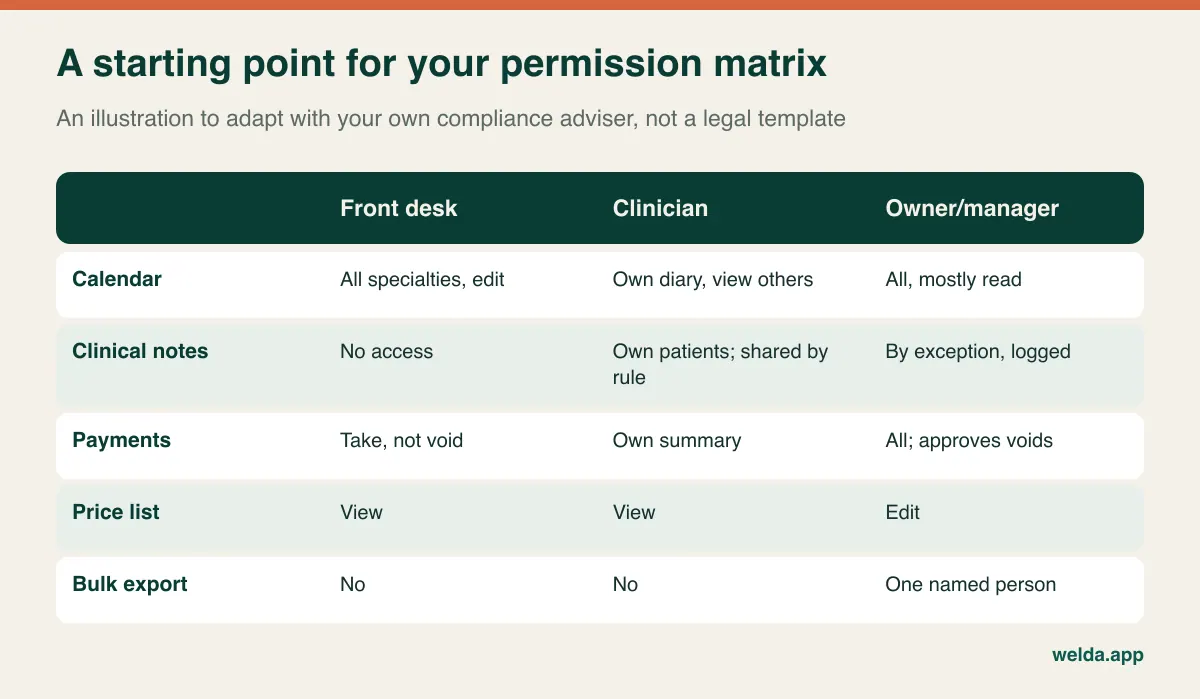
Then test it with three small incidents. A staff member leaves: how many steps remove access, and do their past actions keep their name? A payment is voided: can a manager later see who did it, when, and what the original entry was? A nurse covers reception for a day: can you grant the extra role temporarily, or will the team quietly start sharing a login? That last one matters most. Shared logins are common at busy front desks, and they render any audit log meaningless. If a vendor charges per seat, cost pressure can push you towards them, so count every person who needs an account when you compare quotes.
Data protection adds a further layer. Health data receives heightened protection under regimes such as the GDPR in Europe and HIPAA in the United States, and many other countries have their own equivalents. Do not accept "we are compliant" as an answer, because software cannot make a clinic compliant on its own: notices, lawful bases, retention and staff behaviour stay with you. Ask concrete questions instead. Where is data hosted? Who at the vendor can access it? Is there a processor agreement, or a business associate agreement where one is needed? How are access events logged? How do you get all your data out? Our overview of patient data security in clinics gives a useful list to work from.
Reports that decide something, starting with occupancy
Write down the questions you would like to answer on Monday morning before you look at a single dashboard. Which specialty has unmet demand but not enough doctor hours? Which doctor's empty slots cluster on particular days? Where do no-shows concentrate? What is the gap this month between billed and collected, and which payer explains it? A report that cannot answer such questions in a couple of clicks is decoration, however good it looks in the sales deck.
Occupancy deserves special suspicion, because it depends entirely on its denominator. A doctor who publishes fewer hours looks busier. A figure based on bookings hides no-shows. Compare two specialties using two definitions and you can reach opposite conclusions about which one needs another doctor, and that is an expensive decision to get wrong.
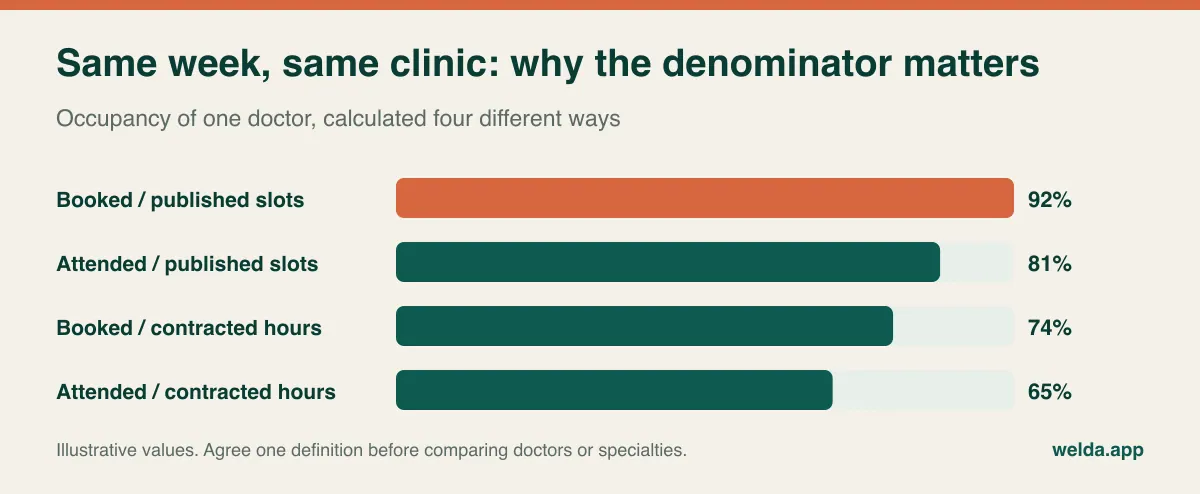
So ask each vendor how occupancy is calculated and whether it is shown by specialty, doctor and period, plus location if you have more than one. Check that no-shows and cancellations are counted separately. Then see whether the figures can be reconciled to something you trust, such as the payments recorded in the same period. A good habit is to build one month's report by hand before you buy, because it gives you an answer key to mark the software against.
Physician pay: the spreadsheet that survives every software project
Most clinics that move to new software still keep one file off to the side: physician payouts. Arrangements vary enormously. One doctor is salaried, another takes a share of revenue, a third rents a room for a session, and a fourth has a guarantee plus bonus. Materials may or may not come off the top. The decisive question is usually whether the share is paid on what was invoiced or on what was collected.
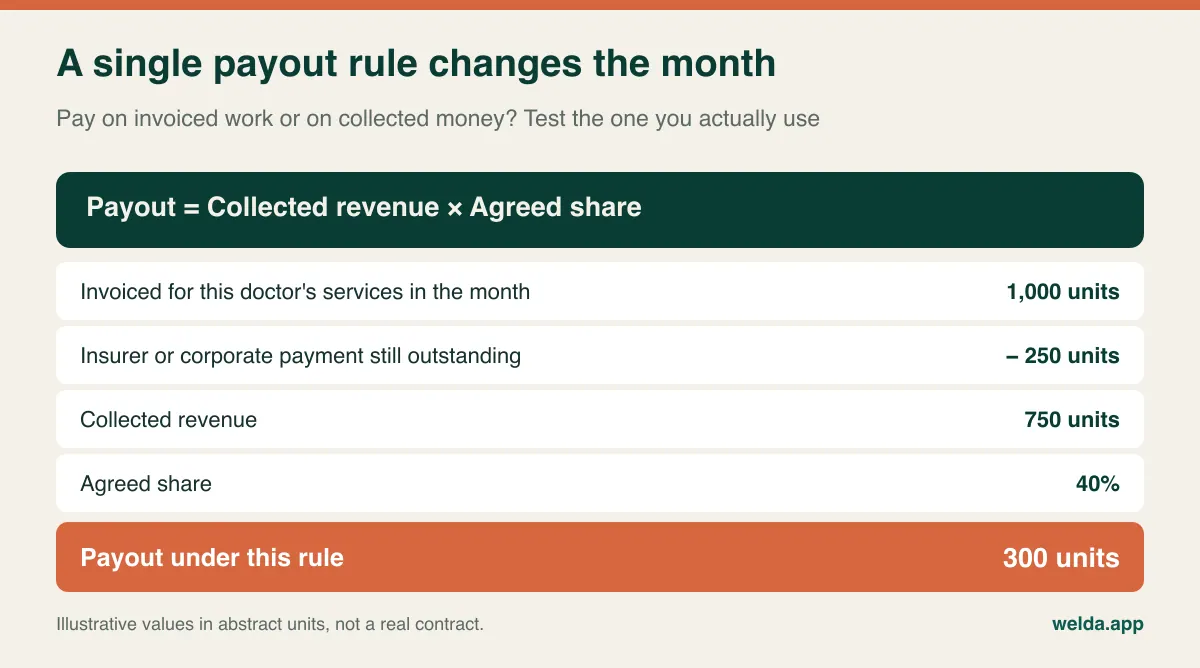
If you bill insurers or corporate accounts, that distinction can move a doctor's monthly figure a long way, and it can create tension if it is not clearly agreed. It is a contract question rather than a software one, but the software has to apply your answer. Bring one doctor's real rule to the demo, stripped of names, and ask for a month to be calculated. Ask how refunds are handled, what happens to a package that was sold in one month and delivered in the next, and whether a doctor can see their own summary without seeing a colleague's.
If your payers differ, ask how prices are held per payer, whether patient and payer portions can be tracked separately, and whether invoicing to a corporate account lives inside the system. An answer of "outside the system" may be perfectly acceptable. What you want to avoid is learning it three months after go-live.
A demo script that the sales deck cannot steer
Most demos follow the vendor's best route through the product. Reverse it. Send your scenario in advance, ask them to load your data or a realistic copy of it, and invite your most experienced receptionist. That person will quickly spot what an owner can miss in a whole session, because they know how many clicks a phone booking can tolerate when two more lines are ringing.
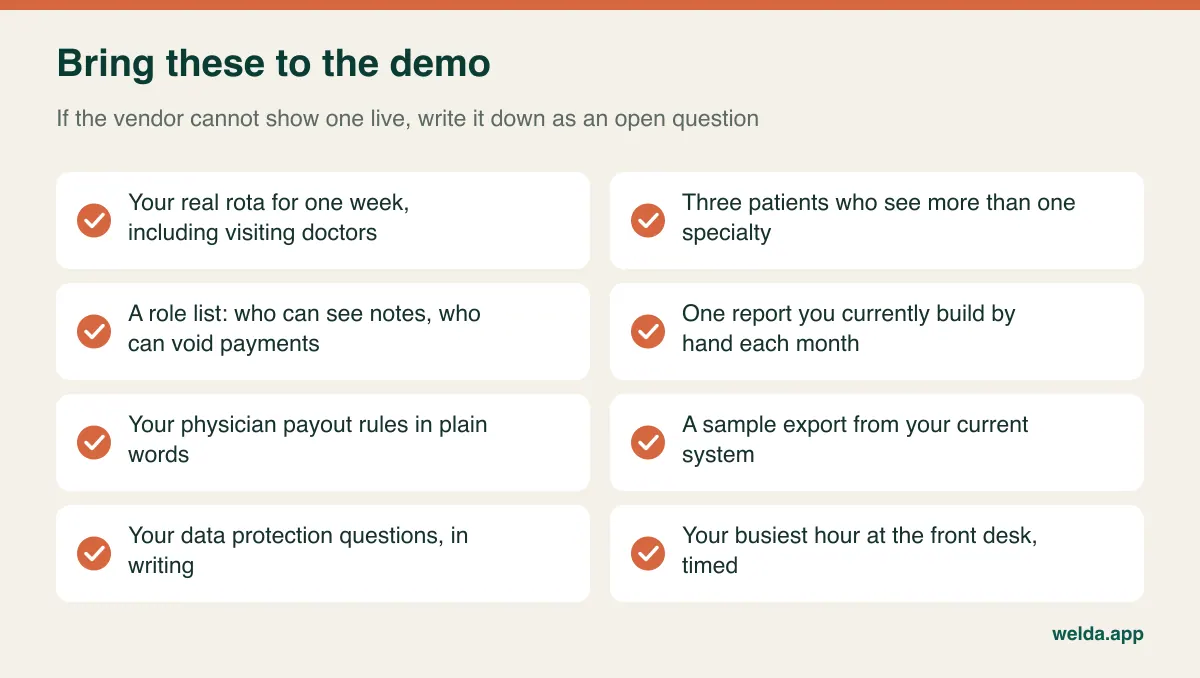
Time a real task: new patient on the phone, two specialties, a reminder, a deposit. Make a deliberate mistake and watch how it is corrected, and whether the correction leaves a trail. Ask what a patient sees in a reminder, in which language and at what time, and whether you can keep medical detail out of it. Ask what happens when the internet drops at 09:15 on a Monday, and whether a printable day list exists. Finally, ask how you leave: in what format you get patients, appointments and payment history back, and whether that costs extra.
Score straight afterwards, using weights you set beforehand, and run the same script for every candidate. Three candidates is usually plenty. Beyond that, the differences blur and the loudest salesperson tends to win.
Which clinics should buy less, and which should buy something else
The right priorities shift with the shape of the clinic, so use this table as a starting point for your shortlist rather than a rule.
| Your clinic | Test first | Can wait |
|---|---|---|
| Two or three doctors on one floor | Booking speed, reminders, payment tracking | Branch comparison, intricate payout rules |
| Several specialties with visiting consultants | Rota exceptions, shared rooms, service durations | The look of the online booking page |
| Heavy corporate or insurer mix | Payer separation, price lists, payout basis | Marketing message flows |
| Several locations | Location-level permissions, central reports, shared patient records | Location-specific screen tweaks |
| Primarily insurance-claim billing | Claims handling, or a clean link to the system that does it | Everything else waits for that answer |
Some clinics should not buy yet. If doctors' hours are renegotiated weekly and no one can state the payout rules in plain words, new software will only digitise the confusion. Writing those rules down costs nothing and makes every later step cheaper. Equally, a truly small practice with one doctor and one room may do fine with a basic booking tool, and it is reasonable to stay there until the second specialty arrives.
Comparing quotes without being misled by the monthly figure
Costs in this category are usually shaped by the number of users, locations, modules and messages, followed by data migration, training, support scope and third-party fees such as messaging or invoicing providers. Give every vendor the same brief, in writing: this many doctors, this many front-desk staff, this many locations, roughly this many appointments a month, these modules. Otherwise, you are comparing different products with similar names.
Then look for what sits outside the quote. Is migration charged separately? Is training repeated for new starters? What happens when message volume exceeds the allowance? Does adding a doctor push you into a tier that changes other things? Is there a fee to export your data on leaving? And count internal costs too: reception hours spent on double entry, or a manager rebuilding reports by hand, are real money even though they never appear on an invoice.
Moving over while patients keep arriving
A multi-specialty clinic cannot close for a migration weekend and expect a clean restart. The riskiest stretch is not the data transfer but the period when two systems both look authoritative. If nobody knows which diary is true, a patient ends up standing at the desk with an appointment that no longer exists.
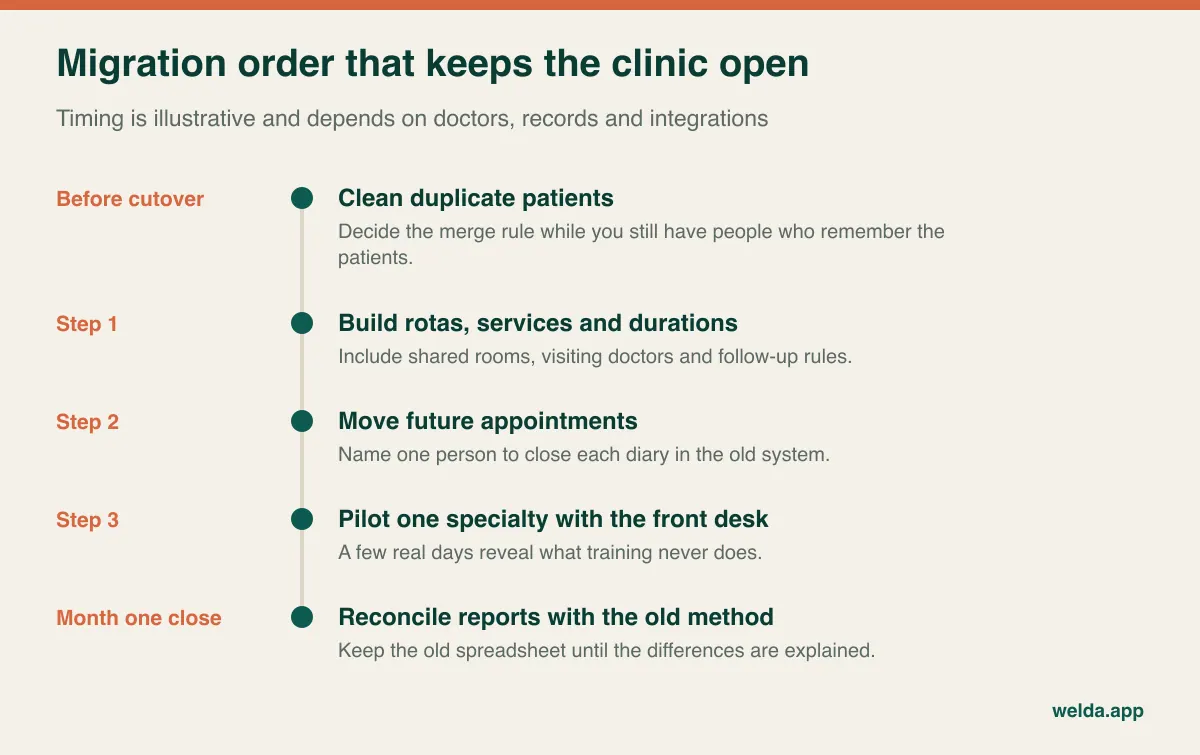
Clean duplicates first, while staff who know the patients can still recognise them. Build services, durations and rotas before moving any booking, then move future appointments and have a named person close each old diary. Pilot with one quieter specialty, but include the real front desk. Treat open balances and part-used packages as a separate checklist, because telling a patient that their balance has vanished is a very fast way to lose trust. Train by role: a doctor may need twenty minutes, but reception needs hands-on practice with real scenarios. Keep the old method running in parallel for reports until month one reconciles, and make sure you retain lawful access to historic records for as long as your local rules require.
How Welda CRM fits, and where it doesn't
Welda CRM is web-based software for businesses that run on appointments, with a setup for private polyclinics. A separate calendar is kept per specialty and physician, while the front desk books all specialties from one screen, with clash prevention. Physician and staff shifts are planned centrally. Patient history sits on a single profile, with encrypted health records and allergy and contraindication warnings. Online booking requests are confirmed by you, a waiting list alerts the next person when a slot frees up, and WhatsApp reminders go out automatically, with interface and templates in English, German and Turkish.
For owners, there are role-based permissions, versioned consent records and an audit log of access. Occupancy, revenue and staff performance reports are live, branches can be compared, and invoices, instalments and cash, bank and card movements are tracked. Commission and payout calculation and monthly targets are available too, with some modules depending on the plan. Setup, data migration and team training are included.
Now the limits. Welda is not positioned as an EHR or an insurance claims platform, and we make no promise here about claims submission, lab or imaging integrations, or e-prescribing. If those are central to your clinic, sort out where they will live first. We also would rather test certain cases with you than answer them with a blanket yes in an article: tracking shared machines as their own resource, merging duplicates, splitting patient and payer portions, or your specific payout formula. Local tax and invoicing requirements vary by country as well, so check those for your market before you decide.
Pricing depends on your locations, users, message volume and modules, and is agreed in a free consultation. A 7-day free trial with all modules open lets you enter a real week of your own rota and see what happens. To start, you can request that conversation from our polyclinic and multi-specialty clinic management software page.
Questions owners ask before signing
What is the difference between clinic management software and an EHR?
An EHR is centred on clinical documentation and orders. Clinic management software is centred on running operations: scheduling, reception, communications, payments and reports. Many products overlap, so ask to see the depth of each area rather than relying on the label.
Do we need one calendar or a separate one per specialty?
You need both views. Doctors work from their own diary, while reception needs every specialty on one filterable screen. What causes trouble is keeping specialties as separate books, because the same patient then exists in several places.
How many user accounts should we budget for?
One for every person who touches the system, including part-time doctors and cover staff. Budgeting for fewer leads to shared logins, and a shared login means your audit trail no longer tells you who did what.
Can patients book online across specialties without creating chaos?
Yes, with limits. Request-and-confirm flows, service-specific durations and restricted slots reduce the risk. New-patient and follow-up visits differ in length, so a wrong choice can upset the day; starting with confirmation required is the safer route.
Are WhatsApp reminders acceptable for a clinic?
That depends on your jurisdiction, your consent basis and what the message says. As a general precaution, keep diagnoses and sensitive detail out of reminders, tell patients how you contact them, and get local advice on the channel.
How do we get doctors to actually use it?
Do not begin by asking them for more data entry. Start with what helps them: a clear day list, quick access to patient history and a personal earnings summary. When payouts come only from the system, habits tend to form on their own.
Can we migrate data from our current software?
Usually, but the scope depends on what your current vendor will export and how clean the records are. Ask for a trial import and check patients, future appointments, balances and packages individually. Ask separately about clinical notes and attachments, which are often the difficult part.