A useful gym management software checklist is not a list of features. It is a short set of situations from your own gym that a product must handle while you watch: a member who pauses mid-contract, a full 6 p.m. class when someone cancels, a renewal that falls due while a payment is overdue. If the software copes with those without notes, side spreadsheets or a phone call to support, it will probably cope with the rest. Before any of that, decide whether you run an open-gym, a class-based studio or a mix, because the right checklist depends on it. Everything below is ordered so you can eliminate options fast and spend demo time where it counts.
Print it, cross out what does not apply, and take it to your next sales call. The numbers in the examples are illustrations, so swap in your own.
Score yourself first: what kind of gym are you buying for?
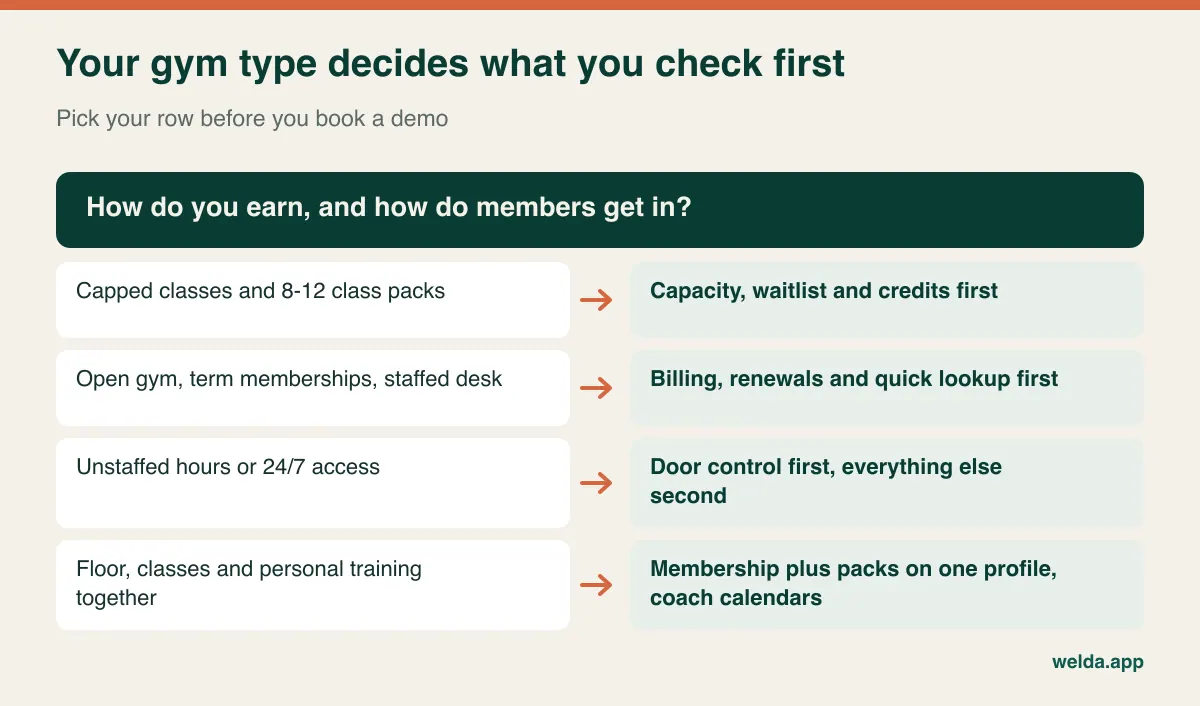
Vendors tend to show the same demo to everyone. A 24-hour strength gym and an eight-reformer pilates studio have almost nothing in common operationally, though both will be told the product is perfect for them. Answer these three questions before you book anything.
Where does most of your revenue come from? Recurring memberships, class packs, personal training, or a blend? A gym that earns from monthly dues lives or dies on billing and retention. A studio selling 10-class packs lives on credits and class fill.
How do members get in? Walk in and train, book a spot, or badge through a door? This single answer decides whether access control is the most important line on your list or an irrelevant one.
What eats your team's time? Chasing payments, answering "is there space tonight?", or checking how many sessions someone has left? Software earns its keep by removing a specific recurring chore, so name yours.
Keep the horizon realistic. If a second location is signed or a studio room is being built, include those needs now. If they are a daydream, do not pay for them today. And if you are a solo trainer with a dozen clients and no classes, a tidy calendar and spreadsheet may honestly be enough for another year.
The membership edge-case test
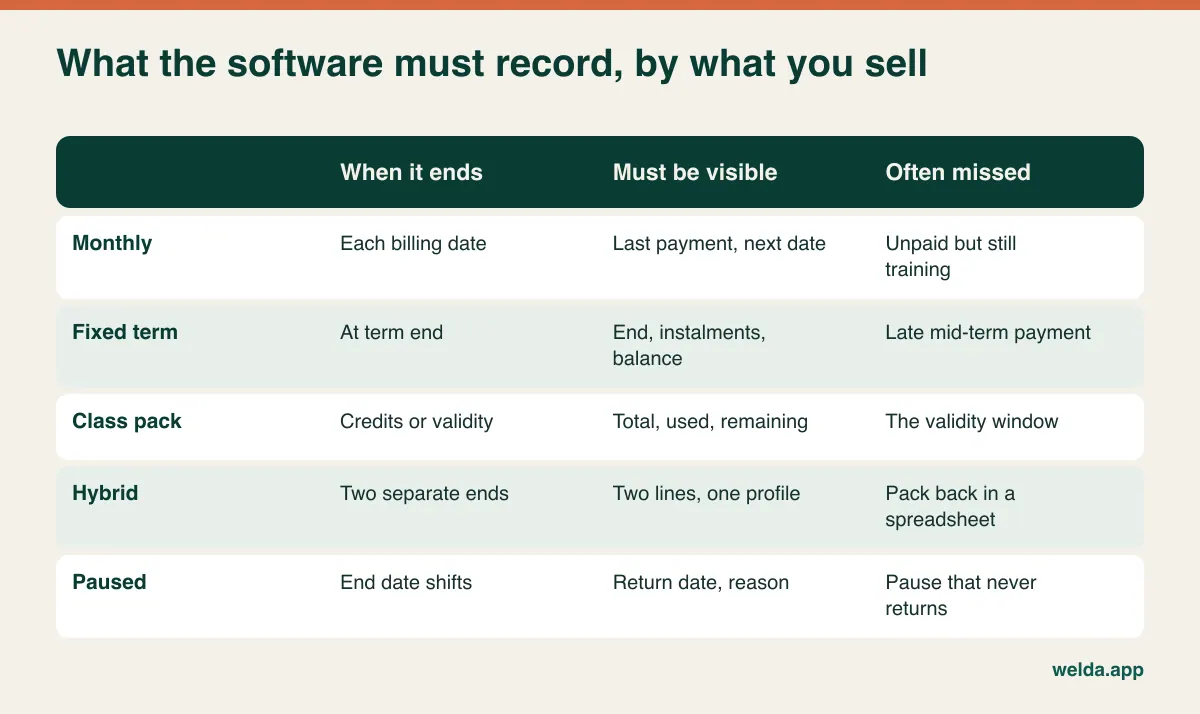
Every gym management system can store a start date and an end date. Differences appear when reality departs from the plan, so bring these cases and ask the vendor to set them up live.
Freeze for six weeks after surgery
Does a pause have its own record with a start and return date, or does somebody manually edit the end date? Is the number of allowed pauses visible? Will anyone be prompted when the return date arrives? Paused members quietly becoming ex-members is a familiar leak in this business, and an edited date field leaves no trail to explain it two years later. Our guide to gym membership management covers how to write freeze rules that staff can actually follow.
Annual plan paid in instalments, one payment late
You want three separate facts on one screen: contract end, next due date and outstanding balance. Where "active" hides an unpaid balance, the awkward conversation only happens at renewal, which is the worst moment to have it.
Open-gym membership plus a class pack
One member, two products, two kinds of expiry: a calendar date and a remaining count, perhaps with a validity window on top. If these cannot sit side by side on the profile, your front desk will restart a spreadsheet within a month.
Upgrade, downgrade and family or corporate plans
Moving from off-peak to full access halfway through a term should not require cancelling and re-creating the member. If you sell couples, family or company memberships, check how one payer linked to several users looks, and what happens when one of them leaves.
For every case, ask one more question: "How do I see later who changed this?" An audit trail ends disputes. When a member insists they paid in March, a dated record of who entered what is worth more than most dashboard widgets.
The Tuesday 6 p.m. test for capacity and waitlists
If you run classes, your software shows its true quality in the last two hours before the busiest session of the week. Picture it: eight reformers, eight bookings, two people waiting, and a cancellation arrives 90 minutes before start. Ask the vendor to walk through it on screen, and tick each item only when you have seen it.
- Capacity per class: set per session and per room or equipment, and retained when the schedule is copied forward.
- Waitlist behaviour: does the next person get notified automatically, or does staff need to call? What happens when they do not reply?
- Late-cancel handling: if your rule says cancellations inside three hours cost a credit, how is that rule applied, and can staff override it with a recorded reason?
- When the credit drops: at booking or at check-in? What if the instructor forgets to mark attendance?
- Attendance on a phone: instructors take the register between classes. If that takes more than a few taps, it will stop happening by week three.
- Booking confirmation: is an online booking instantly final, or a request your team approves? Each has its logic. Instant suits high-volume timetables; approval suits small studios with level requirements. Know which one you are buying.
- Instructor clashes: can the same coach be double-booked between a group class and a personal session? They should not be.
Then look at what the software tells you afterwards. An average fill rate conceals the decision you actually need to make, which is which session to clone and which to cancel. For more on building the weekly timetable itself, see our article on class booking, capacity and waitlists.
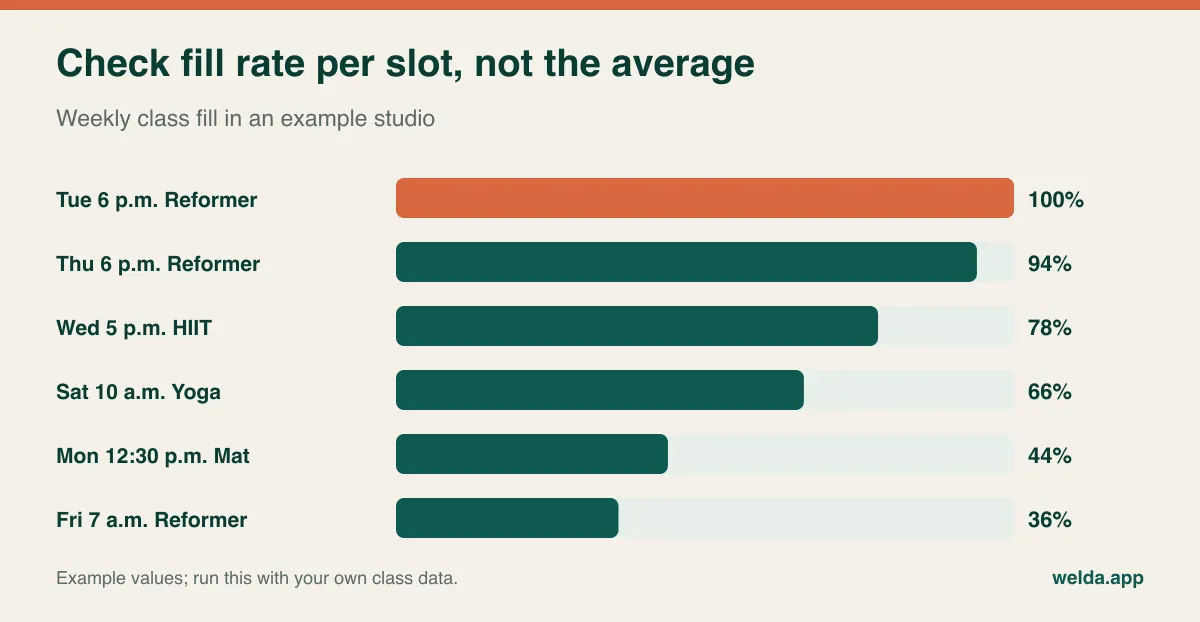
In this example, the weekly average looks acceptable, yet the evening reformer session is permanently full while the midday class runs half-empty. Moving one instructor hour could matter more than any marketing campaign. If the reporting cannot produce this view by slot and class type, capacity tracking has limited value for you.
Door access: the question that decides or disqualifies
This is what separates gym software from general appointment tools. In a clinic or salon the calendar already tells you who came. In an open gym nobody books, so without a check-in record you cannot tell who is using a lapsed membership, and you cannot see the member who has not visited for three weeks, often an early warning that a cancellation is coming.
Be honest about which of these you are:
- Booked classes, small studio: the class register is your check-in. Hardware is usually unnecessary.
- Staffed front desk all day: fast member lookup and a visible status often do the job, and readers can come later.
- Unstaffed hours or 24/7 access: you need integrated door control. Put it at the very top, and treat everything else as secondary.
When access matters, "we integrate" is not an answer. Ask for the supported hardware by name. Ask who installs and who supports it. Ask what the door does when the internet drops, how quickly a lapsed or unpaid membership loses access, and how you let someone in at 11 p.m. when their fob fails. If possible, speak to a gym already running that exact setup.
A plain statement about our own product: Welda CRM does not list turnstile, door or card-reader integrations among its published features. Higher plans include an open API, but that is not the same as a ready-made hardware connection. If your gym depends on unstaffed access, raise this first when you talk to us, and be prepared to choose a system built around access control if the answer does not fit.
Billing and renewals: follow the money, then follow the person
Recurring revenue has two distinct failure modes, and buyers often check only one. The first is mechanical: a payment fails or an instalment is missed. The second is human: a membership approaches its end and nobody speaks to the member.
On the mechanical side, establish exactly what the software does and what it merely records. There is a big difference between a system that charges cards or direct debits on a schedule through a connected payment provider and one that tracks payments taken elsewhere. Both can be valid. If you rely on card-on-file billing, confirm the supported providers in your country, the handling of failed payments and retries, who holds the stored card details, and what it takes to move those details if you ever leave. Welda CRM tracks instalments and balances on the member profile, alongside cash, bank and POS accounts; automatic recurring card collection is not something our pages describe, so if your model depends on it, ask directly.
On the human side, "we send an expiry alert" is where most demos stop, and where the real question begins. Who receives the alert? Where does the staff member record that the member said "call me Friday"? Does Friday's follow-up surface on Friday? Renewals rarely slip because a list is missing. They slip because the list is nobody's job.
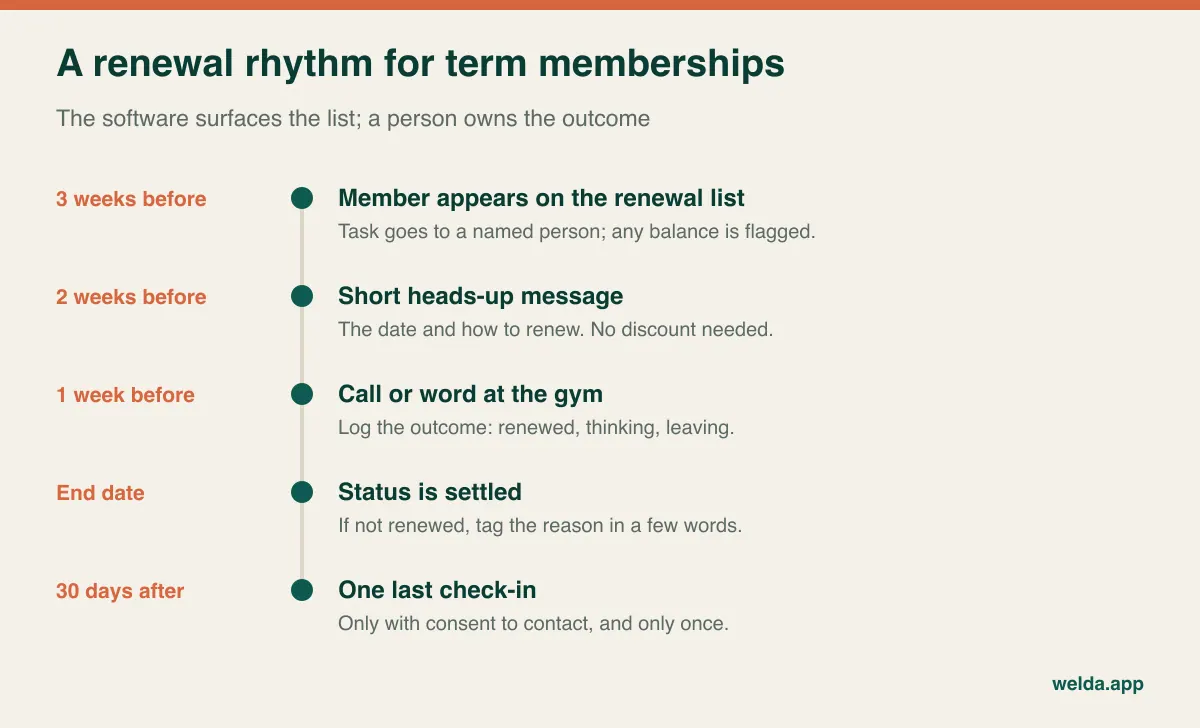
Automated reminders tell members a date; a short conversation with somebody who knows them is often what keeps them. So look at how automated messages feed your team's call list, not whether automation replaces it. Also check the channel. Our guide to WhatsApp appointment automation explains how that works where members live on WhatsApp, but in markets where SMS, email or an app is the norm, you need software that speaks that channel. Ask about monthly message limits as well, since they are a real cost driver as you grow.
A rough calculation helps you size what is at stake without getting into money at all.
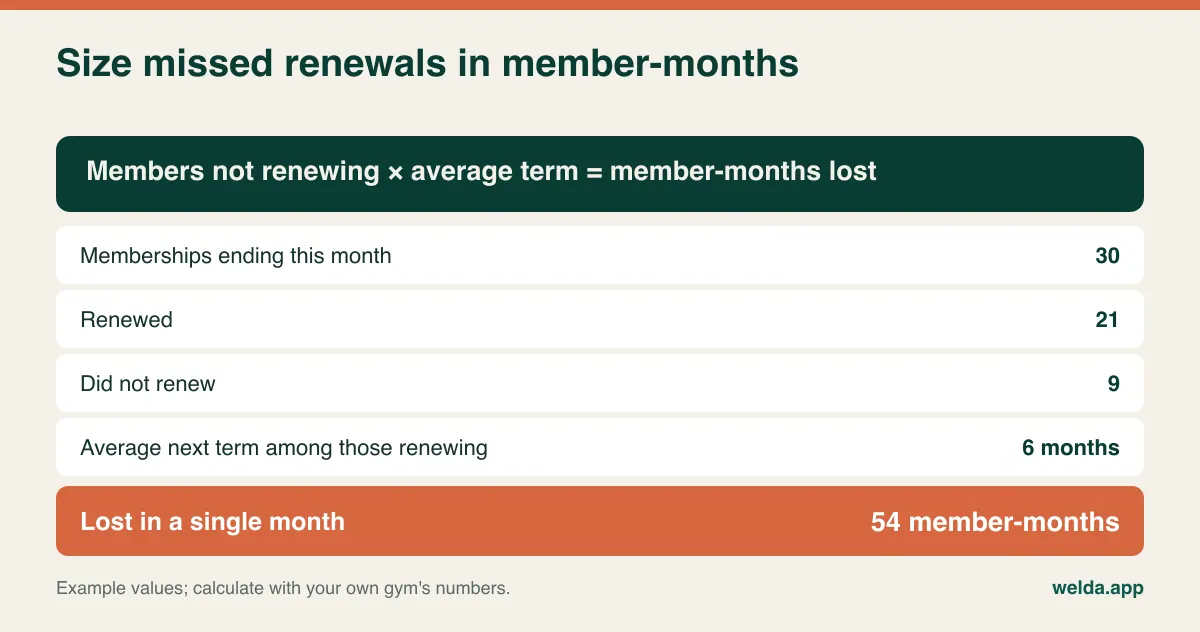
Use this figure as a yardstick when weighing products. The right question is not "how many features does this have?" but "how much easier does this make catching that loss?"
Who actually touches the screen
Gym software usually fails through non-use rather than bugs, and three roles determine whether it gets used.
Front desk. It is 6 p.m. and three people are waiting. How many seconds does it take to find a member by name and see status and balance? Time it. Slow search leads to "just go in, I'll sort it later", and later never arrives.
Instructors and trainers. They need a personal calendar and class rosters on a phone, and they need nothing financial. If you pay commission or per-session rates, run one real month through the software and compare it with your own calculation.
Owner. You want a monthly picture from anywhere: renewals, overdue balances, class fill, attendance per instructor. If someone exports to Excel to produce it, you are paying for half a system.
Then consider permissions. Who may extend a membership, write off a balance or apply a discount? It sounds excessive in a small team until the first staff change, when "who gave that discount?" has no answer. Also check whether part-time instructors count as paid users. In a coach-heavy studio that changes the sums.
For the member side, ask whether booking happens in a web page or a branded app, and be realistic about which you need. A polished app is nice, but plenty of members would rather tap a link. Do not pay for the app unless your members will truly use it.
Data, waivers and the rules where you operate
Regulations vary by country and sometimes by state, so treat this as a list of questions for your adviser rather than legal guidance.
- Personal and health data: injury notes, pregnancy and pre-exercise questionnaires are sensitive in most jurisdictions. Under GDPR and UK GDPR, health data has a stricter status. Ask who can view these fields, how they are encrypted, and where the data is hosted.
- Consent for marketing: a class reminder and a promotional blast may fall under different rules. Member-level opt-in records save trouble later.
- Contracts and cancellations: some countries and US states regulate health-club contracts, notice periods or auto-renewals. Software will not make you compliant, but clear records of contract dates, freezes and payments help with disputes.
- Payments and tax: card data should sit with a certified payment provider, and tax on memberships, sessions and retail may differ. Check that invoices or receipts fit your local requirements.
- Exit rights: what can you export, in what format, and how much notice do you need? Ask this before signing. Getting data out is the question vendors least like and buyers most regret skipping.
Welda CRM stores records encrypted and includes consent management and an audit log designed to support KVKK and GDPR obligations. Your own legal position is still yours to confirm.
The checklist itself
Here is the condensed version to bring along. This gym management software checklist works on any product, ours included, and our fitness studio page lists what Welda CRM claims so you can test those claims directly. Insist on real data: a small anonymised member list and last week's timetable will reveal more than the vendor's perfect demo account.
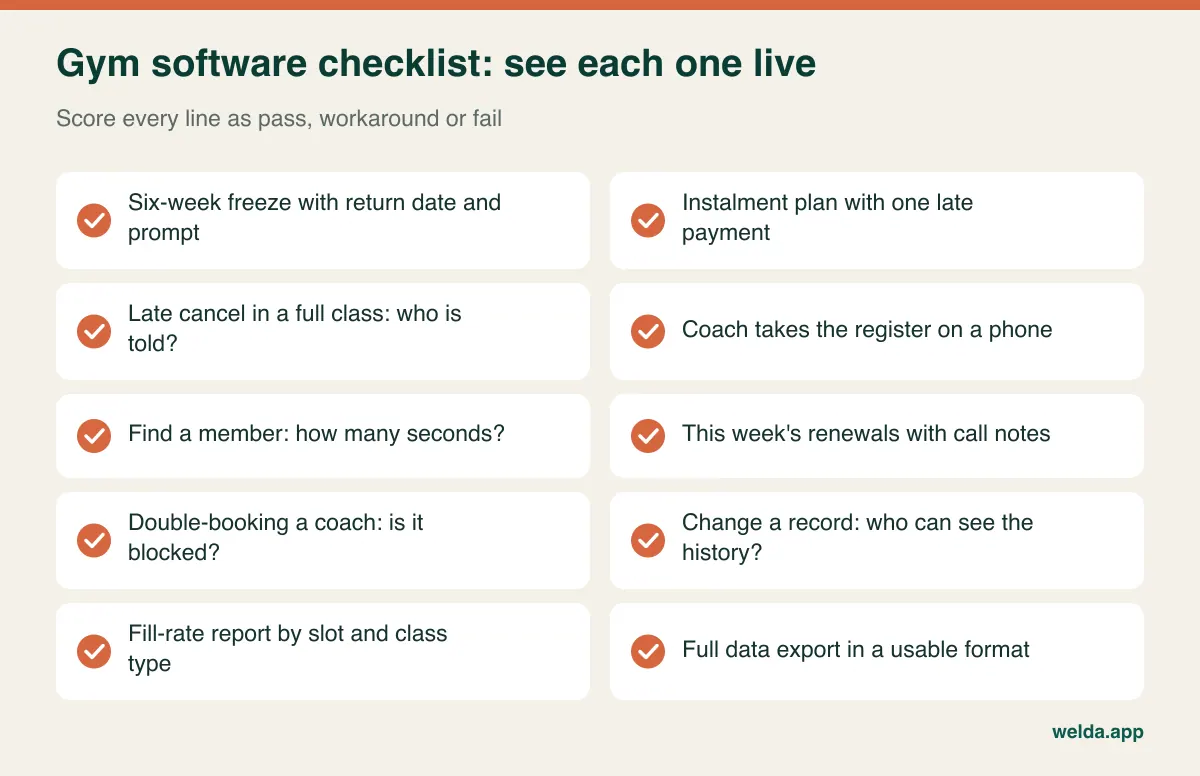
Score each line pass, workaround or fail, and weight the lines using your answers from the first section. A workaround is not a failure, but it should be written down, since every workaround becomes a training item and eventually someone's forgotten habit. Treat "it's on our roadmap" as a no. And to compare quotes fairly, put these on one page: locations, users, message volume, add-on modules, payment processing fees, hardware and installation, data migration, training and contract length. Comparing a single monthly figure before you level these out tells you very little. Ask also what happens to your bill if your membership doubles.
| If you are… | Prioritise | Can wait |
|---|---|---|
| Class-based studio with packs | Capacity, waitlist, credits, phone register | Door hardware |
| Staffed open gym with term memberships | Renewals, instalments, fast lookup | Advanced class tools |
| 24/7 or unstaffed gym | Door control, recurring billing, access rules | Nice-to-have member features |
| Personal training studio | Coach calendars, session credits, commission | Group class capacity |
| Multi-location group | Cross-site rules, per-site reports, permissions | Anything that does not scale |
If you are still weighing up whether you need a CRM-style system at all, our CRM guide for small businesses is a sensible starting point.
Switching without wrecking January
In many markets, new-year and pre-summer periods bring the biggest wave of sign-ups. Look at your own records and avoid those months. Teaching a new system at the busiest desk hour exhausts staff and shows members your worst side.
The risky part of migration is not names and phone numbers. It is the state of each member on the day you switch: remaining credits, open instalments, true end dates, active pauses. Do not try to perfect five years of history. Pick a cut-off date and verify that day's state.
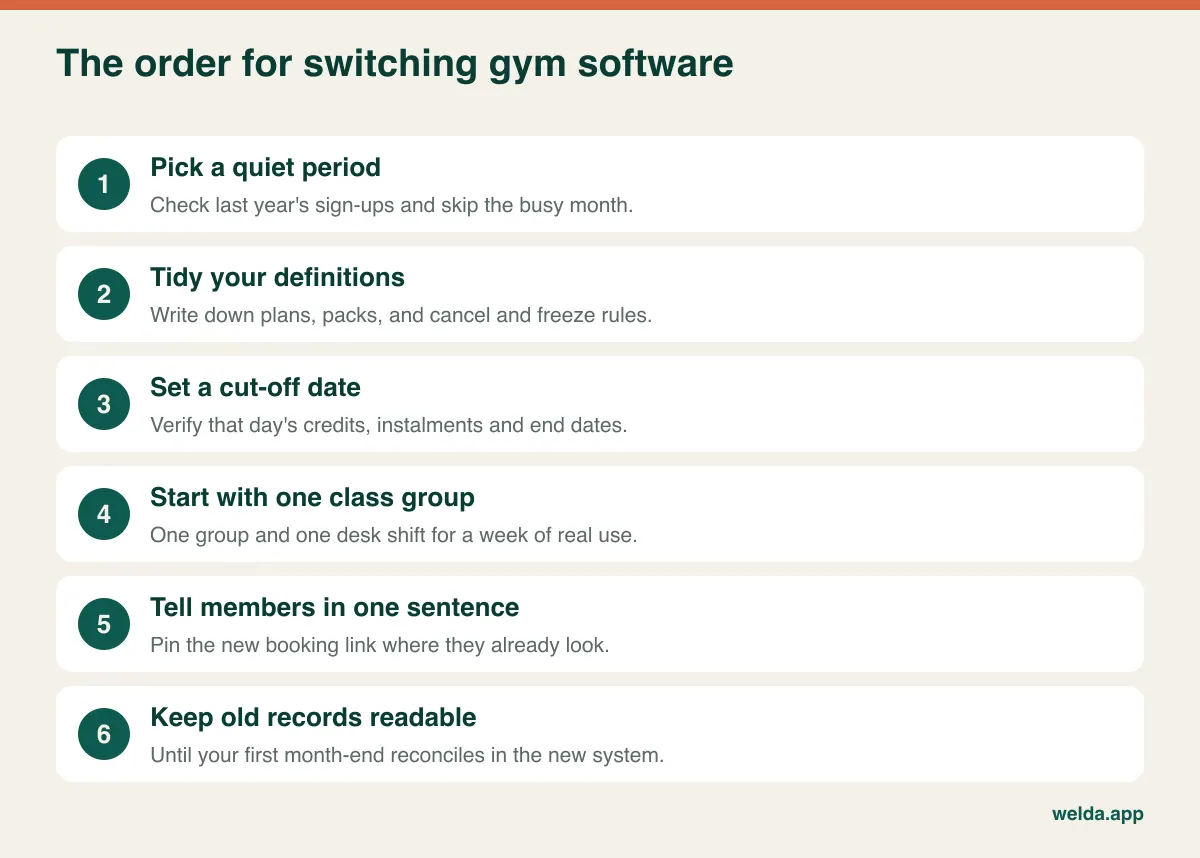
Keep member communication short: "Class bookings now happen at this link" is sufficient. Do not change prices or the timetable that same week, or you will never know which change caused which complaint. Leave your old booking channel open for a fortnight with the new link pinned, then close it.
A trial is best used small. Take one class group and one desk shift, and let them run real days. Welda CRM offers a 7-day free trial with all modules on, which is long enough for a real test on a small slice but too short to move a whole gym.
Where Welda CRM fits on this checklist
Applying our own test to our own product: Welda CRM is a booking and client management system that adapts to studios when you choose the fitness sector. It records membership periods and end dates and lists those approaching expiry. Class packs show total and remaining credits, which drop as attendance is recorded. Group classes run by instructor with set capacity; when a class fills, new requests go to a waiting list and the next person is notified when a spot opens. Members request a place through an online booking page and your team confirms it. Notes, tasks with reminders and a daily follow-up queue help keep renewal calls from being forgotten. Reminders go out over WhatsApp, instalments and balances sit on the member profile, and reports cover fill rate and revenue. It runs in a browser, and the interface is available in English, Turkish and German.
The best fit is pilates, yoga, reformer and personal training studios, plus small and mid-sized gyms where classes and term memberships dominate. It is not the first place to look if you need unstaffed door access or fully automated recurring card collection, as neither appears in our published features. We would rather tell you that now than after setup. Freezes are not described as a separate feature on our pages either, so bring your policy and we will go through how it would work.
Setup, importing your member list and staff training are included. Pricing depends on locations, users, message volume and modules, so it is settled in a free conversation. To run this gym management software checklist against Welda CRM, book a free call or start the 7-day trial from the fitness studio page.
Frequently asked questions
What should a gym management software checklist include?
Membership edge cases such as freezes and instalments, class capacity and waitlists if you run classes, door access if you have unstaffed hours, billing and renewal follow-up, role permissions, reporting by time slot, data export and migration support. Weight each one by your operating model.
Do small studios need gym software?
It depends on traffic, not headcount. A small studio with packs and waitlists can drown in messages. A solo trainer with a few one-to-one clients can stay on a calendar for a while yet.
Is an all-in-one system always better than separate tools?
Not necessarily. One system means fewer places for records to disagree, which is valuable for memberships, classes and balances. But if a specialist tool does access control or payments far better for your setup, a good integration can be the wiser choice. Test the handover between them.
How long does switching gym software take?
It varies with the amount of data, how clean it is, and any hardware involved. Plan around a quiet period and allow a parallel phase rather than committing to a single switchover day. Get the vendor to state who does what, with dates.
How do I compare gym software prices fairly?
Level the scope first: locations, users, messages, modules, payment fees, hardware, migration, training and contract length. Then ask how the bill changes if you double in size. We deliberately avoid quoting market figures here since they vary too widely by country and scope to help you.
Will software reduce member churn on its own?
No. It makes visible who is due to renew, who is overdue and who has stopped coming. Your team still has to make the call and apply the rules. Treat it as a tool for a routine you commit to.
Can I try Welda CRM before deciding?
Yes. There is a 7-day free trial with all modules available, and a free conversation to work through your setup. Bring this checklist along.