The best nail salon software for a small team does four things well: it books each service for its real length and blocks clashes, sends reminders without you touching your phone, keeps colours, allergies and design photos on the client's record, and gives you a booking link you can put on Instagram. That is the list. Stock management, commission calculations, multi-location dashboards, open APIs and white-label domains are useful to someone, but rarely to a one-to-three-person salon on day one. When a vendor shows you a feature, ask one question: which lost appointment does this save me? If nobody can answer, it can wait.
This guide is for owners who still run bookings through Instagram DMs and WhatsApp and are wondering whether it is time to stop. It will not tell you that everyone needs software, because not everyone does. It will help you work out whether you do, what to insist on, what to refuse to pay for, and how to move clients across without a fuss.
Your inbox is a shop window doing a receptionist's job
Instagram is a superb way to be discovered. Clients see your sets, save your work and message you with a photo. The trouble starts when that same inbox has to act as the appointment book, because an inbox has no idea how long anything takes, whether Saturday at two is free, or what happens if someone goes quiet.
Nail techs also feel this harder than most trades. A hairdresser can usually glance up during a colour's development time. You have a client's hand in yours, gloves on, a lamp running. The person taking bookings and the person doing the work are the same person, so messages pile up until the gap between clients, which is also when you need to clean the desk and set up. Replies go out late. A new enquiry who has messaged three salons may have booked with whoever answered first.
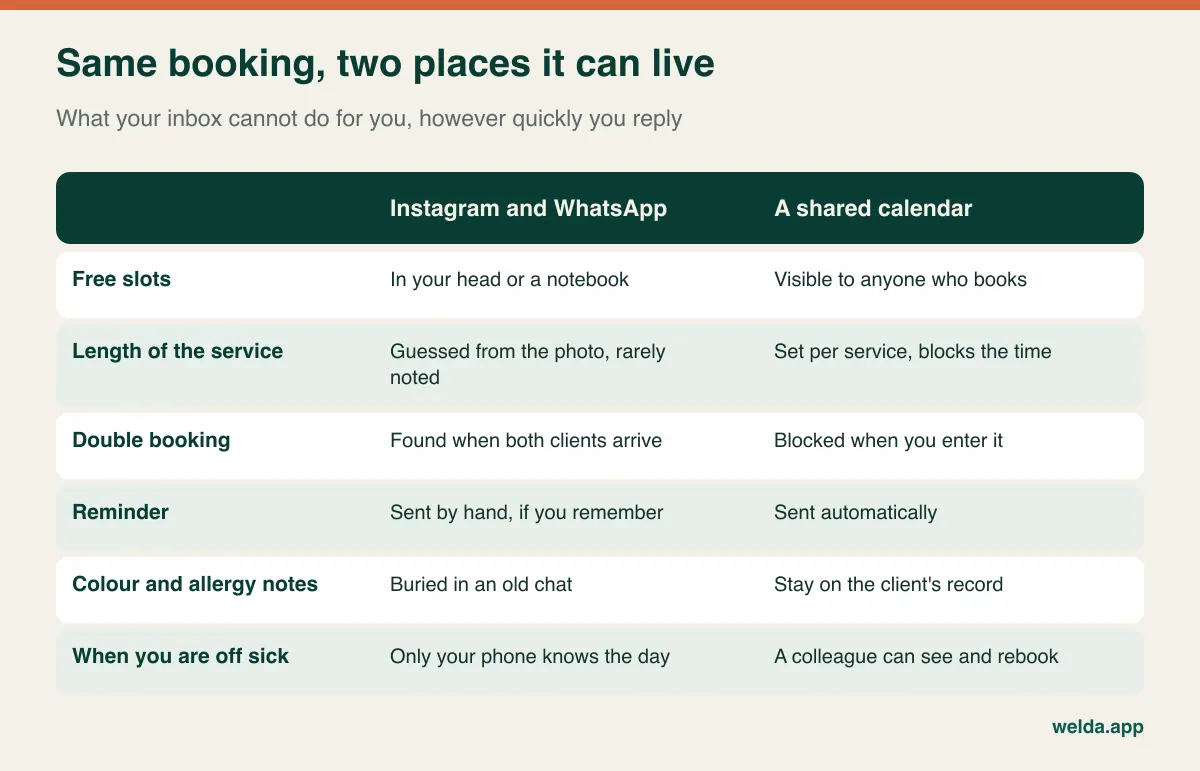
So when you evaluate software, count the conversations it removes rather than the features it adds. If a client can see open times and leave a request, the "does Thursday work? what about Friday?" back and forth shrinks. If reminders go automatically, you skip the morning round of messages. You are buying back the minutes between clients, and that is the honest business case for a small salon.
Keep Instagram exactly where it is, by the way. If you are wondering whether you also need a website alongside it, we weighed that separately in do you need a website if you have Instagram.
One word, six durations: the test generic booking tools fail
The most nail-specific problem in scheduling is that the length of the job is often unknown when the request arrives. "Can I get my nails done Friday?" might mean a forty-minute manicure or a three-hour sculpted set with hand-painted art. The photo a client sends from Pinterest may decide which. Add a soak-off of another salon's work, a broken nail or a longer length, and your careful plan is gone by lunchtime.
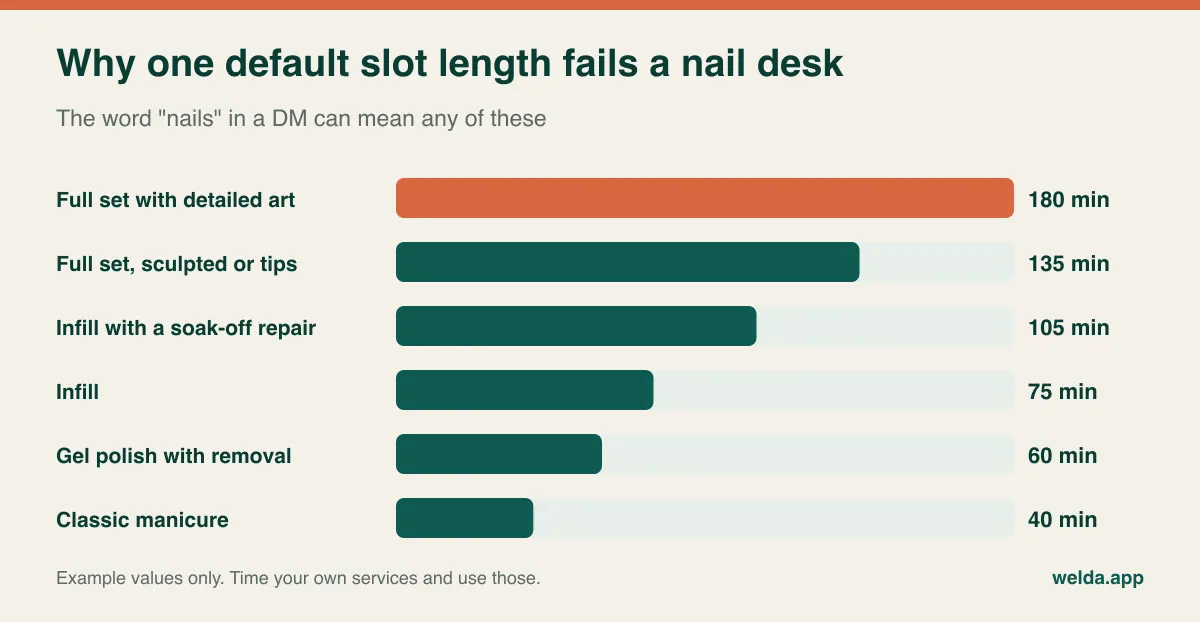
Three things to check in any calendar you are considering:
- Length per service. Infills, full sets, gel polish and manicures should each carry their own time. A system built around uniform slots will fall apart on a nail desk.
- Add-ons that move the clock. Art, removal and repairs should extend the appointment. If the extra time runs into the next client, you want to know when you enter it, rather than when she walks in.
- Somewhere for the photo. The inspiration picture has to be findable on the day. Can it be attached to the client, or will you be scrolling through a chat with one free thumb?
If you employ someone, ask a further question: can service lengths differ by person? A newly qualified tech's infill rarely takes the same time as that of someone with a decade behind her. This almost never comes up in a sales presentation, and it affects every day of your calendar.
There is also a house rule no software will write for you: do not confirm extra time until you have seen the design. A line in your booking form or saved reply, such as "want art? add a photo and I'll confirm the time", avoids most of the arguments. The tool can only support the rule. You have to set it.
The three-week client is your whole business model
Infills and gel polish bring people back at a steady rhythm, which makes nail work unusually predictable if you manage it. A client who rebooks before she leaves is income in the diary with no marketing spend behind it. A client who says "I'll message you" becomes one more conversation two weeks later, answered late, possibly after a competitor has offered her Saturday morning.
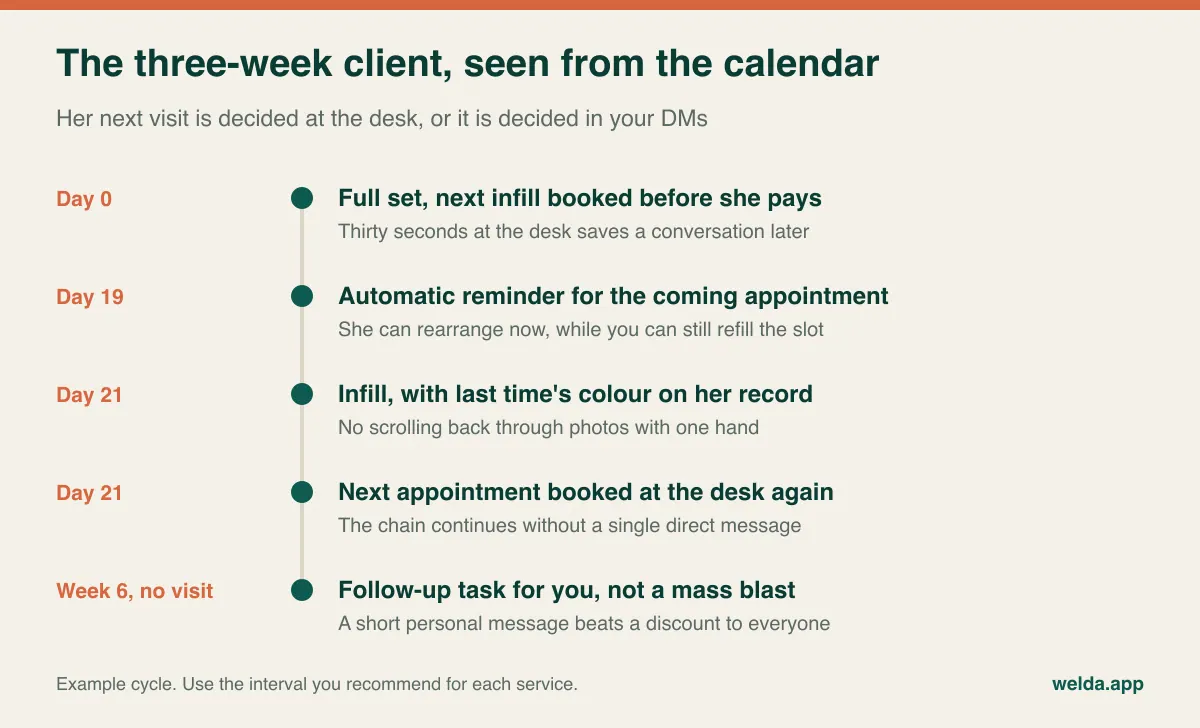
What the software must do to support that chain:
- Fast rebooking at the desk. Time yourself creating the next appointment on a phone or tablet while someone waits with her card out. If it takes long, staff will stop doing it within a fortnight, and so will you.
- History on the same screen. "Same colour as last time" should be answerable without leaving the booking.
- A way to spot who has lapsed. A regular who has gone quiet for six weeks deserves a short personal note. That goes further than a blanket discount, which trains clients to wait for discounts anyway.
- A waiting list for cancelled slots. If someone wanted Saturday afternoon and a slot opens up, the notification should not depend on you remembering who it was.
If you sell prepaid infill bundles, you also need to see sessions left against the client's name. It is manageable with four clients and a source of awkward conversations with forty. If you do not sell bundles, check that you are not paying extra for a module built around them.
What is worth paying for, and what is not
Software quotes rarely grow because of one big item. They grow because of modules added on the grounds that you might need them one day. Here is a more realistic filter.
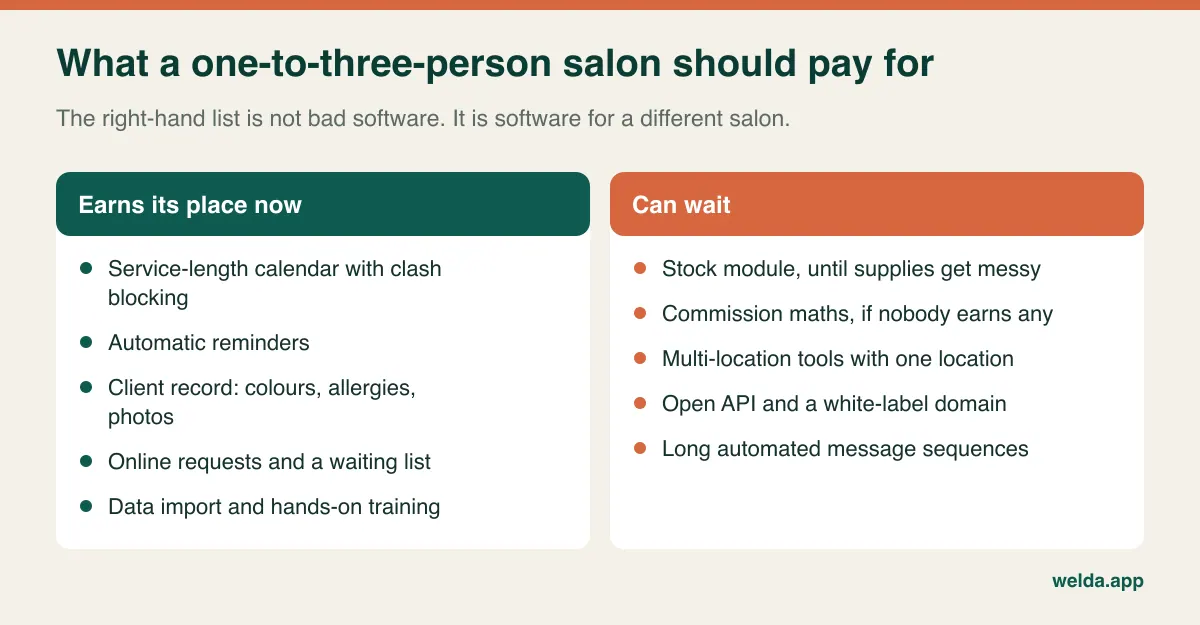
| Feature | Skip it while... | Reconsider when... |
|---|---|---|
| Stock management | You can reorder gel and polish from a simple list | You keep buying duplicates, or want to see product use per service |
| Commission calculations | You work alone or staff are on fixed pay | Staff earn a share and the month-end sums cause disputes |
| Multi-location tools | You have one premises and no plan for another | You are actually negotiating a second lease |
| Marketing automation | Reminders and an occasional personal note are enough | Aftercare and return invites are falling through the cracks |
| Sales pipeline and quotes | Clients ask, then book | You quote for weddings, events or nail classes |
| API and white-label domain | There is nothing to connect it to | A developer has asked for a specific integration |
Two more traps deserve a mention. First, marketplace booking apps that promise new clients: these can be a real channel, but read how you pay. If commission or fees apply to your existing regulars as well as new clients, the sums change. Get in writing which bookings are charged and when. Second, the plan chosen only because it is cheapest. If it limits reminders or makes it hard to export your data, you will be back on paper within months, and that time is a cost too. We looked at where free tools genuinely suffice in free hair salon software; the reasoning carries over to nails.
When comparing quotes, send each vendor the same scenario: two users, one location, your actual monthly bookings. Then total a full year. What moves that number is users, messages, storage, setup, data import, tier differences and what happens when you exceed an allowance. Our breakdown of what drives beauty salon software pricing goes through these line by line. An honest comparison depends on your own scenario rather than on any figure quoted in an article.
When you do not need software at all
If you work from home, know most clients personally and have a calm week, a phone calendar and saved replies may be perfectly fine. Holding off makes sense if most of these are true:
- No-shows and forgotten appointments almost never happen.
- New clients are few and come by personal recommendation.
- You work alone and have no plans to hire.
- You have never double-booked yourself.
On the other hand, the signs that the moment has arrived are fairly clear: you have given the same Saturday slot to two people, you spend evenings copying messages into a diary, you could not find a regular's colour and felt embarrassed, or you are about to take on a second person. Run a quick example with your own numbers: if two clients a week fail to show and the average job is ninety minutes, that is about twelve hours of unsold time a month. Multiply those hours by what you earn per hour, and you have a realistic ceiling for what solving the problem is worth.
Deposits: make the rule before you pick the tool
Deposits are both a money issue and a relationship issue. Losing a three-hour slot hurts. Asking a client of ten years for a deposit can hurt too. Software will not settle this, but a written rule will.
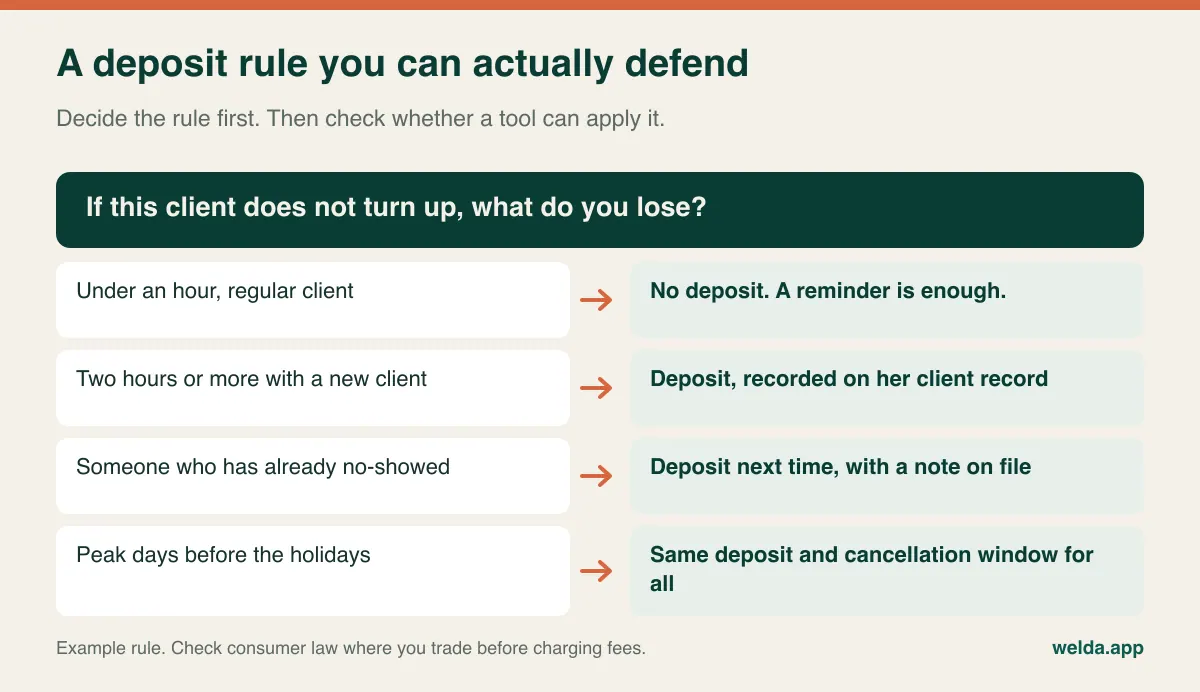
Once the rule exists, the requirements follow. Many small salons take deposits by bank transfer or a payment link. In that case, you at least need to record the deposit against the client and see the balance on the day. If you want the software to collect deposits at booking, ask each vendor directly: is it offered in my country, which payment provider runs it, who bears the fees, and how do refunds work? No-show fees and cancellation charges are also subject to consumer law, which differs between countries, so have your terms checked if you are unsure. State the rule the same way on your profile, your booking page and your reminders.
Booth renters, independent techs and the question of whose clients they are
Nail desks are often rented, or shared between self-employed techs. That raises something software demos seldom mention: whose client list is it? If a renter leaves, do her clients' records go with her? Can one tech see another's bookings or takings? Should each person have a separate account altogether?
Sort this out in your rental agreement before you sort it out in software. Then ask vendors how the system handles it: separate calendars, role-based access, limits on what each user sees, and what happens to records when a user is removed. If each tech is genuinely running her own business, one shared account might be the wrong structure, both for data protection and for tax. An accountant can usually help you with the second question faster than any vendor.
Client records, photos and the rules where you trade
Because this guide is read in many countries, take the following as general orientation rather than legal advice. Names, numbers, booking history and photos are generally personal data. In the EU and UK, GDPR and UK GDPR apply to small businesses too, and health-related notes such as allergies may attract stricter treatment. Other countries have their own rules, and in the US privacy and messaging requirements vary by state and sector.
- Allergy notes. Sensitivity to acrylates or gel products matters at the next appointment. Keep it on a restricted client record rather than in your personal notes app. You are recording something to be careful about, not making a diagnosis.
- Photos on Instagram. Ask before you post. A hand may not seem identifying, yet a tattoo, a name or a face in the frame changes that. Decide where you record the consent so you can find it.
- Marketing versus reminders. A reminder about a booked appointment is usually treated differently from a promotional message. Many jurisdictions require consent for marketing by text or messaging app, and in the US the rules on automated texts can be strict. Check the rules that apply to you, and ask whether the software can separate the two and record consent.
- Tax and invoices. VAT, sales tax, receipts and cash register rules depend on where you trade and your turnover. Ask your accountant what you need, then ask the vendor whether the system produces it. If you handle a lot of sensitive records, our piece on data security for clinics goes deeper, though it was written for a more clinical setting.
Count your messages before you compare plans
Message allowances are the line item small salons most often overlook. WhatsApp and SMS features are usually capped in some way, and the only way to know whether a cap fits you is to do the sum first.
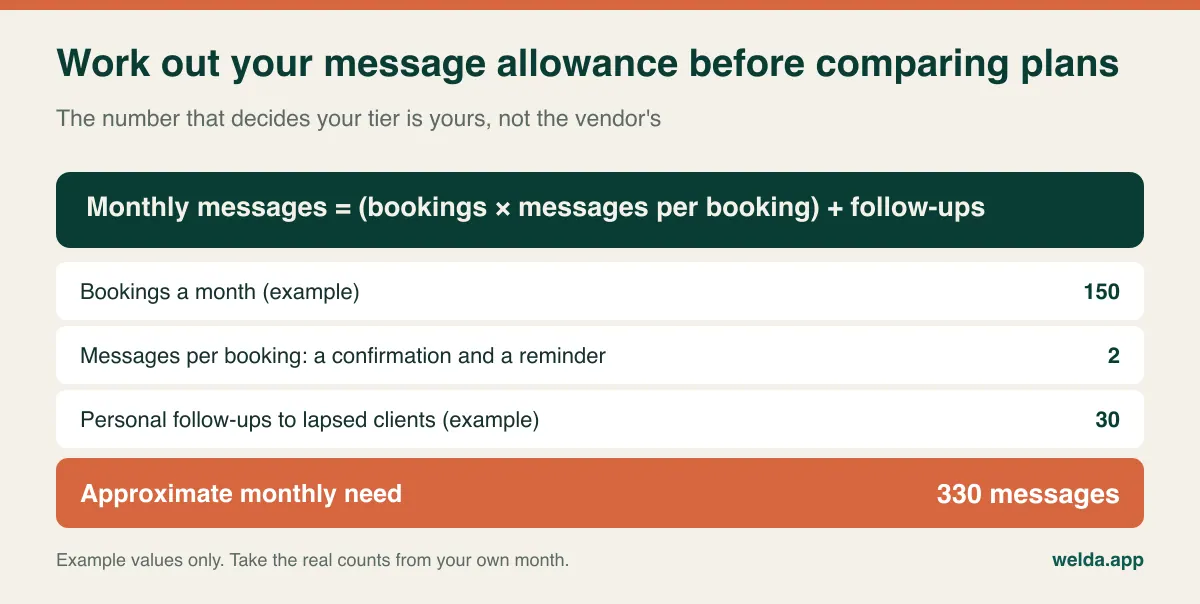
Also ask what a message actually is in that system. Does a confirmation count? What about a failed delivery? Is the allowance per user or per account, and what happens when you exceed it: do messages stop, or does a charge appear? For more on how a reminder flow is structured, see our guide to WhatsApp appointment automation.
A demo you run yourself, phone in hand
A vendor presenting a tidy calendar on a large monitor tells you little about life at a nail desk. Bring your phone and last Saturday's bookings, and then do the following yourself:
- Book a new client for an infill with one hand, as if between appointments. Count the taps.
- Add thirty minutes of art so it runs into the next client. What does the system do?
- Attach a design photo to a client, then find it on a different device.
- Open that client's next booking. Are the last colour and the allergy note visible without searching?
- Cancel a Saturday slot. Who gets told, and can you edit the wording?
- Record a deposit, then check the balance due.
- Export your full client list. In what format does it arrive, and is it complete?
- Log in as a member of staff. Can she see another tech's takings, and can you switch that off?
Use any free trial on a real week of bookings as well. Every system feels quick with an empty calendar.
Moving clients off DMs without annoying them
The fear with switching is that clients will find it impersonal. In practice regulars mostly care that booking stays easy. So skip the dramatic announcement and do it in stages.
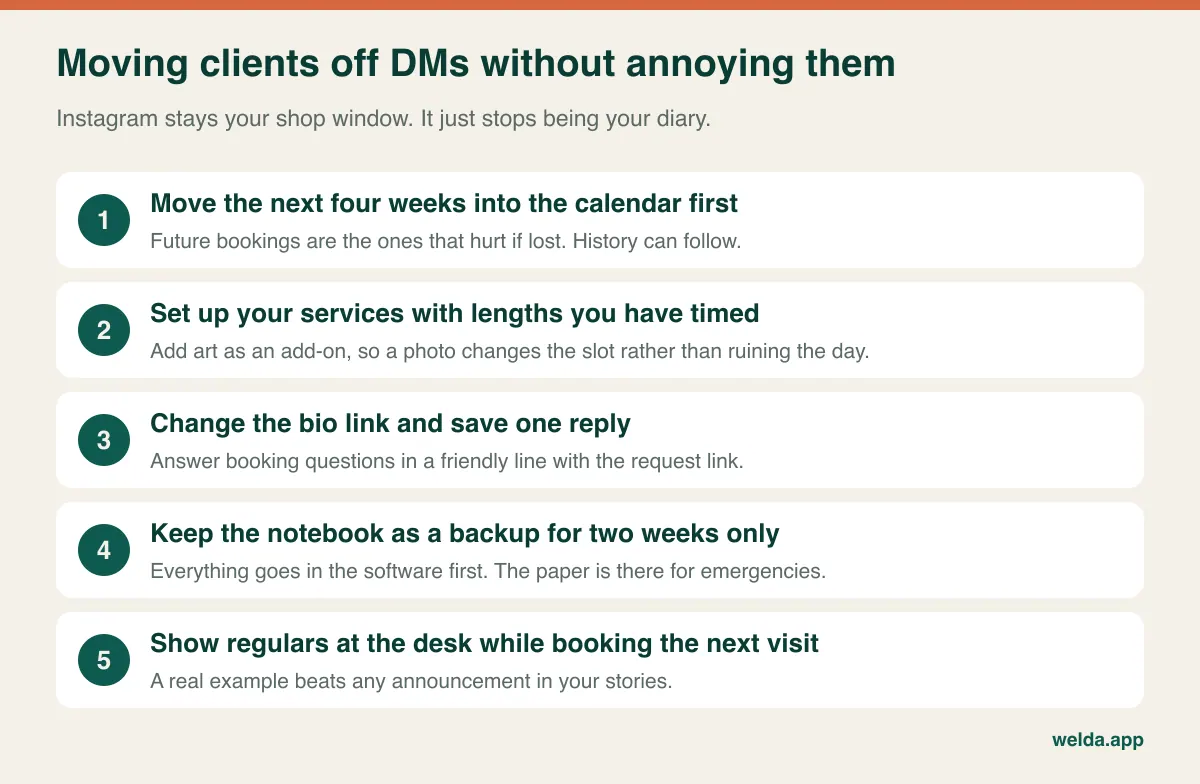
Your saved reply can be this simple: "Hi! You can see my available times and request a slot here. If you'd like art, add a photo and I'll confirm." If someone keeps messaging you anyway, book her in yourself and show her the page next time. Punishing a loyal client for old habits is an expensive way to enforce a process. Over time, you want your inbox full of design questions and largely empty of "are you free Friday?". And choose a quieter month for the switch, not the weeks before the holidays.
How Welda CRM fits a nail salon, and where to test us
Our own product should face the same questions. Welda CRM is web-based software for appointment-led businesses, and our pages do not define a separate nail salon sector. The closest setup is beauty salon, so if you are weighing Welda as nail salon software, that page shows the modules you would be working with. Modules and terminology follow the sector you choose, and the interface and message templates are available in English, German and Turkish.
- Calendar: One calendar with staff, room and location views, plus conflict prevention. Online requests are confirmed by you, and a waiting list notifies the next person when a slot opens.
- Client record: History, notes, tasks with reminders, an encrypted record with allergy warnings, and a photo archive. If you sell bundles, sessions remaining show on the profile.
- Messaging: Automatic WhatsApp appointment reminders. The Starter plan includes 500 WhatsApp messages a month, and the sum above tells you whether that fits.
- Money and access: Invoices and receipts, payments and instalment tracking, role-based permissions, consent management and an audit log.
For most small salons the honest starting point is Starter: one branch, up to three users, with appointments, online booking and the waiting list included. Stock, expenses, cash desk and POS, automation flows, and staff commissions sit in Pro. Unless you pass three users or actually need one of those, there is little reason to move up. Ask us exactly how automatic reminders work on the plan you are considering.
There are also things we would rather you test than read here. Our pages do not describe an integration that pulls Instagram DMs into the system, so on Instagram the realistic setup is a link to online requests. Taking deposits online is not something we list as a confirmed feature; you can record them as payments, and we can discuss online collection when we talk. Add-on durations for art, service lengths per person and day-to-day use on your phone are all worth trying in the demo, since our pages describe browser access on computers and tablets. If your country has fiscal cash register rules, raise that with us and your accountant before relying on any system as your till.
Setup, data import and hands-on training are included on all plans, with no separate setup fee. Pricing depends on branches, users, messages and modules, and is settled in a free call. There is also a 7-day free trial with all modules open, and your data is kept when it ends. If that sounds like a sensible next step, talk to us about nail salon software and bring last Saturday's bookings with you.
Frequently asked questions
My clients are used to messaging me on Instagram. Will I lose them?
You do not have to close that door. Keep replying, but point booking requests to a link and rebook regulars at the desk. If someone insists on messaging, enter the booking yourself. Clients tend to accept a change that makes booking easier, particularly when nobody is told off for doing it the old way.
Do I need software if I work alone?
Not necessarily. A calm week and familiar clients can run on a phone calendar. It starts to make sense when you are catching up on messages in the evening, losing enquiries or suffering empty slots, because you have no receptionist and your hands are busy all day. Being solo can make the case stronger rather than weaker.
Should the app take deposits automatically?
It is convenient, but not essential on day one. What matters first is that a clear rule exists and that deposits are recorded on the client. If you want automatic collection, ask about availability in your country, fees, the provider involved and refunds.
How do I decide how long to book each service?
Time yourself for a week and average the results, then add a small buffer. Keep art and removals as separate add-ons. If you have staff, record lengths per person, because the same infill rarely takes everyone the same time.
Is beauty salon software overkill for nails?
Sometimes. Treatment rooms, machines and long courses matter in a beauty salon; a nail desk cares more about service length, repeat bookings and client notes. Check whether a quote charges you for modules built for other businesses. Our guide on how to choose beauty salon software covers the broader case if you offer more than nails.
Can I use it on a phone?
Test this personally, as it matters a great deal for this trade. Try every shortlisted system on your own phone with a real booking, not just a demo screen. Welda CRM runs in a browser with nothing to install; check the experience on your own device during the trial.
Will software stop no-shows altogether?
No, and be careful with anyone who says otherwise. Reminders and a clear deposit rule can reduce forgotten appointments and bring cancellations forward. Illness and last-minute changes still happen. The realistic goal is to hear early enough to refill the slot.