An online booking system costs you in one of three ways: a commission or fee on bookings, a fixed monthly subscription, or add-ons such as text reminders, deposits and extra locations on top of either one. If you need a marketplace to bring you strangers, a commission can be fair. If your clients already know you and you simply want them to stop phoning, a subscription usually works out better once you pass a modest volume. The figure that matters is your total monthly bill at your real booking numbers, not the number at the top of a pricing page.
That means two businesses can receive the same quote and reach opposite conclusions. A new nail bar with an empty diary and a ten-year-old physiotherapy practice with a loyal list are buying different things, even if both are looking at "booking software". Below you will find a way of working out your own number, the questions that expose costs missing from a pricing page, and an honest view of where Welda CRM fits and where it does not. For Welda, the actual figure is settled in a free consultation.
Whose client is it after the first booking?
Before comparing any numbers, settle this question, because it divides the market more clearly than price does. On a marketplace, clients search a directory, compare you with businesses nearby, and book through the platform's account. On your own booking page, they arrive because they already looked for you, and the relationship stays in your records.
The money follows that split. A marketplace is largely selling discovery, with a calendar attached. A subscription tool sells infrastructure and leaves the marketing to you. A plugin or simple scheduling tool sells a calendar and little else. Comparing their prices directly is like comparing the cost of a shop-front on a busy street with the cost of a till.
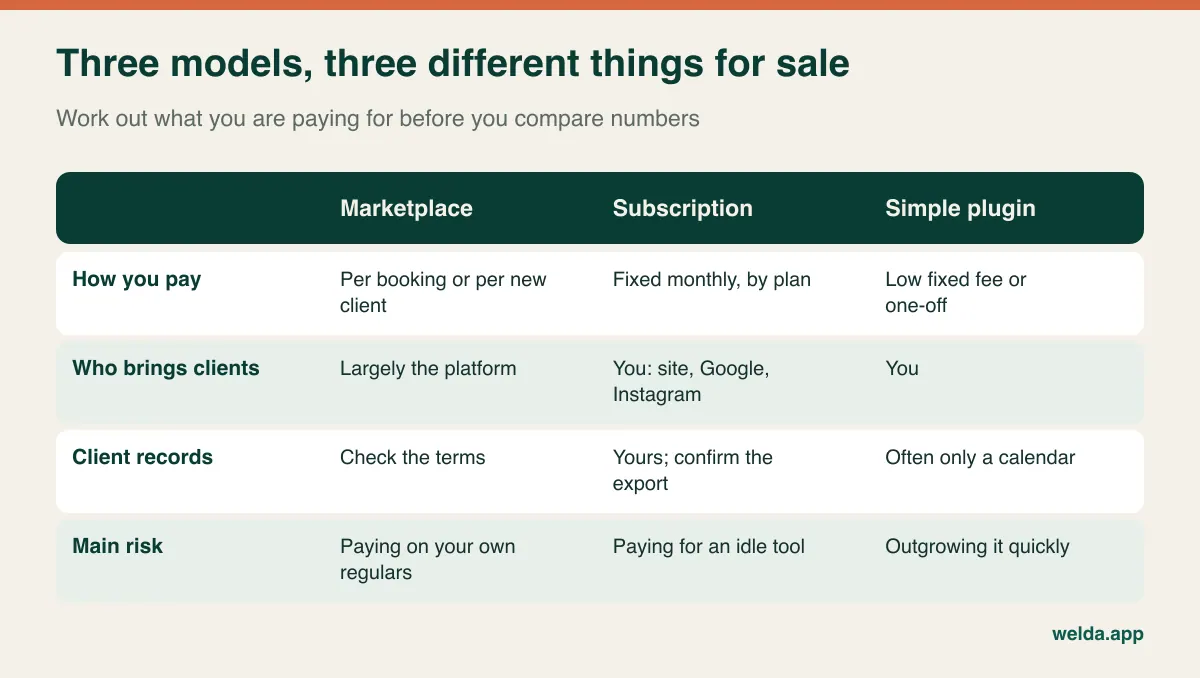
A question worth asking early: can you export a client's name, phone number and booking history if you leave? With software you pay for directly, the answer should be an easy yes. With any platform that sits between you and your client, read the terms closely. Some charge for discovery and also expect to keep the relationship, and that second part never shows up as a line on an invoice.
The new-client fee and the every-booking fee are different deals
"Commission" hides two arrangements. Under a new-client fee, you pay once when the platform introduces someone who has never visited you. Under a per-booking fee, you pay on each appointment made through the system, including the regular who has been coming for years. Same word, very different economics.
Think of the new-client fee as a marketing cost and judge it the way you would judge an advert. If a client who arrived that way tends to return several times, paying for the introduction may be perfectly sensible. The risk is definition. What counts as "new"? A client who visited two years ago? Someone who found you on the platform after seeing your shop window? Someone you sent there yourself by posting the wrong link on Instagram?
Ask for these answers in writing:
- Is the fee triggered by new clients only, or by every booking?
- Does a booking made through your own website or social link count?
- Is the fee calculated on the booked service, or on the final bill including retail and upgrades?
- What happens to the fee if the client cancels or does not show up?
- Is there a monthly charge as well, or a minimum spend?
Work out your break-even in ten minutes
You need three numbers from your own records: bookings per month, how many of those are new clients, and your average service value. Then divide your fixed monthly software cost by the fee per booking. The result is the number of commissionable bookings at which the fixed plan starts being cheaper.
The worked example below uses neutral "units" because these are assumptions used to show the method, not market prices. Replace them with your own quotes and your own currency. Suppose an average service worth 60 units and an assumed new-client fee of 20 percent. Each new client costs you 12 units. If the fixed plan and its add-ons come to 300 units a month, you break even at 25 new clients per month.
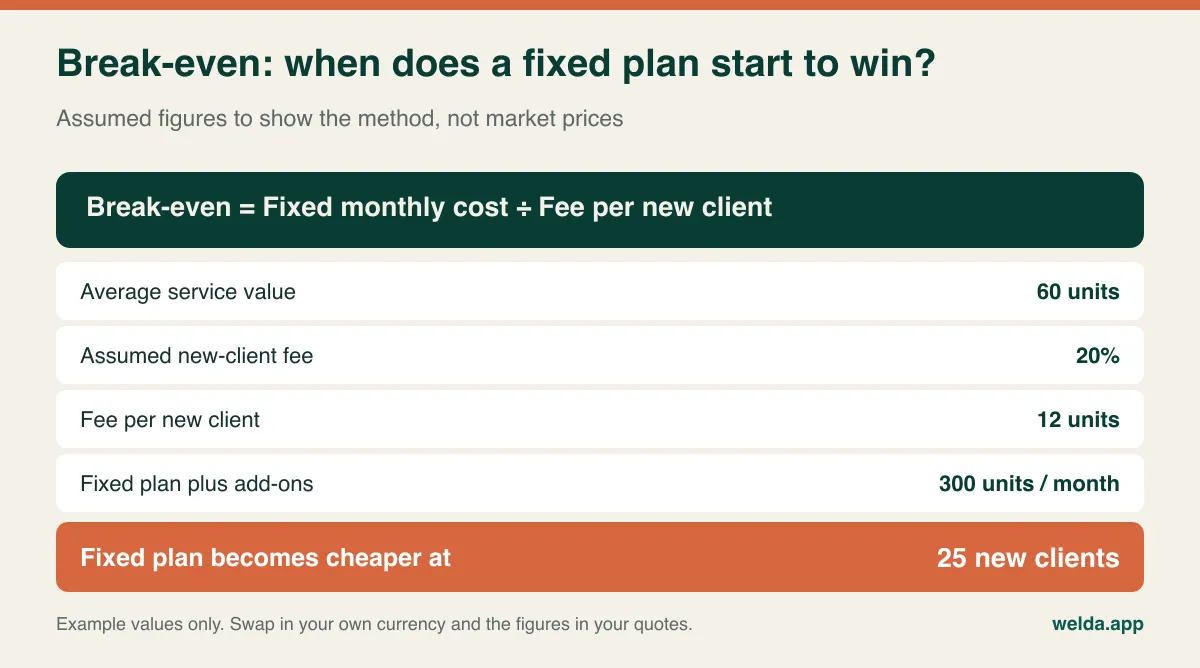
Now the point most people miss. If the deal is per-booking rather than new-client, the same 25 is reached far sooner, because your regulars count too. And if you take only eight new clients a month through the platform, the fixed plan may never pay for itself on fee savings alone. In that case it has to justify itself on other grounds, such as fewer phone calls, client records and reminders.
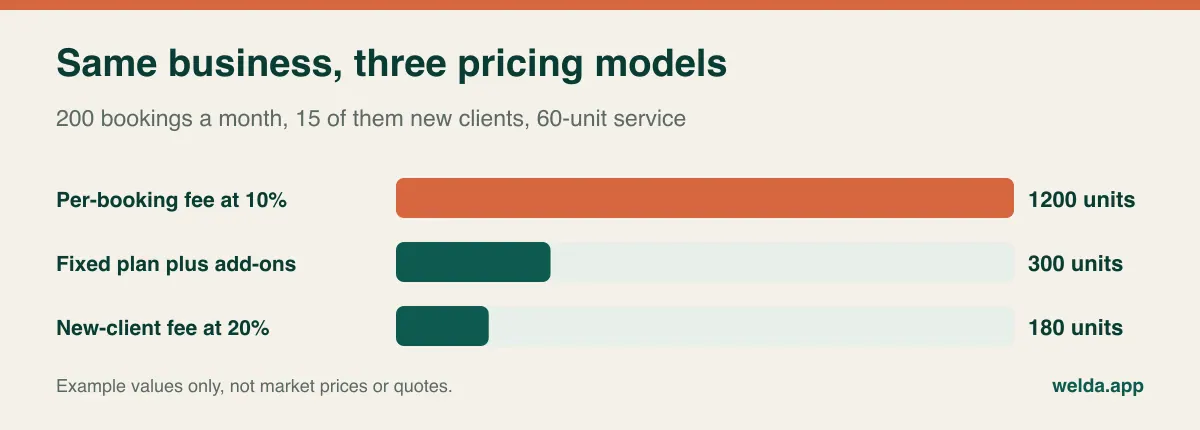
Run the sum at today's volume and at the volume you expect in two years. A model that suits you now can become the wrong one once you are busy, and switching is rarely free.
Why two "per month" prices are not comparable
Subscription prices are built on different meters. One vendor counts logins, another counts staff calendars, another counts locations, and some cap the number of bookings or clients. If your business does not match the meter, a cheap plan climbs quickly.
Take a salon with five stylists, one receptionist and an owner who only looks at reports. A per-user price counts seven. A per-calendar price counts five. A per-location price counts one. All three vendors could describe themselves as affordable and be telling the truth for somebody, just not necessarily for that salon.
| Your situation | The meter to look for | Where it catches people out |
|---|---|---|
| Solo practitioner | Flat or single-calendar plans | Reminders and payments may sit outside the entry plan |
| Team with one front desk | Per-calendar pricing | Part-timers and freelancers still need a calendar |
| Rooms or machines shared between staff | Resource scheduling included | Often only available on higher plans, or missing altogether |
| Group classes | Capacity and waitlist features | One-to-one tools may not handle classes at all |
| Second site planned | Per-location pricing and shared client records | A new location can force a move to a different tier |
Annual billing deserves a moment too. A discount for paying up front is only a discount if you stay. In the first year of a new system, when you are still finding out whether it fits, flexibility can be worth more than the saving. Ask how the price changes at renewal, because an introductory rate is not the same thing as your long-term cost.
Reminders are charged by the message, not the booking
Reminder costs are the classic surprise, because vendors quote in messages and business owners think in appointments. One booking might generate a confirmation, a reminder the day before, a second reminder two hours ahead, and an aftercare note or review request. That is four messages for one haircut.
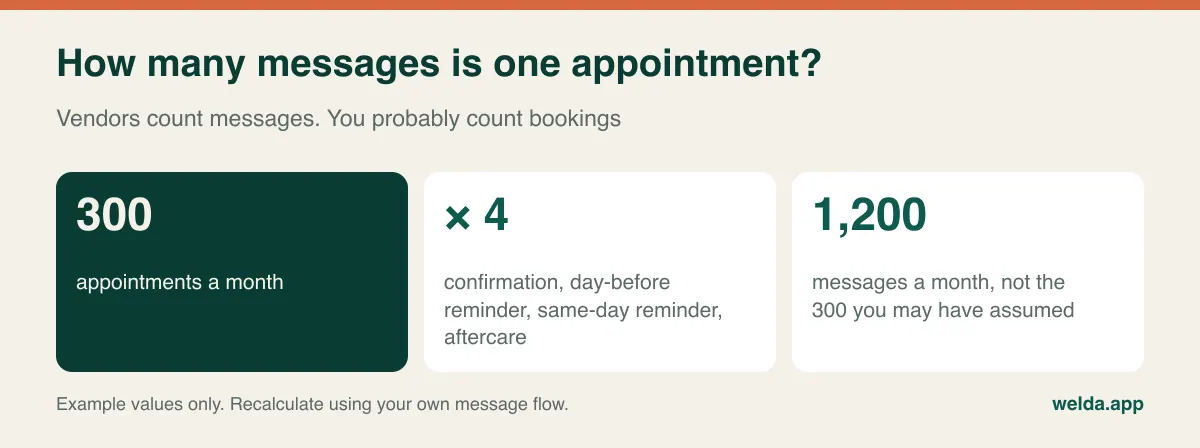
The channel changes the sums. Email is usually cheap and easy to ignore. Text messages are normally sold as credits, and the rate can vary by country, which matters if your clients have foreign numbers. WhatsApp is common in many markets and may be bundled into an allowance or charged separately depending on the vendor. Also check who owns the sender name, and whether marketing messages sit under different rules from appointment reminders in your country.
Three questions cover most of the risk: what happens when the allowance runs out, whether unused messages roll over, and whether reminders stop silently or are billed as overage. If you want to see how reminders fit into a broader plan, our guides on reducing no-shows and automating appointment messages on WhatsApp go further.
Deposits and card-on-file: the line that can pay for itself or backfire
Taking a deposit at booking is the most direct answer to no-shows on long or expensive services. It is also a separate cost centre, and it brings work that rarely appears on the sales page.
- Processing fees. The payment provider takes a cut of each transaction, and some booking platforms add their own margin on top.
- Refund handling. Someone has to process refunds, and fees are not always returned when you do.
- Disputes. Chargebacks take time to answer, so your cancellation terms need to be clear and shown before payment.
- Payout timing. Money may take days to arrive, which matters if cash flow is tight.
- Lost bookings. Some clients will abandon a form that asks for a card, especially first-timers booking a short, low-value service.
A sensible approach is to apply deposits selectively. Ask for them on the three-hour colour appointment, the new client's first long treatment, or the peak Saturday slot, rather than on the regular's trim. Check your own records first. If your no-show problem is concentrated in a few services, a blanket deposit punishes the wrong people. And if you run a healthcare business, take advice on how deposits and cancellation fees sit with your regulator or insurer before you introduce them.
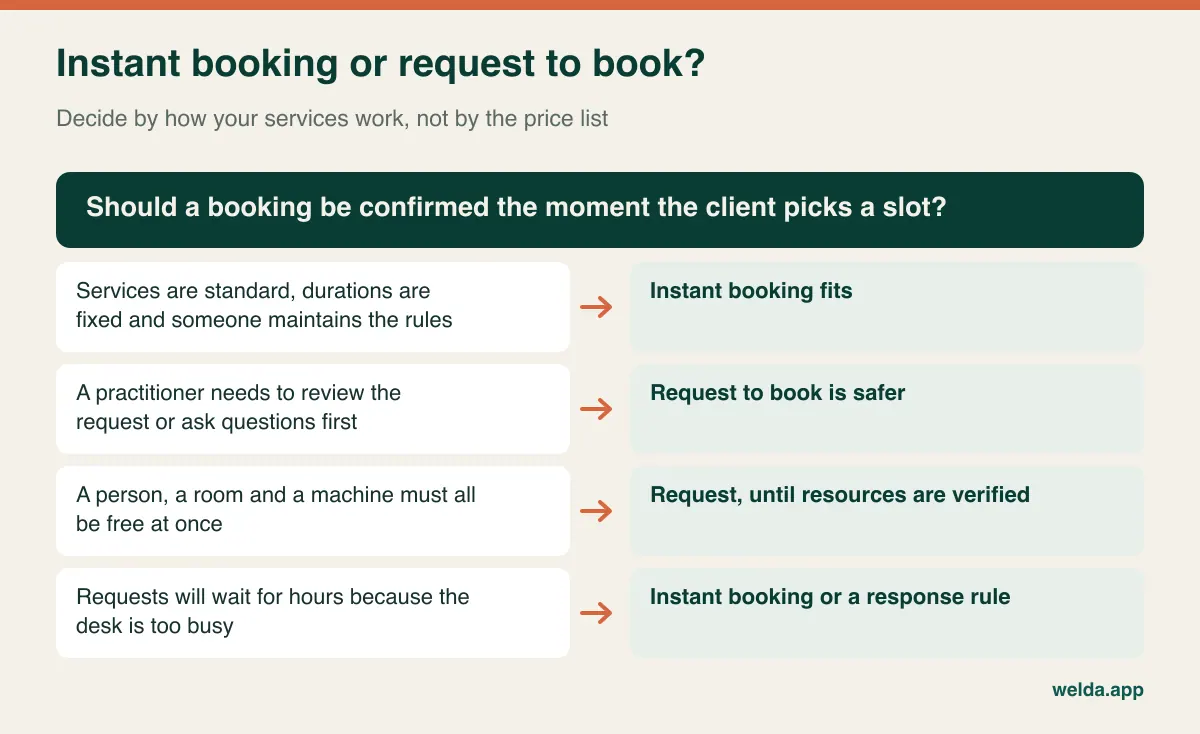
Instant booking or request to book?
This never appears on a price list, yet it shapes your daily workload more than any other setting. With instant booking, the client picks a slot and it is confirmed. With request to book, the client asks for a time and your team confirms it.
Instant booking gives clients the smoothest experience and works beautifully at 11pm when nobody is at the desk. Its price is set-up discipline. Every service length, processing time, staff skill and buffer must be correct, or the system will happily sell slots that cannot work. Someone has to build those rules and keep them up to date, and that person's time is a real cost.
Request to book keeps control with you, which suits clinical services or anything that needs a look before you commit. Its price is speed. A request that sits until morning may have gone elsewhere by then, and confirming requests becomes a job in itself on a busy day. If you pick this route, set a response rule your team can keep, such as answering within a set number of working hours.
Getting bookings onto your site, Google profile and Instagram
A booking page earns nothing until clients can find it. Fortunately the cheapest routes are often the best ones. A link in your Google Business Profile catches people searching for you by name. A link in your Instagram profile and your WhatsApp replies shortens the back-and-forth about availability. A button on each service page catches website visitors at the moment they decide.
Now the cost question. Linking out to a hosted booking page is close to free. Embedding a calendar inside your site looks neater but may need developer time, can slow the page down and, if it sets third-party cookies, may affect your consent banner. Having the page on your own domain without the vendor's logo is often a higher-tier feature. Decide whether that polish changes bookings for your business or whether it mostly pleases you. If you are rethinking your site around this, our guide to a website with online booking sets out the options.
Whichever you choose, try to measure which channel produces bookings. Without that, you cannot tell whether a commission-based channel is earning its fee.
Privacy, tax and currency when the vendor is abroad
A booking form looks harmless, but it collects personal data and, for health businesses, may reveal something about a person's health simply through the service chosen. In the EU and UK, the GDPR and UK GDPR frameworks generally require a lawful basis, a clear privacy notice and a data processing agreement with your software vendor. If you are a US healthcare provider, ask whether the vendor will sign a business associate agreement under HIPAA where it applies. Other countries have their own rules. This is general orientation rather than legal advice, so check your own position.
Keep the form short. A free-text "reason for visit" box invites information you may not want to hold. Ask where data is stored, who at the vendor can see it, and how long records stay after you leave.
On the money side, a vendor billing from another country can bring two quiet costs. The first is currency: a subscription in dollars or euros moves with the exchange rate. The second is tax treatment, because cross-border services may fall under reverse-charge VAT or similar rules. Your accountant can tell you in a few minutes, and it is better to ask before signing than at year end.
Four businesses, four right answers
These are illustrative scenarios rather than client stories, but they show how the sums change.
A solo barber with a full book. Regulars, standard services, and no time to answer messages during a cut. A simple booking page with reminders is the priority. A marketplace fee buys discovery he does not need. See also our guide to hair salon software cost for the wider salon picture.
A skin clinic with one laser and three practitioners. Appointments depend on a person, a room and a machine at once, and courses of treatment need tracking. A cheap calendar plugin will create double bookings here. Spending more on resource scheduling and package tracking is what keeps the day working.
A pilates studio. It sells places on classes rather than one-to-one slots. Capacity limits and a waitlist that notifies the next person when someone cancels matter more than a small difference in monthly price.
A brand-new nail bar. It has no client list, and nobody searches for it by name. A new-client fee can be a reasonable launch expense for a limited period, provided the owner can capture client details and move repeat visits to a channel without a fee.
And there are cases where you should hold off. If you take a handful of appointments a week, or your work begins with a long consultation and a bespoke quote, a shared calendar link and a tidy phone routine may serve you well for some time. Software should solve a problem you actually have.
Test it from the client's side before you sign
Vendor demos show the admin panel. Your clients will never see that. So spend twenty minutes on the other side: open the booking page on your own phone and book as if you were a stranger. Are you forced to create an account? How many taps does it take? What does the confirmation say and whose name is on it? Can you move the appointment without phoning?
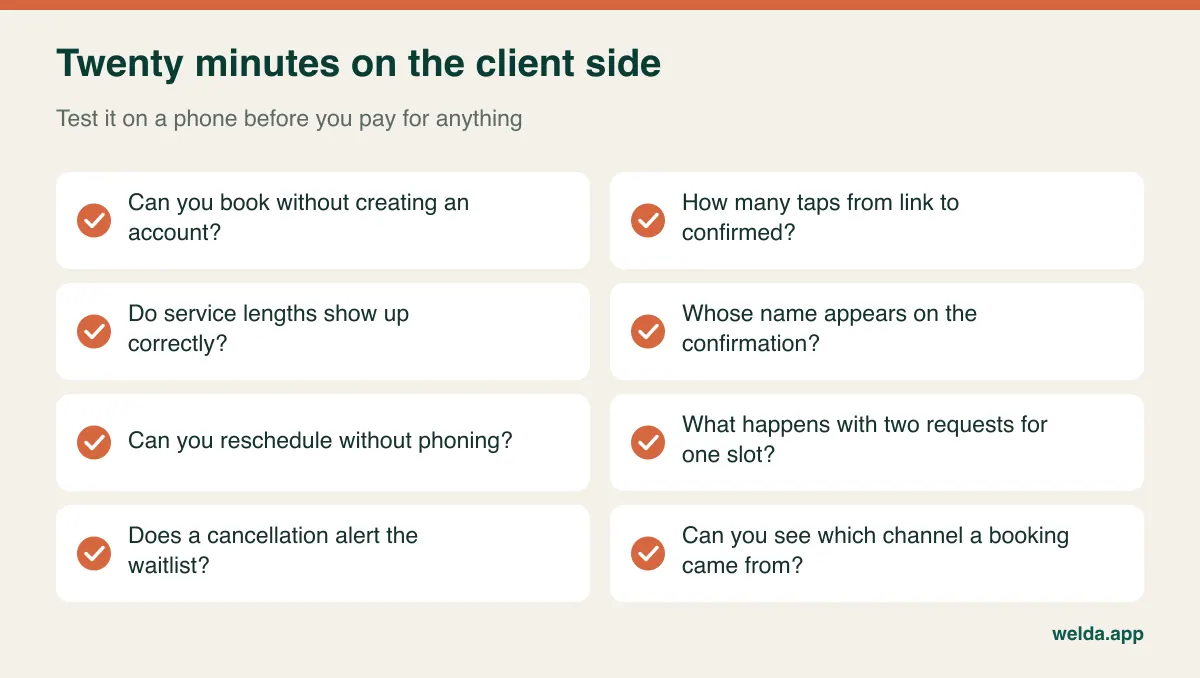
Then try to break it. Send two requests for the same slot from two phones. Cancel one. Book a long service that spans a lunch break. See who is told what, and when. Finally, ask the vendor plainly: which features I have just seen are not on the plan you are quoting me?
Plan your exit on the way in
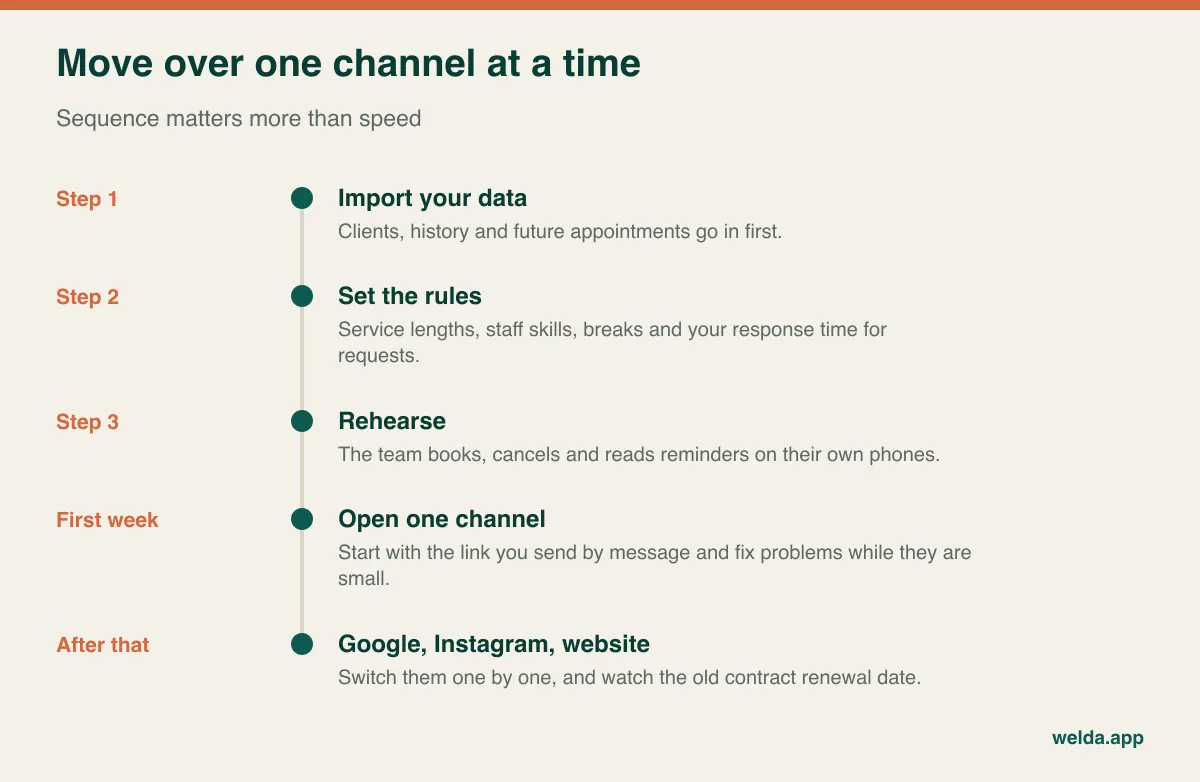
Switching costs are the part of the bill you pay last. Before you commit, find out whether you can export clients, booking history and future appointments in a usable file, whether there is a charge for that, and what notice period applies. On annual contracts, note the renewal date in your diary now.
When you do move, sequence matters. Import clients and future appointments first. Set up services, durations and staff rules next. Run test bookings. Then switch on one channel for a week, usually the booking link you send by message, before changing your Google profile and website. If something goes wrong, you will know where, and only a small share of bookings is affected. Keeping the old system readable for a while costs little compared with a lost week of appointments.
Where Welda CRM fits, and where it does not
Welda CRM is not a marketplace. It is an appointment and client management system for clinics, salons, studios and wellness practitioners, sold as a monthly subscription. If your main need is a directory that sends you strangers, it will not do that on its own. It is built for businesses that want the client relationship in their own records.
On online booking specifically, clients use your own online booking page to request a slot, and your team confirms it with a click. If you need instant confirmation without staff involvement, online deposits at the time of booking, or a calendar embedded inside your website, raise that in the first conversation, because our product pages do not promise those. Better to find out then than after you have moved your data.
What the plans do set out: a shared calendar across staff, rooms and branches, conflict prevention, a waitlist that alerts the next person when someone cancels, automated WhatsApp reminders, client records, and package and membership tracking. The monthly message allowance is 500 on Starter, 5,000 on Pro and 50,000 on Enterprise, so the sum from the reminders section above is worth doing before you choose. Stock, expenses, automated message flows, POS and commissions start at Pro; white-label with your own domain is an Enterprise feature. Setup, data migration and team training are included on every plan.
You can compare plans on our online booking system cost page. The figure itself depends on your branches, users, message volume and modules, and is agreed in a free consultation. There is also a 7-day free trial with all modules unlocked; when it ends your data stays in place and the account becomes read-only. For the wider feature set, see the Welda CRM overview.
Frequently asked questions
What affects online booking system cost the most?
Usually the pricing model rather than the headline rate. Whether you pay per booking, per new client, per user or per location decides how the bill behaves as you grow. After that, message volume and payment fees tend to make the largest difference.
Is a commission-free booking system always cheaper?
No. If you take few bookings and need new clients, paying only when a booking arrives can be cheaper and less risky than a subscription. Fixed pricing tends to win once your volume passes your break-even point and most clients already come to you directly.
Are free booking tools good enough?
They can be for a solo business with a few standard services. The limits tend to appear when you need reminders, a second staff calendar, client history or your own branding. Check what triggers a paid plan and whether you can export your data if you outgrow it.
Do I need a new website to offer online booking?
No. A hosted booking page linked from your Google Business Profile, Instagram and WhatsApp replies is enough to start. A website helps persuade people who do not know you yet, but it is not a precondition for taking bookings.
Should I charge a deposit for every appointment?
Usually not. Deposits add processing fees and refund work, and they can put off some first-time clients. Look at where no-shows really happen in your records and apply deposits to those services or time slots.
Does Welda CRM charge a fee per booking?
Welda CRM is priced as a monthly subscription, and the plan descriptions do not include a per-booking commission. We go through plan scope and message allowance with you in the consultation. You can request one from the online booking system cost page.