The best physiotherapy scheduling software for a solo or mobile physio is usually not the biggest practice management suite you can find. It is a lean system that works properly on your phone, keeps each patient's remaining sessions and payments next to the appointment, sends reminders without you typing them, and lets you approve bookings before they land in your day. If you see a handful of regulars a week, a calendar app may be all you need. Once you are selling courses of treatment, collecting payment on the doorstep and losing time between visits, the separate tools start to cost more than they save.
This guide is for the physio working alone: out of the back of a car, from a rented room, or a mix of both. It should help you decide how much software you actually need, what will drive the bill, and what to test before you commit. If you run a center with several therapists, rooms and equipment to coordinate, start with our physiotherapy clinic management guide instead; the priorities are different.
Your caseload is the product, not your calendar
Most scheduling tools were designed around single appointments. A haircut is booked, delivered and paid for, and then the record is more or less finished. Physiotherapy does not work like that. A patient recovering from a knee replacement or a frozen shoulder is on a course of care that might run for weeks, with exercise progressions, reassessments, missed visits and perhaps a referring doctor who wants an update.
That one difference should reshape how you read any feature list. Ask of each tool: when I open this patient on Tuesday morning, can I see where they are in their course? That means session 6 of 10, paid for up to session 5, last note from Thursday, missed one visit last week. A tool that shows you only "Tuesday 9:00, Priya" is a diary. A diary is fine until you have thirty active patients, at which point the rest of the information lives in your head, your messages and a notebook on the passenger seat.
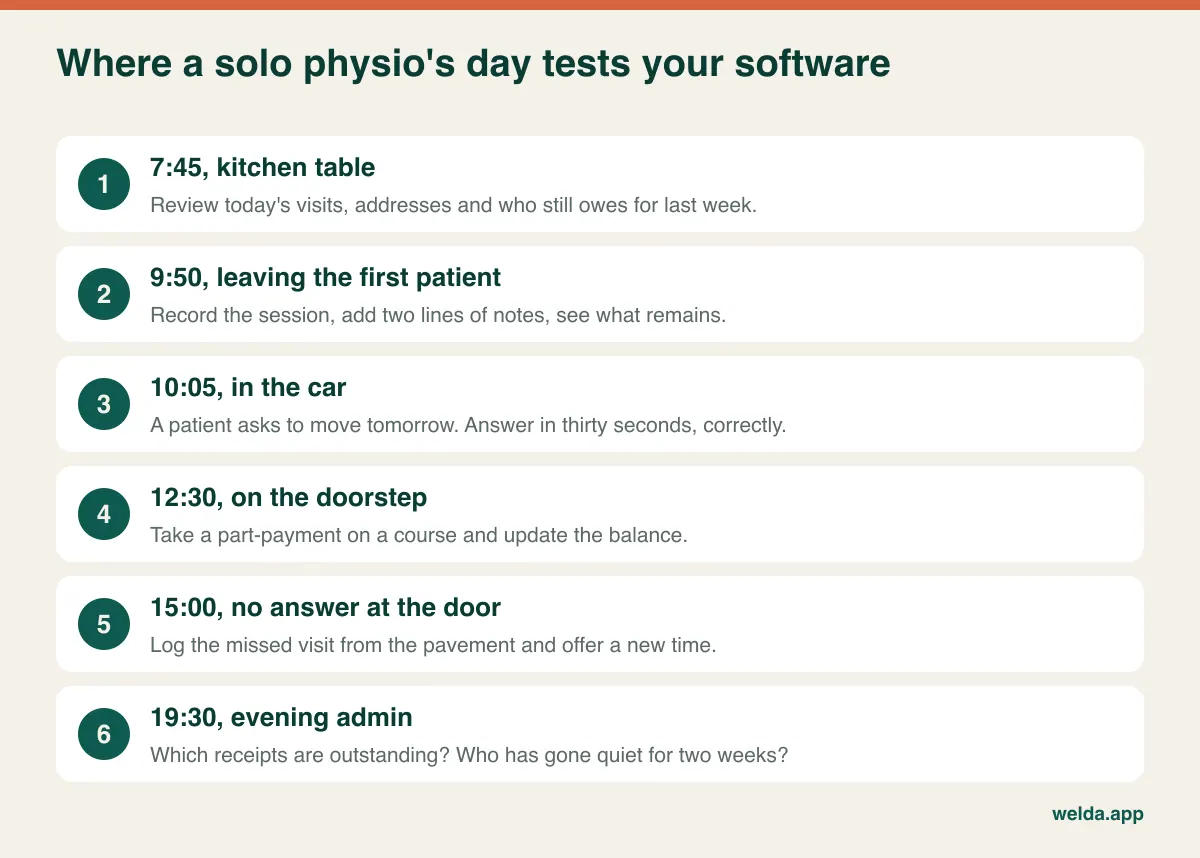
Here is what one ordinary day tends to ask of your system. Read it as a checklist of moments rather than features. Notice how few of them happen at a desk.
The problem no clinic software has to solve: the road
In a clinic, the gap between patients is a few minutes and a change of towel. For a mobile physio, the gap is a variable: traffic, parking, a slow lift, a patient who wants to chat at the door. Scheduling software usually has no idea about any of this. It will cheerfully offer 1:00 pm because the slot is empty, even though your previous visit ends at 12:50 on the other side of town.
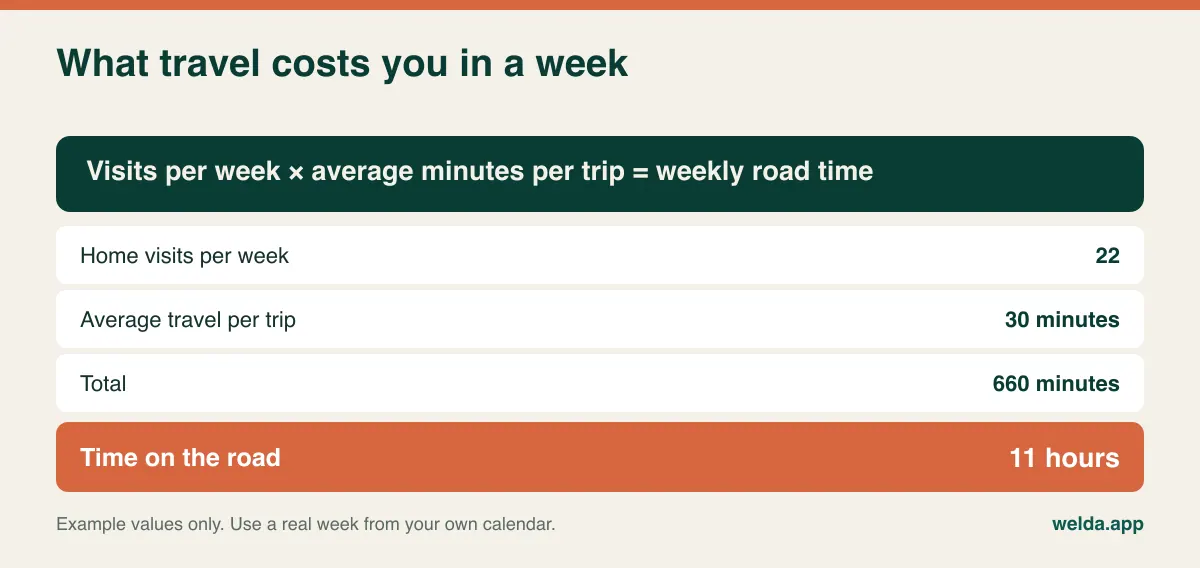
It helps to put a number on it before you shop. The example below uses modest assumptions, and it is still more than a working day.
There are three realistic ways to deal with travel, and only one of them involves buying anything.
Pad the appointment. Enter a 45-minute treatment as a 70-minute slot. It is crude and works in every tool ever made. The cost is that your utilization reports will look strange, which matters little if you are the only person reading them.
Zone your week. North of the river on Mondays and Thursdays, south on Tuesdays and Fridays. This reduces travel rather than merely accounting for it, and it is the change most likely to give you time back. Your software's only job here is to make the pattern easy to see and to keep repeat visits on the right days.
Add a routing tool. Route optimizers are built with field teams in mind. If you do four or five visits a day, a free maps app and a sensible zone plan may do just as well. Treat a built-in routing feature as a bonus, not a reason to choose.
The road also changes how you should think about online booking. A booking page that confirms instantly is great for a clinic with a fixed address. For you, it means a new patient can place themselves ten minutes after a visit that is forty minutes away. Look for a request and approve flow, where the patient asks for a time and you confirm it after looking at where you will be. It is less slick on a sales page and far safer in real life.
The ten-minute phone trial
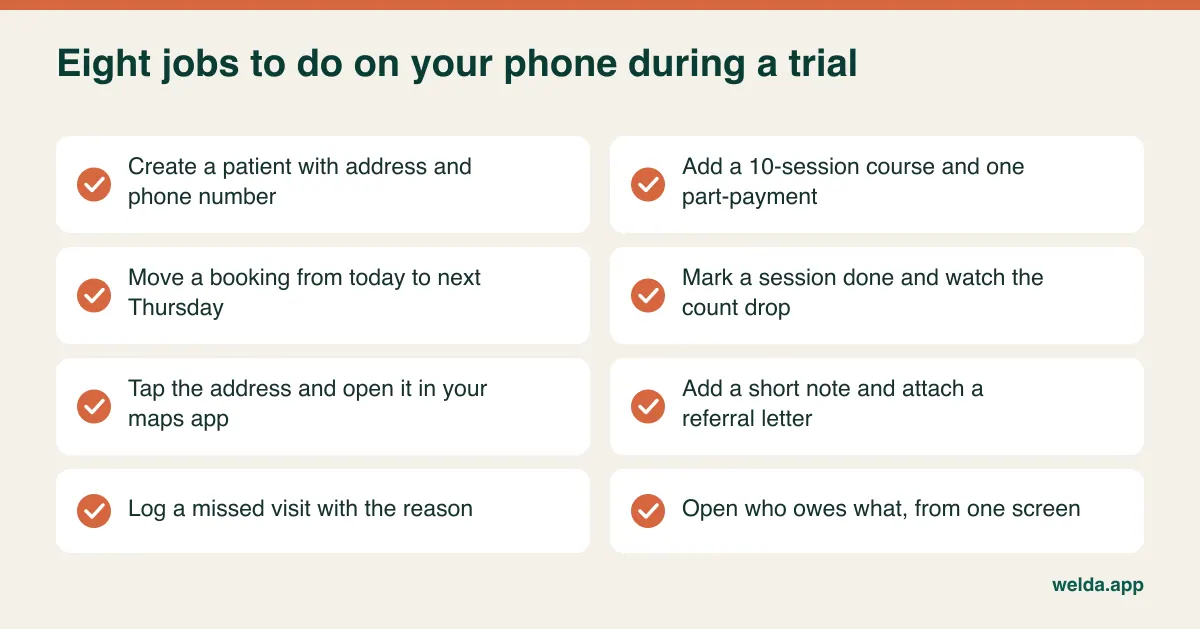
"Mobile-friendly" tells you almost nothing. Some products simply shrink a desktop screen; others have an app that handles the calendar well and sends you to a browser for everything else. The only useful test is to do real work on your own handset, standing up, ideally between two actual visits. Before you start a trial, set up two or three test patients and a course of ten sessions, then run through this list.
While you are at it, turn on airplane mode and see what happens. Web-based systems generally pause when the connection drops, though your records remain safe on the server. Apps vary: "works offline" can mean full editing, or it can mean a read-only copy of today's list. If you regularly treat in basements, rural homes or hospital wings with no signal, this is a make-or-break question. If you do not, a note of tomorrow's first few visits each evening is a perfectly good backup.
Who is paying? The question that narrows your shortlist fastest
Before comparing features, sort out how your money arrives, because it rules out whole categories of software. Practice management systems built around insurance billing are a very different kind of product from booking and client management tools.
| How you are paid | What you need most | What to be wary of |
|---|---|---|
| Self-pay, per visit | Fast payment recording, receipts, outstanding balances | Paying for claims features you will never open |
| Self-pay, prepaid courses | Session counters that link to payments and installments | Tools that sell "packages" but do not reduce the count automatically |
| Insurance or third-party payers | Claims submission or a clean handoff to your billing service, and notes that meet payer rules | General booking tools, including ours, which are not built for this |
| Employer or agency contracts | Invoicing by client organization, visit logs you can export | Tools with only per-patient invoicing |
| A blend of the above | Clear separation of payer types on each patient record | Assuming a demo of one flow proves the others |
If most of your income comes through insurers, stop here and look for software that names your specific payers and claim format. A general tool, however pleasant, will leave you doing the most painful part by hand.
For courses of treatment, write your rules down before you test anything. Does a same-day cancellation use up a session? What if you arrive and no one answers the door? Can a course pause if the patient goes into hospital? Do unused sessions expire? Good software records whatever you decide; it should not decide for you. Our article on session package tracking goes deeper into how to structure them.
The awkward bit about reminders and your personal number
Giving patients your personal mobile number feels easy, and it works right up to the moment it stops working. Your patient list sits next to your family chat. A photo of an MRI report lands in your camera roll. Someone sends "my knee is swollen, is that normal?" at 11 pm, and now you have clinical information in a chat thread and a sense of obligation you cannot document.
Automated reminders do not solve all of this, but they remove a large share of the routine traffic. A simple pattern is one reminder the day before and, for some patients, one on the morning of the visit. Some useful things to check:
- Message content. Can the template be reduced to "Your appointment tomorrow at 3 pm" with no mention of the condition? Lock screens are read by other people.
- The person who actually reads it. With older patients, the contact may be a son, daughter or carer. Can you store a separate contact without confusing the two?
- Channel. WhatsApp, SMS and email have very different reach depending on where you practice. Check that the tool uses the channel your patients actually read, and whether the channel's terms and your local rules fit how you plan to use it.
- Replies. When a patient answers a reminder, where does that reply go? If it ends up in a place you never check, you have built a new problem.
If missed visits are your specific pain, our guide on reducing no-shows covers the policies around cancellations as well as the messaging. For a mobile physio, one extra rule is worth thinking about: a no-show costs you the session and the round trip, so a clearer cancellation window for home visits than for clinic ones is easy to justify.
Rules differ by country, so ask the vendor about yours
Health data receives special protection in many countries, and working alone does not usually exempt you. This is general orientation rather than legal advice. Requirements change and depend on your status, so check with your professional body or a qualified adviser.
| If you practice in | Terms to raise | Question for the vendor |
|---|---|---|
| UK | UK GDPR, ICO, professional record-keeping standards | Where is data hosted, and is a data processing agreement provided? |
| EU | GDPR, health data as a special category | Who are your sub-processors, and do you transfer data outside the EU? |
| US | HIPAA, where it applies to you; state licensing rules | Will you sign a Business Associate Agreement? |
| Canada | PIPEDA and provincial health privacy laws | Can data be stored where my province expects it? |
| Australia | Privacy Act, health records handling | What happens to records when I close my account? |
Beyond the legal labels, three practical checks apply everywhere. First, how long must you keep records, and can you still get to them after you cancel? Retention periods can outlast your subscription by years. Second, what happens if your phone is lost: can you sign out remotely, and does the session time out? Third, can you see a log of who accessed what? That may sound excessive when you are the only user, but the moment you add a locum or an assistant, it matters. Our article on patient data security has a fuller checklist.
What actually determines the cost
Quotes vary by vendor, country and plan, and they go out of date quickly, so a headline number tells you little. What holds up better is knowing which line items make one quote more expensive than another once you have used it for a year.
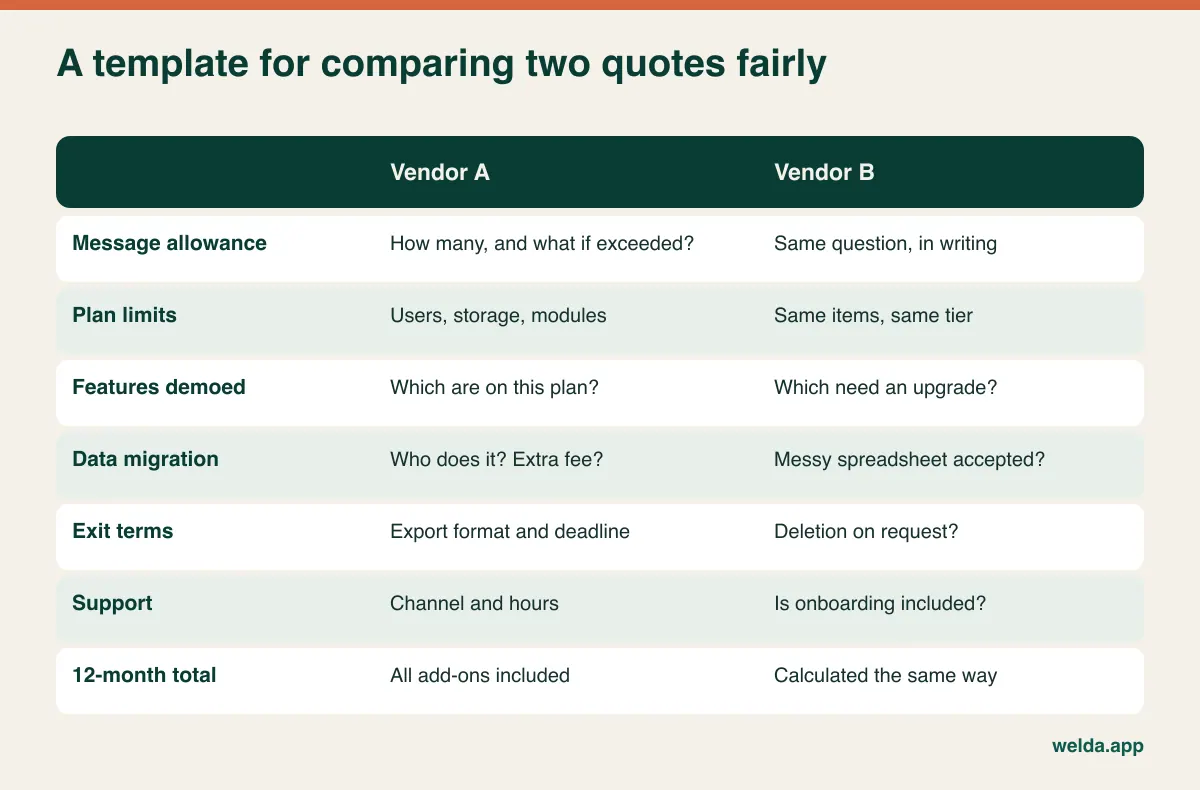
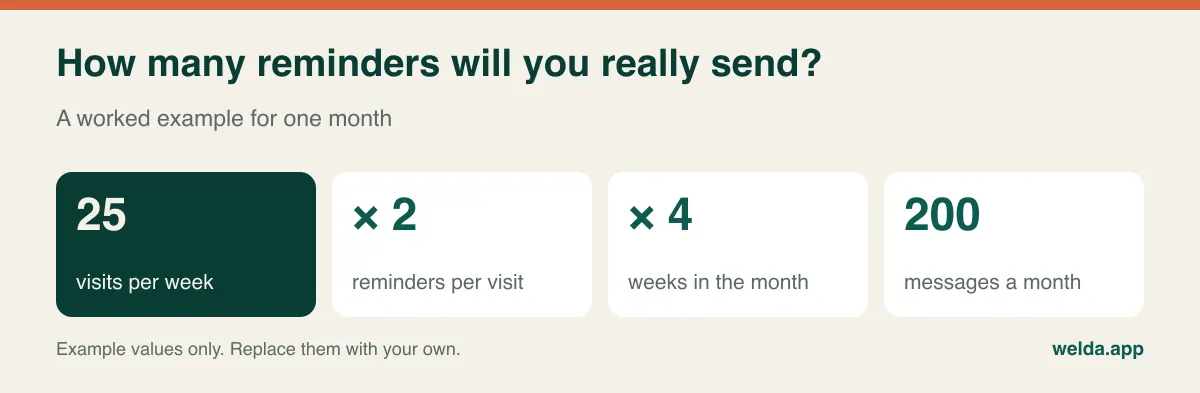
A few of those rows deserve explanation. Message volume is easy to underestimate, and it scales with your success. As a worked example, the figure below assumes two reminders per visit; your own count takes a minute to calculate and tells you whether a plan's allowance is comfortable or tight.
Plan gates are the classic surprise. The feature that sold you in the demo, often automation or payment handling, may sit one tier higher than the plan you were quoted. Ask directly: "Which plan was that screen from?"
Storage matters if you keep scan reports or exercise videos. Photos and PDFs add up slowly, but video does not. Ask about the limit and the overage terms if you plan to film movement assessments.
Your own hours belong in the sum too. A free tool that requires thirty minutes of evening admin is costing you several treatment slots a month. Conversely, a paid tool nobody opens is pure loss. Value your time at your own rate, and compare options over twelve months rather than one.
Exit costs are easy to ignore on the way in. Ask how you get your patient data out, in what format, and for how long after cancellation. A vendor who answers this clearly and without fuss is telling you something useful about how they operate.
When to stay with a calendar and a notebook
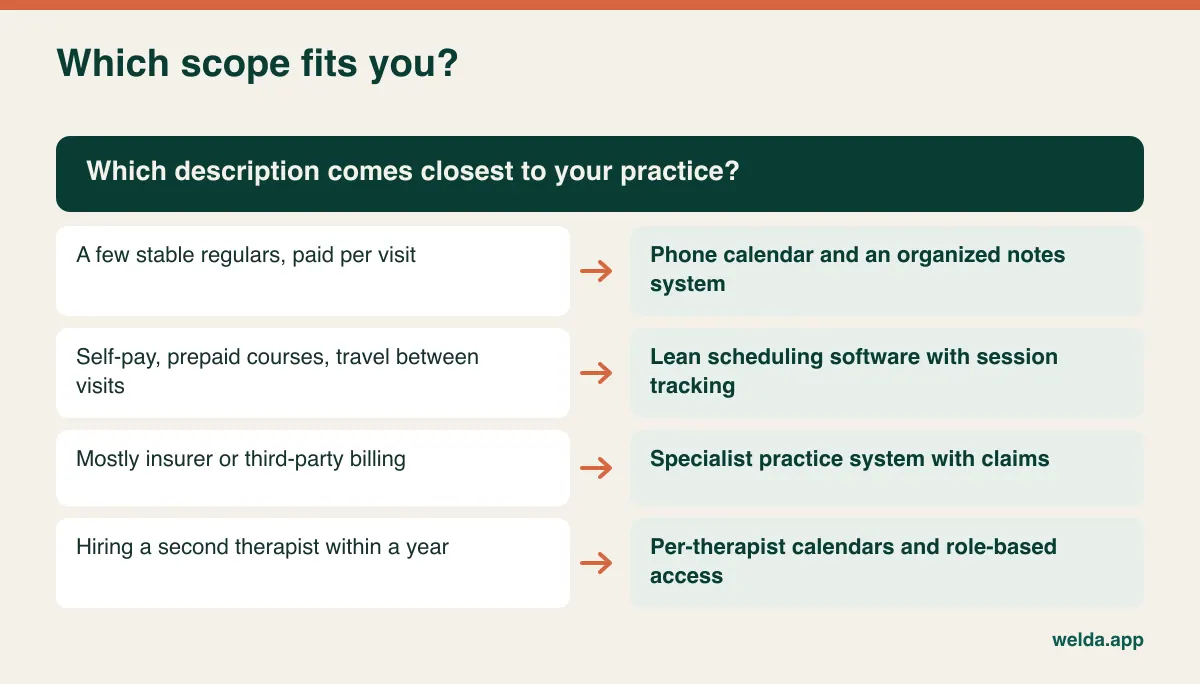
Not every physio should buy software this year. If you see only a few patients a week, you do not sell prepaid courses, and your patients are mostly stable regulars, a phone calendar and a disciplined system for notes can serve you well. Put the money toward a good treatment couch. Just be careful about where the clinical notes end up: a general note-taking app or a shared spreadsheet is rarely a good home for health data.
On the other hand, the case for moving strengthens quickly once you can say yes to any two of these: you have lost track of how many sessions someone has left; you have chased a payment you had already received, or forgotten one you had not; missed visits are costing you round trips; you are answering scheduling messages in the evening; you plan to bring on a second therapist in the coming year.
Here is a quick way to map your own situation to a scope.
How Welda CRM fits, and where it does not
Welda CRM is a browser-based booking and client management system. As physiotherapy scheduling software, it suits self-pay practice where courses of treatment are the core of the work. Total and remaining sessions sit on the patient's profile and update as sessions are recorded. Payments and outstanding balance appear in the same place. Reminders go out automatically over WhatsApp. Online booking works as a request that you approve, which suits the travel problem described above. If someone cancels, the waitlist can notify the next person. Health records include allergy and contraindication alerts, records are stored encrypted, and consents and access are logged.
The Starter plan includes one location, three users, 500 WhatsApp messages a month and 1 GB of storage, along with the calendar, online booking, session tracking, health records, payments and invoices. For one person, that is a reasonable frame. Automated message flows and till/POS sit in Pro, so ask us exactly which reminders your plan includes.
Now the limits. Welda CRM runs online and needs a connection; access pauses if yours drops, and your data is there when it returns. Our product material does not describe a dedicated offline app, and it talks about use from computers and tablets, so run the phone trial above on your own handset before relying on it in the field. It does not list route planning or travel time calculation either, so you would handle travel with padded slots and zones. Insurance claims submission is not part of what we describe, so if you depend on insurer billing, you need a specialist tool. Our compliance material refers to KVKK and GDPR; if you are in the US and HIPAA applies to you, ask about it before entering any patient data. The same goes for two-way sync with your phone calendar: if it is a dealbreaker, ask first.
If those boundaries do not trouble you, the physiotherapy scheduling software page walks through the session tracking scenarios in more detail.
Run your worst Tuesday through the demo
Polished sales demos follow a happy path. Your job is to take them off it, so bring a real day from last month and ask the vendor to rebuild it live, whoever the vendor is:
- "Add a new patient on a ten-session course with half paid up front. Now mark session 3 and show me what remains."
- "She cancelled thirty minutes ago. Record it without using up a session, and show me where that shows on her history."
- "I arrived and no one answered. How do I log that from my phone?"
- "A new patient has requested Thursday at 2 pm. Before I approve, can I see where I am at 1 pm?"
- "Take the condition out of this reminder message. Show me the template."
- "List the patients who have not been seen for two weeks but still have sessions left."
- "Which payments did I take today, and which still need a receipt?"
- "I'm cancelling. Export my patients and notes. What file do I get?"
Ask to see the phone view rather than a shared desktop screen. "Yes, it can do that" is not the same as watching it happen, so note any answer that was never shown.
Switching without disrupting your patients
A solo move is much simpler than a clinic migration, but it can still go wrong if you try to do everything at once. Do not import your whole history in one go unless the vendor does it for you. Start with the active caseload; closed cases can remain in your old records for reference, subject to your retention rules.
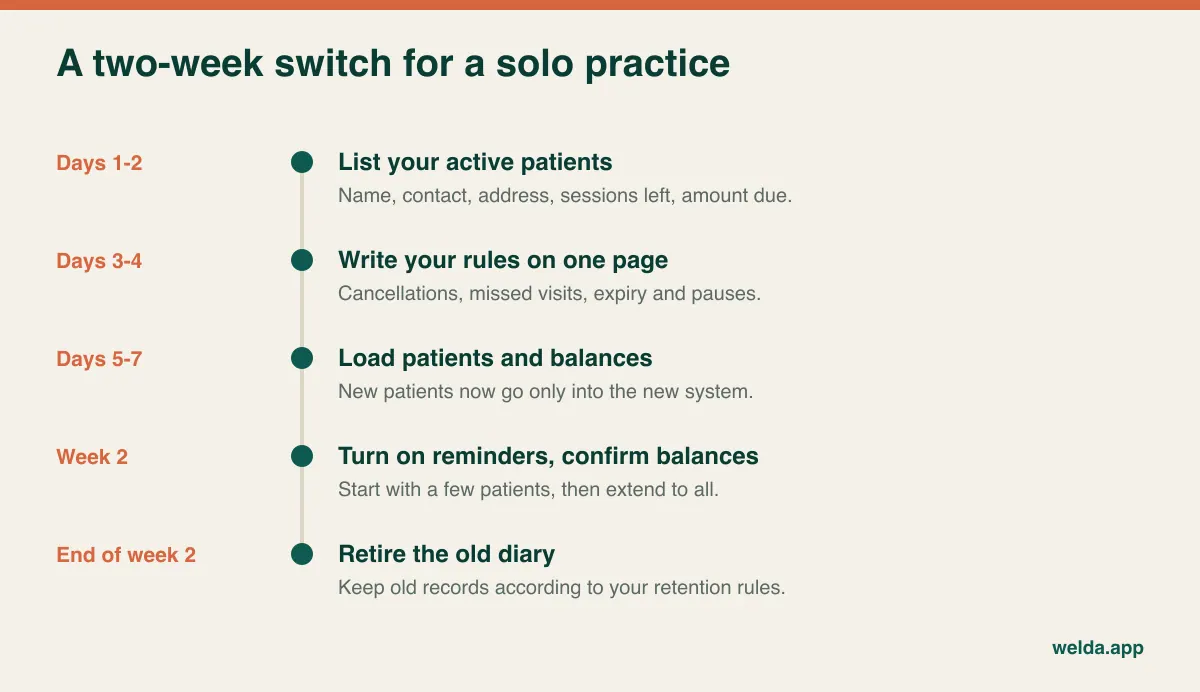
The step that prevents arguments is confirming opening balances. For each active patient, agree the remaining sessions and amount due before the new system becomes your source of truth. A short message such as "I'm moving my records across, and I have you down for six sessions left" is easy to send and clears up doubts early. With Welda CRM, account setup, migration of your existing client and appointment data, and hands-on training are included, so your main job is to give us a clean, current list.
Frequently asked questions
Can I run my physio practice entirely from my phone?
Often yes for scheduling and payments, though long notes and reports can be tiring on a small screen. A workable split is quick entries on the phone and finishing paperwork on a tablet or laptop. Test it on your actual device before you decide.
What is the most important feature for a mobile physiotherapist?
Having session count, payment status and contact details attached to the appointment itself. Right behind that comes approving bookings yourself, so that travel time does not get broken by a self-booked slot.
Do I need a full EMR, or is scheduling software enough?
It depends on your payers and your documentation duties. If you bill insurers or must meet strict charting requirements, you probably need a dedicated clinical system. For self-pay work with simpler notes, a client management tool with health records may be enough. Check your regulator's record-keeping expectations.
Should patients be able to book themselves?
Yes, if the booking is a request. Instant self-booking works well at a fixed location, but tends to create travel conflicts for home visits. A middle route is offering specific zones and days for online requests.
How much does physiotherapy scheduling software cost?
It varies with message volume, users, storage and the modules you need, so compare twelve-month totals rather than headline prices. Welda CRM is a monthly subscription, and the right plan and price are settled in a free consultation; setup and data migration are included.
What happens if I outgrow a solo plan?
You will need more users, per-therapist calendars and role-based access so that everyone sees only what they should. Confirm in advance that you can move up without migrating. With Welda CRM you can change plans as you grow.
Can I use it in more than one language?
That depends on the tool. If you treat patients in more than one language, check both the interface and the reminder templates. Welda CRM's interface and message templates are available in English, Turkish and German.
The next step is smaller than you think
You do not need a research project. Count one real week, write your session rules on one page, then try a shortlisted tool on your own phone between two real visits. That covers most of the decision.
If you would like a second opinion on whether Welda CRM fits your way of working, book a free consultation and tell us how your week actually runs. If it is not the right tool, we will say so. There is also a 7-day free trial of Welda CRM with all modules open, which is enough time to run the phone test above with your own workflow.