Switching appointment software is safe when you do four things in order: read your current contract for the end date and data clause, export your client data and open the file yourself, run a trial import and compare the numbers against the old system, and only then pick a quiet week to cut over. The businesses that lose data rarely lose it to a technical failure. They lose it because they signed with the new vendor first and asked the old one for their data afterwards, with a deadline running and no leverage left.
If you run a salon, clinic, studio or private practice, the decision usually isn't about features. It's about fear: of a client turning up to an empty calendar, of a prepaid package that vanishes, of a Saturday spent untangling double bookings. This guide takes those fears one at a time and turns them into checks you can actually carry out.
First, make sure the software is really the problem
Most people start shopping the day after something goes wrong. Reminders failed, support went silent, or two clients were booked into one slot. That frustration is fair, but it isn't a diagnosis. If the double booking happened because one stylist still writes appointments on paper, a new system will reproduce the problem, with a migration project on top.
Here's a quick way to tell. List your complaints from the last three months and label each one: "it can't do this", "it can, but we don't", or "the vendor won't fix it". If most land in the first and third groups, switching makes sense. If most land in the middle, ask your current vendor for a training session, tighten staff permissions and retire the paper diary. That costs you a few weeks and puts no data at risk.
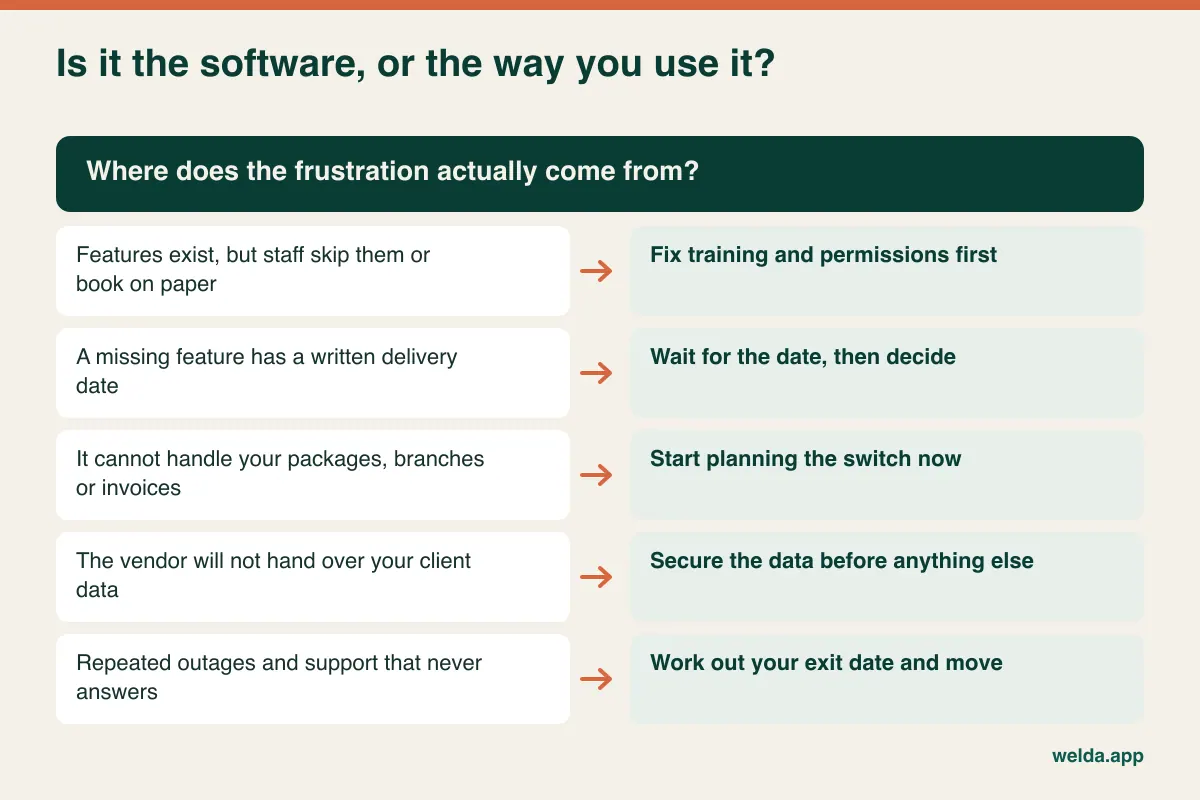
The cases that truly call for a change tend to be structural. You started as a barbershop, grew into a spa, and the system can't track multi-session packages. You opened a second location and now run two separate accounts. Allergy information sits in a free-text note instead of a proper alert. The software lives on one front-desk PC, so therapists can't see today's list on a tablet. Training won't fix any of those, because your business has outgrown the assumptions the product was built on.
The date that runs your whole project
Your switching schedule doesn't start with a demo. It starts with your current contract's end date. Annual plans often renew automatically unless you give notice within a set window, so missing that window by a few days can commit you to another year of software you've stopped using.
Find your agreement, or the terms of service as they stood when you signed, and look for these points:
- Renewal and notice: the exact end date, the length of the notice period and how notice must be delivered. A support ticket may not count if the contract asks for email to a specific address.
- Early exit: whether you owe the remaining term, and whether you lose any prepaid message credits.
- Data return: the format, the cost if any, and how long it takes.
- Access after the end date: whether your account closes on the day or stays readable for a period.
- Deletion: whether the vendor confirms in writing that your data has been removed.
Sometimes the smartest move is simply to pay out the last few months. That turns the old system into a read-only reference while you migrate in a calm week, rather than a rushed one. Do the sum both ways before you decide. If the wording is ambiguous or the sums are large, a short review by a lawyer is money well spent.
The export test: do this before anyone knows you're leaving
This is the most useful hour in the whole process. Log in as you normally would and try to export your clients and appointments. Look for "export", "download report" or "CSV". Then open the file and ask some unglamorous questions:
- Did you get every client, or only the first page on screen?
- Are phone numbers consistent, with their country codes and leading zeros intact? Spreadsheets love to strip them.
- Do accented names survive, or has "José" turned into gibberish? That's an encoding issue to sort out early.
- Does appointment history include the service and staff member, or just a date?
- Do package balances and outstanding amounts appear in any report at all?
You'll end up in one of three places. A clean file means you can have a concrete conversation with any new vendor. A partial file means you can request the rest in writing, while the relationship is still friendly. No export at all means you start saving reports regularly and listing your active clients and their balances, then decide how much that lock-in should weigh in your decision. If the software is installed on a local computer, back up its database folder as well. That machine is a single point of failure, and you'll want those files if it dies mid-project.
A word about ownership. It's common for a vendor's terms to say your client data belongs to you, and that's reassuring. But "it's yours" doesn't guarantee there is a tidy file waiting, so test it. Marketplace-style booking platforms deserve special attention, as clients who found you through the platform may be treated differently from the ones you added yourself. Read those terms closely.
The things that don't travel in a CSV
Comparison sites make migration sound like moving a list. The list is the easy part. The awkward items are the ones where your old system holds an obligation to a client, not merely a record of them.
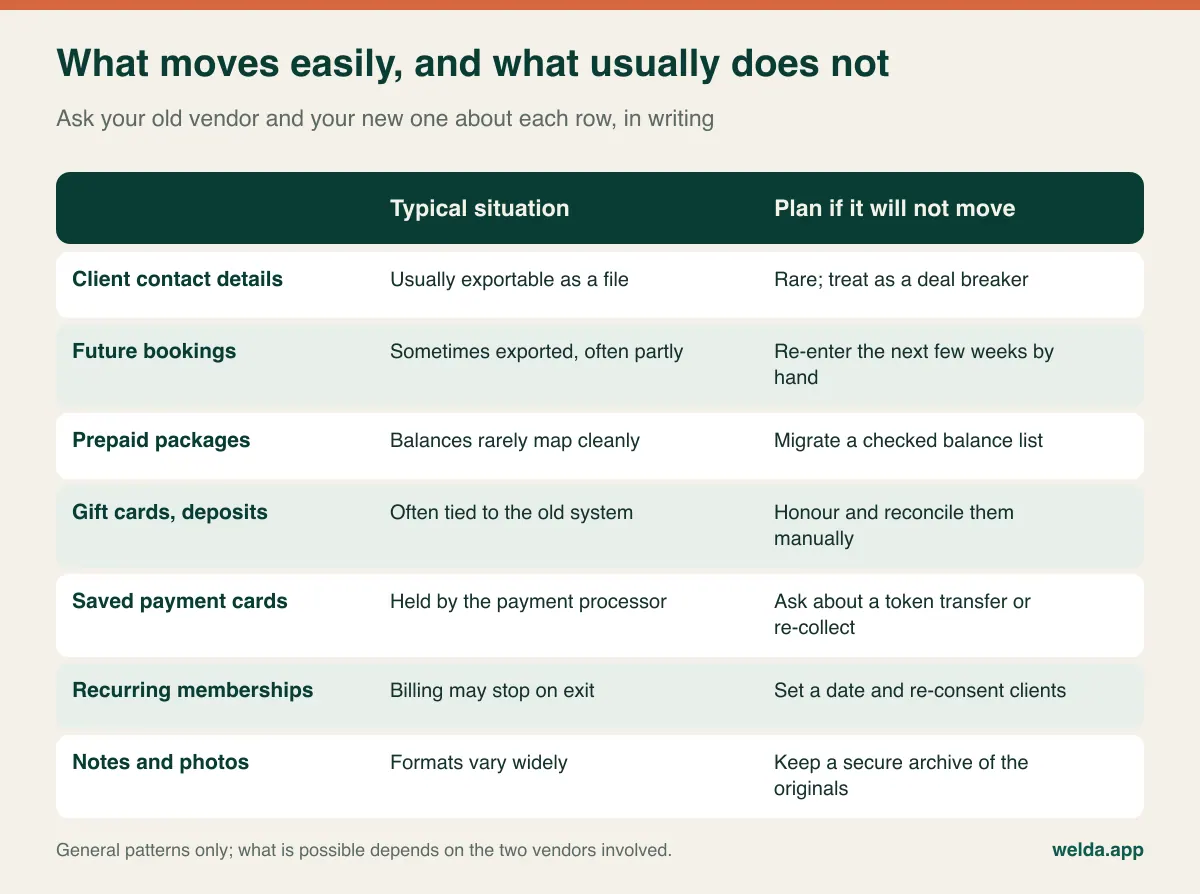
Saved cards and recurring billing. Card details are normally held by a payment processor, not in a file you can download, for good security reasons. Some processors support a token transfer between systems; many setups don't, or it may take time to arrange. If you run monthly memberships, this can be the biggest item in your whole switch. Ask about it first, and plan for the possibility that clients will need to re-enter their card and agree to the new billing. Pick a clear date, tell them ahead of time, and expect a few to fall through the cracks and need a personal call.
Gift cards and deposits. These are promises you've already been paid for. Export the outstanding list while the old system still runs and agree how you'll honour them. A simple approach is to carry each balance into the new system as a client credit, with a note of the original code, so nobody at the desk has to argue about a voucher nobody can scan.
Prepaid packages. A client who bought ten laser sessions and has used six expects to see four remaining, on the right profile. Systems model packages differently, so don't assume they'll map across. Often the most reliable route is a checked list of current balances, loaded as opening balances, with full history kept in the old system for reference.
Notes and photos. Free-text notes rarely land where you'd like them to. A note field might hold allergies in one record and a discount promise in another. Pull out anything safety-related and enter it into the proper field by hand. Before-and-after photos need their own conversation, since they're sensitive, bulky and easy to attach to the wrong person.
You also don't need to carry everything forward. Sort your records into three piles: bring across, archive securely, and delete once your retention duties allow it. Merge your duplicates beforehand too, because one client with three profiles becomes three problems in the new system.
Picking your week, not just your vendor
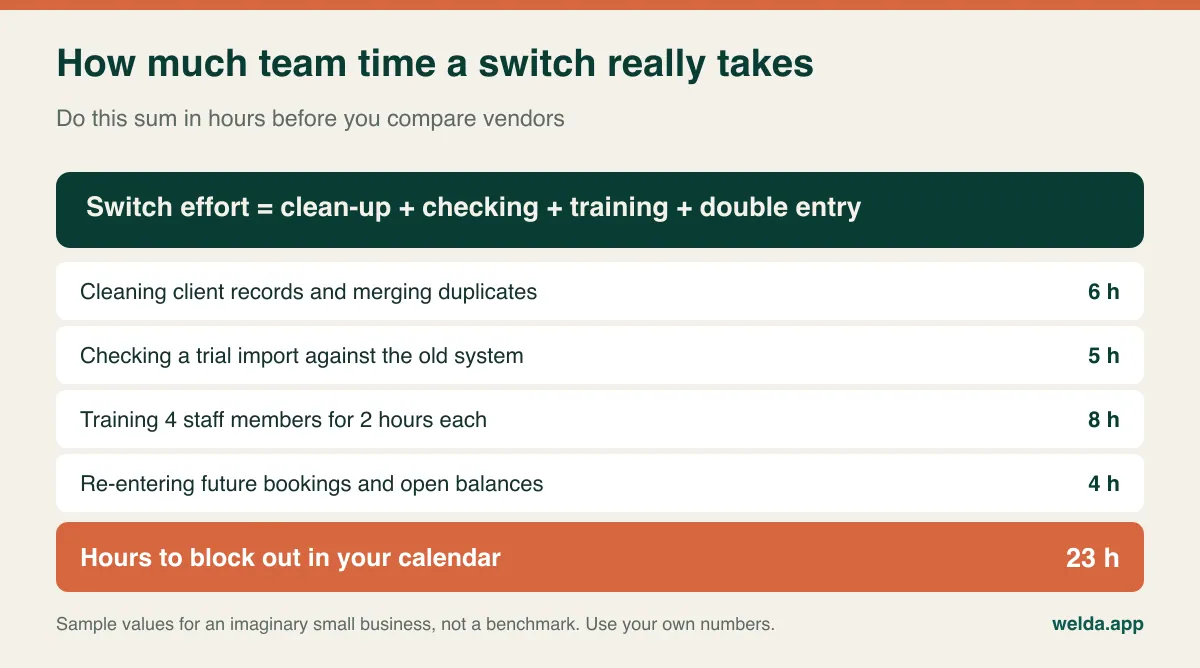
Timing does more for a safe switch than any feature. A migration error in a quiet week is an inconvenience; the same error before a holiday weekend lands in front of your clients, with no spare hour to put it right. Work backwards from your contract date and your calendar:
- Salons and barbers: stay clear of the run-up to major holidays, prom and wedding season. The lull right after a peak is ideal.
- Fitness and pilates studios: January and early autumn bring new sign-ups. Don't ask new members and a new system to find their feet at once.
- Clinics and private practices: look at your own appointment curve, and avoid the weeks when a clinician is away, since you need them for sign-off on clinical records.
- Anyone who invoices: cutting over near the start of a month or tax period gives your accountant one clean boundary rather than two partial reports.
Choose a day when someone who knows the new system can stand beside the front desk for the first two working days afterwards. If your business closes one day a week, the day before reopening is a natural cutover.
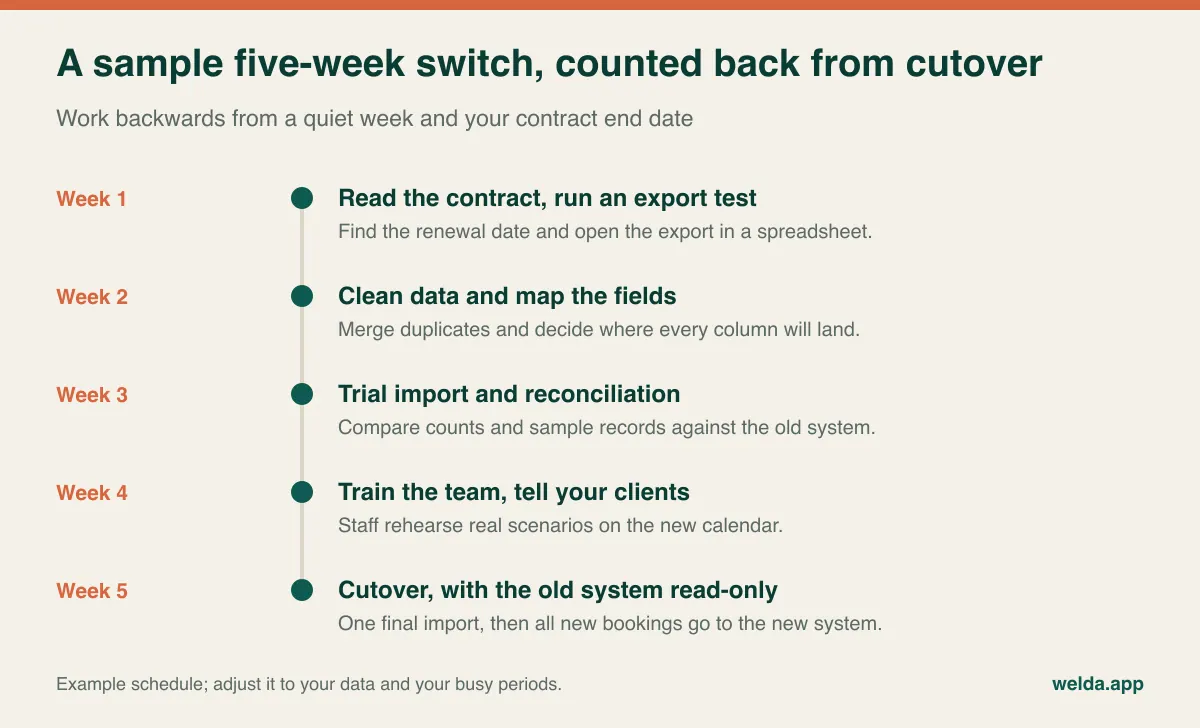
Next, block out the time. Someone has to do this work, and it almost always falls on the person who's already busy. Add up the hours before comparing vendors, then give your project owner that time away from the desk. Choosing one owner matters more than you might think. It should be someone who knows the calendar well, not necessarily the person who signs the contract.
A trial import proves more than a promise
"Don't worry, we'll migrate everything" is a sentence to answer politely and then test. Ask for a trial import using your real export, then reconcile it. Reconciling just means asking both systems the same questions and checking that the answers match. How many active clients do you have? How many appointments in the next two weeks? What's the total of outstanding balances? How many packages have sessions remaining? If a number differs, somebody should be able to explain precisely why. Duplicates you merged are a fine explanation. "Not sure" isn't.
Then look at actual records. Open twenty at random, then go looking for trouble: your oldest client, someone with two active packages, someone with an overdue balance, two people who share a name. Sit down with your receptionist for this. People who use the records every day spot errors in seconds that you'd read straight past.
Fix what you find at the source, and repeat the import if the errors were systematic. The final import should be boring, with the only differences being bookings made since the trial.
Cutover day and the double-reminder problem
Technically, a switch is about data. From the client's side, it's about messages and links. If both systems are live, a client can get two reminders for one appointment, or book through an old link into a calendar no one is watching anymore. That's why running two live calendars side by side for weeks is a poor safety net: it creates the conflicts it's meant to prevent. What should run in parallel is read-only access to the old system.
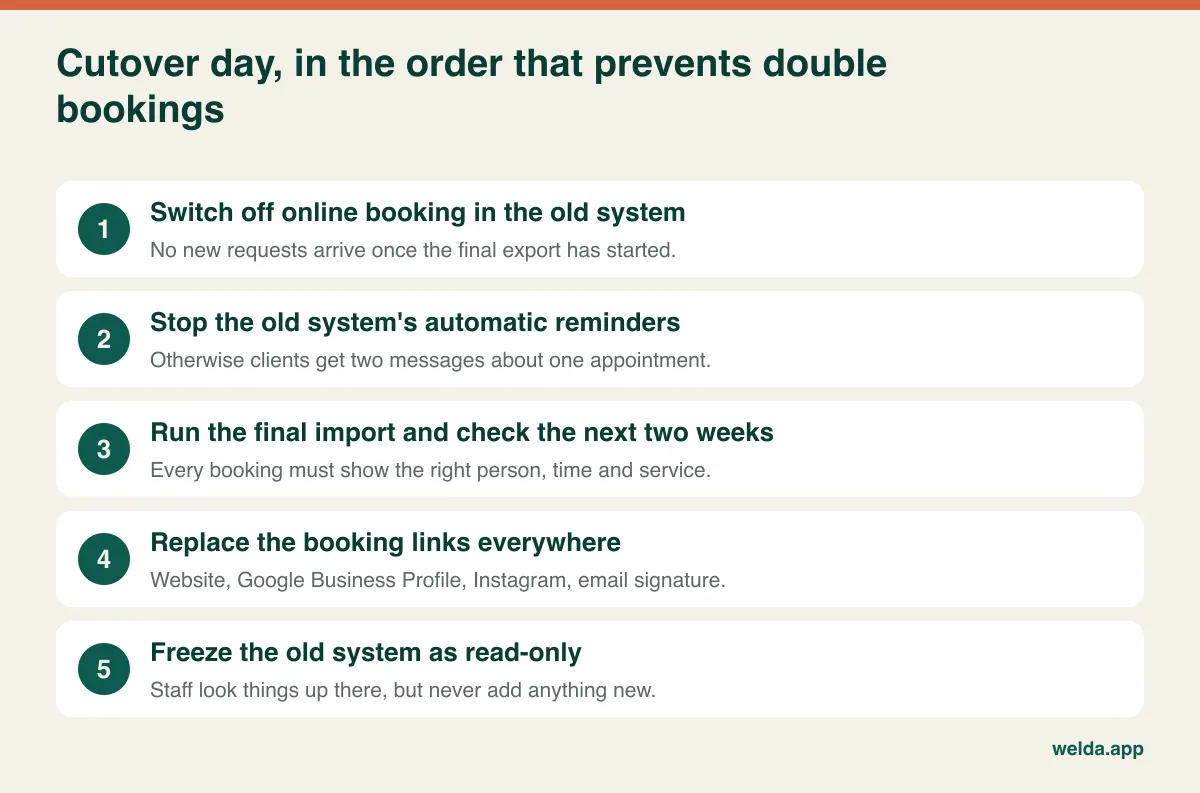
Make a list of everywhere your old booking link lives. Your website button, your Google Business Profile, Instagram, Facebook, email signature, printed QR codes, even a third-party directory listing you've forgotten about. Once the old contract ends, those links may lead to an error page, and clients rarely call to tell you.
Keep your client message short and calm: your appointment is unchanged, and reminders may look a bit different from now on. If the sender changes, say so, or people may ignore a message from an unfamiliar number. And if your reminder channel changes too, say from SMS to WhatsApp, check that your clients actually use it and that you have the consent you need. Our guide to WhatsApp appointment automation covers how those messages can be set up.
For the first week, keep a simple shared list where staff note anything that looks odd in the new system. Check each item against the old one at the end of the day. Most issues turn out to be small, and all of them are easier to fix on day two than on day twenty.
Privacy obligations while the data is in motion
Rules differ by country and sector, and this isn't legal advice. In the EU and UK, you're typically the data controller and your software vendor a processor, so you'd normally need a data processing agreement with the new vendor, and you should know where the data is hosted. Health-related information is a special category under GDPR. In the US, medical practices will need to look at HIPAA and whether a vendor will sign a business associate agreement. Don't assume this applies to any given product, Welda included: if HIPAA is relevant to you, make it a written question before going further.
Practical habits go a long way wherever you are. Don't email unencrypted client lists or pass them around in chat apps. Delete working copies once the import is verified. Ask the old vendor to confirm deletion, after checking how long you must retain records yourself. Keep the consent records and their dates, not merely the marketing tick boxes. For more detail, see our article on patient data security in clinics.
The demo questions that expose a weak migration
Sales demos run on flawless sample data. Yours isn't flawless, so send these questions ahead of time and get the answers in writing. Our guide on how to choose clinic appointment software covers wider selection criteria; these are specific to moving from one system to another.
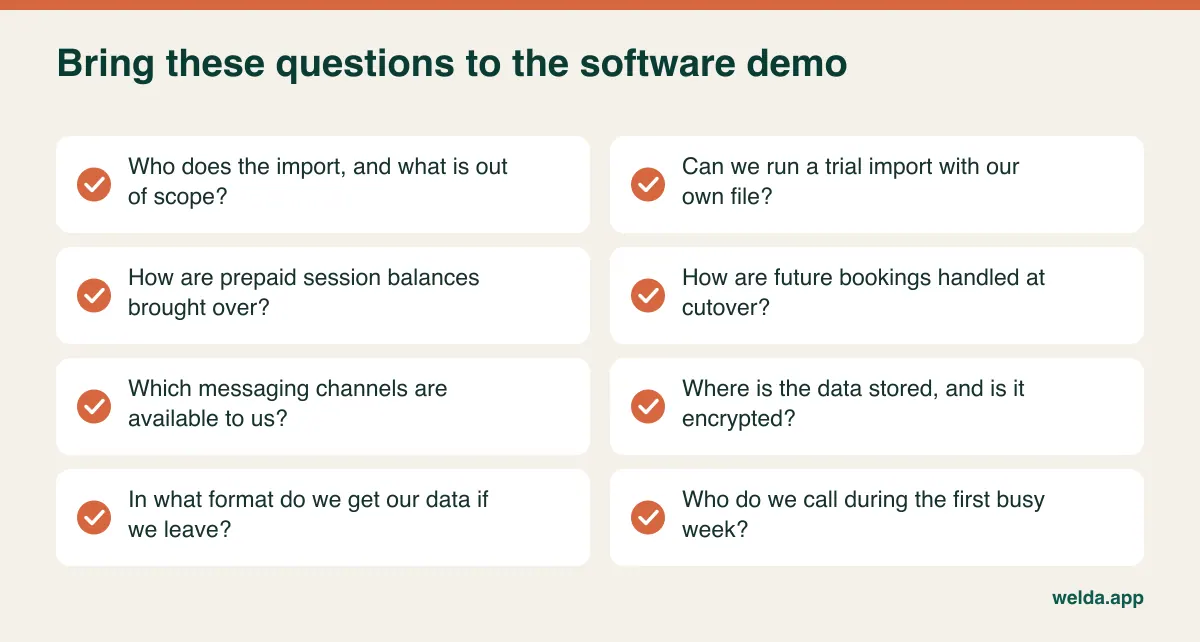
The exit-format question is worth dwelling on. Having just experienced what it takes to leave a vendor, you're in the best possible position to ask how leaving this one would work. A vendor that answers it plainly has nothing to hide. Evasion here tells you a lot.
When you compare offers, look past the monthly fee. Exit charges from the old contract, data return fees, migration scope, per-user charges, training time and unused message credits can all change the picture. Our article on clinic management software cost sets out how to line up two quotes on the same basis.
When waiting is the better decision
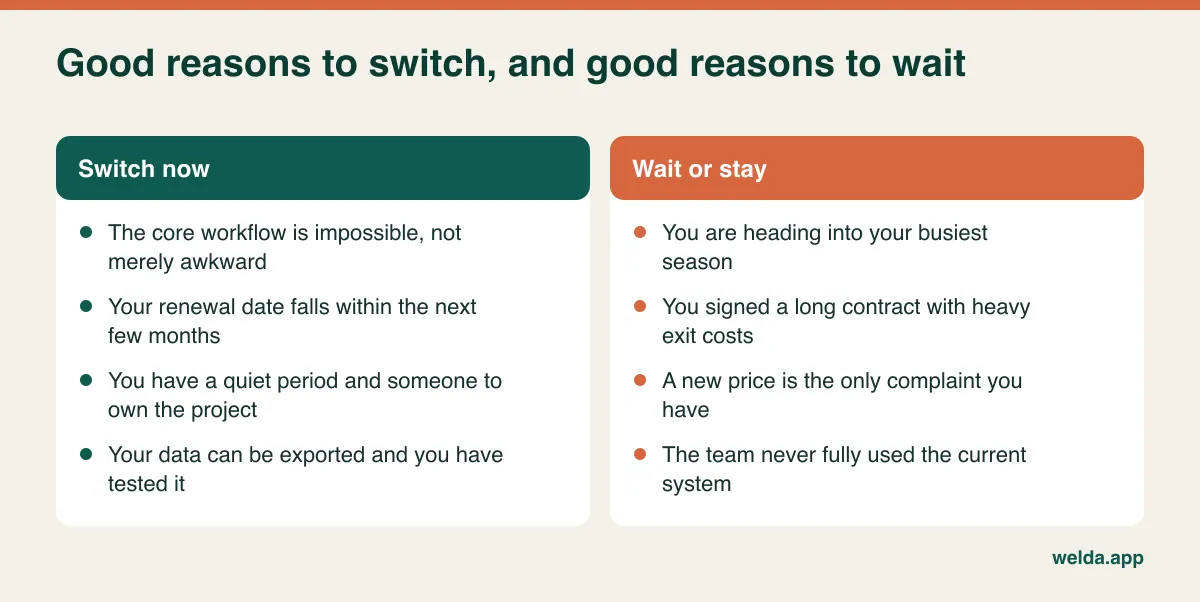
Staying put for now is a perfectly respectable outcome. It's probably right if you're within a few weeks of your peak season, if you're locked into a long contract with heavy exit costs, if your one complaint has a written fix date, or if nobody can own the project this quarter. Set a date to look again, and run the export test anyway so you're ready when the time comes.
Where Welda CRM fits, and where it might not
If you've decided the move is right, switching appointment software to Welda CRM is one option to put through these same tests. It's built for appointment-based businesses: clinics, beauty salons, hair salons, fitness and pilates studios, and specialists such as dietitians and psychologists. Setup, migration of your existing client and appointment data and hands-on team training are part of the subscription, with no separate setup fee.
After the move you'd get a shared calendar by staff, room and branch with conflict detection, online booking requests you confirm, a waiting list, package and membership tracking, encrypted health records with allergy alerts, before-and-after photo archiving, invoices and payment tracking, consent management and an audit log. Reminders go out automatically over WhatsApp, with templates in English, German and Turkish.
A few honest caveats. We can only import what your old system lets you take out, so bring that export file to the conversation; if you have a photo archive or an unusual format, raise it early so the scope is clear. Our messaging is built around WhatsApp, so if your market relies on SMS, ask how that would work for you before assuming anything. The same goes for moving saved payment cards, recurring billing, HIPAA or any specialist integration: we don't list those on our product pages, so please ask, and don't sign anywhere until you have an answer you can hold on to.
You can test it with a 7-day free trial with all modules unlocked. If the trial ends without a plan, your data isn't deleted; the account becomes read-only until you choose one. Plans can be changed or cancelled when you need to. Pricing depends on your locations, users and modules, and is agreed in a free consultation. Book one through our switching appointment software page, and we'll look at your current setup and your export file together.
Frequently asked questions
Will I lose my client history when switching appointment software?
Not if you test first. What matters most is what your old system lets you export, so check that before you sign anything new. Then verify a trial import with counts and sample records. Anything that can't be moved can stay available in read-only access or a secure archive, as long as you know about it in advance.
How long does switching take?
It depends on your data far more than on the software. A single-location business with clean records can move quickly. Packages, memberships, photos and multiple branches add time, and preparation and checking tend to take longer than the import itself. Our five-week timeline is only an example; shorten or stretch it to fit.
Should I run both systems at the same time?
Not as live calendars. Two live calendars produce conflicting bookings and duplicate reminders. After cutover, every new booking goes in the new system, and the old one stays available purely for looking things up.
What happens to prepaid packages and gift cards?
Export an outstanding-balance list before you cut over, reconcile it, and load the balances in the new system as opening balances or credits. Keep the original records accessible in case a client queries a figure. It's a short list, but it's where mistakes are most visible, so check every line.
Do I need to tell my clients?
Yes, but briefly. Tell them that their appointment stands, that reminders may come from a new sender, and that there's a new booking link if that applies. If recurring payments are involved, give them proper notice and clear instructions, since they'll need to take action.
What if my current vendor won't release my data?
Put the request in writing and refer to the relevant part of your contract. In the meantime, save reports and list your active clients and balances securely. If you're still getting nowhere, get legal advice; data protection law in your country may give you or your clients certain rights. This is exactly why the export test belongs at the start of your project.