The right bulk food store POS software is the one that treats a scoop of almonds as a precise stock movement rather than a price typed into a till. Before you compare brands, check three things: it reads the labels your own scale prints, it deducts the exact weight from the correct item, and it shows what each item earns after spills, sampling and cost changes. Most generic retail systems handle barcoded packets well. The gap appears when a single 20 kg case turns into hundreds of unequal sales, and that gap is where this decision is really made.
This guide is for owners of nut shops, refill and zero-waste stores, candy and dried fruit counters and any shop that sells loose goods by weight. You will find a way to classify your own store, the questions that expose weak software, and a plain account of where Welda Stock, our bulk food store POS software for nut and dried fruit shops, fits and where it does not. All calculations are samples and use "units" instead of a currency, so replace them with your own invoices.
Start from the floor plan, not the feature list
Two bulk stores with identical products can need quite different systems, because the software requirement follows the way goods move from bin to till. A staffed nut counter is close to a deli: an employee scoops, weighs, prints a label and hands over a bag. A refill store may look nothing like that. Shoppers bring their own jars, fill them from gravity bins and weigh them at a self-serve station. A third type has a scale wired directly into the checkout, where the cashier weighs everything.
Walk through a normal sale in your store and note the moment the weight is first captured. That moment tells you which category of POS to shortlist, and it saves you from sitting through demos of functions you will never use.
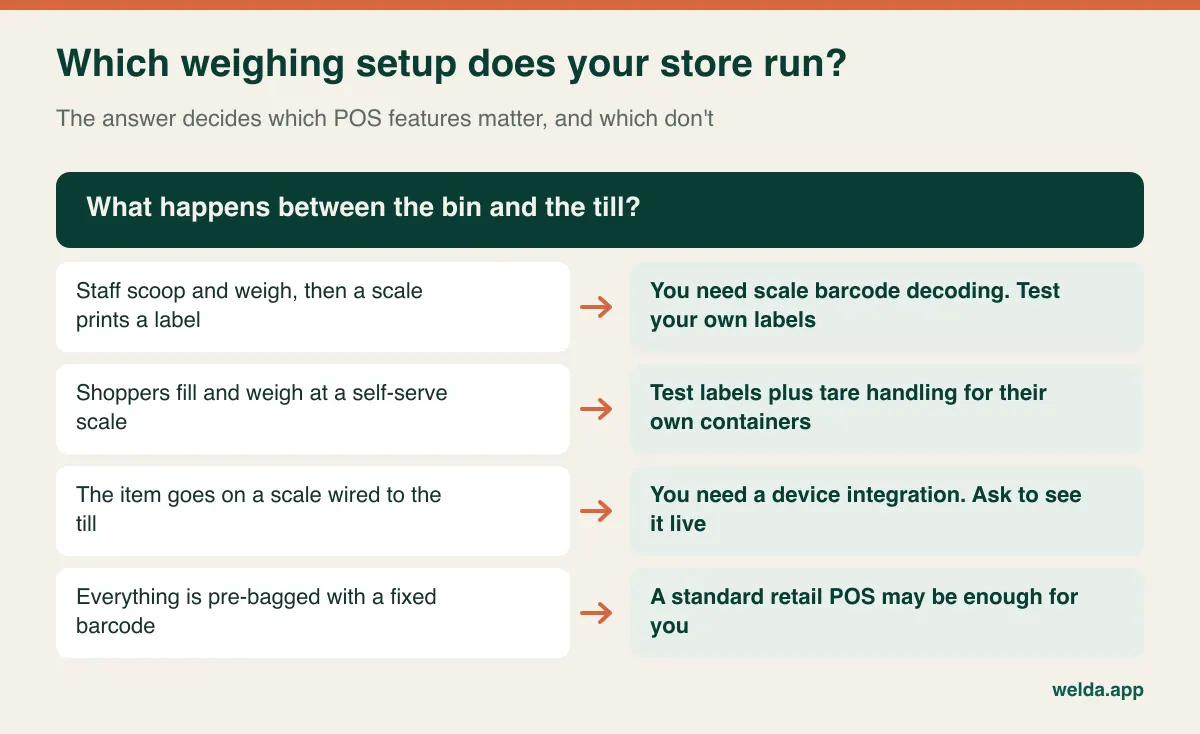
If you sell mostly pre-bagged goods with fixed barcodes, be honest about it: a standard retail POS may do the job, and paying attention to weight handling would be solving a problem you do not have. The rest of this article is for stores where loose product makes up a meaningful share of sales.
The physical reality of a bin: why stock drifts
A packet is either on the shelf or it is not. A bin is a moving estimate. New product gets poured on top of old product, dust collects at the bottom, a scoop drops a few grams on the floor, and a child tries a yogurt-coated raisin. None of those events generates a transaction, but all of them change what you own.
That has two practical consequences for software. First, the system must store decimals properly. If a balance of 7.350 kg appears as 7 or 7.4 somewhere in the reports, hundreds of small sales will produce a variance nobody can explain. Second, the system must accept a loss record with a reason, because a count that simply overwrites the balance tells you nothing about why the balance was wrong.
It also helps to look at your range through the lens of how each product behaves. Oats and flour shed dust. Dried mango sticks to scoops and bin walls. Trail mix and chocolate invite tasting. Oily nuts turn rancid if a bin moves slowly in warm conditions. A report that lumps all of these together cannot help you decide whether to fix a bin, move an item behind the counter or simply order less.
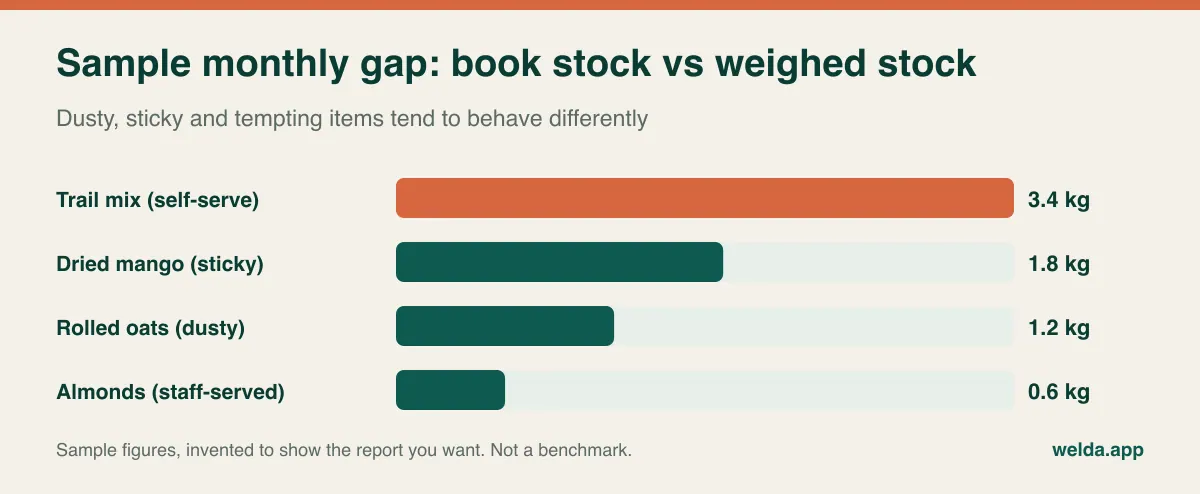
Our guide to preventing retail shrinkage covers the general discipline. For loose goods, the extra step is to record reasons in a short fixed list such as spill, sampling, spoilage and count difference, so that the report stays readable in month six. Free-text reasons tend to fall apart within weeks.
Self-serve changes the transaction, not only the layout
When shoppers handle the scoop and the scale, your store has effectively delegated data entry to people who have never been trained. Every step in the chain below can create a wrong record that looks perfectly valid to the till.
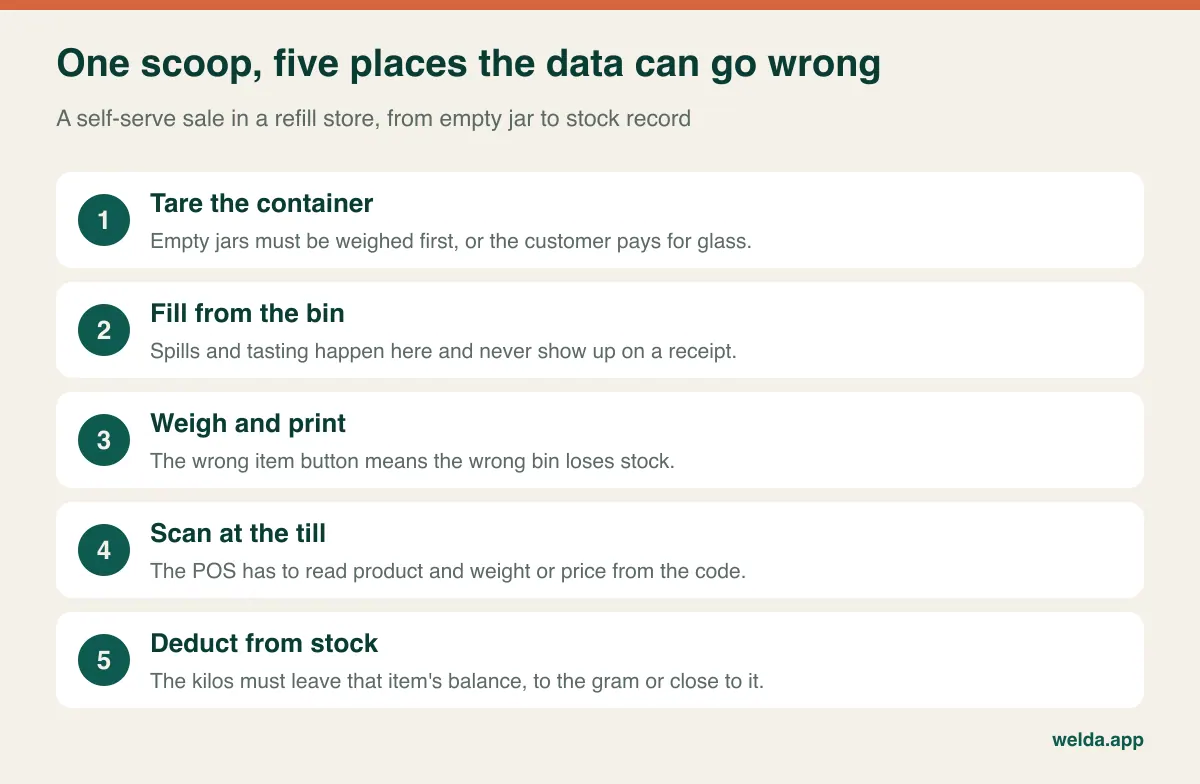
Container weight is the first issue. A glass jar can weigh more than what goes in it. Stores usually solve this with a tare station that prints or writes the empty weight, or with a scale that subtracts it. Before you buy anything, establish whether tare is being handled by the scale before the label prints, or whether you expect the POS to deduct it afterwards. Those are very different requests. If the scale does it, the POS simply sees a net weight on a label. If the till must do it, you need to see that working with your own jars, with a real cashier, at a realistic pace.
The second issue is the item selection. At a self-serve scale, a customer picking "walnut pieces" instead of "walnut halves" sends the sale and stock deduction to the wrong item. Fewer, clearly named buttons with photos and bin numbers help more than any software setting. Your counts will show the pattern: one item persistently over and its neighbor persistently under is a classic signature of mislabeling, and a POS that shows per-item variance over time makes it visible.
The third issue is the bin itself. Topping up new stock over old breaks first-in, first-out and can blur your shelf-life control. No POS can fix this on its own, so decide on a bin rotation routine at the same time as you choose the software, and record the date of each refill somewhere your team actually looks.
Three ways a scale can talk to a till
Sales pages often use one phrase, "scale integration", for setups that have little in common. Asking which one is meant is usually the fastest way to clarify a vendor conversation.
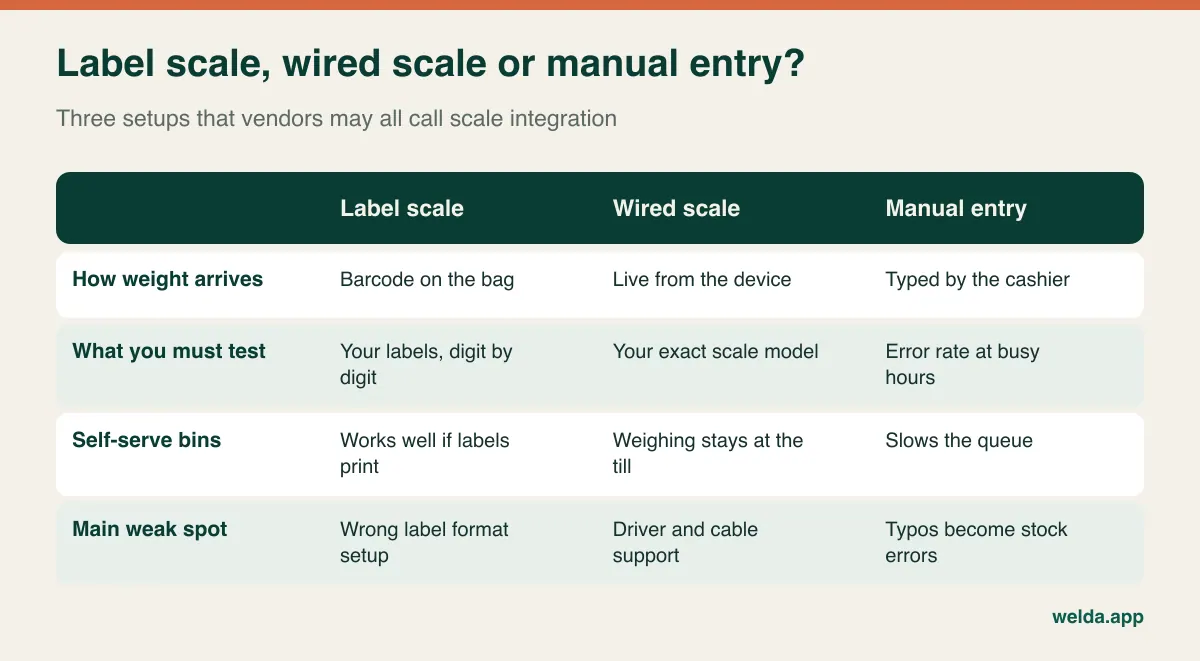
For a label scale, the test is simple and very revealing. Print ten labels from your own scale, covering small and large weights and different items. Write down the expected product, weight and amount for each, then scan them during the demo. Common weight or price barcode formats reserve some digits for the product and others for the value, and settings have to match on both sides. Our article on POS software with scale integration goes through that test step by step.
Welda Stock takes the label route: the weight or price barcode printed by a retail scale is scanned and decoded automatically, and the sale reduces that product's stock by its own weight. A live cable connection from the scale to the till is not described in our product material, so we are not promising it here. If that is a hard requirement, raise it in your first conversation.
The cost of a kilo that never gets sold
Most owners set bulk prices from the invoice. That works until you compare the invoice with what actually crosses the till. Freight added to a delivery and the grams lost along the way both belong in the cost of what you sell.
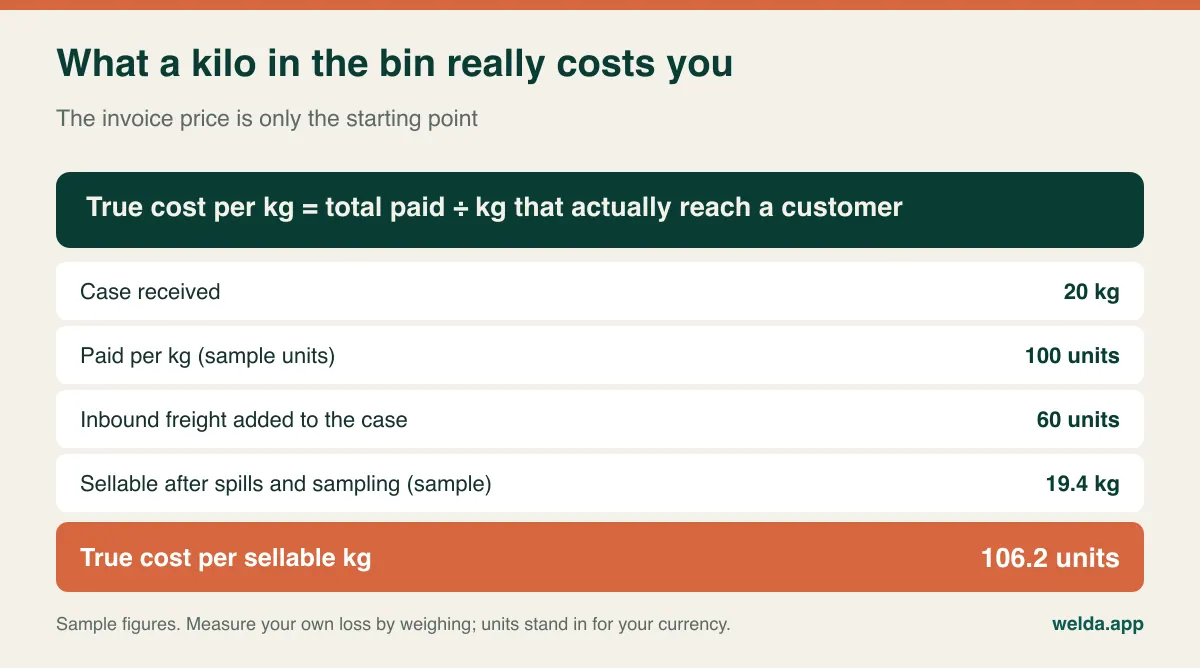
In this sample, a price of 100 units per kilo on the invoice has become about 106 units on the shop floor. On a low-margin staple that difference can matter a great deal. The practical exercise is cheap: choose three high-volume items, weigh the bin at each refill and compare the sales recorded between refills. A few weeks of that gives you real numbers, and tells you what you need from the software more clearly than any brochure.
Roasting adds a further layer. If you roast nuts in-house, the weight goes down and the value per kilo goes up. A simple shop can record the roasting loss as shrink on a single item. If you sell both raw and roasted versions, you will need two items and a way to move stock between them. If you run production daily across many varieties, look for a real production or recipe function, as manual adjustments will wear your team down. The same logic applies to house trail mixes: one line on the receipt may represent five ingredients, so ask how each component is deducted. Welda Stock records roasting and other losses as stock movements with shrinkage entries, which brings the balance down to the actual quantity. Recipe or mix handling is not described in our material, so assume manual adjustments unless a demo with your own scenario shows otherwise.
When your purchase price moves every few weeks
Nuts, seeds and dried fruit are commodities, and their cost can shift with harvests and exchange rates. Suppose your bin holds stock from two deliveries at different prices. Your margin report depends on which cost the software uses.
| Costing approach | What it answers | Where it can mislead |
|---|---|---|
| Latest purchase cost | What will the next case cost me? | Can distort the margin on stock bought earlier |
| Weighted average | What did the stock in hand cost on average? | Can make a sharp price rise look gentler for a while |
| Batch or FIFO-style | What did this particular lot earn? | Hard to do honestly when lots mix in the same bin |
Neither approach is universally correct, and our overview of inventory costing methods explains the trade-offs with examples. Your accountant may also have a view on which method suits your reporting. What matters at the buying stage is a direct question: "If I enter a new invoice before the old stock runs out, which cost does the margin report use?" If the answer is vague, treat the margin report with caution.
With Welda Stock, entering a new purchase price or supplier invoice updates the product's margin picture, so you can see where profit is shrinking and adjust the sale price, and the same invoice records what you owe that supplier. Ask to see the calculation with one of your own invoices if the precise method matters to your bookkeeping.
Metric, imperial and everything else on the shelf label
This is a detail that rarely appears in comparison charts but can shape your decision, particularly in international markets. Check what unit your stock card uses and whether it agrees with your supplier's invoices and your scale. If you buy in pounds and sell in 100-gram increments, or receive 25 lb cases and report in kilos, every conversion is a place for an error to creep in. Pick one stock unit per item, keep it for life and convert at the point of receiving.
Also look at how the receipt describes a weighed sale. Customers in many markets expect to see the weight and the unit price, not only the total, and local rules may require it. Look at a sample receipt from the system before you commit, and check how the item name reads when it gets cut off by the printer's line length. "ORG ALMND RAW SLC" may be fine for a warehouse, but less so for a customer who wants to check what they were charged.
Rules that vary by country: a careful overview
Rules differ from one market to the next, and we cannot tell you what applies to your store. This is general orientation rather than legal or tax advice, so check specifics with your accountant or local authority.
- Fiscal requirements: Some countries require certified fiscal devices or registered tills. Check this first, because it can rule out a system regardless of how good its stock features are. Welda Stock produces a customer receipt, and we do not make a blanket fiscal compliance claim here, so ask us about your country directly.
- Sales tax or VAT: Rates on food can vary by item, and a store with snacks, candy, soap or refill cleaning products may have several rates on one receipt. Confirm that each item can carry the rate your accountant gives you.
- Weights and measures: Scales used for trade are commonly subject to approval and verification, sometimes described as "legal for trade". Changing label settings is a good moment to ask your scale service provider whether anything is affected.
- Allergens and labeling: Loose food sold from bins raises questions about cross-contact and customer information. Rules differ, and your software will not settle them, but a clean product list makes the information easier to maintain.
- Personal data: Customer accounts with balances hold personal data, so the relevant privacy law, such as GDPR in Europe, may apply. Limit access by role and keep only what you need.
A demo script that breaks polite software
A guided tour with clean sample data will always look fine. Your job is to bring the awkward situations from your store. Send the list to the vendor in advance so they cannot be surprised, and judge them partly on how they respond to it.
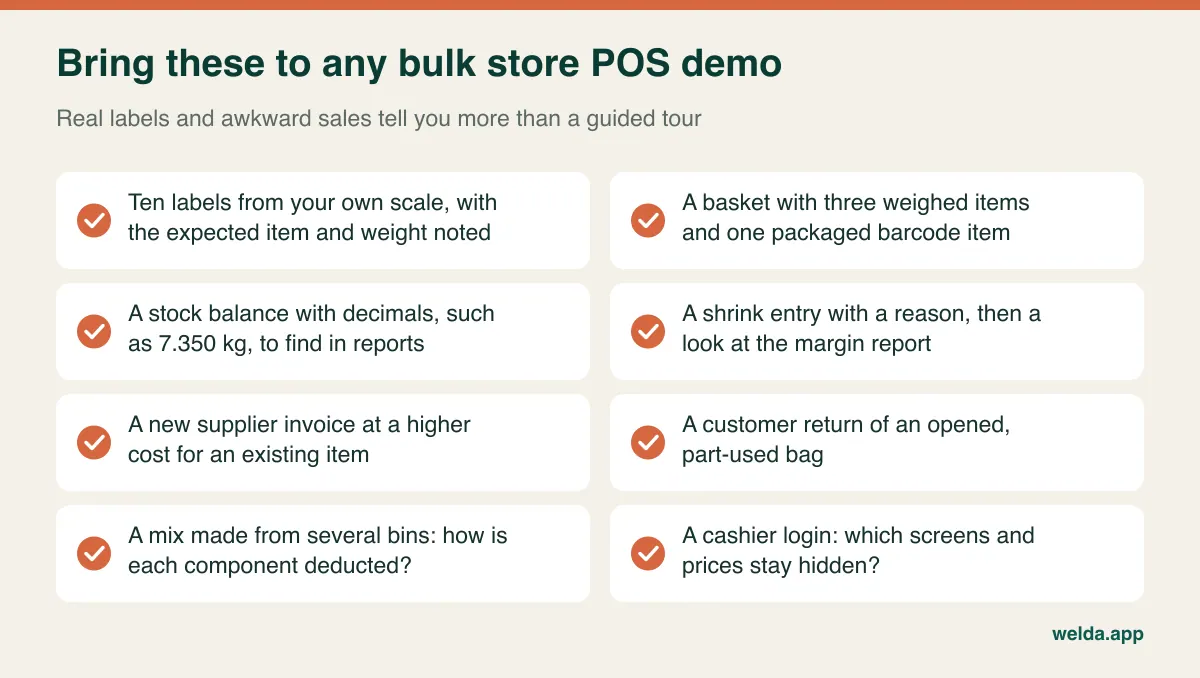
Invite the person who will actually use the till. Owners notice reports, but cashiers notice how long it takes to undo a wrong scan with six people waiting. Permissions deserve a check as well: a cashier should be able to sell without seeing purchase costs or altering stock counts, while a manager handles adjustments.
Comparing quotes without a false bargain
Quotes for bulk food store software are hard to compare, as vendors bundle things differently. Rather than focusing on a headline figure, make a sheet with the same lines for every vendor and ask them to complete it in writing.
- Scale of use: how extra tills, users, stores and warehouses affect the quote
- Data migration: whether your product, price and customer balance imports are included
- Setup and training: who configures label formats and who trains your counter staff
- Hardware: whether your existing scales and scanners can stay; replacing scales is often the largest cost nobody mentions at first
- Add-ons: whether shrink tracking, margin analysis and supplier records are in the base product
- Ongoing charges: support, updates, per-transaction fees or payment processing terms
- Fiscal add-ons: any separate service required for your country's rules
- Leaving: whether you can export your own data in a usable format
With Welda Stock, the quote depends on the number of users, branches and warehouses, your product count and data import, and your hardware and checkout flow. There is a one-time setup fee, and the amount is agreed after a free consultation, so having those details ready makes that conversation short.
Moving over without closing the shop
The most underestimated task is your opening stock. Spreadsheet balances for loose goods are nearly always wrong by the time you migrate, so copying them only moves the error to a new system. A better plan is to clean the list first, with one spelling per product, one stock unit per item and clear names for roasted, raw and salted versions. Then weigh every open bin and case, subtracting the container, on the evening before you go live.
Start at one till if you can, and choose ten control items that you weigh every evening in the first week. If a control item drifts, you can trace it to a label, unit or scanning problem while the memory is fresh. Moving from Excel to inventory software covers the list clean-up in more detail, and the guide to weighed stock in spice shops shows how the sack, jar and packet stages can be kept apart.
Is Welda Stock the right fit for your bulk store?
It is a good candidate if you have a scale that prints barcode labels, sell largely by weight, and want a single place for stock, shrinkage, per-product margin, customer accounts and supplier invoices. On our bulk food store POS software page, you can see how the pieces fit: automatic scale barcode decoding, low-stock alerts, stock counts, separate permissions for cashiers, warehouse staff and managers, and separate balances across branches. Excel import handles the product list, the software is web-based and runs in a browser, and setup is usually completed the same day. Because it is web-based, operations run over your internet connection, which makes a stable connection important.
It may not be the right fit if your country requires a certified fiscal till that we cannot confirm, if you need a live cable link to the scale, if daily recipe-based production and lot tracing are central to your business, or if online orders drive most of your sales. We would rather say that early. Our product material does not describe those functions, so if any of them is a dealbreaker, a specialist system may serve you better.
Frequently asked questions
What is the difference between a bulk food POS and a normal retail POS?
The main difference is how well it handles weight and loss. A normal retail POS often assumes units and fixed barcodes. A bulk food store needs decimal stock, scale label decoding and shrinkage reasons. Some retail systems can do all of this, which is why testing with your own labels is worth more than the product's category name.
Can customers bring their own containers?
That is mostly a question of scale and workflow rather than POS alone. If the scale subtracts the tare before printing, the POS sees a label with a net weight. If you want the till to subtract tare, ask to see it working with your jars. We do not describe till-side tare in Welda Stock's material, so the label route is the one to test.
Do I have to replace my scale?
Not necessarily. If it prints weight or price barcodes, test it first. A scale that only displays a value offers no data to scan, so either the cashier types the sale or a different scale becomes part of the budget. Check compatibility before setup, not after.
How often should I count bulk stock?
Count fast-moving and expensive items more often, perhaps weekly, and the slower items monthly. Bins are hard to count by eye, so weigh them. Partial counts by category are easier to sustain than a single large stocktake, and they show when a problem started.
Can I run more than one store?
Welda Stock supports multiple branches and warehouses with separate stock balances and a shared view from one account. In any system, ask how transfers between stores are recorded, as that is where weighed stock often goes wrong.
How much does bulk food store POS software cost?
It depends on users, locations, product count, data migration, hardware and any fiscal requirements. Compare quotes line by line using the list above. For Welda Stock, we settle the amount in a free consultation once we understand your store.
The smallest useful next step
Before speaking to any vendor, weigh one busy bin between two refills and compare the result with your recorded sales. That one figure will tell you how much this decision matters. If you would like to test it against Welda Stock, book a free consultation and bring a few labels from your scale. We will look at whether it suits your counter, and tell you plainly if it does not.