Cloud inventory software is a sound choice for most small businesses with a dependable connection and a simple backup line, and a poor one for shops where the internet regularly drops for long stretches and mobile signal is weak too. When the connection fails, your saved data stays safe on the provider's servers, but unless the software has a true offline mode you cannot record new sales or see live stock until you are back online. So the decision has little to do with whether the cloud is "safe". It comes down to how often your line drops during trading hours, how fast you can get back to selling, and whether your till depends on the same software as your stock.
This guide is written for the owner who likes the idea of browser-based software but keeps picturing a queue at the counter and a frozen screen. Those fears are reasonable. By the end you should be able to test them against your own shop instead of arguing with a sales page.
First question: is the cloud system also your checkout?
Almost every article about cloud risk treats "inventory" as one thing. In practice, small businesses use cloud inventory software in three very different ways, and an outage means something different in each.
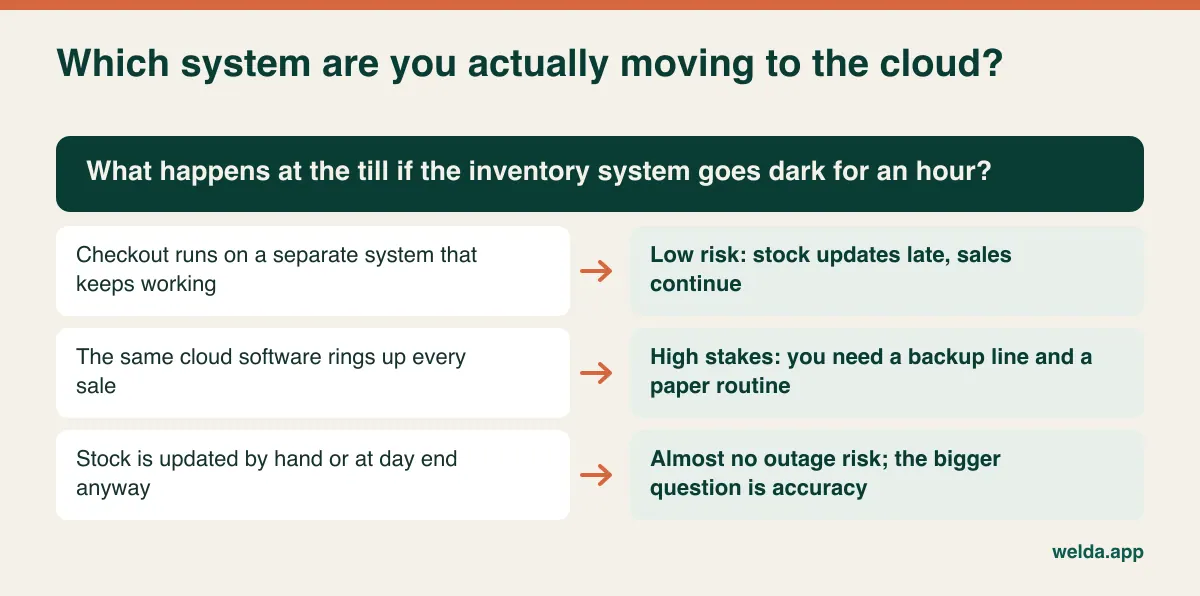
A workshop or wholesaler that books stock in and out a few times a day can lose the connection for an hour and barely notice; somebody writes a few lines down and enters them later. A retailer with a separate point-of-sale system that keeps working offline is in a similar position, although stock figures will lag and any automatic sync between the two has to catch up. A shop where the same web application rings up every sale carries the real risk, because the screen you depend on to take money is the one that needs a connection. That setup can still be the right one. It has the great advantage of keeping sales, stock and customer balances in a single record. It simply deserves more preparation than the other two.
Write down which of these describes you, because the rest of the decision follows from it. If you are still weighing up what you need the software to do at all, our guide on how to choose inventory software covers the wider criteria. Here we stay with the connection question.
Keep a connection log for fourteen days
"Our internet is terrible" and "we never have problems" are both usually memories rather than measurements. Speed tests do not settle it either. Scanning a barcode and saving a sale move very little data, so a modest line that stays up is more useful than a fast one that keeps dropping. What you want to know is how often it fails, when it fails and how long your staff need to recover.
Put a notebook by the till. For two weeks, whoever is on shift writes down each drop: date and time, how long it lasted, whether customers were waiting and what fixed it. If your router keeps a log, compare the two, as it will catch short drops nobody noticed. Then ignore anything that happened outside trading hours. A forty-minute outage at three in the morning has no cost; a four-minute outage on a Saturday afternoon does.
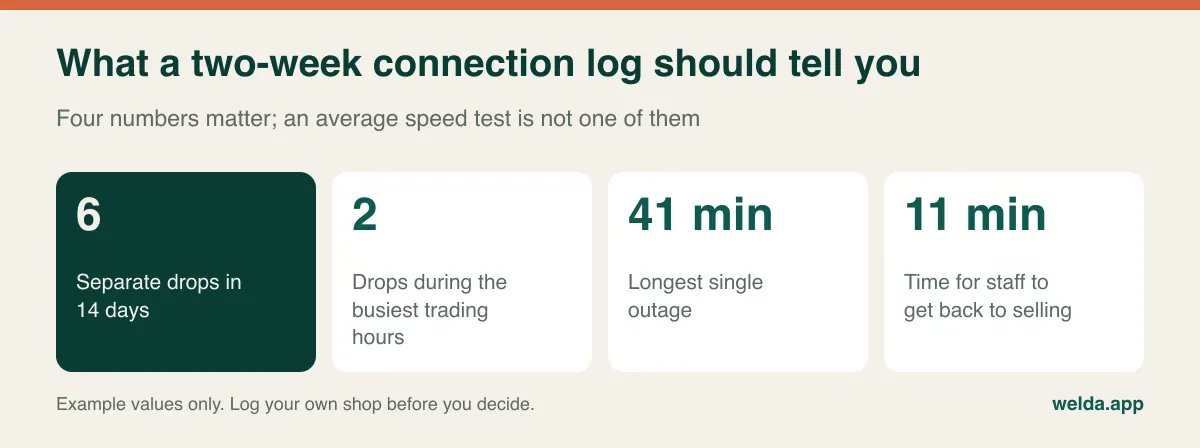
The figure that deserves the most attention is the last one, recovery time. An outage is partly a technical event and partly a staff event. If the connection returns in two minutes but your part-timer spends ten more working out what to do, the shop has effectively been down for twelve. That number is entirely in your control, and it is the one a routine improves most.
Two weeks can mislead you if they are unusual, so think about what the log did not capture. Is there roadworks season on your street? Does the tourist season crowd the local mobile network? Do you share a building connection with other tenants who fill it up after school hours? Add what you know to what you measured.
Reading the uptime promise like a shop owner
Your own line is only half of the picture. The other half is the provider. Vendors often quote an availability percentage, and the numbers look so close together that they feel interchangeable. They are not.
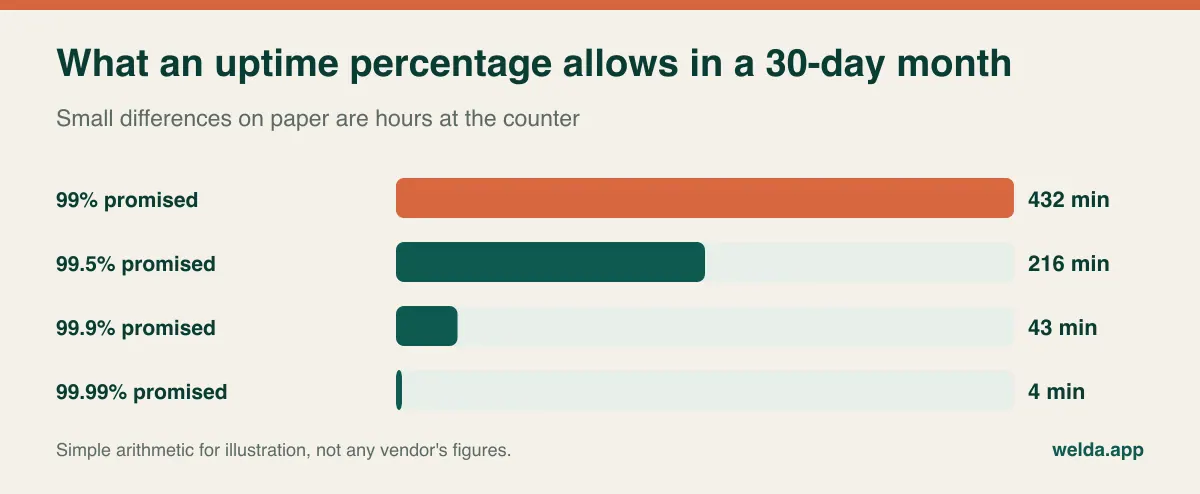
A promise of 99.5% over a thirty-day month still permits more than three and a half hours of downtime, and nothing in that figure says the hours cannot land on your busiest afternoon. So look past the headline and ask four things. Does the percentage exclude planned maintenance, and when does maintenance usually happen? If your store opens at seven in the morning or closes at midnight, "overnight" may not mean what you need it to mean. Is the promise a contractual commitment or a marketing statement? What do you actually receive if it is missed? A service credit will not pay for a lost Saturday, so the remedy matters less than the track record. And is there a status page or outage history that you can read for yourself?
Not every small provider publishes a formal service level, and the absence of one does not automatically make a product bad. In that case, ask plainly how many incidents there were in the past year, how long they lasted and how customers were told. A vendor who answers directly is telling you something useful about how the next incident will be handled.
"Works offline" can mean three very different things
The phrase appears on many product pages, and it can describe anything from a cached list to a nearly complete local system. Try to pin down which one you are being offered.
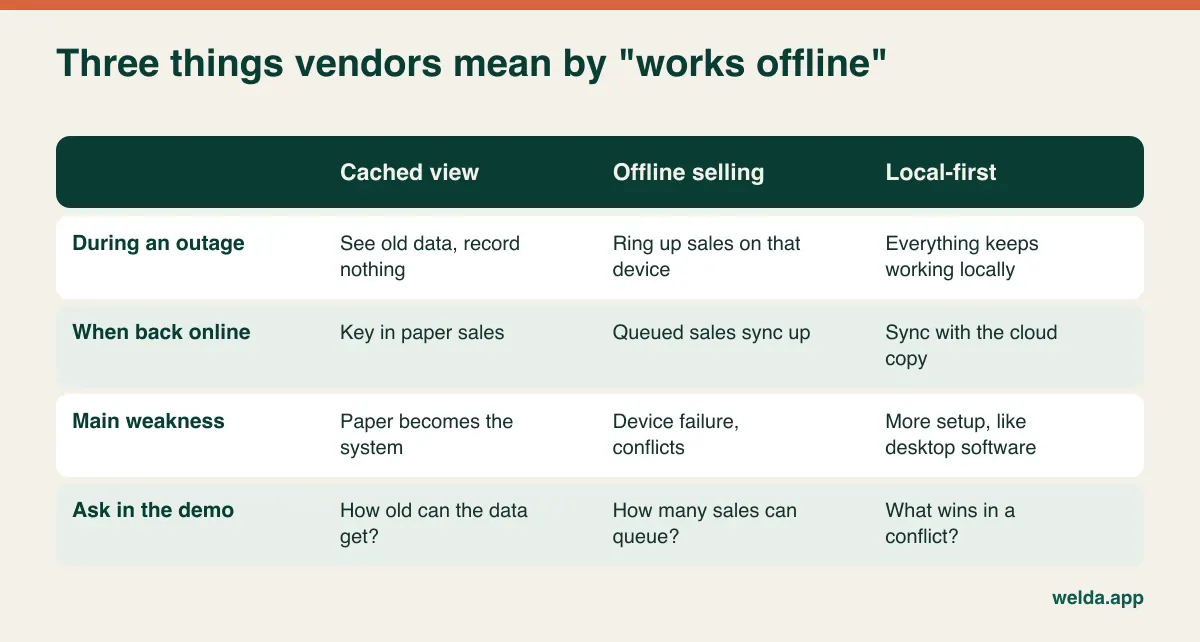
Offline selling sounds like the end of the discussion, but it moves the problem rather than removing it, and inventory is exactly where the moved problem shows up. Take a small gift shop with two locations and a single handmade vase left in stock. The first location loses its connection and sells the vase, and that sale sits on the local device. Meanwhile the second location, still seeing one in stock, sells it to a customer over the phone. Once the first shop reconnects, your stock figure shows minus one and someone has to make an awkward call. If you sell high-volume packaged goods, you can live with that. If you sell one-offs or take deposits against specific items, you need to know how the system handles it.
A few follow-up questions expose how seriously a vendor has thought about this. Does the offline device see price changes made at head office, or will it keep charging yesterday's price? Where are queued sales stored, and what happens if that computer fails or somebody clears the browser? How many sales can queue up before something breaks? When data conflicts, which version wins, and does anyone get told? There is no single correct answer. A clear answer is what you are looking for.
A backup connection usually beats a change of software
For most shops, this is the single most effective precaution, and it needs nothing more exotic than a second route to the internet. A phone hotspot is the bare minimum. A router or modem with its own SIM card is sturdier, and some models switch over automatically when the main line fails. Either approach removes much of the risk from the most common failure, which is your own line going down.
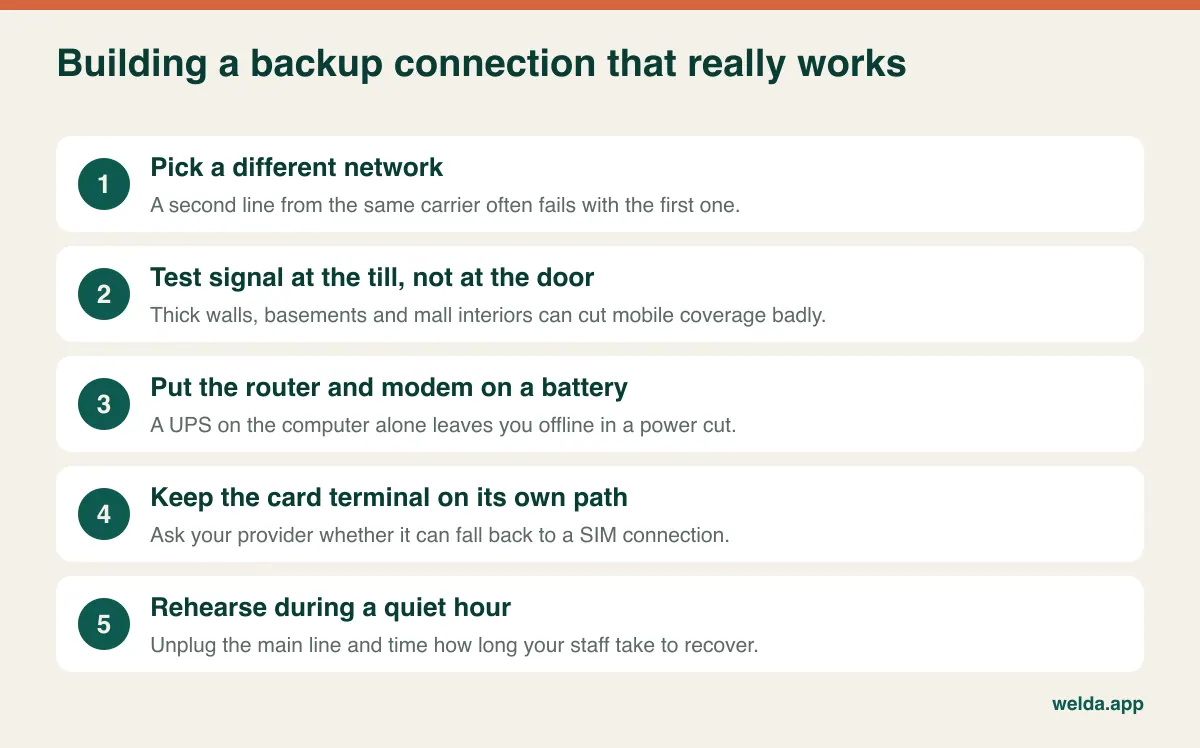
The card terminal deserves particular attention, since a working stock screen is little comfort if you cannot take payment. Depending on your country and provider, terminals may connect by Wi-Fi, by Ethernet or by their own mobile SIM, and some offer a fallback. Ask your payment provider what happens in an outage and what limits apply. If your customers almost all pay by card, this conversation matters more than anything else in this article.
Understand what the backup does not cover. If the provider's servers are down, no second line will help, and if the power is out, the whole shop stops whichever software you run. A small battery unit on the router and the till computer buys you time for short power cuts, though a long blackout means shutting up or switching to paper and cash.
Write the paper routine before you need it
Even a good backup can fail, so your shop needs a way to keep selling with nothing but paper. This does not have to be elaborate, and the whole thing should fit on one sheet taped inside a cupboard by the till.
Keep three things ready: a numbered sales sheet, a printed price list for your best sellers refreshed every week or two, and a separate page for any sale made on customer credit. Decide in advance what you will not do during an outage. Returns, price changes, goods receiving and stock counts can all wait, as each of them is much easier to get wrong without the system. Set a rule for customer credit too. Your staff cannot see a customer's balance, so you either stop credit altogether or limit it to names you have approved. It is unfair to make a nineteen-year-old cashier decide that with the customer standing in front of them.
A small example, with figures invented for illustration, shows what you are signing up for. Say your hardware store handles 25 sales in a busy hour and the connection is out for 30 minutes. That leaves about 12 paper sales, and at roughly a minute and a half each, around 20 minutes of keying in at closing time. That is annoying, but it is not a disaster. Now picture 80 sales an hour, several staff and a two-hour outage. That is 160 slips and a very late night, plus plenty of chances for mistakes. The same arithmetic can reassure one owner and alarm another.
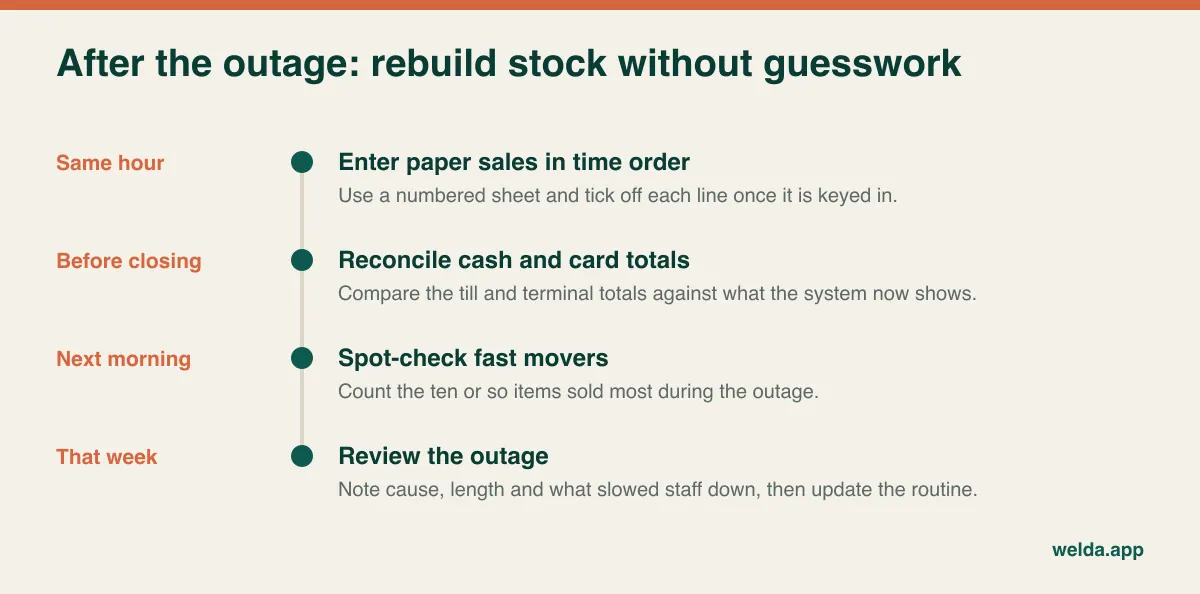
Double entry is the classic mistake after an outage. A sale that was half-finished when the line dropped may or may not have saved, so check recent transactions before keying it in again. Tick off each paper line as you go, and afterwards count the fast movers, since a paper sale that was missed never shows up anywhere except on the shelf. A quick partial stock count the next morning is enough to catch most of it.
Where your data lives, and how you get it back
The other reason owners hesitate is that their records now sit on somebody else's computers. Local software has a matching risk that gets talked about less: the database is on one disk, the backup is on a USB stick next to it, and a burglary, leak or fire takes both. Hard drive failure can wipe out customer balances and years of purchase history. So ask yourself honestly when your last backup was made and whether anyone has ever tried restoring it. A cloud provider should take over that chore, but you should still ask how often backups run and how a restore would work. Our overview of what cloud software is explains the model in more general terms.
Customer records bring privacy duties in most countries. Rules such as the GDPR in Europe, along with similar laws elsewhere, generally continue to treat you as responsible for your customers' data even when a provider stores it for you. The details depend on where you operate, so check them with a local adviser. For your purposes as a buyer, the practical questions are where data is hosted, who at the provider can access it, whether a data processing agreement is available and what happens to the data after you cancel.
Tax rules are a separate matter again. Many countries regulate how retail sales are recorded, whether through certified registers, fiscal devices or sales tax reporting, and these requirements are unrelated to whether your inventory runs in the cloud. Ask your accountant what applies to you, and ask any vendor directly, in writing, how its product fits in. Do not assume that a tool which prints a receipt also meets a fiscal requirement.
The last question is the exit. Ask to export products, stock levels and customer balances yourself during the demo, then open the file. A tidy spreadsheet can be imported elsewhere; a pretty PDF report cannot. As a bonus, the same export gives you a fresh price list for that paper routine. If you are moving from spreadsheets today, our piece on moving from Excel to inventory software shows how to prepare the data.
When cloud is the wrong call
A guide that always ends in "buy cloud" is not much of a guide. Here is where we would be cautious, and where we would not.
Be cautious if you run a market stall, pop-up or mobile business and sell where signal is unpredictable; browser-based software without offline selling will let you down on the days that matter. Be cautious in a rural farm shop or village store where the fixed line fails often and the phone only works by the window. Be cautious in a basement unit or the middle of a large shopping center, where your backup may be useless. And if you are always in the shop, run one till, have no plans for a second location and have a line with known problems, then desktop software with a disciplined backup routine may simply suit you better.
Cloud tends to earn its keep where the owner is not always on the premises and wants to check the day's sales from home, where more than one person works in the system, or where there is more than one location or stockroom to keep in one view. A second site is where local software starts to feel like hard work, since you are suddenly dealing with remote access and data sync that a web application simply includes. A city shop on fiber with decent mobile coverage has little to fear from the cloud model as long as it has a written routine.
A seasonal business deserves one extra warning. A connection test in a quiet month tells you little about a beach town in high summer, when crowds of visitors share the same cell towers. Test at your busiest time if you possibly can.
Do the Wi-Fi test during the demo
Product tours are built around things going well. You learn far more by making things go badly, and it takes about ten minutes. Bring your log, and work through this list on a real computer rather than watching someone else's screen.
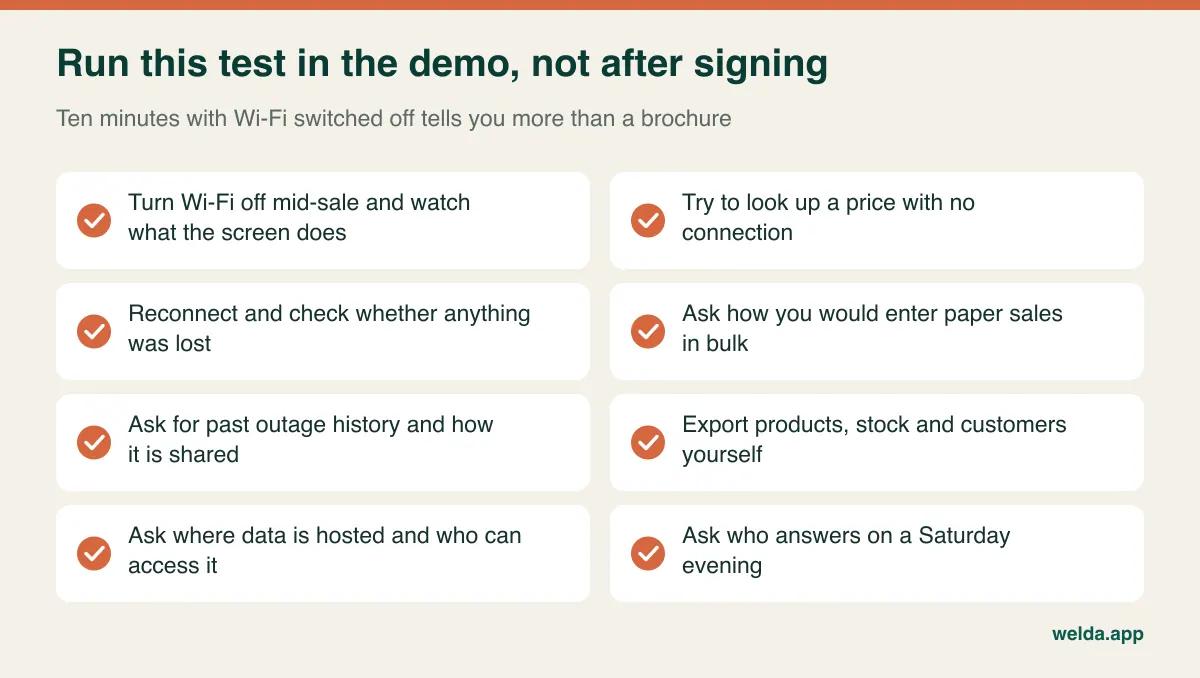
End with the question that tells you the most: "Given this log, would you recommend your product to me?" A vendor who can say "maybe not until you fix that line" is one you can believe on other topics too.
Where Welda Stock fits, including its limit
Welda Stock is cloud inventory software for small business retail, including grocery shops, delis, cafes and similar stores. It runs in the browser with no installation, and transactions go through your internet connection. Our product pages do not describe an offline selling mode, so the backup line and paper routine above apply to our customers just as they apply to anyone else. For shops with unstable connections, we plan the most suitable way of working together during setup. If your log shows long, frequent outages and no usable backup, we would rather tell you that software with true offline selling may suit you better.
With a dependable connection, what you get is real-time stock that falls with each sale, low-stock alerts, fast barcode checkout and automatic reading of scale barcodes, customer credit and supplier debt tracking, profit margin per product, separate permissions for cashiers, stock staff and managers, and multiple branches and warehouses under one account. Excel import and team training come with setup, which we usually complete the same day. Records are stored encrypted and are not shared with third parties. Our pages do not list fiscal certification or online store integrations, so if you need either, raise it in the first conversation and get the answer in writing.
Pricing depends on your number of users, locations and products, and it gets settled in a free consultation. Bring your fourteen-day log along, and we can look together at whether cloud inventory software makes sense on your connection today.
Frequently asked questions
Will I lose sales data if the internet goes down?
Sales already saved are held on the provider's servers and are not affected. The vulnerable item is the transaction in progress when the line drops. Once you are back online, check the recent sales list to see whether it saved before you enter it again.
Is a phone hotspot enough as a backup?
For a single-till shop with short, occasional outages, usually yes, provided the phone is on a different network from your main line, gets good signal at the till and stays in the shop. A plan that relies on one employee's personal phone stops working on that employee's day off. With several tills or frequent outages, a dedicated router with its own SIM is the sturdier option.
How much internet speed does cloud inventory software need?
Scanning and saving sales use very little data, so stability matters more than speed. The trouble usually comes from what else is on the line: guest Wi-Fi, security cameras and streaming music can all saturate it at peak times. If possible, connect the till by cable and put guests on a separate network.
Is desktop inventory software safer than cloud?
It is safer against internet outages and riskier against hardware failure, theft and neglected backups. With desktop software you become the person responsible for backups and updates. Which option is safer depends on which of those risks you can actually manage.
Can several staff keep working if one location loses its connection?
With cloud software, other locations generally keep working because each has its own line. The disconnected site stops recording until it is back online, which means shared stock figures may be out of date for a while. Plan for each location separately, with its own backup line and its own copy of the routine.
What should I do before contacting a vendor?
Start the fourteen-day log today, test a second network's signal at your till, and note whether customers pay mainly by card or cash. With those three facts you can skip the generalities in any demo and get an answer about your own shop.