Welda Stock
Deli Software
From counter to till, your whole deli on one screen
From cheese to olives, delis carry a wide range of products and most of them move fast. Tracking what is left in a notebook or by eye means shortages noticed too late, forgotten orders and counting discrepancies.
Welda Stock tracks every product movement in your deli in real time: stock decreases as you sell, and you receive alerts when items reach critical levels. You close the till with a daily report and follow supplier balances on a single screen.
Welda Stock
Demo screens from the app
The screens below are from the real app, with sample data tailored to this sector.
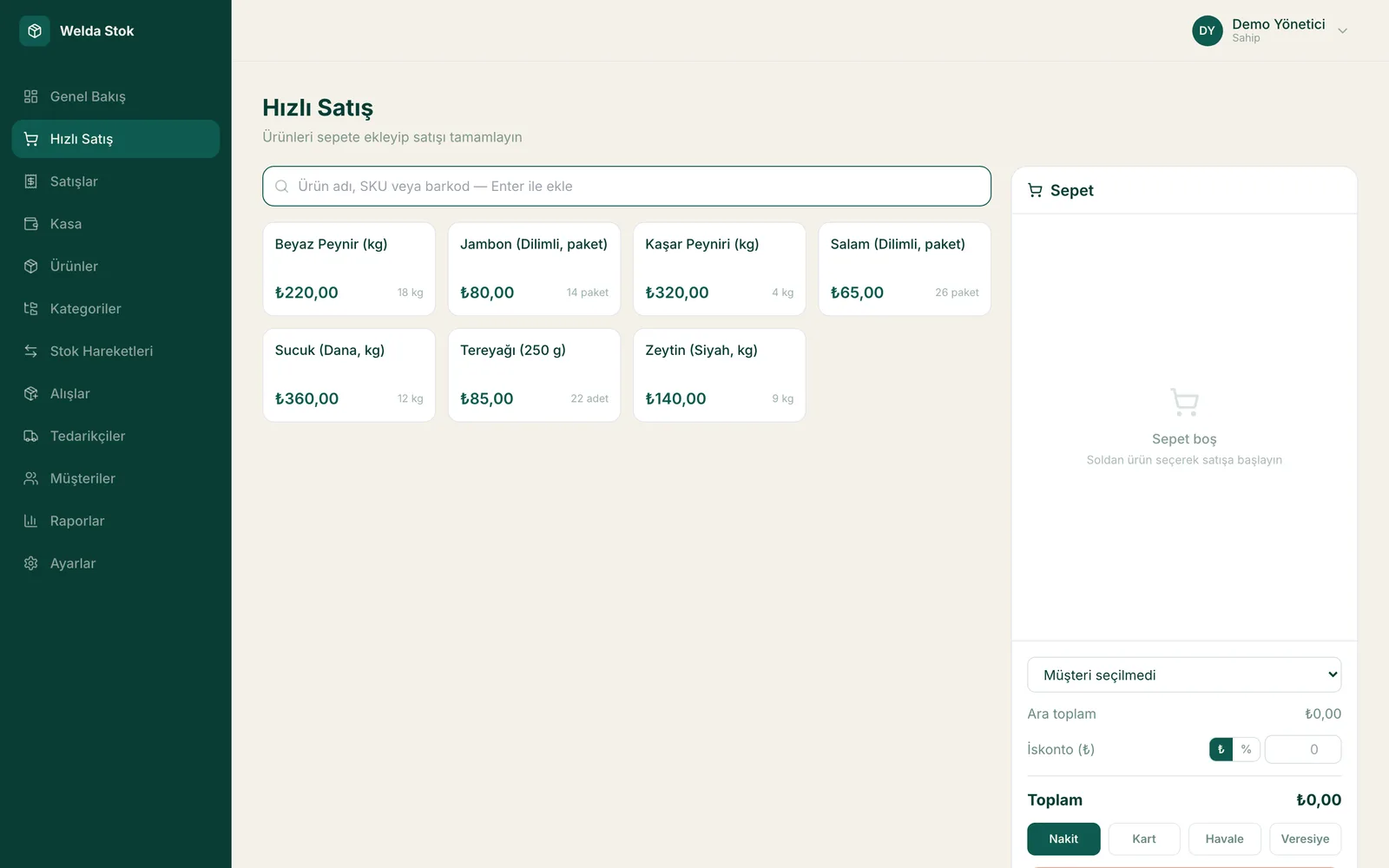
Fast checkout (POS)
Challenges
The challenges of running a deli
Fast-moving products
With daily and fresh goods, shortages are noticed late; an empty shelf is a lost sale.
Many suppliers
Cheese, olives, wholesale goods… Invoices and balances end up scattered.
Credit kept in a notebook
Neighbourhood customers buy on credit; pages get mixed up and balances get disputed.
End-of-day reconciliation
The till is counted by hand; the gap between sales and cash stays invisible.
The Solution
What Welda Stock solves in your deli
Live stock with critical-level alerts
Product movements are recorded automatically; items running low are listed before you ask, so you order on time.
Fast checkout screen
During busy counter hours, sales are recorded in seconds and the customer receipt is printed instantly.
Supplier and credit management
Supplier invoices and payments stay on record; customer credit is tracked per customer with its balance.
A day at your deli with Welda
Weighed sales at the counter
A customer asks for 350 grams of feta and half a kilo of olives. You weigh the items and scan the scale label; Welda Stock reads the weight and price from the barcode, records the sale in seconds, prints the receipt and deducts the exact weight from stock.
Invoices from cheese and olive suppliers
Several suppliers deliver every week. When you enter an invoice on the supplier's account, the goods are added to stock and your balance with that supplier is updated. Each payment you record lowers the debt, so you always know what you still owe without waiting for month-end.
Evening close and tomorrow's order
When you close up, the end-of-day report shows the day's sales, collections and till position. On the same screen you find the list of products that have dropped below their critical level, so you plan the next morning's order from real stock figures instead of guesswork.
FAQ
Frequently asked questions
Can I get an end-of-day till report?
Yes. The daily closing report shows that day's sales, collections and cash position on a single screen.
Can I move my credit notebook into the software?
Yes. Migrating your existing customer and credit records is included in setup; per-customer balance tracking starts right away.
I work with several suppliers — can I track their invoices?
Yes. You record supplier invoices and follow debts and payments per supplier in an organized way.
How much does the deli software cost?
Pricing is tailored to the size and needs of your business. There is a one-time setup fee; in a free consultation we'll learn what you need and work out the price together.
Can my cashier change prices or see reports?
You decide. Separate permission levels are set for cashier, stock manager and administrator; for example, the cashier only sells, while reports and profit margins stay visible to the administrator only.
If I open a second deli, will the same software cover it?
Yes. With multi-branch support each location's stock is tracked separately, and you see sales and stock for all branches from one account. You simply add the new branch to your existing account.
Guides
Guides for Deli businesses
- Deli POS Software: How to Choose by Scale Labels, Margin and WasteChoosing deli POS software comes down to three tests: does it read your own scale labels, does it show margin on what you can actually sell, and can you log loss by cause? A buying guide for counters that sell cheese and charcuterie by weight.
- Preventing Retail Shrinkage: Causes and FixesRetail shrinkage from spoilage, breakage, theft and recording errors should stay under 1-2% of revenue in a healthy store. Here are the causes and fixes.
- Free Grocery Store POS Software: When It Is Enough, When It Is NotFree POS can carry a small grocery store, until staff, scale labels or a dead till computer enter the picture. Decide using backups, support and how the free is funded.
- Grocery Store POS Cost: How to Read a Quote Line by LineGrocery store POS cost is the sum of licence, setup, hardware, lanes or users, and support, with card fees alongside. Here is how to compare quotes over three years.
- POS Software with Scale Integration: What to Test Before You BuyLooking for POS software that works with your label-printing scale? Learn how to identify your barcode format, what hardware to check, and the ten-label test to run before you buy.
Before you decide
- Spreadsheet vs Inventory Software: Where Each One Fits
- POS-Only Software or an Integrated Inventory and Sales System?
- Desktop or Web-Based Inventory Software: Which Fits Your Shop?
- Free Tools or Professional Inventory Software? An Honest Comparison
- Paper Credit Book vs Digital Account Tracking: An Honest Comparison
- Welda Stock pricing
Run your deli with Welda Stock
Request a free demo; setup, data migration and training are completed by our team the same day.
- Free consultation
- Same-day reply on business days
- Ongoing support
Prefer not to fill in a form?