Welda Stock
Clothing Store Stock Software
Every size and color with its own barcode, without counting them one by one
In a clothing store no product stands alone: the same model sits on the shelf in several sizes and colors. If you only notice which size sold out or which color is left over at the end of the season, you lose sales and tie up stock.
In Welda Stock you set up each size and color as its own product with a dedicated SKU and barcode, so you see in real time how much of each size is left. You sell in seconds by scanning a barcode, follow stock distribution across stores from one panel, and base end-of-season pricing on your per-product profit margin.
Welda Stock
Demo screens from the app
The screens below are from the real app, with sample data tailored to this sector.
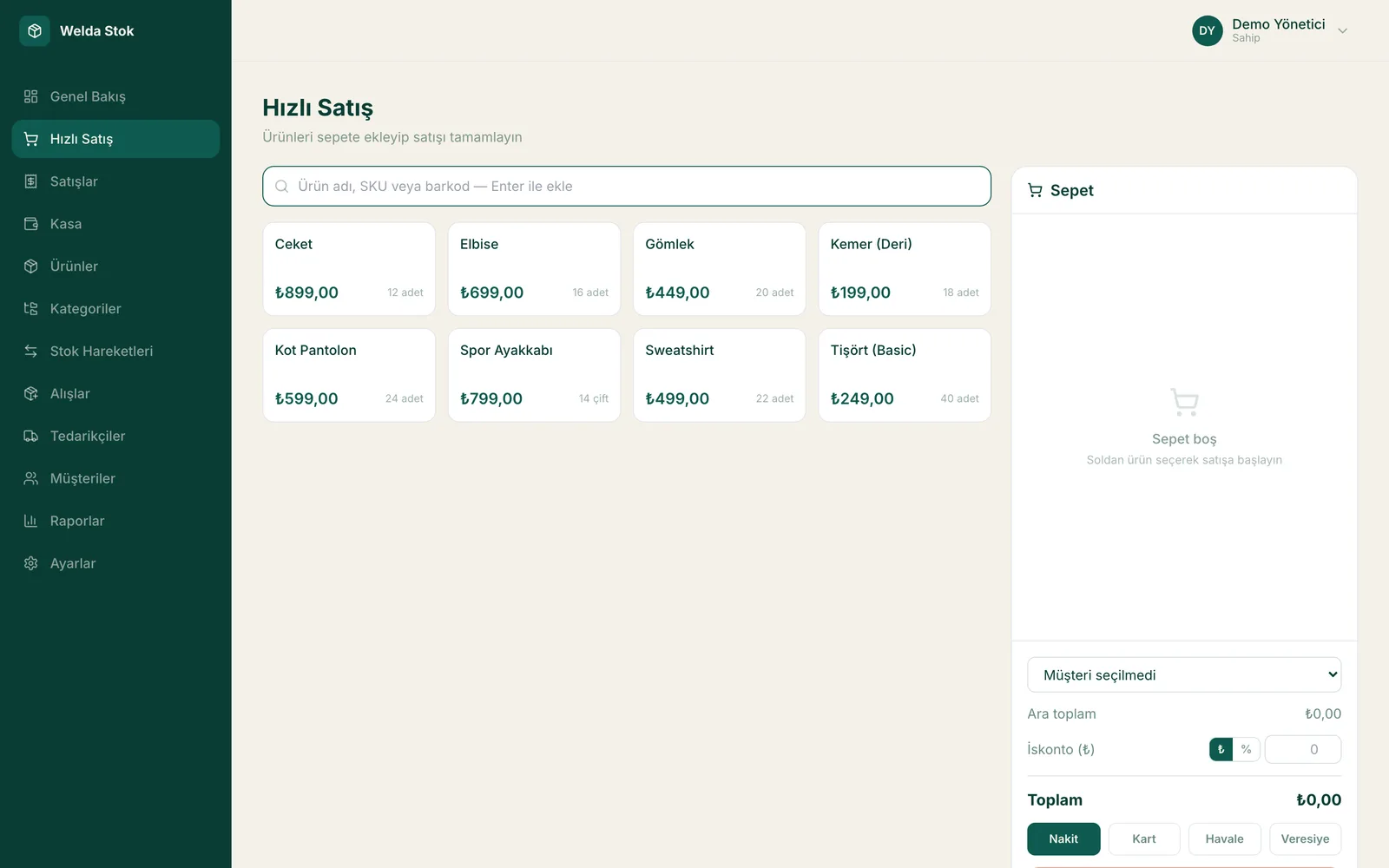
Fast checkout (POS)
Challenges
The challenges of running a clothing store
Size and color variants
The same model sits on the shelf in dozens of size-color combinations; tracking what is left by hand is impossible.
Season and collection turnover
Buying a new collection without knowing what is left over from the previous season locks up capital on the shelf.
Discount and price management
Eyeballing end-of-season discounts erodes the margin; how far you can mark down each item stays unknown.
Multiple stores and transfers
A size sold out in one store may sit in another while stock distribution stays invisible, and sales are lost.
The Solution
What Welda Stock solves in your clothing store
Stock and barcodes per size and color
Each size and color has its own SKU and barcode; scan to sell in seconds and see clearly which sizes are left.
Margins for end-of-season decisions
See per-product purchase-to-sale margins and sales reports, and decide with data how far you can mark each item down at the end of the season.
Multiple stores and profitability
Track stock distribution across stores and see your margin and sales reports per product and per store in one click.
A day at your clothing store with Welda
Booking in the new season
New-season T-shirts arrive in four sizes and three colors. You set up each size-color combination with its own SKU and barcode and import the list in bulk from Excel. When the supplier invoice is entered, stock and the amount you owe are updated at the same time.
Barcode checkout at the till
A customer buys a navy shirt in M and trousers in L. Scan the labels and the sale is completed in seconds, the receipt is printed, and only the stock of that exact size and color goes down. You see at the moment of sale which size has reached its critical level.
Checking stock across stores
The size a customer wants has sold out in this store. From one panel you check the stock of your other branches and tell the customer straight away where the item is available. At the end of the season, per-product margins help you decide how far each item can be marked down.
FAQ
Frequently asked questions
How do I track different sizes and colors of the same product?
You set up each size and color as its own product with a dedicated SKU and barcode; when you sell, only the scanned item's stock decreases, and you see in real time how much of each size is left.
Can I see my margin when I discount at the end of the season?
Yes. You update sale prices per product, and per-product margin analysis shows how a markdown affects profitability, so you can decide how far to reduce each item.
I have more than one store; can I see stock from one place?
Yes. Multi-store support lets you track each store's stock and sales separately or together, and see which size is in which store.
How much does the clothing store stock software cost?
Pricing is tailored to your business based on your number of stores and users. There is a one-time setup fee and no hidden costs. We send a quote within 24 hours.
Can I import my existing product list and barcodes?
Yes. You import products, barcodes, stock per size and color, and prices in bulk from Excel. Our team helps you with the data transfer during setup.
Can I give sales assistants limited permissions?
Yes. You set separate permission levels for cashier, stock manager and administrator. Sales staff only sell, while purchase prices, profit margins and reports remain visible to the administrator.
Guides
Guides for Clothing Store businesses
- Website for Boutiques and Clothing StoresHow should a boutique clothing website handle size charts, stock info, and mobile shopping? The e-commerce-vs-showcase decision, plus 2026 pricing.
- How Do You Set Product and Service Pricing Strategies?Pricing blends cost-plus, competitor-based and value-based methods. Here's how smart price increases and pricing psychology protect your margin.
- How to Set Up a SKU and Product Coding SystemA SKU is the alphanumeric code that uniquely identifies each product variant; a category-brand-variant template built around it cuts search and count time in half.
Before you decide
- Spreadsheet vs Inventory Software: Where Each One Fits
- POS-Only Software or an Integrated Inventory and Sales System?
- Desktop or Web-Based Inventory Software: Which Fits Your Shop?
- Free Tools or Professional Inventory Software? An Honest Comparison
- Paper Credit Book vs Digital Account Tracking: An Honest Comparison
- Welda Stock pricing
Run your clothing store with Welda Stock
Request a free demo; product list migration and team training are included in setup.
- Free consultation
- Same-day reply on business days
- Ongoing support
Prefer not to fill in a form?