Welda Stock
Grocer Software
From the credit book to the end-of-day count, all on one screen
Running a grocery shop is built on trust: neighbours buy on credit and settle at the end of the month. But notebooks wear out, pages get mixed up and forgotten entries cause disputes. Stock, meanwhile, is managed by eye.
Welda Stock moves your credit book into digital: who bought what, when, and what their balance is — you see it in one tap. Sales are deducted from stock automatically, and you close the till with a daily report.
Welda Stock
Demo screens from the app
The screens below are from the real app, with sample data tailored to this sector.
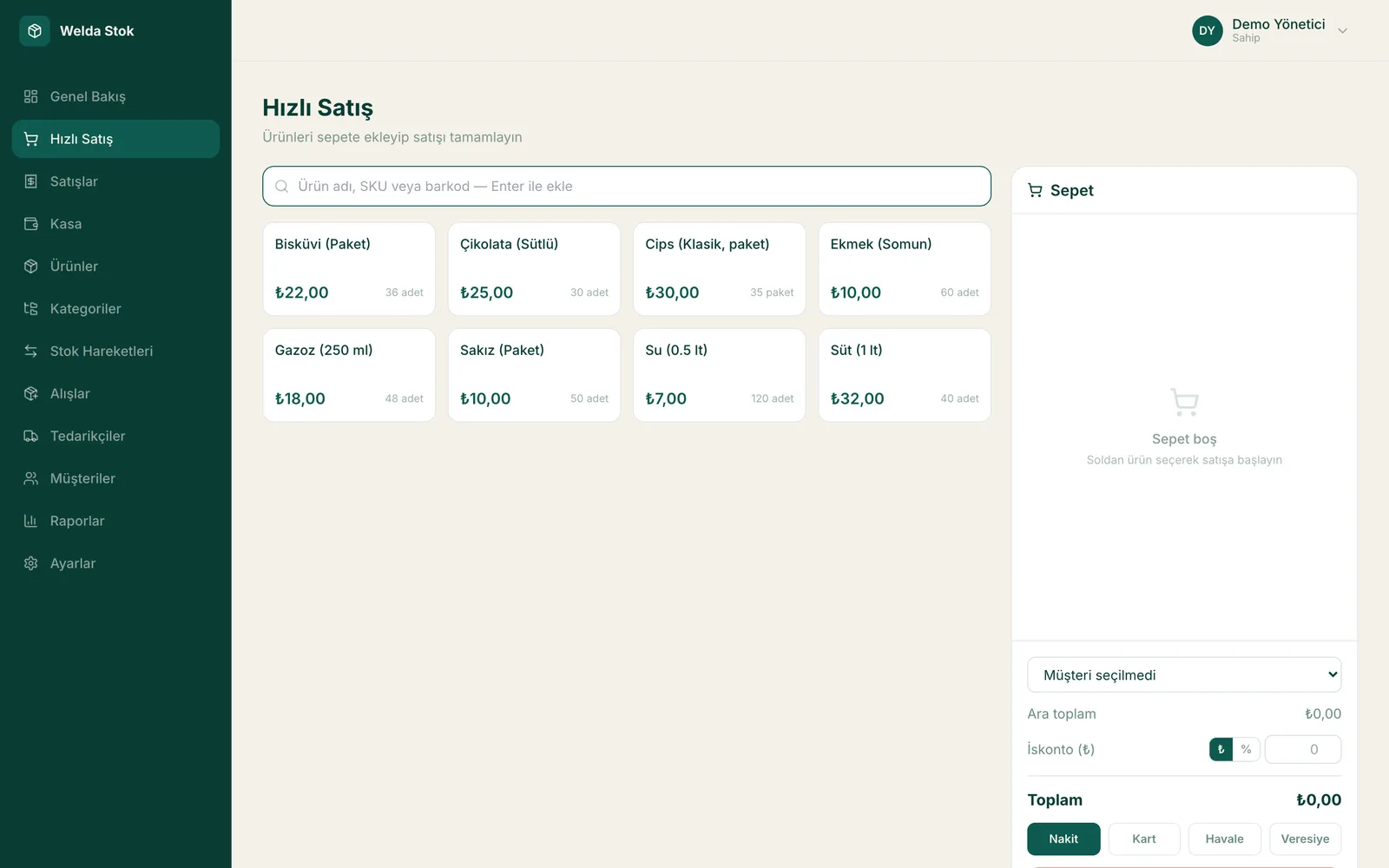
Fast checkout (POS)
Challenges
The challenges of running a grocery shop
A messy credit book
Hand-kept balances go stale; collections are forgotten and disputes arise with customers.
Stock by eye
What is left of which product is only known by checking the shelf; shortages are noticed late.
End-of-day arithmetic
Whether the cash in the till matches the day's sales is worked out by hand.
A one-person operation
The owner runs everything alone and has no time for complicated software.
The Solution
What Welda Stock solves in your shop
Digital credit and account tracking
Per-customer credit records, balances and collection history on one screen; notebook chaos ends.
Fast, simple checkout
You record a sale in seconds; the interface is simple and needs no technical knowledge.
Stock alerts and daily report
Items running low are listed automatically; your sales and till report is ready at the end of the day.
A day at your grocery store with Welda
Store credit for a regular
A neighbour picks up bread, milk and detergent and asks you to put it on their tab. You scan the items and post the sale to the customer's account, and the balance updates immediately. When they pay at month-end you record the payment, and the remaining balance and full purchase history appear on one screen.
Delivery from the wholesaler
The wholesaler brings the weekly order. When you enter the invoice on the supplier's account, the products are added to stock and your debt to the wholesaler is recorded. Make a partial payment and the remaining balance is calculated automatically, so you never have to remember which invoices are settled.
Closing the till and the shortage list
When you close the shop, the end-of-day report shows cash sales, credit sales and collections separately. Products that have fallen below their critical level are listed too, so you already know what to tell the wholesaler tomorrow without walking the shelves.
FAQ
Frequently asked questions
I'm not good with computers — can I use it?
Yes. The interface is kept simple, and during setup our team installs the software with you and shows you how to use it hands-on.
Can I migrate my credit notebook?
Yes. Transferring the customer and balance records from your notebook is included in setup.
How do I see a customer's balance?
Open the customer card and the current balance, purchase and collection history are listed on a single screen.
How much does the grocer software cost?
We offer accessible, business-specific pricing for small shops. There is a one-time setup fee; we reply with a quote within 24 hours.
What hardware does a grocery store need?
A computer with an internet connection and a standard barcode scanner are enough. The software is web-based and needs no installation; you log in from your browser and start working. We recommend a stable internet connection.
Can I check sales when I am not in the shop?
Yes. Because it is web-based, you can log in from any other computer with a browser and see the day's sales, stock levels and customer credit balances.
Guides
Guides for Grocer businesses
- Corner Shop Profit: Which Products Actually Make You Money?High sellers that earn little, slow sellers that block the shelf: how to use sales and stock data to find corner shop profit by product and product group.
- How to Choose a POS System: Cash Register vs. SoftwareBarcode scanning, stock integration and the right hardware all shape your revenue. Learn the real difference between a fiscal cash register and a software POS.
- Practical Ways to Increase Customer LoyaltyWinning a new customer costs more than keeping an existing one. Simple but effective methods that boost loyalty.
- What Is Inventory Turnover Ratio and How Do You Calculate It?Inventory turnover shows how many times your stock sells and is replaced in a year. Calculate it by dividing cost of goods sold by average inventory value.
- Preventing Retail Shrinkage: Causes and FixesRetail shrinkage from spoilage, breakage, theft and recording errors should stay under 1-2% of revenue in a healthy store. Here are the causes and fixes.
- How Do You Set Product and Service Pricing Strategies?Pricing blends cost-plus, competitor-based and value-based methods. Here's how smart price increases and pricing psychology protect your margin.
Before you decide
- Spreadsheet vs Inventory Software: Where Each One Fits
- POS-Only Software or an Integrated Inventory and Sales System?
- Desktop or Web-Based Inventory Software: Which Fits Your Shop?
- Free Tools or Professional Inventory Software? An Honest Comparison
- Paper Credit Book vs Digital Account Tracking: An Honest Comparison
- Welda Stock pricing
Run your shop with Welda Stock
Request a free demo; setup, credit-book migration and training are completed the same day.
- Free consultation
- Same-day reply on business days
- Ongoing support
Prefer not to fill in a form?