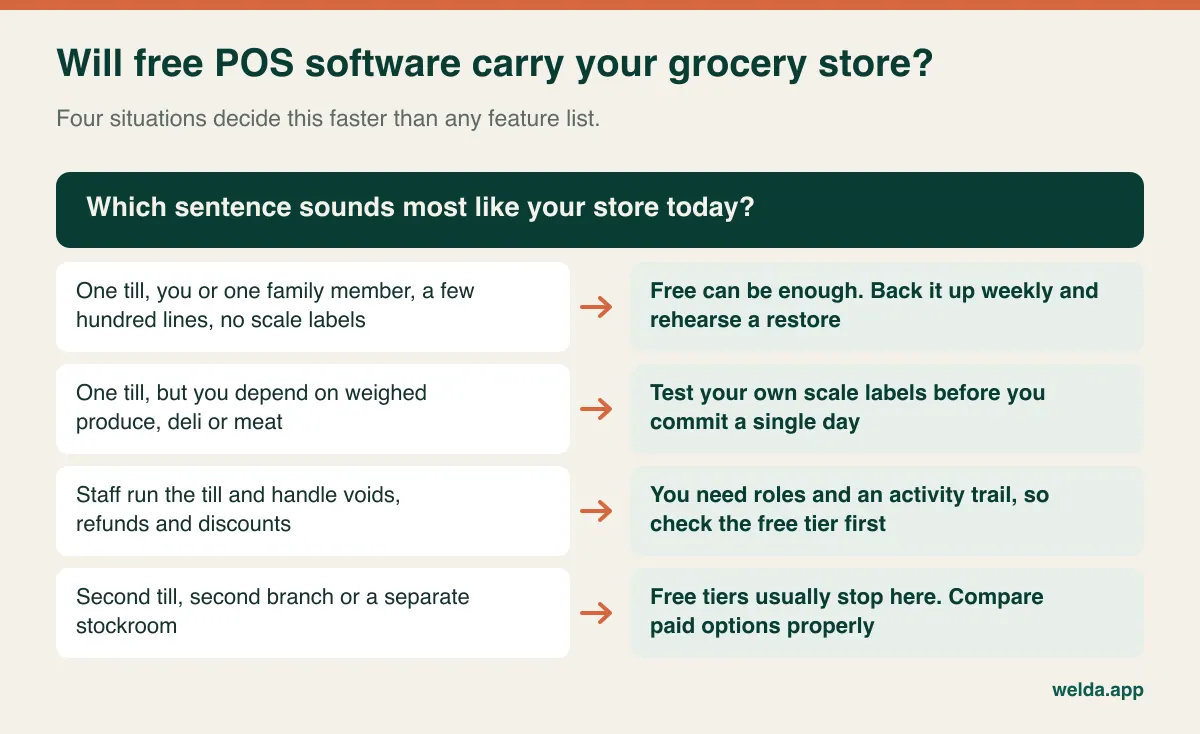
Free grocery store POS software is usually enough for a single-till shop with a few hundred packaged lines where the owner or one trusted person runs the counter. It stops being enough when staff handle refunds unsupervised, when you sell weighed produce or deli items through scale labels, when you add a second till, or when a lost day of trading would genuinely hurt. So the useful question is not which free product has the longest feature list. It is who gets your data back when the computer dies, who answers when the till fails during the evening rush, and how the "free" is actually being paid for.
This guide is for owners of small grocery stores, corner shops and convenience stores who have looked at free downloads or free tiers, and perhaps already installed one. We work through the situations a grocery store runs into, then show where free honestly holds up, then cover how to read paid quotes if you decide to move on. Concluding that free is fine for you right now is a perfectly reasonable result of reading this.
Start with the business model, because it predicts the limits
Software costs money to build and to keep running. If you are not paying for it directly, it is funded some other way, and that funding model tells you more about your future than the marketing page does. In the grocery POS market you will generally meet four arrangements, and they are not interchangeable.
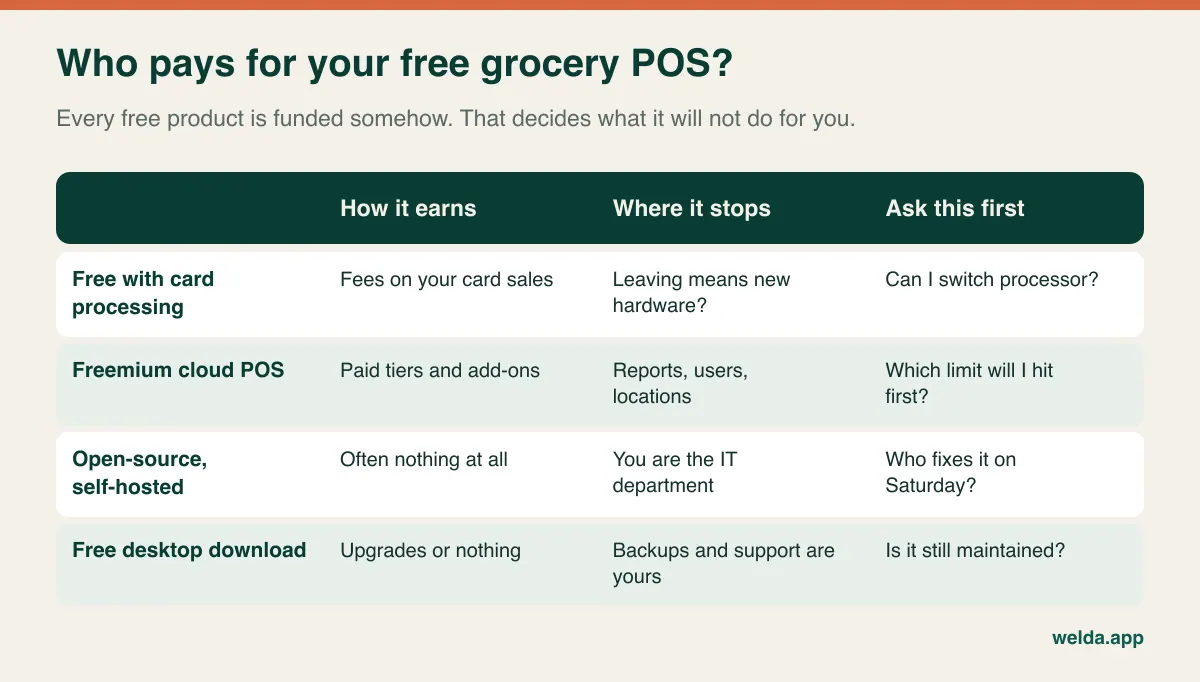
Software funded by card processing can be a good deal if the rates suit you, but your software decision and your payment decision have become one decision. Ask whether you can bring your own processor, whether the card reader works anywhere else, and what happens to your data if you leave. A low-margin grocery basket makes this question sharper than it would be in a clothing store, because a small percentage on a thin margin is a large share of what you keep.
Freemium cloud POS is a sales funnel, and there is nothing wrong with that. Just find out which wall you will hit first. Common candidates are advanced reports, extra users, more locations and inventory features. If the wall is the exact feature you need in month two, you are effectively on a trial without a date attached.
Open-source and free desktop products can be solid, and they do not depend on a vendor staying interested in your account. The trade is that you are the IT department. For a store owner who enjoys this, or who has a reliable technician, that is fine. For one who has never opened a database file, it is a risk you should name out loud.
The morning the till computer will not start
With many installed free products, the store's memory lives on one disk in one computer: products, barcodes, prices, stock quantities, sales history. That setup has a real advantage, since it can keep selling when the internet drops. It also has an obvious weakness.
Picture it. The bread delivery has arrived, you have opened up, and the till computer shows a black screen. The drive may have failed, a power cut overnight may have corrupted something, or malware may have locked your files. Customers are at the door and you are writing sales on a notepad. That day is annoying but survivable. The real question is what you restore from. If the last backup is three weeks old, then three weeks of price changes, new lines and stock movements have to be rebuilt by hand.
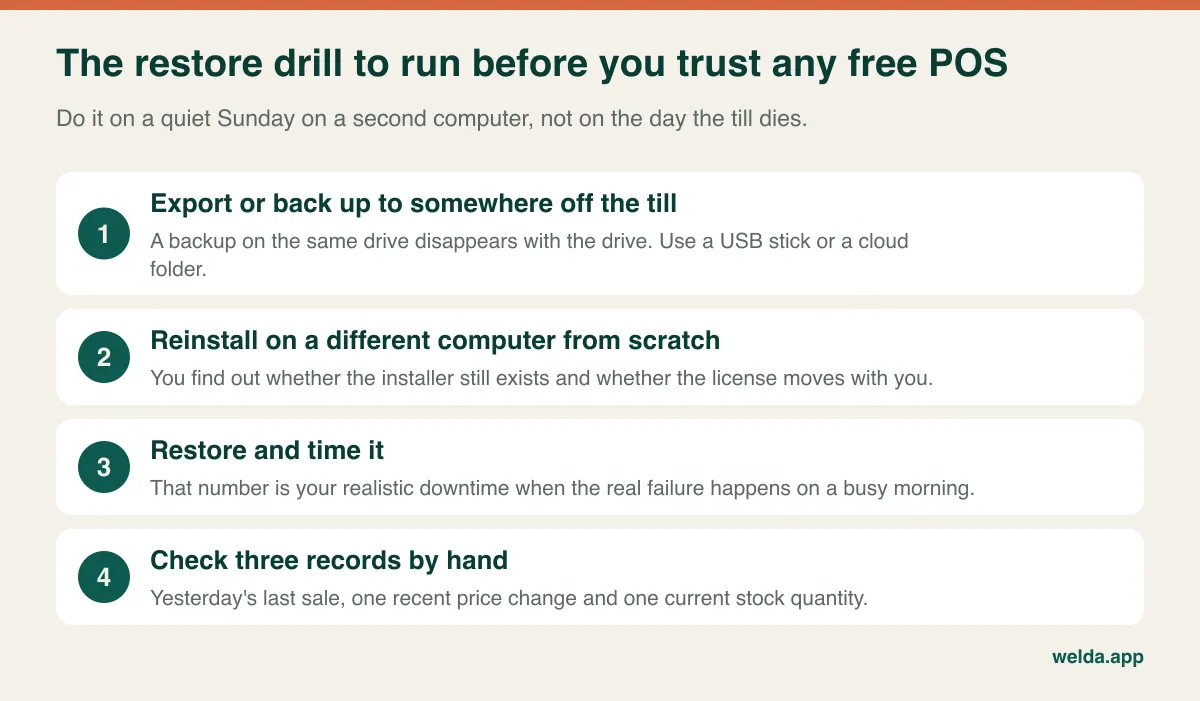
This drill costs you a Sunday afternoon. It tells you whether the installer can still be downloaded, whether the license follows you to a new machine and how long you would really be closed. If the drill fails, do not use that product as your main record. A cloud product changes the shape of the risk rather than removing it: ask how you get a complete export of your data and what happens to your account if you stop paying or the free tier is withdrawn.
While you are at it, set up a one-page recovery sheet taped inside a cupboard: printer and scanner models, a technician's number, where the backup lives, and how to take cash sales on paper for a few hours. Writing that takes twenty minutes and pays off precisely when you can least afford to think clearly.
Grocery's own stress test: the supplier price rise
A grocery store lives with something a salon or a dental practice does not: hundreds of low-margin lines whose prices move in batches. A distributor sends a revised list for dairy, a soft drink brand reprices its range, tobacco prices change overnight where tobacco is sold. A price edit screen that looks effortless in a demo becomes a very different thing when 250 lines have to change before you open tomorrow.
There are two separate tests here. First, can the software update prices in bulk from a spreadsheet, or do you open each product one at a time? Second, how do you keep the shelf tag aligned with what the till charges? A shelf showing the old price and a till charging the new one causes the arguments that hold up a queue, and in some jurisdictions pricing accuracy is also a compliance matter, so check your local rules.
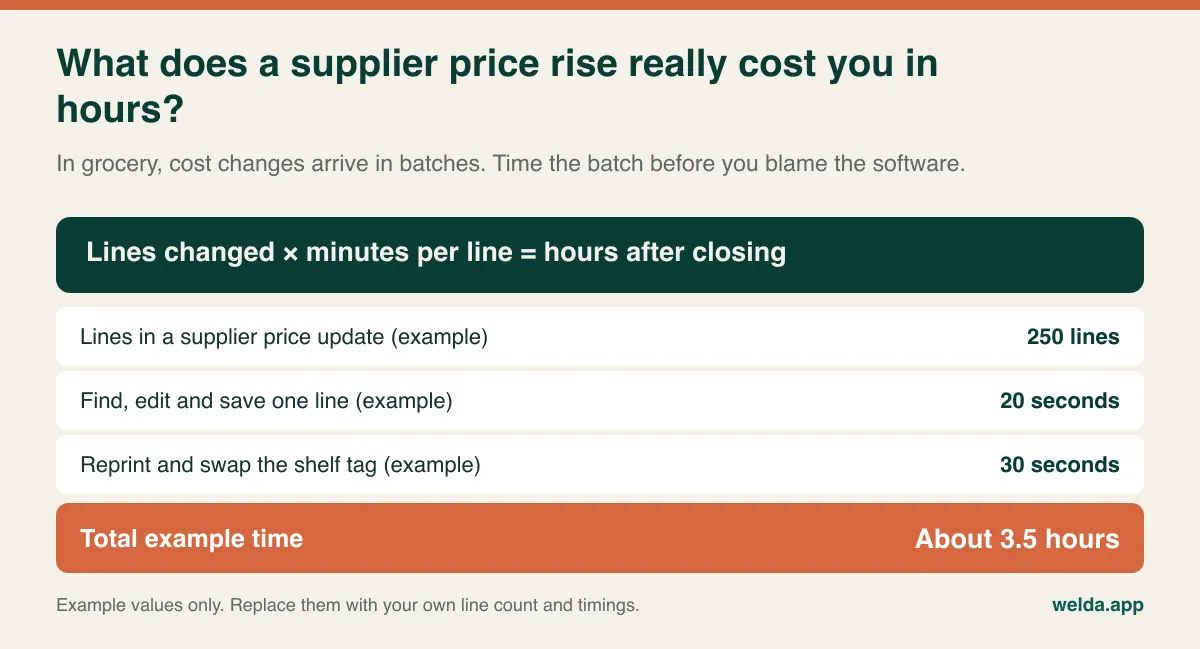
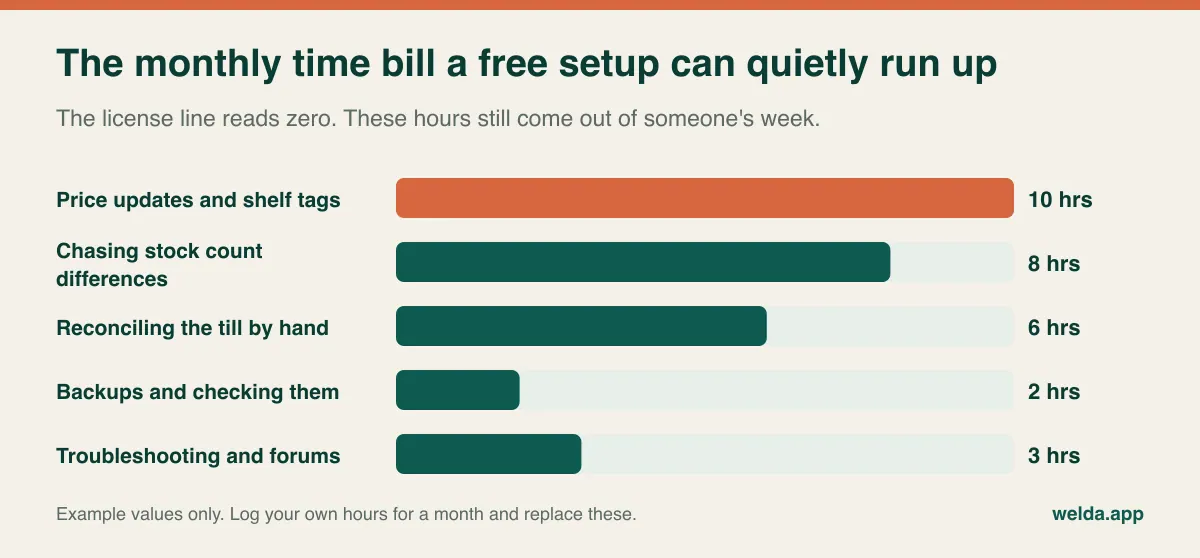
If the answer for your store is a couple of hours once a month, a free product passes this test comfortably. If it is several evenings a month, then the software is free and your evenings are not. Also check what happens to your margin view when costs rise. A POS that records only the selling price cannot tell you that a best-selling line quietly stopped making money after the last supplier increase.
Weighed produce, the deli counter and the test most people skip
Most owners try a free POS on packaged goods. You scan a chocolate bar, the price appears, and everything seems fine. Then the fruit and vegetable section and the cheese counter come into play. For those items the barcode comes from a scale, not from the manufacturer. The digits on the label carry a product code plus either a weight or a price, and the POS has to split those digits correctly.
If you skip this test, here is what can happen. The cashier scans a label and gets "item not found." Under pressure they ring it up as a generic item. The sale completes, but the stock for that cheese never moves and the margin report stops meaning anything. Two months in, you cannot say whether the deli counter makes money.
The test is simple: print ten different labels from your own scale, write down what each one should mean, scan them, and compare. Include a very light item and a very heavy one, and one from each pricing mode you use. Our guide to POS software with scale integration covers this in detail. If you sell no weighed goods at all, skip this section with a clear conscience; free software may never trouble you here.
Other grocery realities deserve the same treatment. Do you sell age-restricted products such as alcohol or tobacco? See whether the screen prompts the cashier or leaves it to memory. Do you buy by the case and sell by the unit? See how a delivery is received, because a wrong conversion puts your stock figures out by a factor of twelve or twenty-four. Do you take vouchers or benefit schemes that apply where you operate? Ask how they are handled before you assume they are.
Refunds, voids and the cashier you did not have last year
While you are the only person behind the counter, permissions do not matter. The day you hire someone, they matter a lot, even if you trust that person completely. It is rarely about dishonesty alone. Without separate roles, honest mistakes cannot be traced either, and a till that comes up short at the end of the day has no explanation.
Look for three things. Can you limit a cashier to selling, keeping refunds, voids and discounts for a manager? Does each action record who did it and when? Can you remove a former employee's access in a single step? Free tiers often treat these as business features, so check before you assume. If you want the wider picture on stock losses of this type, our piece on preventing retail shrinkage goes further.
What "no support" feels like at 6 p.m. on a Saturday
Support looks like filler on a comparison chart until the receipt printer stops or the scanner starts dropping a digit with eight people in the queue. With many free products, your route to help is a community forum, a knowledge base or an email queue. That is no scandal; it is what a business model with no payment from you can realistically offer.
So be practical. Is there someone you can call, a capable relative or a local technician, who will actually pick up on a Saturday? If yes, the lack of vendor support matters much less. If not, then fifteen minutes of a stopped till at your busiest hour is the true price of the free license. When you weigh that, use your own trading pattern rather than an average.
Updates belong in the same conversation. An actively maintained product may push an update at an inconvenient time, so schedule them after closing and back up first. An abandoned product is quieter and more dangerous: everything works until you replace the computer, or the operating system changes, or the printer dies and the new one has no driver. Then you discover that the software will not start and your data is locked inside it. Before installing, look up when the last release shipped. A long silence is itself an answer.
Rules and privacy do not get cheaper with the software
This section is general information rather than legal advice, and rules differ considerably between countries. Still, a few principles travel well.
- Tax and fiscal rules: Several countries require certified or registered cash registers, specific receipt content, or real-time reporting to the tax authority. A free product built for one market may not meet another's rules. Ask a local accountant before relying on it as your legal till record.
- Tax rates: Groceries are often taxed at different rates from household goods or alcohol. Test a mixed basket and check the receipt line by line. Ask how you would change a rate across many products if the rate changes.
- Card data: If you take card payments, keep them in a certified terminal or processor rather than typing card numbers into anything. Ask who is responsible for card security compliance in the setup you choose.
- Customer data: A loyalty list or customer accounts with names and phone numbers are personal data under laws such as the GDPR. Free software does not reduce your duty to control access and keep the list tidy.
- Record keeping: Sales records usually have to be retained for years. Removing the program does not end that obligation, so export before you uninstall.
- Weighing: Scales used for trade are generally regulated. The software does not make a scale legal for trade, so ask your supplier or local authority.
Who should honestly stay on free for now
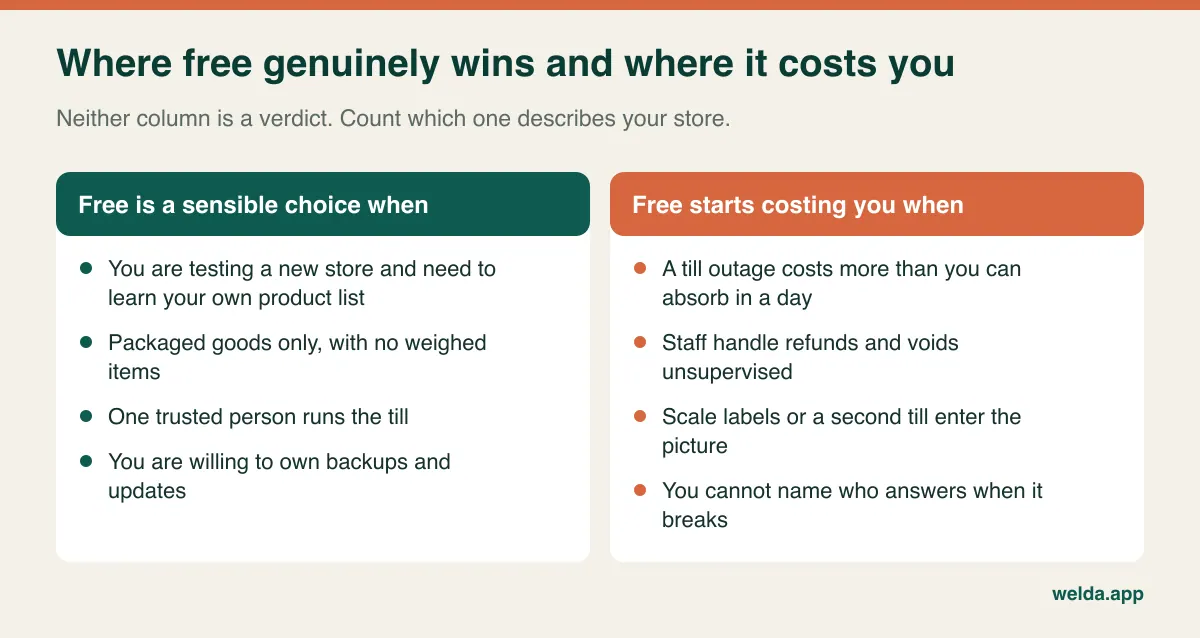
Having listed the risks, here is the other side. Free is a sensible decision in more cases than vendors of paid software tend to admit. If you have just opened and do not yet know your own range, learning it on a free tool is cheaper than buying a system configured around guesses.
| Your situation | Stay on free | Start looking |
|---|---|---|
| Who runs the till | You or one trusted person | Rotating staff who need limited permissions |
| Range | A few hundred lines, occasional price changes | Thousands of lines, regular batch price rises |
| Weighed goods | None | Produce, deli or nuts sold through scale labels |
| Downtime | A day on paper would be unpleasant but fine | A day on paper would disrupt payments or suppliers |
| Technical help | Someone reliable, backups already running | Nobody, and it all waits for you |
| Growth | One location, no plan to change that | Second till or branch within the next year |
Two ticks on the right do not mean you must switch today, but they do mean it is time to collect quotes while nothing is on fire. Three or more mean that staying on free is now a risk that looks like a saving. If you are moving from a notebook or spreadsheet rather than from a free POS, our guide to moving from Excel to inventory software covers the preparation.
Seven days with your own store's data
The big advantage of free is that testing costs nothing, so use it fully. A test with three sample products tells you almost nothing. Spread this list across a week, and you will come away with an informed opinion of the free product and a yardstick for anything you consider later.
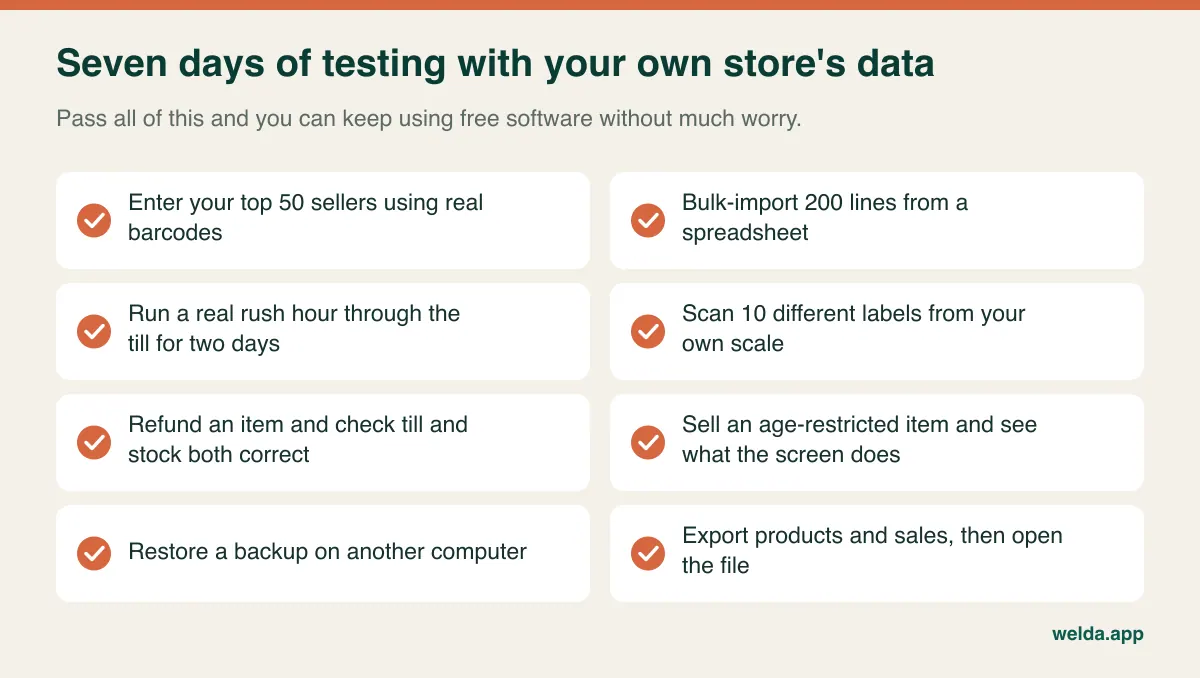
Two mistakes come up constantly. One is testing on a quiet Tuesday afternoon, when any system looks fast. Try the busiest slot you have instead: payday evening, or the day before a public holiday. The other is skipping the opening stock count on the grounds that it will sort itself out. If the starting figure is wrong, every sale subtracts from a wrong number. Within a month, nobody believes the screen. You do not have to count the whole shop; starting with your top fifty sellers gets the useful part right.
Reading a paid quote without getting lost
If you decide to move on, resist starting with the headline figure. Amounts vary too much by store for a published number to help, and quotes are frequently not comparing the same thing. Put these items side by side instead.
| Item | Question | Why it matters |
|---|---|---|
| Pricing model | One-time or recurring? What happens at renewal? | Decides the total over several years |
| Tills, users, locations | Does each extra one cost more? | Shows what growth will cost |
| Card payments | Tied to one processor, or can I choose? | Fees can outlast any license |
| Data transfer | Who moves what comes out of the old system? | A common surprise extra |
| Hardware | Do my scanner, printer and scale still work? | New devices change the total |
| Support | Which hours and channels, and is it included? | Saturday evening is the real test |
| Exit | If I leave, how do I get my data? | Cheapest to ask on day one |
In a demo, ask to see fifty lines of your own product list imported, one of your own scale labels scanned, a restricted cashier role created and a batch price change carried out. Prepared demo data always looks tidy; yours will not. For the broader criteria, see how to choose a POS system. When you do move, export everything first, clean out duplicates and dead barcodes, pick a quiet day well away from a holiday, count your fast movers that morning, and keep the old records readable for as long as your accountant advises.
Where Welda Stock fits, and where it does not
Welda Stock is not free, so treat this as one option among the ones you compare. If you have outgrown free grocery store POS software, our market inventory software is web-based and needs no separate installation. Our product pages describe barcode checkout, automatic decoding of scale labels, stock deducted on each sale, low-stock alerts, stock counts with waste and shrinkage tracking, customer accounts and credit, supplier debt tracking, separate roles for cashier, warehouse staff and manager, multiple branches and per-product margins. Importing from Excel and training for your team are part of setup, which we can usually complete the same day.
Some limits belong here too. Because it is web-based, it works over your internet connection, so a store with an unreliable line should plan for that before setup; an installed desktop product can have the advantage there. Our product documentation does not describe payment terminal integration or certified fiscal functions for specific countries, so we do not claim them here. If your market requires a certified register, ask us directly and have your accountant check the answer. Our customer receipt should not be read as a fiscal document. We can tell you that data is stored encrypted and not shared with third parties; ask about backup frequency and restore arrangements as you would with any vendor.
On pricing, Welda Stock has a one-time setup fee, and the amount depends on your users, branches and product count; we work it out in a free consultation. If a free tool is doing the job for your single-till store, we will happily say so. If scale labels, staff permissions and customer accounts have all arrived at once, you can compare free grocery store POS software with our market inventory software using your own product list in a free consultation, and judge for yourself.
Frequently asked questions
Is there any truly free POS software for a grocery store?
Yes, there are free desktop, open-source and free-tier cloud options. What is free varies: the license may be free while card processing, hardware, add-ons or your own maintenance time are not. Work out how each one is funded before comparing features.
Can free POS handle thousands of grocery products?
Some products cap the number of items and some do not. Even without a cap, searching and batch price changes become the real test as your range grows. Import your complete list and try the till during your busiest hour.
How often should I back up?
A weekly backup can be a starting point for a very small shop; if prices change often or you keep customer accounts, consider daily. It matters even more that the backup sits away from the till and that you have restored it at least once.
Can I start free and migrate later?
Yes, as long as you can get your data out. Try exporting during the first week and open the file to check it. Keep product codes and barcodes tidy from the start. Without an export, you may have to retype products by hand.
What is better during an internet outage, installed or cloud?
Installed software usually keeps selling offline, but you carry the hardware risk yourself. Cloud software keeps the data away from the till, but needs a connection unless it has an offline mode. Welda Stock is web-based, so if your line is unreliable, discuss options such as a backup connection before you start.
Does free POS software meet tax rules?
Sometimes, and it depends on the country and the product. Do not assume that a printed receipt is a compliant one. Tell your accountant which software you plan to use and ask them to check it against the local rules.
Can I try Welda Stock before buying?
Yes. We go through it with you in a free demo using sample data suited to your store. Bring a few lines of your product list and a scale label if you have one, and the conversation will be far more useful.