Before you buy POS software, get written answers to four things: how your data comes out if you leave, who answers when the till stops on a busy Saturday, whether your own scanner, scale and printer actually work with it, and what the contract leaves out. Feature lists from competing products tend to look alike, and these answers are usually where they separate. This POS software buying checklist is meant to be printed and taken into the demo. Each question comes with the reason for asking and a sense of what a good answer sounds like.
Keep one thing in mind throughout: a demo is a rehearsed performance. With tidy products, clean barcodes and an imaginary customer who never returns anything, nearly any system looks smooth. Your job is to drag the conversation back to the messy reality of your shop. We sell software ourselves, so near the end of this article we run our own product through the same list and say plainly where Welda Stock has a clear answer and where you should press us.
Bring your own problems to the demo
The most useful thing you can prepare is a test basket: around twenty items drawn from the awkward sales you actually handle. Ask the salesperson to key these into the demo while you watch, rather than following their own script. A grocery or deli basket might contain a package with a worn barcode, 350 grams of cheese with a printed scale label, loose produce with no barcode, a discounted item, a buy-two-get-one offer, a return with no receipt, a sale paid half in cash and half by card, and a purchase put on a regular customer's account. A clothing shop would add size and colour variants. A convenience store would add the rapid single-item sale that makes up much of its day.
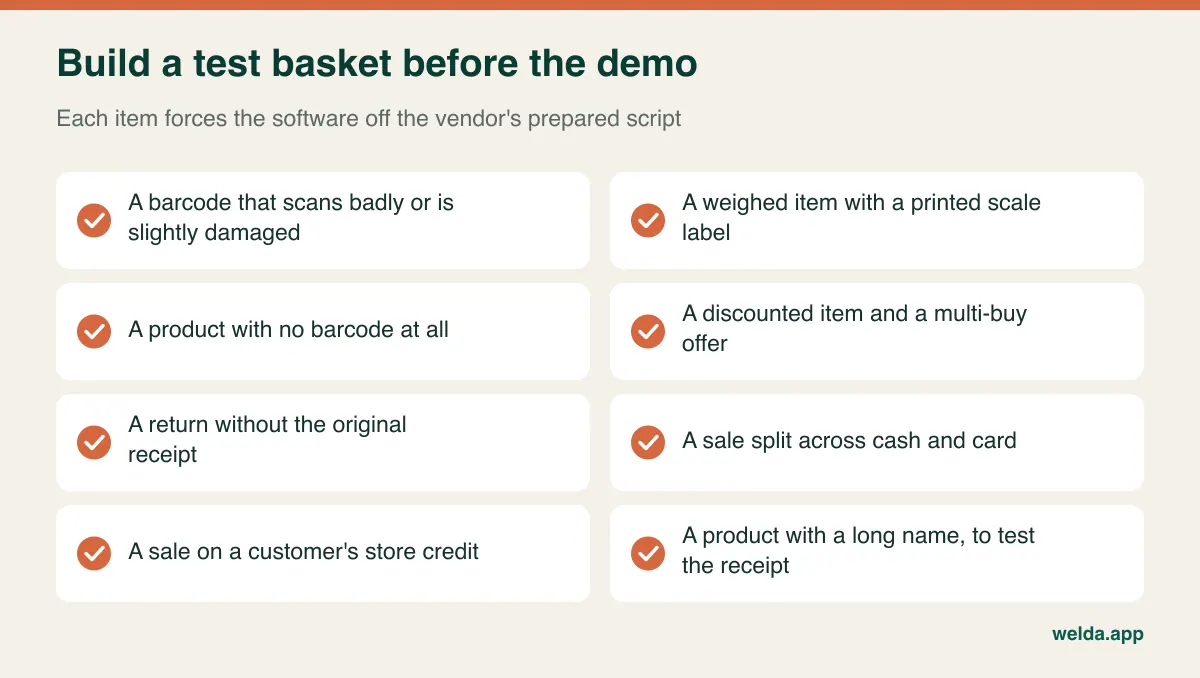
For each sale, watch four things. How many taps did it take? How long did it take to undo a mistake? Did stock actually drop, and on which screen could you see that? Where did the transaction land in the end-of-day report? People skip the last two, but a slick checkout that scatters movements across the reports only delays your problem until closing time.
Next, sign in as a cashier and try to do something a cashier shouldn't: delete a sale, apply a large discount, open the margin report. If it works, ask where permissions are set. Unauthorised discounts and deleted sales are hard to notice in most shops until a stock count comes up short, so this deserves more than a verbal yes. If you can, bring the person who will use the till most. Business owners rarely notice what a cashier spots within a minute, such as how long it takes to find an unbarcoded item while a customer waits.
Finding something the software can't do is not a failed demo. Learning it before signing is the whole point. When a salesperson says “we handle that with a workaround”, write the workaround down and ask your cashier whether it is realistic at peak hours.
Walk the counter, device by device
“Works with all standard hardware” is the usual answer and it is often true in a general sense. It tells you nothing about your specific devices. Send over a list of makes and models beforehand and ask which ones have been tested. Then go through the counter one piece at a time.
Barcode scanner. Most standard scanners behave like a keyboard, so this is often the easy part. Still test a creased label and see how the software responds to a code it doesn't recognise. Scale. This is where trouble tends to hide. Labels can encode weight or price, and formats vary by manufacturer and configuration. A label decoded wrongly means an incorrect amount quietly reaching the till, so hold your real label up to the camera during the demo. Our guide to POS software with scale integration goes deeper. Receipt printer. Check paper width, how long product names wrap, and whether your language's characters print correctly. Cash drawer. Find out whether it opens through the printer and whether it opens on every payment type or just cash. Card terminal. Ask whether the amount passes to the terminal automatically or a cashier types it twice. Double entry produces end-of-day differences, although a separate terminal may be perfectly acceptable in a small shop. The point is to know which arrangement you are buying.
The computer itself. Web-based software needs a supported browser and a reasonable machine, while installed software has its own requirements and update routine. Ask what the vendor recommends and whether tablets are supported for what you plan to do. If new hardware appears on the quote, ask who you call when it breaks: the software vendor, a reseller or the manufacturer.
Decide what an internet outage is allowed to cost you
A POS system differs from most business software in one uncomfortable way: when it stops, customers are standing right there. Some products keep selling offline and sync later. Others depend on the connection. Neither is automatically right. What matters is how your own counter behaves, and it is worth deciding that before you ask any vendor about offline mode, since “does it work offline?” tends to get a confident yes that hides a lot of variation.
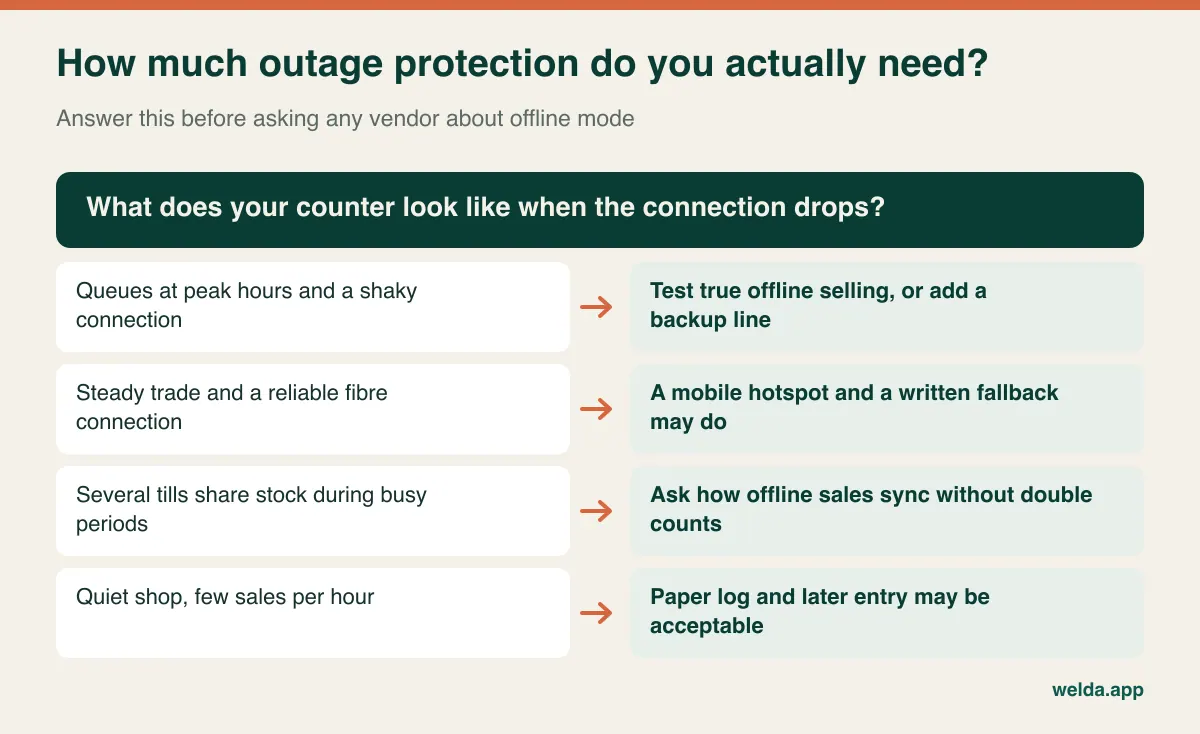
Ask to see it. Disconnect the machine during the demo and try to sell. Can you scan? Can you take card payments? Which functions go dark: customer accounts, stock look-up, reports? Reconnect and see what happens to those transactions. If you run two tills, ask how offline sales from both are reconciled so that the same last item doesn't get sold twice in the records.
If the honest answer is that the software needs a connection, the fix may be simple: a backup mobile line and a short written routine that staff can follow without you. Rehearse that routine once. An outage plan nobody has tried tends to fail at the first busy Saturday. If your connection drops every week, though, this one question may outweigh everything else on the list.
Receipts, tax and payments vary by country, so ask locally
POS software is sold across borders, but the rules around it are not uniform. Some countries require fiscal devices, certified software or real-time reporting of sales to the tax authority. Others leave far more to the business. VAT or sales tax handling, the required contents of a receipt, e-invoicing for business customers and how long records must be kept all differ, and they change. We can't give a verdict on your situation here, and a global salesperson may not be able to either, so ask your accountant first and bring their answer to the demo.
Then ask the vendor directly, in writing: “Is this product a compliant till in my country, on its own, or does it need to run alongside something else?” Follow up with these. Does the receipt it creates count as a tax document where I operate? Does it handle more than one tax rate on a single sale? Can my accountant get the sales and tax data in a format they can use? Has the vendor got customers in my country, and who updates the product when the rules change?
Personal data deserves a question too. A customer account with a name, phone number and outstanding balance is personal data in most jurisdictions, and laws such as the GDPR place duties on you even when a vendor hosts it. Ask where the data is stored, whether there is a data processing agreement, how often backups run and whether a restore has been tested, and how you remove a former employee's access. For card payments, ask who is responsible for the terminal and what the arrangement means for card security obligations such as PCI DSS.
Plan your exit before you enter
It feels odd to discuss leaving a product you haven't bought. But your leverage is highest before signing. Three years on, your business may have changed, the vendor may have dropped the product, or something better may exist. If your data can't come with you, the next system starts empty, and years of product records, customer balances and supplier history stay behind.
Don't ask “can I get my data out?”, because the answer is nearly always yes. Say this instead: “Please share your screen, export the product list and the last three months of stock movements, and let's open the file.” Are barcode, unit, cost and selling price in separate columns? Or is it a nicely formatted report that can't be imported anywhere? A PDF is not an export. Also watch the difference between a balance and a history. “We have 40 in stock” travels easily, but how you reached 40, including write-offs and count corrections, appears only in the movements.
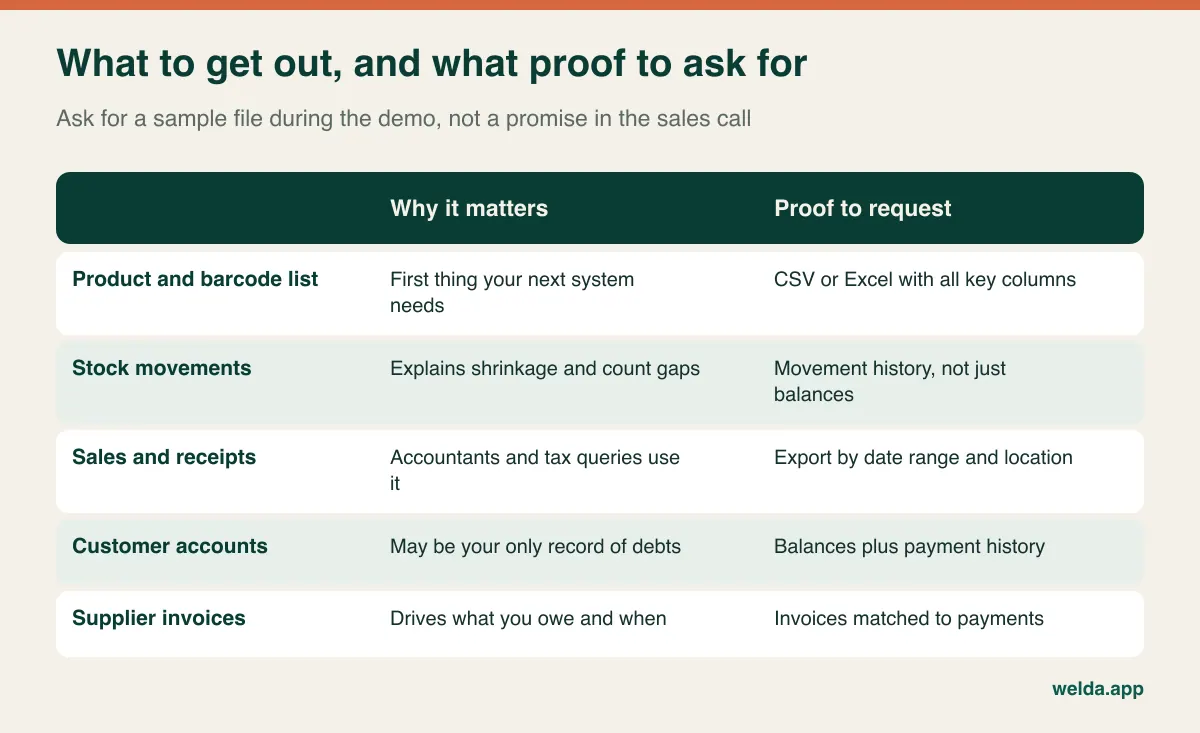
Then ask what happens the day you stop paying. Does the account turn read-only? For how long? When is data deleted, and how are you told? Is there a fee for a full export? If the contract doesn't cover this, get the answer by email at the very least.
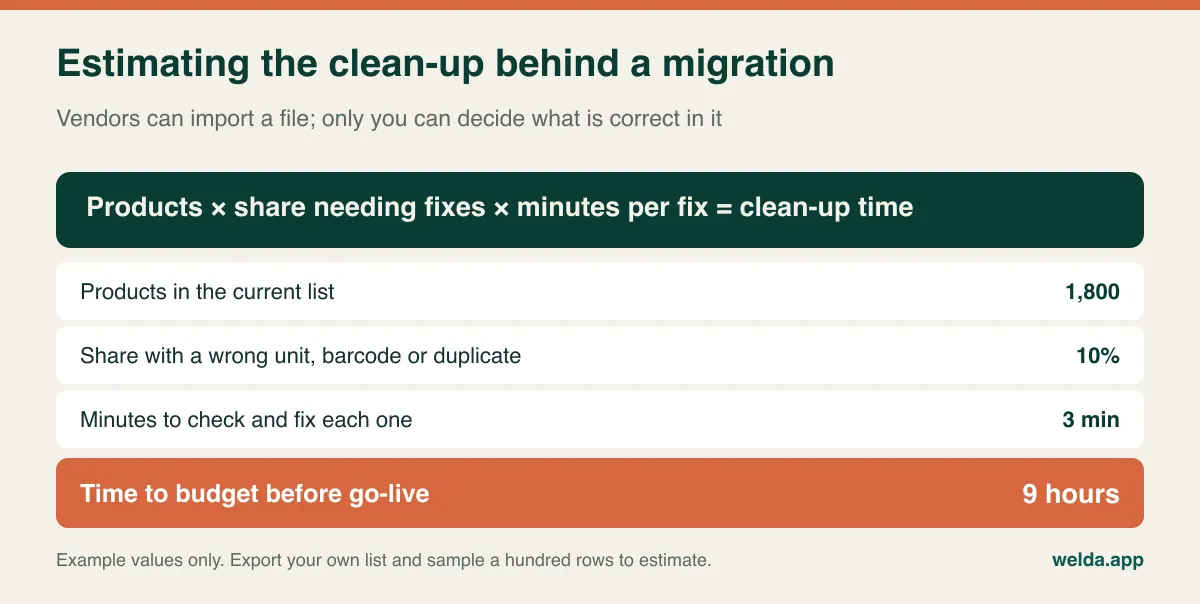
Data going in matters as well, and it hints at how careful the vendor is with data generally. Hand over your messiest product file and ask how they treat duplicates and blanks. A vendor can import a file, but only you know whether “Cola 330” and “Coca Cola can” are the same product, so there is real work on your side. Our guide to moving from Excel to inventory software walks through it. To size that work, take a sample like the one below.
Turn “24/7 support” into scenes
Support is one line in a brochure and a very different thing when the till won't start with a queue in front of it. So don't ask whether support is included. Describe situations and listen. It's 7pm on Saturday and the checkout screen won't load: what number do I call, who picks up and what are you committing to? Scale labels start ringing up the wrong amount: can you connect remotely, and what do I need to do for that? A report looks wrong but sales are running: where does my ticket go, and do I get a reference number? A new cashier starts next month: can I get training again, and is it included?
A sharper question is whether technical support and how-to support are the same team. Many companies route outages and “where do I find this report?” through different channels with different hours. Ask about each separately, including public holidays in your country, because a vendor in another time zone may define “business hours” in a way you won't like. Find out whether a reseller or the maker itself provides support, and what happens if that reseller walks away. If some of your staff work in another language, ask which languages support actually operates in.
You can run a small test too. After the demo, send an ordinary question through the support channel outside office hours. One reply proves little, and pre-sales attention never guarantees post-sale service, but it tells you something. Asking for a reference is reasonable as well: a business of similar size, ideally in your sector. Skip “are you happy?” and ask “when did you last call support and what happened?”
Read the contract against what you were told
For a small retailer, the contract may be a one-page quote and a payment link. That doesn't mean there's nothing to read. It means you need to check whether everything said in the demo made it into writing. Lay this table beside the draft.
| Clause | Question to ask | If it is not written down |
|---|---|---|
| Scope | Which modules, how many users, locations and registers? | Reports or a second till can become extras later. |
| Setup and import | Which data, how many records, by when? | Products move across and customer balances get typed by hand. |
| Training | How many people and sessions? Any repeat for new staff? | Knowledge passes along by word of mouth. |
| Price changes | How can the price change at renewal or in later years? | Your budget stops meaning much. |
| Termination | What notice period applies? Is there auto-renewal? | Miss a date and you may be tied in for another term. |
| Data return | What format, how many days, any fee? | Your data becomes a bargaining chip. |
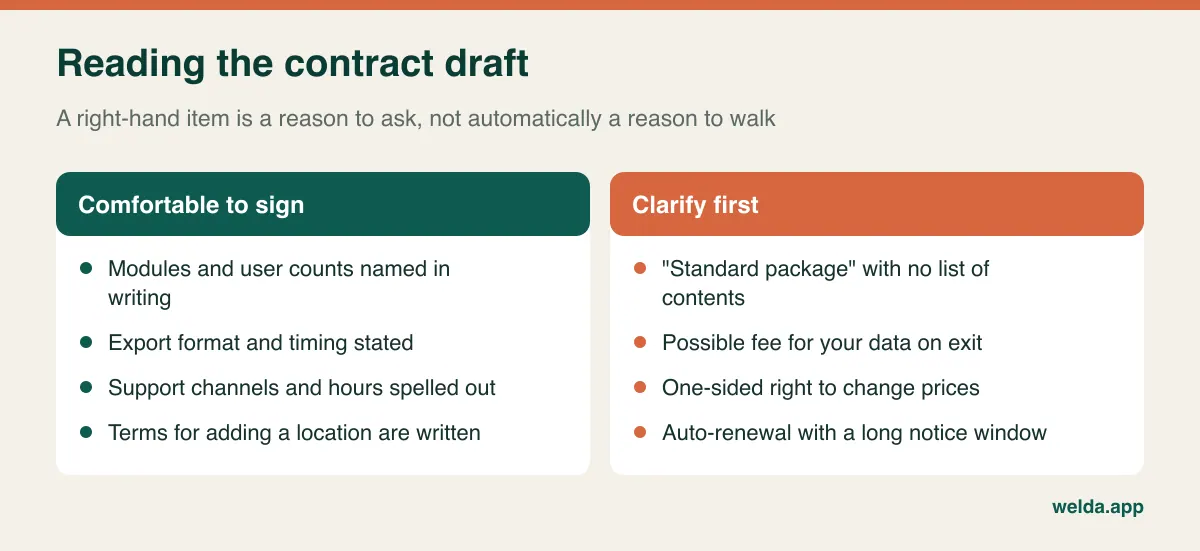
Treat roadmap promises with care. “That feature is coming next quarter” describes something you can't use today. If your decision depends on it, get a date in writing or judge the product as it stands now. Also look for stacked agreements. If hardware, payment processing and software come from separate companies, each may have its own term and its own exit rules, and the shortest one doesn't help you if the longest one still binds you.
Comparing quotes when the headline numbers mislead
Comparing the top line of two quotes is the most common mistake here, as one-time and subscription offers can't be read directly against each other. Put both on the same period and the same scope. Pick a horizon of several years and give every quote a row for each of these: setup and import, per-user and per-location charges, add-on modules, updates and maintenance, support plan, payment processing, hardware, training for new staff and data return on exit. For each empty cell, ask “is this included, or does it not exist?”
Neither payment model is good or bad in itself. A subscription can ease cash flow and make walking away easier. A one-time model can make the long-term figure more predictable, provided updates and support are clearly addressed in writing. Your answer depends on how many years you expect to stay and on your cash position, and our comparison of one-time vs subscription POS software sets out how to work it through. Welda's own pricing depends on your users, locations and product count, so we settle it in a free consultation rather than quoting a figure in an article.
Your time belongs on that sheet too. Cleaning data, doing the opening count and getting staff comfortable all come out of your week. A cheap offer that leaves the import to you may not be the cheap offer once those hours are counted.
Scoring your finalists
After a few demos, memory favours whoever presented best. To counter that, set your criteria and weights before the first demo and score straight after each call. Four criteria suit most shops: data exit, support, hardware fit and contract. A store selling heavily on credit might weight data exit more. A butcher relying on a scale might put hardware first. If the choice of a system still feels too open at this stage, our broader guide on how to choose a POS system covers the earlier decision.
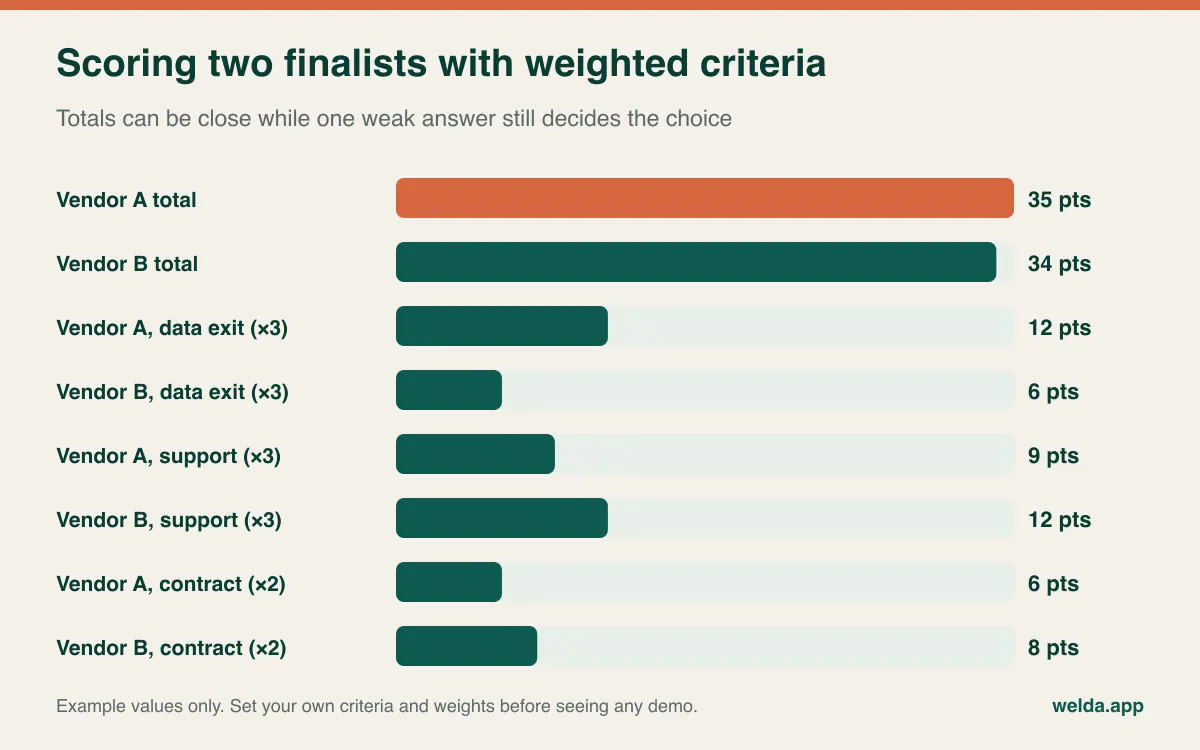
In this example, scores out of five are multiplied by weight. Vendor A scores 4, 3, 4 and 3 for data exit, support, hardware and contract, which gives 12 + 9 + 8 + 6 = 35. Vendor B scores 2, 4, 4 and 4, giving 6 + 12 + 8 + 8 = 34. A one-point gap means very little. The useful question is whether a low score can be compensated for. Better support is pleasant, but it won't rescue you if you can't get your records back. So add two rules: any finalist scoring 2 or lower on a critical criterion is out unless they offer a written assurance, and if totals are close, the person working the till breaks the tie.
Not everyone needs this much process. A single-register shop with a small range and no customer accounts can probably get by with three questions on data export, support hours and notice period. If your spreadsheet still works and stock differences aren't hurting you, waiting is a legitimate decision. The full list earns its keep once you have several users, a scale, customer credit or more than one location, because that is where a wrong choice costs the most.
The same checklist, applied to Welda Stock
You should be suspicious of any vendor that passes its own test on every line. So here is what our product pages state and what they don't.
Data. Product, stock and price lists can be imported from Excel and reports can be exported. Migration of your existing product and customer records is part of setup. Ask us to show the scope of a complete export on exit, with a sample file. Support. We describe a multilingual support team and 24/7 technical support. Ask us to confirm channels and response expectations in writing. Hardware. Standard barcode scanners and retail scale barcodes are supported. Test your own scale label and printer with us first. Connection. Welda Stock is web-based, needs no installation and runs over your internet connection, so if yours is unreliable, tell us and plan the working method before going live. Tax and fiscal. The software creates customer receipts, but our product pages don't present it as a certified fiscal till for any particular country. If you need that, raise it in the first five minutes and check with your accountant. Contract. We state a one-time setup fee with no hidden or recurring costs, and the demo carries no commitment. Have the scope, users and locations written into your quote.
Welda Stock is designed for retail such as markets, delis, grocers, kiosks and herbalists: weighed goods, store credit, supplier debts, per-product margin, several locations and separate cashier, warehouse and manager permissions. If that sounds like your shop, you can run this POS software buying checklist against Welda Stock in a free demo, using your own basket. If offline selling or a certified fiscal till is non-negotiable for you, telling us at the start saves both of us time.
After signing: keep the order of events
Most of the pain in a switch comes from doing everything at once. The steps below keep each problem small enough to fix, and they include one thing few owners do: testing the exit while the relationship is still new.
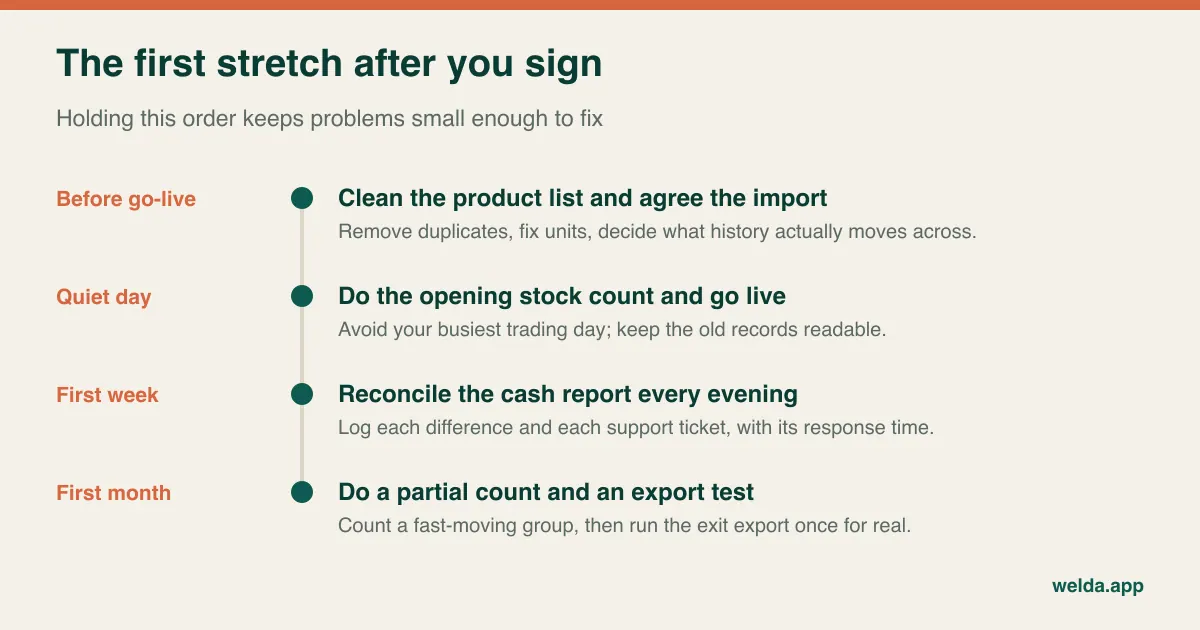
Keep access to your old records until you have got through at least one clean end-of-day and one partial count on the new system. Pick a quieter trading day to go live, and make sure someone who knows the system is in the shop during the first busy period. Keep a simple log of differences and support tickets for the first week. It gives you facts for any conversation with the vendor, and it shows staff that mistakes are expected and get fixed.
Frequently asked questions
What should I ask first in a POS demo?
“Please share your screen, export the product list, and let's open the file together.” That single request tests data exit and pulls the call away from the prepared script. Move on to your test basket next.
Are verbal answers good enough?
Get the deciding answers in writing. For anything outside the contract, send a short summary email after the call and ask the vendor to confirm it. An adviser can tell you how much legal weight that carries, but a written record at least reduces misunderstandings.
How many vendors should I talk to?
There's no fixed number. Two or three serious candidates, all put through the same list, is enough for most small businesses. More than that tends to add time without making the decision easier.
Does POS software replace my accountant's tools?
Usually not. POS and inventory software records sales and stock, while the accounting and tax side may need separate tools and professional advice. Ask your accountant which exports they want, and verify the format in the demo.
What if there's no free trial?
Ask for a live demo using your own data. A guided session with your messy product file and real scale label often reveals more than a week alone with a sample account. Welda Stock's free demo works this way and carries no commitment.
When can I cancel my old system?
Not until the new one has handled at least one clean end-of-day and a partial count, and you have exported and checked your old data. Confirm the old contract's termination date early, because it may set your whole timetable.
Trim this list to fit your business and print it. When you're ready, take this POS software buying checklist to a free Welda Stock consultation and ask us the same questions in the same order.