Switching POS systems comes down to one question: can you move your product catalog, customer balances and stock on hand to the new system with the numbers still agreeing on the other side? You can, and without closing the shop, if you do it in this order. Check your contract and card terminal terms. Prove you can actually export your data. Clean the catalog. Carry over customer balances as agreed opening figures rather than years of transactions. Count the shelves instead of importing the old stock numbers. Then cut over on the evening of a quiet day. Most painful migrations are painful because they ran this list backwards, signing the new vendor first and asking about the old data later.
This guide is for the retailer still running an old desktop POS on the back-office PC: the one that works, more or less, that nobody dares update, and that only one person really understands. You've probably been meaning to replace it for a couple of years. By the end you should know whether you really need to, what can go wrong with your specific data, and how go-live day should run hour by hour.
What a POS switch actually moves (and what it shouldn't)
People talk about "migrating the POS" as if the whole thing were lifted across in one piece. In practice your system holds five different kinds of information, and each one deserves different treatment. Treating them all the same is how you end up with a shiny new system full of old errors.
The product catalog gets exported, cleaned and imported. Customer records get deduplicated and imported, with balances carried as a single opening figure. Stock on hand doesn't get imported at all if you can avoid it, because the old figure is the accumulated drift of every unscanned sale and unrecorded write-off; you count the shelves and start fresh. Liabilities such as gift cards, store credit and layaway deposits need a list you can defend, line by line, because each one is a promise to a real customer. And sales history usually stays behind, in an archive you can still read.
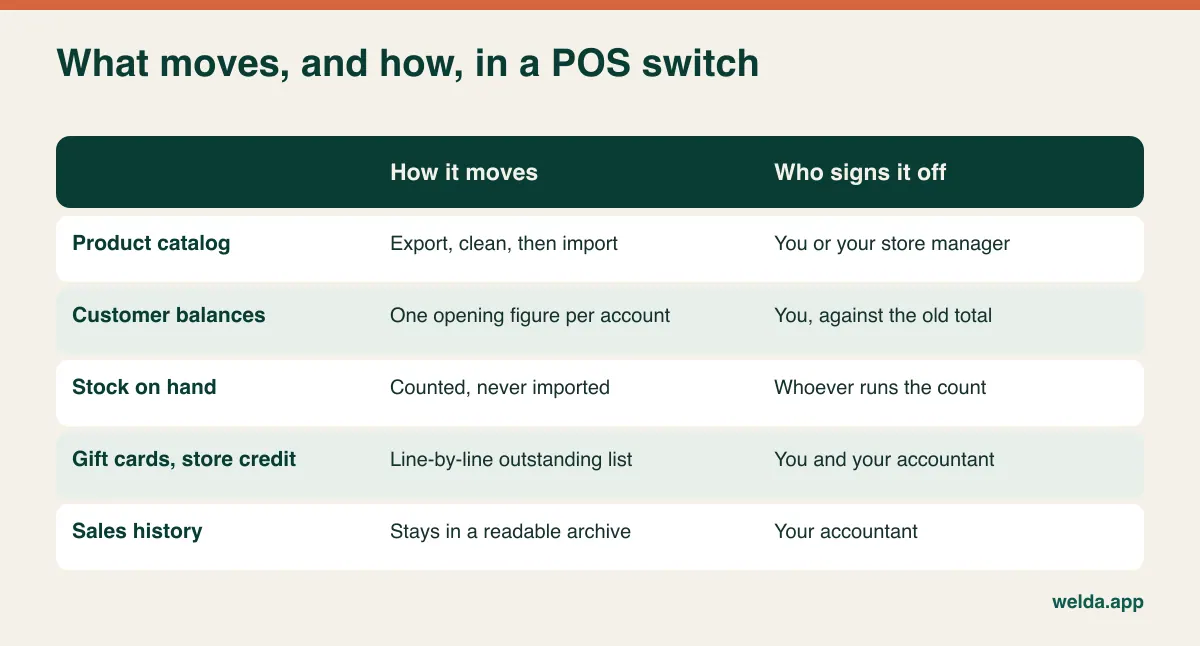
Once you see it this way, the job shrinks. You aren't moving fifteen years of a database. You're moving a clean list, a set of agreed balances and a fresh count. If you've been working from spreadsheets rather than a proper POS, our guide to moving from Excel to inventory software covers that simpler starting point.
Untangle the contract and card terminal first
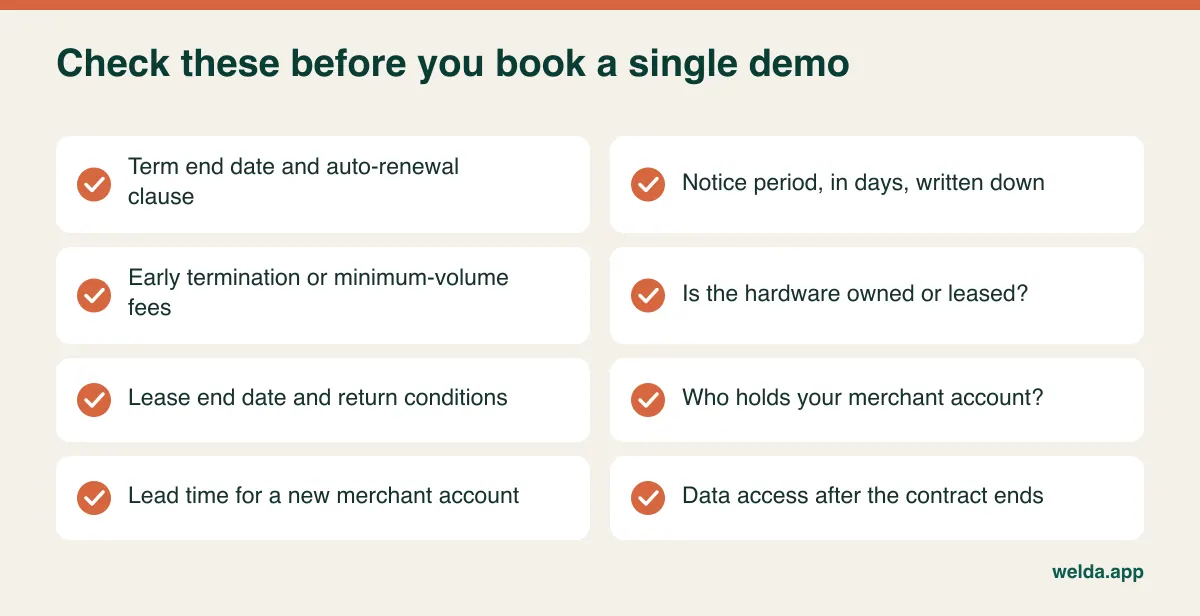
In many markets the POS, the card terminal and the payment processing are sold as a bundle, and this is where a switch can quietly become expensive. Before you look at a single demo, find the paperwork and answer these questions.
When does the current term end, and does it renew automatically? A renewal clause with a notice window can mean that missing a date by a week commits you to another year. Is the hardware owned or leased? Leased terminals and tills often have their own agreement, separate from the software, with its own end date and return conditions. Who is your merchant account with? If the processor is tied to the old POS vendor, moving means opening a new merchant account, and that takes lead time that has nothing to do with software. Are there early termination fees or a minimum volume commitment? And for cloud systems, what happens to your access on the day the contract ends? For a local desktop program the data sits on your own disk, but access to a hosted system can stop on the last day of the term.
Ask your new vendor directly how card payments will work. In Welda Stock's case, the cashier records the payment type at the sale (cash, card, bank transfer or customer account), and our product pages don't list an integrated card terminal. So plan on your terminal staying separate and your card reconciliation being a daily check, and raise it on the call if tight terminal integration matters to you.
Replace, repair or leave it alone?
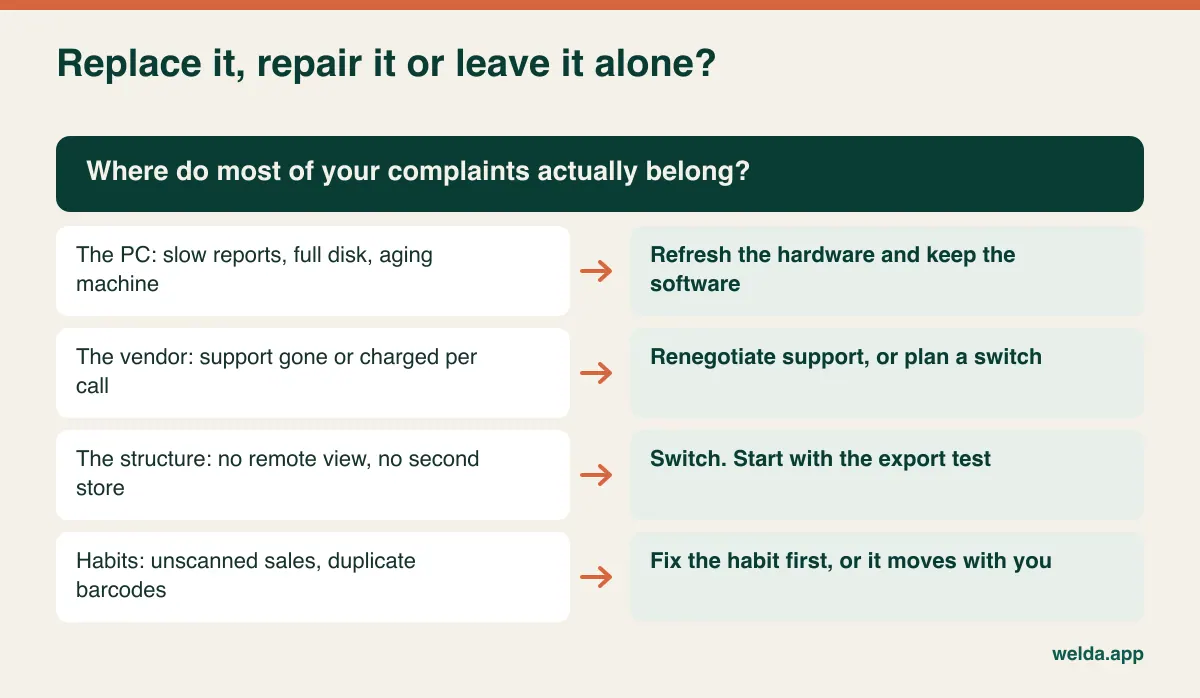
Not every old POS needs replacing. Some complaints belong to the PC rather than the software: slow reports, a full disk, an operating system that's past its best. A hardware refresh can fix those with far less disruption. Others belong to the vendor, like the reseller who retired or support that now costs per call. And some are structural: you can't see today's sales from home, adding a second store means a server project, backups depend on one person remembering to plug in a USB drive.
Take ten minutes and list what actually annoyed you over the last three months. Label each item "machine", "vendor" or "structure". If most land in structure, you have a real case for switching. If most turn out to be habits (two product records with the same barcode, cashiers not scanning, stock receipts entered a week late), a new system will inherit them, so fix the habit first or fix it during the move.
Be honest about what you give up, too. A desktop POS often keeps ringing sales when the internet drops. A browser-based system runs over your connection. That's true of Welda Stock: there's nothing to install and it opens on any computer with a browser, but operations depend on the connection. If your line is unreliable, talk through the working setup before you commit, and test a backup connection such as a phone hotspot before you rely on it. In exchange, you can check stock and sales from anywhere, a failed PC no longer has to stop the shop, and several branches and warehouses can run from one account, each with its own stock balance.
The export test you run before signing anything
Here's the single most useful afternoon in the whole project. On the old system, export your product list, customer list and supplier list to spreadsheets. Open them on a different computer and look closely.
Check that barcodes survived, because spreadsheets love to turn long numbers into scientific notation or strip leading zeros, so open that column as text. Check that units came through and weighed items are still marked as weighed. Look for separate columns for cost price, sale price and tax rate. Look for mangled accented characters. See whether balances appear on the customer list or live in a separate report.
You'll find one of three things. The good case is a clean export from a menu. The middling case is report-style files full of page headers and subtotals, which are fixable with some patience. The hard case is no export at all, or a reseller quoting a fee to pull your data. Even then it isn't over, since printed or on-screen reports can be retyped, but your timeline just grew considerably. Better to learn that now, while you still have time and leverage, than three weeks after signing.
Clean the catalog, because the new system will believe it
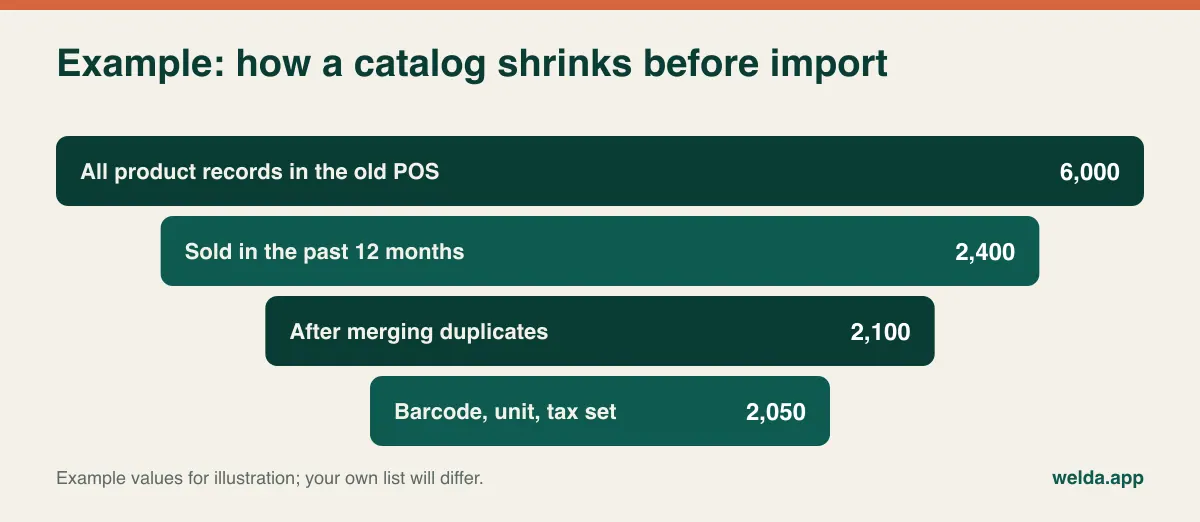
An old POS catalog is an archaeological site. Products discontinued years ago. The same item entered three times under slightly different names. A new barcode created when a supplier changed. Catch-all records called "MISC". Items sitting at minus 40 units. Import all that and your cashier sees three results for one product in the first week, then blames the new software.
The best filter is last sale date. Pull everything that sold in the past twelve months and treat that as your starting list. Archive the rest in a separate file; if something turns up on a shelf, you create a new record when you scan it. Then merge records that share a barcode, standardize units (each, kg, pack), confirm tax categories with your accountant, and reduce your categories to a number someone can actually navigate.
Different kinds of shop have their own traps here. A deli or grocer selling by weight has scale labels: the product codes in the scale need to match the catalog. Welda Stock reads the weight barcodes printed by retail scales automatically, but label formats vary, so test your own label early. A clothing store has sizes and colors: in Welda Stock each size and color combination is defined as its own product with its own SKU and barcode, so if your old system holds one style record with a size grid beneath it, you'll need to flatten the file. Try that with two or three real styles during the demo, not on the night.
Customer accounts, store credit and gift cards: the numbers people remember
A wrong product name costs you a few seconds. A wrong balance costs you a customer. So this is the part of the switch where accuracy matters most, and the main decision is simple: bring across each customer's full transaction history, or a single opening balance as of the closing date?
For most independent retailers, a single opening balance is the right call. Different systems structure transactions differently, so bringing full ledgers across is laborious and prone to error, and you seldom need a purchase from four years ago. Keep it simple: carry the net balance as one line, save each active account's recent statement as a PDF or spreadsheet, and keep the old system readable for a while. When a customer asks where a figure came from, you have the answer.
Before you import, tidy three things. Merge duplicates, since "J. Smith", "John Smith" and "John (bakery)" may be one person and only your staff will know. Decide what to do with old dormant balances, ideally with your accountant, rather than dragging them along by default. And check the sign: some systems show money owed by the customer as positive, others as negative. Test with one customer who owes you and one who has paid in advance. If you run tabs and want a clearer process going forward, see our guide to digital customer credit tracking.
Gift cards and store credit need their own attention, because they're promises to people you may not be able to identify. Get an outstanding list from the old system. Decide how those will be honored on the new one, and check whether the new system has an equivalent. Welda Stock's product pages describe customer accounts and balances, but not a gift card module, so if you sell gift cards, ask how to handle them before relying on a workaround. Your accountant should also weigh in, because unredeemed balances can have tax or accounting consequences that vary by country.
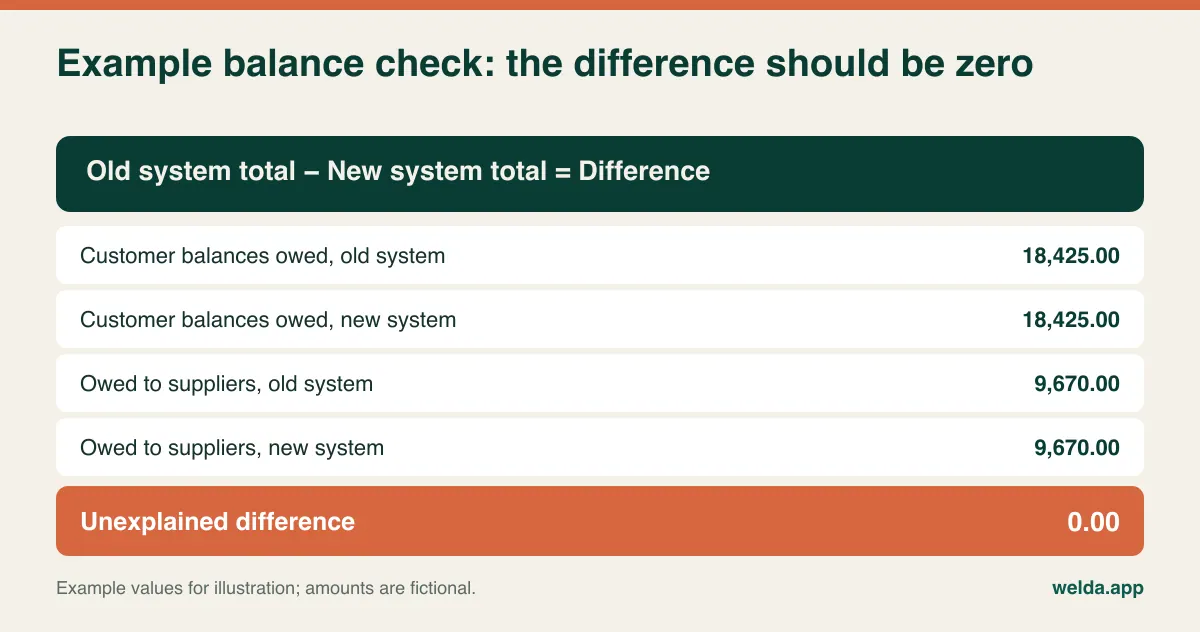
Then reconcile. The rule is that totals before and after must match to the cent. Run the old system's total receivables, read the same total on the new system, and explain any difference. Do the same for what you owe suppliers. Then spot-check your ten largest accounts individually, since two errors can cancel out in a total.
Count the shelves instead of importing the old stock figure
The stock column in your old POS isn't really a count. It's a running estimate, nudged off course by every unscanned sale, every unrecorded breakage and every delivery keyed in late. Import it and low-stock alerts fire at the wrong times from day one. Staff decide the new system is wrong, and they go back to checking the shelf by hand.
So count, and use go-live as the reason. A full closed-door count isn't always possible for a small team, so split it. Count slow-moving sections over the days before cutover, noting anything sold from them afterwards. Count fast sellers and high-value stock on the night itself. It isn't perfect, but a live shop can do it. For technique, our guide on how to do a stock count has a full plan. If the count differs a lot from what the old system claimed, don't bury the difference in the opening figures. Write it down and show your accountant.
Pick go-live day around your trading calendar
"Let's do it this weekend" is how good plans go wrong. The right date depends on your shop's rhythm. Avoid your peak season, whether that's the winter holidays for a gift shop, back-to-school for a stationer or the start of a new season for a clothing store. Think about the month: the first of the month gives a clean cut for accounts, but check it doesn't collide with your tax filing. Choose your quietest day of the week and cut over that evening, so that a slow till the next morning affects the fewest customers. Avoid Friday night, unless you enjoy learning a new system during your busiest Saturday. Make sure your most experienced person isn't on vacation, and confirm that vendor support is reachable the first morning.
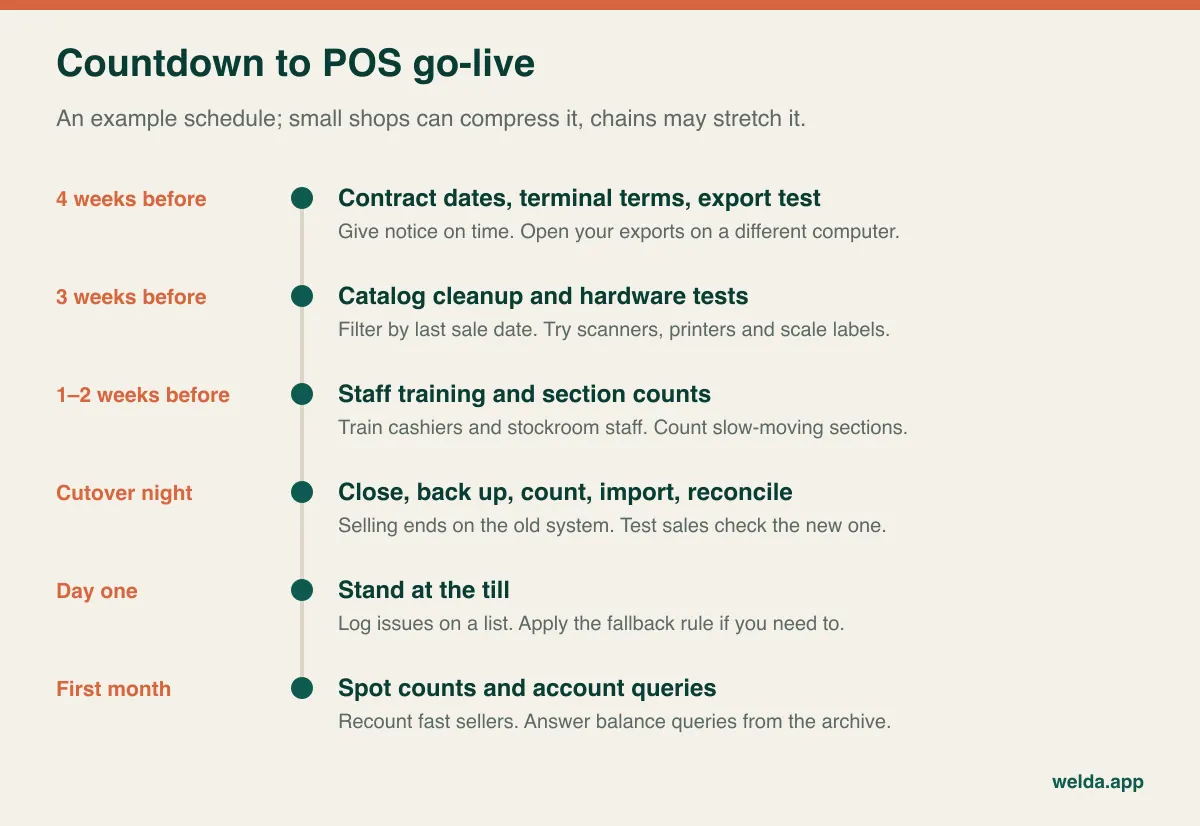
Then work backward from the date. A small shop can compress this; a multi-store retailer will likely stretch it.
The night itself, and the morning after
Cutover is a short sequence, and it's worth printing. Keep a named person responsible for each step, and write your fallback rule down in advance so nobody has to invent one at 9 a.m. with a queue at the counter.
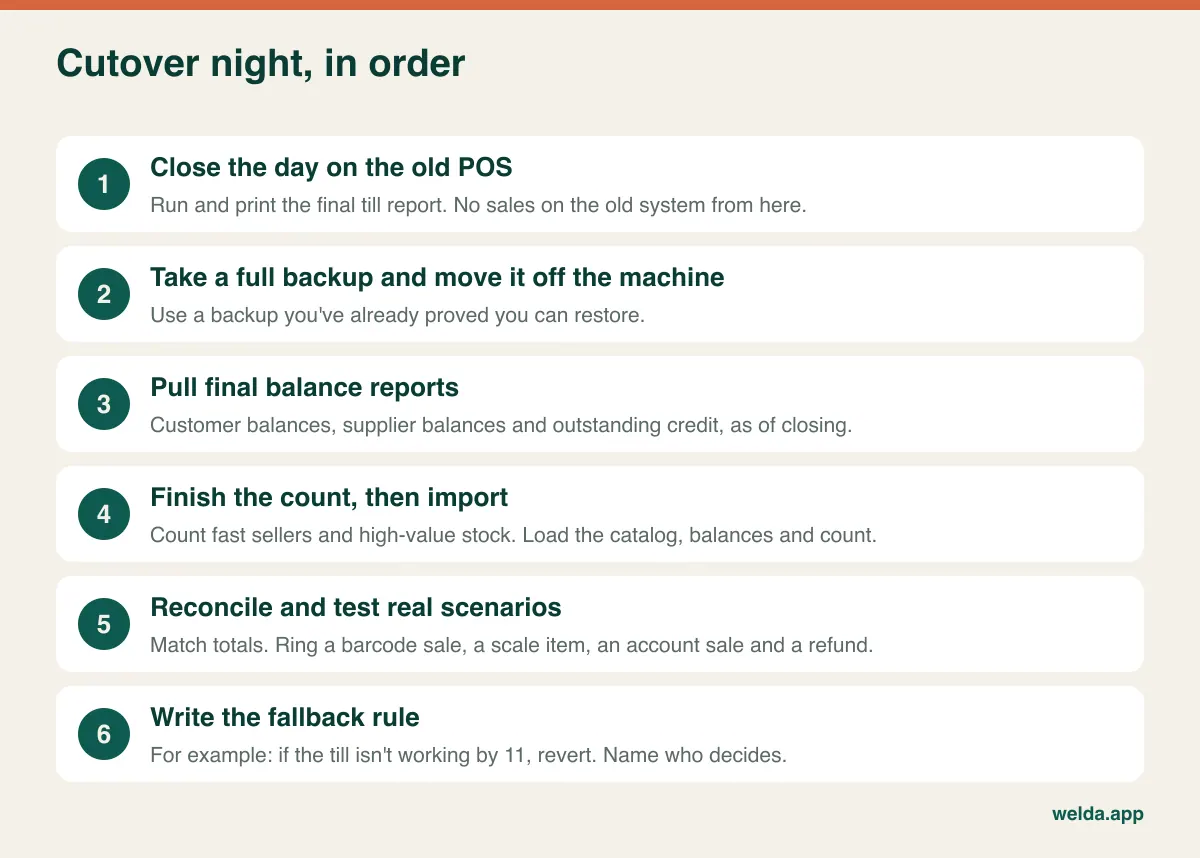
Close the day properly on the old system first, with a final till report and a counted cash drawer, because that closing figure is what your new system starts from. And resist one tempting idea: running both systems side by side for months. It feels like insurance, but once one cashier rings sales on the new till and another uses the old one, neither set of numbers can be trusted. Sell in one place. Keep the old system purely as a reference.
Expect the first week to be slower. Your cashiers have years of keyboard shortcuts in their fingers, and they'll lose them overnight. Stand beside them on day one, keep a list of problems rather than interrupting support for each one, and do a spot count on a few fast sellers after a week. If the numbers hold, confidence follows. If they don't, you've caught the problem while it's still small.
Tax, fiscal and privacy rules travel with you
This is general orientation, not legal or tax advice. Rules differ widely by country and even by state or region, so check with your accountant. Changing software doesn't change your obligations, but it can break the arrangement that was quietly meeting them.
Some countries require certified cash registers, fiscal printers or a tamper-proof recording device. Others require e-invoicing or real-time reporting of sales. If your old POS handled any of this, ask the new vendor in writing whether their product covers it where you trade. Welda Stock creates a customer receipt for each sale, but our product pages don't describe it as a certified fiscal register or as an e-invoicing tool, so if your market requires one, that needs to be the first thing we talk about. It may rule us out, or mean running it alongside a certified device.
Records rarely expire when software does. Most tax authorities expect sales records to be kept for a number of years, sometimes in a readable electronic form. Before you wipe or return anything, confirm how you'll keep that data accessible. On the privacy side, your customer list is personal data under regimes like the GDPR and UK GDPR and many similar laws. During a migration it tends to wander: email attachments, a laptop desktop, someone's phone. Delete working copies when you finish, ask your new vendor where data is held and how you can retrieve it if you leave, and wipe the old PC's disk before it's sold or scrapped, once your records are safe.
What the switch costs, in line items
The number on a vendor's proposal is only part of it. Total switching cost depends so much on your size and your data that a general figure would mislead you, so here's the list to price for your own situation.
| Line item | What to ask | If you miss it |
|---|---|---|
| Old contract | Renewal date, notice period, termination fees | You pay for two systems at once |
| Hardware lease | End date, return terms, who owns the terminal | A leftover bill for equipment you no longer use |
| Data extraction | Can you export it yourself, or does the reseller charge? | Negotiating with your old vendor mid-deadline |
| Cleanup and import | Is it included? Who does it? Which lists are in scope? | The work lands on you and the timeline slips |
| Peripherals | Do scanners, printers and scales work with the new system? | Last-minute hardware purchases |
| Staff hours | Are counting and training during or outside shifts? | Overtime nobody budgeted for |
| Ongoing charges | Monthly fees, support plans, per-register or per-user charges | A multi-year comparison that's simply wrong |
To compare offers fairly, send every vendor the same scenario: the same users, locations, product count and import scope, and ask for a three-year total. Our guide on one-time versus subscription POS software shows how pricing models change the arithmetic. With Welda Stock, pricing is set for each business according to users, branches and products, and is confirmed in a free consultation. It's built on a one-time setup fee, with setup, data import and team training included in the proposal. We'd still ask you to get your own scenario in writing, from us and from everyone else.
Bring your worst data to the demo
A demo using the vendor's tidy sample store tells you very little about migration. Bring five problem products, two awkward customers and a printout from your old system, and ask:
- What happens if my file has two products with the same barcode?
- Can we scan one of my scale labels now and check the weight and price?
- How does a customer who has paid in advance look after import, compared with one who owes me?
- Can I tell opening stock and opening balances apart from later transactions?
- What exactly happens at the till when the connection drops?
- How do I restrict a cashier's ability to issue refunds or discounts?
- How will my card terminal and any fiscal requirement work alongside this?
- If I leave one day, in what format do I get my data, and how?
- Who do I reach on the first morning if something goes wrong?
The last two answers will tell you more than any feature sheet. You're switching because leaving was hard this time. Ask about the exit before you walk in.
Where Welda Stock fits, and where it doesn't
If you run a grocery, deli, corner shop, café, kiosk or similar retail business and want real-time stock, fast barcode sales, scale barcodes, customer accounts, supplier debts, low-stock alerts and a daily till report in one place, then switching POS systems to Welda Stock is worth a look. Setup is usually finished the same day; most of your time will go on the cleanup and counting described above, and no vendor can shortcut that for you.
It's probably not the right fit if you need a certified fiscal register built into the product, integrated card terminals, gift card management, batch and expiry tracking, or guaranteed selling with no connection. Those aren't listed as features on our product pages, so we won't promise them here. If they aren't dealbreakers, the free consultation is the simplest next step: tell us what you sell, how many tills you run and what system you're leaving. We'll go through switching POS systems against your own numbers, then confirm scope and price there.
Frequently asked questions
Do I have to close the store to switch POS systems?
Usually not. The import and final count happen after closing, and you open on the new system the next morning. You might choose a late opening on a quiet day for extra margin, but a full closed day is rarely necessary.
Should I bring all my sales history across?
For most small retailers, no. Archive the reports you need and keep the old system readable for a while. If year-on-year comparison by product matters to your buying, ask about it specifically during the demo.
What if my old vendor won't release my data?
First try the system's own reports and export options, since many lists can be pulled without help. Read your contract and make a written request if you need to. As a last resort, rebuild lists from reports. That's slow but workable, and it's why the export test comes before signing.
How long does switching take?
A small shop with tidy data might need a few days of preparation. A store with thousands of products and many open customer accounts could need several weeks. The software setup is rarely what takes the time; preparing your data is.
Can I keep my barcode scanner and scale?
Often, yes. Welda Stock works with standard barcode scanners and reads weight barcodes from retail scales, but older devices and unusual label formats do exist. Test your own hardware with real labels well before go-live.
Should I run both systems in parallel to be safe?
Not for selling. Double entry tires staff and leaves you with two sets of numbers. Cut over once, then keep the old system available for lookups only.
How much will it cost me?
That depends on users, locations, products, data condition and hardware, so a general number would be misleading. For Welda Stock we confirm the price in a free consultation once we've heard your scenario.