Here is the short answer to the one-time vs subscription POS software question: if you will keep the same setup for five years or more, can pay upfront without starving your stock budget, and have the maintenance terms in writing, a one-time payment usually costs less over time. If your store is new, your lease is short or your till count keeps changing, a subscription is often the safer buy. What settles it for your store is a single number, the month in which your two quotes cross. This guide shows you how to find it.
A disclosure first. We sell Welda Stock on a one-time setup fee, so we have a side in this debate. That is why the method below is built to work on any quote, ours included. If your numbers point to a subscription, follow your numbers.
Licence, subscription or "free": what the words actually buy
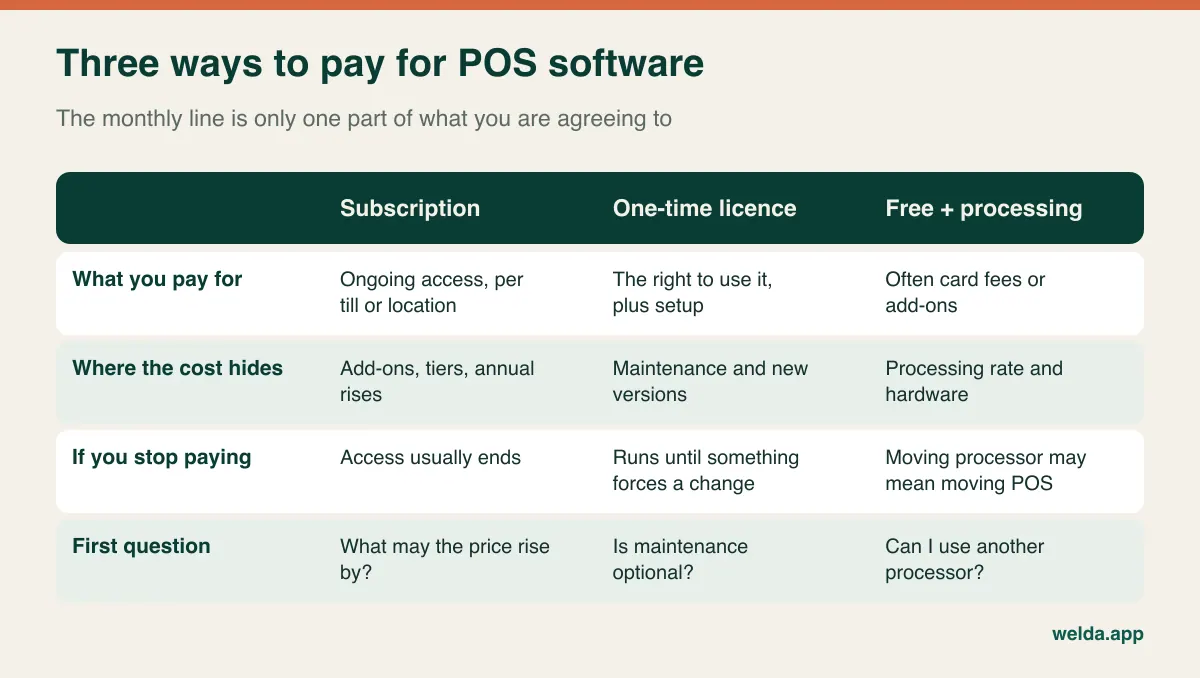
Most comparisons treat this as a two-way choice. In practice you will meet at least three commercial models, and each of them moves the cost to a different place.
A subscription charges you for continued access, usually per till, per user or per location. Updates are normally part of the deal, but the feature you need may sit in a higher tier, and most contracts allow for price changes. A one-time licence charges you for the right to use the software, often with a setup fee on top. The catch is usually what happens next: maintenance, support and major version upgrades may be charged separately. A one-time licence with compulsory annual maintenance is a recurring cost under a different name.
Then there is the third model, which rarely shows up in this debate, although it is common in retail: free or very cheap software tied to card processing or hardware. Nothing appears on the software line, but the vendor earns through the processing rate, the terminal or paid add-ons. Over several years, that margin can be the largest cost of the three. It is also the hardest to leave, because moving your processor may mean moving your POS. Our guide to free grocery store POS software looks at that trade-off in more detail.
One word of caution about "buying". What you buy is almost always a licence to use the software on stated terms, not the software itself. Read what the licence says about transferring to a new owner if you sell the business, moving to a new computer and using it across locations. These clauses matter more than usual if you are paying upfront, because you are paying for the future use they govern.
The payment model and the hosting model are two separate decisions
Many store owners assume "one-time" means software installed on a back-office PC and "subscription" means the cloud. That pairing used to be common, but it is no longer a rule. Installed software can be rented by the year. Browser-based software can be sold for a one-time fee. If you merge the two questions, you may buy the right payment plan on the wrong architecture.
The hosting model decides what happens operationally: does the till keep selling when the connection drops, who runs backups, what is involved in replacing a computer, and can you check sales from home? The payment model decides when the money leaves your account. Answer the operational question first. A store on a shaky rural line that cannot stop selling for an hour has a hard requirement, and no five-year saving makes up for a dead till on a Saturday. Once you know which architecture you need, compare payment options inside that group. For the wider feature checklist, see how to choose a POS system.
Working out the cross-over month
Let's run a worked example. All numbers below are invented and written in "units" rather than currency, because the point is the method and not a price level. Put your own quotes in the same slots.
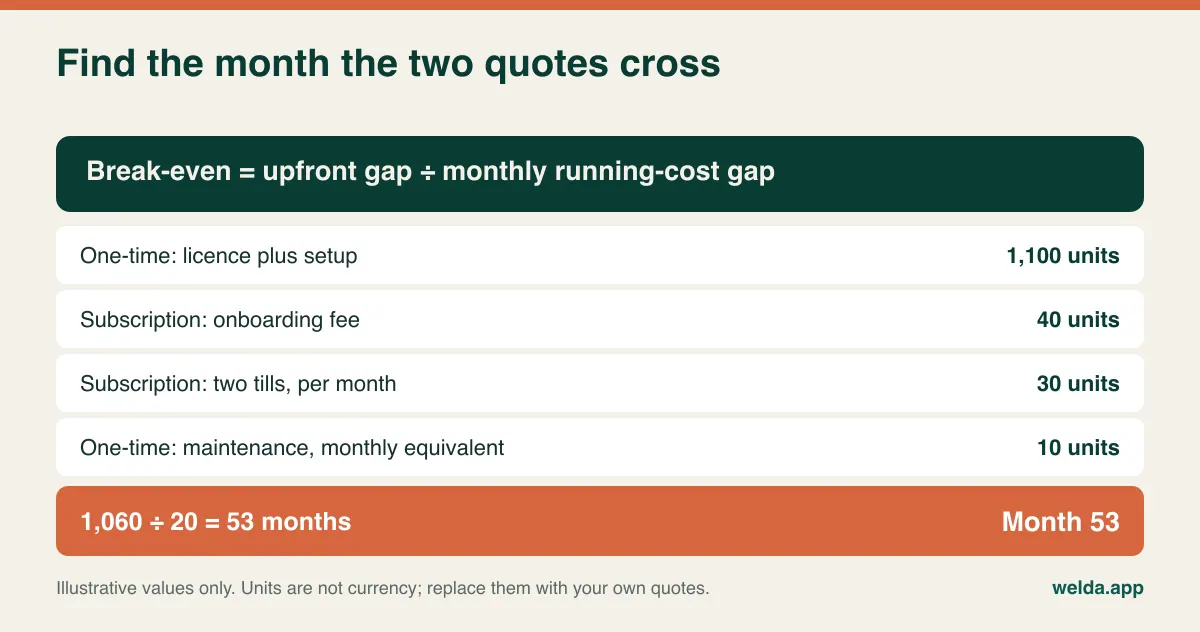
Imagine a store with two tills and two quotes covering exactly the same scope. Subscription: 40 units for onboarding, then 15 units per till per month, which is 30 units a month. One-time: 1,100 units for licence and setup, plus maintenance of 120 units a year, which is 10 units a month.
The formula takes one line. Divide the upfront gap by the monthly running-cost gap. The one-time quote costs 1,060 units more on day one and saves 20 units every month after that. 1,060 divided by 20 is 53. If you expect to keep this setup for less than 53 months, the subscription wins. Beyond that, the licence does.
Laid out by year, the same example looks like this:
| Cumulative at end of (example, units) | Subscription | One-time + maintenance |
|---|---|---|
| Year 1 | 400 | 1,220 |
| Year 2 | 760 | 1,340 |
| Year 3 | 1,120 | 1,460 |
| Year 4 | 1,480 | 1,580 |
| Year 5 | 1,840 | 1,700 |
Two things stand out. The subscription stays ahead for more than four years, and the one-time advantage at year five is only 140 units. So the popular line that "subscriptions always cost more in the long run" is too simple, and so is its opposite. The result depends on the numbers in your quotes and on how long you stay.
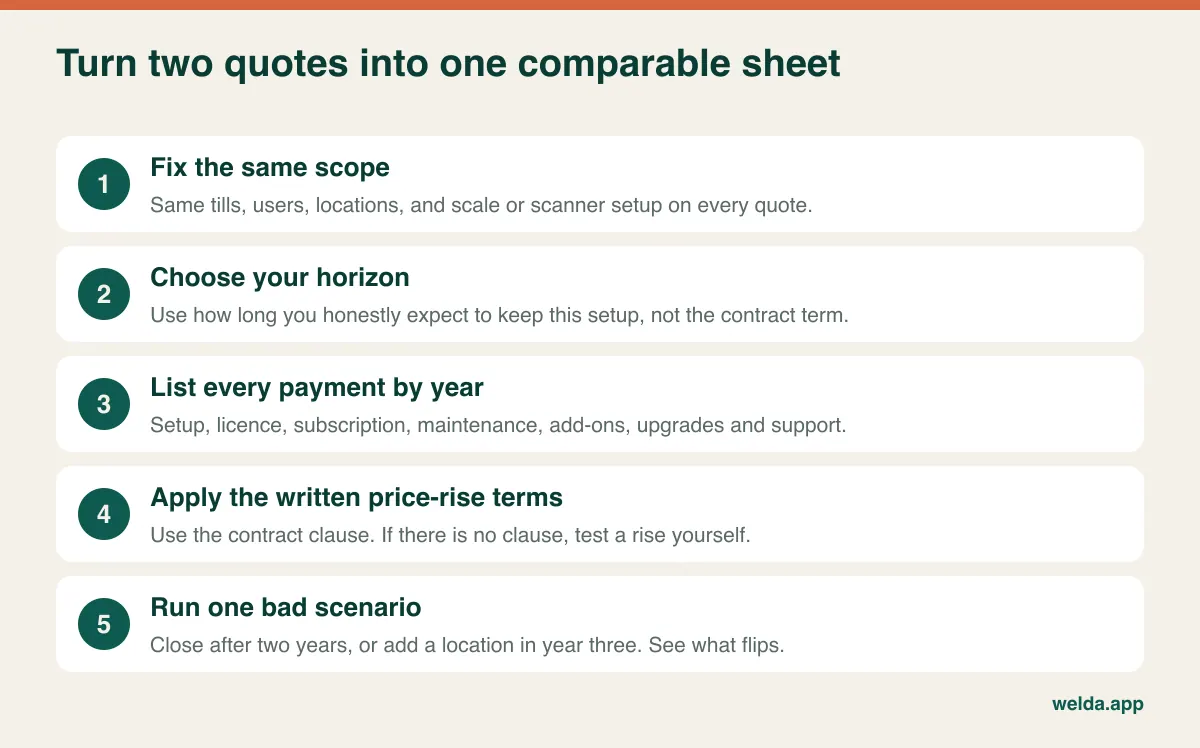
Before you compare, make the quotes comparable. This is where most owners go wrong: one quote covers two tills and a scale integration, another covers one till with scale support as an add-on. Our guide to reading a POS quote line by line covers that part in depth.
Contract terms that can flip the result
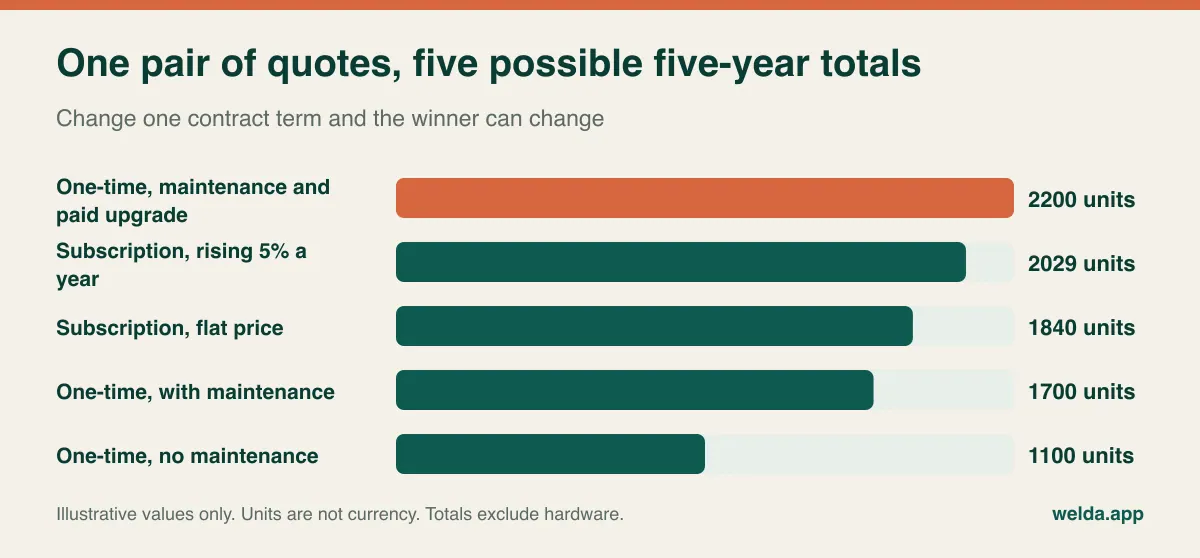
A clean example is useful for learning the method, but contracts are not clean. Keep the same two quotes and change one term at a time.
An annual price rise. If the subscription rises 5% each year, the five-year total goes from 1,840 to about 2,029 units. A clause that lets the vendor apply "the current list price" at each renewal means you cannot calculate this figure at all, which is a reason to negotiate a cap. Check maintenance too, since it can rise the same way.
Skipping maintenance. Drop maintenance and the one-time total stays at 1,100 units, with the cross-over moving to about month 36. It looks like a clear win, but you have swapped a known cost for an unknown one. You need to know what happens when the software has a bug, when your operating system changes, or when a tax rate or receipt rule changes.
A paid major upgrade. Suppose your vendor retires the old version in year four and the upgrade costs 500 units. The one-time total reaches 2,200, well above the flat subscription. A single line that appeared nowhere in the first quote has reversed the result. So ask how often major versions have shipped and what they cost existing customers.
Growth. Add a third till at the start of year three. Under per-till pricing the subscription gains 15 units a month for 36 months, reaching 2,380 units. On the one-time side, say an extra licence costs 400 units and maintenance rises by 40 a year, giving 2,220. Growth widened the gap only a little in this case, and the details of the licence decide whether it does at all.
Closing early. Now run the case nobody wants to think about. If you close or sell after two years, you have spent 760 units on the subscription and 1,340 on the licence. Add a third calculation if your lease ends sooner than your break-even month.
Cash, credit and the price of paying early
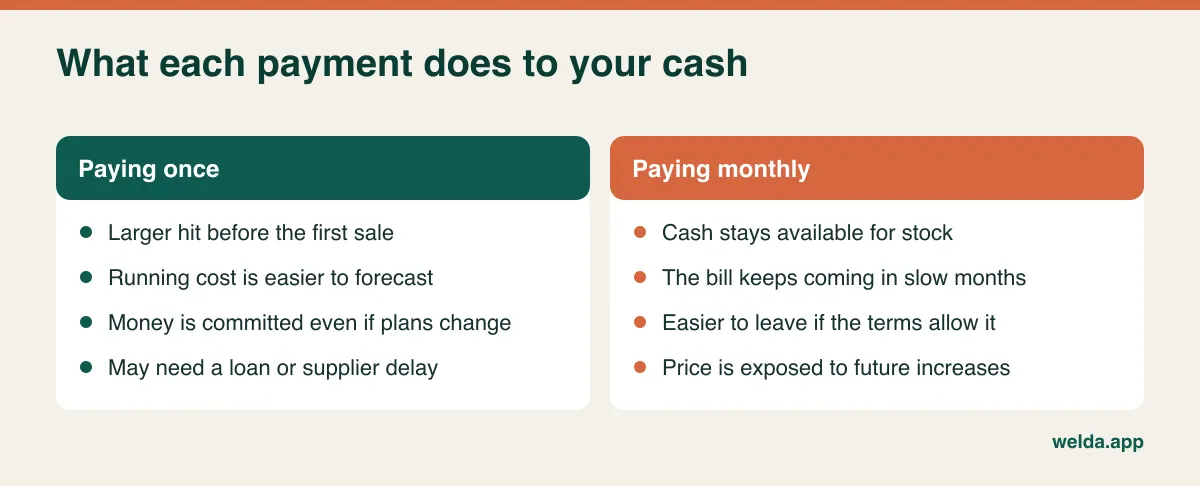
The table above treats a unit today and a unit in four years as equal. They aren't, and for a small retailer this is often where the decision is really made.
Start with where the upfront money would come from. In the example, the licence needs 1,060 extra units on day one. If you would borrow that money, put the interest in the sheet: at an illustrative 10% a year, that is about 106 units in the first year against a running-cost saving of 240 a year. The licence still comes out ahead, but with less room to spare. If the money would otherwise buy fast-moving stock, ask what margin that stock would earn. A store that turns inventory quickly may earn more from the same cash on the shelf than from avoiding a software bill. If it would sit in a low-interest account, the licence looks better.
Next, look at the shape of your year. A subscription bills the same amount in your quietest month as in your busiest, unless it allows pausing. A seasonal gift shop or a beach-town convenience store feels that during the off-season. Ask directly whether you can pause or reduce tills in the slow months, and whether doing so affects your data or price. If you cannot, a licence with light maintenance may fit a seasonal business better, even with a later break-even month.
Finally, ask your accountant about tax. Depending on where you trade, a recurring fee and a one-time licence may be treated differently, with one deducted as an ongoing expense and the other spread over several years. The rules vary by country and business structure, so treat this as a question to ask and not as a reason to choose. Run it in your jurisdiction before you assume there is an advantage either way.
Lock-in: what you still have when the payments stop
This is the difference between the models that least often comes up in sales calls. Your POS holds your product catalogue, barcodes, customer balances and sales history. What happens to them when the commercial relationship ends?
With a subscription, ask what happens when a payment fails or you cancel. Access may stop immediately, drop to read-only, or continue for a grace period. A declined card during your busiest week should not stop your checkout, so get the grace period in writing. With a licence, the risk sits further away and is harder to see: the vendor may discontinue the product or be acquired, or your new hardware may not run an old version. A locally installed copy keeps working for a while, but you become the only one responsible for it.
For a browser-based product sold on a one-time fee, ask how hosting and updates are covered in the long term. "No recurring costs" is a line we use ourselves, so please ask us too and get the answer in the agreement.
The exit question is the same in every model: which records can I export, in which format, and how far back? "You can export to Excel" is not enough of an answer. Ask for a sample file during the demo and check that barcodes, cost prices, customer balances and supplier balances are all there. If those records include personal data, the contract should also state how the data is returned or deleted when you leave. Privacy rules differ by country, so check the requirements that apply to you. If you are moving away from spreadsheets, our guide to moving from Excel to inventory software covers the cleanup work.
Hardware, processing and other costs that sit outside the question
Whichever payment model you pick, the software line is not the whole budget. Scanners, receipt printers, cash drawers and scales are bought or leased separately in most setups, and some vendors only support their own. Ask whether your existing devices work before you assume they do. A vendor-specific terminal can quietly tie your software choice to your hardware for years.
Card processing is the other large line. If the quote bundles it, ask for the rate in writing and for what happens if you want to use a different processor. Compare it across your actual sales volume, since a small difference in rate adds up on a busy till. If the software is priced low because of processing revenue, this line belongs in your five-year sheet.
Then there are local obligations. Some countries require fiscal printers, certified tax modules or electronic invoicing, and those come with costs of their own, whatever the POS payment model. Do not assume a product sold internationally meets the rules where you trade. Ask the vendor specifically, and confirm with your accountant. Staff time also belongs in the sheet: training every new cashier costs real hours, and if the checkout is slow to learn, the cost repeats with each new hire.
Which store should choose what
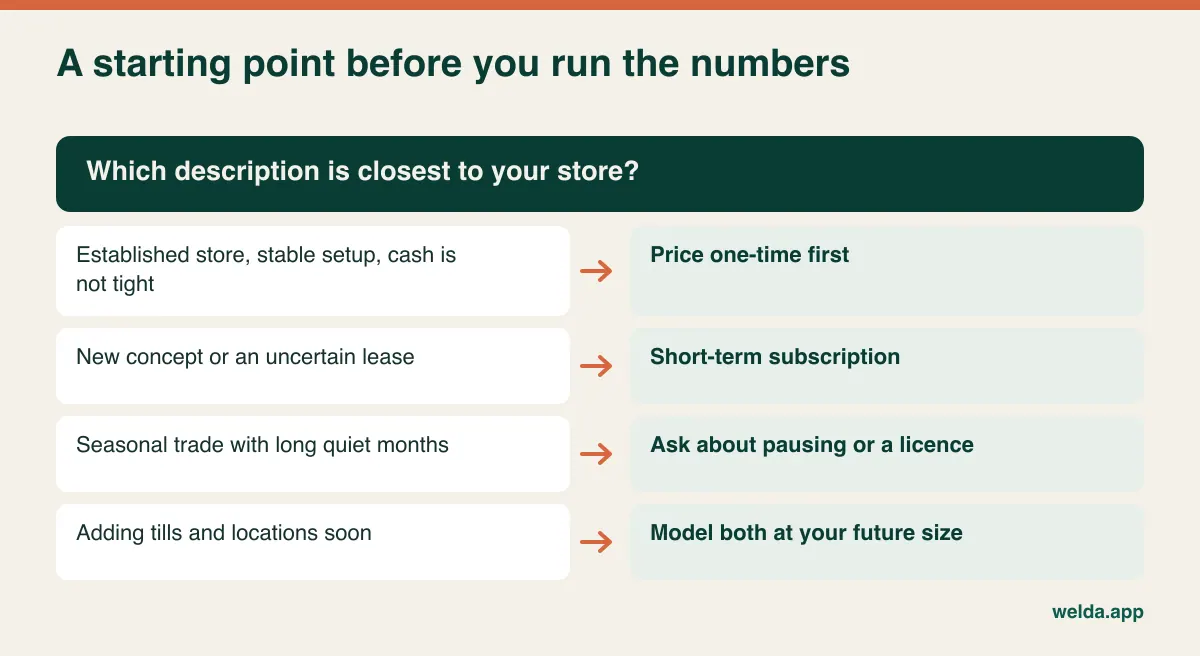
Here are three invented stores to show how the reasoning changes. They are not customers, just ways of testing the logic.
An established corner shop with a long lease. One till, a stable product range, the same owner for years to come. The horizon is well beyond a typical break-even month and the scope won't move. A one-time payment deserves the first look here, provided support terms are written down. If the shop truly needs very little, a free tool could also be enough, which is worth saying out loud before you pay anyone.
A new deli on a two-year lease. The opening stock and fit-out have used most of the available cash, and the location is still unproven. Tying up money during the most uncertain period is hard to justify when the break-even month sits beyond the lease. A short-term subscription keeps options open, so long as the data can be exported later when the business is stable and you recalculate.
A two-store grocer planning a third. Till count and staff numbers are changing. Calculate both models at the size you expect to be in two years rather than today, and then calculate them again as if the third store never opens. What matters here may be running each location's stock separately with central reporting, and that requirement should come before the payment model.
What to ask in the demo before anyone mentions a discount
Salespeople tend to frame the call around a monthly figure or a one-off discount. These questions keep the conversation on what will actually change your total:
- Can you write out every payment for five years at my current scope? This single request surfaces most hidden lines.
- How is the renewal price set? Look for a written formula and a cap.
- What does adding one till, one user or one location cost today?
- What counts as an update, and what counts as a paid new version?
- What support do I get, through which channel and during which hours? Compare those hours with your opening hours.
- Is the contract auto-renewing, and what notice is needed to cancel?
- Can I see a sample export of my data now?
Then test the software on your real work rather than the demo script. Have them add five of your best-selling products, including a weighed one if you sell by weight. Sell on credit if you offer it, do a return as a cashier and pull the end-of-day report. A slow checkout that staff work around makes every calculation above irrelevant, because you will replace it long before the break-even month.
Where Welda Stock fits, and where it does not
Welda Stock has a one-time setup fee, and we state that there are no hidden or recurring costs. The quote is tailored to your number of users, your stores and warehouses, your product count and data import, and your hardware and checkout flow. Setup, importing products, stock and customers from Excel, and team training are included. Because pricing depends on those factors, we work out the figure in a free consultation. You can start by comparing one-time vs subscription POS software on the Welda Stock pricing page, which sets out what shapes a quote.
The product is web-based and runs in a browser, with an interface in English, Turkish and German. It covers real-time stock, fast barcode checkout, scale barcode decoding, receipts, low-stock alerts, store credit and customer accounts, supplier invoices and payables, per-product margin, end-of-day cash reports and permission levels for cashier, warehouse staff and manager. Multiple branches run from one account.
It will not suit everyone, and it is better to find that out now. Operations run over your internet connection. If your line is unreliable, we plan the working setup with you during onboarding, but if you need fully offline selling, raise that first. We don't list certified fiscal modules for specific countries in our product documentation, so if your country requires one, ask early and check with your accountant. And if you might close within a year or two, the table above already shows that a one-time fee may not suit you. Before you buy Welda Stock, we walk through it with you in a free demo using sample data from your industry. Our subscription product, with a 7-day free trial, is Welda CRM, which is built for clinics, salons and studios rather than retail.
If you have competing quotes, bring them along. Tell us your users, locations and product count, and we will fill in the same sheet for Welda Stock so you can compare like with like. You can talk through one-time vs subscription POS software in a free consultation with no commitment.
One-time vs subscription POS: common questions
Is one-time POS software cheaper than a subscription?
It depends on how long you keep it. Divide the extra upfront cost by the monthly saving. If you will keep the setup longer than that number of months, the one-time option is likely cheaper. Include price rises, maintenance and paid upgrades, or the answer will be misleading.
Does one-time mean I will never pay again?
Not necessarily. Maintenance, support, new versions, extra users and extra locations may all be charged separately. Hardware, card processing and local tax modules usually sit outside the software price entirely.
Can cloud POS software be sold for a one-time fee?
Yes. Payment and hosting are separate decisions. Ask what the fee covers over time, including hosting and updates, and get that in the agreement. Welda Stock, for example, is web-based and sold on a one-time setup fee.
What happens to my data if I cancel a subscription?
That depends on the contract. Access may end immediately or continue read-only for a while, and export options vary. Confirm the format and time limit before signing, not when you are leaving.
Which model suits a seasonal store?
Ask whether the subscription can be paused or reduced in quiet months. If it can't, you are paying full price while trading little, which may tilt the numbers toward a licence with light maintenance. Calculate both with your actual trading months.
Should I lease hardware along with the software?
Treat it as a separate calculation. A bundle can ease the upfront cost, but check the minimum term, what happens if you change software, and who owns the equipment at the end.
How long should my comparison period be?
Use how long you honestly expect to keep the setup, capped by your lease or business plan. Five years is a common working period, but also check two years for the early-exit case.
How do I get a Welda Stock price?
The price depends on your users, locations and products, so we confirm it in a free consultation. Tell us your industry and size, and we will take it from there.