Multi-store POS software keeps a separate stock balance for each location while running sales, store-to-store transfers, reporting and staff permissions from one account. You need it when opening a second store means you can no longer see what each location holds, can't get combined numbers without someone sending you a file, or can't limit what a cashier does when you aren't there. If your current system already handles those three things, keep it and tighten how you use it. If it fails on two of them, replace it before the new store opens, not after.
The trouble is that the failure is quiet at first. Your old POS installs fine in the new unit. Barcodes scan and receipts print. Nothing looks broken until the third or fourth week, when a customer asks for something and the only way to check the other store is to phone it, or when you try to work out which store actually made money last month and find yourself merging two exports at the kitchen table.
What usually breaks first after store two opens
Retailers tend to expect the big problem to be reporting. In practice, the first symptoms are smaller and show up on the shop floor. It helps to match what you are seeing to the cause behind it, since some of these point to the software and others do not.
| What you notice | What is probably behind it | Is it the software? |
|---|---|---|
| You reorder something the other store has plenty of | No stock view by location | Usually yes |
| Same product appears twice with slightly different names | Each store creates its own items | Partly: rules plus permissions |
| Stock counts drift further apart every month | Goods moved between stores without being recorded | Mostly habits, helped by a simple transfer screen |
| You call each manager every morning for the numbers | No shared reporting | Yes |
| Refunds spike in one store and nobody can explain why | Permissions too open, no record of who did what | Depends: check the settings first |
| New staff keep making the same till mistakes | Training was only done for store one | No |
Run your own version of this list before you speak to a vendor. If most of your complaints land in the last rows, new software will carry your old problems into a new interface. If they land in the first rows, no amount of discipline will fix it, because the data you need simply isn't being held the way you need it.
"Multi-store" can mean three different products
Nearly every vendor ticks a box labelled multi-location. Behind that box there are three different architectures, and the difference decides how your week goes.
The first is two separate accounts. Each store has its own copy of the system, and the "head office view" is whatever you assemble yourself. That sounds crude, but it is fine if your two businesses really are unrelated, say a coffee kiosk and a gift shop that share nothing except an owner.
The second is a linked add-on. Your existing POS stays, and a central module syncs data between locations. This protects your team's habits and your past investment. Ask how often it syncs, what happens if both stores edit the same item, and what the reports show in the gap between syncs.
The third is native locations: the location is a basic concept in the system, so one item record holds a separate balance per store and every sale writes to the same database. You will mostly find this in browser-based systems. The trade-off is greater dependence on your internet connection, which we return to below.
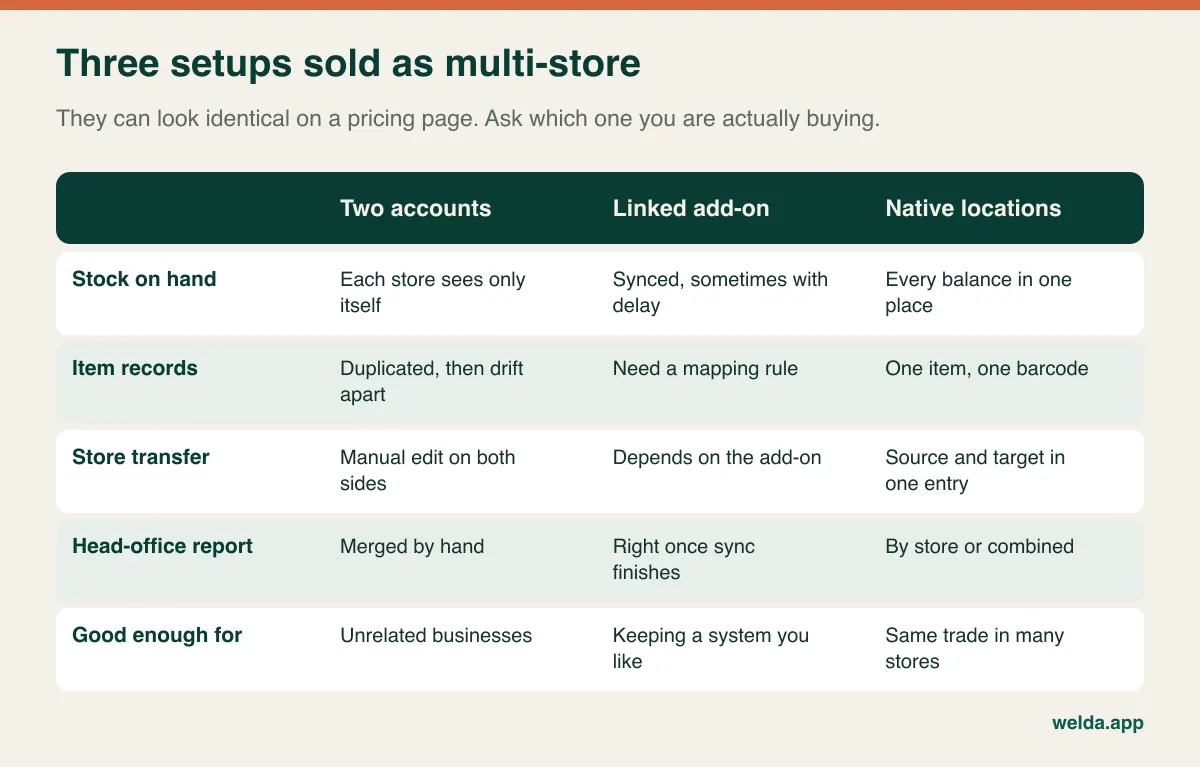
The useful question for a sales call isn't "do you support multiple stores?" It is this: "When someone sells this item in Store B, where and when does it show up for me?" The answer will tell you which of the three you are looking at within about a minute.
Stock by location is the feature everything else depends on
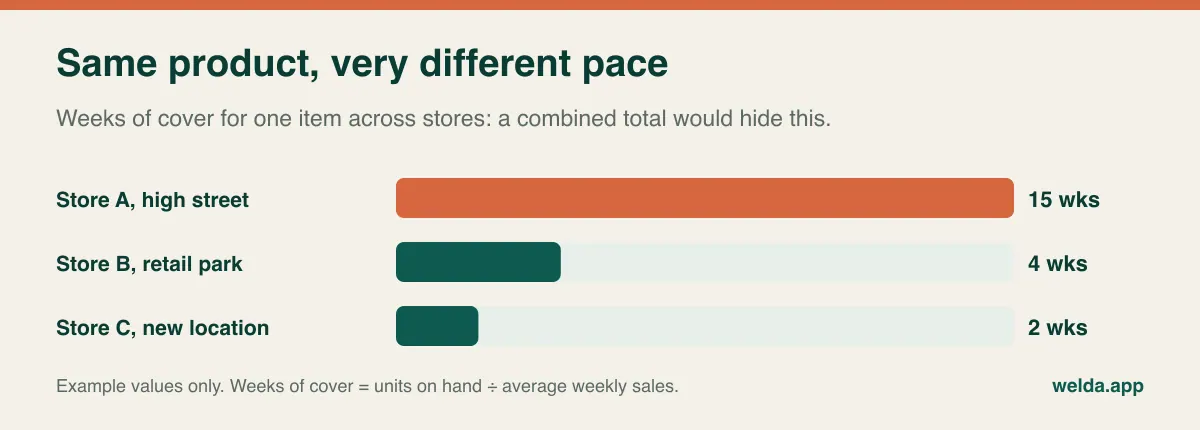
With one store, a stock number describes reality. With two, a combined number can hide a problem completely. Imagine a line showing 40 units in total with a reorder point of 15, so no alert fires. In reality 38 are sitting in your quiet store and 2 are left in the busy one. The busy store sells out by Saturday lunchtime, while the system insists everything is fine.
The way to see this is weeks of cover: units on hand divided by average weekly sales, calculated per store. A single line can look comfortable overall, and still be badly distributed:
When you evaluate software, press on these points in particular:
- Opening balances. Does the new store begin from a counted figure, or does someone copy the list from store one? A copied opening balance guarantees errors from day one.
- Reorder points per location. A downtown store and a suburban store rarely need the same level. Ask whether alerts can be set per store, not only per product.
- Visibility across stores. When a customer asks, can your cashier check the other location on the spot? That single lookup can save a sale that would otherwise walk out of the door.
Our guide to multi-location inventory management covers the operational side in more depth. For a buying decision, the test is simple: pick your best seller and ask the system how many are in each store, on one screen, right now.
A transfer is a sale that never happens, and it still has to be recorded
Store-to-store transfers are the one stock movement a single-location retailer has never had to think about, which is why they are so often handled casually. Someone drives two boxes over at closing time and says they'll enter it tomorrow. Tomorrow gets busy. Store A now shows stock it no longer has, Store B sells items it officially doesn't own, and the difference appears three months later as unexplained shrinkage that causes an awkward conversation with a perfectly honest manager.
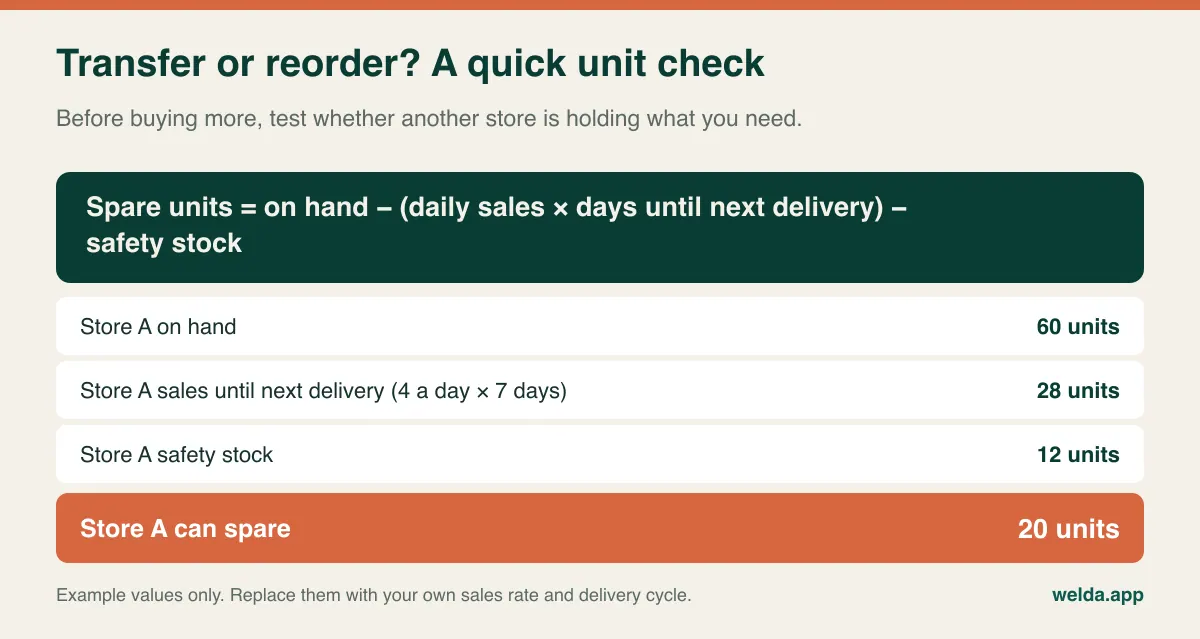
A good transfer process has a simple rule: the record comes before the box. It also answers a question many owners skip, which is whether you should move stock at all. Before you place a new order, check whether another store is holding more than it needs:
In a demo, look at three things. Does a single entry change both balances? Can you find that movement later in a log, and does it show the date and the user? And what happens if ten units are sent and nine turn up? Systems handle this last case very differently: some have an "in transit" state and a receiving confirmation, while others treat a transfer as instant and leave the discrepancy to your next count.
For our own product, Welda Stock has a transfer form where you choose the source store, target store, item and quantity, and a stock movements screen that lists entries and exits. In-transit status and receiving approval aren't on our product pages, so if you ship cases through a warehouse or use drivers, ask us directly. For two nearby shops moving small quantities, what you need most is the habit of logging on time.
Who owns the item list once there are two stores?
This is the decision most owners never consciously make. In one store, whoever adds a new product adds it to the only list there is. With two, a new hire finds a box whose item isn't in the system, so they create "Olive Oil 1L" when "OLIVE OIL 1 LTR" already exists. A few months on, your best-seller report is split across two records, your reorder list shows them separately and nobody can quite say what you sold.
Three practical rules will spare you most of this:
- One owner for the master list. One person or head office creates items and changes prices. Stores can flag what is missing, but they don't invent it.
- Barcode first. Ask whether the system warns you when a barcode already exists. If your range includes items without manufacturer barcodes, agree on your own coding scheme before the second store opens.
- Written naming rules. Brand, product, size, in that order. It takes ten minutes to agree and saves hours of cleaning later.
Pricing belongs in the same conversation. If your shopping-centre location will charge more than your neighbourhood store, ask each vendor to show location-specific pricing using a real product. It is not something every system handles, and it isn't called out as a feature on the Welda Stock pages, so raise it with us rather than assume it. If you want identical prices everywhere, test the opposite instead: change one price centrally and watch it reach both tills.
Can you answer the morning's questions without phoning anyone?
After store two your job changes. You are no longer standing where the sales happen, so reports have to do what your eyes used to do. Rather than counting report types on a feature list, write down the questions you want answered before coffee:
- How did each store do yesterday, compared with the same day last week?
- Which store earns the most margin, as opposed to the most revenue?
- What is slow in one store and fast in another, and could be moved?
- Where did the end-of-day cash count fail to match?
- Are refunds, voids or discounts concentrated in one store or shift?
The last two turn reporting into your main control when you aren't on site. Our guide to reading inventory reports goes further into what to look for. Export still matters, since your accountant will want the data in a spreadsheet, but if you need an export to answer everyday questions, the system has handed the reporting work back to you.
Permissions: what happens at the till when you are somewhere else
Owners tend to hear "permissions" as a question of trust. A better way to see it is accountability, and it protects your staff as much as it protects you. When a void is recorded against a named login and a clear role, an honest mistake stays an honest mistake and doesn't turn into a suspicion hanging over the whole team.
| Action | Cashier | Stock lead | Store manager | Owner / head office |
|---|---|---|---|---|
| Barcode sale | Yes | No | Yes | Yes |
| Refund or void | No, or with approval | No | Yes | Yes |
| Receive goods, log transfers | No | Yes | Yes | Yes |
| Post count differences | No | Enters the count | Approves | Reviews |
| Change prices and items | No | No | Optional | Yes |
| Margin and combined reports | No | No | Own store | All stores |
Treat that as a starting point rather than a standard; in a small operation one person may hold two roles. The software should let you separate these actions and, ideally, limit a user to one location. Test the second part with a real login: can Store A's manager see Store B's margin? Can Store B's cashier sign in at Store A?
Welda Stock has separate permission levels for cashier, stock lead and manager, and you decide which roles can process refunds and voids and view reports. Ask us to show location-level restrictions during the demo if they matter for your setup.
Connectivity stops being an edge case
With one store, a broken line is an occasional annoyance. Across several stores, it becomes a routine event somewhere in your business, so it deserves a decision in its own right rather than a footnote in the comparison sheet.
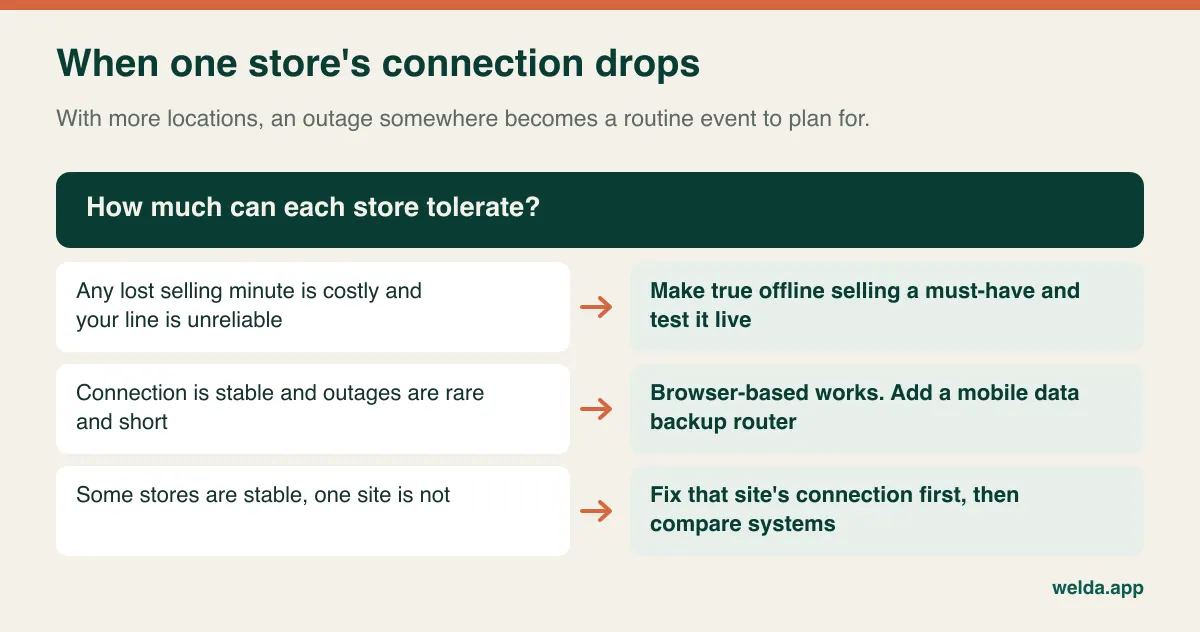
Ask vendors exactly what still works offline: selling, looking up prices, taking card payments, printing receipts? And when the line returns, what happens to stock if the same item sold in two places during the gap? "Works offline" means different things to different vendors.
Welda Stock is browser-based, which is why there's nothing to install and any computer with a browser can use it. It also means transactions run over your connection. We recommend a stable line and plan a working method for shaky connections during setup, but if uninterrupted offline selling is essential for you, that is a real requirement. Tell us at the start.
Tax, receipts, card data and privacy change with the address
A new store can put you under different rules, especially if it is in another state, province or country. What follows is general orientation and not legal or tax advice; check it with your accountant before you open.
- Sales tax and VAT. A location in a new jurisdiction may mean new registrations and different rates. In the US, sales tax can vary by state and locality, and a physical store usually creates an obligation there. Ask how the system sets tax per location.
- Fiscal rules. Several countries require certified fiscal devices, tamper-proof records or specific receipt formats. A POS that is fine in one country may not be sufficient in the next.
- Card payments. Each additional terminal extends the environment covered by your card-security obligations, such as PCI DSS. Ask how terminals connect and who is responsible for what.
- Personal data. Customer accounts and staff logins fall under privacy laws such as the GDPR and its equivalents. More stores usually means more people with access, so restrict customer records to those who need them and close accounts when staff leave.
Be careful about reading more into a product page than it says. Welda Stock's pages do not list fiscal device certification or card terminal integration, so if your jurisdiction or your checkout flow depends on either one, raise it before you decide. Welda stores records encrypted and doesn't share them with third parties; meeting the rules in your market remains your responsibility as the operator.
When you should not switch
Replacing a POS is disruptive, and a second store is not automatically a good reason to do it. Weigh your situation honestly:
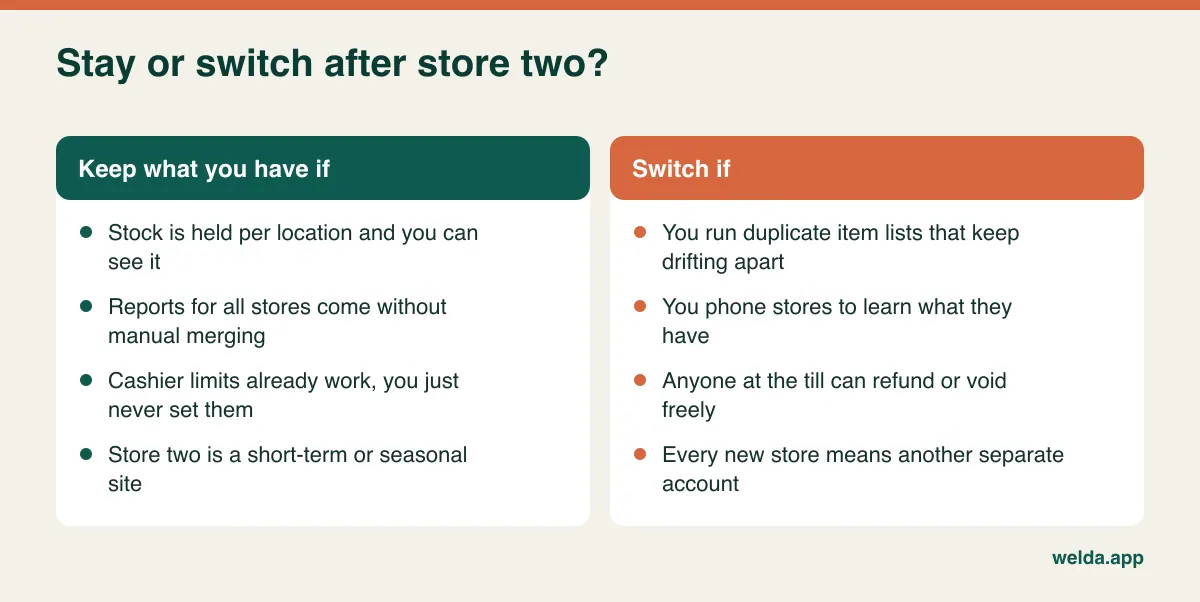
There are also cases where a store-level system is too small. If you run dozens of locations, a central warehouse, a dedicated buying team and complex replenishment, you are probably shopping for an ERP-class system or dedicated retail suite, and the project is about process design as much as software. In our view, a one-account system fits best where the same kind of business runs in two, three or a handful of stores, with decisions made by the owner or a small head office.
Franchises need a separate check too. Your franchisor may dictate the system, and if each store is its own legal entity, combining stock and accounts may not be what you want at all.
How a new location changes the quote
The headline figure tells you little until you know what happens to it at store three. When comparing proposals, put them on a single sheet with the same assumptions and look at these items:
- Billing unit. Per location, per register or per user? A plan that looks cheap for two stores can behave very differently with more tills.
- Payment model. Subscription or one-time? Compare both over the same period, such as three years.
- Reporting and central features. Included or a paid module?
- Migration and training. Is it one-off, or repeated for each new store?
- Hardware. Scanners, receipt printers, scales, terminals and computers for the new site.
- Hidden labour. Merging reports by hand and chasing count differences never appear on an invoice, though you pay for them all the same.
With Welda Stock, pricing depends on your number of users, stores and products and is built around a one-time setup fee that covers setup, data import from Excel and team training. The figure itself comes out of a free call once we understand your scale. It helps to have your store and warehouse count, rough number of products and number of users to hand.
Bring your own stores to the demo
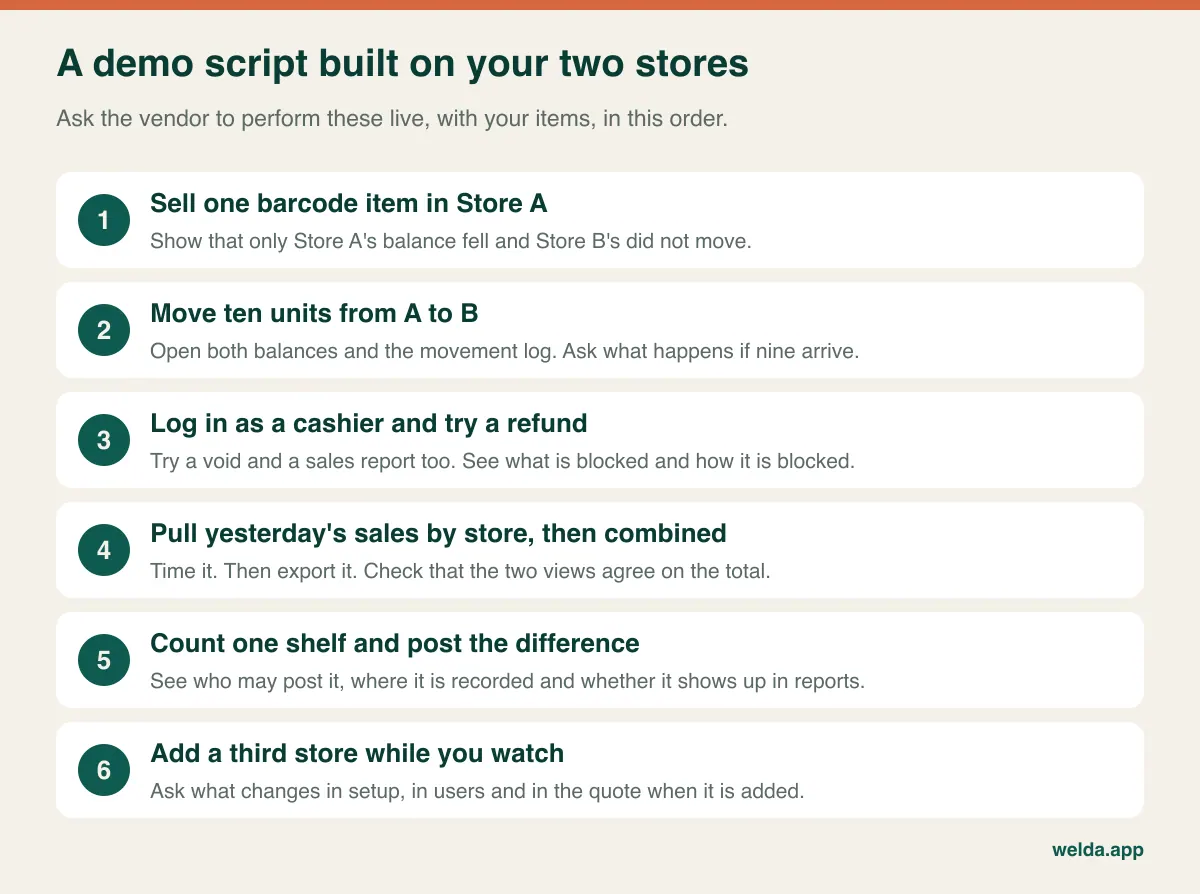
Every system looks flawless on vendor sample data. Take twenty of your own products, including your best seller, something without a barcode and anything sold by weight, and ask the vendor to run this script with your two store names on screen:
Switching over without closing two shops
Two opposite mistakes are common here. One is opening the new store on the old system, planning to migrate "once things calm down": things don't calm down, and you end up moving two sets of bad records. The other is launching new software for the first time on opening day, with a new team, in a new building, so that when something goes wrong nobody can tell which of those three things caused it. The safer order is to start with the store you know.
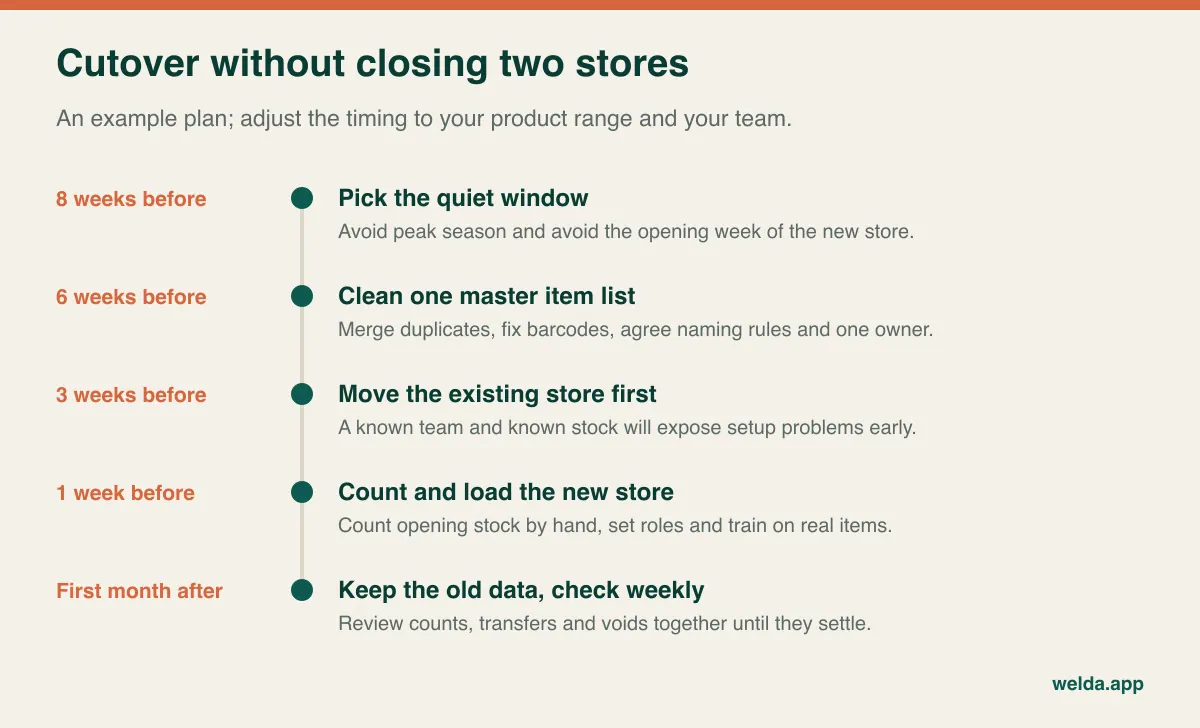
A few details make the difference. Don't import old stock figures blindly; our stock count guide shows how to establish a clean starting point. Clean the item list before loading it, as explained in our guide to moving from Excel to inventory software. Keep access to the old system for past records, customer balances and anything you are legally required to retain. And train by role: a cashier needs a rehearsal of their actual day, not a tour of the reports.
Where Welda Stock fits, and where it doesn't
If you run the same type of retail business in more than one location, such as a grocery, deli or clothing shop, and working from a browser suits you, Welda Stock is built as multi-store POS software for that situation. You manage several stores and warehouses from a single account with separate stock balances, follow sales and stock per store or combined, see end-of-day cash reports and margin per product, and get low-stock alerts. It handles barcode selling, decodes weighed-item barcodes from retail scales, and offers an interface in English, Turkish and German.
It is probably not your best fit if uninterrupted offline selling, certified fiscal hardware, marketplace sync or a tight online store connection are non-negotiable, since none of those are listed on our product pages. We'd rather you learned that now than after a migration.
To see a working example, look at how our multi-store POS software runs in a grocery store. Then, if you'd like to talk through your stores, your range and how you work today, book a free call. You'll leave with a clear answer on fit and pricing, even if that answer is to stay with what you have.
Frequently asked questions
Do I need new POS software when I open a second store?
Not automatically. If your system already tracks stock per location, reports across stores without manual merging and lets you restrict cashier actions, keep it. If two of those three are missing, plan the change before the new store opens.
Why not just buy a second licence of what I already use?
A second licence is often just a second independent copy. The two won't see each other's stock, item lists will drift apart and combined reporting becomes a manual job. That can still be fine if the two stores are genuinely separate businesses.
What's the difference between multi-store POS and inventory software?
POS software focuses on the sale; inventory software focuses on what you hold and buy. For a multi-store retailer the two have to share data, otherwise every sale in one place creates a reconciliation job in another. Many systems, including Welda Stock, combine both.
Can stores share stock without a central warehouse?
Yes. Stores can act as each other's backroom, with overstocked locations feeding understocked ones. You still need per-location balances and a transfer record, whether or not a warehouse exists.
Can each store have different prices?
Some systems offer location-based price lists and others run one price everywhere. If you need this, ask to see it done with a real product during the demo, and include it in your written requirements.
What happens if one store loses its internet connection?
It depends on the system. Locally installed systems may keep selling and sync later, while browser-based ones run over the connection. Welda Stock is browser-based, so we recommend a stable line and plan around weak connections during setup.
How long does the move take?
Software setup is often the short part; Welda Stock's setup is usually completed the same day. Cleaning your item list and counting stock take longer, so allow several weeks ahead of a store opening and avoid your peak season.
How is Welda Stock priced?
It is based on your users, stores and products, with a one-time setup fee. We confirm scope and price in a free, no-obligation call.