The right deli POS software is the one that reads the labels your own scale prints, shows margin against the weight you can actually sell rather than the weight you bought, and lets you record what happens to the rest: rind, heels, drying, samples and spoilage. Test those three things with your own products before you compare anything else. After that, the choice comes down to how you handle customer accounts, staff permissions, tax rules in your country and how much you depend on an internet connection. A system that fails on the labels will cost you more at the counter than any feature elsewhere can win back.
This guide is for owners who buy cheese by the wheel and cured meat by the piece, then sell them by weight over a counter. If most of your range is packaged, ordinary retail software may be all you need, and we will point out where that line falls.
"Deli" describes three different businesses
Vendors use the same word for shops with very different problems. Before you request a demo, work out which of these you are, because each one puts the pressure on a different part of the system.
A cheese and charcuterie counter lives on weighed sales, expensive stock and yield. Its critical questions are about labels, weight-based inventory and margin. A slicing and grocery deli sells a mix of sliced-to-order meat and packaged goods, so the same basket holds scanned items and weighed items, often with several staff behind the counter. A sandwich or prepared-food deli is closer to food service: tickets, modifiers, recipes that consume ingredients, perhaps hot food with different tax treatment. Calling all three "a deli" is how owners end up with software built for someone else.
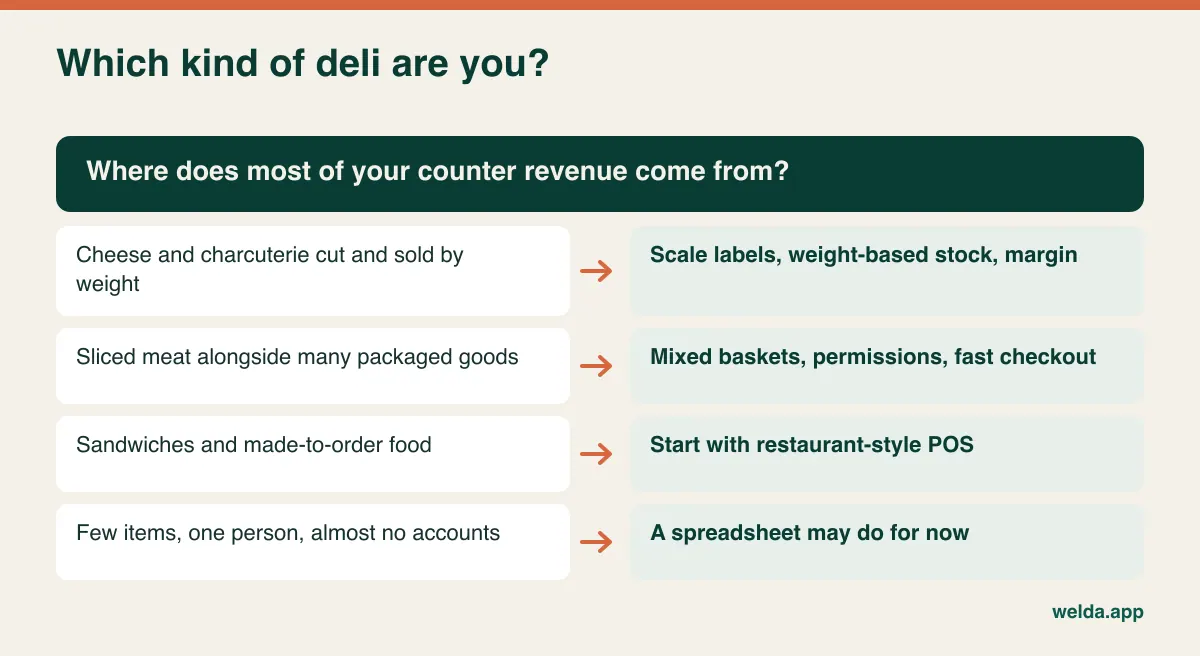
If made-to-order is more than a small share of your sales, look at restaurant-style POS first and treat inventory as a secondary test. The rest of this article is written mainly for the first two types, where stock is sold by weight and the money is won or lost between the invoice and the till.
What is actually inside a scale label
A scale label looks like an ordinary barcode, but it carries changing data. In a common EAN-13 layout, it has a prefix that marks it as an in-store code, an item number known as the PLU, a value field and a check digit. In-store codes generally begin with a 2. In North America, many random-weight labels use a 12-digit UPC that also starts with 2 and often carries price rather than weight. The exact arrangement depends on how your scale was configured.
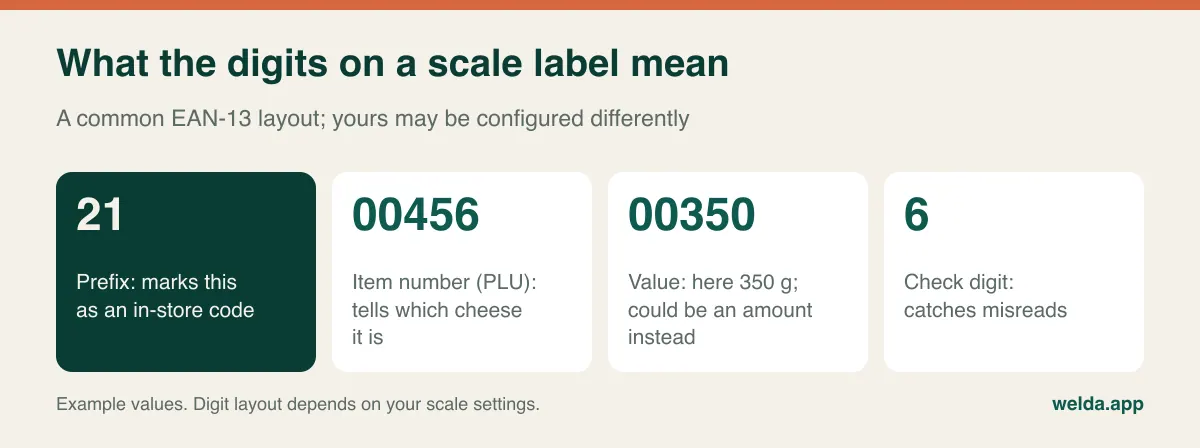
Whether the value field holds weight or price matters more than most people expect. With a weight-embedded label, the system reads the weight directly and calculates the amount from its own price list. If the scale and the software hold different prices, the amount on the label and the amount on the receipt will disagree, which someone at the till will notice quickly. With a price-embedded label, the customer pays the amount printed, but the software must work backwards to find the weight by dividing that amount by the price per kilo. Update a price on the scale in the morning and in the software at night, and every label scanned that day deducts the wrong weight. Nobody notices until the next stock count.
Neither format is wrong. What matters is knowing which one you have and asking the right question. For weight labels: "Which price do you use to calculate the total?" For price labels: "Which price do you use to get the weight back?" If you want to go deeper into scale setups, including till-connected scales and non-printing scales, read our guide on POS software with scale integration.
Bring a tray to the demo, not a wish list
A demo run on the vendor's sample products tells you little about your counter. Print labels from your own scale, write down the item, weight and amount you expect for each one, then scan them and compare. Here is what we would put on the tray for a deli:
- A very small portion, such as 85 g of prosciutto. Low values expose digit-shift errors immediately.
- A large portion, such as 2.35 kg of cheese for a catering order. This confirms the thousands digit is handled correctly.
- A tared sale, such as olives in a tub. Check that the label holds the net weight and that nothing is adjusted twice.
- A mixed basket: two weighed items and a jar of mustard on one receipt, each deducted from stock in its own unit.
- A customer account sale: the same basket charged to an office or café account, with item and weight visible in the history.
- A return: take back a wrongly cut piece. Does the weight go back to stock, and can you write it off instead if it cannot be resold?
- An unknown PLU: a label with no match in the software. You want a clear warning, never a silent sale under the wrong item.
- A label printed before a price change, scanned after it. Which price does the system honour?
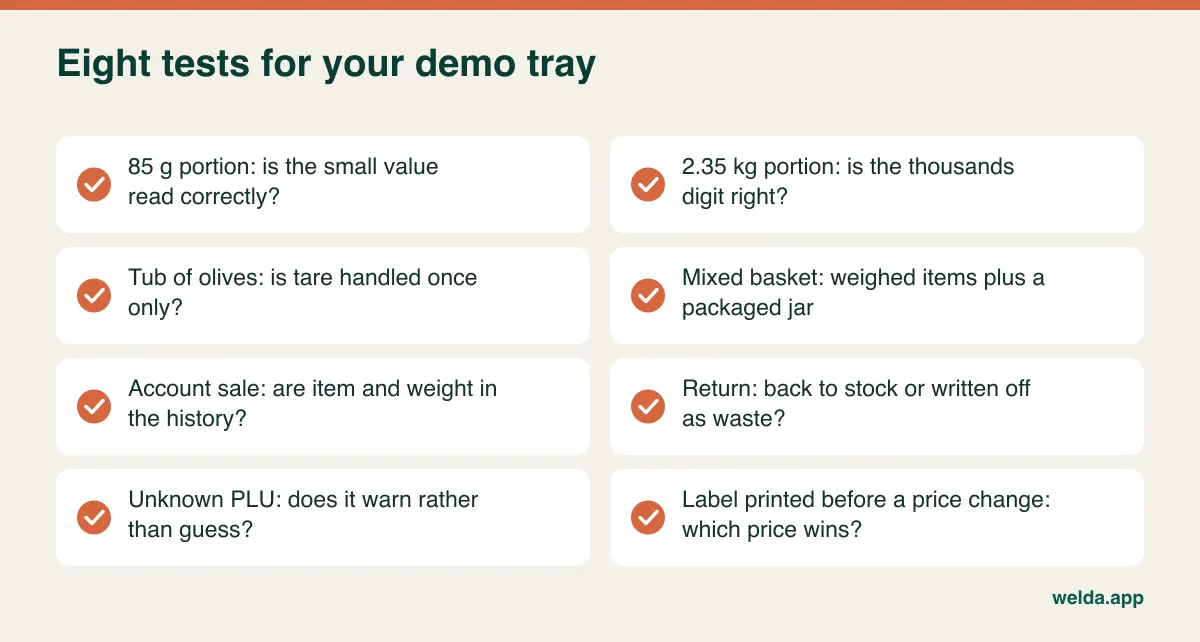
This takes only a few minutes. If any test fails, ask for the cause and the fix in writing, along with who is responsible for changing the scale settings and whether a technician's visit is charged separately. A polite vendor who cannot pass this test now is unlikely to pass it on your busiest Saturday.
The margin you see and the margin you keep
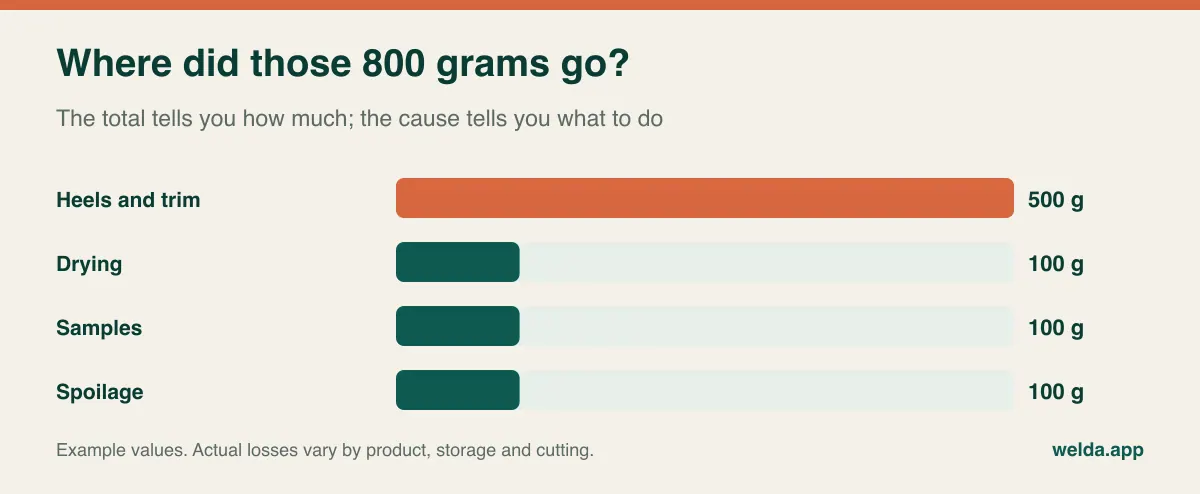
The most expensive misunderstanding in a deli is reading margin from the invoice cost per kilo. A boneless ham or a wheel of cheese never yields the weight on the invoice. The example below uses "units" rather than a currency, so you can drop your own numbers in.
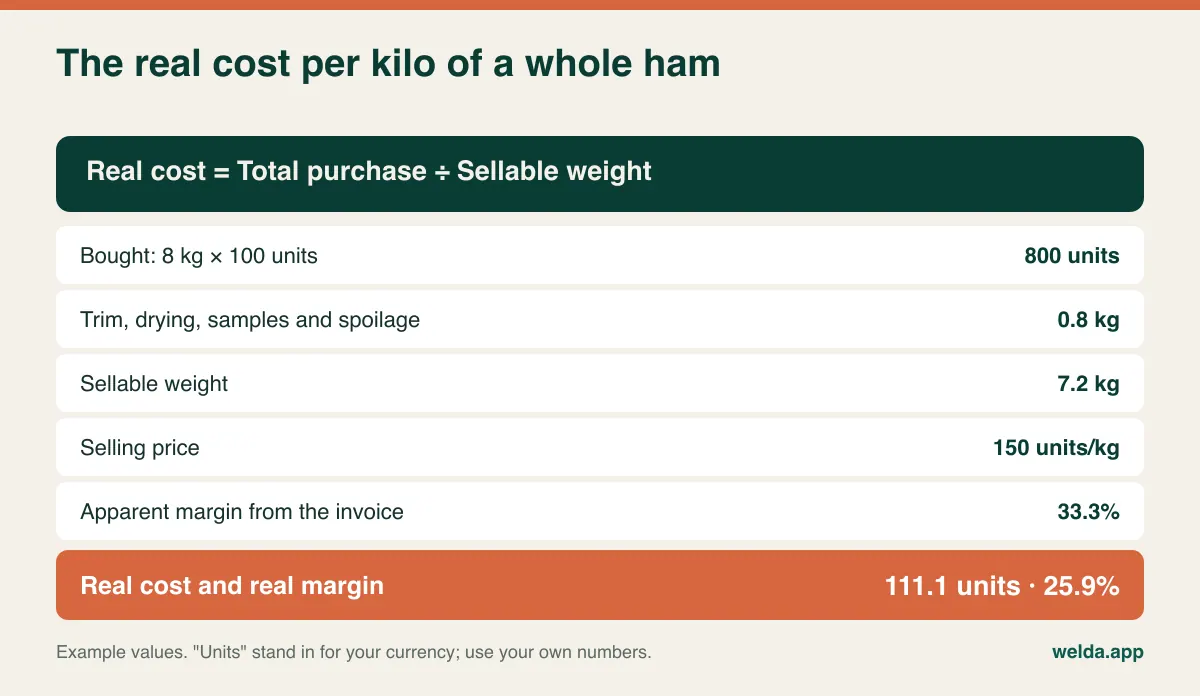
The apparent margin is 33.3%; the real one is 25.9%. The selling price looks healthy, cash arrives each day, and the gap shows up only as a vague disappointment at month end. Across dozens of weighed items, you cannot tell which ones carry the problem without measuring. You can start without any software: pick your three best sellers, record the weight when you open a piece, and add up what you sold by the time it is finished.
Software should support this in three ways. It should hold cost and selling price per kilo for every weighed item. It should show margin per product and update when a new supplier invoice changes the cost, so you are not relying on your memory of last month's price. And it should be clear about how waste entries affect reports. Be alert here: some products reduce stock when you log waste but still calculate product margin from purchase cost. That is a legitimate design choice, but if you do not know about it, the report will flatter you. In the demo, record 1 kg of waste on an item and see whether its margin changes. If it does not, plan to read waste as a separate report and price with both in view.
Also ask what happens when you buy the same cheese from two suppliers at different costs. Is margin based on last cost or average cost? The answer changes how you read every figure on that screen.
Five kinds of loss that deserve five different responses
A deli that writes everything down as "waste" knows how much it lost but not what to do next. Each cause below points to a different decision.
| Cause | Where it shows up | The decision it informs |
|---|---|---|
| Rind, heels and trim | Cheese wheels, hams, salami ends | Pricing, cutting method, whether ends can be sold as a discounted snack or sandwich filling |
| Drying and moisture loss | Cut pieces left on display | Wrapping, how many pieces are open at once, how far ahead you slice |
| Samples and tastings | New products, regulars | Whether tastings sell the product, and which items need a limit |
| Spoilage and date expiry | Salads, opened packs, soft cheese | Order size and order frequency |
| Scale and label errors | Wrong PLU, wrong tare, rush hour | Staff habits and scale settings |
Tare deserves its own mention because the mistake is small and repeats every day. As an example, if the tare for an olive tub is set 5 g higher than the tub really weighs and you make 60 such sales a day, you give away 300 g of product daily. In the other direction, customers pay for packaging, which is both a trust issue and potentially a legal one. Software will not fix tare, but repeated weekly count differences on one product are the clue that leads you to the scale.
When you evaluate a product, ask whether you can choose a reason when logging waste or only type a free note. Free text is fine for a small team if everyone uses the same five phrases; if one person writes "bad" and another "binned", no report can help you. Also ask who may log waste. If everyone can, a writeoff can hide an unrecorded sale. Our article on preventing retail shrinkage covers the wider picture.
How to count a product that sits in brine
Counting a deli is not like counting a shelf. A tub of olives weighs one thing with brine and another drained. A cut wheel has to go on the scale. A cheese sold from a tin has a gross and a net weight. So settle the rules before the first count: is the tin counted gross or net, are olives drained first, is an open piece weighed or estimated? Write them on a sheet and give it to everyone who counts, because if the method changes, the difference between two counts means nothing.
You also do not have to count everything at the same pace. Weekly counts on your high-value weighed items, such as aged cheese and cured whole muscle, combined with less frequent counts on packaged goods, is a reasonable starting point. Count before opening or after closing, and set aside labels that were printed but have not yet been scanned, otherwise they distort the result. Then look at what the software does with the count. It should show the old quantity, the new one, the difference and the date. A one-off gap is a mistake. The same gap on the same item every week is a process problem. For a full method, see how to do a stock count.
House accounts, suppliers and the catering order
Many delis have a quiet second business: the café that takes a weekly cheese order, the office that buys platters, the regular who settles up monthly. When those sales are on a customer account, the balance alone is not enough. Disputes begin with "I never had that much", and they end when the history shows the date, the item and the weight. Our guide to digital customer credit tracking explains how to move these records out of a notebook without losing what people owe you. Check too whether account statements and invoices for business customers come out in a form your accountant accepts.
The supplier side is just as fragmented. A small importer, a local dairy and a wholesaler all invoice differently and on different terms. Entering a supplier invoice should raise stock and update what you owe in a single step; if it takes two, one eventually goes missing. For holiday hampers and gift boxes, try something else in the demo: build one and see how the contents come off stock. Without a bundle or recipe function, you may need to scan each item or adjust stock by hand, which is a workable approach only if you know it in advance.
Rules that vary by country
This is general orientation, not legal or tax advice. Requirements differ by country, region and business type, and they change, so confirm yours with your accountant or local authority.
- Tax on food: Many places tax food differently depending on whether it is cold or hot, and whether it is eaten on site or taken away. Alcohol and non-food items may differ too. A deli basket can easily mix these, so check how the software assigns tax per item.
- Fiscal and receipt rules: Some countries require certified registers or specific electronic reporting. A receipt from retail software is not automatically a fiscal document. If you trade in such a market, this question comes before all the others.
- Legal-for-trade scales: Scales used to sell by weight are generally subject to weights and measures rules, including approval and periodic verification. Your scale technician or local authority can tell you what applies, and whether changing settings has implications.
- Allergen and labelling rules: Food sold loose or packed on the premises often has specific information requirements. The UK, for example, has detailed labelling rules for food prepacked for direct sale. These are your responsibility regardless of the software you use.
- Customer data: Names, phone numbers and purchase histories on customer accounts are personal data, covered by privacy laws such as the GDPR in many markets. Keep only what you need, limit access, and close staff logins on the day someone leaves.
Reading a quote line by line
Comparing two totals tells you little if they do not cover the same work. Send every vendor the same list and ask for written answers.
| Cost driver | Question to ask | Why it matters in a deli |
|---|---|---|
| Payment model | One-off or recurring? What happens in later years? | The real cost only appears over several years |
| Users and locations | Does an extra cashier or second shop change the price? | Weekend and holiday staff are common |
| Items and data import | Are products, PLUs and account balances included? | A wrong PLU feeds straight into stock |
| Scale and hardware | Who configures the scale, and who pays the technician? | No readable labels, no working system |
| Consumables | Who supplies label rolls, scanners and printers? | Ongoing cost outside the software |
| Payments and fiscal | Are terminal and fiscal links included, or separate? | Often a separate line or another supplier |
| Training and support | Does it cover new starters? Which hours? | Your hardest day is before a public holiday |
| Exit | In what format can I take my data if I leave? | Decides what your next switch costs |
Hidden costs rarely sit on the software invoice. They sit in the technician's visit to reconfigure a scale, hours of cleaning a product list, a counter that runs slowly for the first week. Add them to your comparison yourself.
Where Welda Stock fits, and where it does not
We sell one of the options, so we should apply the same tests to ourselves. As deli POS software, Welda Stock is web-based and focused on counter sales and stock. Our product pages describe automatic decoding of scale barcodes, stock deducted as you sell, critical-level alerts, stock counts with waste and shrinkage tracking, margin per product, customer accounts with balance and payment history, supplier invoices and debts, separate roles for cashier, warehouse staff and manager, an end-of-day till report and multiple branches. Importing from Excel and training are part of setup, which we usually complete the same day, and the interface is available in English, Turkish and German.
It suits a counter that prints barcode labels from its scale and wants weight-based stock, margin visibility and accounts in one place. It may not suit you if you need certain other things. Because it is web-based, operations depend on your internet connection, so an unreliable line needs planning before setup. Our product documentation does not describe certified fiscal functions for specific countries, payment terminal integration, a live cable connection to the scale, pushing prices to the scale, recipes, table or ticket management, lot and expiry tracking, or a margin report that recalculates automatically from waste entries. So we do not claim them here. If any of those is a requirement, ask us at the start of the conversation and get the answer in writing. A sandwich-led deli, for example, will probably be better served by a food-service system.
On commercial terms, Welda Stock has a one-time setup fee, and the amount depends on your users, branches, product count and hardware flow; we settle it in a free consultation.
Switching without wrecking a busy week
Your calendar sets the date. The weeks before major holidays are the worst possible time to learn new software at a counter, so choose a quiet period and keep the old process available until the first count has confirmed the new one.
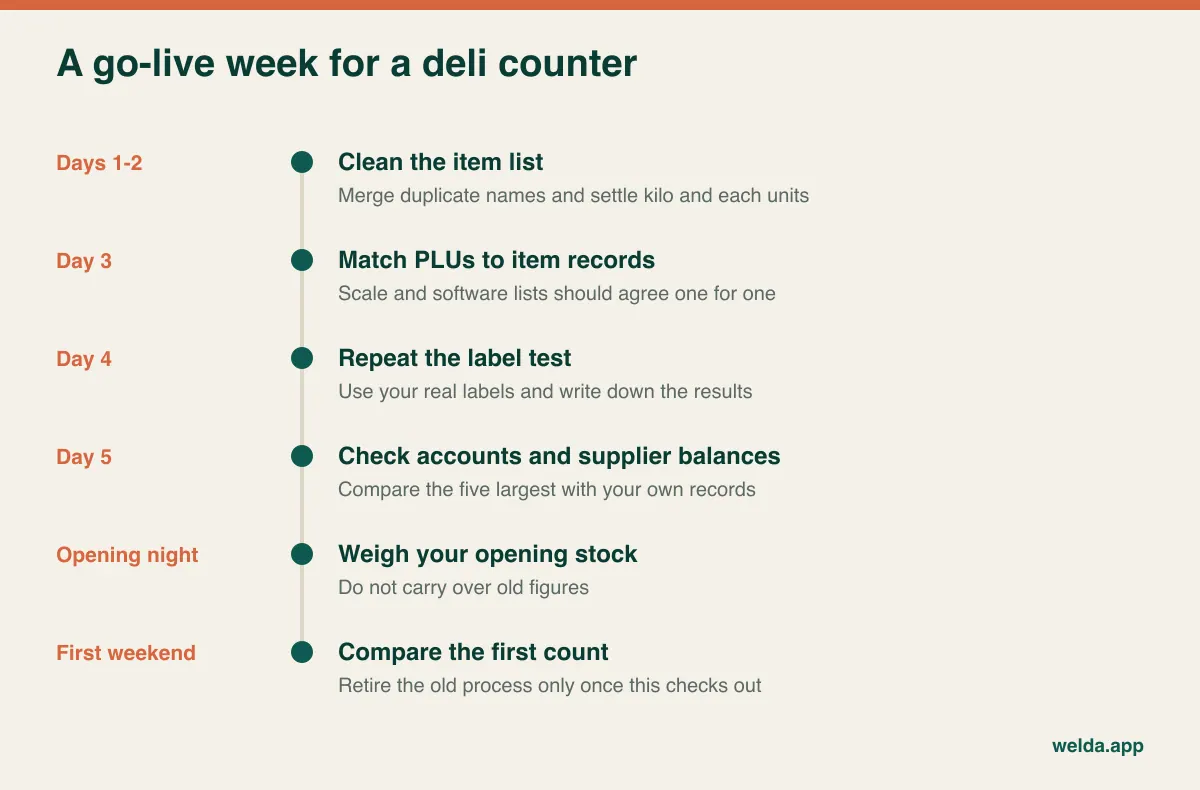
The slowest job is usually cleaning the item list. "Aged Gouda", "Gouda aged" and "Gouda old" may be one product on three spreadsheet rows. Do not go live until the PLU list on the scale matches the software one for one. After importing account balances, check the five largest against your own records. Enter opening stock by weighing it; carrying over an old figure simply moves an old error into a new system.
Frequently asked questions
What is the difference between deli POS software and general retail POS?
Mostly the emphasis. A deli depends on scale labels, stock measured in decimal kilos or pounds, and tracking loss. General retail focuses on packaged barcodes and large catalogues. Retail software can work fine in a deli if it reads your labels correctly and holds weights accurately; the tests above will show you.
Do I need a new scale?
Often not, if your scale already prints barcode labels the software reads correctly. A scale that does not print labels cannot support barcode-based weighed sales, so you would be looking at manual weight entry or a new device. Run the label test before you buy anything.
How often should I log waste?
Log spoiled and discarded product on the day it happens, because later usually means never. Rind and trim are easier to record in one entry when a piece is finished. Drying rarely appears as an event at all; you see it as a count difference, which is why regular counts of weighed goods matter.
Can I use it with a label scale from any brand?
Do not rely on a brand list. What matters is the structure of the label your scale prints in its current configuration. Bring real labels and test them, whichever vendor you are considering.
What happens if the internet goes down?
Locally installed systems may keep selling. In web-based systems such as Welda Stock, operations run over the connection, so plan your way of working during setup. Whichever you choose, write down what the counter should do during an outage before you need it.
What determines the cost?
Users and locations, the range and data to import, your hardware and sales flow, and any fiscal or payment connections. Two quotes are comparable only when they cover the same list. For Welda Stock, we work out the amount with you in a free consultation.
Can I see it before committing?
Yes. We offer a free demo using sample data suited to your sector, and you are welcome to bring your own labels and product list. You can book a free consultation from our deli POS software page. If it is not the right fit for your counter, we will tell you in that same conversation.