The best dietitian practice management software is the one that shows you, without digging, who is overdue for a check-in, how many sessions each client has left, and what you agreed last time, across both in-person and telehealth work. If you are moving off spreadsheets and chat threads, do not start with feature lists. Decide first whether your problem is meal planning or running the practice, then test each candidate against your real week: follow-up cadence, a mixed telehealth schedule, and packages that keep their count when life gets in the way.
This guide is for dietitians and nutritionists in private practice, solo or with a small team, who are close to buying. The answer differs by country as much as by size. A practice billing US insurers and one selling self-pay packages in Dubai or Berlin should not shortlist the same products, so we will say plainly where a tool like ours fits and where it does not.
Three kinds of software get sold under one name
Search for "dietitian software" and three different categories land on the same results page. The first is nutrition analysis and meal-planning software: food databases, nutrient calculations, printable plans. The second is the client-app platform, built around food logging, habit tracking and in-app messaging between sessions. The third is practice management: calendar, client records, packages, reminders, invoices and reports.
Each one solves a different pain. Spending evenings calculating micronutrients is a nutrition-software problem. Wanting clients to log every meal in an app you review is a client-app problem. Losing track of who has not rebooked, or arguing over whether a client has three sessions left or four, is a practice-management problem. A product can overlap two categories, but it rarely does all three equally well, and vendors will not volunteer the weak side.
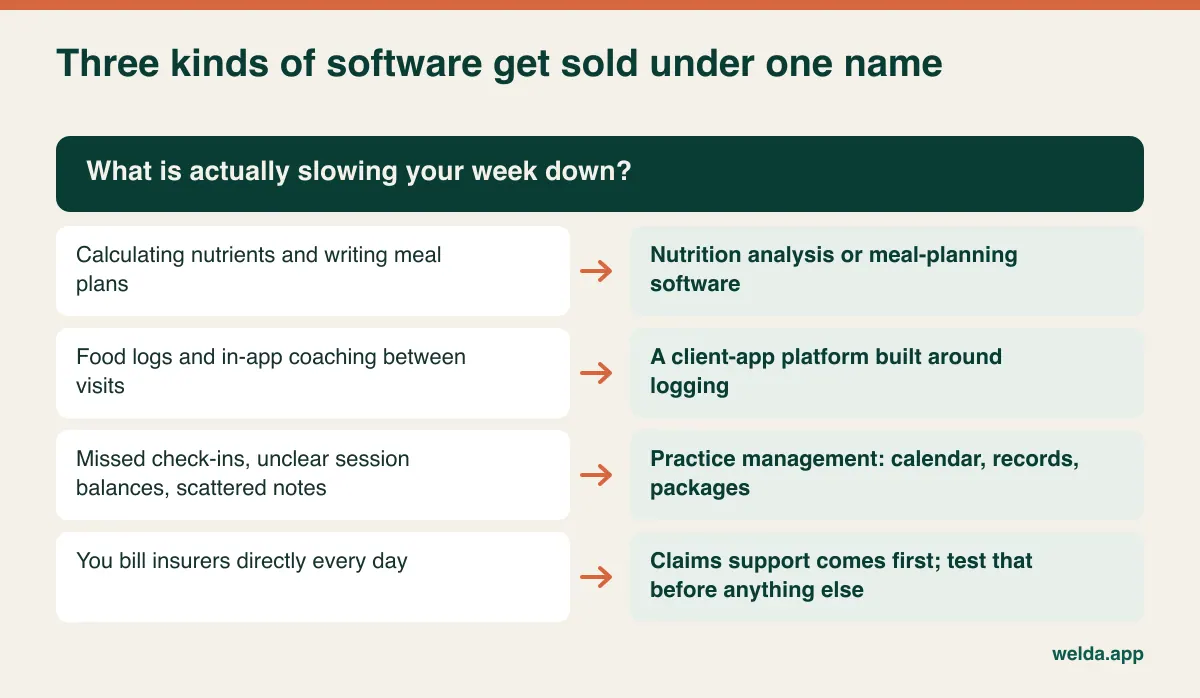
Welda CRM belongs firmly in the third category. It holds client history, notes, documents, multi-session packages, WhatsApp reminders and payments, and adapts its screens to "client" rather than "patient" for dietitians. Meal plans you write elsewhere are attached to the profile as documents. Our product information does not list a food database, automatic meal planning, or a food-logging app for clients, so if those sit at the centre of your service, look at the other two categories first or plan to run two tools.
What the spreadsheet and the chat thread cannot answer
A spreadsheet is not a failure. Plenty of good practices run on one for years. The trouble starts when one client's information lives in three places: the appointment in your phone calendar, the session balance in a sheet, and the last conversation in a chat thread. With a small caseload, your memory stitches these together. As the list grows, memory stops being a reliable part of the system, and the first symptom is usually a client you meant to chase three weeks ago.
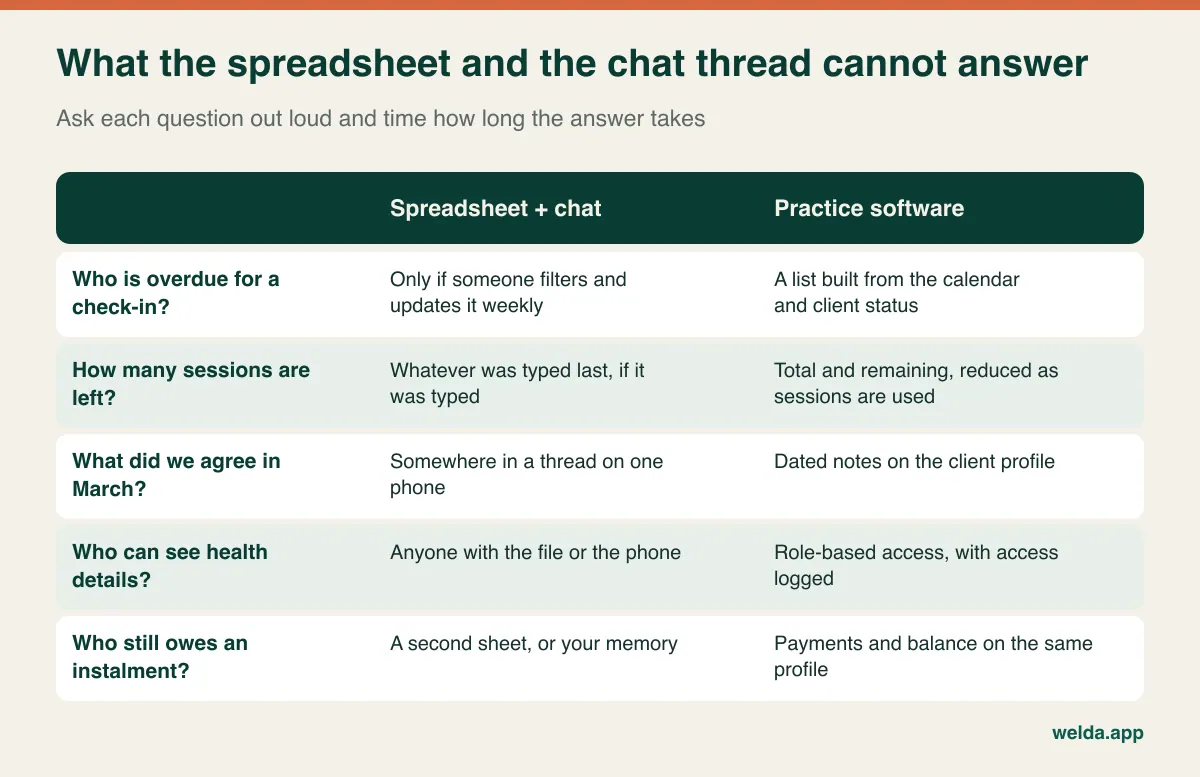
If you stumble on two or three of those, the problem is real and software will help. If you can answer them all in seconds and have no plans to grow, keep your money for now. A tidy routine matters more than a purchase, and our guide to dietitian client management covers what to record from first visit to final check-in. Getting that routine straight on paper also makes it much easier to judge what any tool should do.
The follow-up cadence is the real test of a calendar
A hair client comes back because their hair grew. Nothing about nutrition counselling brings a client back on its own; the week the scale refuses to move is often the week they are most tempted to skip. So the job of a dietitian's calendar is not just recording appointments. It has to expose the person who should be coming but has nothing booked.
Every calendar can create an appointment, so that question tells you little. Ask these instead:
- Can you book the next check-in before the client leaves the screen? A booking made at the end of the session beats any reminder sent later.
- Can you list clients with remaining sessions and no future appointment? This is the most useful screen you will look at each week.
- Does the interval flex per client? Weekly in the first month, every two weeks after that, monthly in maintenance. A rigid recurring rule forces you to fix things by hand.
- What happens around holidays? Ramadan, Christmas, school breaks and summer travel all break a rhythm in ways that depend on who your clients are. Moving a batch of appointments should not take an afternoon.
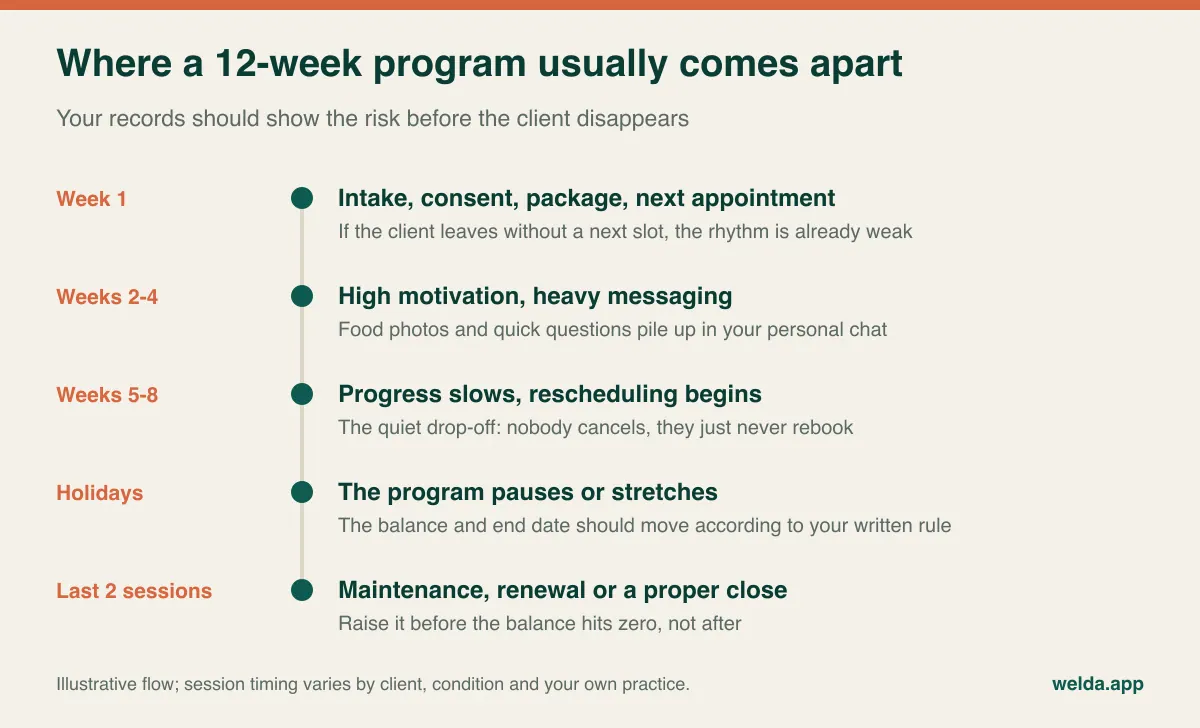
Be realistic about what reminders achieve. An automated message helps someone with an appointment remember it. It does not bring back someone with no appointment; that takes a list and a personal note from you. Welda CRM handles the first part with automatic WhatsApp reminders and the second with notes, tasks with reminders and a follow-up queue. When a slot opens, a waiting list can tell the next person. For more on where automation helps and where it does not, read our piece on WhatsApp appointment automation.
A warning on the channel: Welda's reminders run over WhatsApp. That is a natural fit across much of Europe, the Middle East and Latin America. If your clients live in a market where almost nobody uses WhatsApp and SMS or email is the norm, as in much of the US, that is a real limitation to raise on the first call rather than discover later. Ask any vendor which channels are included and how they are charged.
Running telehealth and in-person from one week
Most software conversations about telehealth collapse into one question: is there built-in video? That is worth asking, but it is not the whole decision. The call may happen in any number of apps. What practice software has to carry is the routine around it, and that is where mixed schedules fall over.
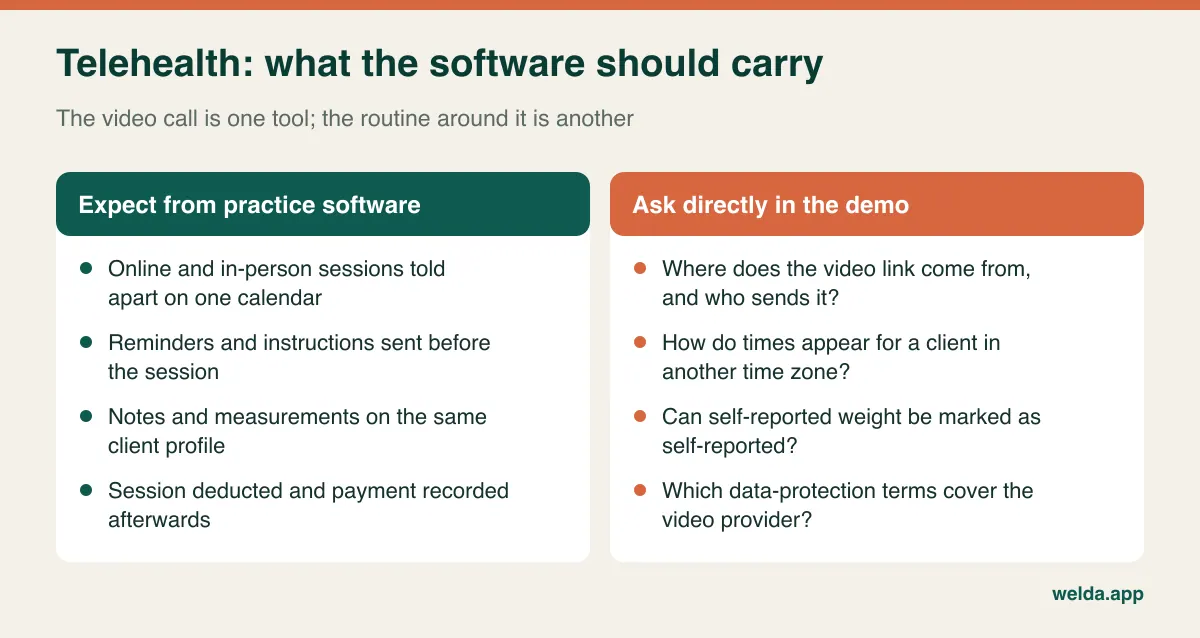
Be clear about Welda here: our product information does not list built-in video calls or automatic meeting-link creation. You schedule the session on the calendar, the reminder and pre-session message go out automatically, and you hold the call in the video tool you already use. Work out in the demo exactly at which step the link reaches the client. If starting the call from inside the same screen is a dealbreaker, say so at the start and choose a product built that way.
Remote work also changes a few details that rarely make it onto feature lists:
- Home data is different data. A weight read off a bathroom scale is not the same as one measured in your clinic under consistent conditions. Decide how you mark self-reported figures so that a trend line three months from now is not misleading. Even without a dedicated field, a consistent note format does the job.
- Time zones catch people out. If you see expat or cross-border clients, test how the appointment time appears in the message they receive. Until you are sure, write the time zone into the template.
- Licensing can follow the client. In some countries and US states, where the client sits at the time of the session may affect whether you can practise. No software settles this; check with your regulator or professional body.
- Cancelling is easier online. There is no travel and little social cost in skipping a video call. Prepayment terms or a clear package rule matter more than they do in person.
- Mixed days need protecting. If you are in the clinic Tuesday afternoon and online Wednesday, room availability and commute time have to be respected. Welda's calendar has staff, room and branch views and prevents double bookings.
Programs and packages: write the rule before you configure it
Dietitians tend to sell two things that look alike. A session package is twelve visits, used whenever. A time-based program is three months of support. They separate at the exact moment things go wrong: a client vanishes for five weeks and comes back. In the session package the balance is untouched; in the time-based program the clock kept running. If you did not spell out that difference at sale, you will be having that conversation over chat, with no record on your side.
Software can apply a policy but cannot invent one. In many small practices the rule lives in the owner's head and shifts from client to client, and after a while nobody can reconstruct why one client was treated differently from another. Write down the five cases below, share them when the package is sold, then look for the matching behaviour in each product.
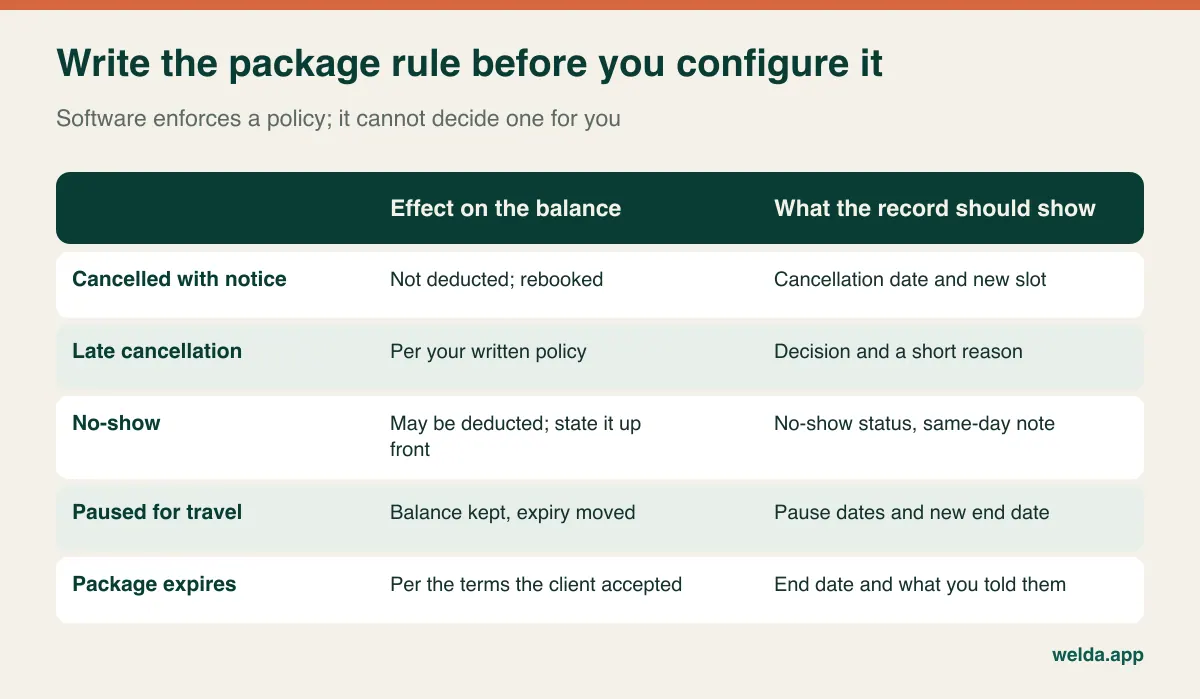
In the demo, check the details. Does marking a session complete reduce the balance automatically? Can a wrong deduction be reversed, and does it show who did it and when? How quickly can you answer "how many do I have left?" Can you see instalments and session use on the same screen? In Welda CRM the total and remaining sessions sit on the client profile and update when a session is used, with invoices, receipts, instalments and the balance tracked alongside them. Our guide to session and package tracking looks at the same problem with examples from other clinic types, and most of it carries straight over.
The messages between sessions
Here is the part of the job that rarely appears in software comparisons. A breakfast photo in the morning. "Can I eat this?" at lunch. A screenshot of the scale at night. "I have a wedding tomorrow, what do I do?" For many clients, this feels like the actual service, more than the check-in itself. It usually runs through your personal number, unpaid and unrecorded, and it contains health information.
Buying practice software does not make this go away. Reminder automation handles outgoing messages; it does not answer incoming ones. Welda's WhatsApp features are reminders plus automated flows before and after appointments, so do not buy it expecting an inbox that moves every daily conversation into the system. If that is what you need, ask directly, or look at the client-app category. What practice software can do is take over the repetitive part of the traffic and give durable information one home.
These rules apply whichever product you choose:
- Separate your work number from your personal one.
- State your reply hours when the package starts, and repeat them in an automatic greeting.
- Say whether messaging support is part of the package and what it covers. Unpriced support tends to grow until it becomes resentment.
- Move anything that matters out of the chat. A new allergy, a new medication or a changed goal will not surface at the next session if it stays in a thread, so add it to the profile as a note.
- Do not let lab results and photos pile up in your phone's gallery. That is the next section's problem.
Where you practise changes the checklist
Nutrition records are health data almost everywhere, and the rules around them differ by country. The summary below is general orientation, not legal advice, and you should confirm the details with a local adviser.
United States: if you are a covered entity, HIPAA applies, and vendors handling protected health information are normally expected to sign a business associate agreement. Our product information refers to KVKK and GDPR, not HIPAA, so ask before assuming. Insurance billing is the other decider. Our pages describe invoices, receipts and payments, not insurer claims or superbills. If you bill insurers every day, Welda CRM is unlikely to be the right fit and you should shortlist products built for that.
UK and EU: GDPR treats health data as a special category, and a software provider acting on your behalf generally needs a data processing agreement. Ask for it, and ask where data is hosted. Welda CRM stores client and health records encrypted, records consents by version, and logs access in an audit trail. Those functions support your obligations, but they do not discharge them.
Canada, Australia and elsewhere: national and sometimes provincial privacy laws apply, along with rebate or private-health arrangements that may require specific invoice details. Check what your rebate or insurer needs before choosing an invoice setup. If your clients claim privately, get a sample invoice from each vendor and compare it to those requirements.
Wherever you are, ask the same practical questions. Can an assistant book appointments without seeing health notes? Can you see who opened which record? How do clients agree to automated messages? How do you export or delete one client's data on request? No system makes you compliant on its own: shared passwords and diagnoses sent over chat are habits, not software settings. Our article on patient data security in clinics has a longer checklist that applies well to client records.
Solo, with an assistant, or several practitioners
The same product means three different decisions depending on your size.
Solo practitioner: speed and simplicity win. You need fast notes, session balances and reminders, and you should not pay for commission tracking or complex reports you will never open. Discipline matters more than features here, because even great software stays empty if you do not enter data right after sessions. Our guide to solo practice management software goes further into what one person really needs.
Practice with an assistant: permissions become the main question. An assistant should book appointments and take payments without browsing clinical notes. Online booking requests fit well here, because the client asks for a slot and someone on your side confirms it, which keeps control of the diary with you.
Several practitioners: you need separate calendars, room clashes prevented, occupancy and revenue by practitioner, and possibly branches. If you run group seminars or corporate wellness sessions, capacity tracking matters too. Decide early how a client's notes pass to a colleague when the practitioner changes.
When practice software is the wrong purchase: your caseload is small and you sell no packages; your real need is meal planning; daily food logging by clients is central to your method; or insurance claims dominate your admin. Saying no to a category is a perfectly good outcome of this process.
What actually drives the cost
Comparing monthly figures side by side is misleading, because the things that make a bill grow are rarely the headline. Fill in the same lines for every quote:
- Users: does an assistant or a part-time colleague count as a paid seat?
- Message volume: are reminders included, and what happens past the limit? A practice running weekly check-ins sends more than you might expect.
- Storage: lab reports, plans and photos accumulate. Where is the ceiling?
- Modules: are packages, expenses and automated flows in the entry plan or only in a higher tier?
- Onboarding: are setup, data migration and training charged separately?
- Add-ons you will need anyway: a video service, a meal-planning tool, an invoicing provider.
- Your time: measure admin before you buy, using a layout like the one below, so you can tell later whether anything changed.
- Exit: how, in what format and how quickly do you get your data back?
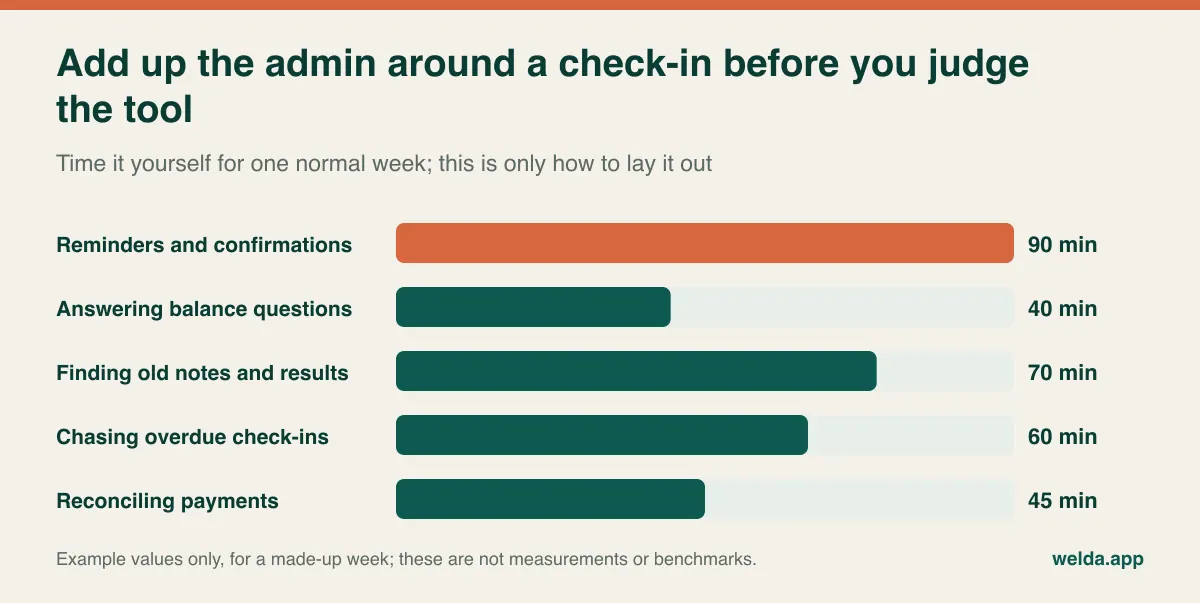
Then total each option over two years, using your own client and message numbers. Welda CRM is a monthly subscription. The price depends on your locations, users, message volume and modules, and it is agreed in a free consultation rather than published as a one-size figure. Setup, data migration and team training are included.
A demo script built from your own week
Vendor demos run smoothly because they contain none of your mess. Arrive with scenarios and ask for each to be performed live. When something gets a "we'll come back to that," write it down, because that is often the answer.
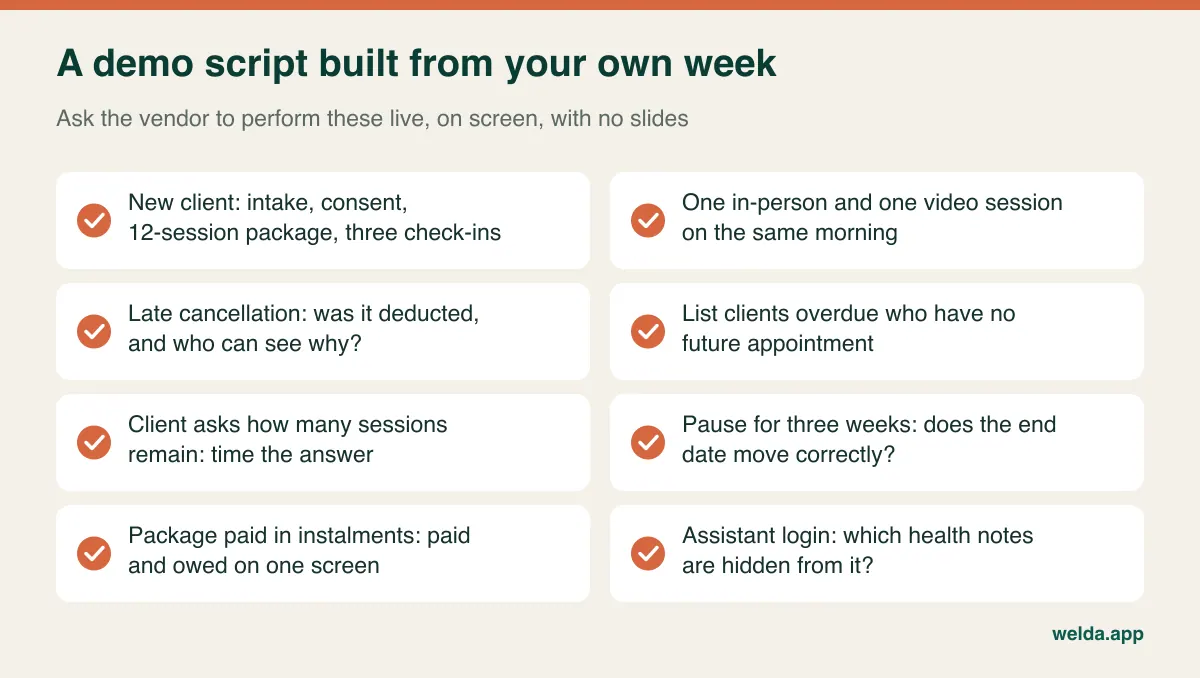
Add a few questions of your own. How comfortable is note-taking on a tablet during a session? Looking at a screen weakens the conversation, so the number of taps it takes is not a trivial detail. Who answers support, and in which hours for your time zone? Can you export one client's full record? Then use any trial on a real week, however short. Welda CRM offers a 7-day free trial with every module open, and your data stays if you do not continue straight away. To see how it maps onto a dietitian's workflow, the page on our dietitian practice management software walks through starting a 12-week program, keeping session notes and preventing missed check-ins.
Moving over without losing half-finished programs
Migrating your whole history is not the hard part. Inheriting current clients with the correct balance is. One wrong count in a client's first session on the new system costs you more credibility than a missing record from 2022. So start with what is open, not with what is old.
- List your active clients. Anyone seen recently, with a program running or sessions remaining.
- Verify balances by hand. Compare the sheet, your calendar and the chat. If they disagree, confirm with the client. This is usually the longest step.
- Clean the file before importing. Duplicates, phone numbers in mixed formats and blank balance cells are far cheaper to fix now.
- Move future appointments. Clients with no next check-in will show up here, which is useful in itself.
- Update consent and tell clients. A reminder from a new sender can be confusing, and consent for automated messages should be settled first.
- Pick a cut-over date and make the old file read-only. Two live systems will both be wrong within weeks.
Avoid switching in your busiest season, such as January if that is when your diary fills. Welda CRM includes moving your existing client and appointment data as part of setup, but only you can decide whether a remaining balance is right.
One last filter
If you are down to two options, stop counting features and finish these sentences for each. "On Monday morning I see this week's overdue clients here." "When a client cancels late, I do this, and this changes." "The telehealth link reaches the client at this step." "My assistant can see this, and cannot see that." Any sentence you cannot finish is a question you did not ask in the demo. The product where you can finish them all, and that your team will really use, is the right one. If you would like to work through this with your own client flow, book a free consultation about our dietitian practice management software.
Frequently asked questions
What is the difference between dietitian software and practice management software?
"Dietitian software" is a loose label. It can mean nutrition analysis and meal planning, a client app for logging, or practice management covering calendar, records, packages, reminders and payments. Decide which of these your problem is before comparing products.
Does Welda CRM include video calls?
Built-in video is not listed in our product information. You can schedule and remind for online sessions, hold the call in your own video tool, and keep notes on the client profile.
Does Welda CRM create meal plans?
Meal calculation and food databases are not part of the product information. You keep writing plans in your preferred tool and attach them to the client profile as documents.
Can I use it if my clients don't use WhatsApp?
Automatic reminders in Welda CRM run over WhatsApp, so if your clients rarely use it, that is a real limitation. Raise it in the first conversation and ask what is possible for your situation.
Is it suitable for insurance billing?
Our pages describe invoices, receipts, payments and instalments rather than insurer claims. If you submit claims daily, shortlist software designed for it. Welda CRM suits self-pay and package-based practices better.
Does software make my practice compliant?
No. Encryption, permissions, consent records and audit logs support your obligations, but your notices, retention periods, agreements and daily habits are still your responsibility. Check them with a local adviser.
Is there a free trial, and how do I find out the price?
Yes, Welda CRM has a 7-day free trial with all modules open. The price depends on your locations, users, message volume and modules, and we set it together in a free consultation once we understand how you work.