Ecommerce replatforming cost has no honest single number, because it is the sum of four separate budgets: building the new store, moving your data and integrations, the revenue exposed during the switch, and the change in what you pay to run the store afterwards. Two merchants moving to the same platform can land far apart, and a quote that looks cheap often just leaves one of those budgets out. Replatforming pays off when your current system is measurably holding back sales or operations and no fix short of moving will remove the limit.
This guide is for the person who has to sign off on that decision. A range published without seeing your catalog would only be guesswork, so the focus here is on what you can act on: the variables that drive the bill, a way to compare quotes that are written differently, and the data, SEO and redirect risks you should price in before you commit. Every figure below is an example you should replace with your own.
The four budgets hiding inside one project
Most merchants start by asking what the new platform costs. That is usually the smallest and least interesting part of the answer. Sort every expense you can think of into one of these four buckets and the project becomes far easier to reason about.
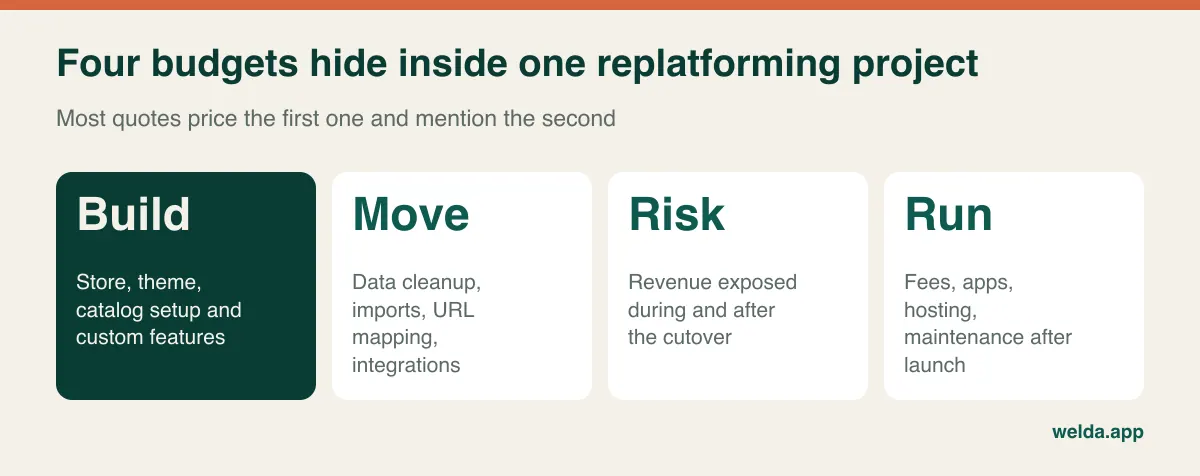
Build covers the store itself: theme or custom design, catalog structure, checkout configuration and any custom features. This is what most proposals describe in the most detail, because it is the most visible part. Move covers the work of getting from A to B: cleaning data, test imports, the redirect map, and reconnecting your ERP, shipping, tax, email and marketplace tools. On a mature store this often takes more effort than the build, yet may appear in a proposal as a single line.
Risk is revenue you might lose while search engines reprocess your URLs, shoppers hit broken links, or checkout misbehaves. It never appears on an invoice, which is why it gets ignored. Run is the change in your recurring cost after launch: platform fees, paid apps, payment processing, hosting, security patches and developer retainers. A migration that lowers the build cost but raises the run cost can be the more expensive choice within a couple of years. To see how these recurring lines add up on a new store, the ecommerce website cost guide goes through them one at a time.
Revenue at risk: the line almost no proposal includes
You can estimate the exposure with simple arithmetic, and doing so changes how you judge everything else. A vendor who is cheaper by a small margin but skips redirect QA is not cheaper if that omission puts a larger sum in play.
Take an example store earning $120,000 a month from organic search, or roughly $27,900 a week. Suppose you plan for six weeks of turbulence and assume, for a poorly prepared migration, that a quarter of that revenue could go missing during that period. The exposure comes to about $41,850. That 25% is a planning assumption rather than a benchmark; your own figure might be far smaller with good preparation. Yet the point of the exercise stays the same: it tells you how much care the SEO portion of the project deserves.
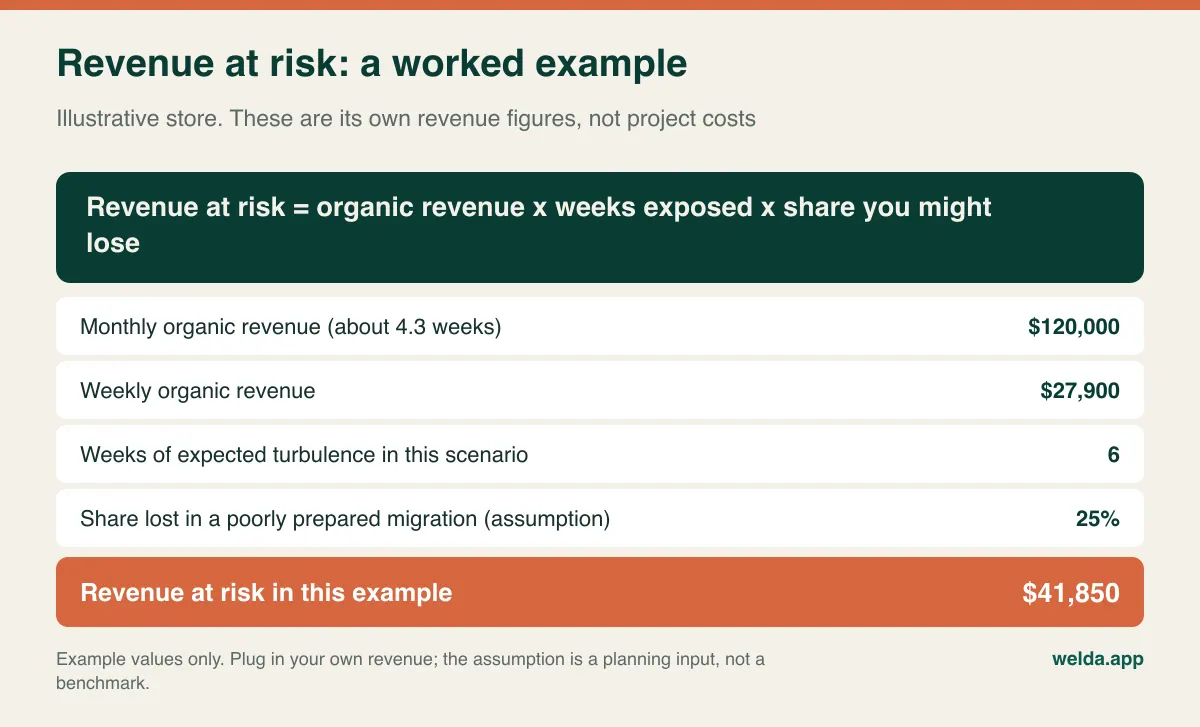
Run this calculation three times with low, middle and high assumptions, and split it by channel. A store that depends on email and paid traffic has a different exposure from one living on long-tail product searches. Then add the operational risk: what does an hour of failed checkout cost during your busiest period? That number tells you whether a cutover on a Tuesday night is worth paying extra for, and how much post-launch support you should insist on.
Do the same for the option of staying. Replatforming proposals are almost always weighed against zero, as if staying were free. It isn't. Log the hours your team spends on manual order fixes, the sales you cannot take because the system lacks B2B pricing or multi-warehouse stock, and the cost of overselling. Use margin rather than revenue for lost sales, and mark clearly which entries are recorded and which are estimates. If that annual total is modest, it may be telling you to fix what you have.
Architecture decides your next bill
Your choice of platform model shapes what you pay for the next several years, and it is far harder to reverse than a design decision. The real trade-off is what you become responsible for.
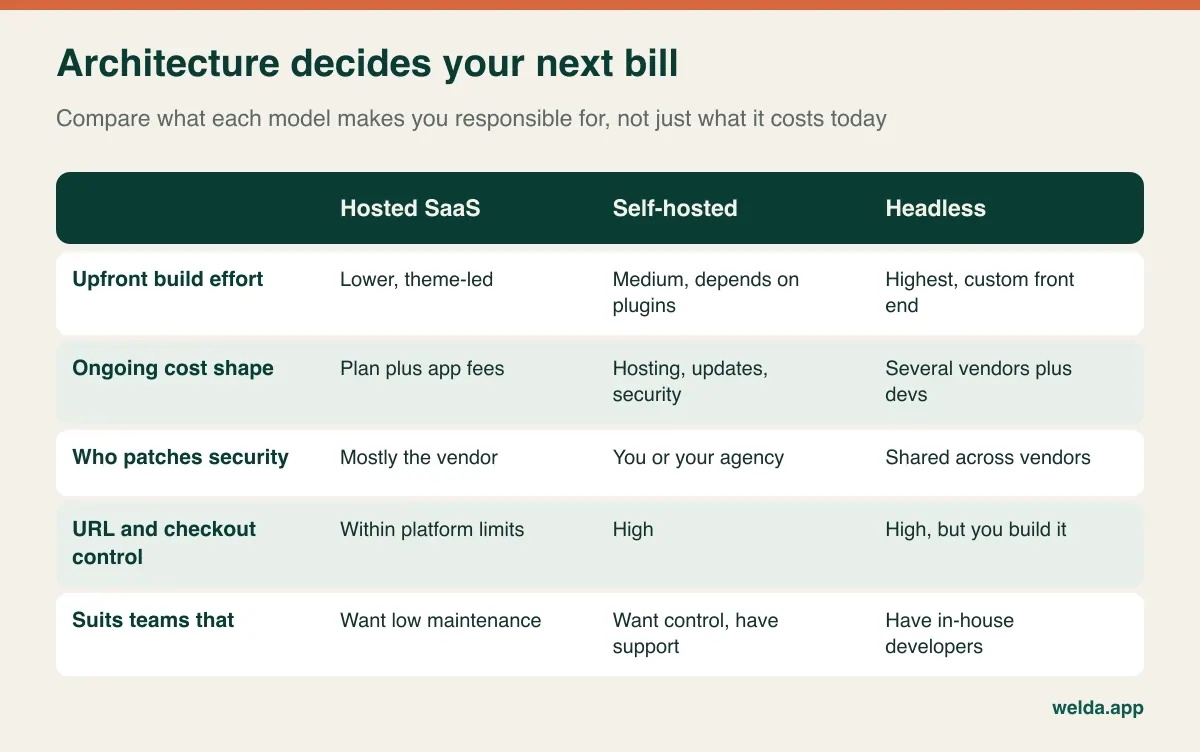
Hosted platforms shift maintenance and much of the security work to the vendor, in return for working within its limits. The hidden line here is usually app subscriptions, which accumulate one reasonable decision at a time. Self-hosted systems give you control over code, hosting and URLs, while updates, backups and patching become someone's recurring job. If nobody owns that job, the savings are imaginary. Headless builds separate the storefront from the commerce engine, which gives you real freedom and multiple things to maintain. For most small and mid-sized merchants without in-house developers, that freedom costs more than it returns, though for a store with truly unusual front-end needs it can be right.
Ask one question that exposes the fit quickly: if our main developer or agency disappeared tomorrow, who could run this? If the answer is “nobody”, the architecture is ahead of your organization. At Welda we build on Shopify and WooCommerce, depending on what a merchant needs. If your requirements point to a large enterprise suite or a custom headless build, that is outside what we list on our service page, and we would rather say so in the first conversation than stretch a project to fit.
The data that refuses to move cleanly
Products and customers export easily. The relationships among them are what break. A store can show the correct product count and still have sizes attached to the wrong colors, order history detached from customer accounts, or reviews that lost their original dates. Any proposal that says “data migration included” without saying which entities, how many records and how many test runs is leaving the most expensive question open.
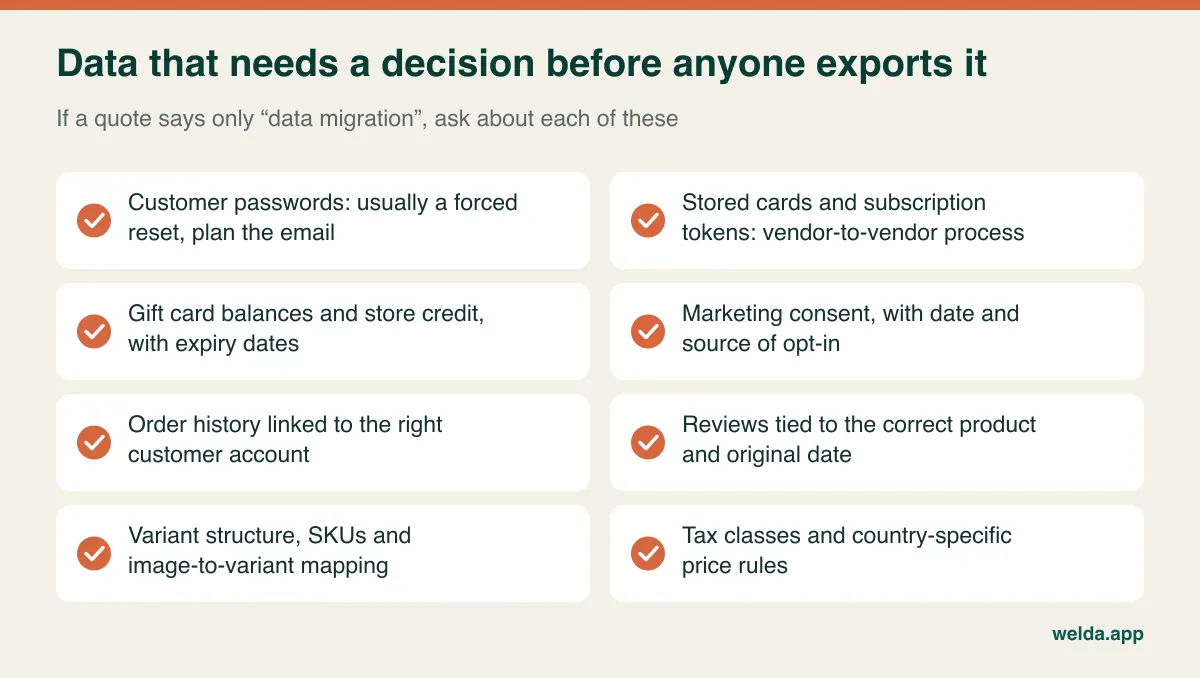
Three categories deserve special attention. Customer passwords are generally stored as one-way hashes and may not work on the new system, so expect to plan a forced password reset. That means an announcement email, guest checkout as a fallback, and a reset screen that doesn't feel like an error. Stored cards and subscription payment tokens usually live with your payment provider, and moving them to a new one is a separate process that depends on both providers. If subscriptions matter to your revenue, confirm this before choosing anything, because a failure here shows up as a wave of failed renewals weeks after launch. Gift card balances and store credit are effectively money you owe customers, so they need exact reconciliation and an honest answer on expiry dates.
Privacy obligations move with the data. Depending on where you sell, rules such as GDPR, UK GDPR or US state privacy laws can affect how customer records are transferred, which vendors process them and what your privacy notice must say. Carry marketing consent across with its date and source; re-emailing people whose opt-in you can no longer prove creates risk just when you're trying to rebuild momentum. Take this as a prompt to check with a qualified adviser, not as legal advice. Card data needs its own caution: never export or email raw card numbers, and confirm how PCI scope changes on the new setup.
Plan at least two rehearsal imports. After each, reconcile with simple counts plus manual spot checks. For example, if the old store has 1,200 products and 4,300 variants, the new one should match. Then open 50 random products and compare price, stock, images and category by hand, and pull up 20 customers to confirm their order histories. This is also the cheapest moment to clean up. Retired products, duplicate SKUs and empty attribute fields cost more once they are live, so decide what to leave behind.
URL mapping is where the bill gets decided
A store's organic traffic is tied to addresses built up over years. When you change platforms, those addresses usually change too, and each old URL needs a sensible new destination. The website migration SEO checklist covers the general procedure; the points below are the ones that matter specifically for stores, and they tend to separate a realistic quote from an optimistic one.
Build the inventory from several sources: a site crawl, Search Console, analytics, server logs and a backlink report. A crawl on its own misses out-of-stock products that still earn traffic and old campaign pages with valuable links. Then sort by value. Thousands of product URLs may follow a pattern, while the changed category tree needs human judgment, and the small group of pages that earn most of your traffic and links deserves individual verification.
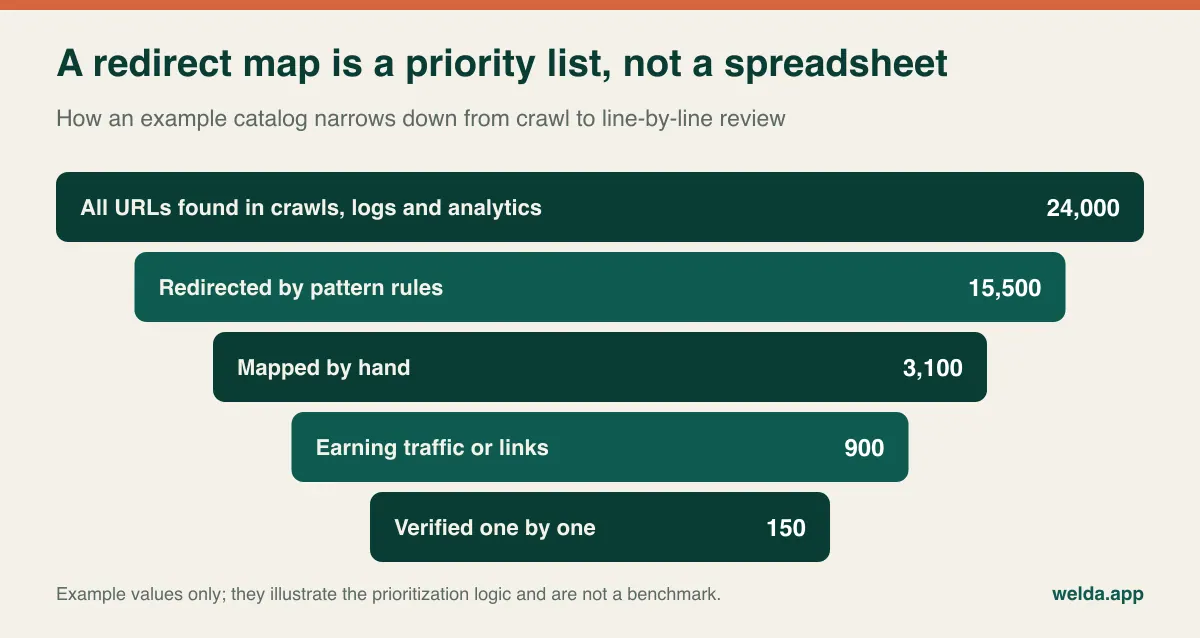
Store-specific traps are worth raising with every vendor. Some hosted platforms enforce fixed URL prefixes for products and collections, so your existing pattern may not survive; confirm this on the target platform during scoping. Filter and sort parameters can create duplicates of category pages if canonical rules don't carry across. Sending all discontinued products to the homepage is a poor shortcut: the nearest category or a close substitute serves both the shopper and the search engine better. Clear out redirect chains left over from earlier migrations, so that old URLs go straight to their final destination. On multi-language or multi-country stores, hreflang pairs must be rebuilt correctly at the same time.
Redirects are necessary but not sufficient. Page titles, meta descriptions, product structured data, image URLs and internal links all need to survive the move, and the “noindex” setting from your staging site must come off on launch day. It sounds too obvious to list, so list it. Google's site move documentation recommends keeping redirects in place for as long as possible, generally at least a year. Budget for that, and keep the old domain registered. For the on-site structure that should exist after the move, see the ecommerce SEO guide.
How to compare three quotes that don't look alike
One vendor sends a fixed bid with four lines. Another sends a rate card with an estimate. A third sends a forty-page proposal. Comparing the totals tells you almost nothing, because you are likely comparing different scopes. Before you look at any price, send all of them the same written questions and ask for answers in the same structure.
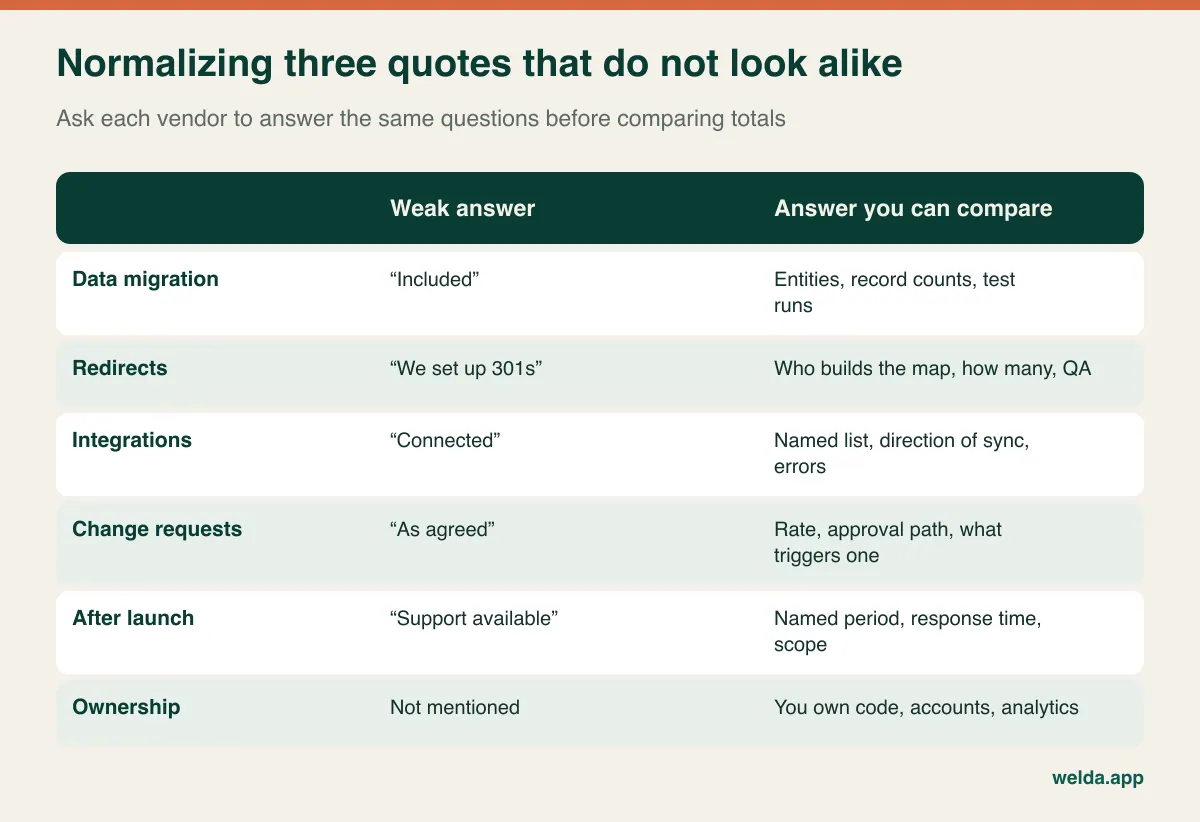
Once the answers are in, rebuild each quote in your own table with the four budgets as columns. Where a vendor has excluded something, such as redirect mapping or the second test import, put your own estimate in that cell and mark it. The ranking often shifts at this point, and that shift is the insight you were paying for. Add the recurring costs for at least two or three years, including apps and support retainers, so that a low build cost doesn't hide a higher run cost.
- Fixed bid or time and materials? A fixed bid gives budget certainty only if the scope is written in detail. Time and materials suits uncertain legacy systems, provided you have milestone caps and timesheets.
- Who owns what afterwards? Code, theme, analytics, ad accounts and platform accounts should be in your name. Leaving a vendor should not mean rebuilding.
- What is the change request rate and process? Late surprises are normal on migrations, so the mechanism for handling them is part of the price.
- Who else will touch the project? Your ERP vendor or payment provider may need paid work too, and that won't appear in anyone's proposal.
Some costs surface only on your side of the table: the overlap period when you pay for both platforms, staff time during testing and training, slower work while people learn new tools, campaigns postponed around the switch, and new contract terms if your payment processor changes. None of this is a vendor's fault. All of it belongs in the comparison. If integrations are a large part of your scope, the guide to ecommerce shipping and payment integrations can help you write a more precise list of requirements.
Signals that it's too early to move
Sometimes the most profitable replatforming decision is to postpone it. If sales are falling because of ad efficiency, product fit or price competition, a new platform will fix none of that and will consume months of attention. If the motivation is mainly that the store looks dated, a theme refresh on the current system may reach the same goal at much lower risk. And if pages are slow, audit images, scripts and hosting first, since you might carry the same problems with you to the new system.
Test your reasons with a blunt exercise. List the incidents of the last six months, then note how often each happens, what it cost in hours or sales, and what your current vendor said about it in writing. An item with no written “we don't support this” is an assumption and not yet a limit. If only one or two real limits survive, a cleanup project will probably serve you better. If several survive and point at the same structural problem, such as your catalog model or your integration layer, you have a case.
People matter as well. A migration needs someone on your side who knows the product data, can make decisions quickly and has time to test. If that person is also running peak-season campaigns, something has to give. The reverse applies too: if your vendor has announced the end of support for something you depend on, waiting makes things worse. Moving early and on your own timetable is far better than moving in a hurry.
Cutover: the two days that test everything else
Pick your date by working backward from your peak. Black Friday, Cyber Monday and your own category's busy season should see a store that has already run for several calm weeks. Launching close to peak means any minor bug surfaces on the most expensive days of the year. A low-traffic night midweek is a common choice, because support and vendors are still reachable the following morning.
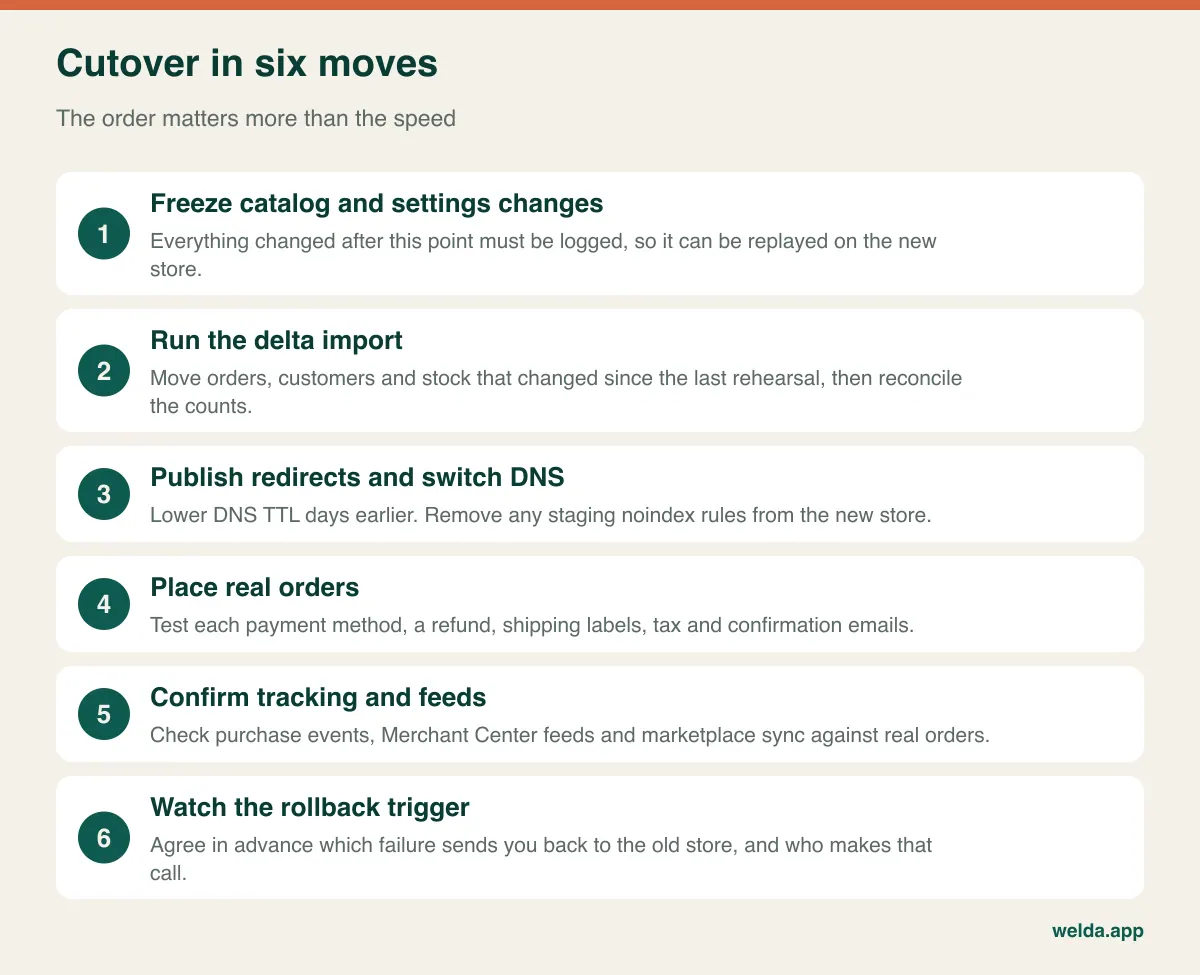
The rollback criterion deserves more thought than it usually gets. Agree beforehand on something like “if payments can't be taken and the fix isn't in sight within two hours, we go back”, along with who makes that call. Deciding this in the middle of an incident rarely goes well. Plan as well for orders that arrive on the old store during the switch, as they need to end up in your fulfillment flow rather than in a forgotten database.
For the first 30 days, keep a short daily checklist: 404 reports, redirect errors, payment success rate, marketplace sync errors, Search Console crawl status, and analytics purchases reconciled against actual orders. Save your baseline numbers before the switch so you are comparing against facts instead of memory. Read any drop carefully. Some weeks of organic fluctuation are to be expected after a move. A sudden break in cart-to-checkout is a bug, and it needs fixing today.
Where Welda fits, and where it doesn't
We build mobile-first stores on Shopify or WooCommerce, structure the product catalog, connect payments and shipping, keep marketplaces such as Amazon and Etsy in sync with your store, and set up measurement through GA4 Enhanced Ecommerce and the Meta Pixel. After launch we can keep working on conversion, or you can run daily operations yourselves. If you also want stock, marketplaces and physical sales in one pool, Welda Stock can run alongside your store.
We don't publish fixed prices. The fee depends on platform, product count, integrations and how much management you want. How much of your old data we can bring over depends on what your current system can export, so we'd want to look at it before promising anything. If you are weighing up your ecommerce replatforming cost, bring your incident list and your revenue-at-risk estimate to a free consultation. We'll work out the scope together and tell you plainly if staying put looks like the better decision.
Frequently asked questions
What drives ecommerce replatforming cost the most?
Usually catalog complexity, the number of integrations, and custom features, more than the visual design. Variants, B2B pricing, ERP connections and multi-country setups add work to data, testing and redirects alike. Any serious ecommerce replatforming cost estimate should be broken down by these variables rather than given as one lump sum.
How long does a replatforming project take?
That depends on catalog size, integrations and how quickly your team makes decisions. A simple store with few connections and a complex one with ERP and marketplaces will have very different timelines. Plan backward from your peak season and leave dedicated time for test imports.
Will I lose my Google rankings?
Some temporary fluctuation is common and nobody can honestly guarantee otherwise. A complete redirect map, preserved titles and structured data, checked crawl settings and monitoring after launch greatly lower the risk of lasting damage. Lasting losses usually trace back to skipped steps.
Can customers keep their passwords?
Usually not, because passwords are stored as one-way hashes that may not be compatible across systems. Most migrations ask customers to reset on first login. A clear announcement and a smooth reset flow keep this from turning into lost sales.
Should we move to headless?
Only if you have a specific front-end requirement that a theme-based store can't satisfy, and developers who will maintain it long term. Otherwise the extra vendors and upkeep often outweigh the flexibility.
Is it cheaper to stay and fix the current store?
Often, yes, if the problems turn out to be images, plugins, hosting or process rather than real platform limits. Work out the annual cost of staying, then compare it to the four budgets over two or three years.