B2B ecommerce website development means building a store where each trade customer logs in, sees the prices negotiated for their account, checks available credit and places an order that follows your approval rules into your back-office system. It is less a design project than a rules-and-integration project. Scope and budget depend mainly on three things: how customer-specific pricing is calculated, where account and credit data lives, and who has to approve what. Answer those in writing and vendors can quote the same job. Leave them open and every quote rests on different assumptions.
This guide is for manufacturers and distributors who want dealers and resellers to order online at their own prices. It helps you work out what size of project you actually have, which questions separate a serious vendor from a template reseller, and how to keep your customers and sales team on board once the site is live.
First, check whether you need B2B ecommerce at all
Not every business that sells to other businesses needs a dedicated build. A small roaster selling to a few cafés at one wholesale price, paid by card, can often use a regular online store with a password-protected wholesale section. You need a real B2B build when the order itself carries commercial conditions: this buyer has this price, pays in 30 days, has this credit limit, and must quote a purchase order number.
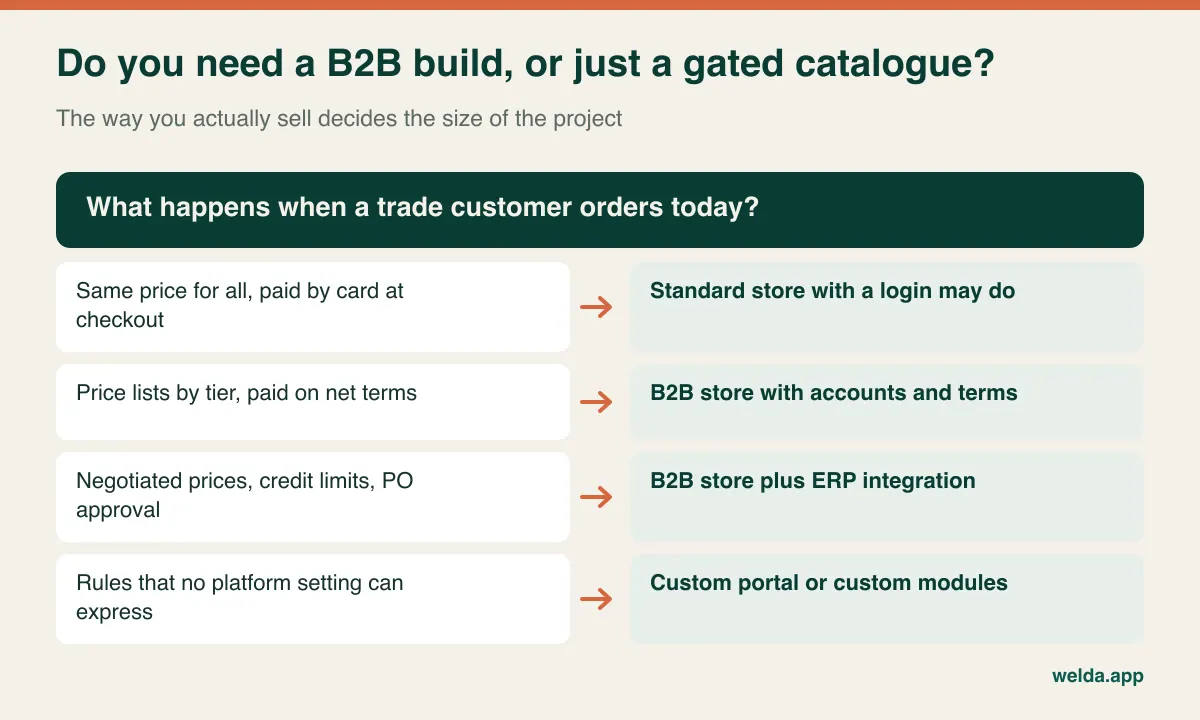
A useful exercise takes one hour. Pull ten recent trade orders at random. For each one, note how it arrived (email, phone, spreadsheet, rep), whether the price matched the standard list, whether anyone checked credit, and how many people touched it before it shipped. Those ten orders will tell you more about your requirements than a long feature workshop. They also give you real test cases to hand to vendors later. If your trade side is still taking shape, our guide to managing wholesale sales covers how to separate prices, payment terms and minimum orders before you try to automate them.
Customer-specific pricing is where projects quietly double in size
"Customers should see their own price" sounds like one requirement. In practice, it can mean any of these, and they are not equal in effort:
- Tier discount: one list, with Gold, Silver or Bronze customers receiving a fixed percentage off.
- Multiple price lists: separate lists per customer group, region or currency.
- Contract pricing: a negotiated price for a specific customer on specific SKUs, often with a start and end date.
- Stacked logic: tier plus volume break plus promotion plus freight or currency adjustments, with precedence rules deciding which applies.
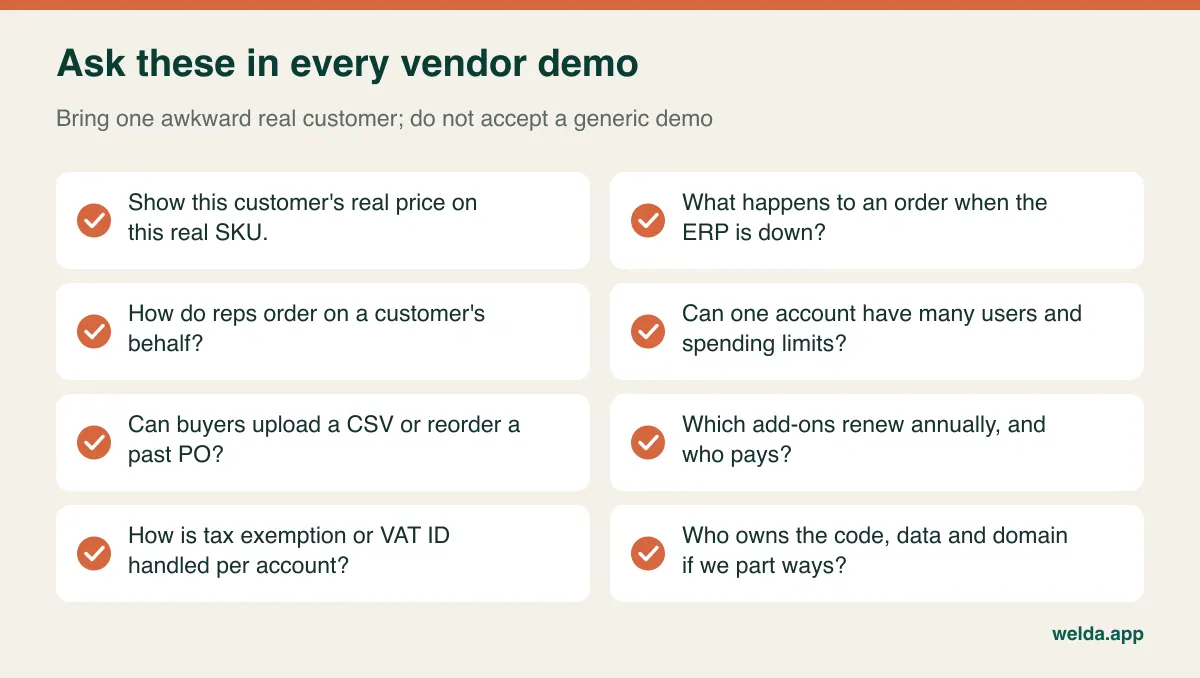
Many platforms and extensions handle the first two comfortably. Whether they handle the last two depends on the plan, the add-on and how your data is structured, so never accept "yes, we support B2B pricing" as an answer. Ask to see your own awkward case in a working environment.
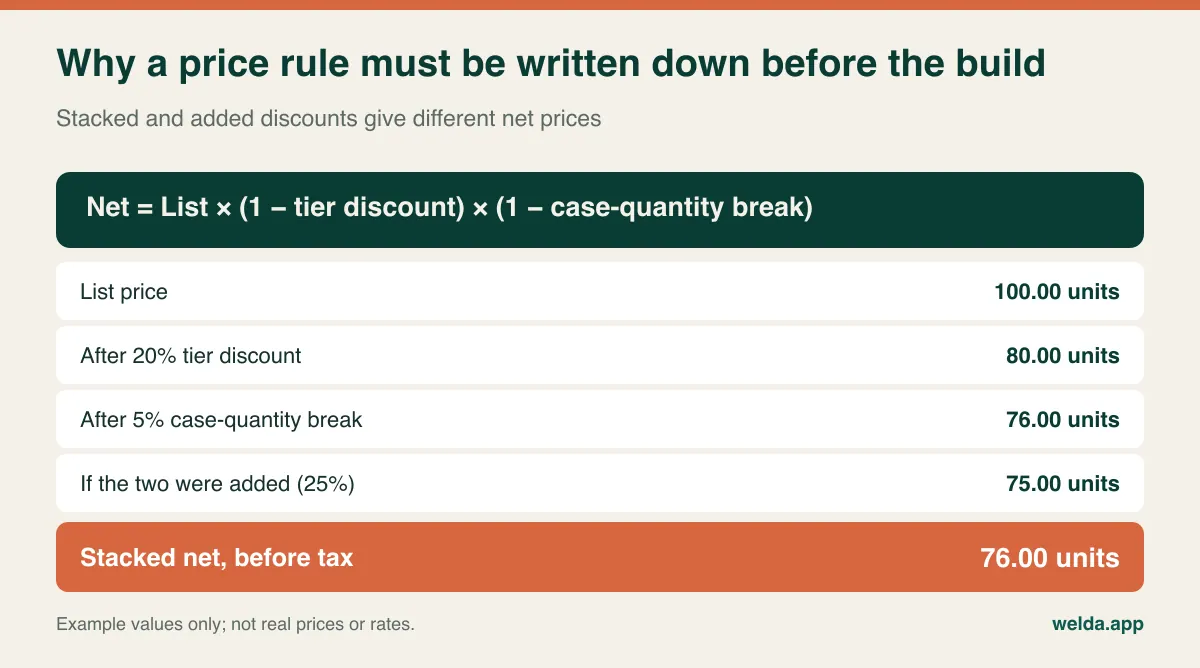
Write your rule down precisely, including precedence. If a customer has a contract price on a SKU and a promotion runs on the same SKU, which wins? If a volume break would make the price lower than the contract, does the customer get the lower one? Do discounts stack or add? The example below shows how a small wording difference produces a different invoice value.
A few pricing questions tend to surface far too late:
- Where does the correct price live? ERP, a spreadsheet the sales director maintains, or both? The site can only inherit an answer you have already decided.
- How long does a cart price hold? A buyer who builds an order on Monday and submits it on Friday, after a price change, needs a defined outcome. So does your finance team.
- How do you handle currencies? Showing a converted price is simple. Holding a quoted price in a currency, invoicing in it and reconciling it in your books is not.
- Can one customer ever see another's price? They must not. Page caching, exported catalogue files and notification emails all need testing with two separate accounts as part of acceptance.
Decide which system owns each piece of data
B2B integration trouble often starts before any code is written: nobody has decided which system is the source of truth. A site that lets someone edit a credit limit, while your accounting system holds another figure, will eventually produce an argument with a customer. Agree this table with your finance lead and your vendor before anyone estimates integration work.
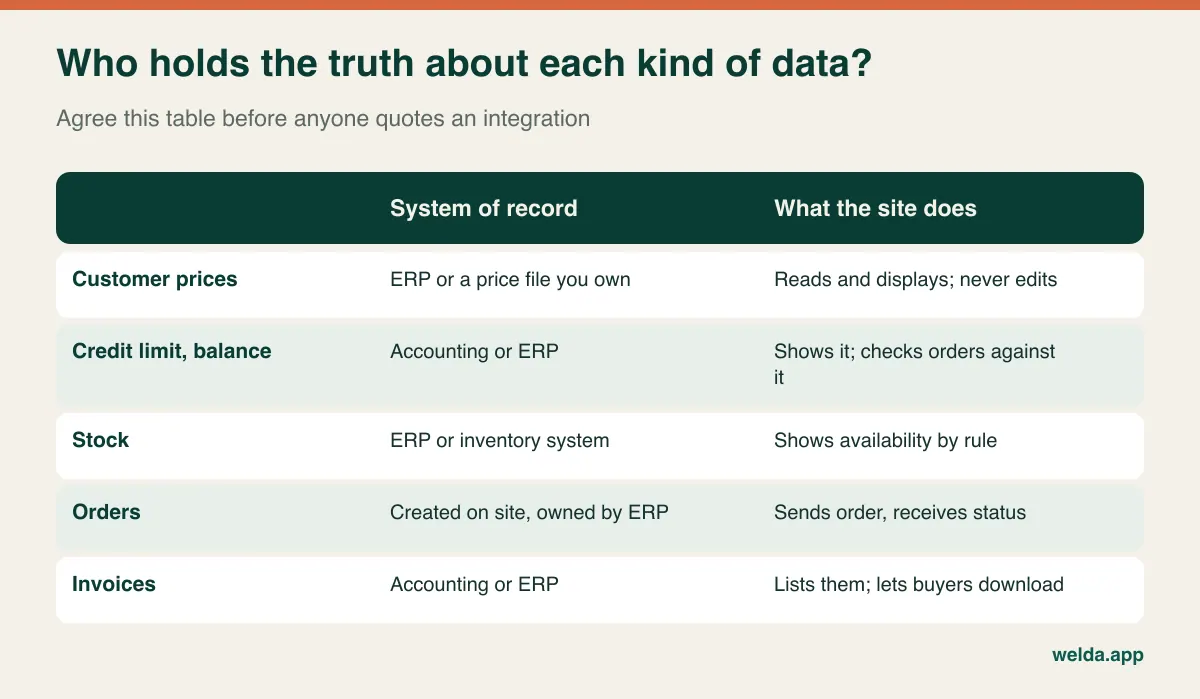
Then choose how fresh each data type must be. Three patterns cover most cases. A scheduled file export is cheap to set up and can suit a small account base, provided the screen says "balance as of" with a date. Timed sync through an API or middleware suits most growing distributors. Live lookups make sense when a stale credit figure genuinely costs you money, but they require an ERP with a dependable API and a plan for what happens when it is offline. Should the site refuse orders, or accept and queue them? That single decision changes both the build and your customers' experience.
ERP integration is also where a vendor's generic promise meets your specific version. The same accounting or ERP brand can behave differently between editions, hosted and on-premise installs, and customised setups. Before signing anything, ask your ERP vendor or partner which endpoints are available, whether extra licences or connector fees apply, and who fixes the connection when an update breaks it. For the wider picture on connecting payment and shipping, see our guide to ecommerce integrations.
Approvals run on both sides of the order
A B2C store has one person making one decision. B2B orders often have a chain on each side, and treating them as one workflow is a classic scoping error.
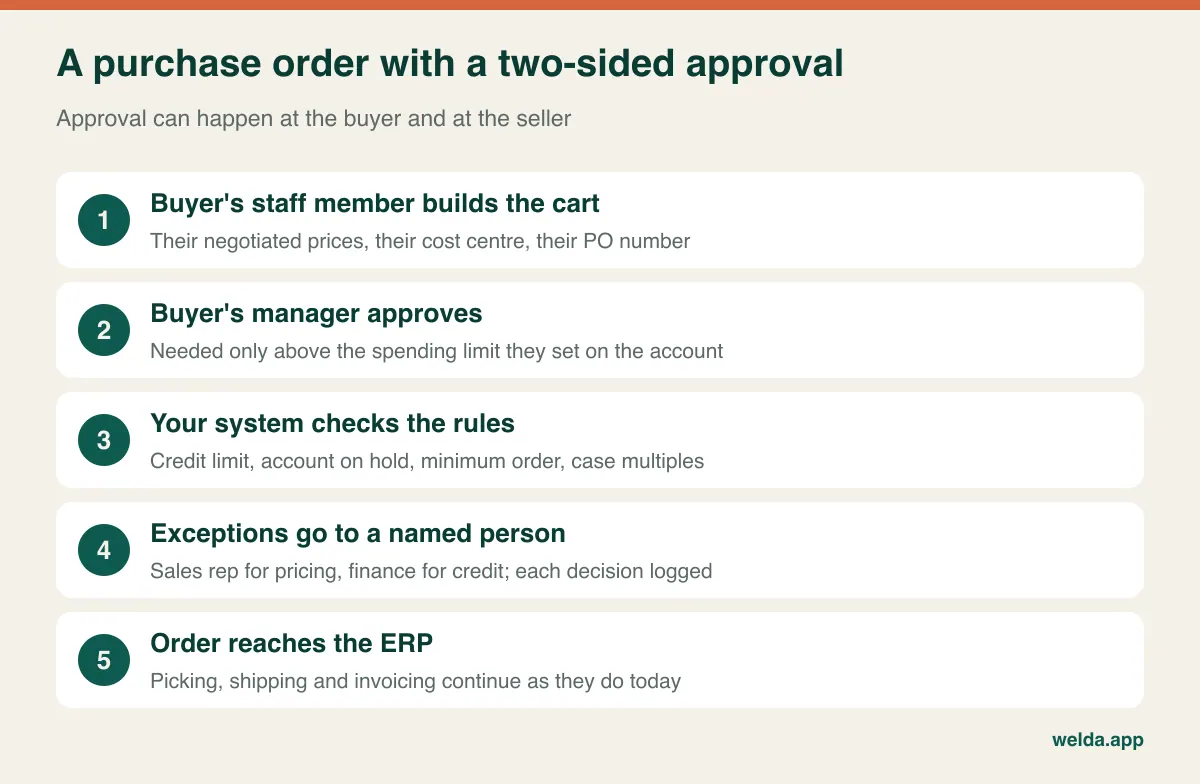
On the buyer's side, larger accounts may want several users under one company, spending limits per user, cost centres, and a required purchase order number. A small independent dealer usually has one login shared by the owner and needs none of that. Check how many of your customers really work this way before paying to build it. If only two accounts need it but they are your two largest, that is a commercial decision you can make deliberately rather than by accident.
On the seller's side, resist the instinct to review every order. If each one waits for a person, you have only moved the phone queue to a screen. Let compliant orders flow automatically, and define the exceptions: over credit limit, account on hold, below minimum order value, quantity not in case multiples, out-of-stock item, requested special price. For each exception, write down who sees it, how quickly they decide, who covers their holiday, and where the decision is logged. That table saves more scoping time than any wireframe.
Payment terms belong here too. Net terms, card, bank transfer and pay-by-invoice are all different checkout paths. Each needs a rule stating which accounts may use it, under what limit. Larger customers may also expect punchout from their procurement system or EDI orders. If any of your buyers require these, raise it in the first conversation, because either can change the platform shortlist on its own.
What a B2B buyer does on the site that a retail shopper never would
Buyers usually know exactly what they want, so the interface should serve speed rather than discovery. A plumbing wholesaler's customer ordering 60 lines does not want to browse 60 product pages. The features that earn adoption are often plain: quick order by SKU, reorder from a past order, CSV upload, saved lists per site or job, visible case quantities, the customer's own part numbers alongside yours, and downloadable invoices and statements without an email to accounts.
Search matters more than the home page. Trade buyers type part numbers, partial numbers and supplier codes, sometimes the old code from a discontinued line. Test the search with real queries from your customer service inbox. Product data is usually the hidden workload here: inconsistent units, duplicate SKUs and missing specifications cannot be solved by design, and someone inside your company must own the cleanup. Technical attributes and pack sizes matter more than lifestyle photography for most trade catalogues.
Gated portal or open catalogue? A marketing decision disguised as a technical one
If everything sits behind a login, search engines cannot index your product pages. That is acceptable if your customer list is closed and you only want an ordering tool. If you also want new dealers to find you, a public catalogue with hidden prices and an application form gives you pages that can rank, at the cost of showing your range to competitors and maintaining more public content.
A middle path can suit a manufacturer well: public category and technical pages, with SKU-level lists and prices behind the login. Whichever you pick, define the onboarding workflow in the same conversation. Who reviews applications? What documents do you require, such as a resale or tax exemption certificate or VAT ID where relevant? Which price group does a new account start in? Without these answers, the application form becomes an unattended inbox.
Platform or custom build: judge it by how standard your rules are
This choice is often framed as a technology debate. It is really a question of how unusual your commercial rules are, and whether they are a competitive advantage or simply habit.
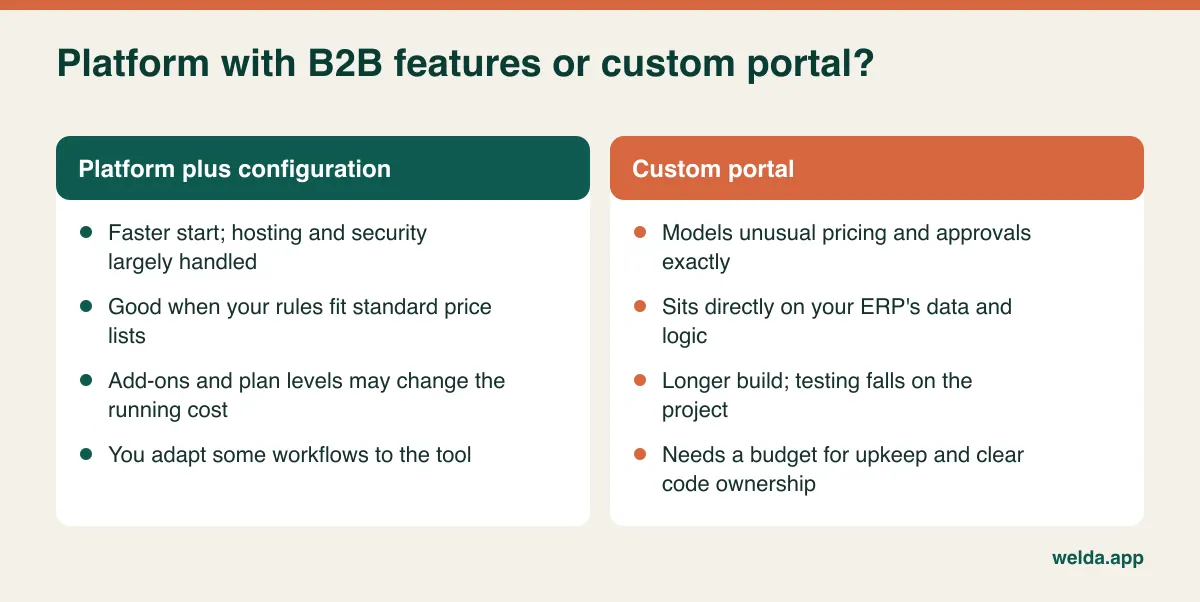
Before paying to reproduce a complex rule, ask whether anyone would notice if it were simplified. Some discount structures survive only because nobody has reviewed them. Simplifying pricing before you digitise it can remove more cost from a project than any technical choice. On the other hand, if contract pricing really is how you win and keep accounts, don't force it into a setting that cannot express it; the workaround will end up with staff correcting prices by hand.
A hybrid can be sensible: use a platform for catalogue and checkout, then handle pricing and account data through a separate integration layer. Whichever route you take, have ownership written into the contract. Our article on website ownership and source code lists the clauses to check, and they matter more on an integrated B2B project, because leaving a vendor means untangling connections as well as a site.
Reading quotes without being misled by the total
The number on a B2B quote follows from the rules above, so the useful work is making quotes comparable. The cost drivers are platform licence or build fee, design, price and approval logic, ERP or accounting integration, payment and shipping connections, product data cleanup, testing, user training and post-launch support.
The costs that usually sit outside the quote are just as important: annual add-on renewals, plan upgrades triggered by B2B features, ERP connector licences or partner fees, the internal hours your team spends cleaning data, and the cost of running old and new ordering side by side during rollout. For a general breakdown you can read our guide to ecommerce website cost; on B2B work, however, integrations and pricing rules tend to separate quotes more than anything else.
The strongest comparison method is a shared scenario pack. Choose three real accounts: your most ordinary customer, your most complicated pricing arrangement, and the account that most often hits its credit limit. Write one sample order for each and send the same pack to every vendor. Ask them to state, per scenario, what works out of the box, what needs configuration, what needs custom work and what is excluded. A low total that excludes your hardest scenario is not a low price; it is a later change request.
Getting tax, invoices and privacy right across borders
Rules vary by country and change over time, so treat this as a checklist for your accountant and legal counsel rather than legal advice. Tax treatment often depends on the customer: US sellers may need to store resale or exemption certificates, while EU cross-border B2B sales usually involve VAT ID checks and specific invoice wording. Electronic invoicing obligations are expanding in several markets, so confirm which system issues the legal invoice and whether it can meet your formats.
Privacy law still applies in a business context. A buyer's name, work email and login are personal data under regimes such as the GDPR, so you need a privacy notice, user access controls and a process for removing leavers. Consumer rights such as withdrawal periods may not apply to genuine trade sales in many jurisdictions, but they can apply if you also open the site to consumers.
Your sales reps can make or break adoption
This is the risk few proposals mention. A rep who has served an account for ten years may see online ordering as a threat, and if commission depends on who keys the order, that fear is reasonable. One sentence from them ("don't bother with the site, just text me") will end adoption at that account.
Settle three things early. Will online orders still credit the assigned rep? That is the most direct way to remove the conflict, though it is your commercial call. Can reps log in and order on a customer's behalf, so phone and field orders enter the same system? And can they see their territory's balances and order history, so they arrive at each visit prepared and spend less time taking dictation?
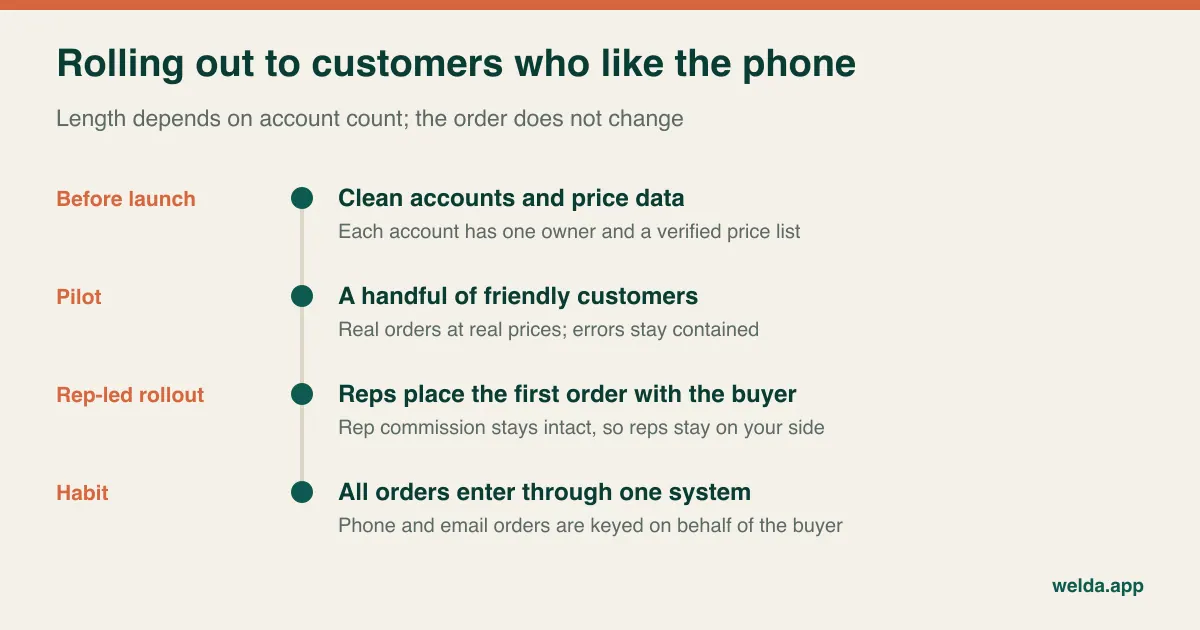
Treat rollout as its own project. The first order is critical; a wrong price at that moment damages trust out of proportion to the error. Pilot with a few cooperative accounts on real orders. Have reps sit with buyers for their first order. Keep old channels open for a while, but key those orders into the system so all reporting lives in one place. Then look at who hasn't moved, and ask them why. The answers are often small fixes, like a missing part number or a saved list.
Where Welda fits, and where it doesn't
Welda's ecommerce service covers store builds on Shopify or WooCommerce, catalogue structure, payment and shipping integration, marketplace connections and measurement, and we can connect your existing inventory and POS system. Dealer-specific pricing and approval flows are not listed as a fixed, ready-made package. We look at your rules first and tell you plainly whether a chosen platform can carry them. When B2B ecommerce website development outgrows platform settings, our custom software service builds web applications and API integrations, with source code and documentation belonging to you.
Our own product, Welda Stock, was built for retail inventory and sales: live stock, multiple warehouses and branches, customer accounts and supplier debts. It is not a dealer portal and we would not claim otherwise. If you already run an ERP, it should normally stay your system of record.
The most useful preparation for a free consultation is simple: your written price rule, the name of your accounting or ERP system, and those three sample customers. With that in hand, a conversation about B2B ecommerce website development for your business can move straight to scope, and pricing gets settled during that call rather than guessed at beforehand.
Frequently asked questions
What is the difference between a B2B store and a dealer portal?
The terms overlap. A dealer portal usually means a closed, login-only ordering area; a B2B store may also include a public catalogue and a new-customer application. Compare vendors by listed functions, not by the label on their proposal.
Can I add B2B to my existing retail store?
Often, if your rules are simple: customer groups, hidden prices and net terms can be added to many stores. Running retail and trade side by side with separate pricing, payment and promotions adds testing and risk. If the two businesses behave very differently, a separate storefront connected to the same product data can be cleaner.
Do I need an ERP before building a B2B site?
No, but you do need a clear source for prices, balances and stock. A small operation can begin with scheduled files from its accounting software. Entering the same information by hand into two systems tends to create errors as order volume grows, so plan the next step.
How long does B2B ecommerce development take?
There is no honest single figure. A gated catalogue with simple price groups is a much shorter job than live ERP integration with multi-step approvals. Timelines often depend on your ERP partner's availability and how clean your data is, so ask vendors what they need from you and when.
How do I get customers to actually use it?
Offer something the phone can't: instant balance, one-click reorder, out-of-hours ordering. Protect rep commission, pilot before launching widely and track who has not switched. A forced cutover before the site has earned trust usually creates a backlash.
How much will it cost with Welda?
We don't publish list prices. The fee depends on platform, number of products, integrations and the level of management you want. It becomes clear in a free consultation, once we have seen your pricing rules and systems.