The right physical therapy practice management software depends first on how you get paid. If most of your revenue runs through insurance claims, the claims and documentation engine is the product and everything else is secondary. If you are cash-based or package-led, the product is the plan of care on the calendar: visits counted automatically, therapists never double-booked, missed visits recorded properly, and patients who drift away made visible before they are gone. Decide which of those two practices you run, then test every candidate on that basis.
This guide is written for owners and clinic managers who are close to a decision. It focuses on the part generic comparison lists tend to skip: how multi-visit scheduling and missed-visit tracking should actually work, and how to find out whether a product handles them before you sign.
Start with the payer question, because it splits the market in two
Two practices on the same street can need entirely different systems. One bills insurers for most visits and lives by authorizations, coding, denials and resubmissions. The other sells self-pay evaluations and packages to runners, post-surgical patients and office workers with stiff necks. Software that is excellent for the first can be expensive furniture for the second, and software that delights the second can be useless to the first.
The details differ by country. In the United States, insurance-based practices usually look for claims handling, CPT coding support, Medicare documentation rules and an EMR built around them. In the UK, Ireland, the Gulf and much of Europe, private practice often means direct payment, sometimes alongside private insurers with their own forms. National systems have their own rules, and we would not claim to summarize them here. What holds everywhere is the logic: find out what your largest payer requires, and treat that as a pass/fail filter before you look at anything else.
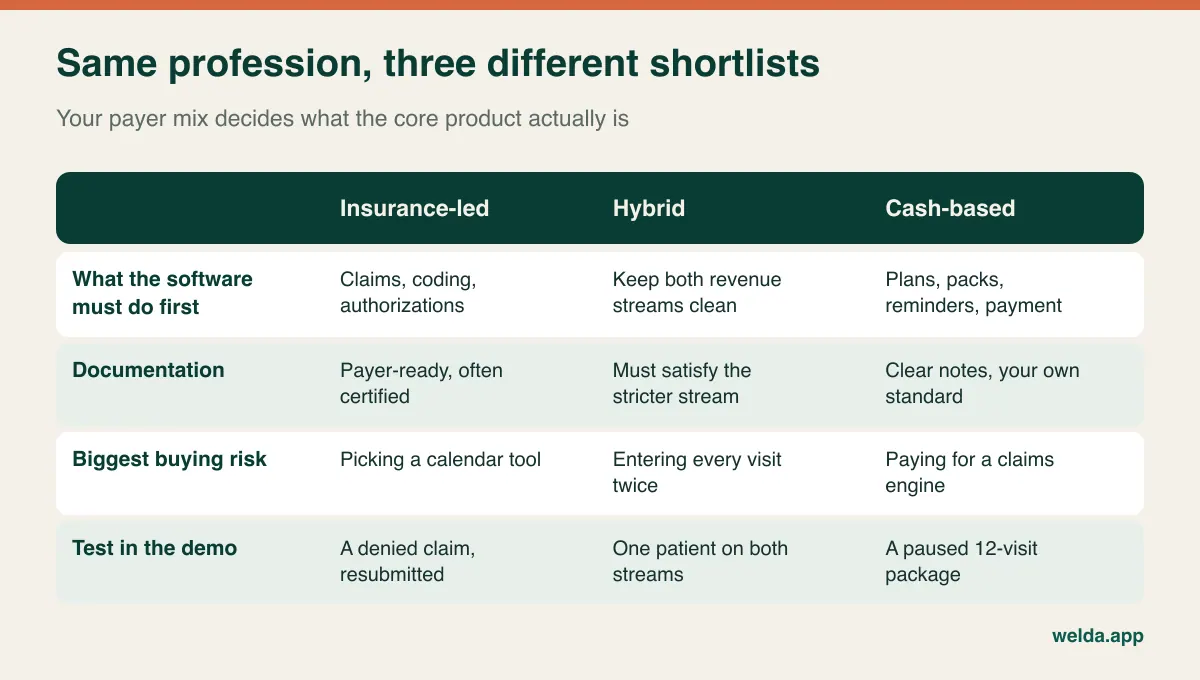
Hybrid practices have the hardest call. Keeping your claims system and adding a separate tool for self-pay packages can work, but it creates a real risk: if appointments live in two places, a therapist's 5:30 pm slot can be sold twice. If you go this way, choose one system as the single source of truth for the calendar and count how many patients each week you would have to enter twice. A handful is tolerable. Half your caseload is a sign you need a single platform.
The plan of care is the thing you are really buying for
A dentist's appointment is often an event. A physical therapy appointment is usually visit 4 of 12. That difference is why general booking apps feel fine for two weeks and then start to fail. They see twelve unrelated appointments, while your front desk sees one patient on one plan, with a certain number of visits left, a certain number booked and a balance outstanding.
A useful test is the profile screen. Open a patient and ask whether you can see, without clicking around, the total visits on the plan, how many have been used, how many remain, when the next one is and what is still owed. If those facts live on four different screens, your staff will end up keeping a side spreadsheet, and the spreadsheet will quietly become the real system. For the mechanics of counting and selling packs, our guide to session and package tracking goes deeper; the rest of this article stays with what is unique to therapy.
Also ask how the plan gets onto the calendar in the first place. A new patient at the desk says, "Mondays and Thursdays after work for six weeks." Can staff book that in one motion, or do they place twelve appointments one at a time while the patient waits? Neither answer disqualifies a product outright, but you should time it, because it will happen many times a week. Where insurers limit authorized visits, the same counting logic matters even more: the number on the screen must match what has been approved, and someone must be warned before it runs out.
Overlapping patients, aides and the gym floor
Few calendars are as odd as a busy therapy clinic's. Some therapists work strictly one-on-one, in a closed room, for a full hour. Others overlap: one patient finishes on a modality or works through exercises with an aide while the therapist starts on another. Some clinics run small group classes. Where insurers or licensing rules apply, there may be limits on how supervision and overlapping care can be delivered and billed, so check what applies to you rather than assume your scheduling habit is allowed.
Whatever your model, write it down in one sentence before you see a demo, because it determines what "conflict prevention" means for you. For a one-on-one clinic, a hard block on double-booking is a lifesaver. For an overlapping clinic, the same block can become an obstacle that staff learn to work around, and every workaround damages your data.
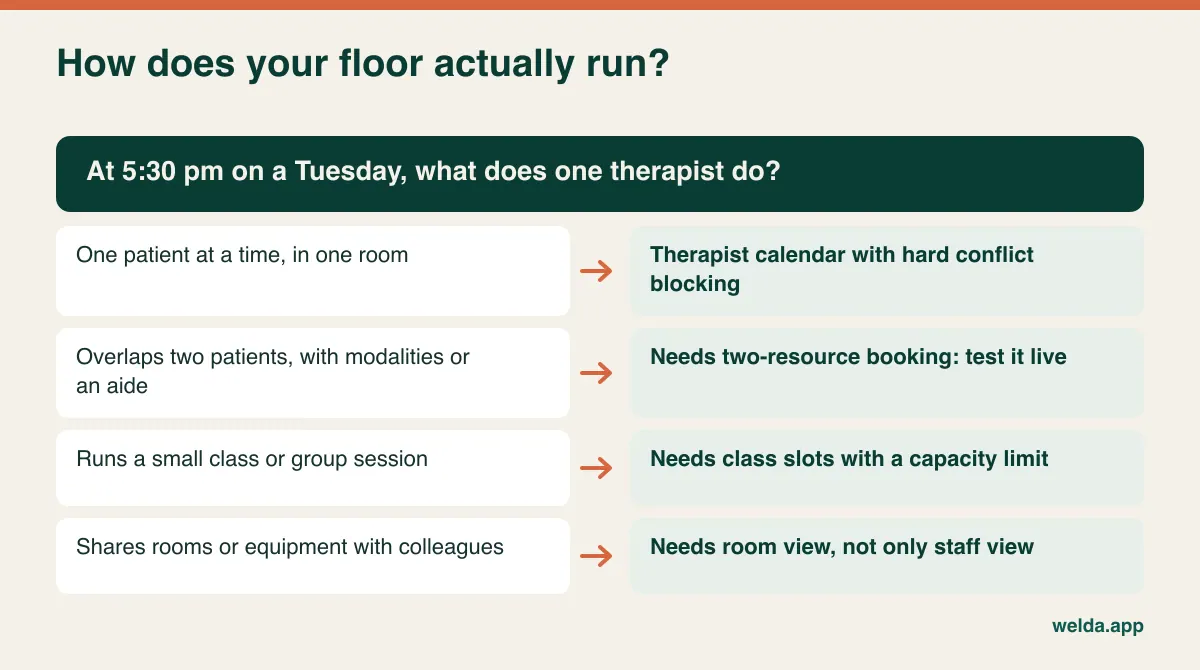
Welda CRM keeps calendars by staff member, room and branch, and its conflict detection stops the same therapist being given two appointments in the same slot. Several therapists can see patients at the same hour, and there are group classes with capacity limits, which were designed with studios in mind. If your therapists routinely run two patients in parallel, or you need separate booking of each piece of equipment, please test that scenario with us directly. It is not something our product pages promise, and it would be a poor surprise after setup.
Shifts belong in the same conversation. When rotas live in one spreadsheet and bookings in another, a patient eventually gets booked with a therapist who is on leave. Ask whether staff shifts are planned in the same system as appointments, and what happens to booked visits when a therapist calls in sick. Moving a whole Wednesday should take minutes, not an afternoon of phone calls.
Evening slots: a plan booked today occupies the calendar for weeks
Working patients want the end of the day, and in many clinics the hours after 5 pm fill first. Because care is delivered in series, handing out an evening slot today is a promise for weeks. A patient on twice-weekly visits for six weeks ties up twelve of your scarcest slots. Look at the calendar for today and it may seem you have room. Look across the next six weeks and you may not.
That has a practical consequence for the phone. When a new patient asks whether you can do Mondays and Thursdays at 6 pm for six weeks, your front desk should be able to answer before the call ends. Ask to see this in the demo: paging forward through future weeks, filtering by therapist and spotting free recurring times. Occupancy reports then help you see which time bands are permanently tight. They might justify adding a late shift, or nudging flexible patients toward mornings. A waiting list that alerts the next person when a slot opens can also help. Welda CRM includes occupancy reports and a waiting list that notifies the next patient when a cancellation frees up a time.
A late cancel is not a no-show, and neither is a clinic cancellation
Most software offers a single missed status and stops there. Your clinic has at least four different events, and each one has different consequences. A patient who cancels two days ahead gives you time to refill the slot, so nothing is lost and the visit stays on their plan. A patient who cancels 90 minutes before the appointment almost certainly leaves a hole. A patient who simply does not arrive needs a phone call, today. And when your therapist is ill, the fault is yours and the patient deserves priority rebooking.
| Event | Does the visit count against the plan? | What should happen next |
|---|---|---|
| Early cancellation | No; it is rebooked | Offer the slot to the waiting list |
| Late cancellation | Your written policy decides | Record the reason, apply the policy consistently |
| No-show | Your written policy decides | Same-day call; flag a second miss to the therapist |
| Clinic cancellation | No | Priority rebooking, with the reason on file |
Write the policy before you choose software. How many hours counts as late? How many exceptions do you allow? When is a prepaid visit forfeited, if ever? Tell patients in writing when they buy a package, and take local advice on consumer rules and on any insurer contract that restricts charging for missed visits. Many arguments at the front desk come down to nobody having said it out loud on day one.
Then ask the vendor one direct question: "When I mark someone as a no-show, what happens to the count, and can I choose?" A system that always deducts will create arguments. One that never deducts forces manual corrections. Knowing the behavior matters more than which default it has. In Welda CRM, recording a session updates the remaining count automatically, a non-attendance is visible on the record, and you reschedule the remaining session. Try your own late-cancel policy against it during the 7-day free trial rather than taking anyone's word for it. For the wider toolkit, see our guide to reducing no-shows in clinics.
Do not underestimate reminder volume, either. As an illustration, take 40 active patients at two visits a week with one reminder each: that is 80 messages a week, or roughly 350 a month. A salon with the same number of clients sends far fewer. Message allowances can look generous on a pricing page until you do this sum for your own caseload.
The patients who vanish never appear on your no-show report
Here is the failure unique to multi-visit care. A patient finishes visit 6 of 12, feels better, says "I'll call to book the rest" and does not. There is no cancellation, and no no-show, because there was never another appointment to miss. The calendar looks perfectly healthy, while the patient has left the plan unfinished and may come back later with the same problem.
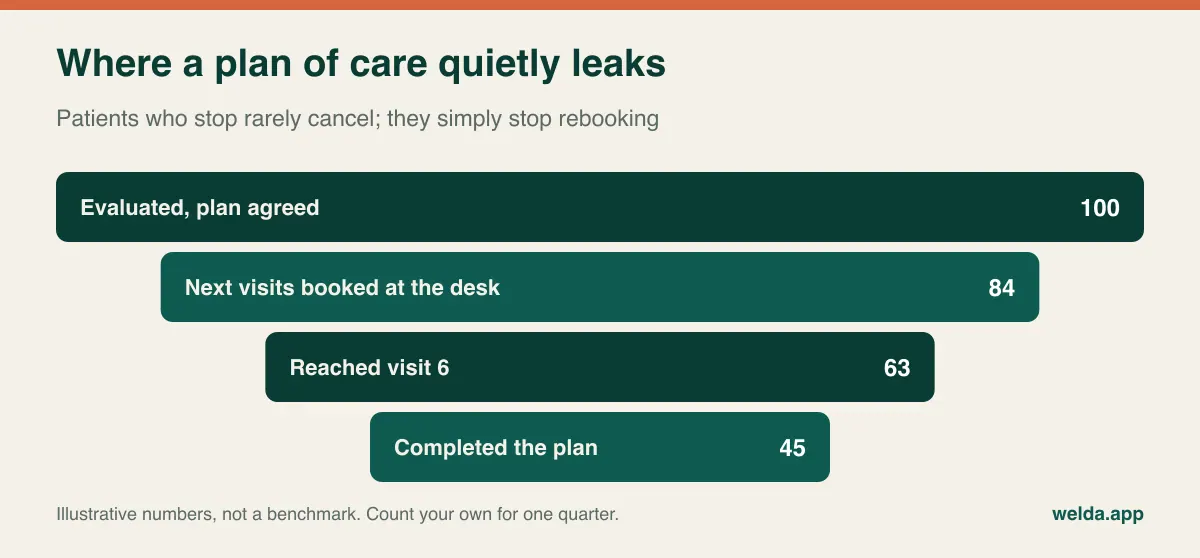
The report that catches this is simple to describe: patients with visits remaining and no future appointment, sorted by days since they last attended. Ask each vendor to produce it live. If it exists, wonderful. If it needs a filter or an export, count the steps, because a report that takes twenty minutes will not get run weekly.
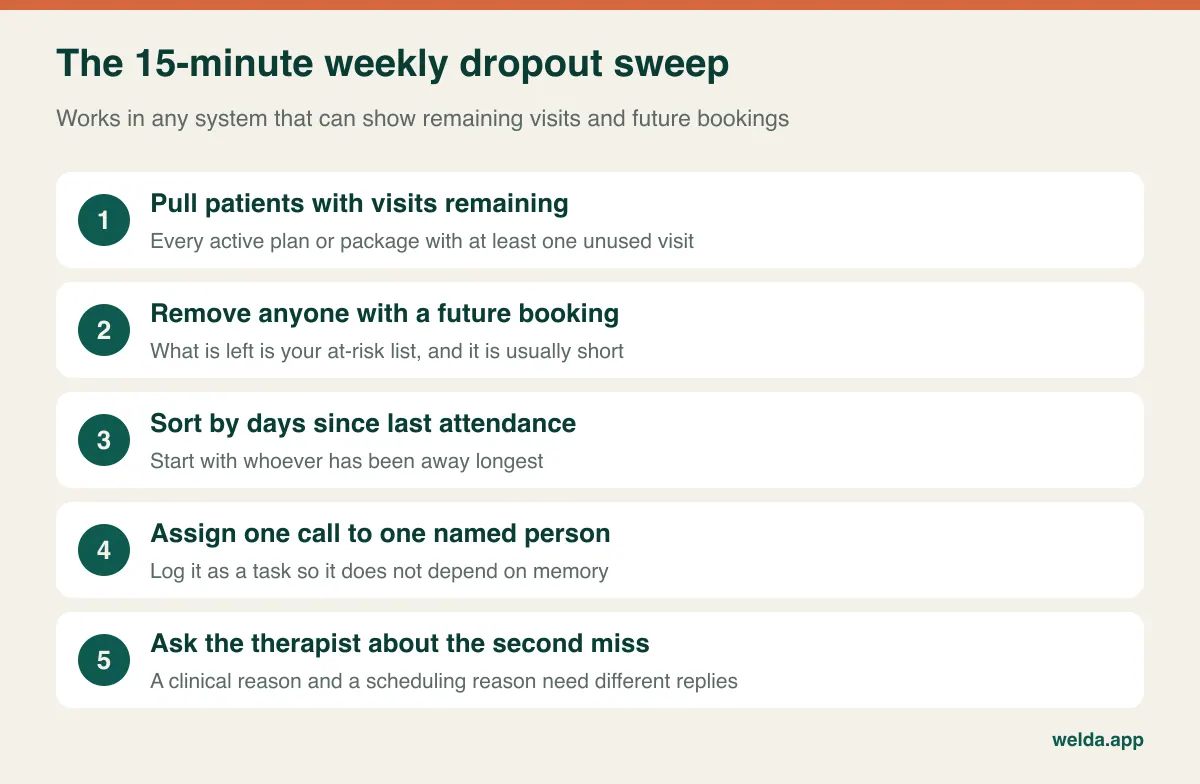
Be careful about who makes the call. A receptionist can sort out scheduling, but "my knee feels fine now" is a clinical statement, and the therapist should respond to it. The aim is not to pressure anyone into visits they do not need. It is to make sure stopping is a decision rather than an accident. To be straight about our own product: Welda CRM holds remaining sessions on the patient profile and offers notes, tasks with reminders, and a daily follow-up queue, but our pages do not list a ready-made report with this exact definition. Check with us how you would produce it in your workflow. Reaching former patients is a separate job, which calls for a recall routine of its own.
Prepaid visits are a promise sitting on your books
Clinics selling packages have a quirk that rarely shows up in a revenue report: cash in the bank includes money for care you have not yet delivered. A good month of package sales can look like growth while also filling your future calendar with obligations. Ask for a figure few systems put up front: unused visits across all active packages.
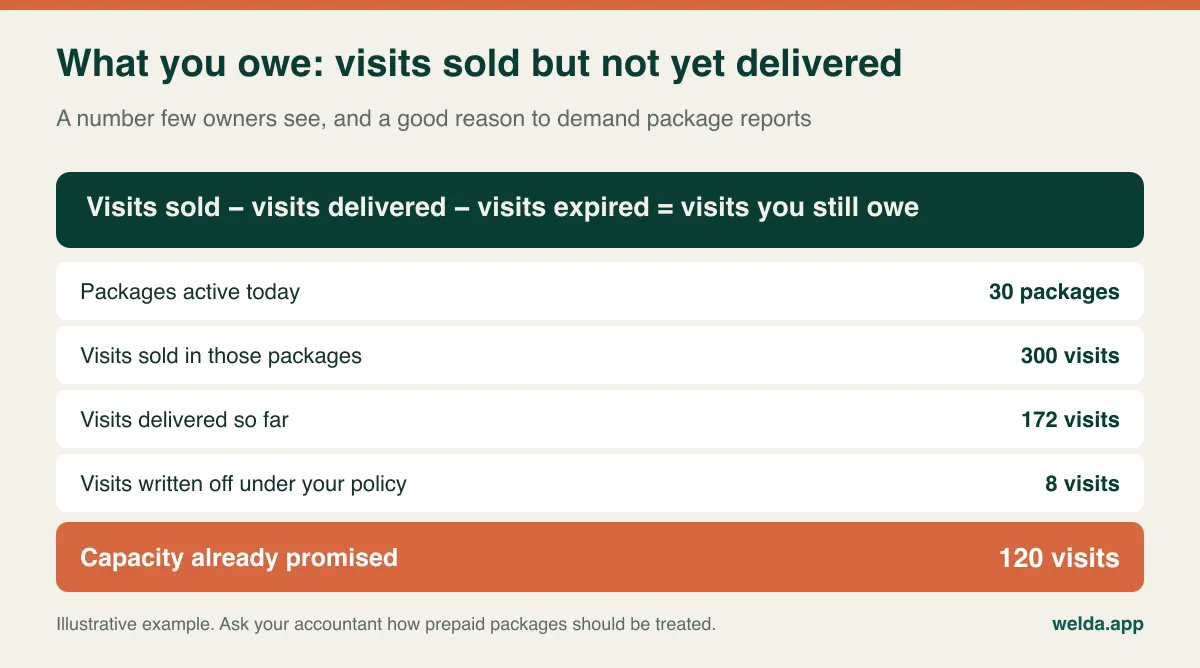
Next, test how the money behaves when things go wrong. Show a part-paid package with visits still running: where does the open balance appear? If instalments are late, can staff see that next to the remaining visits? If a patient stops halfway and asks for a refund, how are used visits, the discount and the balance worked out? How therapist pay is calculated matters too, whether on visits delivered or on packages sold, since commission set the wrong way round rewards selling plans that nobody finishes. Your accountant should advise on how prepaid packages are recognized and invoiced where you operate. Welda CRM covers invoices and receipts, payments and instalments, with staff commission, cash-desk and POS tracking in the higher-tier modules, and e-invoicing goes through your chosen provider.
The clinical gap: what you should check that scheduling tools may not do
A practice management system and a clinical documentation system overlap, but they are not the same thing. Before signing anything, list what your therapists actually need to record. Plain session notes and allergy or contraindication alerts are one level of need. SOAP-style templates, standardized outcome measures, a home exercise library with videos, referral letters to physicians, and documentation that satisfies a payer audit are another.
Ask therapists rather than guessing. They will also raise a question owners tend to forget: where does the note get written? If a therapist has to walk back to a desk between patients, notes wait until the end of the day and lose their detail. A browser-based system that works on a tablet at the plinth often solves this cheaply. For Welda CRM, the honest position is that treatment notes and progress build up on the patient profile, health records carry allergy and contraindication alerts, and it runs in a browser on computers and tablets. Our pages do not list an exercise library, standardized outcome-measure tools or certified EHR status, so if those are central to your practice, weigh that heavily or plan on a companion tool.
Patient data across borders: questions, not legal advice
Requirements depend on where you practice, so use the points below as prompts for your vendor and your adviser. Under HIPAA in the United States, a vendor handling protected health information is generally expected to sign a business associate agreement. Under the GDPR and UK GDPR, health data is a special category, and you will usually need a data processing agreement plus clarity on where the data sits. Other countries have their own rules. Our guide to patient data security is a useful companion.
Reminder content. A message on a locked phone screen should not reveal a diagnosis or treatment. "Your appointment is tomorrow at 6 pm" does the job. Open the template in the demo and check you can edit it. Whether messaging apps such as WhatsApp are appropriate for your patients is worth raising with your compliance adviser.
Who sees what. The front desk needs phone numbers, bookings and balances, not necessarily the detailed clinical note. Log in with a front-desk account during the demo and see what is actually visible.
The audit trail. Can you find out who opened a record and when a patient consented to what? Welda CRM stores client and health records encrypted, with role-based permissions, KVKK/GDPR consent management and an audit log. Our product pages describe KVKK and GDPR specifically and do not mention HIPAA, so a US practice should raise that with us at the outset rather than assume.
Reading a quote like the person who will pay it for years
Headline prices tell you little here, because your caseload shape drives the bill. The variables are the number of logins (does every therapist and aide need one?), locations, monthly message volume, modules and document storage. Add claims fees if the system charges per claim. The costs people miss tend to be elsewhere: data migration, staff training, per-seat add-ons, an e-invoicing provider, overage charges and what it takes to get your data out when you leave.
To compare fairly, send every vendor the same one-paragraph scenario: therapists, active patients, weekly visits, locations, packages sold and share of insured patients. Compare the answers as a total over twelve months, and include the reminder sum above. Get two answers in writing: what happens if we exceed the message limit, and in what format do we receive our data if we cancel? For Welda CRM, the price depends on the same variables and is agreed in a free consultation. There is no separate setup fee, and setup, migration of client and appointment data, and team training are included in all plans.
Where Welda CRM sits among your options
Welda CRM is a good candidate if you run a private, self-pay or package-led practice and want appointments, patient records, packages, reminders and payments in one place. You set up the program as a package on the patient profile, place sessions in the therapist's available hours and let the count update as sessions are recorded. Reminders go out over WhatsApp automatically, and multi-branch clinics see each location's calendar and reports separately. The interface and message templates are available in English, Turkish and German, which helps mixed-language teams. To see how a day runs in a clinic, visit our page on physical therapy practice management software.
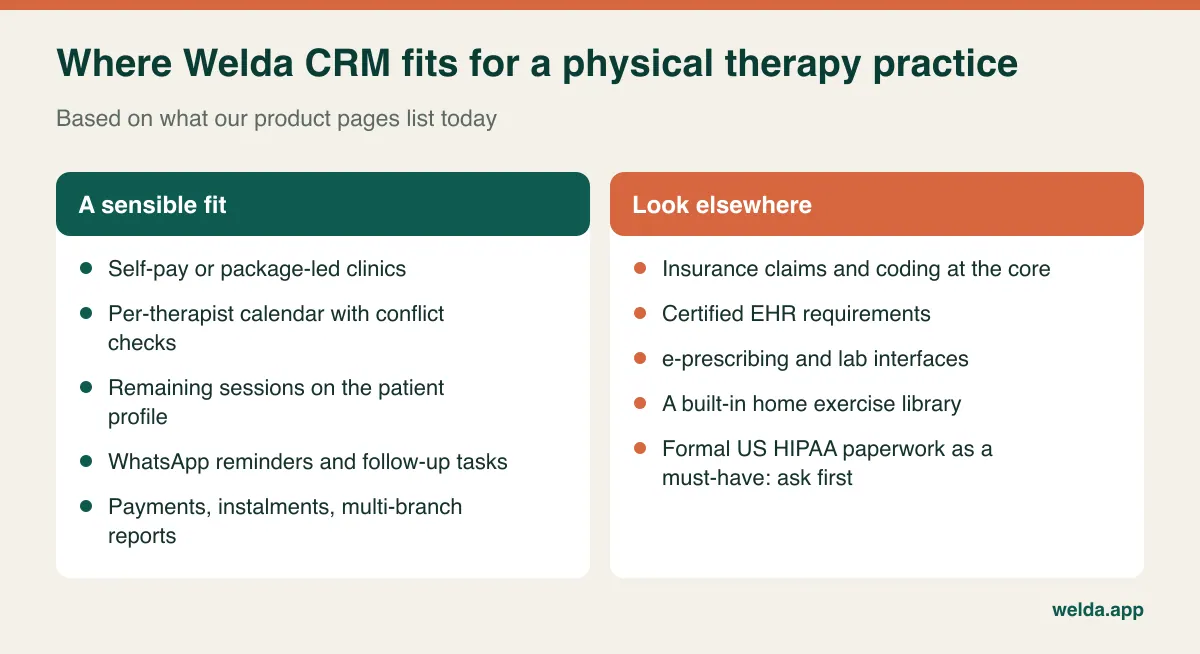
It is the wrong core system if insurance claims are the heart of your revenue. Our pages do not list claim submission, coding, e-prescribing, lab interfaces or certified EHR status, and we would rather you know that now.
Run the demo around one patient's 12 visits
Polished presentations show the happy path. Bring your front desk lead, hand the vendor a real scenario and time it. Anything awkward at a quiet demo becomes impossible at 5:45 pm with three people at the counter and the phone ringing.
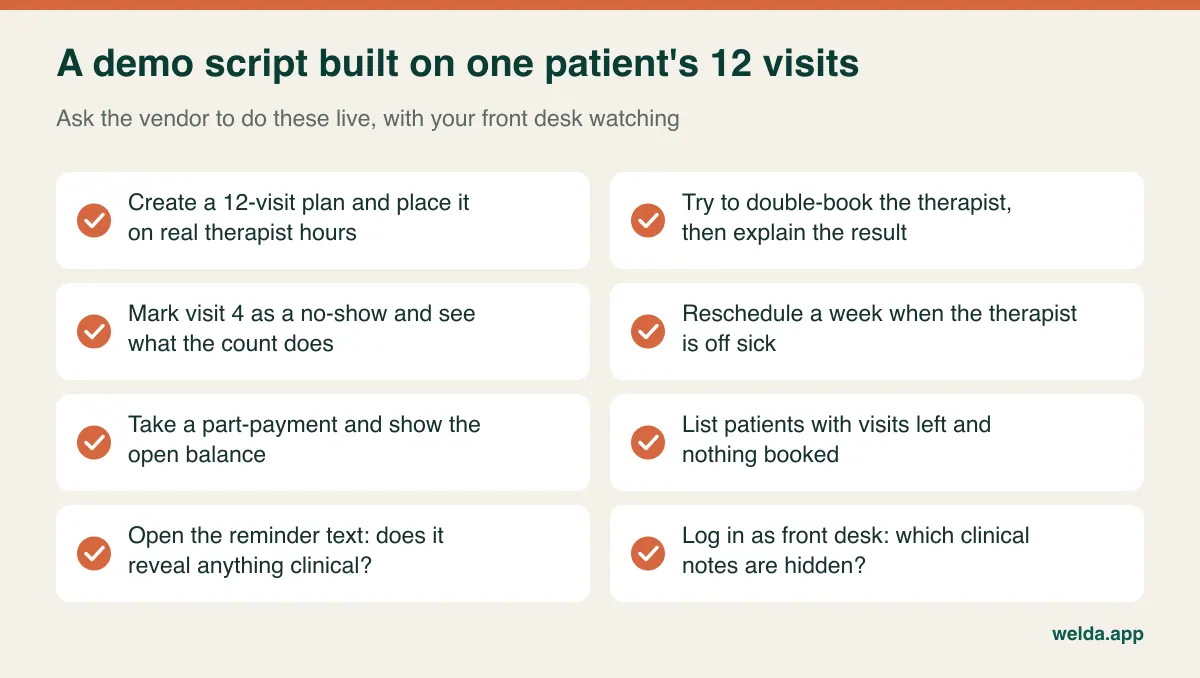
Give the final vote to more than one person. Therapists judge note speed, the front desk judges phone-time speed, and whoever closes the month judges the output. Clinics often buy on the owner's impression and then discover that staff work around the product. Welda CRM's 7-day free trial has all modules open, so use it to run a realistic week rather than click through menus; keep data protection in mind before entering real patient information.
Switching systems with patients mid-plan
Historic records are the easy part. What causes pain is the open plan: a patient on visit 7 of 12 expects exactly five visits to be waiting for them after you switch. Prepare one list before anything else: every open plan, with total visits, used, remaining, amount paid and balance. Reconcile it with therapists against their own notes, and resolve mismatches before migration, not during a tense conversation at the desk.
Choose a quiet cutover week, and tell the team in writing which system is the truth from that date. "Enter it in both for a while" sounds cautious but creates conflicting calendars. Test reminders on staff phones before switching them on for everyone. Give patients a short heads-up that messages may arrive from a new number and that their remaining visits are unchanged. Keep the old system readable for the first few weeks, and check your retention duties for old records. If you are insurance-based, ask how claims already in progress will finish in the old system. Most vendors will tell you it is cleaner to let those run out there.
Frequently asked questions
What is the most important feature in physical therapy practice management software?
That depends on your payer mix. For insurance-led clinics, it is reliable claims and documentation. For self-pay clinics, it is automatic visit counting linked to the therapist calendar, with missed visits properly recorded and a way to see patients with visits left and nothing booked.
Do I need a practice management system and an EMR, or can one tool do both?
Many products combine them, but the depth differs widely. List what therapists must document and what your payers require, then test those exact items. If your needs are plain notes and alerts, a single tool may do. If you face audits, make documentation the deciding test.
Should a no-show use up a prepaid visit?
That is a clinic policy and, where insurance is involved, may be limited by the contract. Write the rule, share it when selling the package and apply it consistently. Then confirm the software can follow your rule without manual fixes.
Does Welda CRM submit insurance claims?
Claim submission and coding are not listed on our product pages. Welda CRM is aimed at self-pay and package-based work. If claims drive your revenue, use a claims-focused system as your core.
Can a small or solo practice skip this kind of software?
A solo therapist without packages can get by on a simple booking tool for some time. Once you sell packs, hire a second therapist or send regular reminders, manual tracking starts to break down. Our overview of physiotherapy clinic management can help you plan that step.
Is there a trial, and how do I find out the price?
Welda CRM has a 7-day free trial with all modules open. Pricing depends on locations, users, message volume and modules, and it is settled in a free consultation.
Tell us how your clinic gets paid and how your busiest hour runs, and we will tell you plainly whether we fit. Book a free consultation about physical therapy practice management software for your clinic; if it looks right, try your own week in the 7-day free trial.