The short answer: start on a SaaS platform unless your business model genuinely will not fit a standard cart-to-checkout flow, or standard rules are forcing your team to fix the same orders by hand every day. Fully custom builds make sense less often than vendors of custom builds suggest, and hosted platforms fall short more often than their marketing admits. For many growing merchants, the sensible answer sits in between: a hosted core with a thin layer of custom code for the one thing that truly makes you different.
This guide is written for an owner or operator about to commit real money. It deliberately names no vendors, because the first decision is the type of solution, and only then the brand. By the end you should be able to settle the SaaS vs custom ecommerce platform question with your own numbers rather than someone else's sales deck.
What you are really choosing: a landlord, a hybrid or a building project
A useful way to think about this is property. A SaaS platform is renting a well-run unit in a managed building. You decorate, you trade, and somebody else deals with the roof, the wiring and the fire regulations. You cannot move the walls, and the landlord can change the terms when the lease renews.
A fully custom platform is building your own premises. You decide where every wall goes. You also own every leak, every inspection and every future renovation, including the ones you did not plan for. Open-source platforms sit somewhere between: you get a solid floor plan for free in licence terms, but hosting, patches and plugin compatibility land on you or your agency. "Open source" is not a synonym for "low effort", and it is worth asking any proposal who actually carries that work.
The hybrid route is renting the unit and bringing in one bespoke piece of equipment: a pricing engine, a product configurator, or a service that talks to your ERP. Checkout, payments, orders and security stay with the vendor. Your custom code stays small enough to understand and maintain.
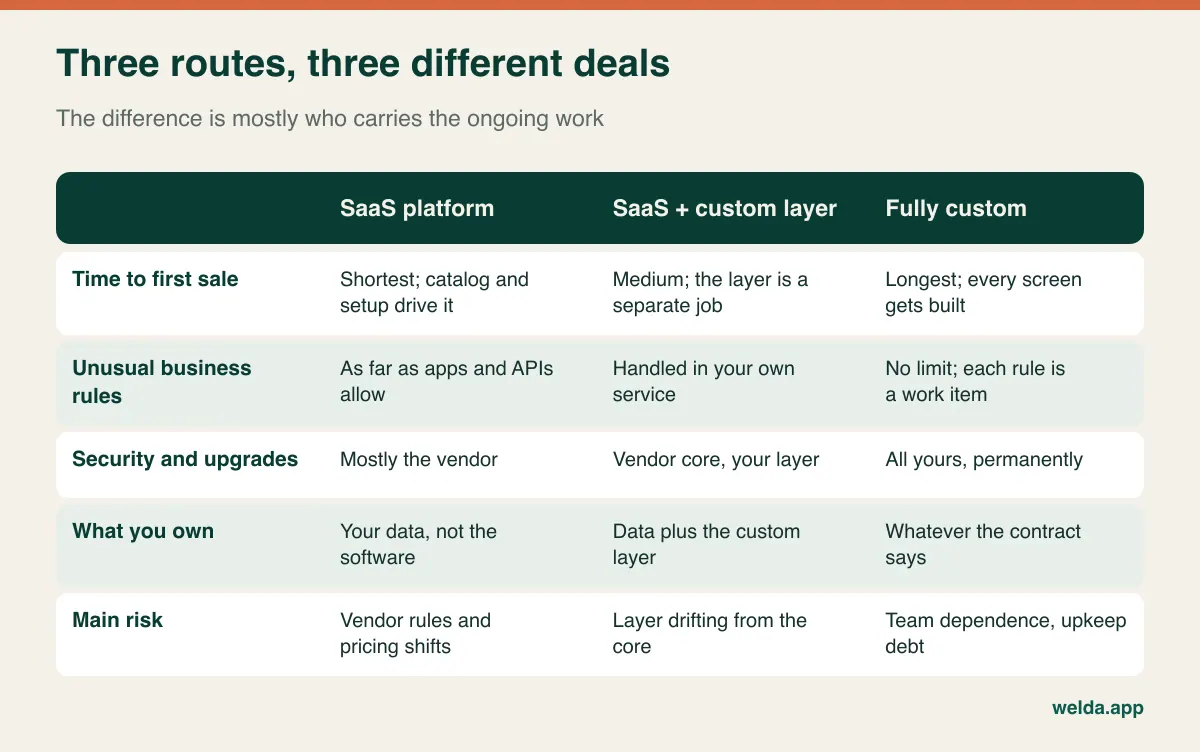
The most common misjudgement is treating a custom build as "what we have now plus the missing features". In reality, you must first rebuild everything you take for granted: discount logic, tax handling, returns, search, filters, email templates, sitemaps, admin permissions, audit trails. Only then do you start on the feature you wanted in the first place. If you want the wider picture beyond retail, our guide on what custom software is and when a business needs it covers that ground.
The exception log: a two-week exercise that beats any feature matrix
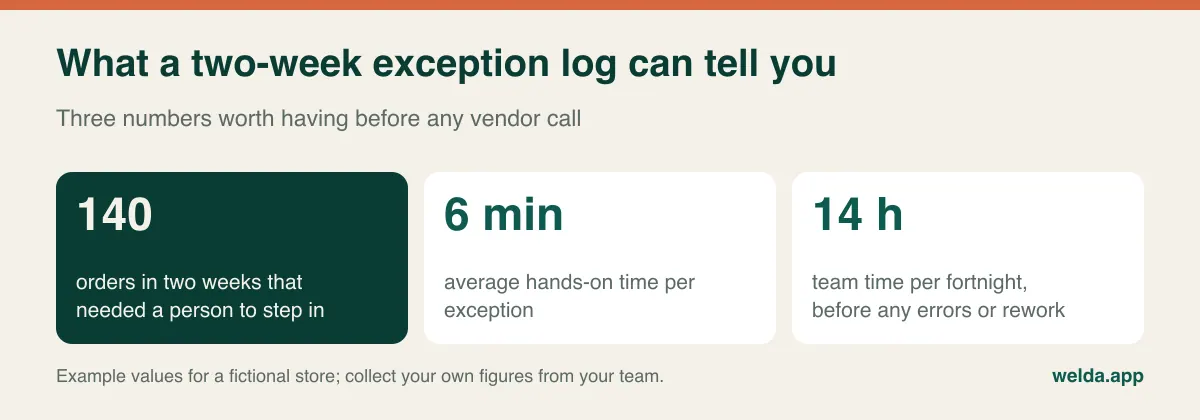
Feature matrices are comforting and nearly useless, because every serious platform ticks most boxes. What separates your business from the matrix is exceptions: any order that leaves the standard path and needs a human. A partial refund on a discounted bundle. A shipment split across two warehouses. A corporate customer with a negotiated price and purchase-order approval. A marketplace order whose invoice is created by hand.
For two weeks, ask whoever touches orders to log each exception in a shared sheet: what happened, who fixed it, how long it took. Keep it deliberately low-tech. If you have not launched yet, walk through your expected process and write down every point where you can imagine someone saying "we would do that one manually".
Now take your original requirements list, the one where everything is labelled essential, and put each line through four questions in order.
- Can settings cover it? Shipping rules, customer groups and promotion types are built into most platforms, even when a salesperson has not shown them to you.
- Is there a maintained app for it? Not merely an app. Check who publishes it, how recently it was updated and what happens when the platform releases a new version.
- Could the process change instead? A small operational rule, such as only allowing split shipments on certain product lines, often costs nothing and removes the need for software altogether.
- Is it why customers choose you? If a requirement survives this far and makes you different in the eyes of buyers, it deserves investment. If it merely reflects how the team has always worked, it does not.
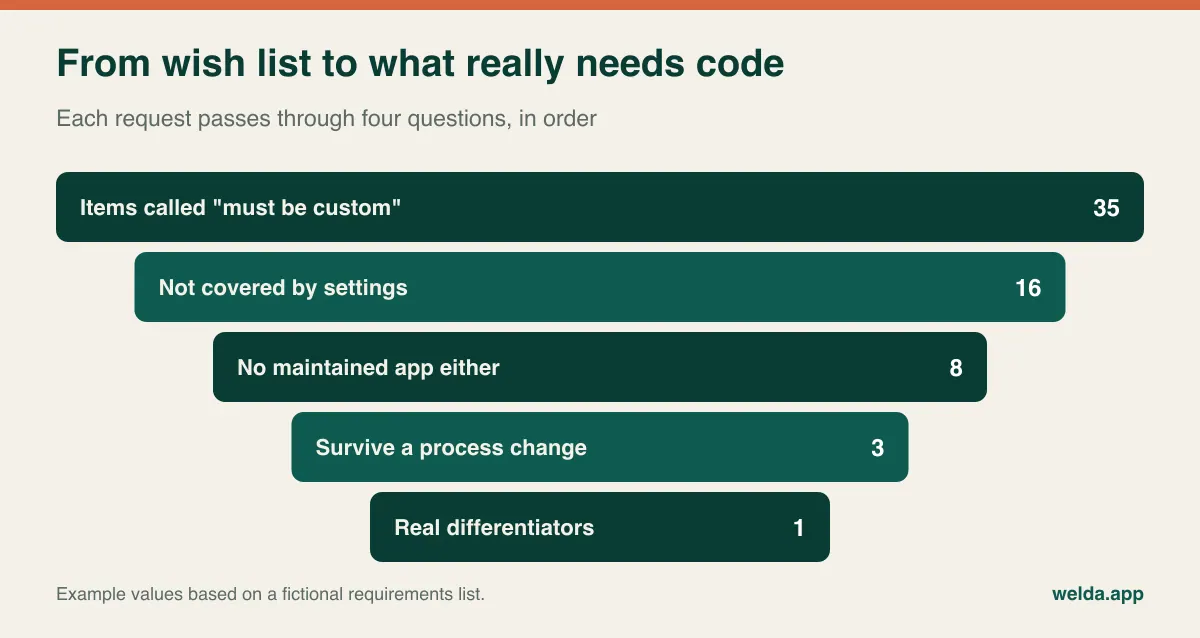
What remains decides the route. Nothing left means SaaS. One or two items that sit beside the order flow, such as pricing or a configurator, point to a hybrid. Items that change the shape of the order itself, such as one basket containing many sellers with separate payouts and returns, are where a custom or marketplace-specific core earns a serious look.
Where SaaS really stops, and where custom quietly bites
Both sides of this debate tend to get caricatured, so it is worth being specific about the limits.
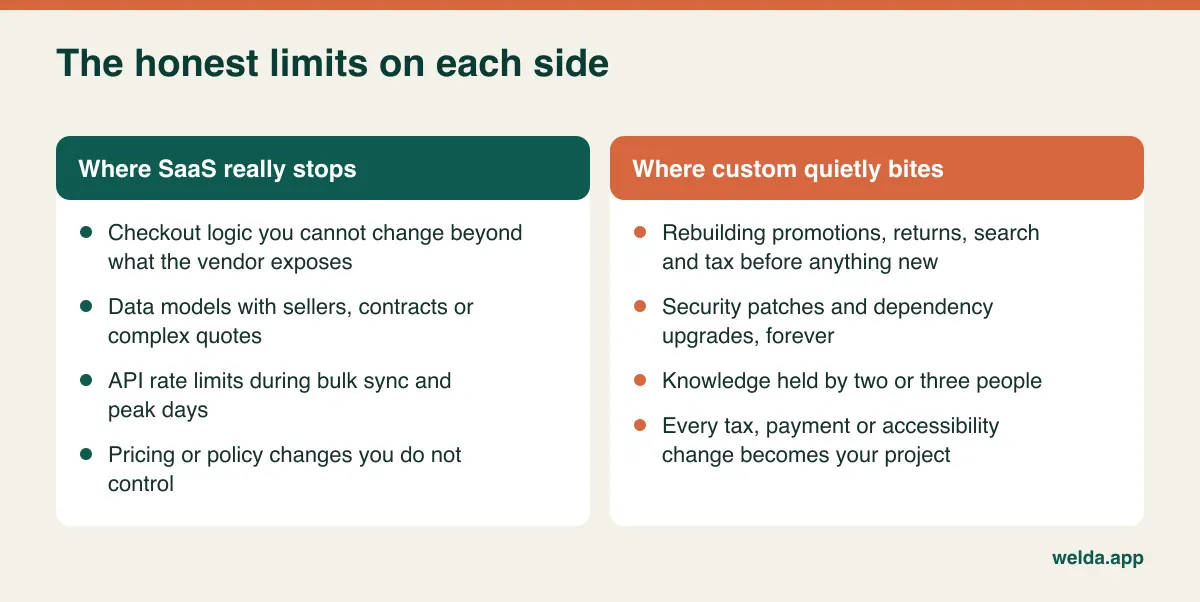
On the SaaS side, the checkout is usually the most restricted area, and for good reason, since the vendor is carrying payment security. If your commercial advantage depends on what happens at that exact step, find out precisely what is exposed. Rate limits are the second trap. They rarely matter when one order arrives at a time, but they matter a great deal when a bulk price update, an ERP sync and a flash sale collide on the same morning. A third is simply dependence: pricing tiers, transaction fees and app policies are outside your control, so read how they have been changed in the past and how much notice is given.
On the custom side, the burden is mostly invisible at signing. Software does not stay finished. Libraries get security advisories, browsers change, payment providers retire old APIs, tax rules move and accessibility expectations rise. Someone has to do that work every month, indefinitely, and it competes with the new features you wanted. Then there is knowledge risk. If two developers understand the system and one leaves, you have an expensive problem even if your contract says you own all the code. Ownership on paper and the practical ability to hire someone else to maintain it are separate things.
Order volume matters less than what happens on your worst day
People ask for a magic number: at how many orders per month should a business move to custom? No honest number exists. A store shipping thousands of identical orders can sit comfortably on a hosted platform, while a wholesaler with a couple of hundred monthly orders can strain one because every order carries unique prices, terms and approvals. Volume multiplies exceptions, and that product is what you should be watching.
A better volume question concerns peaks. Many merchants earn a large share of their year in a few intense periods. What matters there is not the monthly total but the behaviour of the whole chain over a few hours: checkout, payment gateway, stock sync, warehouse labels and customer emails. On a SaaS platform, ask about capacity during peak events, whether higher tiers are required, and how the apps you rely on behave under load, because apps often fail before the core platform does. On a custom build, peak readiness is a project of its own: load testing, caching, database tuning and someone awake at 3 a.m. when something breaks.
Catalog shape matters too. Ten thousand simple products may be less demanding than a few hundred products with thousands of option combinations. Variant limits, search quality and import speed are all worth testing with your own data rather than the tidy demo catalog.
Selling across borders changes the maths
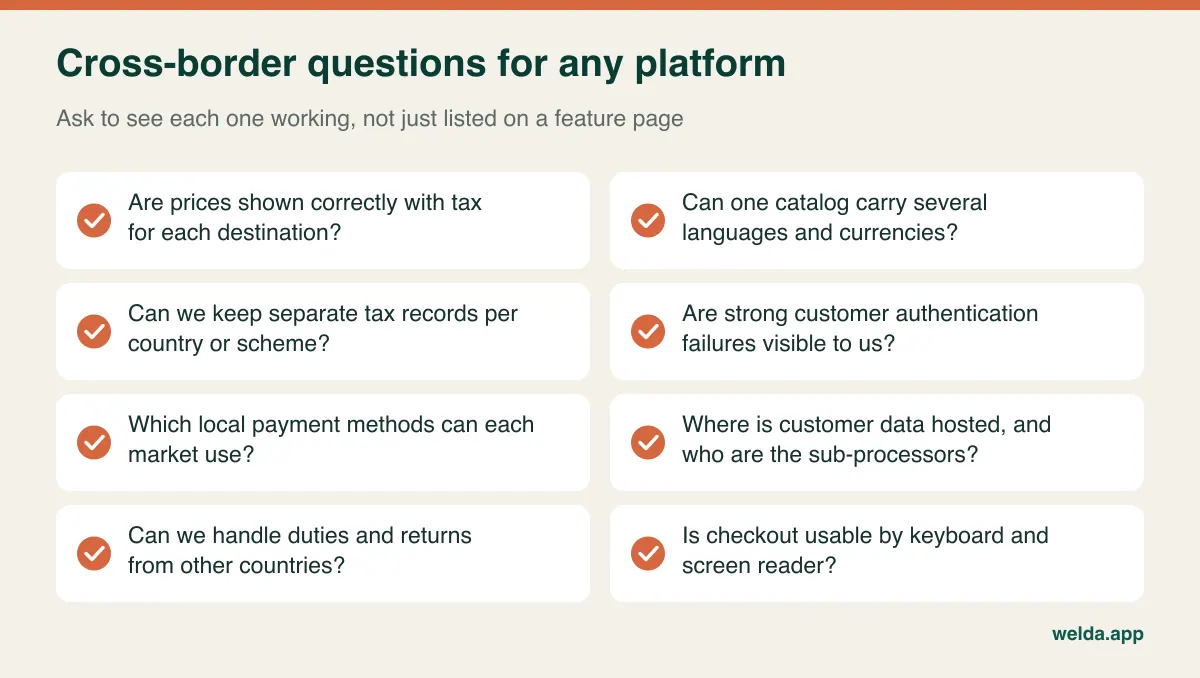
If you only sell domestically, plenty of these points will not apply yet. If international sales are part of the plan, they should weigh on the decision early, because this is the kind of work a good platform absorbs and a custom build inherits.
Tax. VAT, sales tax and similar regimes differ by destination, by customer type and sometimes by product. The EU's One-Stop Shop scheme simplifies reporting for many sellers but still requires accurate records per country. In the United States, sales tax obligations can depend on your activity in each state. Rules vary and change, so take advice from an accountant familiar with your markets; what you need from the platform is correct calculation, clear invoices and exportable records.
Payments. Card schemes, wallets, bank transfers and buy-now-pay-later options differ by market. In Europe, strong customer authentication adds a step that can fail silently unless you can see those failures. Whatever route you choose, avoid storing raw card data yourself and hand that task to your payment provider, as this greatly reduces your PCI DSS burden. Doing payment handling yourself in a custom build is rarely a good trade.
Privacy and accessibility. Data protection rules such as GDPR shape consent, retention, where data is processed and which sub-processors you must disclose. The European Accessibility Act has also raised expectations for many consumer-facing online shops. A platform can help, but it cannot make your shop compliant by itself; your content and any customisation still count. Get legal advice for your specific situation, and treat any vendor claiming blanket compliance with polite suspicion.
Language and logistics. Translated product content, local URLs, cross-border returns, duties and delivery promises are where international projects actually slow down. Our guide to shipping, payment and accounting integrations goes deeper on what to connect first.
Reading a budget without a price list
Any published figure for this kind of project would be misleading, since scope, region and timing swing the result too far to be useful. It is much more productive to know what drives the number, so you can read any quote on the same terms. Compare the routes over three years rather than comparing launch costs, because launch cost is where custom looks worst and running cost is where SaaS can surprise you. For a line-by-line view of a store budget, see our ecommerce website cost guide.
| Cost driver | SaaS route | Custom route |
|---|---|---|
| Getting started | Setup, theme adaptation, catalog migration | Discovery, design, development, testing |
| Recurring fees | Plan fee, possibly transaction fees, per-seat charges | Hosting, monitoring, backups, licensed services |
| Integrations | App subscriptions, connector services | Development plus upkeep per connection |
| Keeping it safe | Mostly included; plugin compatibility may fall to you | Patches, upgrades and audits are your line items |
| Changing things | Limited but usually quick | Flexible, and each change is scoped work |
| Leaving | Data migration, redirects, rebuild of apps | Finding a team able to take over the code |
When two proposals sit side by side, the differences usually hide in the lines one of them does not mention. Ask how many products, staff accounts and orders the price assumes. Ask what happens when you exceed them. Ask how many revision rounds are included, how long bugs are fixed free of charge after launch and whether peak capacity costs extra. Mark off each answer on both proposals. A low quote often just has fewer rows.
A hidden line belongs in every custom budget: your own management time. Someone has to write requirements, test builds, make priority calls and chase decisions, and that person is normally already busy. Convert your exception log into hours and do the same with this time, so you can compare like with like. As an example, if a custom integration would remove 300 hours of manual work a year, weigh that against development hours plus annual upkeep hours. Hours are easier to agree on than currency, and you can then apply your own rates.
Is headless the compromise it claims to be?
You will almost certainly hear "headless" or "composable" in these conversations. The idea is to separate the storefront from the commerce engine, so a custom front end can talk to a hosted back end through APIs. It can be the right answer when you have real reasons: very specific content-led experiences, multiple front ends sharing a single back end, or performance needs a theme cannot meet.
It is also frequently oversold. Going headless means you take on a front-end application, its hosting and everything the platform's theme used to give you for free: previews, some apps, parts of checkout integration and sometimes tracking. You also need developers on hand for changes your marketing team could once have made themselves. Ask a simple question: which specific customer-facing result would we lose by staying on a theme? If nobody can give a concrete answer, stay on the theme and put that money somewhere customers will notice.
The same test applies to any microservice-heavy proposal aimed at a small team. Architecture should follow a real constraint, not a trend. A thin custom layer that does one job well is a very different commitment to a platform assembled from a dozen services, each needing an owner.
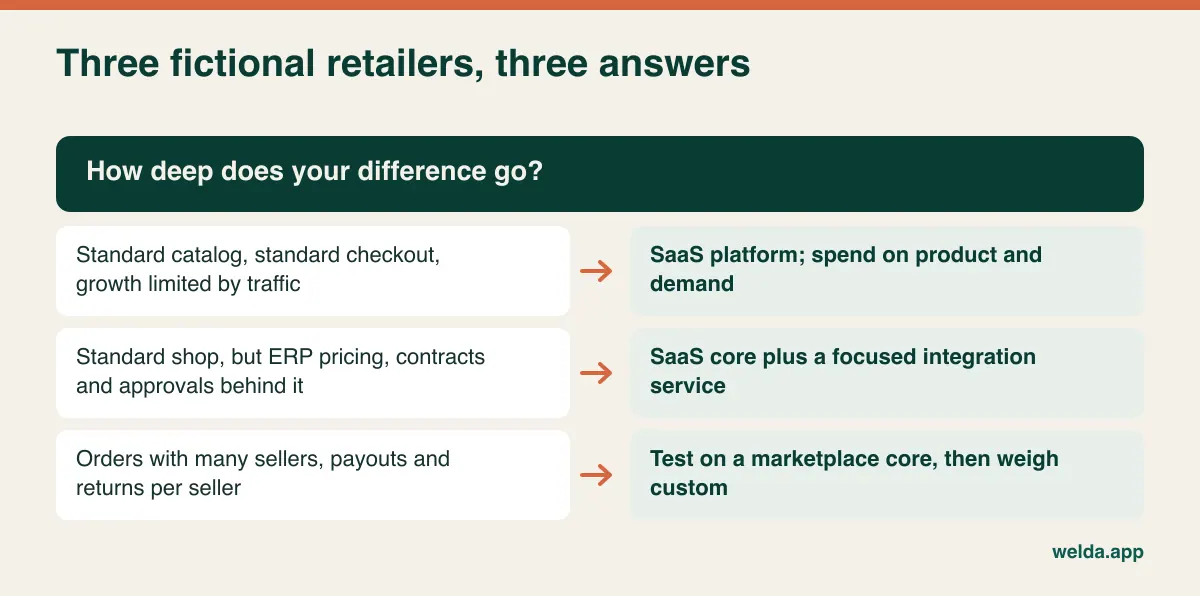
Three fictional retailers, three answers
These businesses are invented to make the logic concrete. They are not clients or case studies.
The homeware brand. A few hundred products, ordinary variants, one warehouse, some marketplace sales and a growth problem that is really about traffic and repeat purchase. A custom build here would spend money that should go on photography, content and demand. A hosted platform, set up carefully with sound measurement, is the right call. Deciding how much to sell through marketplaces versus your own site is the bigger question, and our marketplace or own store comparison looks at that trade-off.
The trade supplier. Thousands of part numbers, contract prices per customer, credit terms and an ERP that is the source of truth for all of it. The storefront is unremarkable, while the logic behind it is not. A hosted core with solid B2B features, plus a focused service keeping prices, stock and orders in step with the ERP, usually beats rewriting a whole shop. The custom work is real but small, and it sits exactly where the value is.
The curated multi-seller marketplace. One basket, several sellers, separate payouts, commission rules and returns per seller. The order model itself is different, so a standard shop will be a poor fit. Custom development becomes a serious option. Even so, it is wise to test demand on a marketplace-oriented core first, since a large build before proof of demand is the most expensive form of market research there is.
Proving fit before you sign
Every platform demo looks good, as it is designed to. Replace the third demo with a small, time-boxed test using your own difficult cases. Most SaaS platforms offer some form of trial or development environment, and a custom vendor can usually walk you through comparable work or build a narrow paid prototype.
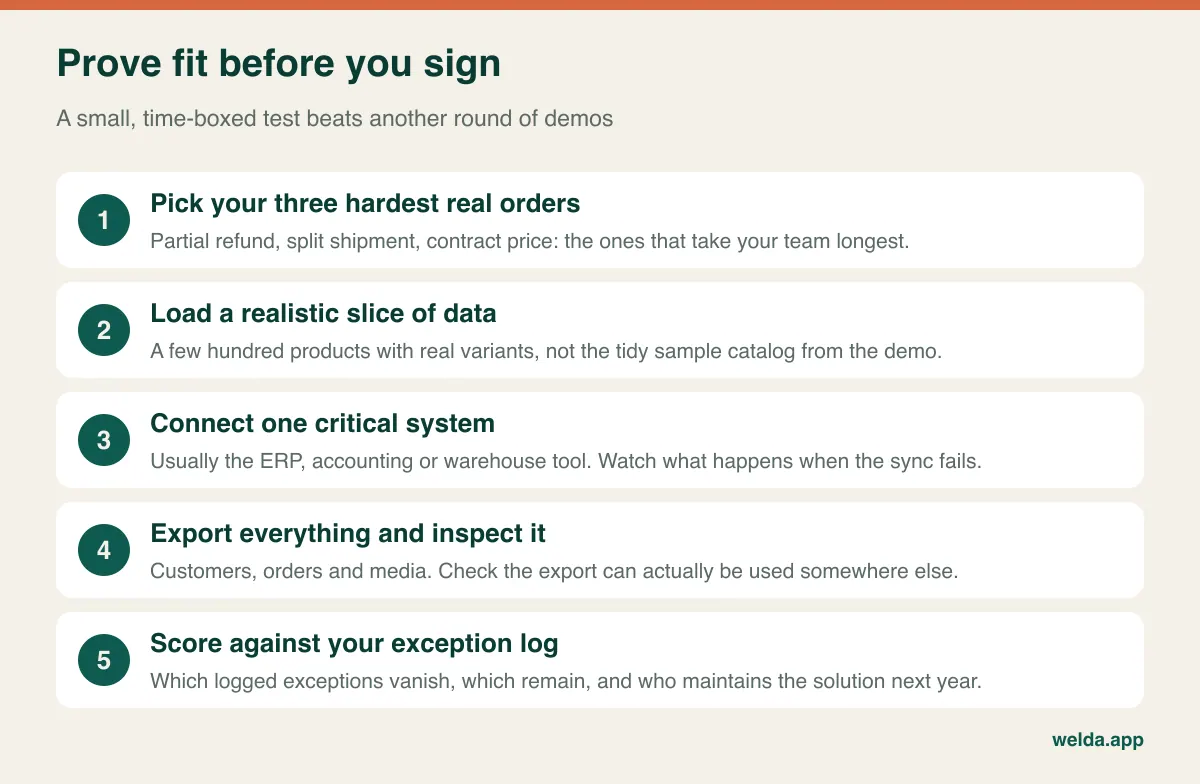
While you test, ask questions that reveal how people work. For a SaaS vendor or implementer: what are the API limits, and what does your team do when a sync fails overnight? Which of these requirements needs a third-party app, and what happens if that app is abandoned? For a custom vendor: who writes the code, and what happens if they leave? How are acceptance criteria written and by whom? Will source code live in a repository that we control from day one? Can you show something comparable running in production, and how do you handle a checkout failure at the worst possible moment? A team that operates its own live product tends to have stronger answers to that last one than a team that only delivers and moves on.
Also check the contract's exit clause. For SaaS: how long can you export data after cancellation, and in which formats? For custom: are source code, database schema, documentation and intellectual property assigned to you explicitly, and do you hold the hosting and domain accounts in your company's name?
Changing your mind later is normal
This decision is not a one-way door. Starting on SaaS, adding a custom layer and moving to custom only once real data proves the need is a sensible path, because each stage is informed by what actually happened. Moving back from an overgrown custom system to a hosted platform is equally respectable, and sometimes the most profitable project a business can run.
Migrations go wrong in predictable ways: redirects missed so search traffic falls, a payment step broken on a certain device, orders not reaching the accounting system and stock figures out of sync. Each can be planned for. Build an inventory of products, customers, orders, URLs and integrations. Run the new store in parallel and rehearse the data import at least twice. Test real end-to-end scenarios including refunds. Move outside your busy season, with every old URL mapped to its new home. Keep the old system readable for a while, because returns and invoice queries will need it. Customer passwords often cannot be moved, so plan a friendly reset message instead of leaving people locked out.
Where Welda fits into this
We work on both sides of this decision. Our ecommerce solutions work covers mobile-first stores on established platforms, chosen to suit your needs, with payments, shipping, marketplace connections, catalog work and conversion measurement. Where a standard solution will not stretch, our custom software and automation team builds integrations and bespoke modules, and on those projects source code, IP and documentation belong to you. If you want store, marketplace and in-person sales drawing on one stock pool, our own product Welda Stock can sit behind that; if you would rather keep your current stock or POS system, we look at integrating with it instead.
Plainly put: if a clean hosted setup is the right answer for you, we have no reason to talk you into custom code. And if you are planning something very large or highly specialised, we would rather say at the start whether the scope suits us.
We do not publish a fixed price list, since cost depends on the platform, catalog size, integrations and how much ongoing management you want. Bring your exception log and rough order numbers to a free initial consultation, and we can work through the SaaS vs custom ecommerce platform decision using your figures, then turn it into a scope and a quote.
Frequently asked questions
Will my business outgrow a SaaS ecommerce platform?
Maybe, but less often because of raw order volume than people expect. Limits tend to appear first in custom business rules, API allowances and app reliability during peaks. Many merchants solve these with a higher plan or a small custom service long before a full rebuild is justified.
Is a custom platform better for SEO?
Not automatically. Custom gives you more technical control, but you also have to build sitemaps, canonical handling, structured data and performance work yourself. A well-configured hosted store usually beats a poorly built custom one. Setup quality and content matter far more than the label.
Should a new business start with a custom build?
Rarely. Even when your model is unusual, test it in the smallest possible form first, sometimes with manual steps behind a simple store. You will learn what actually needs building, and you will spend far less finding out.
Can I add custom features to a SaaS store later?
Usually, yes, through APIs and app frameworks, although limits vary by platform and plan. Pricing, stock, integrations and reporting tend to be easier to extend than checkout, which is usually the most locked-down area. Check that specifically before you commit.
Who owns the code in a custom ecommerce project?
Whoever the contract says. Do not assume that paying for development transfers ownership; have source code, IP, documentation and repository access set out explicitly, ideally with advice from a lawyer in your jurisdiction.
What should I prepare before talking to vendors?
A two-week exception log, product and variant counts, a list of sales channels, the systems that must connect, your busiest period and your three most complicated recent orders. That is enough to compare proposals on equal terms and remove unnecessary scope from the start.