The right yoga studio software for a small studio does three things reliably: it holds a class schedule with a real capacity for each class, it reduces a student's remaining credits when attendance is taken, and it offers a cancelled spot to the next person waiting. If a tool does those three, most other features can wait. If it doesn't, you will still be keeping a notebook, however polished the dashboard looks.
That is a narrower brief than most vendor comparison pages suggest, and it is deliberately so. A yoga studio is not a small gym and it is not a clinic with mats. Students drop in without booking, teachers work across several studios, a good share of income can come from workshops and retreats, and the owner is frequently the person teaching the class while the booking messages pile up. This guide works from those realities towards a decision: whether you need software yet, what to require from it, what to test in a demo, and how to move across without arguing with anyone about their credits.
Do you actually need software yet?
Not every studio does. A teacher running four weekly classes in a rented room, taking payment per class, with a dozen regulars, can run happily on a shared calendar and a tidy sheet. Buying software at that stage adds a login and a monthly bill without removing a problem.
The signal to look for is not headcount. It is a specific kind of failure. A useful test is to look back over the last month and write down what actually went wrong. Did a student claim three classes left when your sheet said one? Did you turn someone away from a full class and then teach it with two empty mats? Did you spend Sunday evening reconciling messages against a spreadsheet? Those are failures of connected records, and they tend to get worse as you add teachers and passes rather than better.
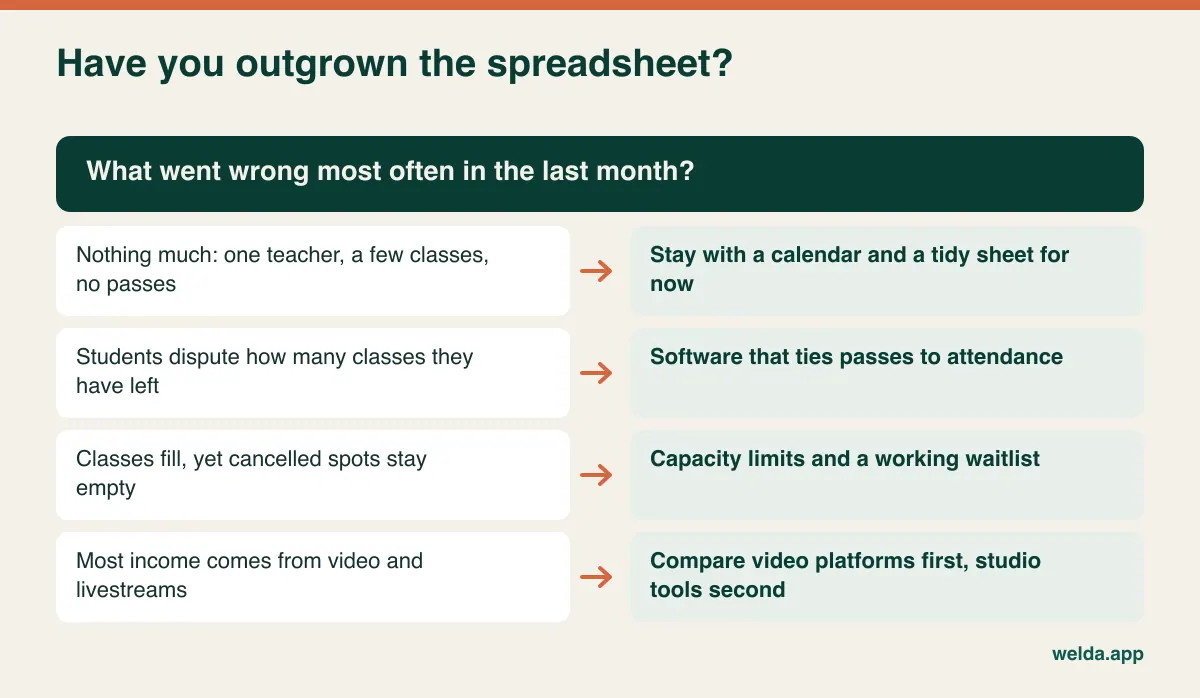
Note the last row of that chart. If most of your income comes from on-demand video and livestreamed classes, your primary tool is a video platform, and a studio scheduling tool is the second purchase. Many studios run a hybrid of the two, so be honest about where the money comes from before you book demos.
The drop-in problem: students who don't book ahead
A lot of booking software assumes that people reserve first and turn up later. Yoga has a stubborn tradition of the opposite. Someone finishes work, feels like a class, and walks in at 6:50 with a mat under one arm. Other studios have travellers who visit once, neighbours who come twice a month, and regulars who consider booking an unnecessary formality. If your software treats all of them as exceptions, your teacher will end up working around it at the door.
Think through what happens at the door of your own studio when a class is half booked and three people walk in:
- Can the teacher see at a glance how many mats are really left, on a phone, without opening three screens?
- Can a brand-new walk-in be added quickly, with just a name and phone number, and completed later?
- Does a walk-in count toward capacity, so that the online figures stay accurate for the next person checking?
- Where does the payment go if it is taken in cash or by card at the door?
- Will the health or injury question still get asked, even when the student arrives with two minutes to spare?
This is also where you need to decide how far your own culture bends. A studio that wants to keep drop-ins can do so, but it usually needs to hold back a couple of mats from online booking in popular classes, or accept that regulars who booked get priority. Software will not make that decision for you; it will only make it visible. A studio that moves to "booking required" gains a far more reliable waitlist and attendance record, at the cost of some spontaneity. Neither answer is wrong. What matters is that the door rule and the software rule are the same rule.
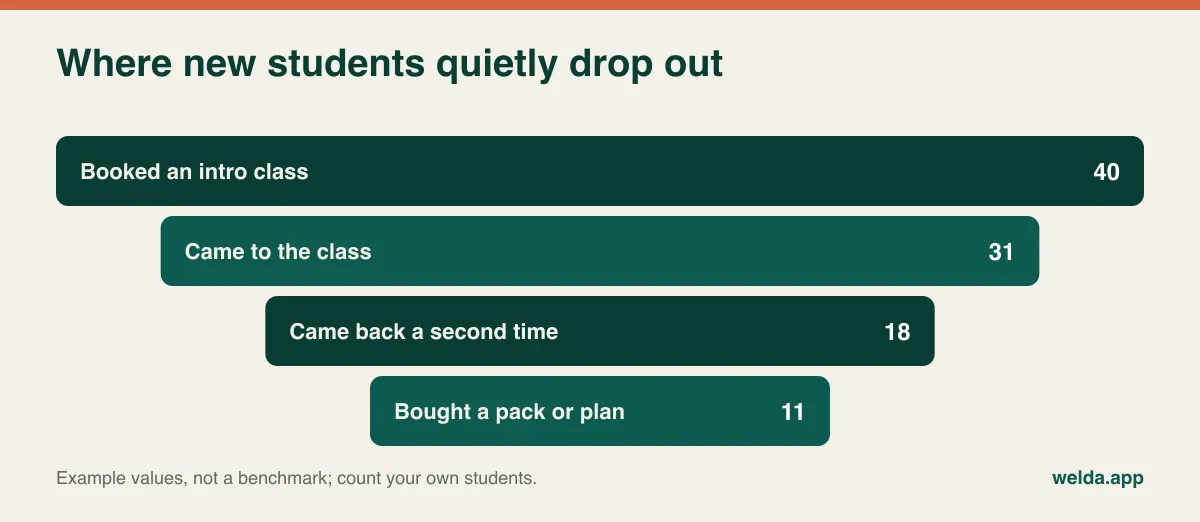
The brand-new student deserves special attention here, because the first few visits are when a yoga habit either forms or does not. Many small studios can't say how many intro-class students come back, because the information is spread across a notebook and a message thread. Even a simple record of first visit, second visit and first purchase tells you whether your problem is getting people through the door or getting them to return.
Capacity in yoga is a judgment, not a device count
In a reformer studio, capacity is the number of machines. In yoga, it depends on the floor, the style and what you want the class to feel like. A room might hold fourteen mats for a Vinyasa flow but feel full with nine people in a Restorative class, once bolsters, blankets and blocks are spread out. A beginners' course needs room for the teacher to walk and adjust. Aerial yoga is the exception that behaves like equipment: you have as many students as hammocks, and that is that.
The practical requirement follows from this. Capacity needs to be a property of each class, not a single number attached to the room. As a second check, ask who is allowed to override it. Most owners will want the freedom to squeeze in one more regular on a quiet Tuesday. Few want every teacher deciding that independently on a Saturday morning, when overcrowding changes the experience of everyone already in the room.
Once capacity is honest, your attendance records become useful for planning. Studios often respond to a quiet patch with more marketing when the real issue is a timetable that has drifted away from when people can attend. Counting empty mats per week by slot tells you where to look.
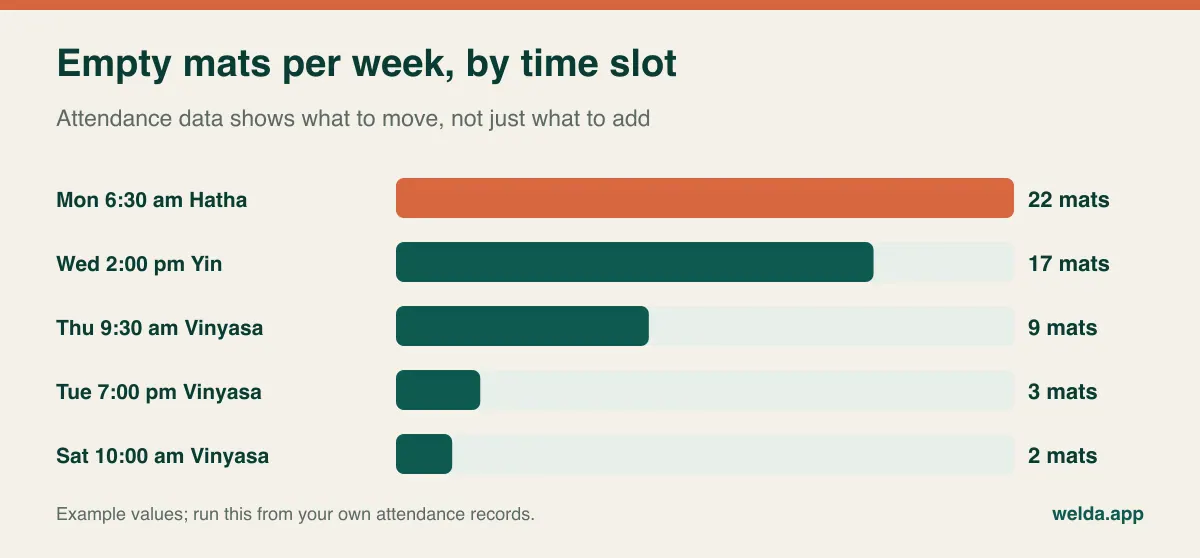
Be careful with what you conclude. An early class that is half empty may still be the reason three loyal members stay with you. Attendance data starts the conversation; it shouldn't end it.
Every pass you sell is a promise with fine print
A class pack feels like a simple transaction, but it is prepaid service: the student has handed over money and you owe them classes. A monthly membership is a different promise: access for a period, renewing until someone stops it. A drop-in is a third. Problems start when a single spreadsheet column is expected to represent all three, and when the rules exist only in the owner's head.
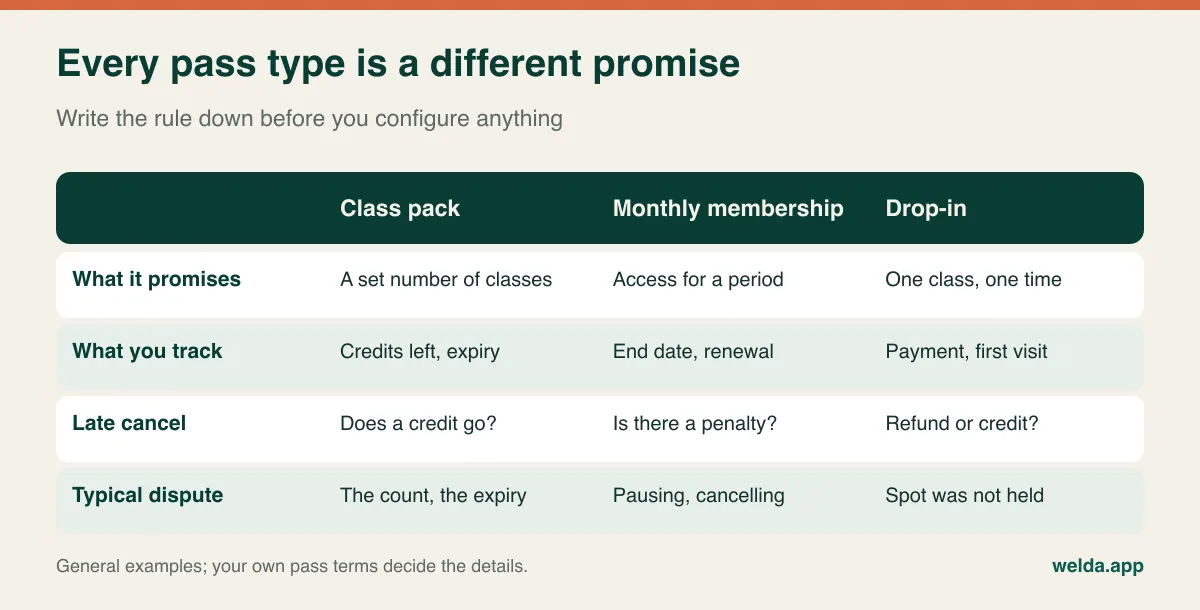
Before you look at any software, write your rules out in sentences you would be comfortable sending to a student. How long is a pack valid? What is the late-cancellation window, and does a late cancel cost a credit? Can someone pause for pregnancy, injury or three months abroad? Can a pack be shared with a partner? What happens to a no-show? Consumer rules on expiry, refunds and automatic renewal differ widely between countries, so have these terms checked locally rather than copying another studio's small print.
Then bring those sentences to the software and test each one. Three questions tend to expose the most:
- When exactly does a credit drop? At booking, or when attendance is marked? Each works, but they fail differently. Deducting at attendance is easier to defend; it also means somebody must actually take attendance.
- Is the late-cancel rule enforced by the system or by a person? If it is a person, you need to see who applied it and when. That record is what ends arguments.
- How is a pause handled? Pausing comes up often in yoga, and tools differ in how they handle it. Ask to see it, not just to hear about it.
In Welda CRM, the total and remaining classes of each pack appear on the member profile and a credit is deducted automatically for each class attended; membership periods and end dates sit alongside, and instalments and outstanding balances are visible on the same profile. We would rather you asked in a consultation how your own pause and late-cancel rules map onto it than take a blanket promise from a blog post.
Teachers who work at three studios
Yoga teaching is often freelance. The teacher on your Monday timetable may teach elsewhere on Tuesday and at a company on Wednesday. Software that assumes a fixed staff roster creates friction, and three situations are worth testing.
Subs. Cover is arranged at short notice, often in a teacher group chat. Students like to know who is teaching, so you want an easy way to change the teacher on one class without altering the recurring schedule. You also want the record to show who actually taught, because that is what pay is based on.
Pay. Studios commonly pay teachers per class, per head, or a base amount plus a per-head element. With a flat rate, you only need to know who taught. Under per-head pay, attendance turns directly into payroll, so an unmarked register now costs a teacher money and creates an awkward conversation at month's end. Ask whether the reports can show classes and attendance per teacher, and what you would still have to calculate outside the system. Employment status for freelance teachers also varies by country and is worth checking with an adviser rather than assuming.
Access. A teacher who works at several local studios does not need to see your full student list. Role-based permissions let them see their own classes and registers without exporting your members' contact details. It is easy to overlook until a teacher leaves to open a studio nearby.
Welda CRM gives each instructor a calendar and each user permissions matched to their role. Commission tracking starts at the Pro plan, so raise it in the consultation if you need the pay calculation handled inside the system.
Workshops, retreats and teacher trainings don't fit in a class pack
A meaningful part of a yoga studio's income can sit outside the weekly schedule: a Saturday inversion workshop, a sound bath, a five-day retreat, a 200-hour teacher training, a corporate lunchtime class. These do not behave like regular classes. They have their own capacity and their own price, people may attend without being members, and retreats often involve deposits and balance payments spread over months.
If this is only an occasional thing, a separate event tool or a simple form may be perfectly adequate, and there is no need to make your studio software do everything. If it is a large share of your income, take one real event to the demo. Say: "Twelve places, deposit now, balance six weeks before, two of these people aren't members." Watch how many workarounds are required to record it. Teacher training is the hardest case, because it adds modules, attendance requirements and certification. Be prepared for that to need its own system, whichever studio software you choose.
Corporate classes add one more wrinkle: the customer is a company, not a student, and invoicing goes to a business name rather than to the people on the mat. Check that this can be recorded without creating a fake member.
Online classes and aggregators: settle these before the demo
Two topics tend to surface too late, so decide your position on them first.
The first is online teaching. Are livestream or on-demand classes a side offering or a core income stream? A side offering can often run through a meeting link sent to registered students. A core stream needs a real video platform with a library and access control. Welda CRM is built for appointments and studio classes, and we don't present it as a video platform.
The second is aggregator and corporate wellness platforms, where students reach you through a third-party subscription. If those visits are a material share of your attendance, ask any vendor how they are recorded and how capacity stays in sync, because a class can fill from two directions at once. No connection to such platforms appears in Welda CRM's published feature set, so if yours depends on it, ask directly before going further.
Student apps are a related question. A branded app sounds impressive, but consider who your students actually are and whether they will install it. Your bookings page and a website built for a pilates or yoga studio may do most of the same job with less friction. In many markets, WhatsApp is already where students are, which is why WhatsApp reminders and automation are worth comparing with app notifications.
Waivers, health notes and privacy
Yoga studios collect more sensitive information than they tend to realise. Injury notes, pregnancy, blood pressure and anxiety may all count as health data in many jurisdictions, and under the GDPR and comparable laws that category gets stronger protection. Rules vary by country, so treat what follows as questions to raise rather than legal advice.
- Where do health notes live? A group chat or a paper folder at reception is hard to defend. A role-limited record is better. Consider whether a substitute teacher needs to see the note, and if so, only for those attending that class.
- How is consent recorded? You want to be able to show what someone agreed to and when, separately for health information and for marketing messages.
- Are waivers stored and findable? If you use a liability waiver, confirm with a local adviser what form it should take, then check where a signed version is stored.
- What about group chats? A class WhatsApp group exposes every member's phone number to everyone else. Individual reminders avoid that.
- Who can see the audit trail? If there is ever a question, you should be able to tell who opened what.
Client and health records in Welda CRM are stored encrypted, with KVKK/GDPR consent management and an audit log. That supports your obligations, but it does not replace your own privacy notice or the advice of someone who knows your local rules.
What shapes the cost, and how to compare two quotes
The subscription figure is the easiest thing to compare and often the least informative. To make quotes truly comparable, send every vendor the same written scenario: one room, two teachers, one part-time assistant, eighteen classes a week, seventy active students, packs and monthly memberships, WhatsApp reminders. Then ask each one what that scenario would cost and what it leaves out.
These are the items that tend to move the total:
- Users. Will each teacher log in, or does one person handle registers?
- Message volume. This is where studios get caught out. A clinic sends one reminder per appointment; a group class with twelve students sends twelve. For example, a studio with 150 attendances a week and one reminder per attendance sends roughly 600 messages a month. Read any message allowance against your own version of that sum.
- Modules. Check whether commissions, a cash desk or retail stock for mats and props need a higher plan.
- Setup and migration. Is it included, charged separately or left to you?
- Payment processing. Card fees and any required payment provider sit outside the subscription, and they can restrict your choices.
- Contract and exit. Monthly or annual? Which format do you get your data in if you leave?
- Your own hours. A cheap tool that needs manual reconciliation every week carries a cost that never appears on a quote.
Welda CRM is a monthly subscription. Setup, data migration and team training are included, and there is no separate setup fee. Pricing depends on your locations, users, message volume and modules, and it is settled in a free consultation once we understand how your studio runs.
A demo script based on your own Tuesday
A prepared demo makes every product look effortless. So take control of it. Write a scenario from your real week and ask the presenter to run it on screen: the 7 pm Vinyasa has 14 mats and all are booked. Maya is first on the waitlist. At 4 pm, Tom cancels. Maya has one credit left on a pack, and the second part of her payment is overdue. Priya was due to teach but is ill, so Sam covers. Two walk-ins arrive. Thirteen booked students attend and one doesn't show.
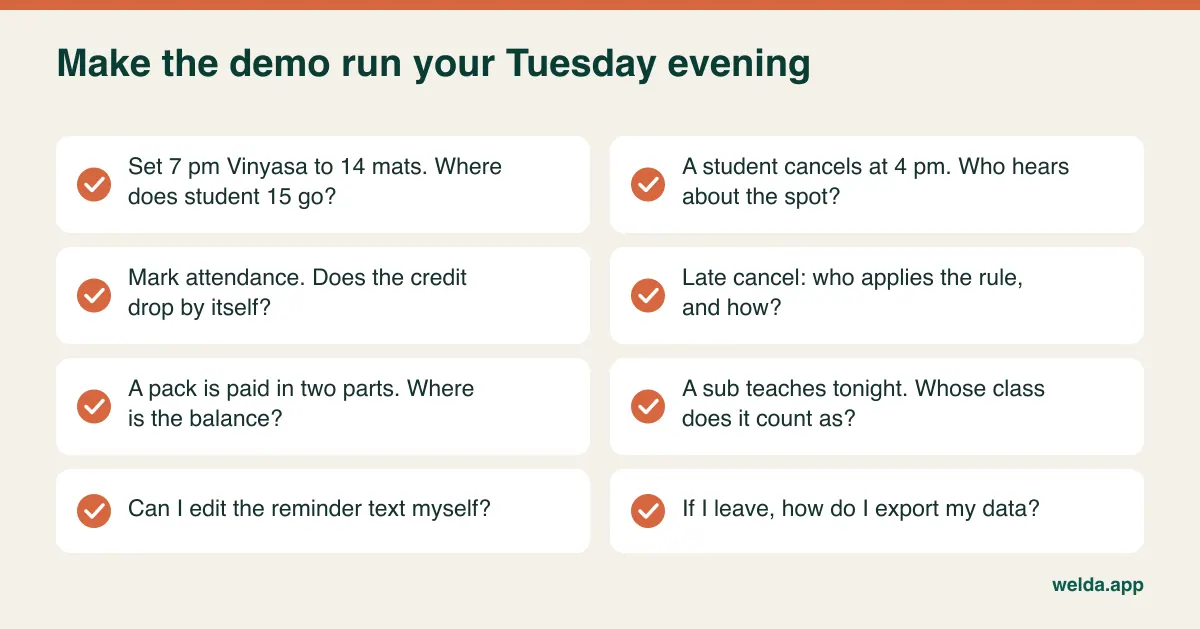
It's fine if a product can't do everything on the list. What you are looking for is a clear picture of what stays manual and whether you can live with it. If the free trial lets you, run one class type on it for a full week with real students. Welda CRM has a 7-day free trial with all modules open, which is long enough to run a real week; if the trial ends, your data isn't deleted and the account becomes read-only until you pick a plan.
Moving across without arguing over credits
The delicate part of migration is not the student list. It is the open passes. Everyone remembers their own balance favourably, so the switch is the one moment you can settle each balance once and for all. Choose a cutover date, count open packs, and where you're unsure, ask the student and record the answer.
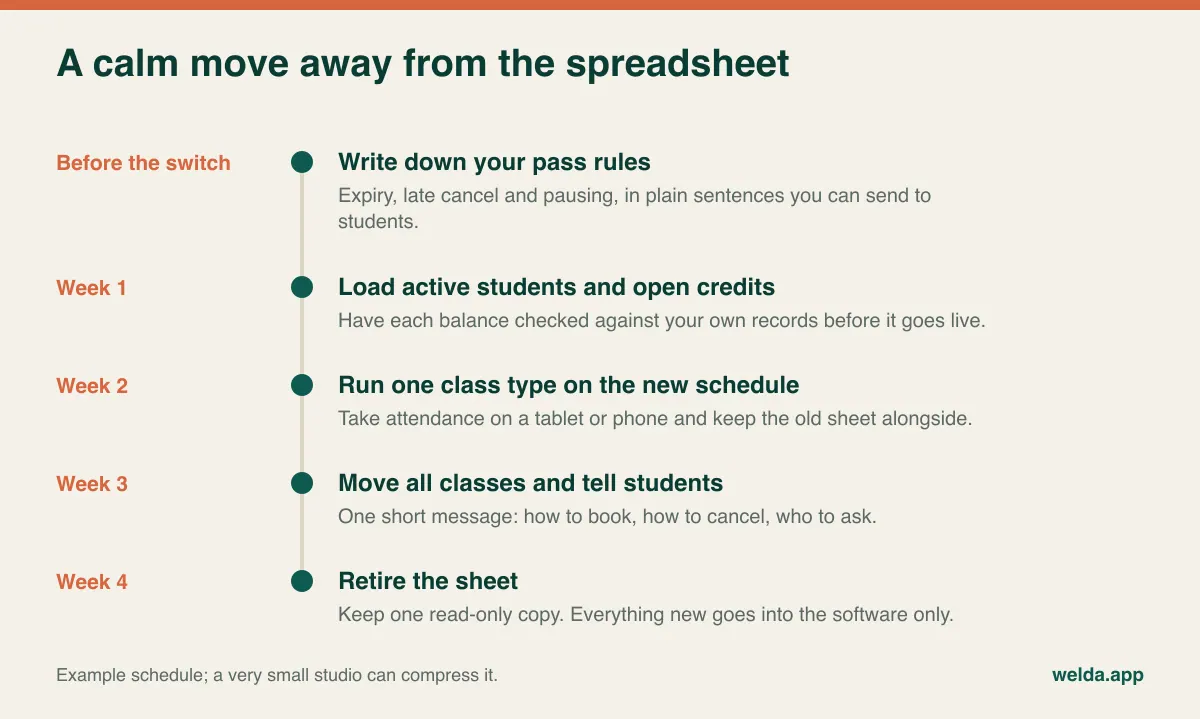
Two habits make this work. First, tell students once, clearly: how to book, how to cancel, who to ask. Second, stop answering booking questions in the old channel, politely and consistently, after the switch. If the teacher keeps taking bookings by message because it's easier that day, you end up with two systems and the software gets the blame. A teacher group chat can stay for cover arrangements, and a student WhatsApp group can become announcements only, rather than disappearing overnight.
Leave old history for later. Students who left years ago don't need migrating before you can run Tuesday's class. If you do intend to contact them, check what they consented to first.
Where Welda CRM fits, and where it doesn't
Welda CRM covers the core of this article: memberships with end dates, class packs with remaining credits, group classes with capacity per instructor, a waiting list that notifies the next person, online booking requests, WhatsApp reminders, payments and instalments, and occupancy and revenue reports. It's web-based, so nothing needs installing, and the interface is available in English, Turkish and German, which can help a studio with an international student base. You can see how it works for this kind of business on our yoga studio software page, which covers fitness, pilates and yoga studios together.
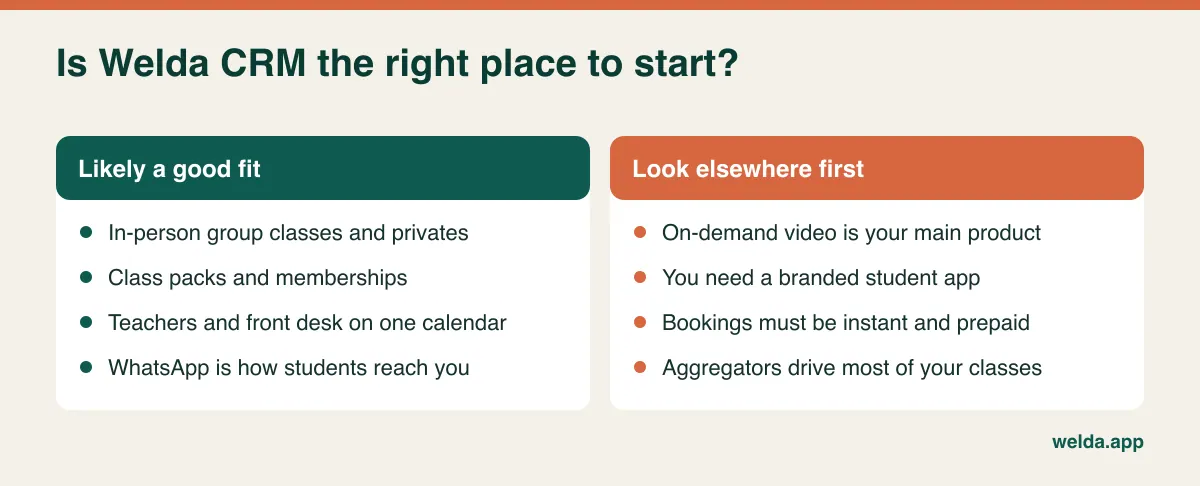
One detail matters for a yoga studio: online booking in Welda CRM works as a request that you confirm, rather than an instant prepaid reservation. Many small studios prefer that level of control, but a teacher in class won't confirm anything until the class ends, so weigh it against how you work. Our published feature set doesn't promise a branded student app, prepayment at the moment of booking or aggregator connections, so if any of these is central to your plans, raise it early.
If you run a reformer-led studio, our guide to pilates class booking, capacity and waitlists goes deeper on equipment-based capacity, and if your concern is mainly renewals, see membership management. When you're ready to compare, book a free consultation about yoga studio software for your schedule: tell us your rooms, teachers and pass types, and we'll work through the plan and price with you.
Frequently asked questions
What is the most important feature in yoga studio software?
The link between class, spot and credit. Capacity per class, attendance that reduces a pack automatically and a waitlist that fills cancellations solve most daily problems. A long feature list without that link won't help.
Is gym software good enough for a yoga studio?
Sometimes. Software built around memberships and door access may treat classes as an add-on. Check that it handles capacity per class, class packs, substitute teachers and drop-ins. Tools that serve studios and gyms together can work well, provided they handle classes properly.
How many students do I need before software is worthwhile?
There is no fixed number. The trigger is usually the first dispute over credits, a second teacher, or a weekly reconciliation that eats your evening. A teacher with a few classes and no passes may not need it yet.
Can students book classes themselves?
In most tools, yes, but the mechanism differs. Some confirm instantly, others take a request. In Welda CRM, members request a spot through your online booking page and you confirm it.
How should I handle no-shows and late cancellations?
Set the rule first, tell students when they buy, and apply it consistently. Then check whether the software enforces it or leaves that to a person. Reminders help, but they don't replace a clear rule.
Can I bring my existing student list and packs?
Ask every vendor how this works and who does it. With Welda CRM, migrating your existing client and appointment data is included in setup. Check open pack balances yourself beforehand, because that step prevents most later disputes.
How much does yoga studio software cost?
It depends on users, message volume, modules and contract terms, so compare using the same written scenario for each vendor. Welda CRM's price is agreed in a free consultation, and there is a 7-day free trial if you want to test it with your own classes first.