The right clothing store POS software tracks every size and color as its own stock line, lets you receive a season's delivery in hours rather than days, and handles an exchange as two stock movements instead of one. If a system can do those three things and suits the way you trade, it will probably serve a boutique or a small chain well. If it can't, no amount of polish at the till will fix the gap between what the screen says and what is on the rail. This guide shows how to test that before you sign anything.
Most people searching for this have just had a very specific bad week. The system said you had the navy overshirt. The customer wanted a medium. You went to the stockroom and came back empty-handed. Two months later you are marking down extra-smalls of the same style. That is not a staff problem. It is what happens when the records describe a style while customers buy a size.
Three questions the till has to answer
General retail software is usually built around a product that is interchangeable: one can of soup replaces another. A garment isn't like that. Fifteen navy overshirts count as zero if none of them fits the person in front of you. So instead of starting from a feature list, start from the three questions a store owner actually asks on a busy Saturday.
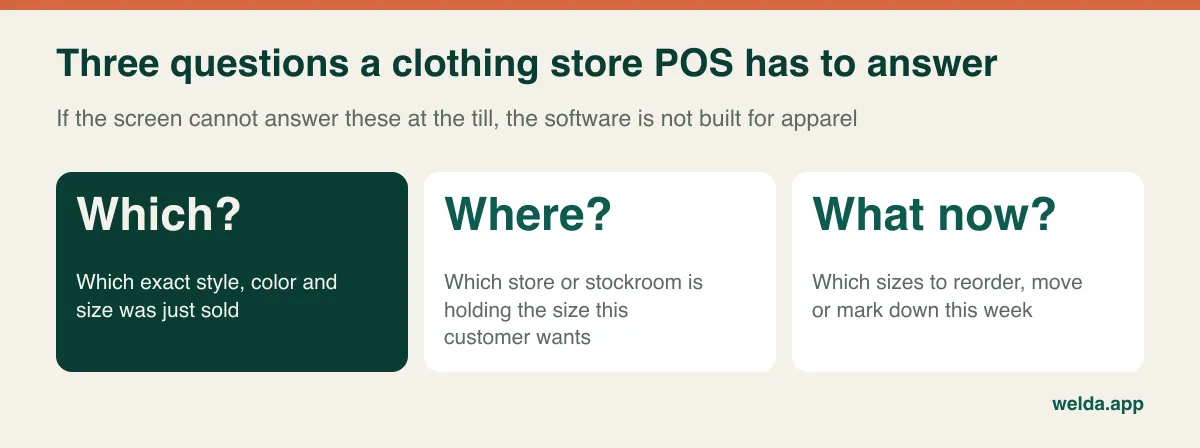
Software approaches the first question in one of two ways. Some systems give you a parent style with a size-and-color grid underneath: you create the style once and the combinations appear below it. Others treat each size and color as a separate product with its own SKU and barcode. Both can keep stock accurate. The difference is how much effort it takes to create items and how easily you can view a whole style at a glance.
Welda Stock uses the second approach. Each size and color gets its own SKU and barcode, and a sale reduces only the scanned item. Our product documentation doesn't describe a parent-style grid view, so if that view matters to you, ask to see how a style looks in a demo rather than taking anyone's word for it. Because products can be imported in bulk from Excel, the setup work is mostly about preparing a clean list rather than typing. Our clothing store POS software page walks through a sample day in a store.
The number to calculate before you speak to any vendor
Store owners tend to quote how many styles they carry. Software cares about stock lines, and that figure is far bigger. Multiply it out once and the conversation with every vendor changes, because this number drives data import, labeling work and the scope of the quote. A small boutique can easily carry as many records as a mid-sized convenience store.
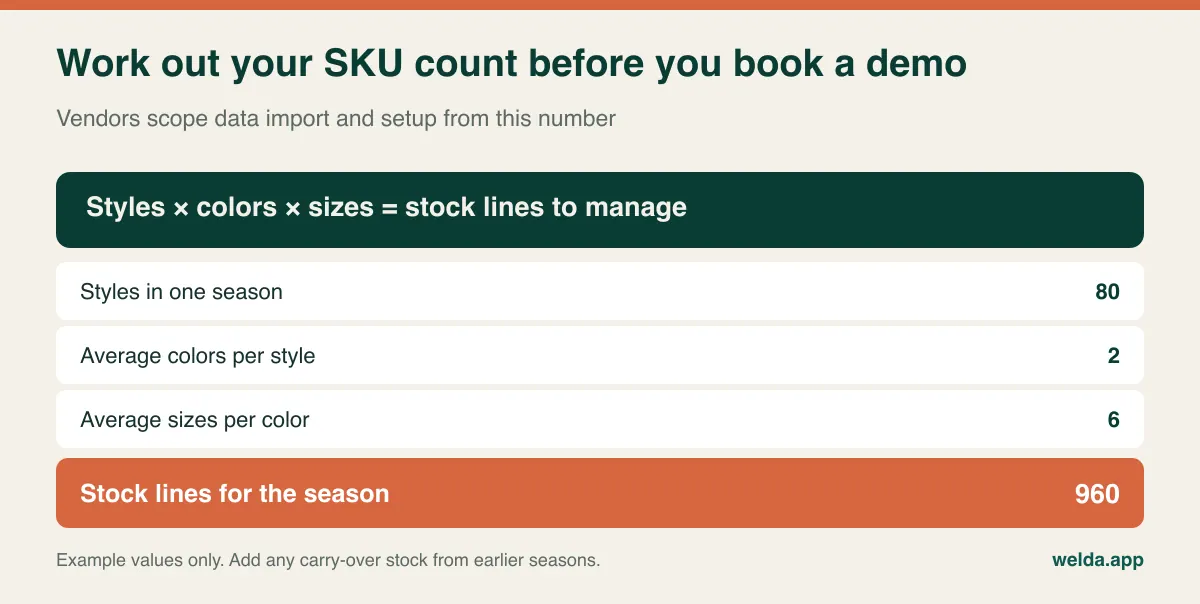
Two things are easy to miss when you do the sum. Carry-over stock doesn't disappear when the season ends: last winter's coat comes back next winter and needs to remain findable. Accessories have no sizes, but belts, scarves and bags often come in many variations, so count them separately. And think about shoe sizes if you sell footwear, since they multiply the total faster than anything else in the shop.
The larger the list, the more a naming rule matters. Without one you will eventually hold three records for the same item: "Navy Overshirt", "O/Shirt Navy" and "Ovrsht NVY M". A simple pattern of season, style number, color and size, such as SS26-0412-NVY-M, keeps things searchable and makes it easy to pull one season's items back up later. Agree it before the first import, because retrofitting a code system is miserable work.
Barcodes are where clothing retail differs most from other shops
In grocery, the manufacturer takes care of the barcode. Fashion offers no such guarantee. Branded goods usually arrive with a code on the swing tag, but goods from wholesalers may have none at all, and some suppliers print a single code across every size of a style. That last case is the dangerous one. The scan succeeds, the sale goes through, and stock quietly drops from the wrong size. You won't find out until a count weeks later.
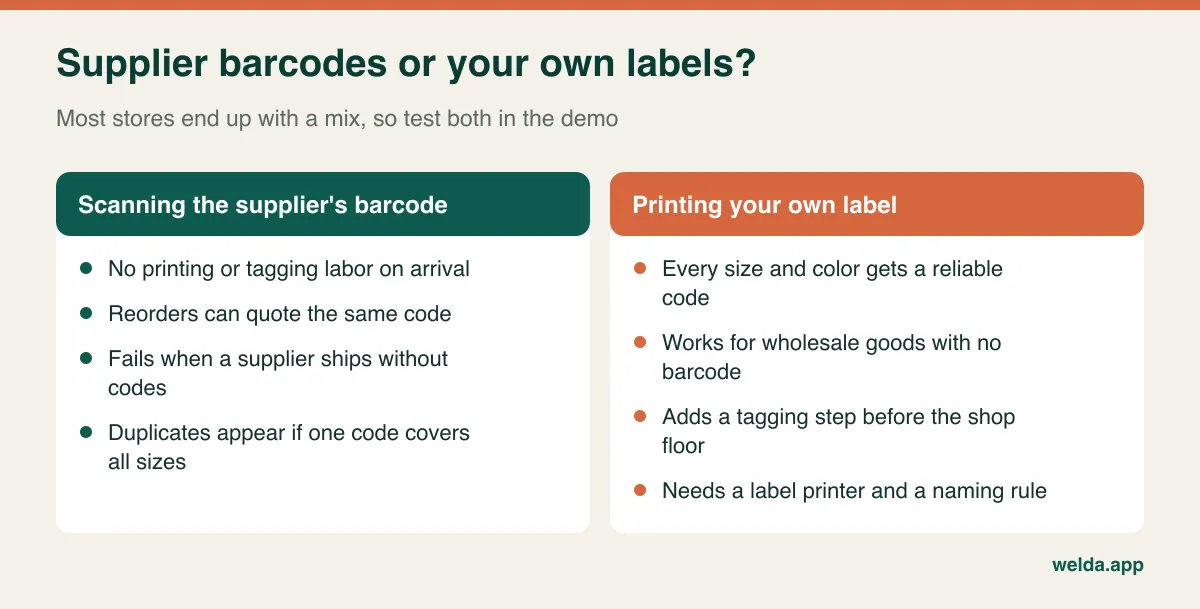
Whichever route you take, your POS needs to accept outside codes and let you assign your own to anything without one. Ask who prints the labels, on which printer, and at which step. Welda Stock works with standard barcode scanners and supports product, SKU and barcode entry. Label-printer workflows aren't described in detail in our documentation, so bring your printer model to the consultation and we can look at it together. For the wider picture on scanners and error types, see our guide to barcode inventory tracking.
One habit is worth more than any feature here. Before a delivery reaches the shop floor, scan one garment of each size in each color and check that it lands on the correct line. Five minutes at the receiving bench saves weeks of unexplained stock differences.
Buying in size runs, and why reorders need size-level data
Apparel is bought in a way almost no other retail category is. You commit to a style months ahead, often as a pre-pack with a fixed spread of sizes, and then the shop's actual customers disagree with that spread. Styles don't sell out all at once. They come apart one size at a time: the mediums go first, the large follows, and what remains is a broken size run of very small and very large pieces that looks like healthy stock on every report.
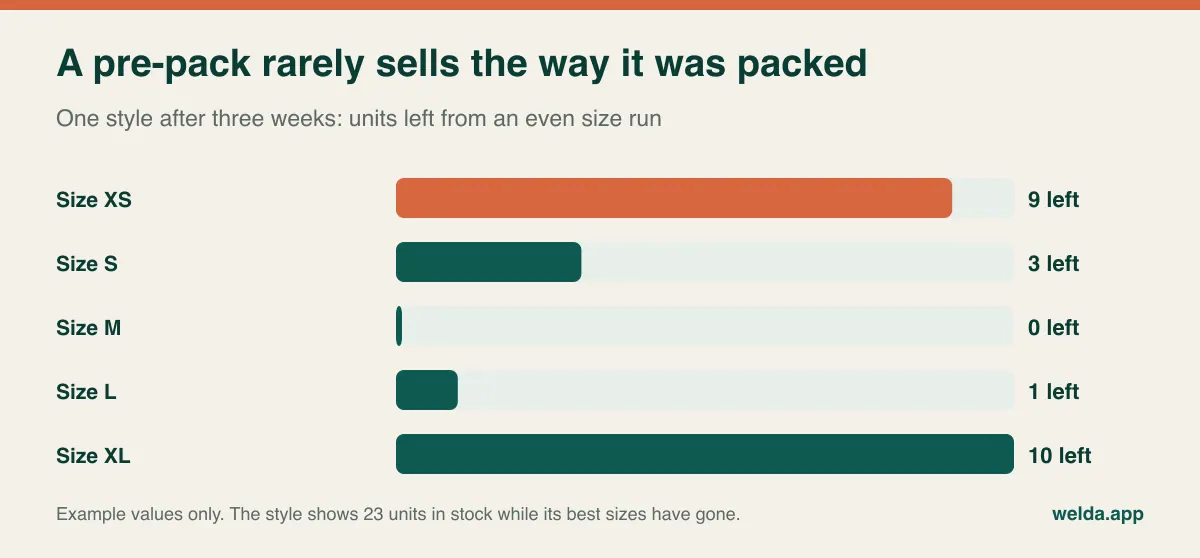
Two things follow for your software decision. First, low-stock alerts must attach to the size-and-color line, not to the style, and they should be able to differ by size: a threshold that makes sense for a medium is too high for an extra-small. Second, you need to see sell-through by size across a season, without exporting to a spreadsheet and building a pivot table. A report nobody opens doesn't change a buying decision.
That size-level history is also what makes you a stronger buyer. "This pre-pack leaves me with XL every season, can I have a different spread or order singles?" is a far better conversation with a supplier than "it felt slow this year." For the timing side of buying, our guide to seasonal inventory planning covers how to plan quantities around peaks.
Receiving day is the real product demo
A delivery of a new season tends to arrive while you are still serving customers. A system that makes you create items one at a time will consume the evening for even a modest shipment, and when a process is that painful, staff start skipping steps. So test receiving with a real packing list rather than the vendor's sample data. Don't ask "do you support pre-packs?" Hand over a packing list and say "show me this one going in."
Even without pre-pack logic in the software, you can usually split a pack into size lines in a spreadsheet and bulk import the result. What matters is how long it takes and how errors are caught. Check what happens if a size is missing from the carton, because supplier shortages are routine at the start of a season. Check, too, that the delivery updates what you owe that supplier as well as your stock. In Welda Stock, supplier invoices and payables tracking sit alongside stock, so one purchase record doesn't have to be entered twice.
Exchanges: the transaction other retail barely has
In clothing, the most common post-sale event isn't a refund. It's a size swap. A customer bought a medium, it was tight, and they want a large. At the counter that feels like one small favor, but in stock terms it is two movements: the medium comes back and the large goes out. If staff wave it through without recording it, both sizes are now wrong. If they record it clumsily, the price difference gets lost. A good share of the differences you find at stocktake start with small shortcuts like these.
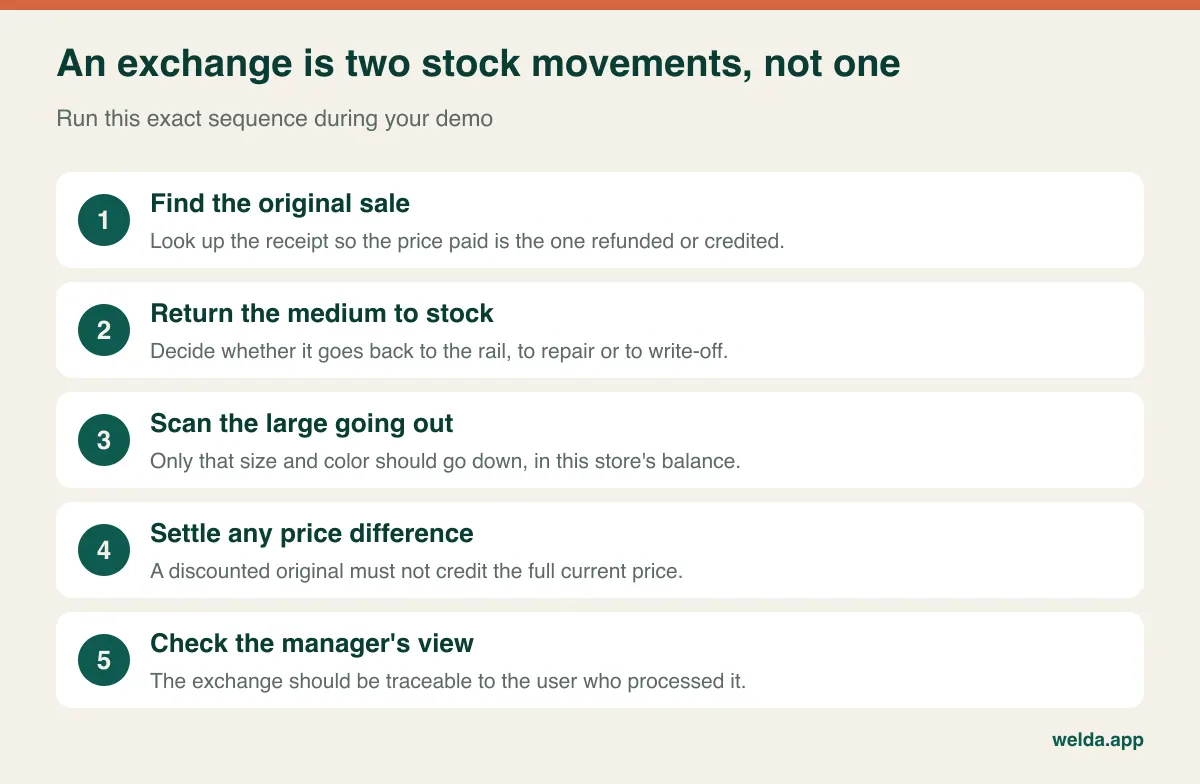
Exchanges get trickier during sales. If something was bought at full price and is now marked down, which price applies? Write your own policy down and check the system can support it, including how it handles missing tags or items bought on promotion. Consumer rights vary from country to country and a statutory right for faulty goods is different from a goodwill exchange policy, so take local advice on the details. Our guide to returns and exchanges in retail goes further into setting policies.
Permissions belong in the same discussion, as returns, voids and discounts are where errors and misuse usually concentrate. In Welda Stock you set separate permission levels for cashier, stock manager and administrator. Sales staff can sell while purchase prices, margins and reports stay with the administrator. That is often the setting that lets you take a Saturday off. Fitting-room losses, on the other hand, are not a software problem. Short, frequent partial counts simply make them visible sooner.
The second store changes the question
With one shop the question is whether you have it. With two it becomes where it is. If the size a customer wants sits in the other branch, you need to see that branch's balance and you need a record when the garment physically moves. Without the record, both stores' numbers become unreliable within weeks. A text saying "sent you two mediums" isn't a stock movement.
Welda Stock tracks each store and stockroom with its own balance from one panel, and it includes a branch-to-branch transfer form with source, destination, product and quantity. Per-store margin and sales reports show which shop sells what. The tool needs a routine around it, though. Decide who sends what, who confirms arrival, and how often you rebalance. A weekly look at size distribution by store, followed by moving slow sizes to where they sell, can close broken runs without placing a new order. Our article on multi-location inventory management covers the broader setup.
Markdowns: see the margin before you discount
End-of-season decisions are often made at rail level: "everything forty percent off." Yet two garments on that rail may have very different margins. Take an example with a cost of 100 units for each. One is ticketed at 200, the other at 160. Forty percent off brings the first to 120, still profitable, and the second to 96, below cost. The figures are illustrative, but the principle holds everywhere: a flat discount treats different items as if they were the same.
Look for per-product margin alongside sales speed, and for a sensible way to change many prices at once, because editing hundreds of lines by hand during a sale invites mistakes. Welda Stock shows per-product margin and sales reports, so when you update a selling price you can see the effect on profitability. Then there is what to do with what's left: carry it over, bundle it, or clear it. Our guide to clearing dead stock offers a framework for that decision.
Tax, receipts and customer data depend on where you trade
A POS sold internationally can't be assumed to meet your local rules. Some countries require fiscal printers or certified registers; others require digital receipts, real-time reporting, or specific tax handling on clothing. Children's clothing, for example, can have different tax treatment in some jurisdictions. These rules change, and they aren't something you should take from a blog post, including this one. Ask your accountant which requirements apply to you, then ask the vendor to say in writing how the software meets them.
Being straightforward about our own product: Welda Stock creates a customer receipt for each sale and a daily till closing report, but our documentation doesn't describe it as a certified fiscal device for any given country. If your market requires one, make it the first topic in our conversation and involve your accountant. It may mean running a compliant register alongside stock software, or it may mean another product suits you better.
Customer data deserves similar care. Clothing stores love collecting emails and phone numbers at the till for offers and loyalty. Under GDPR in the EU and UK, and under comparable privacy laws elsewhere, you need a lawful basis, clear information for customers, and usually specific consent for marketing messages. Choose software where you can limit which staff see customer records, and get advice on the specifics.
Match the type of system to the way you trade
There are many products but only a few kinds. Knowing which kind you need before comparing brands saves you from several pointless demos.
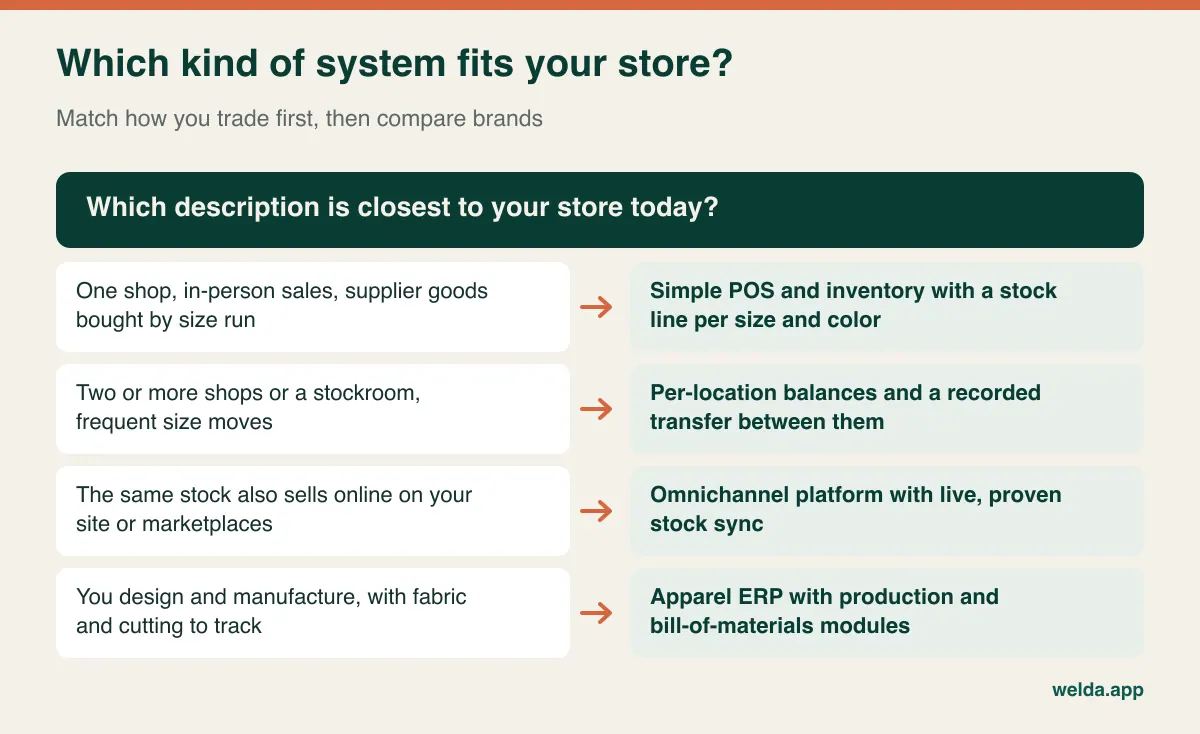
Where Welda Stock fits: stores buying finished goods from suppliers and selling in person by barcode, with one or several locations, that want size-and-color stock and per-product profitability. Stores that extend credit to regulars can also track balances and payments per customer. The interface is available in English, German and Turkish, which helps teams that work across languages.
Where it may not fit: if the same stock sells on your own site and on marketplaces and you need live sync, our documentation doesn't describe that integration, so a platform built for omnichannel is likely a better starting point. Brands tracking fabric, cutting and production will need an apparel ERP. Since Welda Stock is web-based and works over your connection, a location with unreliable internet is something to raise before setup rather than after.
There is no universally best POS for clothing stores. A two-shop retailer with no webshop can get better results from simple, well-kept software than from an ERP full of modules nobody opens. For a brand selling mostly online, any tool without channel sync means manual corrections every single day.
What to bring to the demo
Bring a real garment, a real packing list and a sample of your current product list. Then ask the vendor to step back and let the person who will be on the till run the scenarios: creating a style in three colors and five sizes, tagging an item with no barcode, selling one size, exchanging it for another, moving a size between stores, hiding purchase prices from a sales login, marking something down and reading the new margin, and importing fifty lines of your list.
Then ask the questions nobody puts in a brochure. When we count, on which line does a difference show? How do we write off a damaged piece? When a staff member leaves, how do we close their access? If we leave you, in what format do we get our data back? Who answers the phone on a Saturday in December? Ask to see answers on screen wherever you can, since a verbal "yes, of course" tells you very little.
Comparing quotes without comparing the wrong things
Quotes for clothing store POS software rarely line up neatly, because vendors put costs in different places. Before looking at totals, set out the scope in one table: users, stores and stockrooms, item limits, whether data import is included, training, support hours, and hardware. You will often find that the quote that seemed cheapest simply left things out.
Hidden costs usually surface through these questions. Does adding a user cost extra? Is a new store priced separately? Are reports or channel connectors sold as add-ons? Does the payment processor have to be the vendor's own, and on what terms? What are the conditions for exporting your data if you leave? How do annual price rises work? Modelling the same scenario over three years is the fairest way to compare a monthly subscription with a one-time fee.
Don't forget the costs no quote mentions: selling time lost during setup and the hours staff spend learning at the start of a season. They belong on your calendar even if they don't appear on the invoice. For Welda Stock, pricing is based on your users, stores and products. It works on a one-time setup fee, with setup, Excel import and team training within scope, and we settle the figure in a free consultation.
Choosing your cutover date around the season
The best time to switch in clothing is after your end-of-season sale, when stock is at its lowest and new deliveries haven't arrived. There is less to count and less to get wrong. Switching at the height of a season means counting, learning and selling all at the same time.
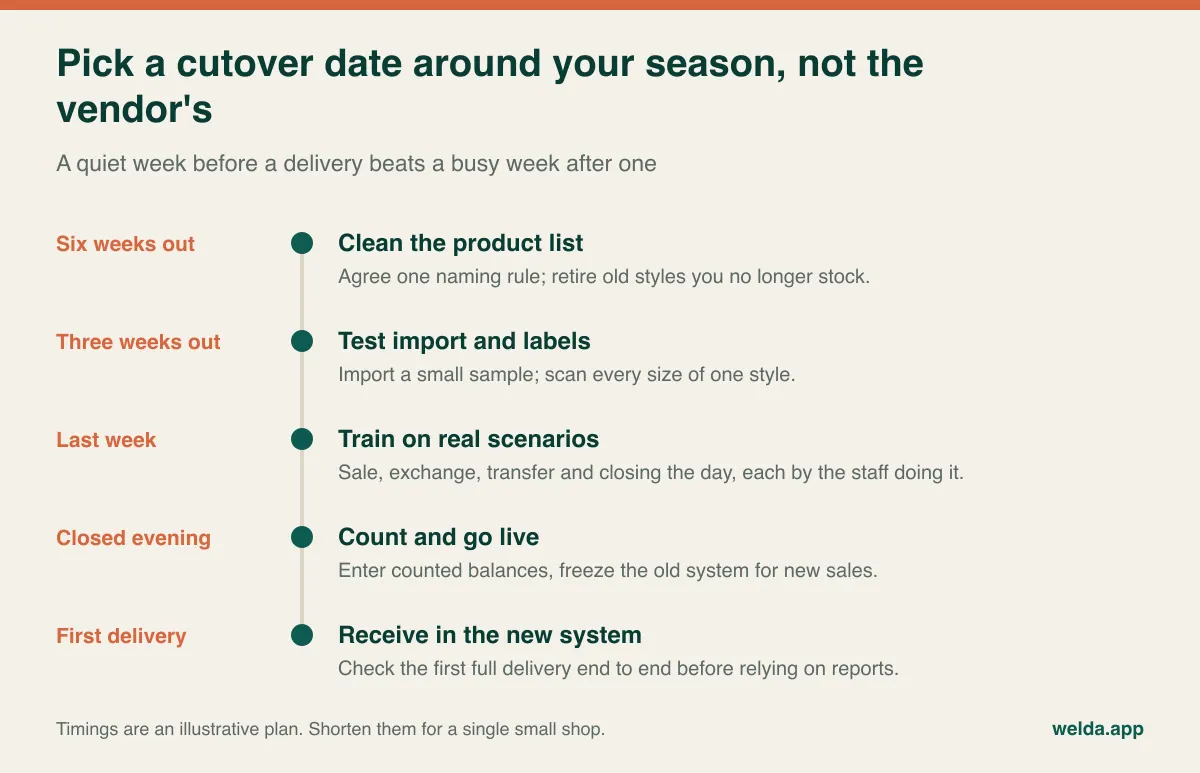
Most small stores also do better with a clean break than with weeks of running two systems, which tends to multiply errors rather than catch them. Welda Stock is web-based and needs no separate installation, and we generally complete setup the same day, including help with your product list. The process runs from a demo and needs analysis through to setup, team training and go-live with multilingual support. We can plan the date around your own delivery schedule.
A practical next step
You'll get the most out of a conversation with a rough SKU count, one packing list and your current product list to hand. Take a look at our clothing store POS software page for the details, then book a free consultation. We can try the software with your own items, and if it isn't right for your store you will know before you buy.
Frequently asked questions
Can I use a regular POS system for a clothing store?
Yes, if it can track each size and color as a separate stock line and sell by barcode from the correct line. A system that only counts by style will let you down quickly, because "in stock" tells you nothing about whether the customer's size is available.
What if my products have no barcodes?
Assign your own code to each size and color combination and print labels. This is common with wholesale goods. Test it from start to finish in your demo, and take your label printer into account when you plan.
Is this level of detail overkill for a small boutique?
Not if you carry a few hundred stock lines a season, since the real savings show up in buying decisions. But stay simple. A single shop rarely needs an omnichannel platform or production modules. Barcodes, size-and-color stock, margins and a daily closing report cover most first needs.
Do transfers between stores update stock automatically?
They should, and it's easy to test: transfer one size in a demo and check both balances. In Welda Stock you record a transfer with source store, destination store, product and quantity, and each location keeps its own balance.
Will online sales reduce my in-store stock?
Only with a channel integration, and not every system has one. Welda Stock's documentation doesn't describe site or marketplace sync. If online makes up a meaningful share of your sales, treat this as a separate requirement and ask vendors to demonstrate it live.
When is the best time to switch systems?
In the weeks after your end-of-season sale and before the next delivery. The count is smaller and your team reaches the busy period already familiar with the software.
How do I find out what it will cost?
Once your users, stores, item count and data import scope are clear, the price follows. Share your rough SKU count and we will work out the figure with you in a free consultation.