The right small grocery store POS software is the system that keeps your till moving at the busiest hour, keeps thousands of item records tidy, and answers your month-end questions without a spreadsheet. To find it, do not begin with feature lists. Begin with three numbers from your own store: how many items actually sell, how many customers a till handles in your worst hour, and which decisions you need the reports to settle. Then test each candidate against those numbers using your own awkward products.
Groceries are unforgiving for software. Baskets are small and frequent, margins are thin, and the same person may be scanning, restocking and arguing with a delivery driver within the same ten minutes. A two-second annoyance that would not matter in a furniture store happens hundreds of times a day here. So the buying decision is less about what a system can do in theory and more about what it does to a normal Friday evening. What follows is written for an owner who wants the till and the stock in one place, and who wants to know honestly when that is not the right move.
Bring three numbers to every demo
A salesperson who hears "we are a small grocery" will show you the standard tour. A salesperson who hears "2,800 active items, two tills, a queue of six at 6 pm, and I need margin by product" has to show you something relevant.
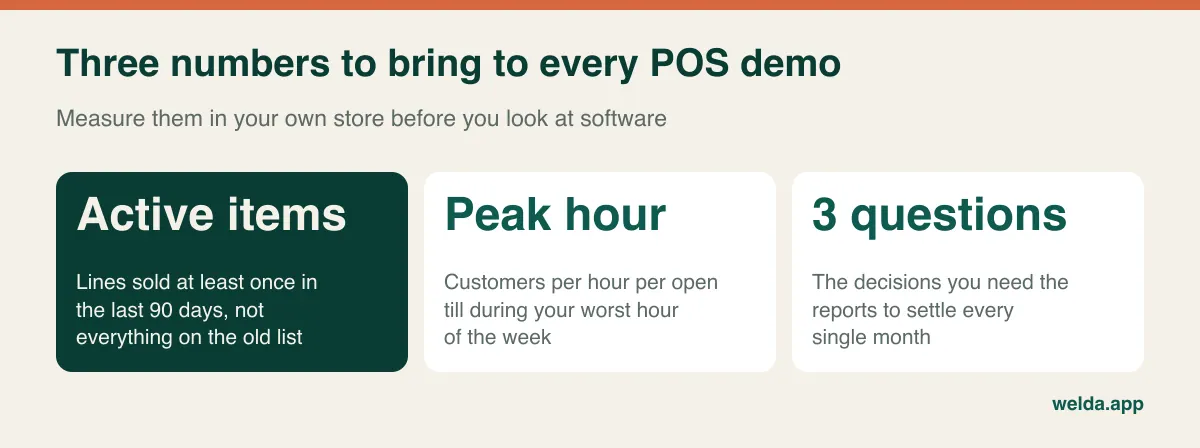
Getting the numbers takes an afternoon at most. For active items, ignore the old price list, which tends to include every product you stocked since you opened. If you have no sales data, walk the aisles and estimate by section: dry goods, drinks, household, snacks, dairy, produce. For the peak load, stand beside the till during your busiest hour and count customers and the longest queue. For the reporting questions, write down three things you wish you had known last month. Good ones are specific: "Which twenty products bring in the most gross profit?", "What do I owe each supplier?", "What has been sitting on the shelf for three months?"
These numbers also tell you what kind of buyer you are. If you need the broader framework first, including payment hardware and general selection criteria, our guide on how to choose a POS system covers that ground. The rest of this article stays with grocery.
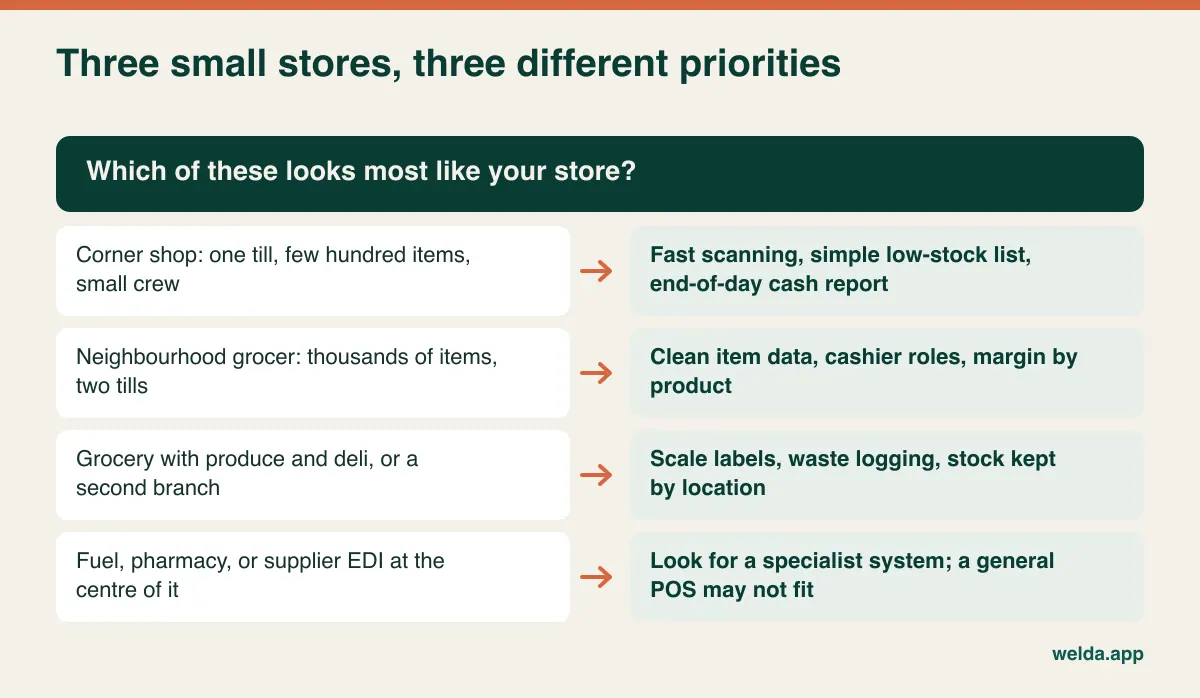
What "number of products" really means in a grocery
Vendors often treat product count as a capacity question: can the system hold 5,000 items? The answer is nearly always yes, and it tells you almost nothing. The more useful question is how many different behaviours are hiding inside your catalogue, because each behaviour is a place where a till can slow down or stock can drift.
Pasta is easy. One barcode comes in, the same barcode goes out. Bottled water may be sold singly and by the case, with a different barcode for each, while the stock should come out of one pool. Tomatoes arrive with a scale label that encodes a weight or a price. Fresh bread and carrier bags may have no barcode at all, so the cashier looks them up by hand dozens of times a day. Then there are products whose barcode changes when a manufacturer redesigns the pack, leaving old and new stock side by side on the shelf for weeks.
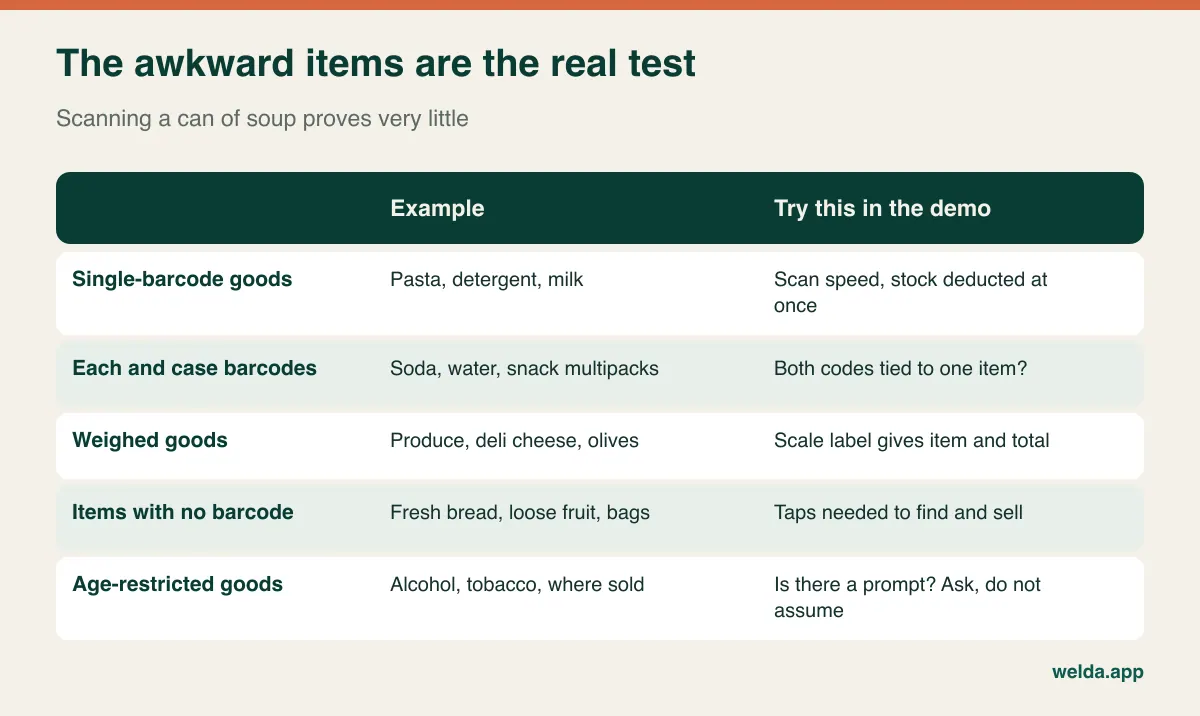
Every system scans pasta well, so scanning pasta in a demo proves little. Bring the awkward items. Hand over a case and a single of the same product and ask how they connect. Do not accept "yes, that works" until you see stock fall correctly on screen. We apply that to our own product as well: Welda Stock handles barcode sales and scale barcodes, and we would rather walk through your case-and-single setup with your real items than promise you a general answer, because stores handle cases differently.
The other half of the product question is data hygiene. A spreadsheet maintained for years may list the same oil as "Sunflower Oil 1L", "SUNFLOWER OIL 1 LT" and "Oil sunflower 1000ml". Split sales across three records and your low-stock alerts and margin reports will both be wrong, regardless of which software you buy. Cleaning this list before import is usually the highest-value hour in the whole project. Welda Stock imports products, barcodes, stock and prices from Excel in bulk, and our team helps during setup, but only someone who knows the shop can say which rows are really the same item. Our walkthrough on moving from Excel to inventory software covers the method.
Rush-hour arithmetic
"Fast checkout" appears on every vendor's website and means nothing until you measure it. In a grocery, the time a customer holds the till breaks down neatly into scanning, looking things up and paying.
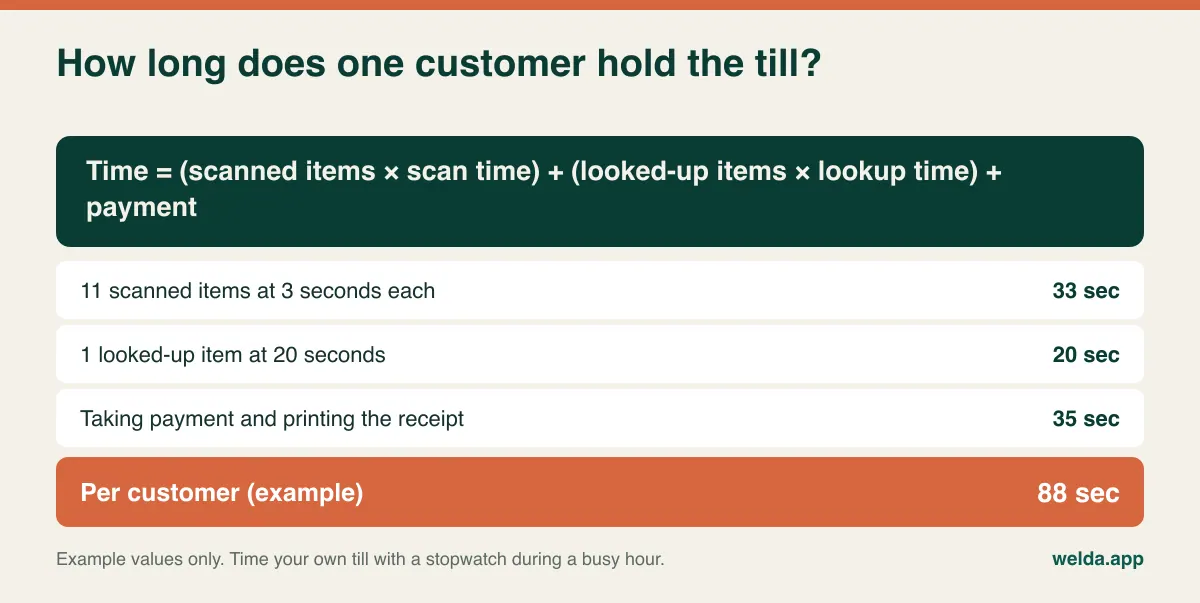
Notice what the example shows. One looked-up item costs about as much time as seven scanned ones. Divide 3,600 seconds by 88 and you get roughly 40 customers an hour for that till. If that single lookup became a three-second scan, the time would drop to 71 seconds and the same till could serve about 50. These figures are illustrative, and yours will differ, but the pattern tends to hold: queues grow because of exceptions, not because of ordinary scans.
So list your exceptions, then rehearse them:
- A barcode that will not read, or an item missing from the system
- No-barcode items sold all day, like fresh bread or bags
- A manager being called over for a void or a discount
- Typing the total into a separate card terminal
- Age checks on alcohol or tobacco, where you sell them
- Splitting a payment or putting a sale on a customer's account
Take a real basket of about thirty mixed items, including weighed and no-barcode goods, sit your actual cashier down and time it. Run it a second time. Then ask the cashier what they think, because the person who has to use it for eight hours will notice things you will not. Separate terminals deserve particular attention. Welda Stock records sales in several payment types, but card terminal integration is not something our product pages list, so if you need the total sent automatically to your terminal, raise it with us before deciding, and raise it with every other vendor too.
The internet connection belongs in this calculation as well. Browser-based systems like Welda Stock need no installation and run from any computer with a browser, but transactions go through your connection. Uninterrupted offline selling is not something we promise. If your line is unreliable, tell us and we will plan a practical setup with you, such as a backup mobile connection. If you truly cannot stop selling for even a minute during an outage, treat this as a make-or-break criterion for every vendor you consider, and ask to see the offline behaviour rather than hearing about it.
Goods that come in cases and leave one at a time
A grocer's stock moves in a way most retail software descriptions gloss over. You buy by the case or pallet, usually from several suppliers and a wholesaler, sometimes with direct-to-store delivery from a route driver who wants a signature in thirty seconds. You sell one unit at a time. Between those two events, a surprising amount can go wrong.
Ask a vendor to walk through a real delivery. A driver hands you an invoice for twelve cases of soda, one of them short. How do you receive it, how does twelve-pack quantity turn into units, and how do you record what was missing? The supplier's invoice and what you owe them matter just as much as the stock count, and it is common for a small grocer to carry open balances with several suppliers at once. Welda Stock includes supplier invoices and debt tracking, so you can see those balances beside your stock.
Next, run a price change through the system. Supplier price lists can change often, and when they do, a large number of retail prices may need adjusting at once. Three things matter here. Can you update many prices without opening each record? Welda Stock lets you import product, stock and price lists through Excel, so try that with your own file layout. Does the margin view tell you when a cost rose and the retail price did not? That is where per-product margin earns its keep. And what happens at the shelf? If the till price has risen and the tag has not, the argument takes place at the register, and rules on displayed prices vary by location, so check what applies to you.
Produce, deli and dates: where the stock goes bad
Packaged goods are the easy part. The real test is what spoils, what gets weighed and what has a date on it. Treat these as three separate questions, because a yes to one says nothing about the others.
Weighed goods. If your scale prints labels, the software has to read those labels correctly. Welda Stock decodes weight and price barcodes printed by retail scales, though the label format depends on your scale and needs testing with real labels. Our article on POS software with scale integration gives you a ten-label test to run before you pay anything.
Waste. If bruised peaches and broken eggs go in the bin without a record, the system believes they are still for sale. On count day, that shows up as an unexplained shortage. Welda Stock has stock counting and waste and shrinkage tracking, but the software cannot make someone log it. Decide who records waste in each section and when. Our guide on preventing retail shrinkage has practical routines for this.
Expiry dates. Lot-level or date-level stock tracking is not listed as a feature on our product pages. You can record expired goods as waste. If tracking each delivery's date and getting automatic warnings as products approach expiry is essential to how you run dairy or chilled, ask about it at the start of the conversation so you get a straight answer. Ask other vendors the same thing and request a demonstration: "expiry tracking" can mean anything from a true alert report to a free-text note on the product.
Reports should end arguments
There is a pattern every grocer recognises: the till looks busy, and the month still comes up short. Part of the explanation is usually that the highest-revenue products are not the highest-profit ones. Tobacco, where sold, can inflate turnover while leaving little behind, and produce can lose its healthy-looking margin to spoilage. A system that only reports revenue will not reveal this. Judge the reports by the question each one answers.
| Your question | What to look at | The decision it supports |
|---|---|---|
| Does the cash add up today? | End-of-day till report | Whether a discrepancy needs looking into |
| What should I order tomorrow? | Low-stock list | Which supplier to call and for how much |
| What actually makes money? | Margin per product | Shelf position, pricing, supplier negotiation |
| What is taking up shelf space? | Weekly and monthly sales read beside stock | Whether to reduce the range or clear it |
| Who owes what? | Supplier debts, customer account balances | Payment planning, chasing balances |
| Which branch is falling behind? | Sales and stock by location | Transfers, staffing, range changes |
Welda Stock offers an end-of-day cash report, low-stock alerts, margin per product, daily, weekly and monthly sales reports, supplier debt, customer account tracking and per-branch stock, and it can export reports to Excel for your accountant. In a demo, the useful test is whether someone without accounting training could look at the screen and make a decision within two minutes.
Tax, receipts and data: the rules software cannot carry for you
This section is general orientation, not legal or tax advice, and rules change. The English-speaking world and beyond is a patchwork, so check with your accountant or local authority.
- Sales tax and VAT. Food is often taxed differently from non-food, and treatment can depend on the item. A grocery catalogue may need several rates. Ask how rates are assigned and who is allowed to change them, and confirm the setup with your accountant.
- Fiscal rules. Some countries require certified fiscal devices or registered tills, and some do not. Check whether a program meets local requirements before relying on it as your main till. Our product pages do not list fiscal certification for Welda Stock, so ask us directly and get the answer in writing.
- Benefit programmes and restricted sales. In some markets grocers accept government food-benefit payments or have rules for age-restricted goods. These are usually tied to specific certified equipment or processes. We do not claim support for them, so verify anything of this kind with your payment provider and your vendor.
- Customer data. Moving customer credit accounts into software means you are handling names, phone numbers and balances. Data protection laws such as GDPR, where they apply, give you duties here. Limit access with roles, collect only what you need, and ask vendors where data is held.
When a one-system setup is the wrong call
One system for till and stock is attractive, but it is not universally right. It usually fits one to several locations selling barcoded and weighed goods, often with customer accounts and supplier balances, where the owner or manager wants to read the reports personally. If that sounds like you, our page on small grocery store POS software shows how Welda Stock approaches it, including the day-to-day use cases.
Keep looking if any of these describes your store:
- You run dozens of locations with central promotions, replenishment and automated ordering
- Large suppliers require electronic ordering and invoicing, such as EDI
- You need guaranteed offline selling on a weak connection
- Lot or date tracking sits at the centre of your compliance or customer commitments
- You need certified fiscal hardware, benefit-payment acceptance or fuel integration from a single vendor
None of that makes a specialist system better in general, only better for your situation. The opposite case also exists. A tiny shop with a hundred and fifty items and one person behind the counter may not need a full system yet; a clean barcode list and a simple cash routine may do for now.
Comparing quotes without being misled by the headline number
Two quotes that describe different work cannot be compared by price. Before looking at any figure, write down the same scenario for every vendor: your number of users, tills, locations and items, the data you need migrated, and the hardware you already own. Then answer the same questions for each.
- What exactly is included in setup, data migration and staff training?
- Is there a recurring charge? What does it cover, and do updates and support sit inside it?
- Are reports, customer accounts, extra branches or scale support charged separately?
- What happens to the price when you add a till or a location?
- Can your current scanner, receipt printer, computer and scale be kept?
- If you leave, can you export your products, sales and customer balances, and in what format?
Hidden costs tend to live in the gaps: data clean-up everyone assumed was included, a second round of training, a charge for the second branch. Work out the three-year total on the same scenario and the difference between a small recurring fee and a larger one-time fee becomes much easier to see. Add your own time as well, because your staff will spend hours on counting and learning however good the software is.
Welda Stock is priced for the individual business, according to users, locations, product count and your hardware and sales flow. It works on a one-time setup fee model, with setup, data migration and training included in the quote. You will get the actual price in a free consultation rather than from a list, so bring the scenario above and hold our answers to the same standard as everyone else's.
Dress rehearsal, then go live
A demo should feel less like a presentation and more like a trial shift. Bring a physical kit so that the vendor is working with your reality rather than their sample data.
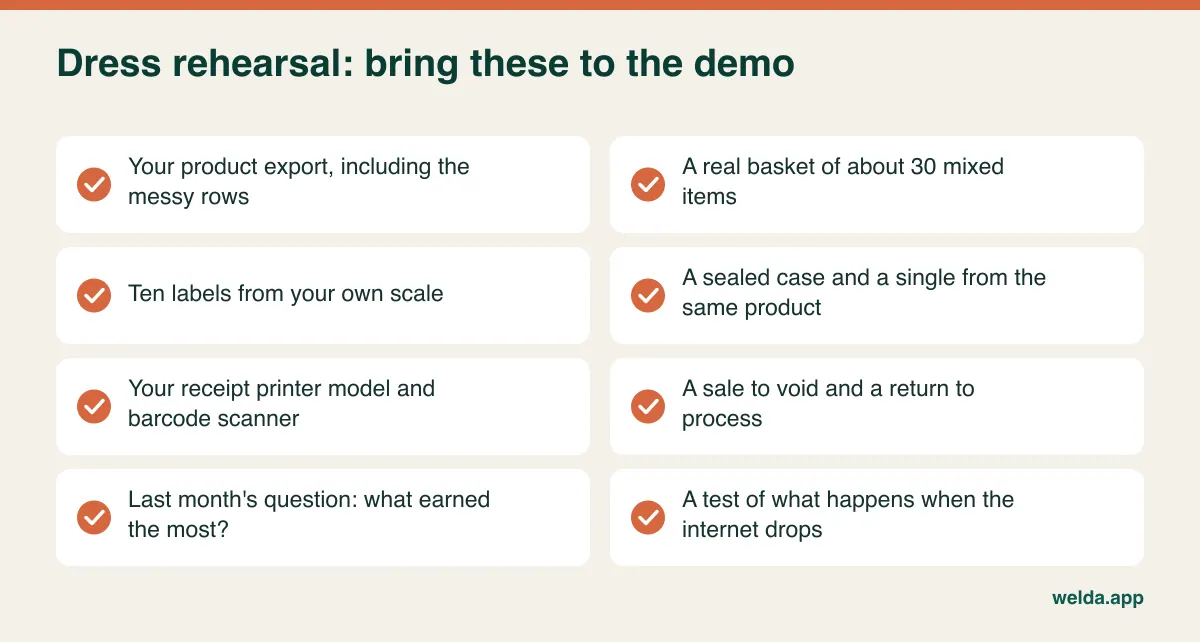
While you are there, ask a few uncomfortable questions. Who gets the call when something breaks on a Saturday night? Which requests do you usually say no to? When a vendor answers "yes", ask them to show it on screen, and treat any "yes" you did not see as half an answer.
Going live is mostly a stock-count problem, not a software one. Browser-based software is quick to set up; Welda Stock installation is usually finished the same day. The hard part is putting correct numbers into it, because a wrong opening balance undermines every report from day one, and staff stop trusting the system quickly.
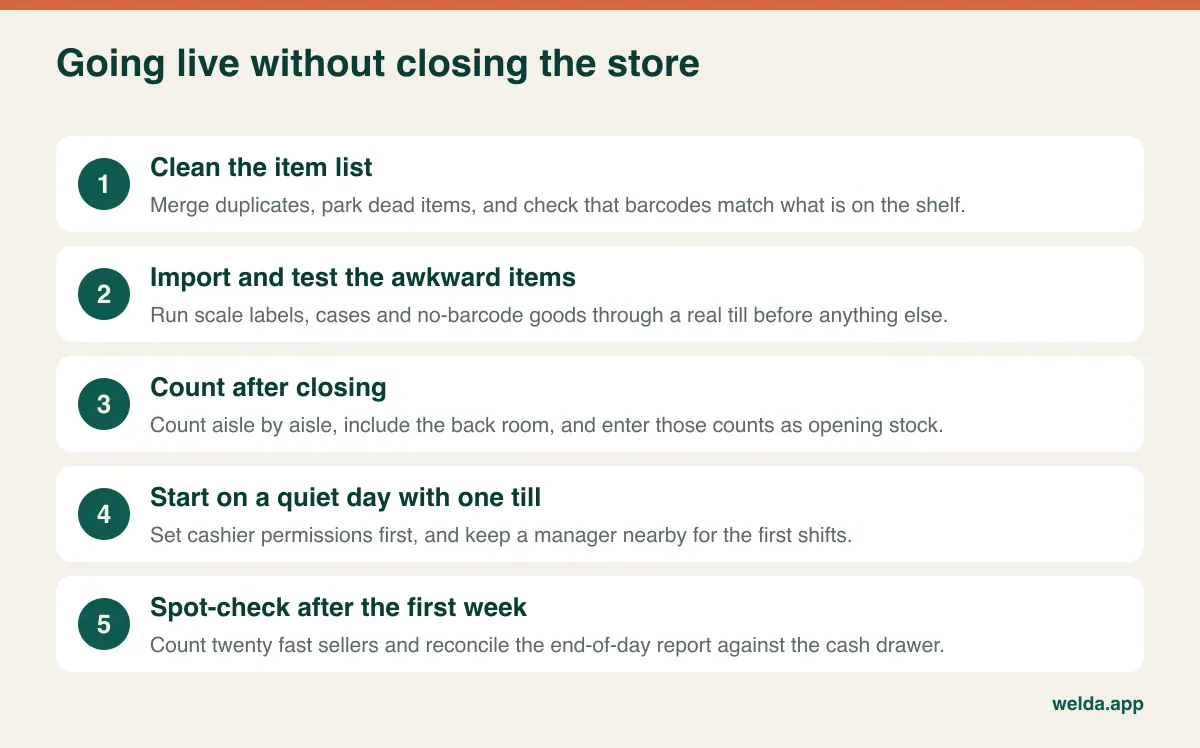
The mistakes here are mostly about discipline. Owners often pick a busy weekend because a promotion just ended, when a quiet weekday is much safer. The back room gets skipped, so low-stock alerts look absurd within days. Everyone gets manager rights to save time, and then nobody can trace a void or a discount. Setting separate levels for cashiers, stock staff and managers takes minutes at the start and saves trouble later. Running the old notebook and new system in parallel for months is another trap: a short overlap helps, but without an end date your team will tire of recording everything twice and neither record will be complete. If you carry customer accounts, set aside separate time to agree balances first, because moving a disputed balance into software just moves the dispute.
When you are ready, bring your three numbers to a free consultation. We will look at your items, tills and locations, show Welda Stock against your own scenario, tell you where it does not fit, and work out the price there. Start with the market inventory software page, or go straight to contact.
Frequently asked questions
What is the best POS software for a small grocery store?
There is no single best one, because a corner shop and a two-till grocer with a deli counter have different problems. The best choice for you is the system that handles your awkward items and your busiest hour, and that you have tested with your own data rather than a sample catalogue.
How many products can a small grocery POS handle?
Capacity is rarely the limit. The better question is how the system deals with case barcodes, scale labels, no-barcode items and duplicate records, because those shape day-to-day accuracy far more than a maximum item count.
Do I have to enter thousands of items by hand?
Usually not. With Welda Stock, products, barcodes, stock and prices are imported from Excel in bulk, and our team helps during setup. The work that takes time is cleaning the list beforehand.
Can a browser-based POS run several tills at once?
Several users can work in Welda Stock at the same time, each with permissions matched to their role. Describe your till layout and hardware during the consultation so that setup is planned around them.
What happens if the internet goes down?
Welda Stock runs over your connection, so a stable line matters and a backup connection is sensible. We plan the most workable arrangement with you during setup. If uninterrupted offline selling is essential, make that clear early and test it with any vendor you shortlist.
What affects the cost of grocery POS software?
Mainly users, tills and locations, the extent of data migration, hardware needs, and support terms. Quotes for Welda Stock are prepared for your business and confirmed in a free consultation. Compare vendors on the same scenario and over several years, not on the headline figure.
How long does switching take?
Software setup can be quick, and Welda Stock is usually installed the same day. The total time depends on how clean your item list is and when you can run the opening stock count, so allow more preparation for larger catalogues and pick a quiet day to go live.