The right convenience store POS software is the one you can run with a queue at the counter and a customer already reaching for their wallet. If you are buying your first system, ignore the feature grid for now and test four things: scanning a barcode, selling something with no barcode, fixing a mistake, and putting a regular's purchase on a tab. If those four feel easy after half an hour, the rest can be learned. If they do not, a longer feature list will not save you, and within a month you will be back to the notebook and the old cash drawer.
This guide is for owners who have never had a proper system and who are, quite reasonably, a bit nervous about computers. That nervousness is useful. It tells you exactly what to look for, and it protects you from buying something built for a supermarket head office.
A corner shop has a different rhythm from a supermarket
Most retail software is designed around a world that does not look like yours. A supermarket has clean barcodes, trained cashiers, a back office and an IT contact. A convenience store has one person doing everything, a customer who wants a pint of milk and a chat, a delivery driver at the door and a phone ringing behind the counter.
That rhythm changes what "good" means:
- Transactions are small and interrupted. You may ring up two items, stop to answer a question, then come back. The screen should still make sense when you look at it again, and it should be obvious what is in the basket.
- The product mix is messy. Packaged snacks sit next to loose bakery items, hot drinks, single cans and things you bought from a local supplier with no barcode at all.
- The same few people use it all day. That is good news. You do not need software a stranger can pick up in a minute. You need software that you and one or two family members or staff can get fast at.
- The owner's memory is the current system. You know who owes what, what the wholesaler charged last week and which shelf is running low. The real job of the software is to get that knowledge out of your head, so the shop still works on the day you are not there.
Keep that last point in mind. Many owners buy POS software to "speed up the till". In a small shop the till is rarely the real bottleneck. The bigger gains usually come from knowing what you sold, what you owe, who owes you and whether the cash is right.
Do you actually need POS software yet?
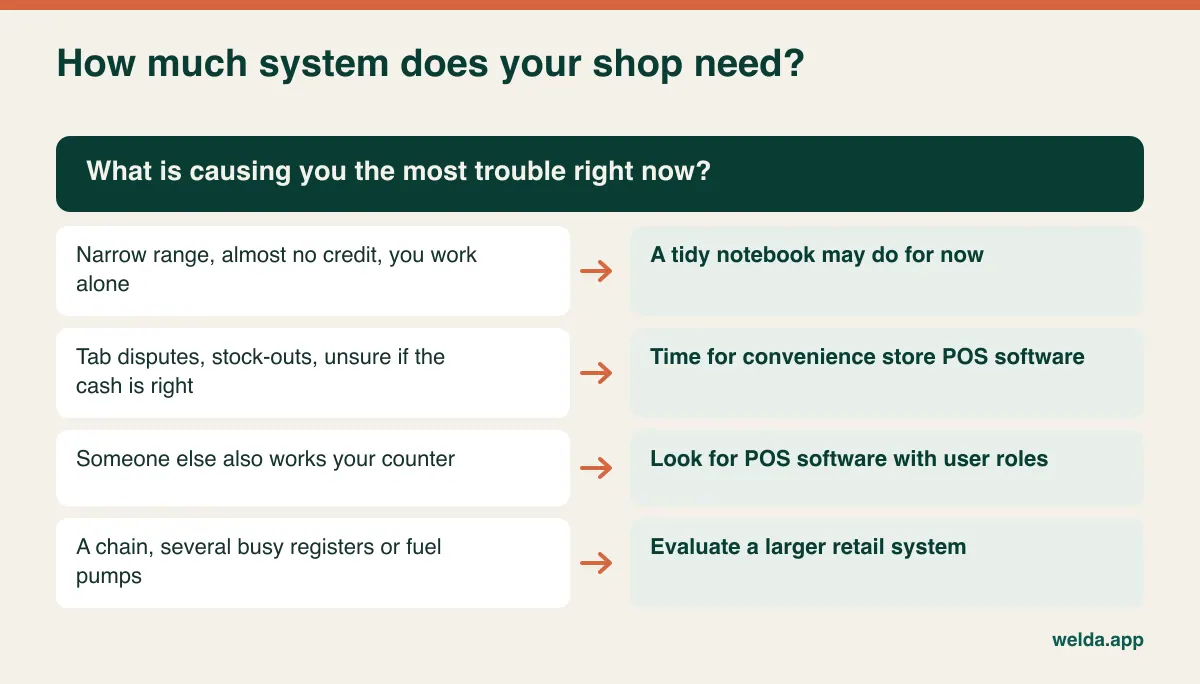
Not every small shop does, and it is better to be honest about that before anyone sells you anything. If you carry a narrow range, know your stock by sight, give almost no credit and work alone, a tidy notebook and a simple cash count can carry you for a while longer. Buying software too early means paying for something you will not use.
The signs that you have outgrown paper are specific. You find out that you are out of something when a customer asks for it. You cannot say whether the cash at closing matches the day's sales. Arguments about tabs keep coming up. Somebody else works the counter and has to keep asking you for prices. Your accountant gets a shoebox.
A spreadsheet tends to be a poor stop along the way. Nobody updates a spreadsheet between customers, so it is out of date by lunchtime. Its real value is as a clean product list you can bring across to your new system. If you already keep one, hold on to it: importing it can save you many evenings of typing during setup.
At the other end, if you are planning a chain, need several busy registers side by side, or operate a forecourt with fuel pumps, you are shopping in a different category. Say so early in any conversation. Welda Stock handles multiple branches and warehouses from one account, but our product pages say nothing about fuel controllers or lottery terminals, so do not assume these are covered.
Four moments to test at the counter
Forget menus for a moment. These are the moments that decide whether the system survives its first busy Friday evening.
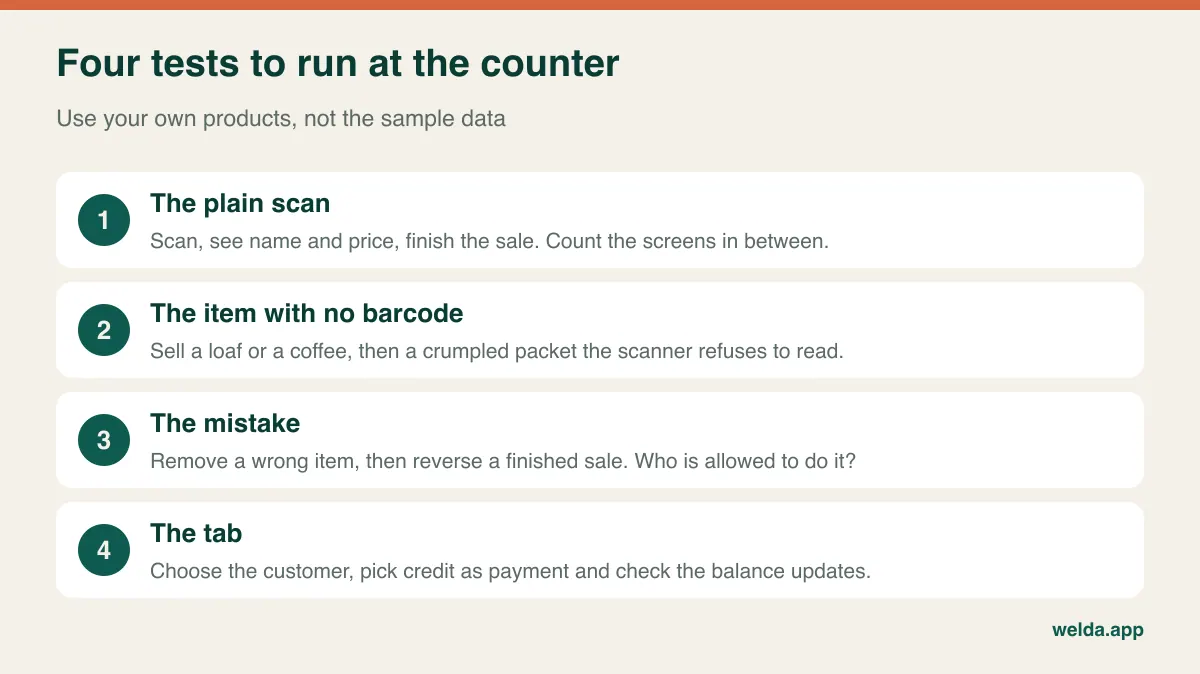
The plain scan
A standard barcode scanner does most of the work for a nervous user: no typing, no spelling, no hunting through categories. Scan, see the name and price, scan again. Ask how many clicks stand between the last scan and a finished sale. Any screen that appears between those two points is something you will meet hundreds of times a week. If you want to understand what sits behind the scanner, our article on barcode inventory tracking explains how the stock side works.
The item with no barcode
This is where convenience stores differ most from the demo. Think of a loaf from the local bakery, a coffee from the machine, a carrier bag or a sandwich you make yourself. Look for product buttons or a quick search by name, and try your own best-seller. If your top-selling loose item takes three steps every time, the software is telling you who it was built for. Then test the damaged barcode: a crumpled crisp packet that will not scan. How quickly can you find it by hand?
The mistake
Nervous users worry about breaking something, so make a deliberate mistake in the demo. Scan the wrong item and remove it. Then finish a sale and try to reverse it. You want to see two things: that a mistake before payment takes one simple action, and that refunds after payment can be restricted to the owner. Role-based permissions sound like a big-company feature, but they matter even when the only other user is your nephew on Saturdays.
The tab
Store credit is not universal, and in many shops it is rare. If you never offer it, skip this test. But in neighbourhood shops around the world, including many run by immigrant families, "put it on my tab" is part of everyday trade, and most generic POS software treats it as an afterthought. The test is simple: scan the items, choose the customer, pick credit as the payment type, and see the balance update.
Tabs, trust and the regular who pays on Friday
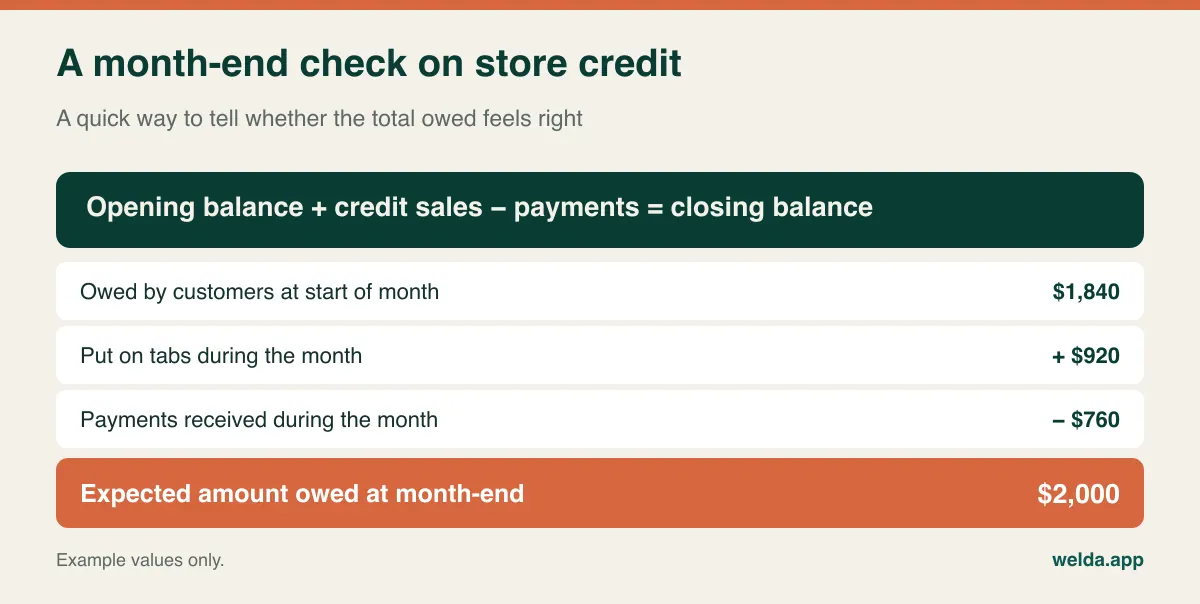
If credit is part of your shop, it deserves its own evaluation, because this is where a paper notebook hides a lot of quiet cleverness that software has to match.
- Telling people apart. In your notebook, "Mary, flat 3" is perfectly clear. On screen you need a name and phone number or note that separates her from the other Mary, and you need to find her from the first few letters. A debt on the wrong account is harder to notice on a screen than on the wrong page of a book.
- The child sent to the shop. A kid buys bread and says "Mum will pay". At the end of the month Mum asks what that charge was. A single line with a total cannot settle this. Date, time and items can.
- Part payments. Someone settles half on payday and the rest later. You should be able to record a partial payment and see what is left without doing the arithmetic.
- Knowing when to have the conversation. A credit limit field on the customer record gives you a line to watch. See what happens at the limit: does the system warn you, or does it block the sale?
In Welda Stock, a credit sale is posted to the customer's account and the balance updates at once. Opening the customer card shows the current balance with purchase and payment history on a single screen, and moving the customer and balance records from your notebook is included in setup. For more on making the switch, see digital customer credit tracking.
A word of caution that applies to any system. Rules on extending informal credit, keeping customer records and chasing debts vary by country and sometimes by state. A tab with a name, phone number and purchase history is also personal information. Keep only what you need, limit who can see balances and do not leave the customer list facing the queue. If you are unsure about local requirements, ask your accountant or adviser.
What your POS software will not do for you
This is the part that sales conversations tend to skip, so it pays to ask directly. Three boundaries regularly surprise first-time buyers.
Card payments. Recording that a customer paid by card is one thing. Having the card terminal receive the amount automatically from the POS is another. Many small shops run the terminal separately and type in the amount, which works fine but creates one more number to reconcile at closing. In Welda Stock you can record cash, card, bank transfer or credit as the payment type. Our product pages do not list a direct card terminal integration, so if you need one, raise it in the conversation rather than assume.
Tax and receipts. Countries handle retail tax very differently. Some apply VAT or GST with several rates in the same basket, some have local sales tax, and a number of countries require certified fiscal registers or real-time reporting to the tax authority. Printing a customer receipt does not automatically meet those rules. We cannot tell you what applies in your location, and neither should a software salesperson without checking. Ask your accountant first, then ask each vendor in writing whether their product meets the requirement. Welda Stock produces a customer receipt for each sale and exports reports to Excel, but it is not presented as a certified fiscal device.
Age-restricted sales. Tobacco, alcohol and vaping products are often a big share of a convenience store's trade. Some POS systems prompt for an age check when these are scanned; others leave it entirely to the person at the counter. Our product pages do not describe an age-check prompt, so treat this as something to confirm. Either way the legal responsibility stays with you and your staff, so your training still matters more than any pop-up.
The same goes for the extras specific to convenience retail, such as lottery, phone top-ups, money transfer, parcel collection or government benefit payments. These usually run on their own terminals. The practical question is how you will record that income in your day-end numbers so your till still balances.
The hardware reality on a small counter
You may be expecting a costly till installation. With web-based software, the starting point is much simpler. For Welda Stock, you need a computer with an internet connection and a standard barcode scanner. There is nothing to install, because you log in through a browser, and from any other computer you can check the day's sales, stock and credit balances while you are away from the shop.
The constraint in a small shop is usually physical. Before you buy, stand behind your counter and answer these questions. Where does the screen go so you can see it while talking to a customer? Does the scanner cable reach the far end of the counter, where bulky items get scanned? Can customers see the screen, including balances? Is the socket safe from a mop bucket? It sounds trivial, but a badly placed screen is enough to send a tired owner back to mental arithmetic.
Then there is the internet. Web-based software runs over your connection, and that includes Welda Stock, so we recommend a stable line. If your signal drops often, tell us at the start and we will plan the most suitable way of working during setup. Whatever you buy, ask what happens during an outage and keep a paper backup under the counter. A notebook retired from daily duty still makes a fine emergency plan: write down sales during the outage, then enter them once you are back online.
The evening count and the delivery morning
In the first weeks, software may even slow your sales down a little. The return comes at two other moments.
Closing time. A day-end report should separate cash sales, credit sales and money collected from earlier tabs. That separation matters: your turnover can look healthy while the drawer looks thin, simply because half the day went on tabs. Comparing the report to the counted cash each night lets you catch a difference while you still remember the day. Our guide on end-of-day cash reconciliation shows how to make this a five-minute habit.
Delivery day. A list of products below their critical level replaces the walk along the shelves before you call the wholesaler. When the delivery arrives, entering the invoice on the supplier's account adds the goods to stock and records what you owe. Partial payments reduce the balance automatically. Do check how the system handles case quantities: if a case of 24 cans goes into stock as one unit, your numbers are wrong from day one, and that error tends to surface only at the next count.
Once a few months of data exist, a better question opens up: which lines sell well but earn little? Welda Stock shows margin per product, which is the basis for the analysis in our article on which corner shop products actually make money. This should not lead your buying decision, because you cannot use it on day one. It is a bonus for later.
Bring a carrier bag to the demo
Sample data always looks clean. Take a carrier bag of real products to your demo instead, and include the awkward ones. A demo over a video call works too: hold the items up and ask the presenter to set them up with you. Better still, ask for control of the mouse.
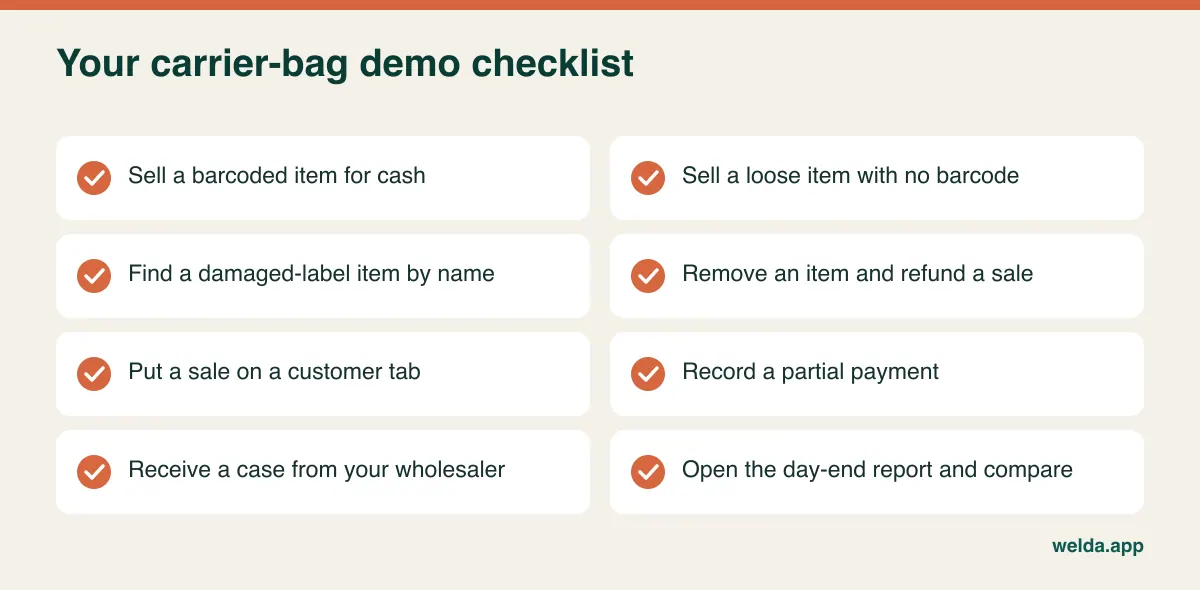
After the run-through, ask yourself one honest question: "Could I do this tomorrow morning with a customer waiting?" If your answer is "yes, after one more walkthrough", that is a good sign. If it is "not a chance", move on, however impressive the reports looked. Bring whoever else works your counter too. They will use it as much as you, and they may be the first to spot a problem.
A few questions are also worth getting answered in writing. Who is going to enter my products and credit balances, you or me? Who do I contact when I get stuck in a few weeks' time? If I leave, can I take my data with me? Do updates cost extra?
Comparing quotes without being misled
POS quotes are hard to compare because every vendor bundles things differently. One looks cheap until you add training. Another includes setup but renews each year. Line them up by what you get, using the same list for every vendor.
| Item | What to ask | What goes wrong if you miss it |
|---|---|---|
| Setup | Is it included? Who does it, and how? | You own software you cannot get running. |
| Product list | Who enters products? Is a spreadsheet import possible? | You spend your evenings typing hundreds of items. |
| Credit balances | Is moving the notebook covered? | Old and new debts live in two different places. |
| Training | How many people, and can you repeat it? | Only one person knows the system, and the shop falls apart without them. |
| Recurring fees | Monthly, yearly, per register, per user? | A low entry price grows into a large lifetime cost. |
| Hardware | Is it locked to the vendor's devices, or standard? | Replacing one scanner becomes a special order. |
| Payment fees | Must you use the vendor's card processing? | A low software price is paid back on every card sale. |
| Support | Which channels and hours? Your language? | You get stuck at closing time and wait until morning. |
Add the costs that never appear on a quote: evenings spent entering data, slower sales while you learn, and software that goes unused. Free tools can be perfectly fine for a small single-user shop, but they tend to run out of road when you need credit accounts, user roles or someone to call.
With Welda Stock, pricing depends on your number of users, branches and products, and on how much data has to be moved. There is a one-time setup fee, with no hidden or recurring cost, and setup, Excel data transfer and training are included. The actual number gets settled in a free consultation once we understand your shop. Rough answers to four questions make that conversation quick: how many products, how many people on the system, what hardware you already have and how you keep records today. You can read more on our convenience store POS software page for grocers and corner shops.
Switching without closing the shop
The riskiest plan is "everything changes tomorrow". A small shop can phase the move while keeping its doors open, and retire the notebook gradually.
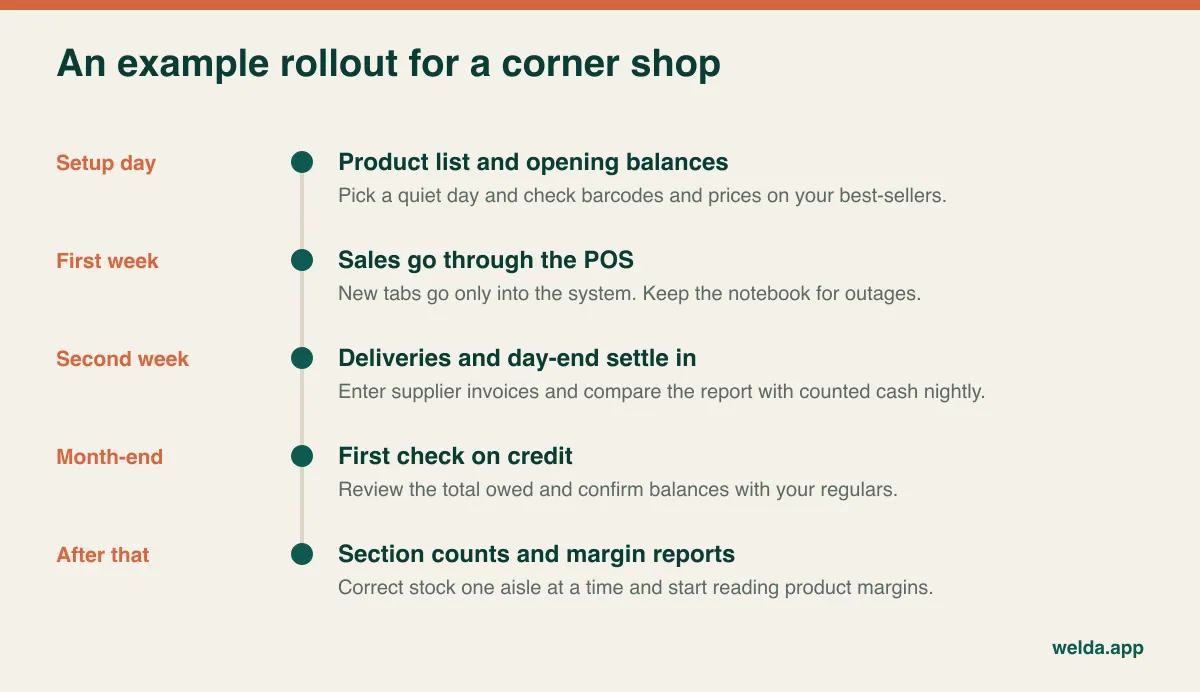
- Pick a quiet day. Avoid payday weekends, holidays and delivery mornings.
- Get your best-sellers right first. Accurate barcodes and prices on the lines you sell most are far more useful than a half-checked list of everything. The slow movers can follow.
- Set a cut-off date for tabs. Total each customer's balance as of a specific date and enter it as their opening balance. After that date, new tabs go only into the system. Writing them in both places is how errors are born.
- Tell your regulars. A friendly "I've moved the book to the computer, so let's confirm your balance" prevents a lot of later disputes.
- Keep the old notebook. It costs nothing and may settle an argument months later.
- Count in sections. Rather than counting the whole shop in one exhausting night, do one aisle at a time and let your numbers improve steadily.
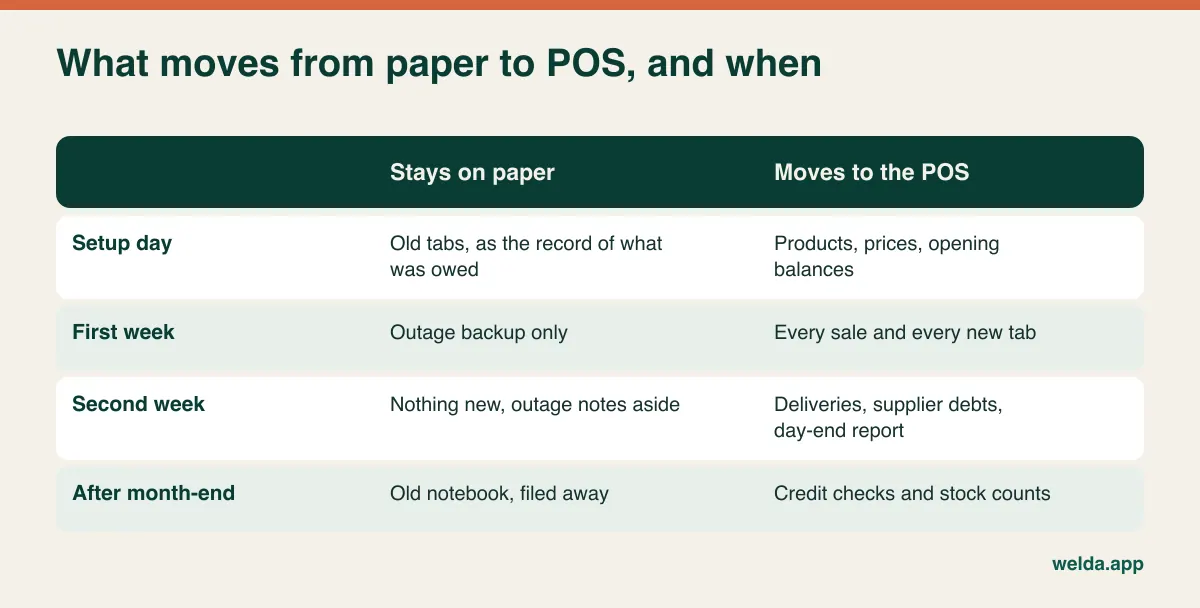
With Welda, the sequence starts with a demo and a look at your needs, followed by setup and data transfer, training for the people who will use it, then live use with multi-language support. Setup is usually completed the same day. Getting comfortable takes longer, and that is normal. If you would like to look at convenience store POS software through the lens of your own shop, the first conversation is free and carries no obligation.
Frequently asked questions
I'm not good with computers. Can I really run POS software?
If you can scan an item and read a total, you can learn the core of it. Before deciding, do a sale, a tab and a payment yourself during the demo. Welda Stock keeps the interface simple, and our team walks you through it hands-on during setup.
Do I need a barcode scanner?
Not strictly, since you can also pick products from on-screen buttons or by searching. But if most of your range has barcodes, a standard scanner makes selling faster and reduces wrong-item errors.
Can I use it if the internet goes down?
Web-based systems such as Welda Stock depend on your connection, so ask every vendor exactly what happens during an outage. Tell us if your line is unreliable so we can plan a way of working during setup, and keep a paper backup.
Does POS software replace my fiscal register?
Do not assume so. Requirements vary widely by country. Check with your accountant what your location demands, then get each vendor's answer in writing. Welda Stock is not presented as a certified fiscal device.
What about my existing notebook of customer balances?
Choose a cut-off date and enter each balance as an opening amount. With Welda Stock, transferring customer and balance records from your notebook is part of setup.
Can I handle items sold by weight?
If you sell cheese, olives or other weighed goods, check how the system reads scale labels. Welda Stock decodes weight barcodes from retail scales. If you have no scale and no plans for one, do not let this feature sway you.
How much does convenience store POS software cost?
The cost depends on users, branches, products, data transfer and any recurring or payment fees, so compare quotes using the table above. For Welda Stock, the price is settled in a free consultation.
The best system for your shop is the one your hands stop thinking about. Pack a bag of awkward products, jot down how you keep tabs today and book a free consultation with us. We will try Welda Stock against your real routine, and if it is not the right fit, you will know before you spend anything.