Good produce store POS software is defined by three things a general retail system rarely gets tested on: how fast you can reprice after the morning market run, how few steps a loose bag of tomatoes takes to get through the till, and whether the waste you log tonight changes the margin you read tomorrow. Choose the system that passes those three tests with your own items, your own scale and your own staff. A longer feature list will not save a system that fails them, because in a produce store the software that slows the morning down gets abandoned within weeks.
This guide is for owners of greengrocers, fruit and vegetable shops, farm stands and neighbourhood produce markets who are close to buying. It explains what actually separates the options, what to bring to a demo, which legal questions to raise with your accountant, and where Welda Stock fits and where it may not. The examples use both pounds and kilos because the same decisions apply in either unit.
Why a grocery POS feels wrong in a produce store
Most retail POS software assumes the same four things: every product has a factory barcode, it sells by the piece, its price holds for weeks, and everything you bought can eventually be sold. In a produce store, all four assumptions break on the first morning. A vine tomato has no barcode you can trust, it sells by weight, its cost moved since Tuesday, and part of what you paid for will go in the bin.
So the common questions, "does it scan barcodes?" and "does it track inventory?", tell you almost nothing. Nearly every vendor answers yes to both. What separates one system from another is how little manual effort it demands in a world that is loose, weighed and constantly changing.
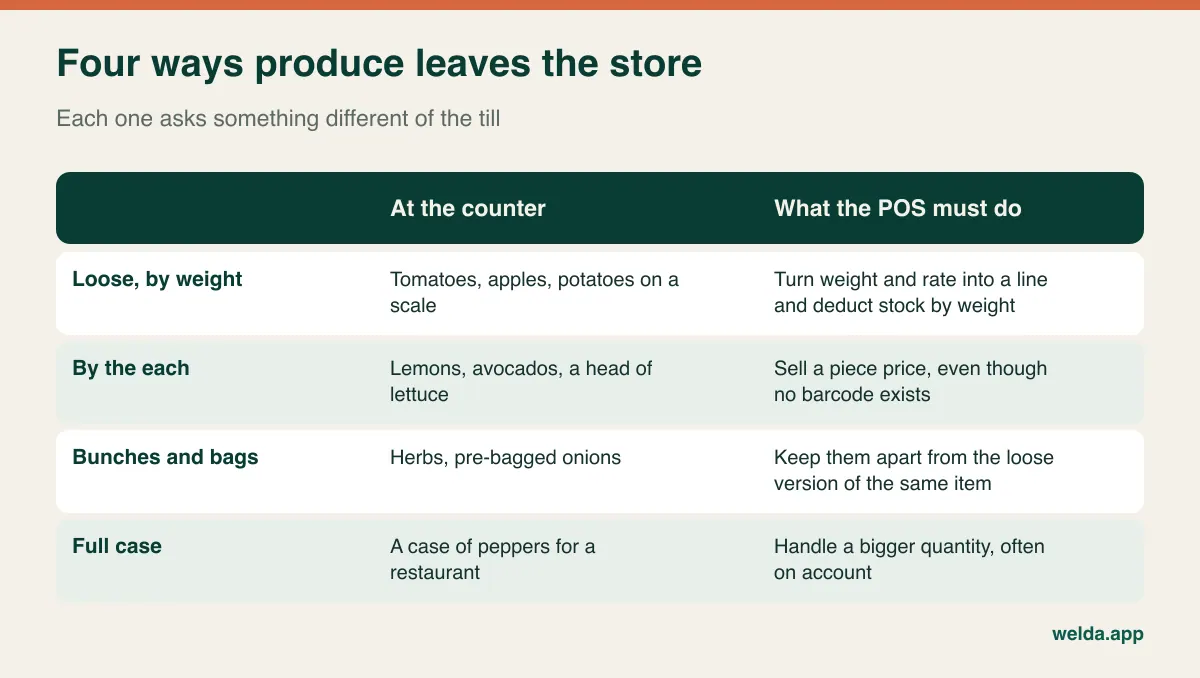
Before you look at any product, estimate how your sales split across these four patterns. A store where nine out of ten sales go over the scale should test the scale workflow first. A store that sells avocados, lemons and herbs by the each should care more about how quickly a cashier can pick an item with no barcode. A store that also sends cases to restaurants has a different centre of gravity altogether: customer accounts, invoices and bigger quantities at the till.
The sticker on the apple is not your barcode
Buyers new to produce retail often mix up three different numbers, and vendors do not always correct them. Getting this straight will save you an awkward conversation after purchase.
- The fruit sticker PLU. The small sticker on an apple or banana usually carries a price look-up code from the International Federation for Produce Standards. Standard yellow bananas, for example, are 4011. It identifies the variety. It says nothing about weight or your price, and stores use it as a lookup, usually typed by a cashier.
- The scale's item number. Your label scale has its own list of items, also often called PLUs, numbered however whoever programmed the scale chose. Your banana might be item 12. This is the number that ends up inside the printed label barcode.
- The scale label barcode. The barcode the scale prints is generated fresh for every weighing. GS1, the barcode standards body, reserves ranges for in-store use, which is why these labels often begin with a 2. The code contains the item number plus either the weight or the price.
Now ask the question properly. "Do you support PLUs?" might mean keying the sticker code at checkout, or it might mean reading scale labels. They are different features. If your cashiers type sticker codes today, ask whether you can type 4011 and land on your own banana item, or whether your staff need to learn a new numbering. If you use a label scale, ask how the software maps the item number in the barcode to your product.
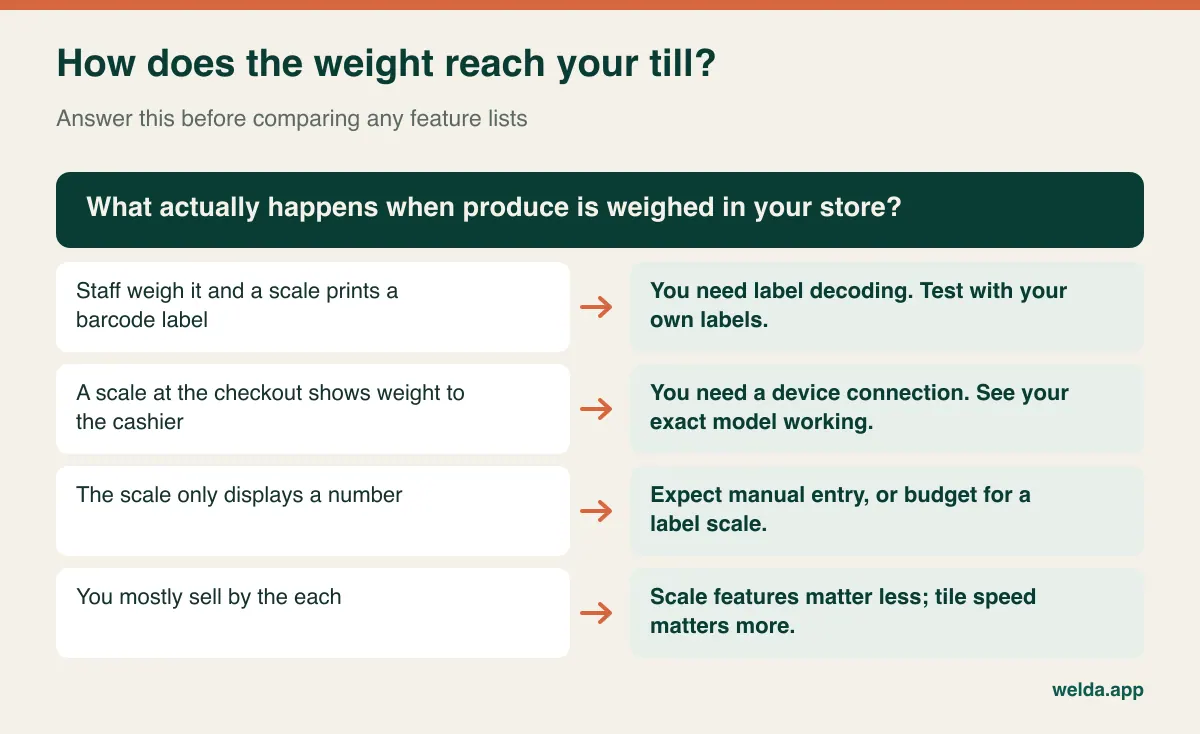
Our guide to POS software with scale integration covers how to work out your own label format and how to run a ten-label test. For the purposes of buying, here is the commercial point: whichever of these setups you use, make the vendor prove it with your actual device or actual labels. Compatibility claims are cheap and a replacement scale is not.
The morning repricing drill
The real test of a produce POS happens before the doors open. You are back from the wholesale market, the invoice is on the counter, and half your costs have moved. If repricing takes ten minutes it gets done every day. If it takes forty, it gets postponed, and yesterday's signs stay up while today's costs eat your margin without anyone noticing.
Asking "do you have bulk price updates?" will get you a yes and teach you nothing. Run the drill below during the demo, using a real invoice, with a stopwatch.
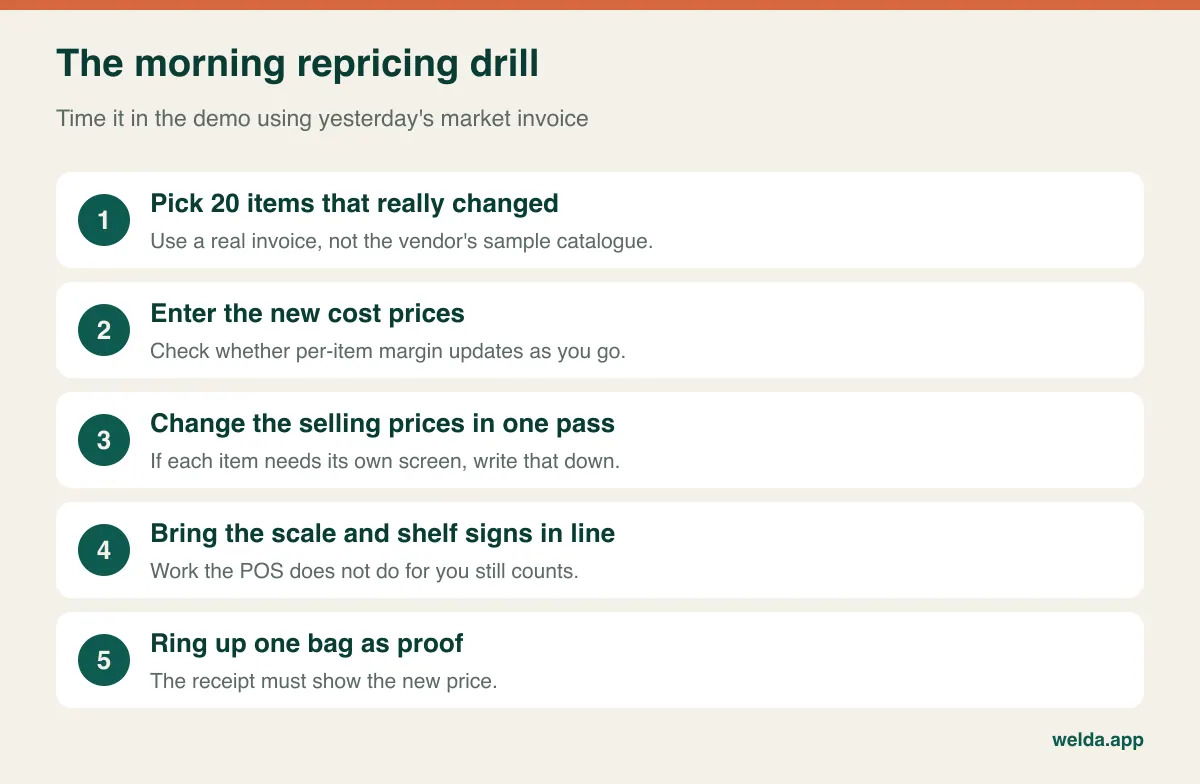
While you watch, look for four things. Can you filter the list down to vegetables, or to items that came in on this invoice, instead of scrolling through everything? Does the price field catch an obvious slip such as 32.50 typed as 325.0? Can you see cost and margin while choosing the new price, so that you are making a decision rather than updating a label? And can the person doing the job work from wherever they stand at that hour?
Then deal with the afternoon. Reducing soft peaches at 5 p.m. is one of the most ordinary decisions in this trade, and systems handle it differently. A changed shelf price and a discount at the till give you different reports. With a discount you can see how much you gave away, while a price change keeps the till and the sign in agreement. Neither is wrong, but you should choose deliberately and confirm that earlier sales keep the earlier price in your margin report. We go deeper on this in our guide to greengrocer pricing and profit tracking.
There is one more trap, specific to label scales. Your scale keeps its own price list. When the label carries the weight, the till multiplies by the POS price, so the POS price decides. When the label carries the price, the till accepts what the scale calculated, so the scale decides. Either way, a customer watching the scale display and then reading a different figure on the receipt will not care which device was out of date. Unless the two are linked, you are updating prices in two places, plus the sign. Include all of it in your timing.
Cases in, pounds out
You buy by the case and sell by the pound, or by the crate and kilo. Between those two numbers sits most of the margin in a produce business. A general retail system may treat this as an edge case; in your store it happens with nearly every delivery.
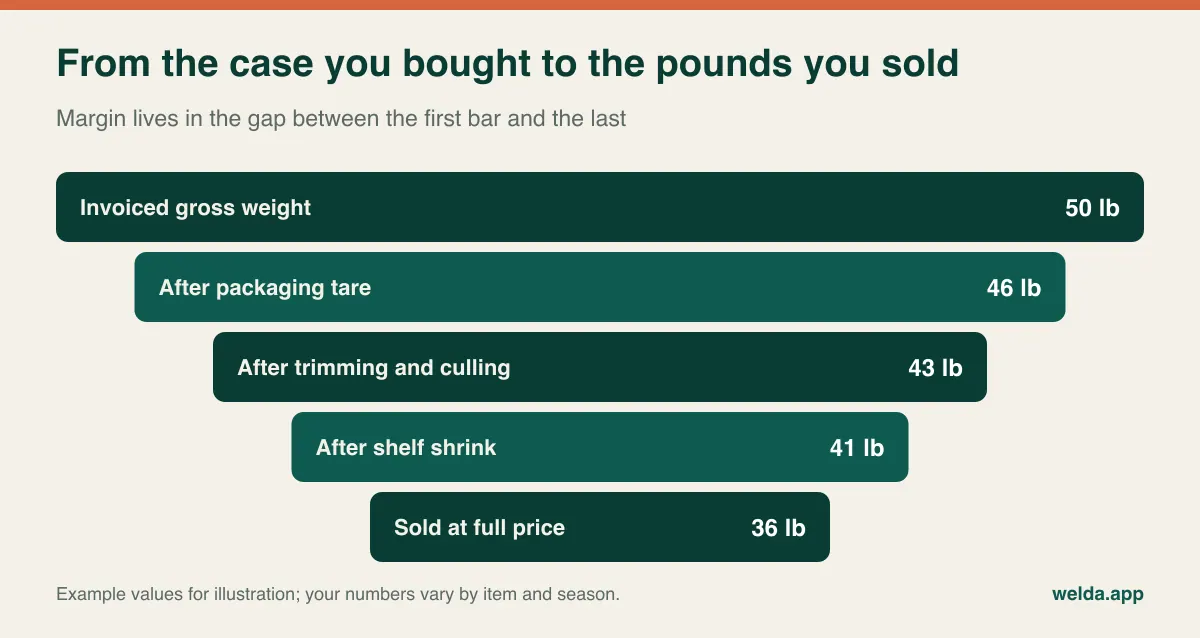
Three practical questions follow from that picture.
- How is a case received? Show the vendor a real delivery: gross weight on the invoice, packaging tare, and a cost per case. Does the receiving screen let you record what you actually got in the unit you sell in? How does it deal with a case of 88-count oranges that you sell by the piece, by weight, or both? Conversion between purchase and sale units is the question to ask with your own items rather than theirs.
- How short is the waste entry? It is done by a tired person at closing. If logging five items takes more than a couple of minutes, it stops happening by the second week. Our piece on tracking greengrocer waste and spoilage covers how to build the habit.
- Does waste reach the margin figure? Deducting it from stock is not enough. If per-item margin is still calculated as though everything sold, the report flatters you. In the demo, log a deliberately large waste quantity against one item and check whether the report moves. Those five minutes may teach you more than the rest of the presentation.
Be realistic about stock accuracy, too. Weight-based stock in a produce store will never match the system to the gram. Lettuce loses water, a scale rounds, staff trim leaves, and customers taste a grape. Treat the on-hand number as a guide for buying rather than an audit figure. Weighing your ten fastest sellers once a week is a reasonable place to start, and whichever software you pick should show the difference between counted and expected quantities without fuss.
Match the system to the kind of store you run
The same product can be right for one produce business and wrong for another. Find yourself below, since it changes which questions come first.
| Your store | What matters most | What you can ignore for now |
|---|---|---|
| Owner on the till, small range | Speed, a plain screen, a short waste entry | Multi-location tools, detailed role structures |
| One store, a few staff, separate weighing counter | Label scale workflow, permissions over refunds and discounts | Advanced transfers |
| Several stores, or a central buyer | Per-branch stock and sales, consistent pricing rules | Lightweight or phone-only setups |
| Supplying restaurants and cafés | Customer accounts, invoices, case quantities | Fancy checkout layouts |
| Market stall or roadside farm stand | Whether a browser-based till works there at all | Most back-office features, at least at first |
That last row deserves honesty. If your stall has weak mobile signal, no counter space for a computer, and a dozen items sold by one person, a full back-office system may be more than you need right now. A simple mobile payment device and a notebook routine might be the sensible first step, with stock software coming later when the range or staff count grows.
Where Welda Stock fits, and where to press us
Welda Stock is browser-based stock and sales software for small retailers, and our produce store POS software page describes how it applies to greengrocers. It decodes the weight or price barcode printed by a retail scale, lets you update prices in bulk, posts sales to stock by weight, and records waste so that per-product margin reflects what really happened. It also keeps supplier invoices and what you owe each trader, along with store credit, customer balances and an end-of-day report, and it offers separate permission levels for cashier, warehouse and manager, as well as multi-branch management.
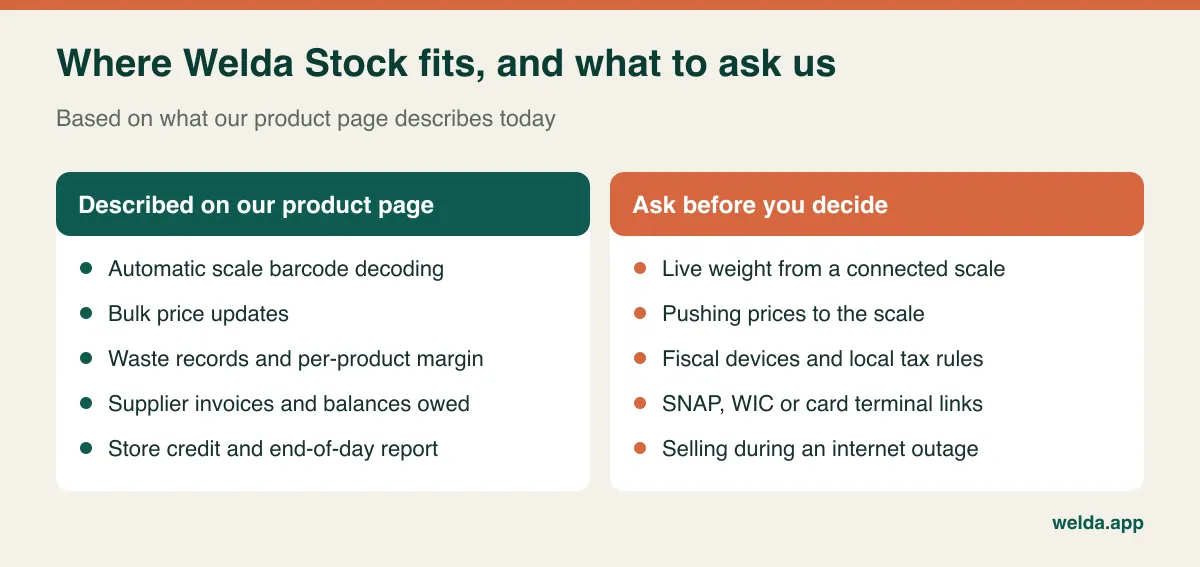
The right-hand column matters as much as the left. Our route for weighed items is scanning the label the scale prints. We do not promise here a wired link that sends live weight to the till, or sending price lists from the software to the scale. Because the system is web-based, work happens over an internet connection; if yours is unstable, we plan the working method with you at setup rather than promising uninterrupted selling during an outage. If any of these is a hard requirement, raise it first and expect a direct answer. If the answer does not suit you, another system is the right choice, and it is better to learn that before setup than after.
Scales, tax, payments and traceability
Software does not change the rules that apply to your store. What follows is general orientation, not legal or tax advice. Rules vary by country and region and change over time, so confirm the details with your accountant or local authority.
- Trade-approved scales. A scale used to sell by weight generally has to be approved and may be subject to inspection or verification. That typically means NTEP-certified devices and state weights-and-measures checks in the US, and the Non-Automatic Weighing Instruments Directive with national rules in the EU; other countries have their own regimes. Check with your scale service before changing settings to suit a new POS, as some adjustments can affect a seal.
- Sales tax and VAT. Fresh produce is often treated differently from soft drinks, flowers or carrier bags, though the rules are specific to where you trade. A produce store tends to sell a mixed basket, so check how rates are set per item and how they appear on receipts and reports.
- Fiscal requirements. Some countries require certified fiscal devices or tax-authority reporting for retail sales. A customer receipt from sales software is not automatically a fiscal document. Ask how any system works alongside your local requirement, and ask us too; we do not claim fiscal certification here.
- Payments and benefits. In the US, many produce sellers accept SNAP EBT or WIC benefits, which come with their own approval and equipment rules. If that applies to you, or you need a specific card terminal linked to the till, confirm it before signing rather than assuming it.
- Food traceability. Rules such as the US FDA's food traceability requirements cover certain fresh produce, and other markets have their own. Which ones reach a small retailer depends on your circumstances. Keep invoices and lot information organised, and ask whether the software helps or whether this stays a separate paper trail.
- Customer data. Store credit records contain names, phone numbers and purchase history. Under GDPR and similar privacy laws, keep what you need, limit who sees it, and be ready to answer requests about it.
Comparing quotes without being misled by the total
Two quotes for the same store can describe very different things. Before looking at the bottom line, write each one out against the same list: number of users and tills, branches, setup, data import, training, scale and scanner configuration, and support. Then look for the costs that typically show up later in a produce store:
- Scale configuration. If a technician has to change the label format, who books and pays for the visit?
- Labels and printer rolls. Label scales consume them daily. Which size, and can you buy them anywhere?
- Forced hardware. Can your scanner and scale stay, or does the offer assume new equipment?
- Recurring items. Annual maintenance, per-user charges, updates, payment processing commitments.
- Growth. What changes if you add a second till or a second store?
- Leaving. Can you export your product and customer data, in a usable format, if you move on?
Welda Stock is priced according to your branch and user count. Our product page describes a one-time setup fee, with migration of your product list and team training included. The actual figure is worked out in a free consultation once we understand your store, so we do not quote one here. Fill in the same list for us as for anyone else, and if a line stays blank, ask.
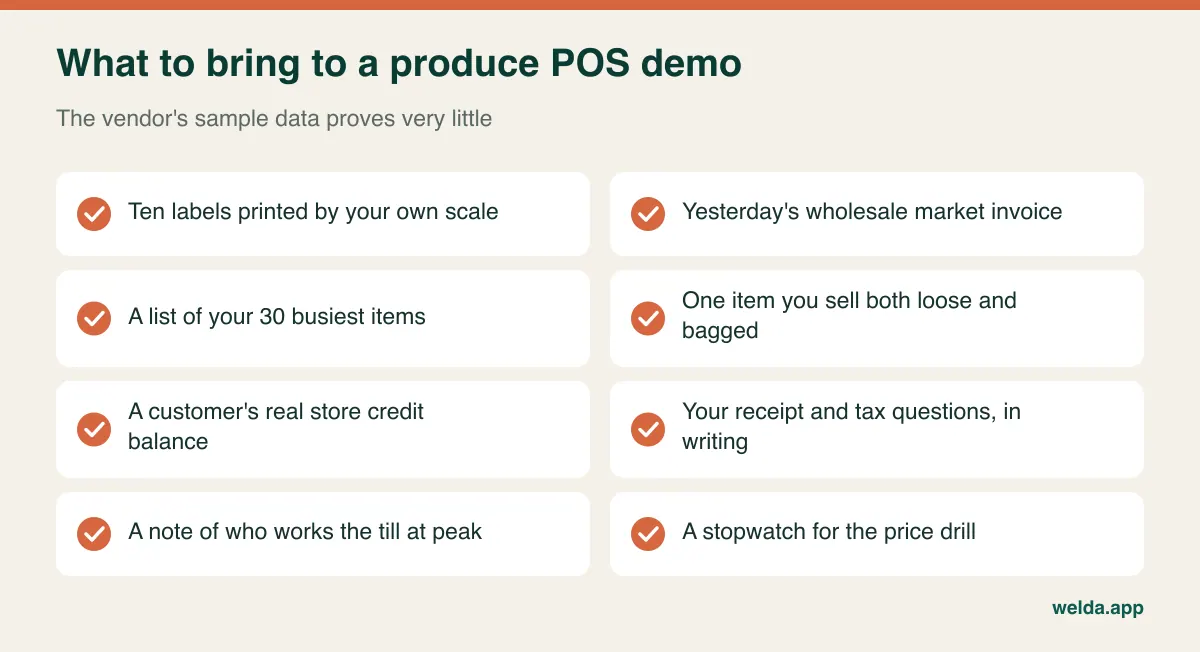
Run the demo with these in hand and in this order: enter the market invoice, reprice twenty items against the clock, scan your labels, sell something with no barcode by the each, add a packaged item to the same sale, put a sale on store credit and take a part payment, log heavy waste on one item and read the margin report, then open the end-of-day report and ask whoever counts your cash whether it makes sense to them. Let your busiest cashier drive rather than the salesperson. Salespeople know the shortcuts, while your Saturday helper shows you where people really get stuck. Get anything left unanswered in writing, because "we can do that" and "here it is working" are not the same sentence.
A cutover that does not fight the market week
The hardest part of moving to new software is usually the item list. Is a vine tomato separate from a beefsteak? Are grade one and grade two apples one item or two? Is organic always separate? Create too few items and your margin report turns to mush; create too many and morning repricing drags and the scale list swells. A useful rule is that an item gets its own record if its cost or price differs. Everything else merges.
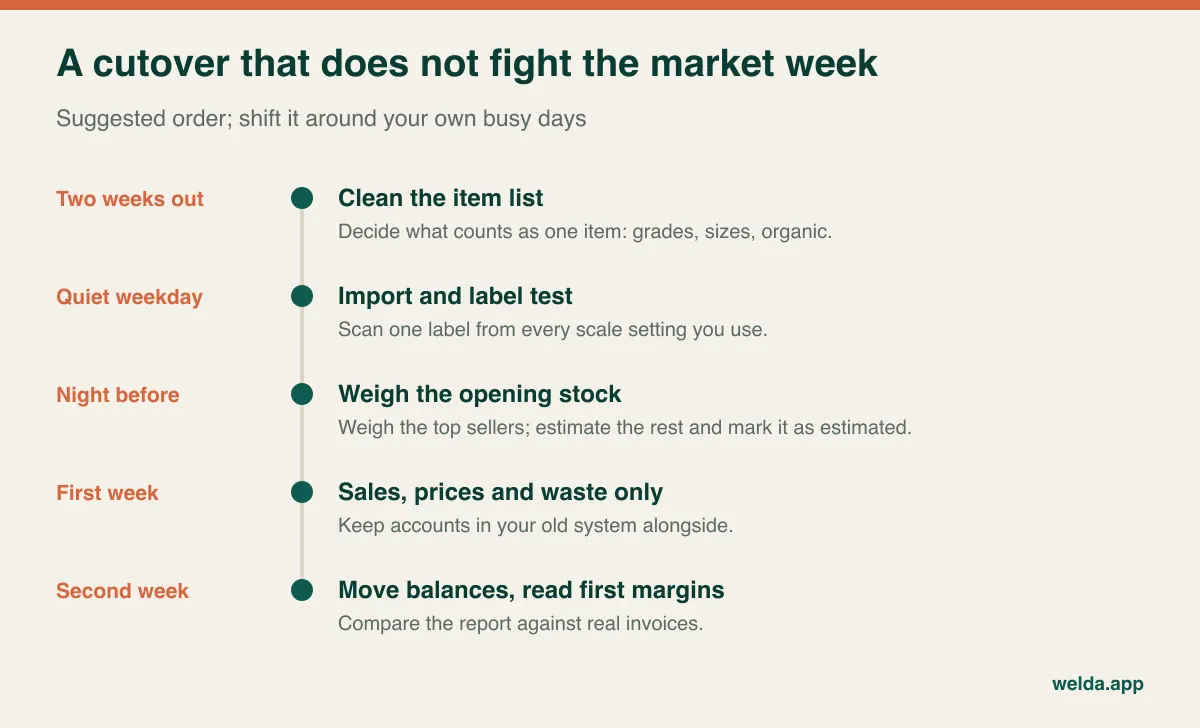
A few errors recur often enough to plan around. Going live on the morning of your busiest day is the classic one, so pick a quiet weekday. Importing a spreadsheet full of old names and typos is another, and our guide to moving from Excel to inventory software covers how to clean it first. Training only the owner is a third; if the person on the till is struggling, the software is effectively not in use. Trying to count every last item before opening is a fourth. Weigh your top sellers, estimate the rest, mark it as an estimate, and correct it at the first weekly count.
With Welda Stock the path starts with a demo and needs review, then your product and stock lists are imported from Excel, branches and permissions are set up, and your team is trained from checkout to reading reports. If you would like to test all of this against your own store, book a free consultation and bring ten scale labels and yesterday's market invoice. We will run the drills together, and you will leave knowing whether it fits, whichever way the answer goes.
Frequently asked questions
Do I need a label-printing scale for a produce store?
No. A small store with one person on the till can start by selecting the item on screen and keying in the weight. It gets slower at peak times and mistyped weights become a real source of loss. When weighing and checkout are done by different people, or queues form regularly, a label scale usually becomes easier to justify. Check whether your current scale has a barcode option before replacing it.
Can I keep using PLU codes my staff already know?
That depends on the software. Ask whether you can search or key items by the codes your team uses, and test it with your busiest twenty items. In Welda Stock's checkout you can search by product name, SKU or barcode; check in the demo how your existing codes would map onto those fields before you rely on them.
How do I handle selling the same item loose and bagged?
Treat them as separate records if the price or cost differs, for example loose onions by weight and a fixed-price net by barcode. Decide how bagged stock gets created, since onions that you bag in the back room move from one record to another. Ask the vendor to show that exact case during the demo rather than describing it.
What happens when the internet goes down?
It depends on the system's design, so ask specifically and ask to see it. Web-based software needs a connection, and that includes Welda Stock. A backup such as a phone hotspot, and a simple rule for writing down sales during an outage, are sensible precautions whichever software you pick.
Is spreadsheet tracking enough for a small greengrocer?
For a price list and basic weekly buying, a spreadsheet can work for a while. Its limit is the till: it does not deduct stock as you sell, tie a customer's balance to a receipt or close the day for you. If your range is small and sales are light, staying with it may be perfectly reasonable. Once either grows, the manual work tends to grow faster.
How much does produce store POS software cost?
Cost is driven by users, tills and locations, the scope of data import, your scale and scanner setup, and any recurring services. For Welda Stock the figure is settled in a free consultation based on your store. When comparing vendors, line-by-line comparison of the items above will tell you more than the headline totals will.