Boutique POS system cost is rarely the figure on the vendor's pricing page. For a single-store boutique, the real budget is the software fee plus four things that page tends to leave out: counter hardware, the work of setting up every size and color, the card processing contract, and the support you will need on your busiest Saturday. The reliable way to compare options is to write each quote out over 36 months, in the same lines, including your own hours.
What makes a boutique different from the grocery or café examples you will find elsewhere is the shape of the stock. You buy in size runs. You buy by season. Much of what you sell may be marked down at some point, and part of your day goes to swapping a medium for a large. Those facts change which line items matter, so this guide starts with them instead of with a generic feature list.
It is written for owners with one store, or one store and a firm plan for a second, who are setting aside a budget for the first time or leaving a spreadsheet behind. If you run twenty locations with a buying department, most of this will feel too small.
The monthly number is the smallest decision you will make
A monthly fee is easy to advertise and easy to compare, so it gets all the attention. It also tends to be fixed and predictable, unlike much of what surrounds it. The expensive surprises usually arrive from somewhere else: a variant limit you hit in your second season, a label printer nobody mentioned, a payment contract that runs longer than the software, or a Saturday with a frozen till and a support desk that opens on Monday.
So split your budget into two columns before you speak to anyone. The first column holds what you pay the software vendor. The second holds everything needed to make the system actually work in your shop, which you may pay to someone else or pay in hours. When a system turns out to be more expensive than expected, the difference usually lives in that second column.
Once you have both columns, the question stops being "which one is cheapest per month?" and becomes "which one costs least across three years for the way I actually sell?" That is a question you can answer with a sheet of paper, and it is worth answering before you sit through a demo, because a good demo is persuasive and a table is not.
Count SKUs, not styles, before anyone quotes you
Ask a boutique owner how many products they carry and they will usually count styles. Your POS will not. To the software, a navy shirt in medium and a navy shirt in large are separate records with separate stock levels and, often, separate barcodes. That is the entire reason you want a system: the customer does not ask whether you have the shirt, she asks whether you have it in a large.
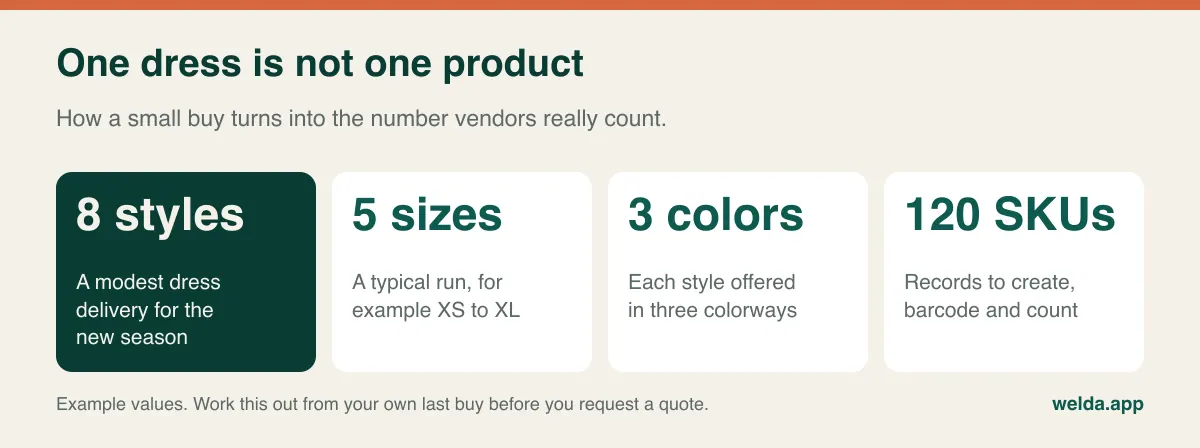
Now apply that to pricing. Software that sells tiers by product count may push you up a tier well before you expected it, particularly when last season's stock lingers next to this season's. Any data entry billed by time will take longer. Your stock counts take longer. Each of those records may need a printed tag. Before you ask for a quote, go through your last two deliveries and multiply out the size and color runs. Add what you plan to carry over. You now have an estimate that is honest in a way that "about sixty products" is not.
A related question to ask every vendor: does a variant count as a product in your limits, and are size and color handled natively or as an add-on? Some systems treat a style as a parent with sizes beneath it, others treat each size as its own product. Neither is automatically wrong. Welda Stock, for instance, sets up each size and color as its own product with its own SKU and barcode, which keeps counting and scanning simple; if you specifically want a single parent style with a size grid on screen, look at that in the demo rather than assuming it.
Keep the historic records in your thinking as well. Deleting last spring's lines may tidy the list, but those lines are what tell you which sizes to buy next spring. A plan that makes you pay to keep old records is a plan that discourages good buying. Our guide to seasonal inventory planning shows how that history feeds the next order.
Reading the software line: three pricing shapes
Vendors tend to price in one of three ways, and each one looks cheap from a different angle. None of them is the honest one by default. What matters is how they behave once you put your own shop into them.
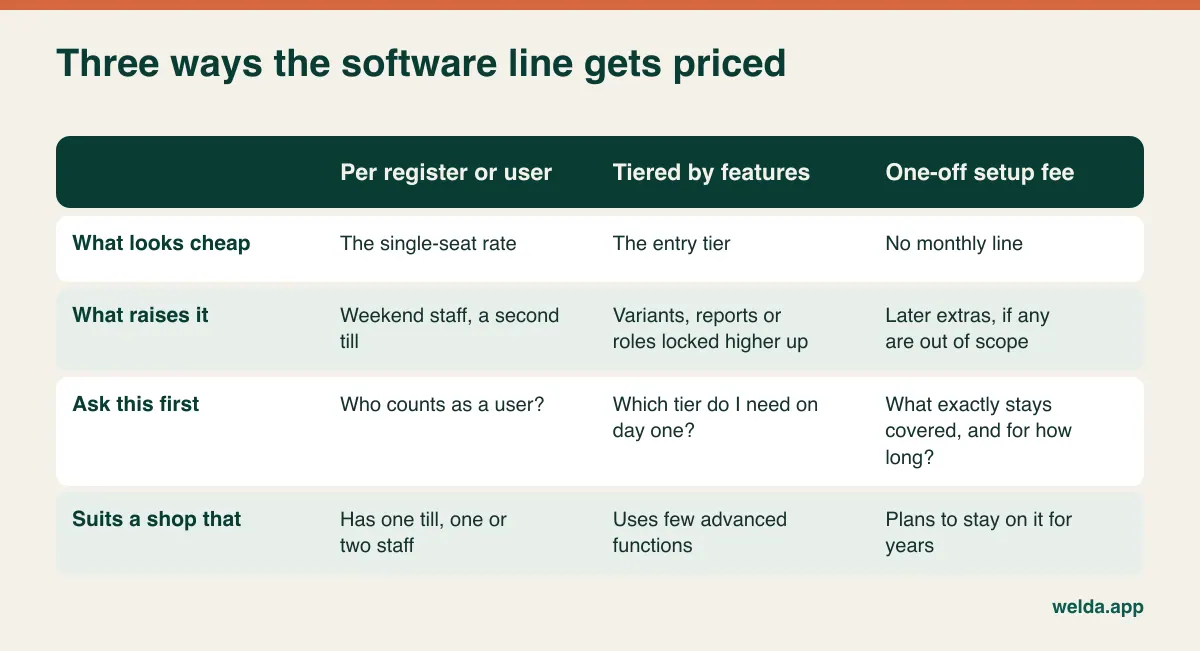
Per-user or per-register pricing is sensitive to staffing. Boutiques often run on part-timers, and busy seasons bring extra hands. Find out whether a shared login is allowed (and whether you would want one, since shared logins ruin accountability for discounts and voids) and what a seat costs during the months you only need it occasionally.
Tiered pricing is sensitive to features. The questions that bite a boutique are specific: is variant reporting on the entry tier, or is it where the upsell lives? Are staff roles included? Can you see margin per item? Are gift cards, customer profiles or end-of-season reports extras? A tier that lacks one feature you need every week is not an entry tier for you, however it is labelled.
A one-off setup fee is sensitive to scope and time. It removes the monthly line, which is attractive, and it is the model Welda Stock uses. Ask the same questions of us that you would ask anyone: what exactly is covered, what would trigger a new charge in the future, and how does scope change if you add a store? Our material states there are no hidden or recurring costs; hold that up against the written quote you receive.
The counter: what you really need on day one
Boutique counters are small and usually visible to customers, so hardware decisions carry an aesthetic and a practical side. Your list will look different from a supermarket's. You almost certainly do not need a conveyor or a scale. You may well need a label printer, which a supermarket rarely thinks about at the till.
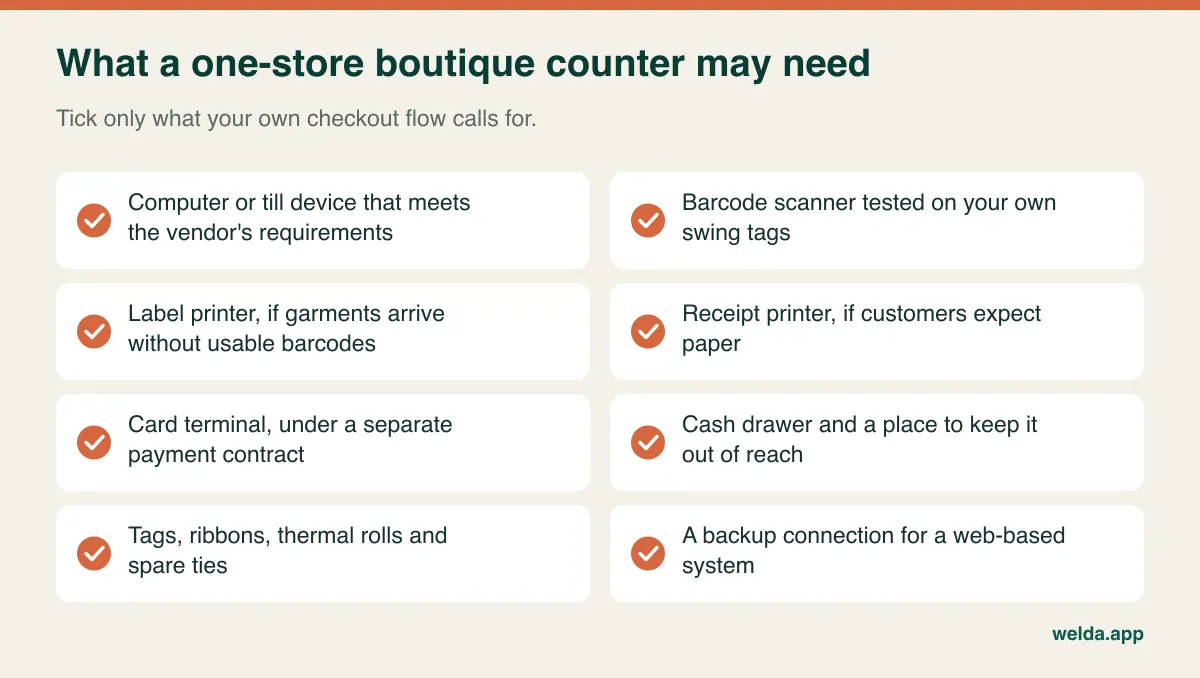
A few points to settle per device. Scanner: test it on your real swing tags, including small or glossy ones, and on tags that have been folded in a garment. Label printer: ask who sets up the label template and whether the size fits your tags; this deserves its own section below. Receipts: some customers expect paper for returns, and a clean receipt helps with exchanges. Ask how the system prints from your device. Till device: Welda Stock needs a computer with a browser, an internet connection and a standard barcode scanner. If you want to run the whole counter from a tablet or phone, ask to see it in real conditions, since our product material describes access from computers with a browser.
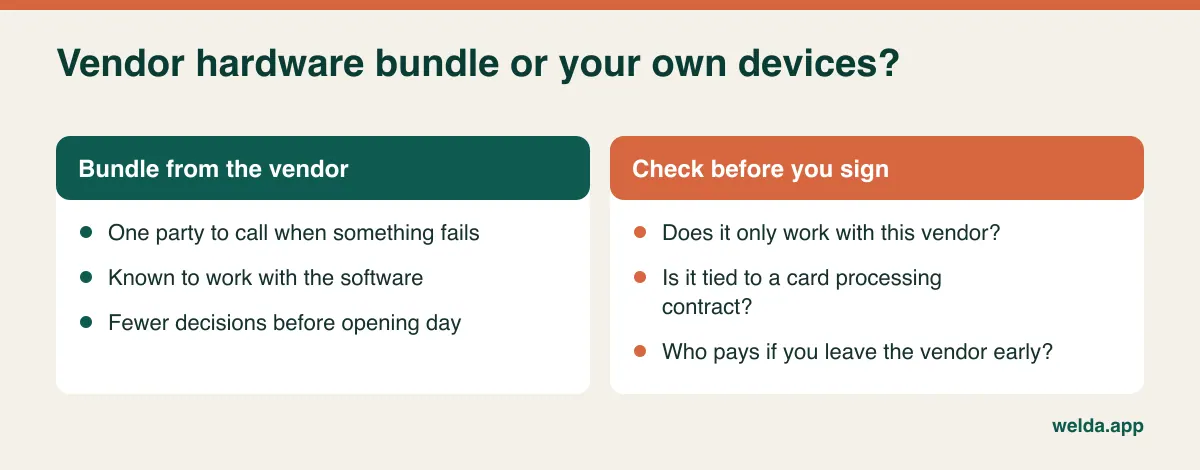
Bundles deserve a careful read. A vendor package with terminal, scanner and printer can save you real effort, especially before an opening, and one phone number when something breaks is worth something. The risk is lock-in. Some devices only work with one vendor, and some bundles are tied to a processing agreement. Ask what happens to the hardware if you leave. Ask whether you own it. Ask for the model numbers so you can compare them yourself.
Card fees: the software cost that scales with your best days
Many POS providers also process payments, and for some of them that is where the business model sits. It is not automatically a bad thing. Integrated payments reduce keying errors and make end-of-day reconciliation easier. But it means a low software fee may be paired with a processing rate you cannot negotiate or take elsewhere, and the cost grows exactly as your sales grow.
That makes this the one line you cannot fix in advance. To make it comparable, take last year's card sales by month and apply each provider's quoted rate, including any fixed per-transaction charge, terminal rental, monthly minimums and statement fees. Boutiques with higher average tickets and fewer transactions often see a different picture from a coffee shop with many small tickets, so do not rely on anyone else's example.
Ask three direct questions: can I use my own processor with this software, what are the contract length and exit fees for processing, and do the software and the card contract end together? We should be plain about our own position: card processing is not something our product material describes as part of Welda Stock, so treat your processor as a separate relationship and raise it in the conversation. Tax treatment and fiscal receipts vary by country too. A Welda customer receipt should not be read as a certified fiscal document, so if your country requires a fiscal device or certified software, ask us before anything else and check with your accountant.
The tag problem nobody puts in the proposal
A packaged-goods retailer scans a manufacturer barcode and moves on. Fashion is messier. Established brands often ship with usable barcodes, but small labels, wholesale markets, local makers, vintage and your own private label may arrive with nothing or with something unusable. Then the tag is your job.
That job has a hardware cost (a label printer), a running cost (labels, ribbon, swing tags, ties), and a time cost that lands on you or on the assistant who could be selling. It also carries a risk: if a medium tag ends up on a large, your stock is wrong from the moment it hits the rail, the system keeps confidently reporting it, and you stop trusting the numbers.
Before you commit, find out how the software deals with an item that has no barcode. Can it generate one? Can you print from inside the system, or do you need separate label software? Who designs the template? What happens if a supplier later ships the same item with its own barcode? Welda Stock lets each size and color carry its own barcode, but label printing is not described as a feature in our product material. If most of your deliveries arrive untagged, make it the first thing you ask us, because it may change what your counter needs.
A simple way to price this: time yourself tagging one delivery. Multiply by the deliveries in a season. Whatever hourly figure you put on your own time, that is a real budget line, and for some shops it can outweigh the software.
A worked example, in units rather than currency
Real numbers depend on your country and your scope, so here is the method in neutral units. Imagine a single-store boutique, one till, two part-time assistants, about 400 SKUs, with most deliveries already barcoded but some untagged.
| Line (example, 36 months) | Units | Why it sits here |
|---|---|---|
| Software fee | 36 | One unit per month in this example |
| Staff hours for SKU setup and tagging | 16 | Initial setup plus six seasons of deliveries |
| Hardware, bought once | 14 | Scanner, label printer, receipt printer, drawer |
| Tags and printer supplies | 9 | Follows the number of garments received |
| Add-ons for extra users | 6 | Assistants above the base allowance |
| Total, excluding card fees | 81 | Less than half is the software fee |
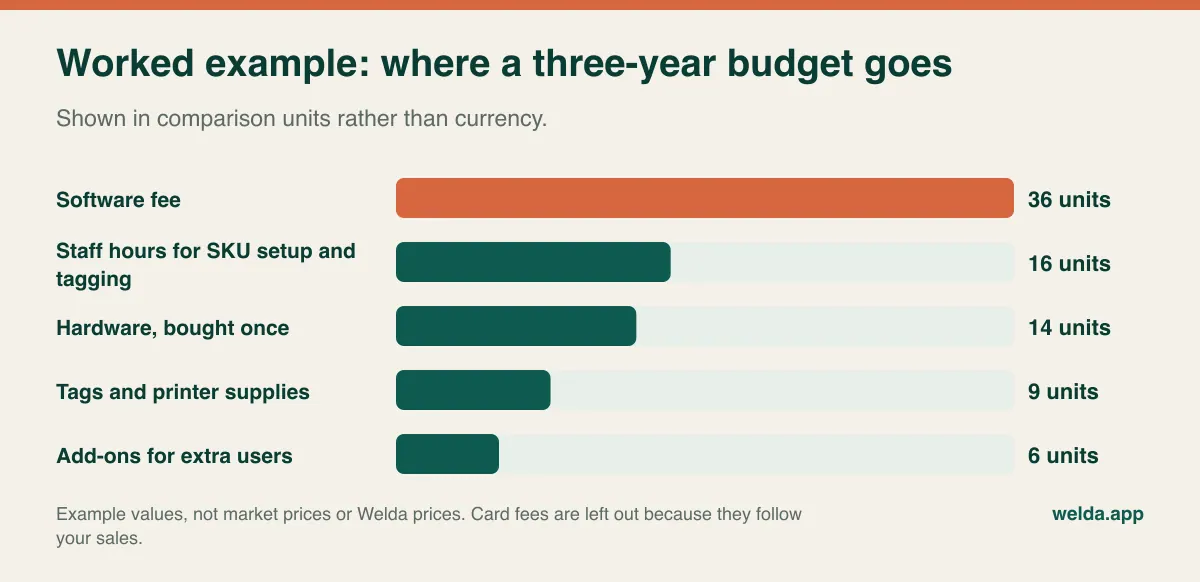
Notice what the table is saying. The vendor's headline accounts for less than half of the total in this invented scenario. A rival offer with a slightly higher fee but free extra users and a generated-barcode workflow that cuts tagging time could be the cheaper choice over three years, despite looking dearer on the pricing page. Equally, if everything you buy arrives barcoded, tagging shrinks and the software line matters more. The value is in running your own numbers, not in borrowing ours.
Why 36 months? Because a POS is annoying to change. Once your team knows it and your history is inside it, most shops keep it through several seasons. A one-year view flatters low monthly fees and penalizes one-off fees; a three-year view is a fairer test. If a vendor's contract has an annual price review, add a line for it.
Support, measured against your Saturday
Retail support hours are often built around offices. Your calendar is the opposite: weekends, holidays, sale launches. A system that fails at four on a Saturday in December can cost you sales and goodwill that no refund of a subscription will recover, so ask for the support hours in writing and ask which channel works at that time.
Beyond hours, ask whether support is included or tiered, whether onboarding covers new staff, and what it costs to retrain the next seasonal assistant. With part-time staff, the training burden can return every season. The most useful test at a demo is to hand the keyboard to someone who has never seen the system and watch how far they get with a single sale and a single exchange.
Check connectivity too. Web-based systems run over your connection, and that applies to Welda Stock. If your line is unreliable we plan a working setup with you during onboarding, but if you need a fully offline till, ask directly. Older shopfronts with thick walls can be surprisingly hard on Wi-Fi, so test from the actual counter, and keep a phone hotspot and a paper fallback for the hour it matters.
Finally, ask how you leave. A complete export of products, stock and sales history in a common format is the cheapest insurance in this whole article. If a vendor is vague here, take that as an answer. Welda Stock handles product, stock and price lists through Excel import and report export; ask to see what comes out so you can judge it for yourself.
Markdowns and exchanges: put them on the demo script
Boutique trading has two habits that generic POS demos skip: selling the same item at different prices across its life, and taking it back to swap it for another size. Neither is unusual, and both can break stock figures if the software treats them awkwardly.
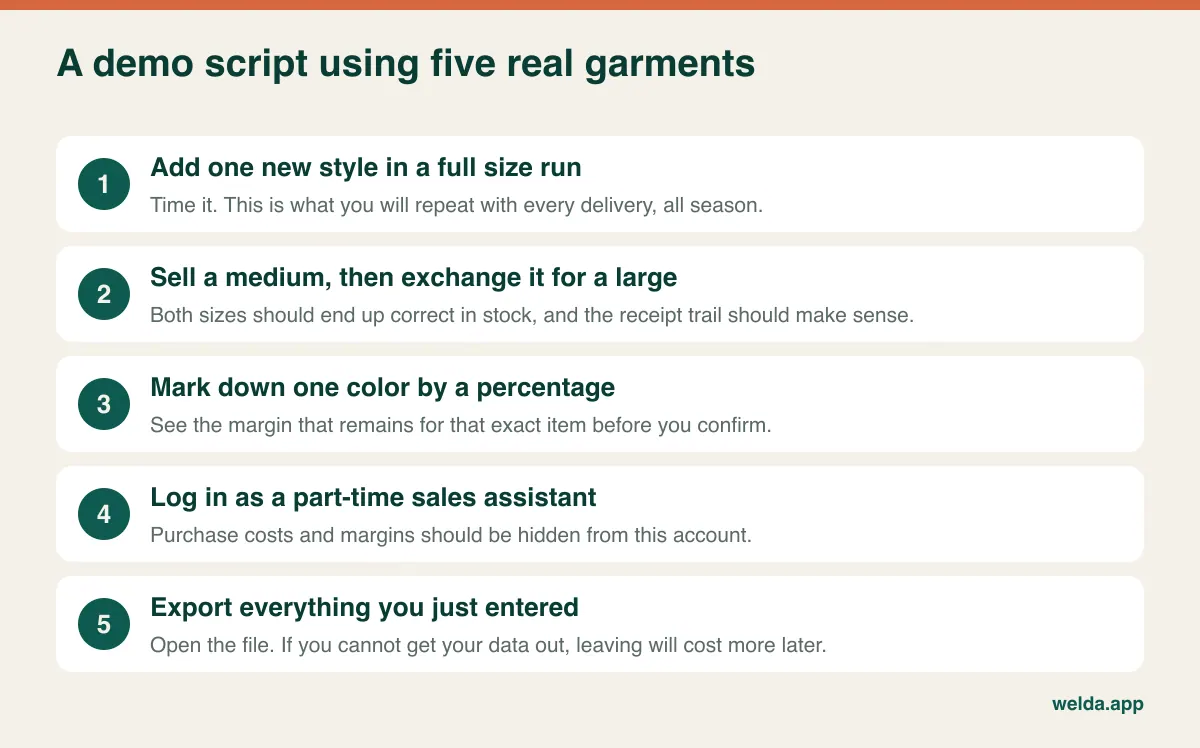
On markdowns, what you want to see is the margin left on one specific item after a discount, ideally before you confirm the price. Say a jacket has sold through in small and medium, with only extra large left. A blanket discount across the style may be the wrong decision, and without a margin figure you would not know. Welda Stock shows purchase-to-sale margin per product along with daily, weekly and monthly sales reports, so season-end pricing can be based on data.
On exchanges, walk through it live: sell a medium, come back as the customer with the receipt, exchange for a large, then look at both stock figures and the transaction history. Then repeat as if it were a gift with no receipt. What your policy allows is your decision, and consumer law differs by country, so check local rules. What the software has to do is keep the record right. We go through return policies and processes in how to set up returns and exchange management.
While you are there, test permissions. Part-time staff should be able to sell without seeing purchase costs, and you probably want control over who can apply discounts or process returns. Welda Stock has separate levels for cashier, stock manager and administrator; whatever you are evaluating, log in as the lowest role and see what is on the screen.
Not every boutique should buy the same thing
The honest answer to "how much should I spend?" depends more on how you sell than on how much you sell.
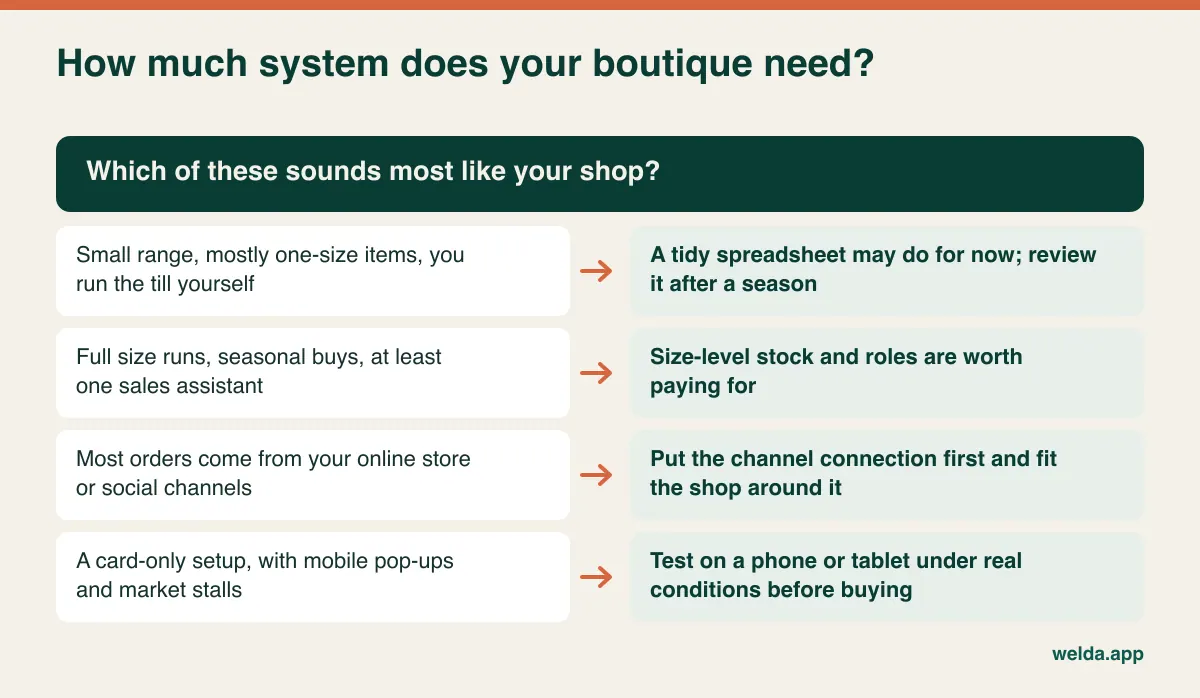
Mostly one-of-a-kind or one-size pieces, owner at the till. Vintage shops, makers and small gift-style boutiques can often manage for a while with a tidy spreadsheet, a basic till and regular counts. You lose little by waiting a season, particularly if you still have to decide on your range.
Full size runs, staff on the floor. This is where stock tracked at size level starts to earn its place, through fewer trips to the stockroom and clearer buying decisions. If you are in this group, budget for variants, roles and margin reports first, and pay less attention to loyalty features until the basics hold.
Online first. If most of your orders come through your own store or social channels, the channel connection is the actual product you are buying, and it should lead your search. A retail POS without that connection can leave you reconciling by hand, however good it is at the till. Our product material does not describe online store connections for Welda Stock, so if this is you, tell us early; we would rather point that out than have you find out later. If you still need a shop window on the web, our guide to boutique websites covers what to look for.
Pop-ups and market stalls. A mobile setup with card-only sales has its own requirements. Test on the actual device, in the actual place, with the actual signal, before you pay for anything.
Switching without losing a season
Timing can cost more than any line on the quote. Changing systems the week a delivery lands, or in the middle of a sale, means counting a full store in a rush while customers wait. The calm moment is at the end of a season, when stock is thin and the next collection has not yet arrived. Fewer garments mean fewer labels and a quicker count, and a thin rail also makes your first stock figure easier to get right.
Plan backward from your next big delivery. Get quotes while buying is still in progress. Clean your spreadsheet so each row holds one size in one color, with separate columns for style, size, color, barcode, cost and retail. Then do your opening count section by section, ideally with the shop closed. When the delivery comes, book it in on the new system: for Welda Stock, entering the supplier invoice updates stock and the amount owed together, which gives your team a clear first real task. In the first two weeks, spot-check a few fast sellers every evening against the screen. You will catch tagging mistakes while you still remember the delivery. The steps for moving off a spreadsheet are in our guide to moving from Excel to inventory software.
With Welda, the process starts with a demo and needs review, followed by data import, permissions and staff training. Setup is usually finished the same day, though your own count and the settling-in time come on top of that.
Where Welda Stock sits in all this
On the boutique POS system cost question, here is our own position. Pricing is tailored to your number of users, stores and warehouses, your product count and data import, and your hardware and checkout flow. There is a one-time setup fee with no hidden or recurring costs. Setup, import of your products, stock and customers from Excel, and training for cashiers, stock staff and managers are part of the quote. The actual figure is settled in a free consultation; the general factors are on our stock software pricing page.
For a clothing store, it covers per-size and per-color stock and barcodes, fast barcode checkout with customer receipts, low-stock alerts, stock counts, supplier invoices and balances, customer accounts, margin per product, role-based permissions, and an interface in English, Turkish and German, along with multi-store support if a second shop follows.
Things to raise instead of assuming, as covered above: fiscal requirements in your country, card processing, buying the devices themselves, label printing, gift cards, loyalty and online store connections. If one of those is essential for you, make it the first thing you tell us. If we are the wrong fit, you will have lost one conversation and gained a sharper list of questions for the next vendor. You can check what we cover on our clothing store software and boutique POS system cost page.
Boutique POS questions owners ask most
What drives boutique POS system cost the most?
Usually not the monthly fee. The largest swings come from how variants are counted, how many users you need, whether you tag your own stock, and the card processing contract. Two boutiques with the same software can end up with very different totals, so build the budget from your own SKUs and sales.
Why do vendors avoid giving a single price?
Sometimes because scope really does change the figure, and sometimes because the opening number leaves things out. Either way, send every vendor the same one-page summary of your shop and ask for a quote structured against your lines. A price with no scope cannot be compared with anything.
Do I need a separate label printer?
Only if meaningful amounts of your stock arrive without usable barcodes, or you want your own tags. Time a typical delivery before deciding. If you do need one, confirm the model, the tag size and who sets up the template, and test it before you sign.
Can I reuse the hardware I already have?
Often, yes, but confirm with exact model numbers. Standard barcode scanners usually carry over. Proprietary terminals and printers tied to another vendor may not. Ask for a short test with your own device instead of accepting a general assurance.
Is free POS software enough for a small boutique?
It may be, if your range is small and one person works the till. Limits tend to appear with size runs, staff permissions and margin reports. Some free options rely on a payment contract, so check that too, along with how to export your data if you leave.
How long should I budget for setup?
The software side can be quick; Welda Stock setup is usually finished the same day. Your count and list cleanup take longer and depend on your SKU count and how tidy your spreadsheet is. Plan a calm stretch at the end of a season, not the week a delivery arrives.
How do I find out what Welda Stock would cost for my shop?
Send us your SKU estimate, number of users and current setup, and we will go through it together in a free consultation and demo. The price is settled there, and there is no obligation.
If you already have a quote or two, bring them along. Book a free consultation and we will go through your SKU count, hardware and checkout together, line by line, whichever system you end up choosing.