The best cafe inventory management software for a small coffee shop is rarely the one with the longest feature list. It is the one your team will actually use during a rush: a stock count of your key items that takes about fifteen minutes after close, a waste entry that takes less than a minute, and a low-stock alert that reaches you while there is still time to order. If you are mainly trying to find out where milk, beans and pastries are disappearing, judge every product against those three jobs first. Then ask two follow-up questions: do you serve at tables, and do you need recipe-level costing from day one?
That is the whole decision in miniature. The rest of this guide explains how to test it, including where our own product, Welda Stock, fits and where it does not. A cafe sold the wrong system stops using it within weeks, and that helps nobody.
A cafe sells drinks but loses ingredients
In a shop, the thing on the shelf and the thing at the till are the same. One chocolate bar comes in, one goes out. A cafe breaks that equation almost everywhere. The customer buys a flat white; your storeroom loses milk, beans, a cup and a lid. You sell a pot of tea, but what you count is a box of leaves. Your sales report says you sold 140 milk drinks today. It does not say how much milk those drinks should have used, and it certainly does not say how much was poured down the sink from a half-empty jug.
This is why generic stock demos can be misleading. They almost always show a barcode being scanned and a number going down by one. That flow is real, and it works perfectly for bottled water, packaged cookies and soft drinks. But your real exposure sits in items without barcodes, in open containers, measured in litres and grams. Before you compare any tools, split your list into two groups: products that can be deducted directly at the moment of sale, and ingredients you can only really track through purchases and counts.
Once you see the list this way, "does stock update automatically?" stops being a useful question. Better questions are: which items update automatically, by what calculation, and how will I monitor the ones that do not? Keep that in mind while reading vendor pages, including ours.
Recipe deduction or count-based variance: pick your method before your vendor
There are two honest ways to track ingredients in a cafe, and most of the frustration in this category comes from buying one while expecting the other.
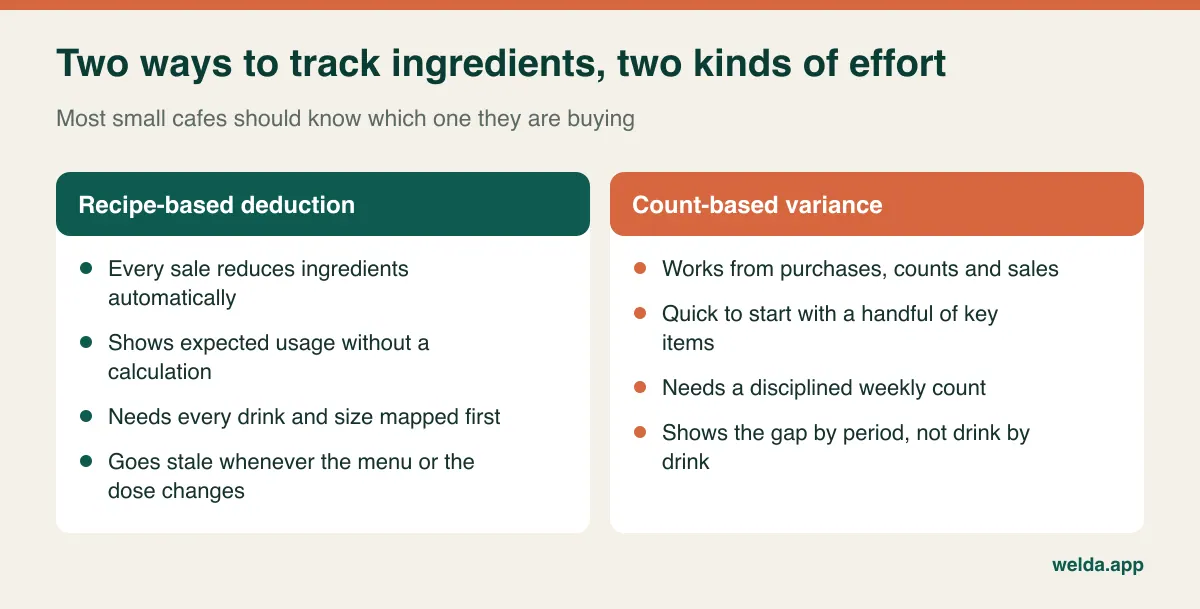
Recipe-based deduction means every menu item has a bill of materials: for example, 18 grams of beans, 250 millilitres of milk, one cup and one lid for a medium latte. Each sale reduces those ingredients. It is elegant, but it has an ongoing cost. Each size and each milk option has to be mapped, and each menu change has to be reflected. Add a seasonal pumpkin drink and forget the recipe, and your numbers begin to drift without any warning. A recipe also only knows what should have happened. It does not know that a new barista is overfilling the jug.
Count-based variance means you record deliveries, count key items at regular intervals, and compare actual usage with what your sales suggest. It is less automatic, but it can be running within days and it surfaces the size of the problem quickly. The arithmetic is simple enough to do on the back of a delivery note:
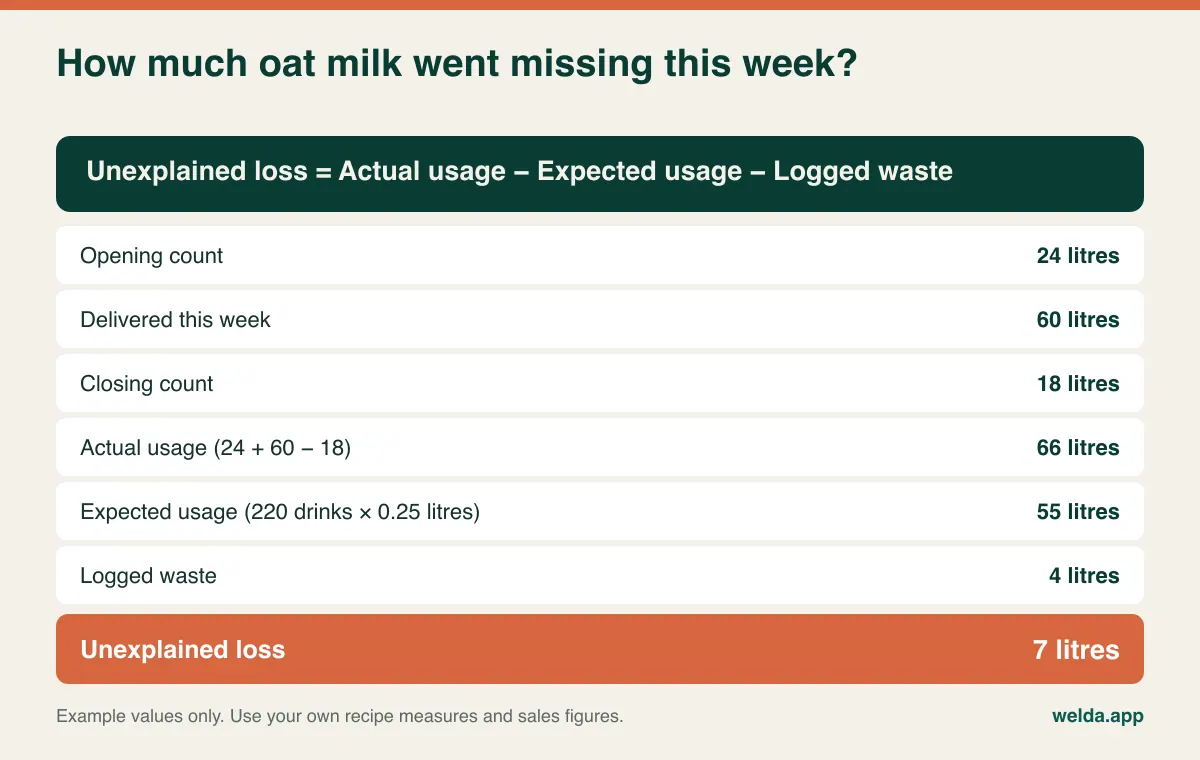
In the kitchen trade this gap between what you should have used and what you did use is often called theoretical versus actual usage, and it is one of the most useful numbers a small operator can have. Seven litres of unexplained oat milk in the example above is not proof of theft or spoilage. It only tells you to start asking questions. Is the measure really 250 millilitres? Is milk being poured away without being logged? Are drinks leaving the counter without going through the till? The point of the figure is not to find someone to blame; it is to know which question to ask next.
So which should you choose? If you have a short menu, a small team and your first goal is to learn how big the loss is, starting with counts usually makes sense. If you have a wide menu, several locations and a need to know margin per drink, look for a proper recipe module and test it thoroughly. To be straightforward about our own product: the Welda Stock functions we describe on our product pages are ingredient and product stock movements, low-stock alerts, stock counts and waste tracking. Automatic gram-level deduction from recipes is not something we can promise you in this article. If that is the deciding feature for you, bring your menu to the consultation and we will give you a clear answer.
Waste is five different problems wearing one label
Most systems have somewhere to record waste. What matters is the reason attached to it. A log reading "waste: 12 litres milk" tells you nothing you can act on. Split that same number into reasons and each line points somewhere different.
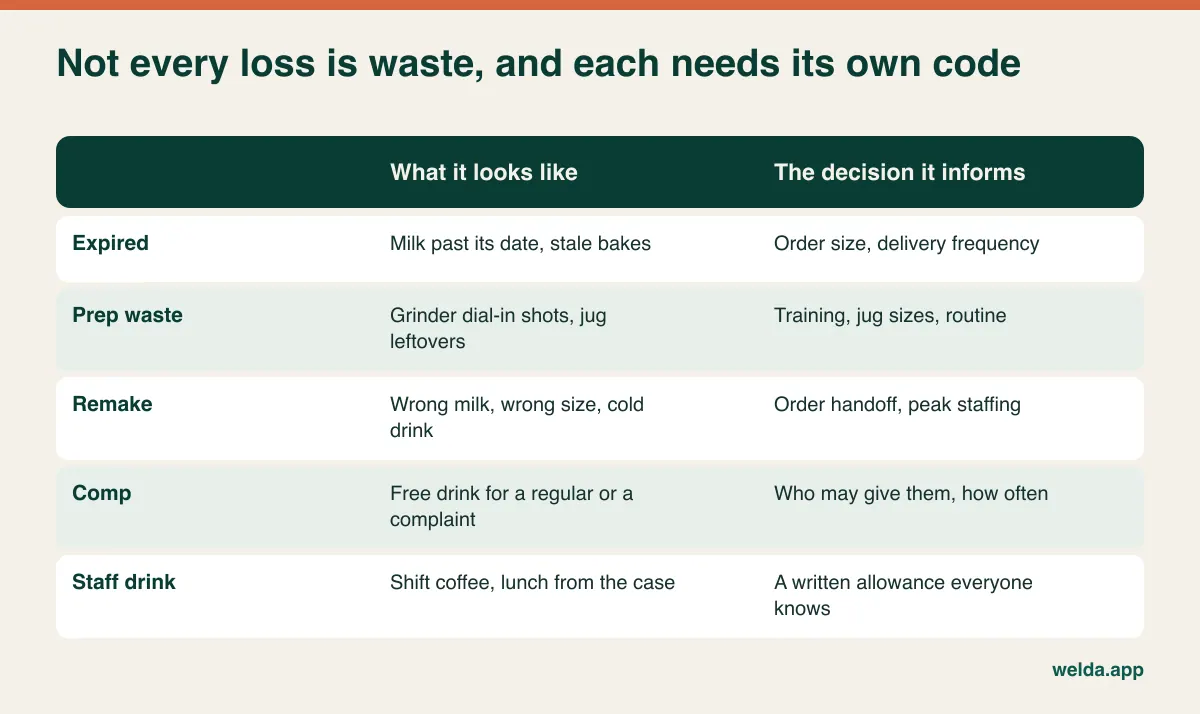
Comps and staff drinks deserve particular attention, because they are usually a deliberate choice, not a loss. The free coffee for a regular who had a bad experience is good business. The shift coffee is a normal benefit. Yet if neither is recorded, they look exactly like shrinkage on your variance report and you may end up suspecting the wrong thing. Write down the allowance, give it a code, and much of what you thought was mysterious may stop being mysterious.
Who logs it in the middle of a rush is the question that decides whether any of this works. Expecting a barista with a queue out the door to open a six-step form is not realistic. A pencil and a printed sheet under the counter, transferred at the end of the shift in five minutes, is a low-tech routine that holds up. What you want from software, then, is that entering waste takes a few taps and records who entered it. For a wider look at the causes of loss outside hospitality, see our guide to preventing retail shrinkage. Just remember that in a cafe, more of the loss tends to happen on the counter than on the shelf.
Pastries are their own lesson, because the fix depends on the timing, not the total. Look at how the same week of waste can break down by day.
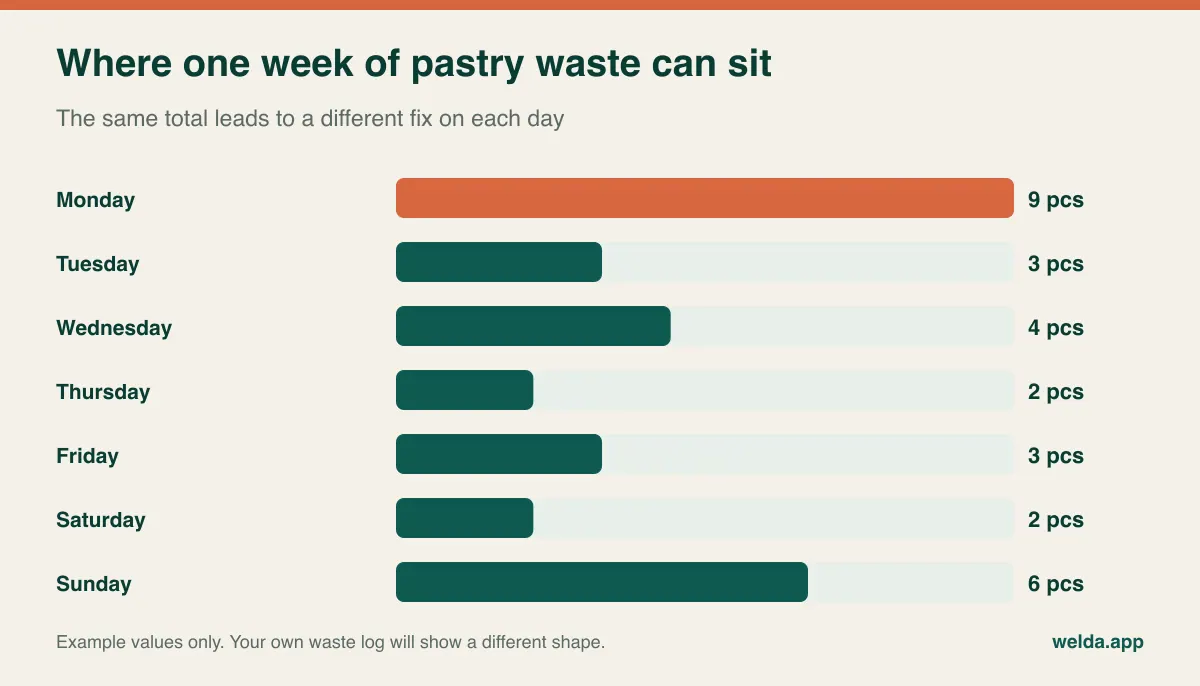
A spike on Monday may mean the order you place at the weekend assumes footfall that does not come back until Tuesday. A spike on Sunday may mean you are carrying the Saturday quantity one day too long. A flat low number may mean you are selling out by noon and losing sales instead, which no waste log can show you. That is why waste data should be read beside the sales report, ideally in one system.
The fifteen-minute count: how open containers get handled
The enemy of a useful cafe count is the open container. Half a bag of beans, a third of a bottle of syrup, an opened carton of milk. If you have not decided in advance how to count these, every count is a different person's guess and the variance figure loses its meaning.
A few simple rules take care of it. Weigh beans and ground coffee on a small scale, and note the empty bag weight once. Count syrups in quarters; that is accurate enough for most cafes, and chasing greater precision wastes more than it saves. Opened milk gets logged as waste if it is thrown out at close and counted as a quarter or a half if it goes back in the fridge. Write those rules at the top of the count sheet so the method survives staff changes.
Order your count sheet by walking route, not by alphabet: under-counter fridge first, then the bar, then the storeroom shelves. Each week, count only the items where loss concentrates, such as milk, beans, cups, lids and the pastry case, and leave the rest to a monthly cycle. If you want more on methods, our guide on how to do a stock count goes further.
Questions for any demo: when you buy by the case but count by the bottle, how does the system convert? When a count is entered, does the difference appear as its own movement or does it silently overwrite the old figure? Can you see who counted and when? In Welda Stock you carry out stock counts and enter the quantities, and the gap between the stock on paper and on the shelf becomes visible. How your own units map, especially case purchasing against gram-level use, is worth checking in the demo using your real bean order.
Milk and cups need different reorder logic
A low-stock alert sounds simple. It tells you when a quantity falls below a level. In a cafe the hard part is the level itself. Too low and you run out of milk at Saturday lunchtime. Too high and it spoils in the fridge. Unlike most retail, a cafe's core ingredient has a genuine upper limit, because of shelf life. Many operators use the term par level for this: the amount you want on hand once a delivery has arrived.
| Item group | What sets the level | Common mistake |
|---|---|---|
| Fresh: dairy, alt milks once opened, daily bakes | Usage until the next delivery, capped by shelf life | Over-ordering for a bulk discount, then binning the excess |
| Dry: beans, tea, syrups, sugar | Supplier lead time and your freshness standard for roasted coffee | Judging by eye, forgetting public holidays at the roaster |
| Disposables: cups, lids, sleeves, napkins | Lead time per case, takeaway share | Not tracking them because they are cheap, then stopping takeaway on a Saturday |
| Barcoded retail: bottled drinks, wrapped snacks | Sales speed and wholesaler order day | Ringing them under a generic key, which breaks the stock figure |
A worked example: suppose a cafe uses 12 litres of milk per day and gets deliveries every second day. It wants at least 24 litres, plus a margin for a busy day, on hand at the start of delivery day. If the same owner stocks 60 litres because a supplier offers a deal, they have manufactured their own waste. The numbers here are purely illustrative; the reasoning applies anywhere. Our article on setting minimum stock levels covers the formula in more detail. Weekend-heavy neighbourhood cafes may find that one level does not fit all days, and reviewing a few levels every Friday morning is a small habit that helps.
Welda Stock sends alerts for items at critical levels, and the overview screen shows those items beside an upcoming-expiry panel. Checking that list before opening can replace the mid-morning call saying there is no milk. To be honest about the limits, that expiry view works on a 30-day window, which is useful for syrups or beans but does not replace a hands-on date check on milk that lasts days. Keep fresh dating in your morning routine.
Table service changes the decision completely
Inventory software and restaurant POS software are often found through the same searches, but they solve different problems. If you run table service, then floor plans, open tabs, split bills and kitchen tickets sit at the centre of your day. If guests order and pay at the counter, you need almost none of that.
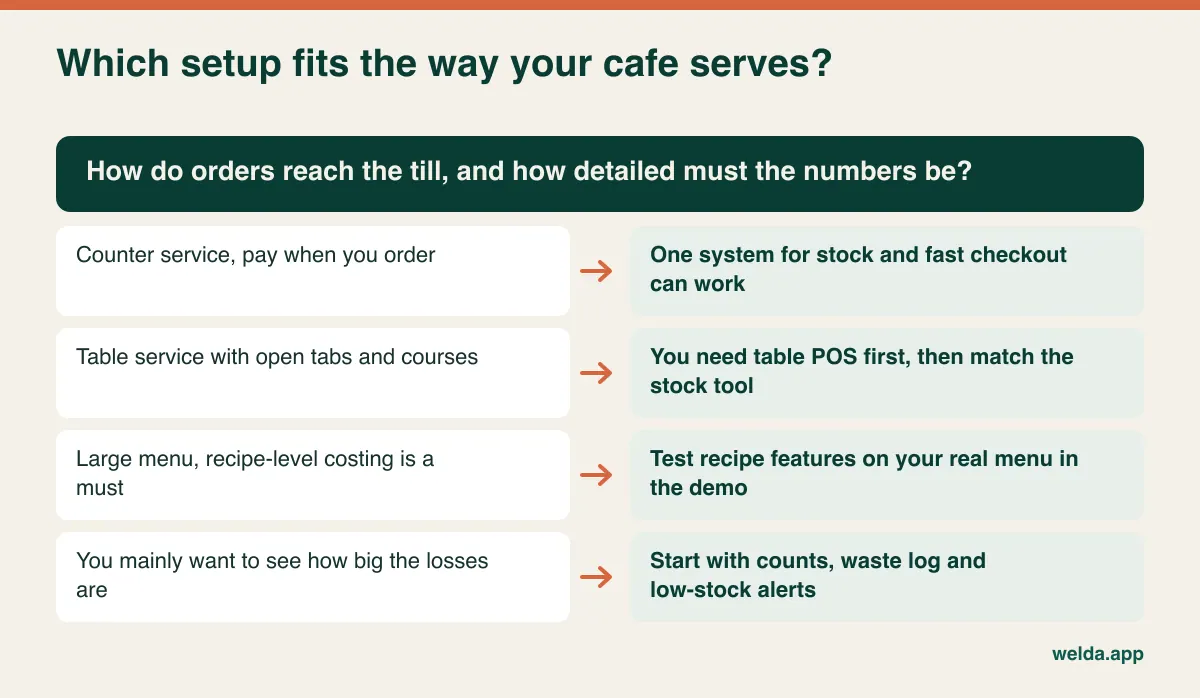
Where Welda Stock sits is clear: it focuses on counter sales and stock management, and it does not handle tables and tabs. We are working on a separate product, Welda Restoran, for that, but we are not offering it here as something you can rely on today. If you run a brunch place with waiters, Welda Stock should not be your main system. Sort out your table POS first, then test its inventory side against the criteria in this article.
Our cafe inventory management software is a closer fit for counter-led businesses: specialty coffee bars, takeaway-heavy kiosks, campus and office lobby cafes, and bakery cafes selling from a display case. For those, the useful bundle is a fast checkout screen, role-based permissions, low-stock alerts, supplier invoices and balances, per-product margin analysis and an end-of-day till report in one place. With more than one location, each site's stock and sales can be reported separately or together. The interface is available in English, Turkish and German, which can matter where a team does not share a first language.
Staff turnover is another cafe reality worth testing. Giving a new starter access to sales only, while keeping refunds and voids under a manager's control, should take a few minutes. Welda Stock lets you set selling, refund and report-viewing rights per role.
What software cannot settle for you: receipts, tax and customer data
Rules differ widely by country and even by city, so treat this section as a prompt for questions, not as advice. Many jurisdictions regulate how cash sales are recorded and how receipts must be issued, and some require certified fiscal devices or specific tax reporting. VAT or sales tax treatment can also differ between takeaway and eat-in, or between food and drinks. A stock tool's receipt is not automatically a valid tax document in your country. Welda Stock's product pages describe issuing a customer receipt for each sale; do not read that as a statement about fiscal compliance where you trade. Ask your accountant, and ask every vendor, us included: "What does this receipt legally replace here, and what does it not?"
Food safety rules are a related blind spot. Local authorities often expect you to manage use-by dates and storage temperatures. An inventory system can support the habit of checking dates, but it does not replace your food safety records. If you keep customer data for loyalty schemes or credit accounts, privacy law such as the GDPR or its local equivalent applies: collect only what you need, control who can see it and check your notice obligations with a qualified adviser.
Reading two quotes without being misled by the headline number
Two proposals with the same headline figure can buy very different things. Put these lines side by side before comparing anything:
- Payment model: monthly or annual subscription, or a one-time fee? Work out the three-year total on your own scenario.
- Scale limits: are there per-user or per-location charges? What changes when you open a second site?
- Module splits: are stock, reporting, recipes and supplier tracking in the base product or sold separately?
- Getting started: are data import and team training included?
- Hardware: do your existing computer and barcode scanner work, or is a new terminal required?
- Support: who answers at 8 a.m. on a Saturday?
- Payment and delivery integrations: what connects, and who pays if a connection needs extra work?
- Abandonment cost: software your team ignores is months of wasted spend. It is on no quote, but it is real.
With Welda Stock the price depends on your locations and user count, and it follows a one-time setup fee model, with spreadsheet or existing-system data import included in setup. We set the actual figure with you in a free consultation, which is why no amount appears here. It helps if you can bring your location count, user count and a rough number of items.
Going live without closing for a day
The classic mistake is trying to load every item perfectly on day one. Two weeks later the list is out of date, the team is tired, and the system is quietly abandoned. Do the opposite: start narrow and keep those few items truly accurate.
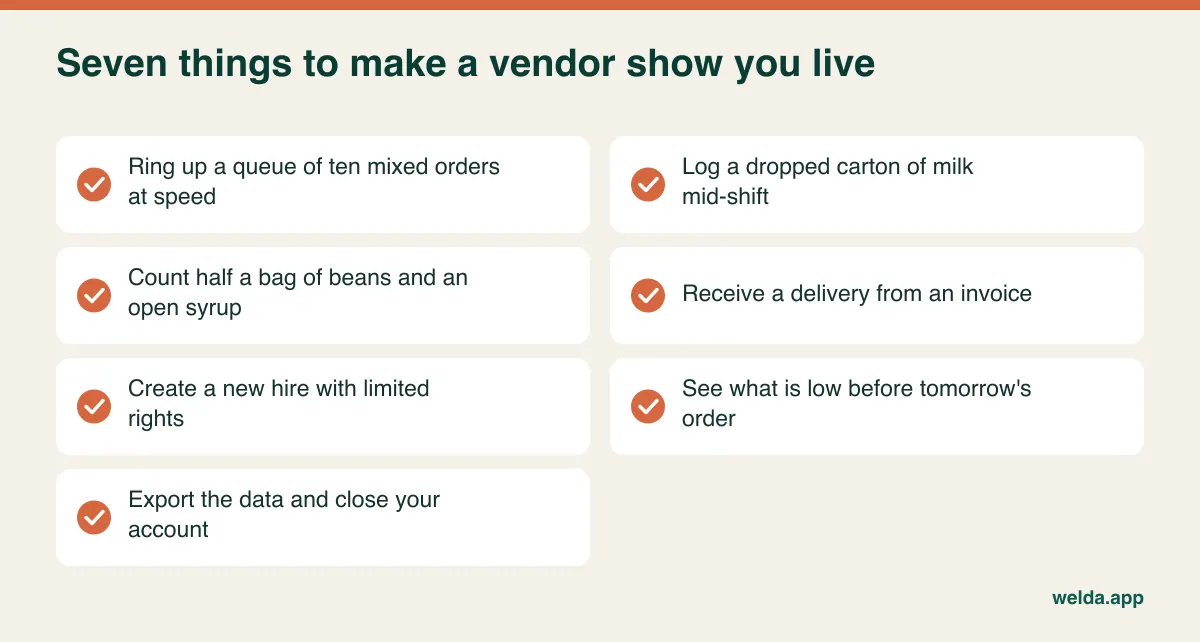
Those live tests should come before you sign, ideally with one of your shift leads in the room. If your best barista finds the checkout screen clumsy, that opinion matters more than anything else in the demo. Also ask what happens when the connection drops. Web-based systems run over the internet, and that is true of Welda Stock too: no installation is required, but you do need a stable connection. If your line is unreliable, mention it early so it can be planned for. Keeping your tills off the customer Wi-Fi is a small precaution that is easy to overlook.
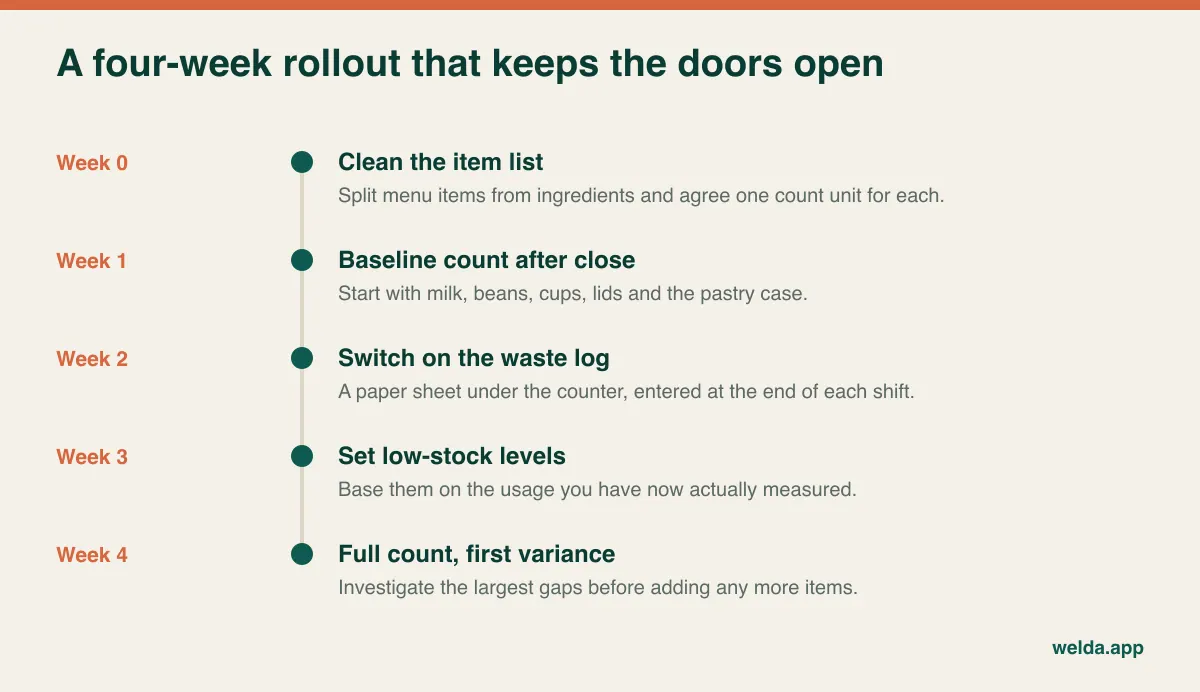
If you already have an item spreadsheet, clean it before anything else; the same drink spelled three ways or last winter's seasonal items should not make the journey. Our guide to moving from Excel to inventory software walks through the file side. Welda Stock setup, data import and team training are usually completed the same day, but a waste-logging habit does not form in a day. That part is yours to lead. Telling the team "this is so we order correctly, not so we can blame anyone" and reading the first variance figures together does more for reliable logging than any software feature.
By the end of week four you should have a trustworthy variance number on a handful of items. Ask three things. Which item has the biggest gap? Is waste logging still happening, or did it stop in week two? Did low-stock alerts change what you did, or were they ignored? The answers tell you whether to widen the scope or fix the routine first.
Cafe inventory software questions we hear most
Does a single small cafe really need inventory software?
If you have few items and the owner is behind the counter every day, a spreadsheet and a regular count can carry you for a while. Software earns its place when several people work shifts, when you want the till and stock in one view, and when you need alerts on critical items. The trigger is not size. It is the moment you can no longer hold it all in your head.
Can I see waste without a recipe module?
Yes. You can see logged waste and the period variance. The purchases, counts and sales calculation shown above tells you how big the loss is. What it cannot tell you is which specific drink caused it. For most small cafes that level of detail is not necessary at the start.
How often should a cafe count stock?
Weekly for milk, beans, cups, lids and the pastry case is a reasonable starting point for many cafes, with other items monthly. Count a suspect item more often for a while if you need to. Counting too often tires the team and lowers quality, so keep to the same day and the same method.
Does Welda Stock handle tables and tabs?
No. It focuses on counter sales and stock management. We are working on Welda Restoran for table and tab management; share your needs and we will keep you posted.
Can I keep my current POS?
Ask this directly of any vendor, since it depends on whether the two systems can exchange data. If they cannot, you may end up entering sales twice, and that rarely lasts. Welda Stock's checkout and stock live in the same system, so if your current POS has to stay, raise it in the consultation and we will tell you plainly whether it makes sense.
Which items should I track first?
Start with whichever three items you believe you are losing the most on, then add cups and lids, because running out of those stops takeaway altogether. Everything else can wait until the routine holds.
If you would like to see where milk, beans and cups are going in your own cafe, take a look at how our cafe inventory management software works in practice, or book a free consultation. Tell us about your menu and how you serve today, and we will talk through whether it fits, including the places where it does not.