The right liquor store POS software for a store losing bottles or finding till gaps is the one that ties every transaction to a named user, restricts refunds and voids, and makes it practical to count high-value spirits and tobacco often. If you run the store alone, barcode checkout, stock deduction and a daily report will usually cover it. If you have staff on shifts, judge the permissions and audit trail before you judge the checkout screen. And if your jurisdiction expects ID scanning or regulated reporting, that requirement should narrow your shortlist before anything else does.
That order matters because many owners start by looking for "fast checkout" and end up with a fast way of recording the same uncertainty. A checkout screen will not tell you why two bottles of bourbon vanished between Friday and Sunday. Records will. This guide is written for owners of liquor stores, off-licences and bottle shops who already suspect stock or cash is leaking and need to decide what to buy, what to test before they sign, and when a tool like ours is not the right answer.
Spirits shrink differently from everything else on your shelves
General retail advice treats shrink as a percentage of sales. In a liquor store that average hides the problem, because your risk sits in a handful of small, expensive, easily resold items. A premium bottle fits under a jacket. A carton of cigarettes fits in a bag. Neither looks like much on a monthly report, and both can erase the gross profit of many honest sales.
Turn a loss into the number of bottles you must sell to recover it, and the conversation with yourself changes. Divide the landed cost of what went missing by the gross profit on a single sale. The figures below are index units for illustration, not real prices.
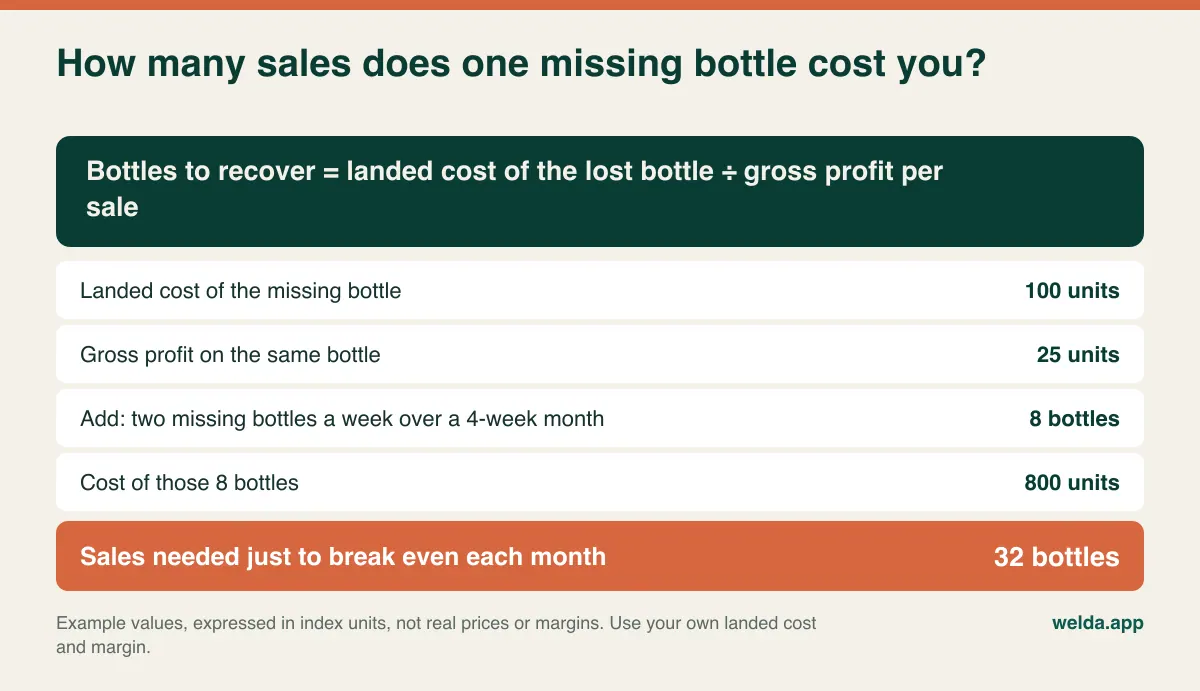
In this example, losing two bottles a week means selling thirty-two more bottles each month simply to stand still. Run it with your own numbers and your most stolen item. You will probably reach a practical conclusion: a modest fix on a small section of shelf is worth more than a broad improvement across the whole store.
It also shows what software can and cannot do. No program stops a hand reaching for a shelf or a till drawer. What it can do is shrink the window in which a loss could have happened. A shortage you find in a quarterly count could have occurred on any of ninety days. A shortage you find at Tuesday night's handover belongs to one shift, a handful of transactions and a small group of people. Our guide to preventing retail shrinkage covers the wider picture; the rest of this article is about the decisions specific to selling alcohol and tobacco.
Find out which of four problems you actually have
Before you look at any vendor, spend one week writing down two figures each day: the difference between counted cash and recorded sales, and the difference on a short count of your twenty most valuable lines. These two columns tell you far more than a feature list.
Cash short, stock correct. The problem is on the money side: wrong change, cash taken from the drawer, or card and cash payments recorded incorrectly. You need clear per-shift reporting and payment types kept separate.
Cash correct, stock short. This one catches owners out. If a bottle is sold without being rung up and the money pocketed, or a bottle simply leaves the shop, the till still balances. A store that only checks its till will never see this loss. You need frequent counts, a stock movement history and proper receiving records.
Cash short, stock over. The system thinks you have goods you do not have. A refund or void recorded after the customer has left would produce this pattern, though it does not prove it. You need approval on refunds and a report you can actually read afterwards.
One line over, a similar line short. This usually points to a scanning or catalog issue: a 750 ml and a 1 litre sharing a barcode, or a cashier picking the nearest item on screen when a label will not scan. You need a catalog clean-up, not an investigation.
Keep these patterns as prompts for questions rather than as verdicts about anyone. Early variance can easily turn out to be case counting, duplicate items and sloppy receiving. If you begin by treating your team as suspects, you will get worse records, not better ones.
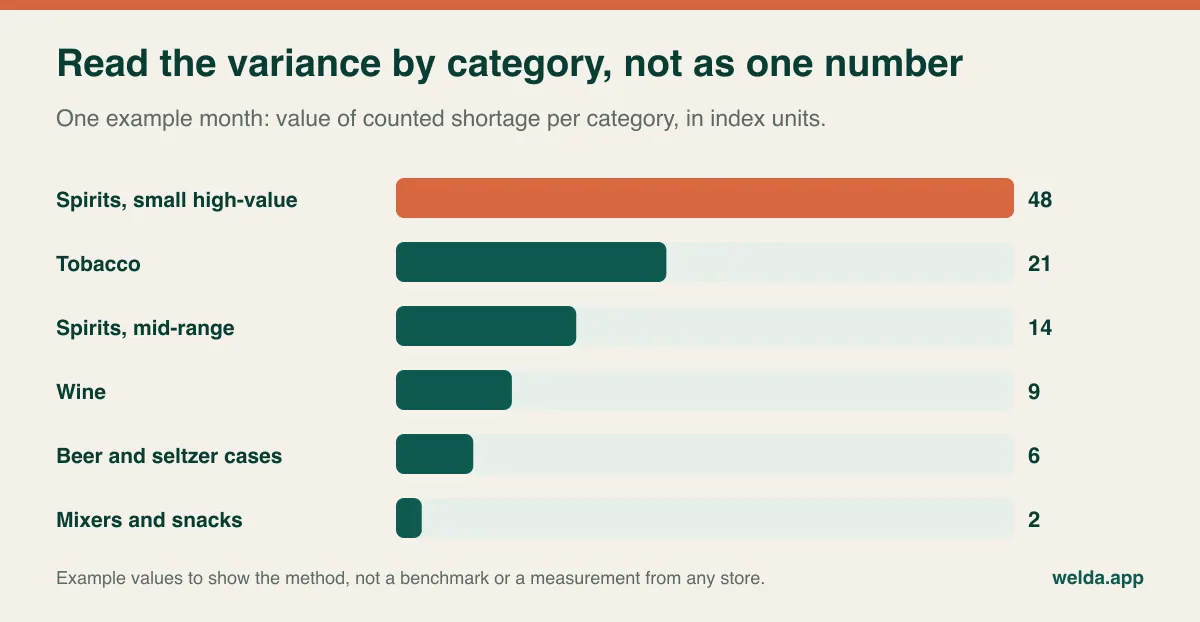
It also helps to split the variance by category rather than looking at a single total. The chart below uses made-up numbers to show the method: when one category holds most of the shortage value, that is where your counting time should go.
Permissions are the feature that pays for the system
Sharing one login "because the queue will not wait" is one of the costliest habits in small retail. A shared login records that something happened but not who did it, which means every other control you build rests on nothing. Individual accounts come first; everything else is a refinement.
Use the grid below as a starting point. A small store might combine the stock lead and owner roles, and that is fine. What matters is that refunds, voids and price changes are not available to everybody by default.
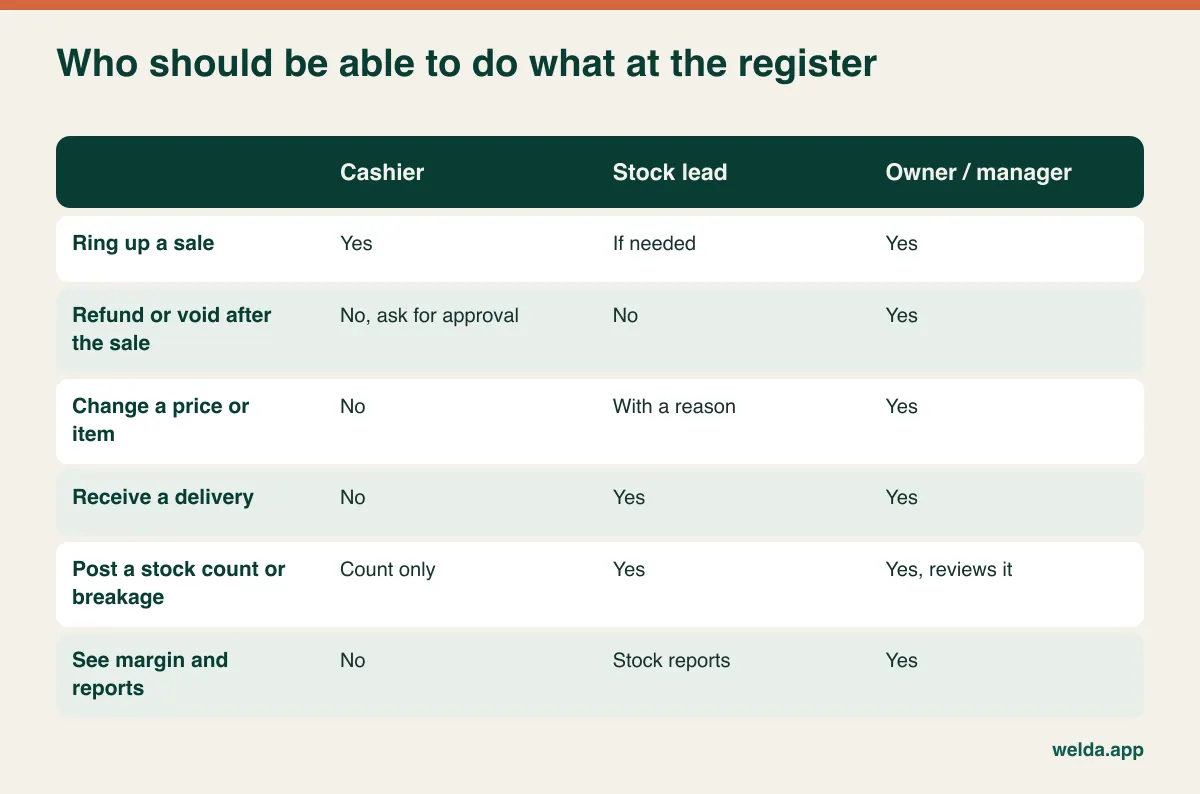
Good permissions protect honest staff too. If a shortage appears and there is a clean record of who did what, the person who did nothing wrong is not left under a cloud. Explain the setup that way when you introduce it.
In Welda Stock each employee works under their own account, sales are recorded per user, and you decide which roles can handle returns, voids and report viewing, with separate permission levels for cashier, stock lead and manager. There is one detail we would tell you to verify on any system, including ours: can you later find a specific void, with the person, time and reason, without asking the vendor for help? Likewise, ask how far you can limit discounts per role. Our product materials describe role-based permissions, but this level of detail is best judged on screen with your own scenario. A vendor's brochure tick against "user roles" does not answer it.
Cases, four-packs and singles: where the stock count goes wrong on its own
Liquor stock has a unit problem most retail software demos gloss over. You buy beer by the case and sell it as a case, a twelve-pack, a four-pack or a single can. Cigarettes come in cartons and sell in packs. Each of those often has its own barcode. If the system does not model the relationship correctly, stock goes wrong from day one and looks exactly like theft.
Consider a four-pack whose barcode was attached to the single-can record. Every sale removes one can instead of four. After a busy weekend the system shows dozens of cans you do not have, while a report on actual sales looks fine. Or someone receives ten cases by typing "10" against the single-can record, and stock suddenly goes negative a few days later. Neither has anything to do with dishonesty, yet both will send you hunting for a thief.
So before interpreting a variance, audit your twenty fastest lines: every pack size, every barcode. When evaluating software, ask whether one product can hold several barcodes, whether a case received converts to singles, how breaking a case is recorded, and how mixed cases or "build your own" packs are handled. Welda Stock works with products, SKUs and barcodes, but our product materials do not spell out case-to-single conversion in detail, so we do not promise it here. Bring a real case to the demo and test it with us.
Breakage belongs in the same conversation. A dropped bottle should be recorded as breakage or waste with a reason, not silently corrected in a count. Otherwise "it broke" becomes the explanation for every missing bottle, and you lose the signal you are paying for.
A counting rhythm that fits a store that never really closes
"Count monthly" is sensible advice for mixers and terrible advice for a locked cabinet. Group your stock by value and risk and give each group its own rhythm:
- At every shift handover: tobacco and the locked cabinet, ten to fifteen lines, counted by the outgoing and incoming person together. From that moment on, any gap belongs to one shift.
- Weekly: mid-range spirits and anything small enough to walk out. Rotate through different sections if it feels too long.
- Monthly: beer, wine and stockroom cases. Open a sample of cases; a case with two missing cans still looks full from the outside.
- Quarterly: the whole store, compared against your breakage and waste records.
The software requirement that follows is partial counts: you must be able to count one shelf without closing the store, and the result must appear as a dated adjustment rather than silently overwriting the number. If you are unsure how often to count your own categories, our article on how often to count inventory walks through the trade-offs. Welda Stock includes stock counts and waste tracking, and the end-of-day till report gives you the other half of the picture. Pair the two with a simple routine from our guide to end-of-day cash reconciliation.
Receiving, price changes and the distributor problem
Some of your shortage arrives through the back door. A delivery shows up at a busy moment, someone signs, the cases get stacked and nobody counts. If a bottle or a case was short on arrival, it is now "missing from the store" forever. Make receiving a rule: no invoice goes into stock until the delivery has been counted, and high-value lines get opened and checked. The person who receives it should do so under their own login.
In Welda Stock, when you enter a wholesaler's invoice on the supplier's account, the goods are added to stock and your balance updates; you can see what you still owe as you pay. If you buy from several distributors this keeps stock and cash flow in one view. How you record a short delivery or a credit note is worth walking through in a demo, with one of your own invoices.
Prices are the second reality. Distributors, excise changes and promotions can move hundreds of lines at once. Ask how quickly you can update them in bulk, and who can do it. Our tool supports importing product, stock and price lists from Excel. Keep that power with one person, because a mistyped price on a premium line either costs you money quietly or creates an awkward moment at the counter. Margin per product then tells you whether the new price still does its job, rather than leaving you to guess from revenue.
Low-stock alerts earn their keep here as well. Running out of a customer's usual bottle can send them to another store. Setting a minimum per line and ordering from a low-stock list prevents that and also shows the opposite problem: expensive stock that has not moved in months is cash sitting on a shelf.
What software will not do for your licence
Liquor retail is regulated differently almost everywhere, so treat this as a general outline rather than legal advice, and confirm the details with your licensing authority and accountant.
Age verification. In the US, rules on alcohol sales come from each state, and many stores use ID scanners. In the UK, age checks fall under the licensing regime, and many retailers adopt a Challenge 25 policy. Australia, Canada and others have their own requirements. An ordinary stock and POS tool does not replace staff training, and our product materials do not describe ID scanning, so plan for it separately if you need it.
Licence-related reporting and excise. Some jurisdictions require specific records, reporting or restrictions on hours, volumes or wholesale purchases. Ask your authority what you must keep, then ask each vendor exactly how that record is produced. Do not accept a general "yes, we're compliant".
Tax and fiscal rules. Sales tax handling, fiscal printers and certified registers vary by country. A receipt from a program is not automatically a compliant fiscal document. We do not claim a fiscal or certified-register integration for Welda Stock in this article; ask in the consultation if your market requires one.
Privacy. Customer credit accounts, employee activity logs and CCTV all contain personal data. In the UK and EU, GDPR applies, and other regions have equivalent laws. Limit who can view data and get advice on monitoring staff before you combine camera footage with till records.
Liquor-specific POS or a general retail system?
This is the real buying decision, and there is no single right answer. Specialist liquor POS products usually focus on things such as ID checks, case-break logic, regulated reporting or delivery integrations. A general retail stock system tends to focus on inventory, staff control, supplier balances and margin. Match the tool to whichever requirement you cannot live without.
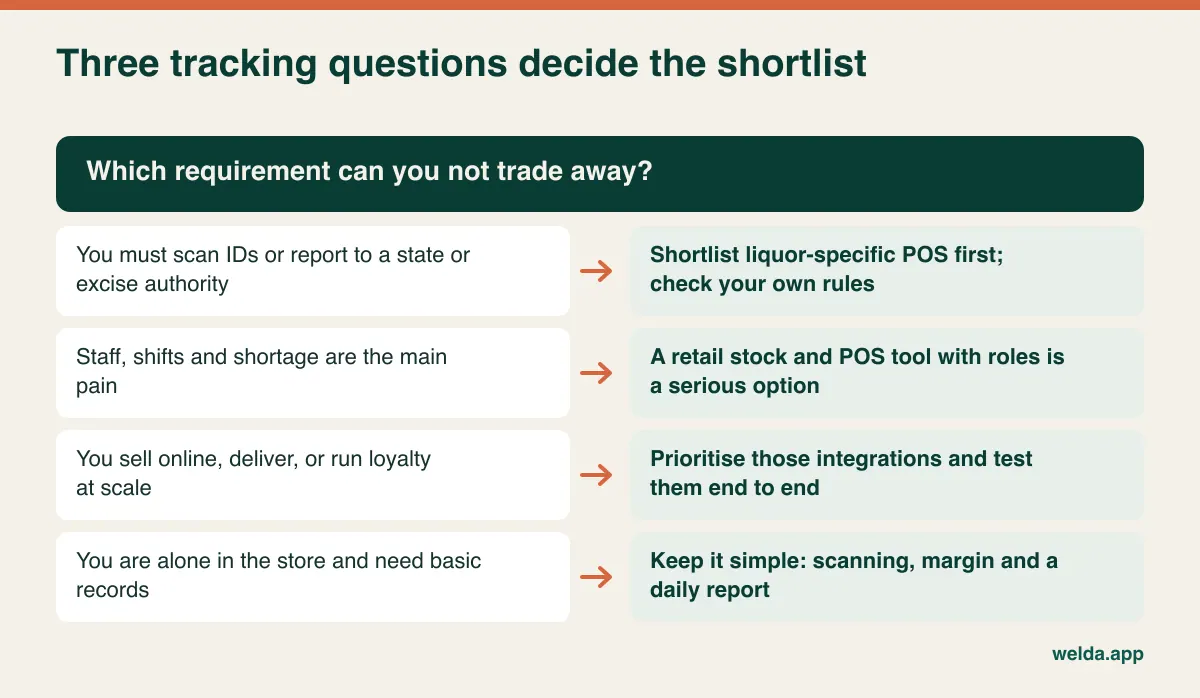
We will say plainly where Welda Stock fits. Its documentation describes real-time stock, barcode checkout, stock counts and waste tracking, per-user sales, role-based permissions, end-of-day reports, customer credit accounts, supplier invoices and balances, margin per product and multi-branch management from one account. If staff control and shortage are your main problems, the closest fit in our range is the liquor store POS software setup we offer through our kiosk solution. It is built around the same issues: fast-turning stock, shift handover and till discrepancies. We do not sell a separate liquor-branded edition.
It is likely a weaker fit if you must have ID scanning or state-specific reporting, if selling through online delivery marketplaces is central to your business, or if you need guaranteed offline selling. Welda Stock is web-based and runs over your internet connection; if your connection is unreliable, we plan a way of working during setup, but you should not read that as offline mode. If those points are decisive, shortlist specialists first and treat this article's tests as your comparison sheet.
A demo script that exposes the awkward parts
Every demo runs on clean sample data with nothing going wrong. Take control. Bring a real bottle of bourbon, a case of beer, a four-pack and a carton of cigarettes (or their barcodes), and work through this list in order.
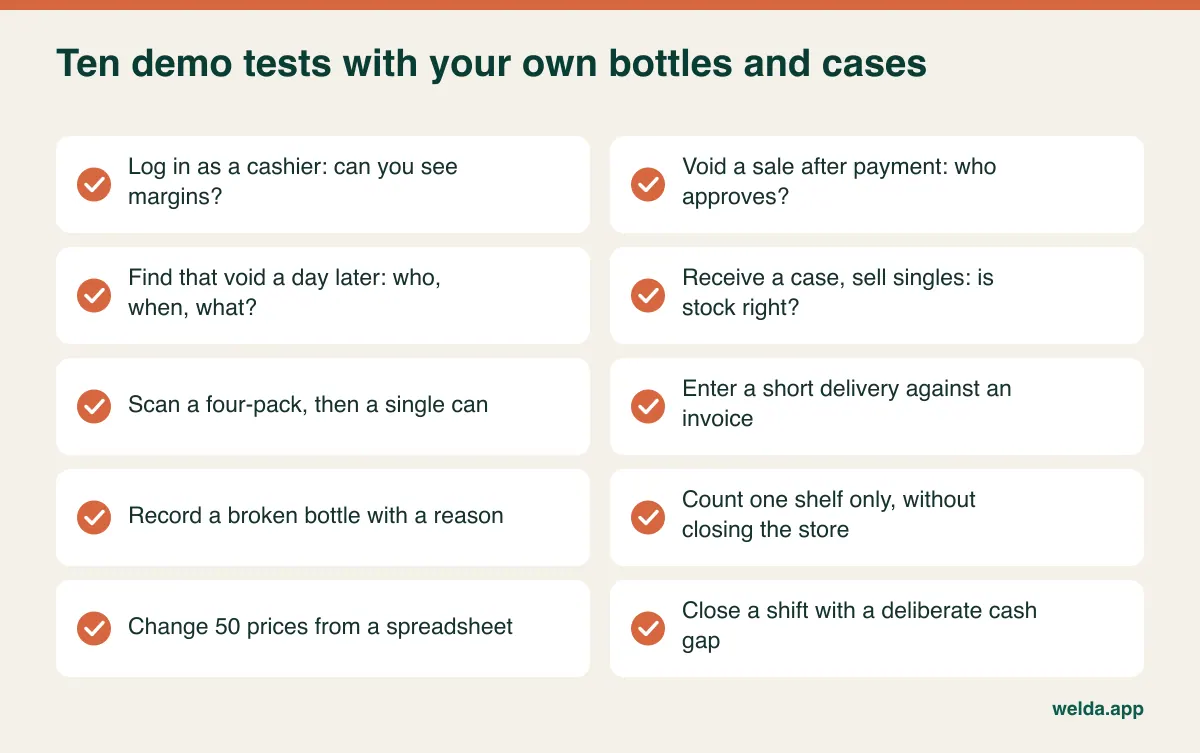
Watch the screen rather than the slides. When you hear "we can do that", ask to see it. When you hear "that's in the reports", ask them to open the report and note how many clicks it takes. Also ask these questions:
- What happens to a sale when the internet drops at 9 pm on a Saturday?
- Can I export my products and sales if I leave, and in what format?
- Which scanners and receipt printers are supported, and do I need to replace mine?
- Can I restrict who opens a customer credit account? Unpaid store credit on premium bottles is a recorded loss.
- Who answers support at the hours we are busiest?
How to compare quotes without getting fooled by the headline number
Quotes for this kind of software are hard to compare at face value, so build a one-page sheet and fill it in for each vendor: users and registers included, branches and stockrooms, catalog and data import, setup and staff training, support hours, hardware (scanners, printers, computers), any fiscal or ID-scanning add-on, and what happens to your data if you leave. Also check whether the fee structure is one-off or recurring, and what adding a user does to the cost.
Then look for costs that never appear on an invoice. A slow screen costs you queue time every evening. Missing barcodes cost days of re-entry. A per-user charge steep enough to make your team share a login quietly removes the very control you bought the system for. A cheap system that encourages that behaviour is not cheap.
Welda Stock pricing follows the same logic: it depends on your number of users and branches, your catalog and your hardware and checkout setup, so the figure is worked out with you in a free consultation rather than taken from a list.
The switch: treat opening stock as the critical moment
Many early "discrepancies" in a new system are an inaccurate opening balance in disguise. Start by cleaning your list in a spreadsheet. Our article on moving from Excel to inventory software offers a useful checklist. Then run the sequence below, and pick a quiet night rather than the run-up to a holiday weekend.
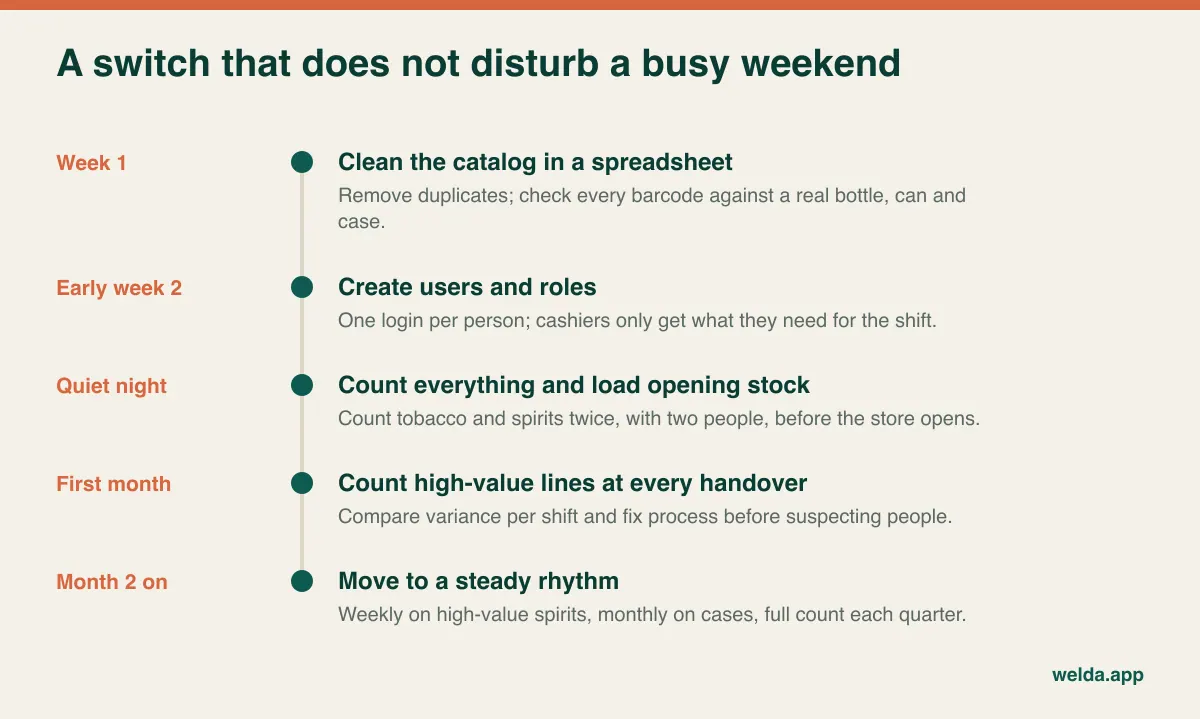
For Welda Stock, a computer with a browser, a standard barcode scanner and a stable connection are enough to begin, and we help with the Excel import during setup, usually completed the same day. An import does not replace a count, however: the file says what you believed you had, and only a physical count says what you have.
Set expectations for the first month. Your reported variance may go up, and that usually means you can see what was already happening. Review per-shift differences, voids and refunds weekly. A corrected barcode and a habit of counting together at handover are often the most valuable outcome of the first thirty days.
If this approach matches your store, book a free consultation and we will look at your liquor store POS software needs together, using your own barcodes and the demo script above. If it turns out you need a specialist instead, we will tell you so.
Frequently asked questions
What is the most important feature in liquor store POS software?
For a store with staff, it is individual logins combined with restricted refunds and voids and a searchable record of those actions. Without them, reports show totals but not responsibility. For a sole owner, accurate barcode data and simple daily reporting usually matter more.
Can software stop employee theft?
No software can stop it on its own. It narrows down when a gap appeared and leaves a trail of transactions. Paired with frequent counts and a handover routine, this makes losses far easier to spot early, and it clears staff who did nothing wrong.
Do I need a liquor-specific POS?
You probably do if your rules demand ID scanning or regulated reporting, or if you depend on certain delivery integrations. If your main issues are shortage, staff control, supplier balances and margin, a retail stock system with roles can be a sensible choice. Test it with your real packs first.
How often should a liquor store count stock?
A practical starting point is tobacco and locked cabinets at each handover, valuable spirits weekly, beer and wine monthly and the whole store quarterly. Adjust after a few weeks of data, and spend your time where the shortage actually sits.
Does Welda Stock handle customer accounts and wholesaler invoices?
Yes. You can track customer balances and payment history, and supplier invoices add goods to stock and update what you owe. If you offer store credit, keep access limited and handle that personal data carefully.
Can I try Welda Stock before I decide?
Yes, through a free demo, where we go through the program using examples relevant to your store. Scope and pricing are settled in that free consultation, with no commitment required.