A barcode POS software price is not one number, because a shop moving to barcodes for the first time is really budgeting for three separate things: the software, the devices on the counter, and the preparation work that makes the products scannable in the first place. The software cost usually depends on your users, locations, product count and how much data you need moved. The hardware cost depends on how many lanes you run and how your counter is laid out. The preparation cost depends on a figure that rarely appears on any quote: how many of the products on your shelves actually carry a barcode that scans.
Keep those three apart and most of the confusion about pricing goes away. Mix them and you will end up comparing a vendor's all-in bundle with another vendor's software-only line, or buying a scanner and a receipt printer before you know whether your chosen system works with them. So rather than chase a headline figure, work out your shopping list first, measure your labelling load, and only then ask vendors for numbers. Anything quoted before anyone has asked about your products and your counter is a guess about a shop they have not seen.
Software and hardware are different purchases, so quote them differently
The two have different lifespans, different billing and different failure modes. You generally buy a scanner once, and if it is a standard model you can usually keep using it after changing software. Software is either paid once or billed monthly or yearly, and it is where your product list, sales history and customer balances accumulate. That is where the real lock-in lives. A device can be replaced in an afternoon. Years of data can only be moved if somebody planned for it.
Bundles are not bad in themselves. One point of contact and devices that have already been tested together can save real effort, especially for a first installation. The trouble is that a bundle makes comparison impossible. One vendor includes a scanner and a printer, another prices software only, and the lower number tells you nothing about which deal is better. Ask every vendor to separate devices from software on the page, name the make and model of each device, and say who owns the hardware if the software contract ends. Some bundled or leased terminals may be tied to a vendor's platform, so ask the question directly rather than assuming.
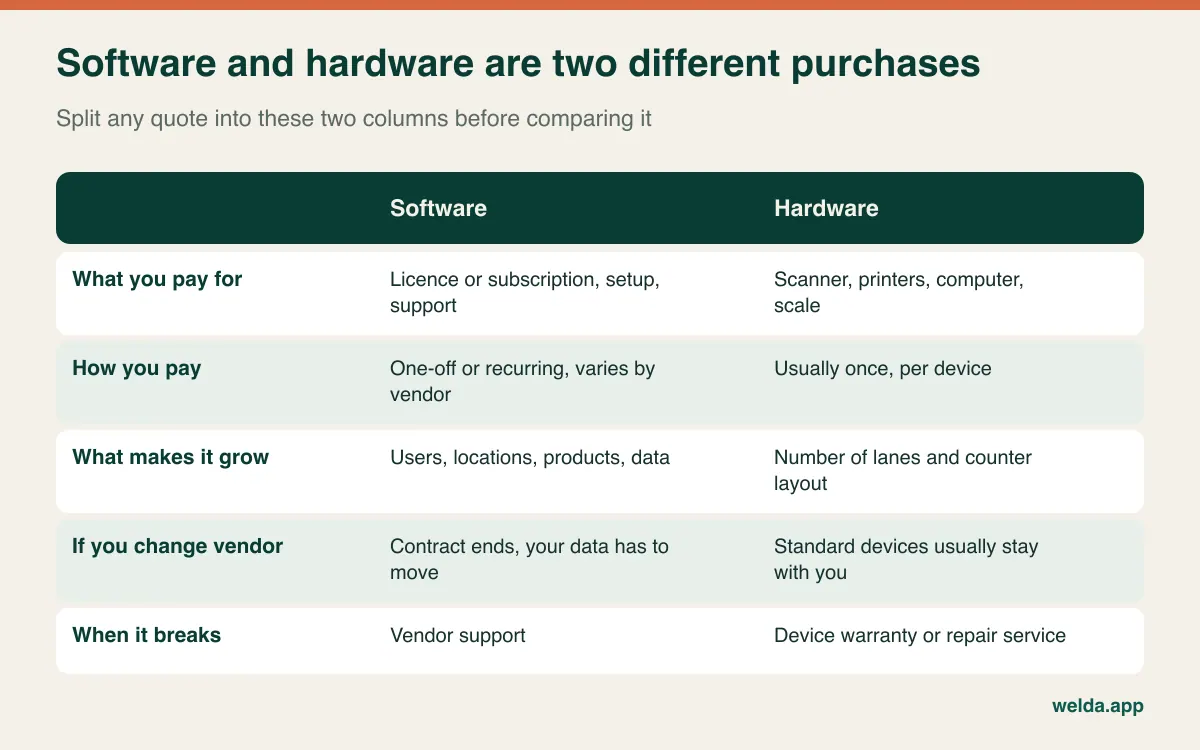
The split also fixes the order of decisions. Choose the software first, then buy what it supports. If you already own a scanner or a scale, mention it in the first conversation and test it before signing. Once boxes of hardware are sitting in the back room, your options shrink and your negotiating position goes with them.
Build the hardware list backwards from the counter
Hardware catalogues invite you to buy everything. A better approach is to picture a real sale: the customer hands something over, you scan it, you take payment, and the customer expects some kind of receipt. Each step either needs a device or it does not.
| Item | When you need it | The question that changes the budget |
|---|---|---|
| Computer or tablet | Almost always; what you already own may do | Does the vendor support this device and operating system? |
| Barcode scanner | Essential for barcode selling | Corded or cordless? Do you need 2D and QR codes? |
| Receipt printer | When receipts print from the software | Does this model work with this system, especially from a browser? |
| Label printer | When many products arrive without barcodes | How many labels, on what stock, for how long on the shelf? |
| Retail scale | When you sell by weight | Does it print labels the software can decode? |
| Cash drawer | When cash matters to your trade | Is it triggered by the printer, the computer or by hand? |
| Card terminal | When you accept cards, so nearly always | Separate contract, or linked to the till? Who sets the rates? |
| Backup internet | When the system runs online | Is a phone hotspot enough for your till at busy hours? |
Card processing deserves a sentence of its own, because it is a line often left out of the conversation. The transaction fees usually come from a payment provider, sometimes the POS vendor itself and sometimes your bank. A low-looking software fee paired with a required payment processor is a different product from software you can connect to anyone, and you can only compare them once the fees are written down over a realistic sales volume.
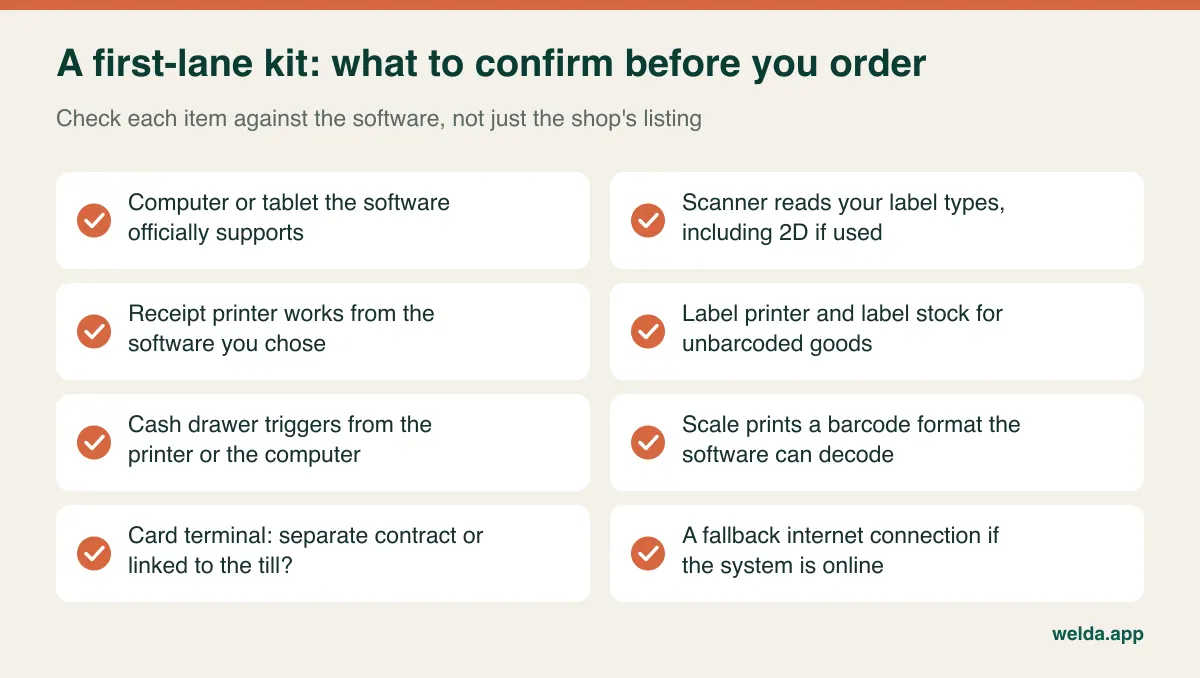
The scanner question is what it fails to read, not what it costs
Scanners fall into two broad families. Linear (1D) models read the traditional striped barcodes found on most packaged goods, and for many shops they are enough. 2D imagers also read QR codes and codes on phone screens, which matters if you run loyalty or coupon codes, or sell goods carrying 2D marks. Buy what your products call for rather than the longest feature list.
Corded or cordless depends on your floor. For someone standing at a counter scanning handheld items, a corded scanner is simple and never needs charging. Cordless earns its place in a hardware store, a garden centre or a pet supply shop, where the bag of feed stays on the cart or the pallet and the scanner goes to it. In a small kiosk, it is more often just one more thing to charge. Presentation scanners, the kind that sit on a stand and let staff use both hands, can help with queues of small packaged items.
What separates devices shows up on awkward products: curved shampoo bottles, glossy snack bags, tiny cosmetics barcodes and creased labels. Take your own hardest products when you test. A scan that hesitates adds up across a queue, and a slow reader teaches your staff to give up and search by name, which quietly removes the point of the whole system.
How many of your products already have a barcode?
This is the number that moves a first-time budget most, and it rarely comes up in a sales call. In a convenience store, nearly everything arrives with a manufacturer's code, so connecting a scanner and importing a list gets you most of the way there. A craft shop, gift store, hardware dealer, toy shop or spare-parts counter can look completely different: plenty of goods come from wholesalers without a code, and some of those that have one are too small or too damaged to scan.
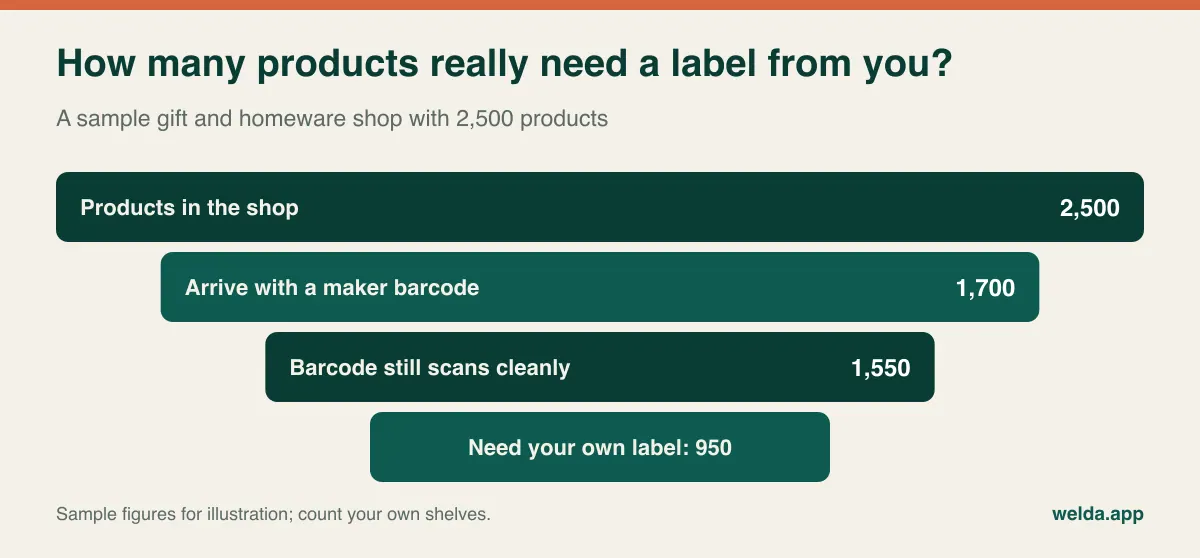
Products without a code need an in-store code and a printed label. In the EAN system, numbers starting 20 to 29 are generally reserved for restricted, in-store use, which makes them a common place to number your own items. In North America you will see similar in-store use of UPC ranges starting with 2 and 4. If you make products and plan to sell them through other retailers, this no longer applies: you need a properly registered number from GS1. Settle this before you print anything, because relabelling is the most expensive correction you can make.
Multiply your unlabelled product count by the average number of units on the shelf and you have your opening labelling job. Using the sample above, 950 items at eight units each comes to 7,600 labels. That is several evenings for two people, and nobody's quote includes it. There are ways to shrink it. For small, cheap, unmistakable goods, a laminated barcode sheet by the till can replace labelling each unit. Use this sparingly, though: the moment two similar items share a sheet, staff will scan the wrong line and your stock figures will drift.
Label stock has its own trap. Direct thermal labels are convenient but can fade with heat and light, which matters little for fast movers and a lot for items that sit on a sunny shelf for months. A label that no longer scans in six months brings you back to searching by name. We covered the setup logic in more depth in our guide to barcode inventory tracking.
Three shops, three very different starting budgets
These are invented examples rather than customers of ours, chosen to show how the same question produces different answers.
A corner convenience store with one till. Most products already carry a code. The priority is scanning speed and getting the first list right, so the hardware side might shrink to one standard scanner on the computer already behind the counter. What sets the bill is the number of staff who need their own logins and how many of your sales run on store credit or tabs that need moving across.
A stationery and craft shop. A huge range, many items without codes, and a seasonal rush at back-to-school. The label printer becomes the key hardware purchase and labelling is the key cost in time. Doing the switch weeks before the rush is the priciest choice you could make. The same work in a quiet month costs far less in stress and mistakes.
A clothing boutique. Every style exists in several sizes and colours, and each combination needs its own code. Thirty styles in four sizes and three colours turn into 360 records. If your suppliers do not provide codes, labelling begins again with each new season, which makes the label printer a permanent working tool rather than a one-time preparation expense.
Selling by weight adds a further variable. A deli, butcher, produce or bulk-food shop has to prove that its scale and software agree on the label format before anything else matters. We go through that test in POS software with scale integration. Do it before you budget for a new scale, since replacing one that already works is money you do not have to spend.
Is your spreadsheet ready to carry barcodes?
Most shops switching for the first time hold their products in a spreadsheet, and spreadsheets treat barcodes as numbers. A thirteen-digit code may display as 7.61E+12, and if the file is saved in that state the final digits can be lost for good. A whole supplier's range can collapse into one wrong number. Leading zeros get stripped in the same way, which is why some products with shorter or zero-prefixed codes fail unexpectedly.
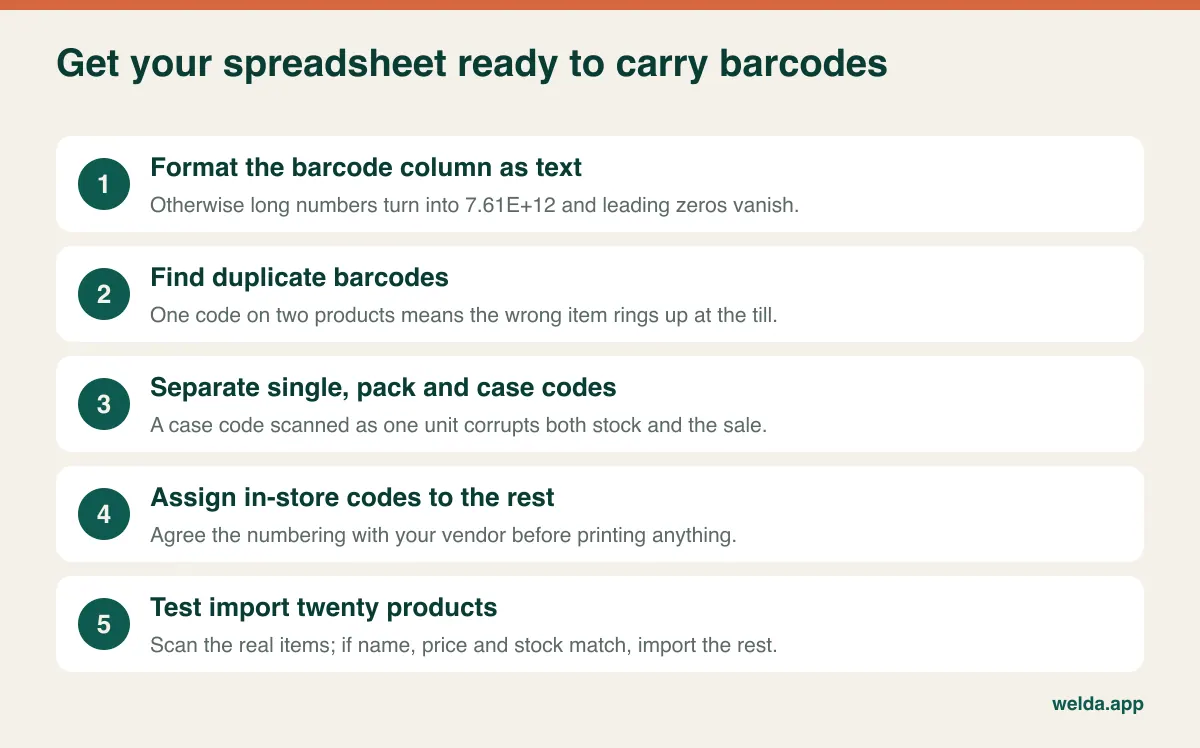
The next problem is pack and case codes. A case of 24 drinks has a different barcode from the single can. Attach both to the same record, and a case can ring up at the price of one can, or one can come off stock as a whole case. Check your best sellers by hand. A third issue is the collision: an imported product whose code already belongs to something else on your list. Find out in the demo what the software does when it sees a duplicate.
A messy list deserves its own line in your budget, so ask who cleans it and who imports it. Some vendors only accept a ready-made template and leave the cleaning to you. Our walkthrough on moving from Excel to inventory software covers the sequence in detail.
Turn each software quote into the same table
With hardware set aside, three questions remain for the software: what is it priced on, when do you pay, and what is included? Vendors may charge per lane, per user, per location, or set tiers by product count. Under a per-user model, a single till with three shifts can look expensive, while a per-lane model may penalise a shop that opens an extra till on Saturdays only. So start by writing your own numbers down: tills, people, locations, product count, and customer balances to migrate.
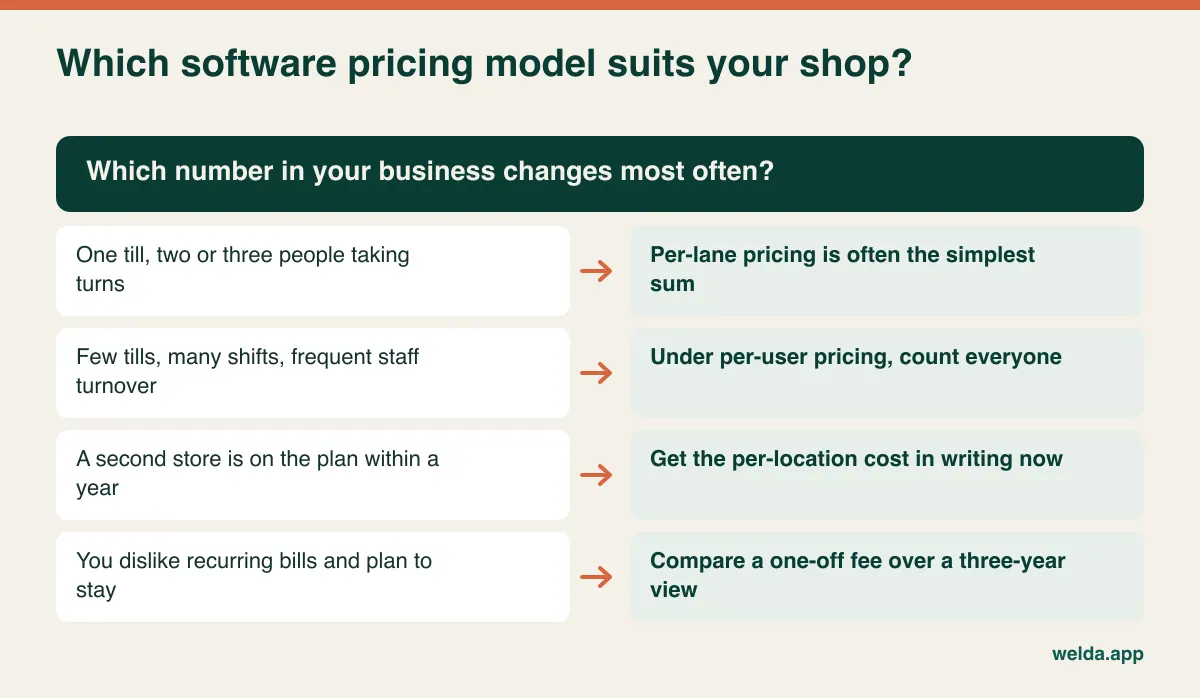
Billing model changes the comparison more than it first appears. A subscription spreads the cost and comes up for renegotiation at each price change. A one-off fee is more visible up front. The honest way to compare them is a three-year total of everything you would pay, including annual maintenance, upgrades, extra users, support, and payment fees if they are tied in. Add one more row: at the end of those three years, can you take your data and leave? That full total is the fairest way to judge any barcode POS software price you are quoted.
Now add the costs that no invoice will show: closing early for the opening count, slower checkouts during the first few weeks, label stock, the replacement scanner a year or two down the line, the backup connection, and retraining each time someone new starts. None of these is anyone's fault, and none of them is free. If you run a larger store, our guide to reading a grocery store POS cost quote line by line goes deeper into how lanes and departments change the numbers.
Tax, receipts and privacy depend on where you trade
Rules on sales records vary sharply by country, and a piece of software that is fine in one place can fall short in another. Some countries require certified fiscal devices or fiscal software, or real-time reporting of receipts to a tax authority. Others focus on keeping sound records and applying the right sales tax or VAT rates to each product. Before you sign, ask a plain question: "What do I have to do to sell legally in my country, and which parts of that does your system handle?" Then check the answer with your accountant. This is general guidance rather than legal or tax advice.
In budget terms, find out whether a compliant receipt is built in or depends on an extra device, whether tax rates can be set per product, and how long records must be kept and in what form. Privacy matters as well. The moment customer names, phone numbers and balances go into the system, you are holding personal data. In the EU and UK, that brings GDPR obligations; elsewhere, local rules may apply. Ask who can see the data, where it is stored, and what happens to it when the contract ends. Restrict your cashiers' access to only what they need.
When holding off is the right call
Not every shop needs barcodes today. A workshop selling a few dozen handmade pieces, a business that is mostly services, or a dealer in one-of-a-kind items may find that labelling costs more than it returns. A tablet with product buttons can cover this kind of shop for a long time.
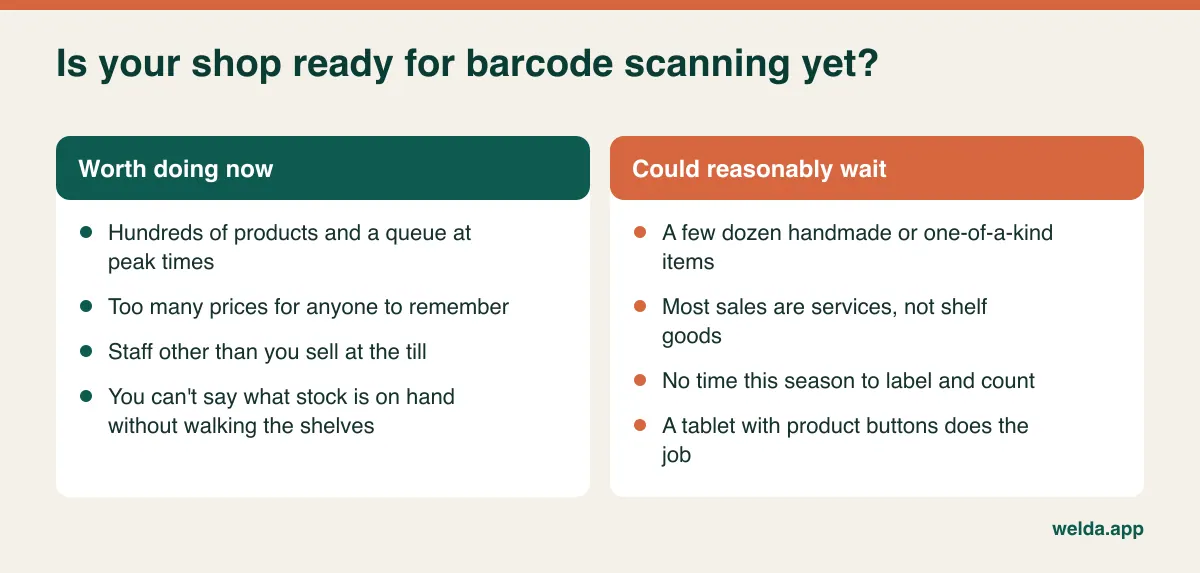
The signs for moving now are more specific. Someone other than you is selling and doesn't know the prices. The same item goes out at different prices depending on who rings it up. You have to walk the shelves to know what is left. The till and the sales records disagree at the end of the day and you can't explain why. If several of these sound familiar, compare the cost of delay against the setup cost using your own figures, not a vendor's sales pitch. A broader look at the decision is in how to choose a POS system.
Switching while the doors stay open
The biggest risk in this move is timing rather than technology. Choosing your busiest week means your staff learn an unfamiliar screen in front of a queue. Pick a quiet period and break the work into pieces small enough to finish in the evenings.
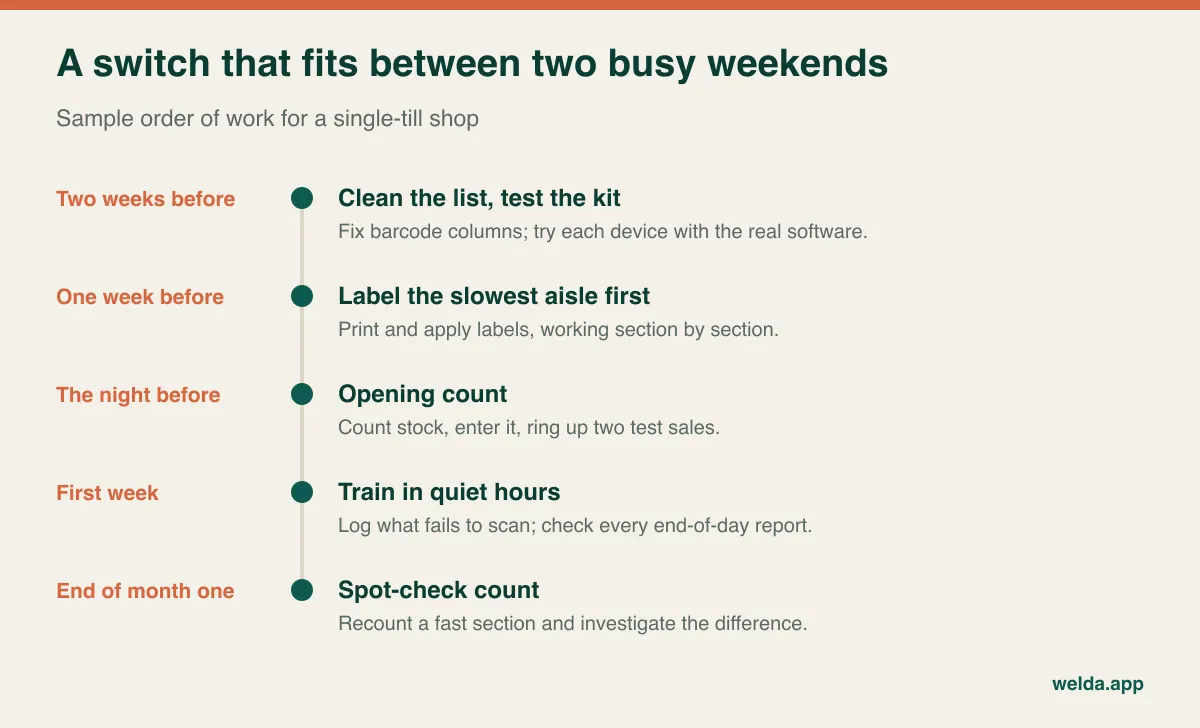
Be careful about running two systems side by side. A notebook kept alongside the software feels safe for a few days, but if it carries on, nobody trusts either record and both drift. Set a cut-off date, and after it, only the software records new sales. Keep a notepad by the till for items that fail to scan and fix them at the end of each day, before searching by name becomes a habit.
Finally, decide early who can ring up an item without scanning it. A till where everything can be keyed as "miscellaneous" will quietly undo all the preparation you just paid for in time and effort, and the stock figures will never catch up.
Bring a bag of awkward products to the demo
In a vendor's demo, every barcode scans and every price is right, because the data was built for the demo. Yours will not be. Pack a bag with one curved bottle, one crumpled label, a product that has both a single and a case code, something with no code at all, and a real label from your scale if you have one. Add two scenarios: a return and a voided sale. If the demo is remote, describe them and ask to see the exact screens.
Then ask: What does a cashier see when a code is not on file, and what can they do without a manager? Can I change prices in bulk? What happens to sales when the internet drops? Which printers can I use? Does adding a user change my bill? When the contract ends, what format do I get my data in? "No, but here is the workaround" is a perfectly useful answer. The ones that hurt are those you get after installation.
What Welda Stock covers on this list, and what to ask us
Welda Stock is web-based inventory and barcode selling software. It runs in a browser on a computer with a standard barcode scanner and a stable connection, and needs no installation. If you sell by weight, it decodes the weight and price barcodes printed by retail scales, and we check compatibility with you before setup. Each sale takes stock down immediately and generates a customer receipt, and you get an end-of-day till report. It also covers low-stock alerts, store credit and customer accounts, supplier invoices and debts, margin per product, stock counts and shrinkage tracking, separate roles for cashiers, warehouse staff and managers, and multiple locations with separate stock. The interface is available in Turkish, English and German.
On pricing, the Welda Stock barcode POS software price is not a fixed package. It depends on your users, your locations and warehouses, your product count and data import, and setting up your hardware and till workflow. There is a one-time setup fee, with no hidden or recurring costs, and setup, spreadsheet import and team training are part of the quote. The amount itself is agreed after a free consultation, once we have heard what you need.
The limits are worth stating too. Because it is web-based, operations run over your connection; if your line is unreliable we plan the working setup with you, but if a fully offline till is a requirement, raise it at the start. Our product documents do not describe fiscal device connections, label printing, in-store code generation, card terminal links or specific printer models, and we won't promise them here. Ask us directly about whatever matters to you. If Welda Stock is not the right fit, it is better for both of us to find out before setup.
Barcode POS questions first-time buyers ask
What is the minimum hardware for barcode selling?
For many shops, it is a computer and a scanner. What you add depends on your products: a label printer if many items have no barcode, a label-printing scale if you sell by weight, and a receipt printer if receipts come from the software. Confirm compatibility before you buy.
Does any barcode scanner work with any POS software?
Most standard USB scanners behave like a keyboard, typing the number wherever the cursor is, so compatibility problems are uncommon. Small settings can still cause trouble, such as whether the scanner sends Enter after a code or how it handles your keyboard layout. A short test with your own scanner settles it.
Can I switch if most of my products have no barcode?
Yes, but put the labelling job in your budget and on your calendar. Multiply unlabelled products by average shelf quantity to see the size of it. Barcode sheets by the till can bridge the gap for small, unmistakable items. Ask how the software handles in-store codes.
Is a subscription or a one-off fee better?
It depends on your cash flow and how long you expect to stay. Compare both on a three-year total, including extra users, support, upgrades and any payment fees tied to the system. Welda Stock has a one-time setup fee, and the amount is agreed in a free consultation.
Can I reuse the devices I already have?
Often, yes, particularly standard scanners and computers that meet the requirements. Receipt printers and scales are where compatibility needs testing. List your devices with their model names when you ask for a quote, so that you are not priced for hardware you already own.
What should I prepare before asking for a quote?
Note your industry, locations and warehouses, approximate product count, number of users, whether you use scanners or scales, and how you track stock now. A rough count of unbarcoded products helps too. With these facts on the table, vendors will be pricing the same job and you can really compare them.
If your list is ready, the next step is simple. Tell us your product count, your devices and how your counter runs, and we will fill in the same table for Welda Stock with you in a free consultation, with no commitment.