The right cosmetics store inventory software tracks every shade and size as its own item, records who did what at the till, and lets you see sales, margin, stock value and count variance for each brand. If you sell many brands and high-value products, those three abilities matter more than any feature count. A general stock tool can run a beauty shop for a while, but it tends to fail in the same places: shades merged into one record, testers that vanish into "shrink", and a brand conversation you have to prepare by hand.
This guide is for owners of independent beauty, fragrance and skincare shops who suspect they are losing money somewhere between delivery and till, and who want to choose software on that basis. It explains how to test any product against the awkward realities of this trade. It also says plainly where Welda Stock, our cosmetics store inventory software, fits and where its published feature set doesn't reach, so you can rule it in or out quickly.
Three questions to ask before you compare a single feature
Most software comparisons begin with feature grids, and feature grids flatter everybody. Start instead with the questions you currently struggle to answer. Pick a real product from your shelf, say a fragrance that came up two units short at the last count, and imagine asking the system about it.
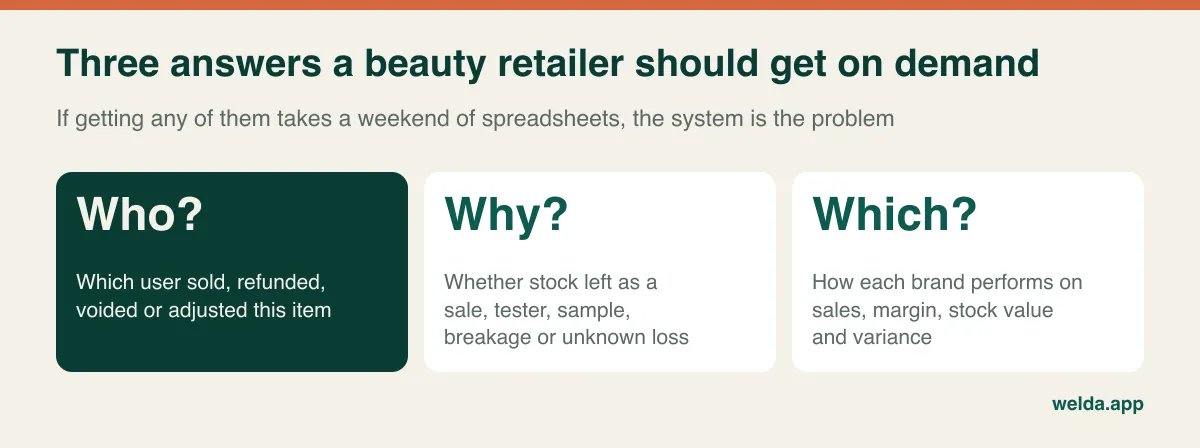
Who touched it? You need to know which user sold it, refunded it or changed its quantity. Why did it leave? A sale, a tester, a sample, a breakage and an unknown loss all look identical on the shelf, which is to say the item is gone. Which brand does it weigh on? If that product's brand is your biggest source of variance, that shapes what you put in a locked cabinet and what you say to the brand's representative.
Keep these three questions in front of you through every sales call. They translate almost everything else in this guide into something you can actually check. They also protect you from a common trap, which is buying impressive dashboards that summarise data your staff were never recording properly in the first place.
Why a single lipstick can wreck a stock count
Beauty has a variant problem that looks mild until you try to count it. A foundation may come in dozens of shades, a fragrance in three bottle sizes plus a travel spray, and a skincare line in full size, mini and refill. Each of these sells at its own pace, runs out at its own pace and gets reordered separately. If they share a record, you only ever see a total, and totals lie: the system reports nineteen units while the shade your regulars want has been gone for a month.
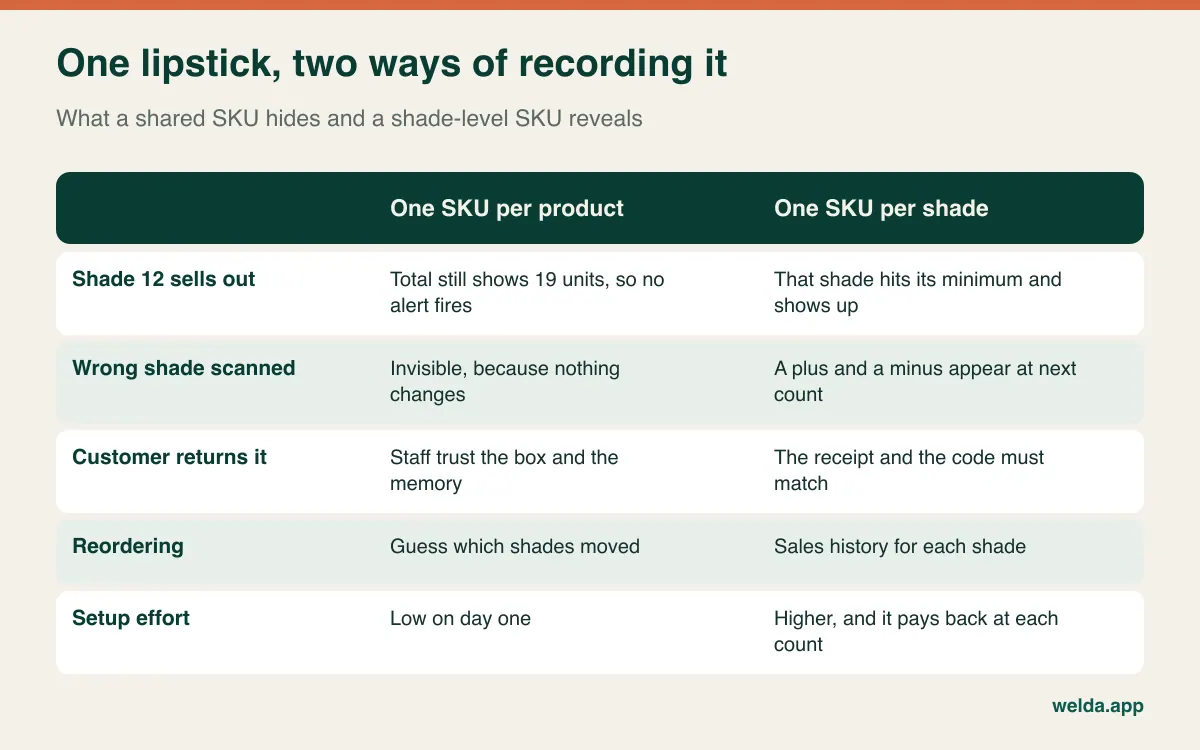
Shade-level records bring a useful side effect. Similar packaging means staff will sometimes scan shade 12 when the customer bought shade 14. In a shared record that error never shows. With separate SKUs it shows up at the next count as one unit over and one unit short in the same line. That is a pattern worth learning to read: pluses and minuses within a line usually point to scanning habits, while minus-only variance on expensive items deserves a harder look.
Gift sets need their own decision. A boxed set often carries its own barcode, while the same items also sell individually. If your software does not automatically reduce the components when a set is sold, treat the set as a separate item. If you break up unsold sets after the holidays, record that as a stock movement, not as a quiet shelf rearrangement. Ask any vendor how sets are handled and watch the answer on screen, because bundling is one of the areas where products differ most.
Welda Stock defines products by SKU and barcode and imports lists from Excel, so a shade-level catalogue is achievable without typing every line. Our pages don't describe a dedicated parent-and-variant screen or automatic set components, so we would set each shade up as its own SKU and treat a set as its own item.
Testers, samples and gifts: stock that leaves without a sale
Here is where beauty differs most from general retail. A meaningful amount of product leaves your sellable stock deliberately. Testers get opened, samples go into bags, a gift-with-purchase promotion moves units out by the carton, and bottles get dropped. None of this is theft, but if nobody records it, it leaves exactly the same hole in your count as theft does.
That creates a costly habit of mind. When a large variance appears, someone says "it's probably testers" and the conversation ends. A vague explanation like that is a perfect hiding place for real losses. Recording planned movements is less about tidy books and more about shrinking the unexplained remainder until it means something.
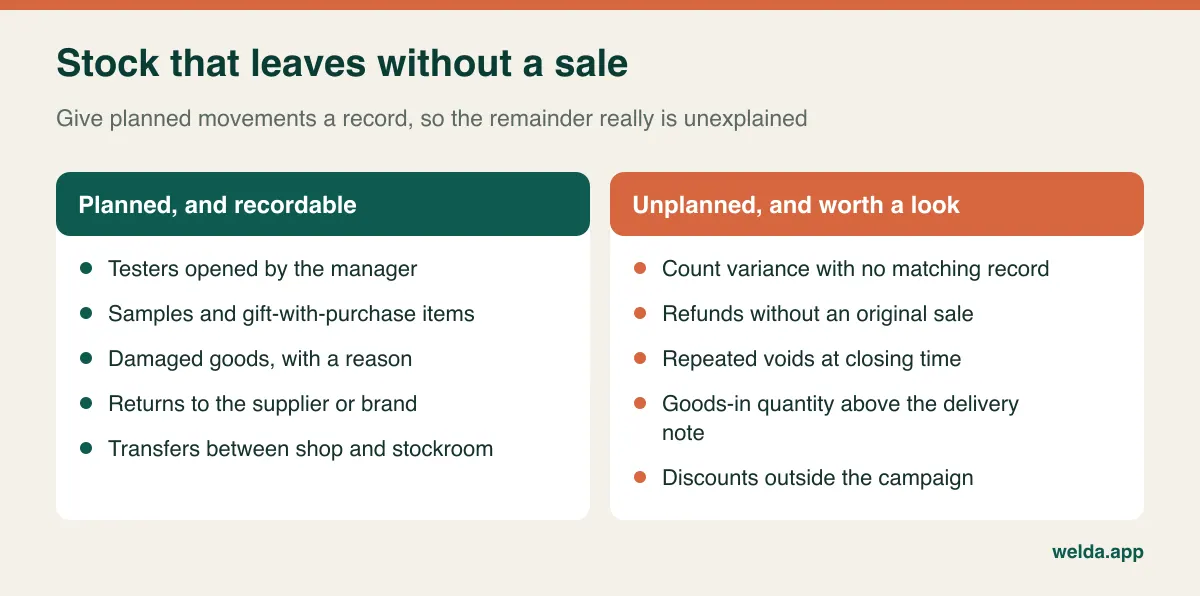
Separate two kinds of tester. Those supplied free by a brand shouldn't enter sellable stock at all, although they sit on your shelf and can confuse a counter. Those you open from your own stock are a real cost, and they belong in your margin thinking. Your supplier terms determine which is which, and your accountant should advise on how they are treated in your books. Set a simple rule too: only a manager opens a tester from stock, and the date goes on the record, so you can see whether a brand's testers are being replaced monthly or weekly.
Welda Stock includes stock counts and shrinkage and loss tracking, and that is what we would use: self-opened testers recorded as a loss entry with a clear note, or a separate SKU for tester units. Our product pages don't describe a dedicated tester module, so don't assume one. Our guide to preventing retail shrinkage covers the wider picture, including the physical measures software can't replace.
Shrink isn't one number: reading variance by brand and by value
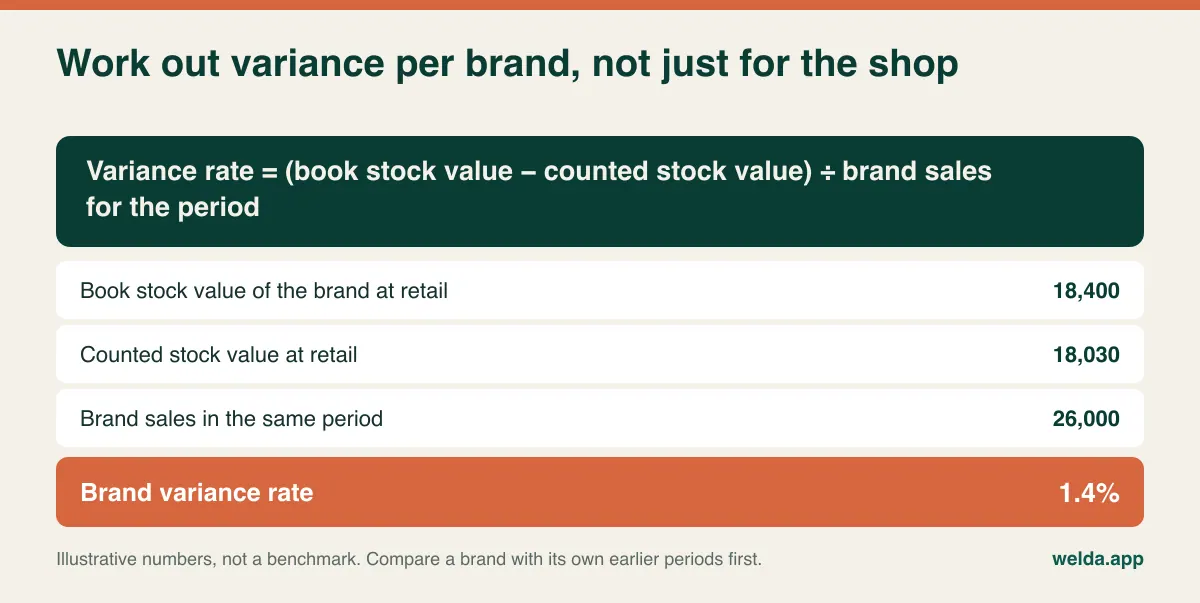
A single shop-wide shrink figure has limited use in cosmetics, because losses are concentrated. High value in a small package means two missing fragrances can outweigh many missing low-cost items. Unit lists hide this. A report sorted by units puts lipstick first, since it has many lines and look-alike packaging. Sorted by value, fragrance may jump to the top.
So review count differences in units and in value, side by side, and then per brand. The calculation below is simple enough to do in a spreadsheet, as long as your data can be filtered by brand.
Timing matters as much as measurement. If you count once a year, a problem that began in February is ancient history by December, with footage overwritten and rotas forgotten. A better rhythm is to count by risk. Check the locked fragrance cabinet at closing, take one small high-value category or brand each week, count a whole brand once a month, and do a full count before each main gifting season. Your software should make that easy, which means counting one brand or shelf without freezing the whole store. We go deeper on rhythm in how often to count inventory.
One expectation to set clearly: no software stops anyone from pocketing a lipstick. Display design, cabinets, cameras and attentive staff do that work. What software can do is shorten the time between a loss and your noticing it, and narrow it down to a product, a period and, sometimes, a type of transaction.
Permissions for a shop floor where advisers also sell
In many beauty shops, the person advising the customer also rings up the sale, processes the return and helps count at the end of the month. In a small team that overlap is normal, but it means one person can create and clear the same discrepancy. Separating a few duties protects honest staff as much as it protects you. When a difference appears and the rules are clear, nobody needs to feel under suspicion.
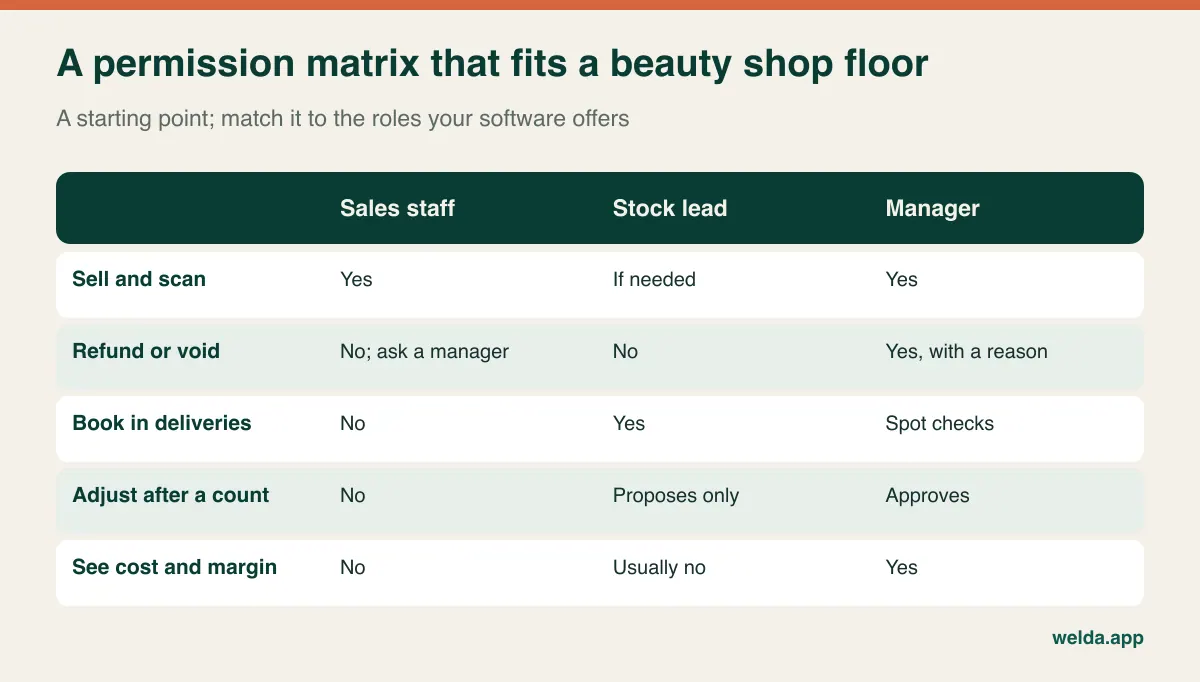
The actions to watch are predictable: refunds without a linked sale, voids clustered at closing time, discounts outside any campaign, goods booked in above the delivery note quantity, and stock corrected without a count. All of these have innocent explanations. The aim is to see them when they repeat. And drop the shared "till" login, because no permission structure survives a password that five people use.
Welda Stock offers separate permission levels for cashiers, warehouse staff and managers, and you decide which roles can handle returns, voids and report viewing. Staff log in under their own user, so sales are recorded per user. There are three things our pages don't spell out, so please see them on screen before relying on them: a per-user discount cap, a full history of every stock adjustment, and a login limited to a single brand. Read more on the people side in our piece on retail staff management.
Brand-level reporting: the report your buyers and reps will ask for
Multi-brand beauty retail runs on brand relationships. Shelf space, promotions, purchase targets, returns of unsold lines and year-end terms are all discussed brand by brand, and arrangements vary widely by contract. Some brands place their own consultants in your shop, some supply goods on consignment, and some link support to purchase volume. A system that only reports by product and category leaves you building that picture by hand each time.
Before any meeting with a brand you should be able to produce six numbers: sales in units and value, gross margin, current stock value, stock turnover, average discount given, and count variance. Read them together. The brand with the largest sales may also tie up the most capital and generate the most variance, while a smaller line quietly earns more per unit of shelf space. That is the conversation you want to have with evidence on the table, and it might end with less buying, a better returns term or a larger display. For a primer on interpreting these figures, see how to read inventory reports.
Three practical knock-on effects are worth checking in any system. A brand's consultant should have their own login and shouldn't see other brands' cost prices. Consignment stock sits on your shelf but may not be your capital, so a stock value report needs to separate it, even if only through a dedicated supplier or product group. And if your terms depend on annual purchases, you want to answer "how close are we to the target?" in October, not January, which requires purchase history by supplier.
Now for candour about our own product. Welda Stock's pages describe per-product margin analysis, daily, weekly and monthly sales reports, supplier invoices and debt tracking, and Excel export of reports. They don't describe a ready-made brand scorecard or a consignment module. The working method is to prefix SKUs by brand or use product groups, export the report to Excel and summarise by brand. For a weekly or monthly review, that's a sensible setup for many shops. If you need the scorecard live inside the system, ask directly and see it before you decide. Ask every other vendor the same thing, and don't accept "you can build a custom report" until someone has built one in front of you.
Same barcode, two costs
A detail that general stock software tends to skim over: you may buy the same fragrance from different authorised suppliers or on different promotional terms. The barcode stays the same while your cost changes. If the system only knows the latest purchase price, your margin on older stock is really an estimate. Ask how cost is calculated, whether by last price or an average, and how a promotional purchase affects the margin report.
Provenance matters too. Beauty is a category where customers worry about counterfeits, and where brands may care which channels you buy through. You rarely need bottle-level tracking, but you should be able to show which supplier invoices a product came in on. It is good housekeeping, and it gives you a straight answer when a customer or a brand asks.
Batch codes, expiry dates and period-after-opening
Cosmetics have a shelf life and carry traceability marks. Depending on the market, packaging commonly includes a batch number and either a minimum durability date or a period-after-opening symbol. In the EU, these labelling duties sit within the Cosmetics Regulation (EC) No 1223/2009; other markets have their own rules, and they change over time. Treat this section as a guide to the software decision and take legal questions to a qualified adviser or your national regulator.
For inventory purposes, ask how far you actually need to go. Level one is shelf discipline: first in, first out, older stock to the front and a monthly date sweep. Level two is a watch list for slow lines with short dates. Level three records batch and expiry for every delivery and traces which batch went to which sale. Level three makes a recall easier to handle, but it requires extra scanning and discipline at the till, which is real labour in a busy shop. Some businesses, depending on their contracts and product mix, may need it. Many independent shops won't find it worthwhile.
Be clear about what you are buying. Welda Stock lets you write off expired items as losses, but our pages don't describe batch-level tracking or expiry alerts. If batch traceability is a hard requirement, prioritise tools built around it and test that function first with real products.
Tax, receipts and customer data in your market
Fiscal rules for retail differ by country: some require certified tills or fiscal devices, others require specific receipt content or real-time reporting. Sales tax and VAT treatment of samples and free gifts can also be less obvious than it looks. Don't assume that an inventory product is automatically your compliant till. Ask each vendor: "In my country, is your receipt a legal fiscal document, and what do I need alongside your system?" Then check the answer with your accountant.
Welda Stock creates a customer receipt for each sale and an end-of-day cash report. Our product pages don't claim fiscal certification for any particular country, so raise this at the start of any conversation with us.
Customer data needs thought as well. Skin concerns, sensitivities and allergy notes can go beyond ordinary contact details and may attract stricter treatment under the GDPR and similar laws. Only record what you need, limit who can see it and get proper consent for marketing. User-level activity reports are also personal data about your staff in many jurisdictions, so tell your team what is being monitored and why.
A demo script built from awkward products
Vendors demo with tidy catalogues. Bring a bag of real products and make the session about your edge cases. A good script takes under an hour, and running the same one with each vendor gives you comparable notes.
- Two near-identical shades. Scan the wrong one, complete the sale, then correct it. How many steps does it take, and what trail remains?
- Two sizes of one fragrance. Are prices, stock and sales history separate? How fast can a new adviser find the right one without a barcode?
- A boxed gift set. Sell it, then break one up. What happens to stock for the set and its contents?
- A tester opened today. Record it as a real employee would. Where would you see it next month?
- A refund with no receipt. Log in as a cashier and try it. What blocks you? Who can see that you attempted it?
- A partial count of one brand. Count without closing the shop, then adjust the difference. Who approves it, and can it be seen later?
- A brand export. Produce a report for one brand with sales, margin and stock value, right now, from the data on screen.
Two habits make the demo more useful. Time the routine jobs, because if choosing a shade takes three screens on a busy Saturday, staff will find a shortcut and your data will suffer. And when someone says "yes, it can do that", ask to see it. That applies to us as well; our free demo uses sample data suited to your sector, and we would rather you test an awkward case than discover it after go-live.
Comparing quotes without being misled by the headline figure
The licence line is the most visible part of a quote and often not the most decisive. In a cosmetics store, total cost is shaped by the number of users and locations, the size of the catalogue, who cleans and imports shade-level data, staff training, hardware such as scanners and receipt printers, add-on modules, support terms and any recurring charges. Put them in one table and work out a three-year total for each vendor. Get written answers to the questions that usually surface later: is data migration included, what does an additional user cost, what happens to your data if you leave?
Then consider the cost that never appears on an invoice: a poor setup. Rebuilding a catalogue that wasn't structured by shade, retraining staff on new codes and making buying decisions from reports nobody trusts can outweigh a difference between two quotes.
Welda Stock is priced for each business based on users, locations and products. It has a one-time setup fee, and our pricing page states there are no hidden or recurring costs. Setup, Excel data import and team training are part of the offer. We confirm the scope and the price in a free conversation, once we understand your shop.
When this kind of software isn't the right fit
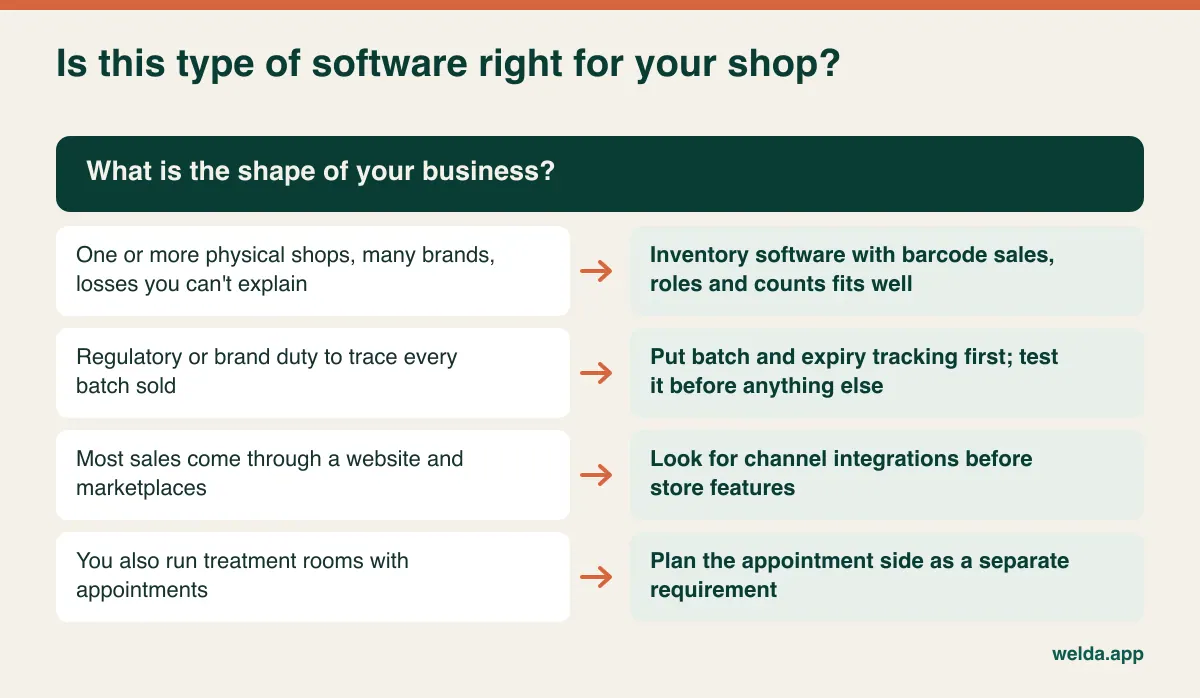
Welda Stock fits a physical retailer that scans barcodes, runs one or several shops and stockrooms, and wants clear stock, permissions and reporting. Each location keeps its own stock balance, and you see them all from one account. It is web-based, so there is nothing to install and you can check sales from another computer. It also depends on your internet connection, so if yours is unreliable, tell us early so we can plan for it.
It is less likely to fit if most of your sales run through a web shop and marketplaces, since channel integrations aren't part of what our pages describe. The same goes for a business where batch traceability is mandatory, or where a points-based loyalty scheme or gift card programme sits at the centre of how you sell. In those cases you are better served by a specialist, or at least by asking the question before anything else. Treatment rooms and appointment booking are a separate requirement from stock too, and should be assessed as such.
Moving over without losing the gifting season
Beauty retail peaks around gift-giving: the winter holidays, Valentine's Day and Mother's Day, along with local festivals in your market. Avoid changing systems just before any of them. Your new process should have settled well before the first busy weekend.
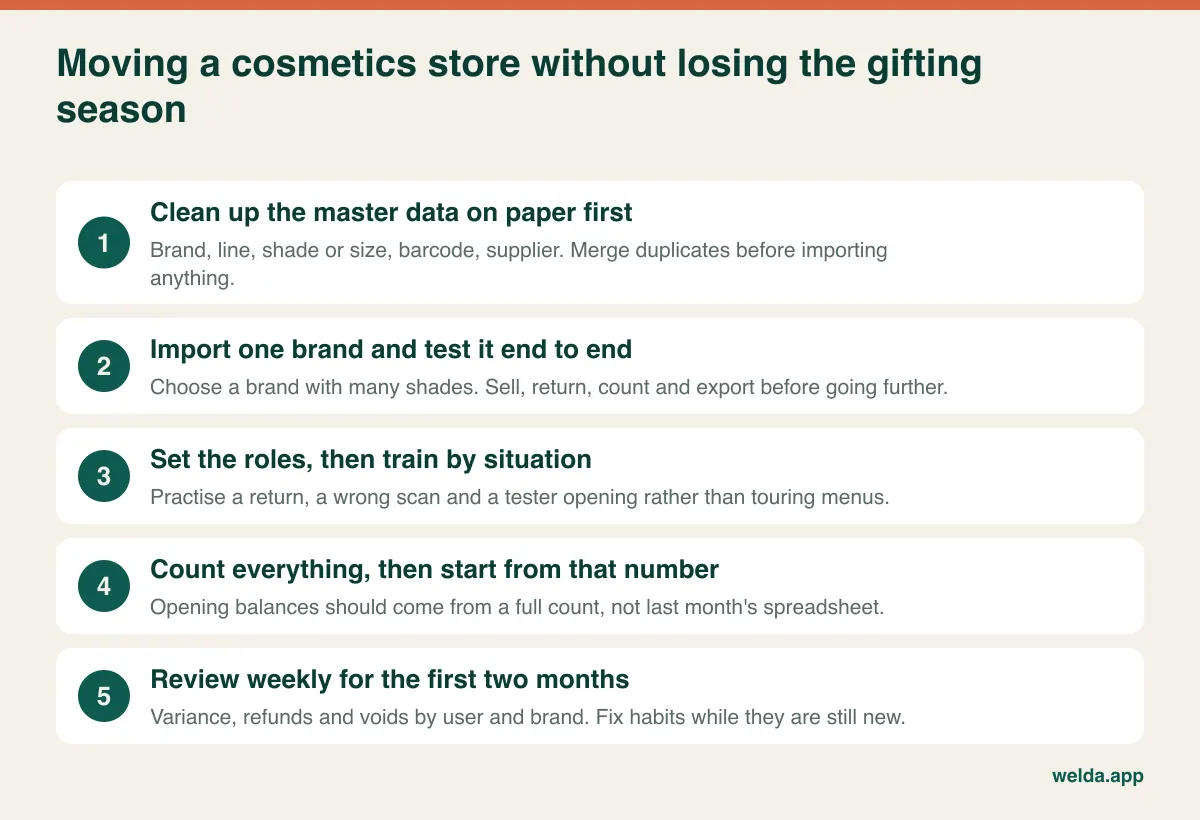
When you are ready to look at your own shop rather than a generic one, review what our cosmetics store inventory software covers and book a free conversation. Bring your number of brands, an approximate SKU count and your location setup. That is enough to establish whether we are a good fit, and to settle scope and price if we are. If we aren't, we would rather tell you so at that stage.
Frequently asked questions about cosmetics store inventory software
Will inventory software stop theft in my shop?
Not on its own. Physical protection comes from display design, cabinets, cameras and attentive staff. Software helps you notice losses sooner and narrow them down by product, brand and period, as well as see who performed which transaction.
Does every shade need its own SKU?
If it sells and runs out separately, yes. Manufacturer barcodes are usually shade-specific, and bulk import from a spreadsheet means you needn't type each line by hand.
How should I record testers?
Keep brand-supplied testers out of sellable stock with their own code. Record testers opened from your own stock as a written-off item with a note and a date. In Welda Stock you would use a loss entry or a separate SKU, since our pages don't describe a dedicated tester function.
Does Welda Stock report by brand?
A ready-made brand report isn't described on our pages. Per-product margin and sales reports are, along with Excel export, so you can link products to brands through an SKU prefix or product group and summarise from there. If you need it live on screen, ask us and see it before deciding.
Can I stop cashiers from issuing refunds?
Yes. You set separate permission levels for cashiers, warehouse staff and managers, and you decide which roles can handle returns, voids and report viewing.
Does it track batches and expiry dates?
Our product pages don't describe batch tracking or expiry alerts. You can write off expired products as losses. If batch traceability is required in your business, choose a tool that clearly offers it.
Can I see which shop has a shade in stock?
Yes. Each branch and warehouse has its own stock balance, visible from one panel, so an adviser can check another location while the customer is standing there.
How long does the switch take?
Welda Stock setup is usually finished the same day, and importing data from Excel is included. The real time goes into cleaning your shade-level list and carrying out the first full count, and that depends on the size and condition of your catalogue.