The right herbal shop POS software passes three tests with your own stock: it records loose herbs by weight and packaged goods by unit without confusion, it reads your scale's label at the till and reduces stock by the exact amount, and it shows you what each product earns after supplier prices change. A system that cannot do those three things will end up as an expensive card terminal, however good the demo looked. Everything else, from loyalty features to dashboards, is a second-round question.
This guide is for owners of herbal shops, apothecaries, spice shops and natural product stores with hundreds of small items. If you want practical advice on organising the stock itself, our guide to bulk and weighed stock in herbalist shops covers that step by step. This one has a narrower job: helping you decide what to buy, what to test before you sign and when a specialised system would be a waste of money.
Why general retail POS struggles behind a herb counter
Most retail POS systems start from one assumption: a product has a barcode, someone scans it and one unit leaves the shelf. A clothing store or gift shop fits that perfectly. A herbal shop does not. A customer might ask for two ounces of nettle, a bottle of tincture and "that tea I bought last month, the purple one". Only one of those three items has a barcode, and one of them does not even have a name yet.
The trouble is rarely a dramatic failure. It looks more like slow abandonment. Weighed sales take too long, so staff start ringing them through under a generic "herbs" button. Stock figures drift away from what is on the shelf, so nobody trusts them. Within a few months the system handles payments, while the real knowledge of the shop stays in the owner's head and a notebook under the counter. You paid for inventory software and got a till.
So instead of comparing feature lists, measure the most ordinary five minutes of your day. Picture a Saturday with three people waiting. The first wants loose chamomile and a boxed tea. The second wants a refill of a house blend. The third has a question about a tincture while you are mid-weigh. If a system can move those sales along without forcing you to invent workarounds, it deserves a closer look.
Decide how you will sell before you judge the software
Your product records matter more than the look of the sales screen, and they are where the decision really begins. The same chamomile can exist in your shop in three ways: loose in a jar, pre-packed in your own two-ounce pouch and as an ingredient in your house blend. Each has a different selling unit, a different way of being scanned and a different cost.
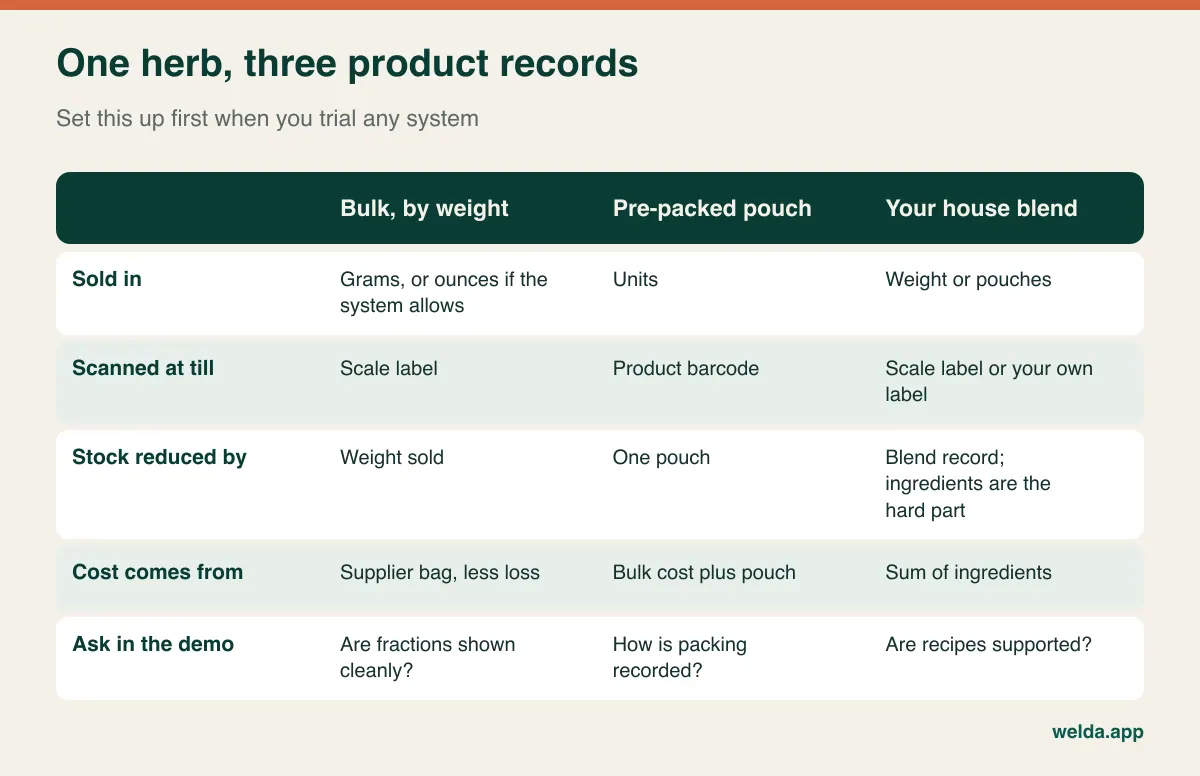
When you evaluate a system, three questions tell you a lot about whether it was designed with weight in mind:
- Does it handle fractions properly? After selling 1.5 ounces, does the stock figure show the correct remainder, or does it round? Systems built around whole units often produce stock counts that are technically present and practically useless.
- How do you record packing? When you fill 30 pouches from a bulk bag, the bulk figure should fall and the pouch figure should rise. Some systems have a dedicated action, others use two separate stock movements. Either can work, so ask to see it and time it.
- What happens with two grades of the same herb? Organic and conventional lavender at different prices usually deserve separate records. Otherwise your margin report averages two very different products into one misleading number.
Also count your range honestly before you speak to anyone. Do not count jars; count records. Loose peppermint is one, a one-ounce pouch is another and a four-ounce pouch is a third. Counted this way, the number can easily land above your first guess, and any quote or setup plan depends on it.
Common names, Latin names and the search box
Here is a test no grocery POS demo will suggest. In a herbal shop, one plant commonly goes by several names. Customers ask for lemon balm, your supplier invoices melissa or Melissa officinalis, and an older book on your shelf may call it something else again. Pot marigold and calendula are the same herb on two different labels. Some common names can even refer to different plants depending on who is speaking, which is exactly why careful shops keep the botanical name on record.
This has a direct cost. A new assistant who searches "calendula" and finds nothing either loses the sale or picks the wrong item. Sell the wrong record and one product shows too little stock, another too much, and the next count produces a gap nobody can explain. If a supplier invoice uses a different name, it is easy to create a second record for the same herb. A year later you have three lemon balms, and neither the stock nor the margin on any of them is right.
Things to check in the search box:
- Does search match a word in the middle of a name, so "balm" finds "Lemon balm (Melissa)"?
- Can you search by SKU as well as by name, and does it respond fast enough while a customer waits?
- If you rename a product later, is its sales and purchase history preserved?
- Is there a field for alternate names? If not, a consistent naming pattern such as "Calendula (Pot Marigold), loose" does most of the work.
That last item is mostly up to you. A couple of hours spent building your own dictionary of names before migration saves months of confusion. It also helps any new staff member, whichever system you end up choosing.
Weighed sales: what actually has to happen at the counter
A label-printing scale prints a barcode that contains an item code plus a weight or price. When it is scanned, the POS decodes it and adds the right item, weight and amount to the receipt. Packaged products go on the same receipt with their own barcodes. That is the workflow to look for, and our article on POS software with scale integration explains barcode formats in more depth.
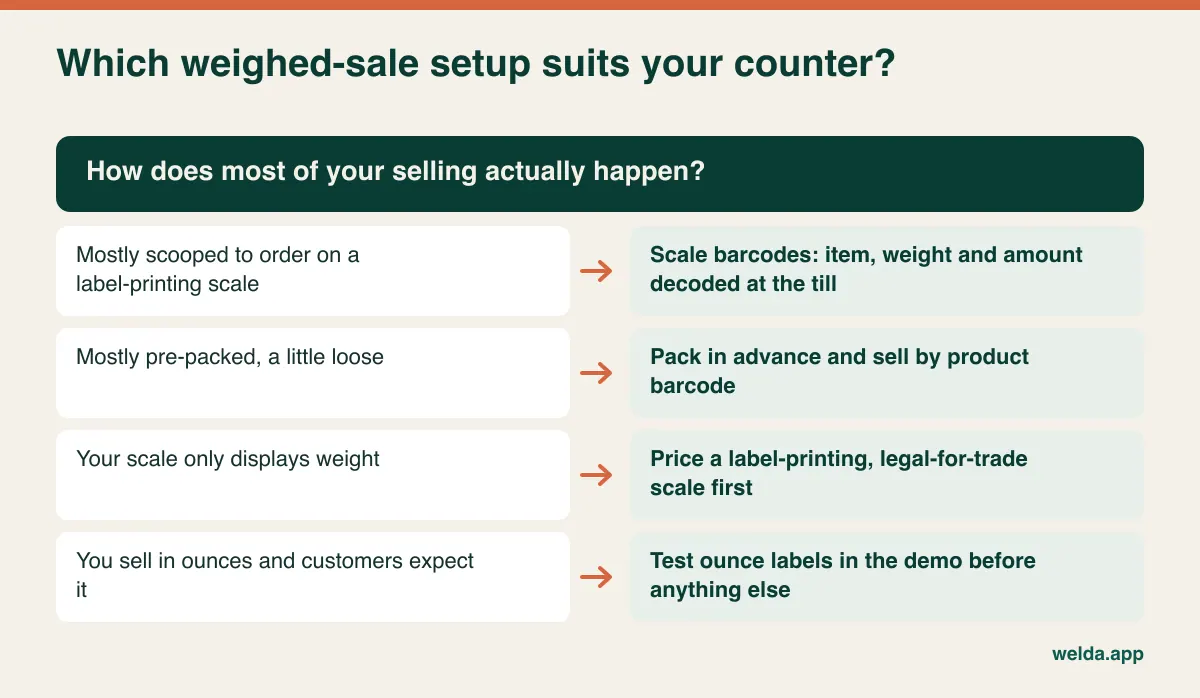
Herbal shops also run into details that rarely come up in a sales call:
- Very small quantities: A scale chosen for vegetables may not suit half an ounce of saffron or a few grams of a costly resin. Check the scale's resolution and whether the label represents small weights accurately.
- Tare: The bag or jar should not be sold as product. On small sales, even a light paper bag is a meaningful share of the weight, so set tare carefully.
- Customers' own containers: Refill customers bring jars. Decide how you will weigh and record the empty jar before you fill it, and try the routine during the demo.
- Ounces versus grams: If your customers in the US think in ounces while your supplier invoices in pounds or kilograms, conversions must stay consistent from bag to label to stock figure. Test this explicitly. We describe Welda Stock's scale workflow in grams and kilograms, so if ounce-based labels matter to you, bring one to the demo and see the result with your own eyes before relying on it.
- Two price lists: If the scale and the POS hold separate prices, a price change means two updates. Ask who changes a price, where and in how many steps.
With Welda Stock, weight and price barcodes printed by retail scales are decoded automatically, packaged items are added by barcode on the same receipt and each item's stock drops by the amount sold. You can see this on our herbal shop POS software page. We would rather test your actual labels than promise compatibility with a scale model we have not seen.
House blends: the question most POS demos skip
Blends are what make herbal retail unusual. Sleep teas, digestive blends, seasonal mixes: you make them on the premises, they often carry your best margin and they are hard for stock software. A blend sold over the counter looks like one line on a receipt, while three or four ingredient jars have quietly gone down.
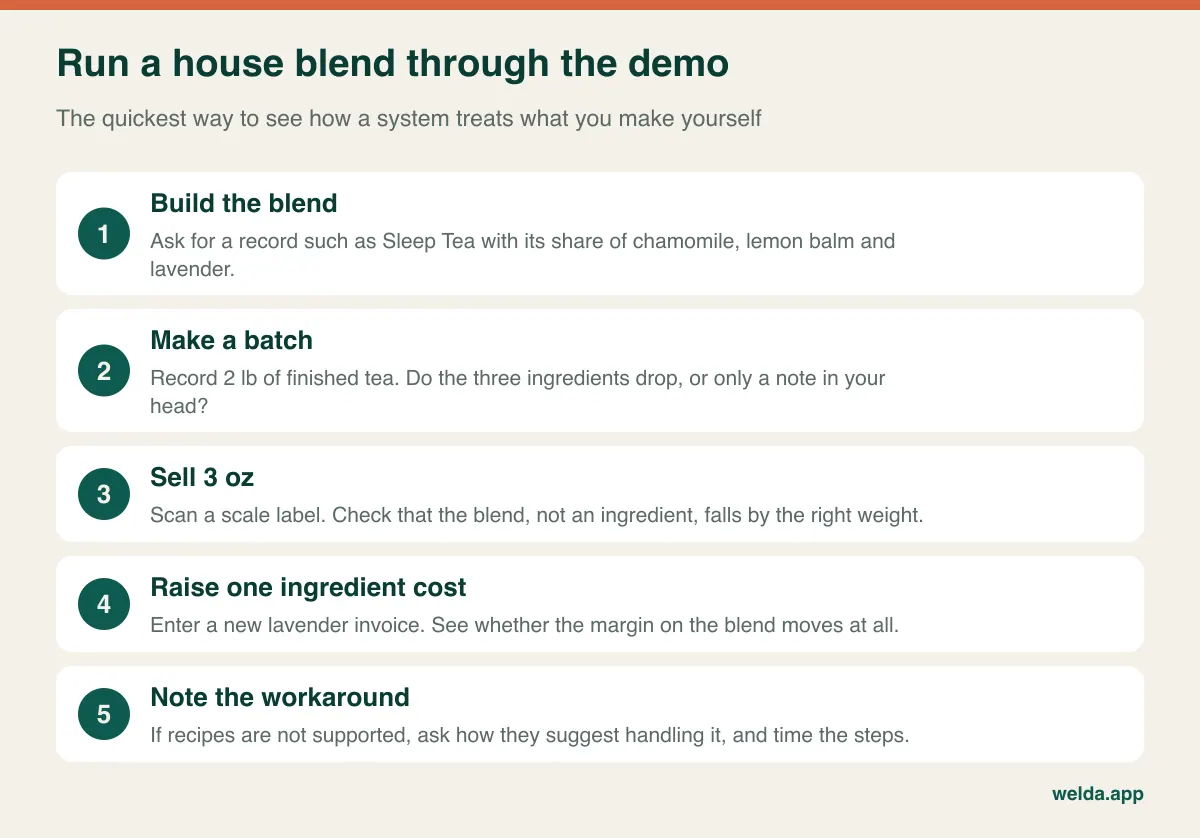
Where a system supports recipes, you define the mix, record a batch and let ingredients drop automatically. Cost then follows current purchase prices. That capability often comes as a production or manufacturing module, which may be more than a small shop wants to run. The honest question is how much of your turnover depends on blends:
- A few blends in small batches: A separate record for each blend, with ingredients reduced by stock movements when you make a batch, is usually enough. You work out the cost by hand now and then.
- Blends as a core product line: Ask to see recipe logic live. Change one ingredient cost and check whether the margin on the blend responds.
- Your own brand sold to other retailers: You are moving beyond retail POS. Batch records and labelling become serious needs, and so do the rules around them.
To be straightforward: we do not describe a recipe or blend production module for Welda Stock on our pages. It offers stock movements and waste records, but if blends sit at the centre of your business, raise it at the start of the conversation so that neither of us wastes any time.
The margin report that should drive your decision
Best sellers and best earners are often different products, and few herbal retailers can say with confidence which is which. The invoice weight is not the weight you sell. Dust settles at the bottom of a bag, spillage happens on every refill and some stock sits until its aroma has faded. Your report needs to reflect this, or it is flattering you.
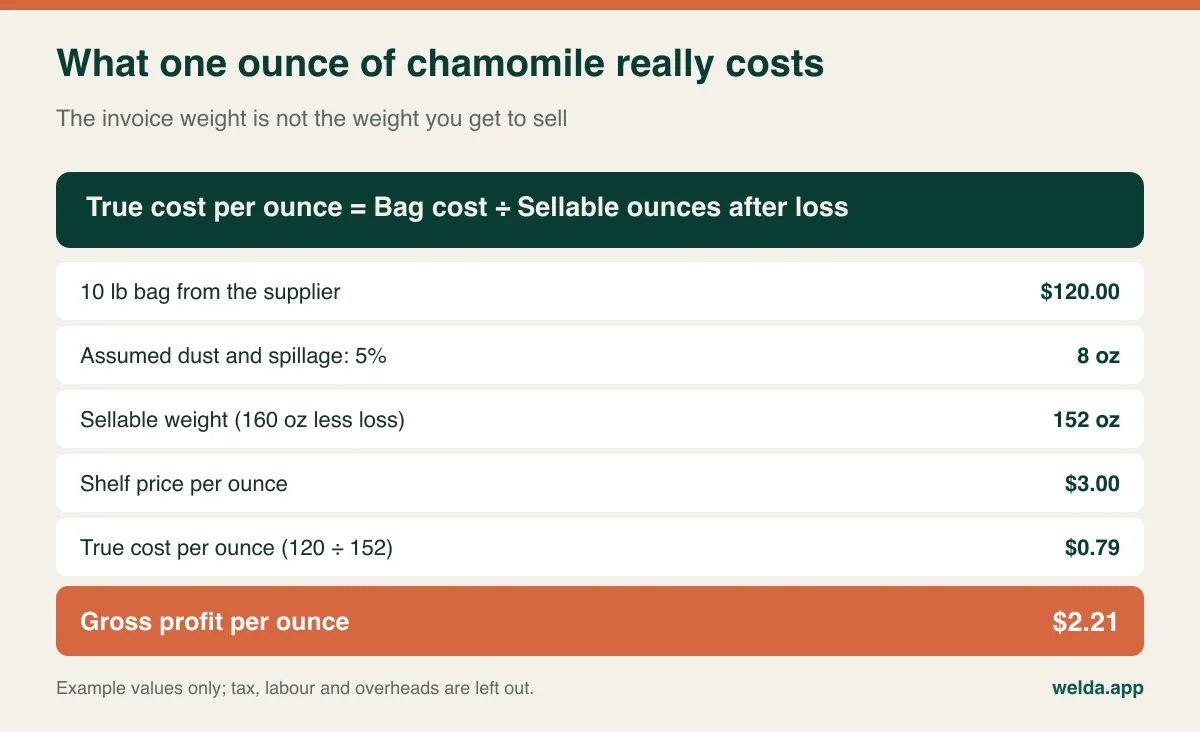
Now suppose your supplier raises that bag by 15% to $138, as an example, and your shelf price stays where it is. True cost goes to about $0.91 per ounce and gross profit falls from $2.21 to about $2.09. Nothing on the shelf looks different and your sales report looks the same. Only a report tied to purchase prices will show you this happening, and across hundreds of items at once that drift adds up.
Three things to ask for in any margin view:
- Per-product margin. Not just total profit, but the buy-sell spread for each item, ideally sortable, so that your top and bottom earners are visible in one look.
- The costing method. When a new invoice arrives before the old bag is finished, does the system use the latest purchase price or an average? Either can be fine; you need to know which so that you read the figure correctly.
- A way to spot slow movers. Roots and seeds that have not sold for months tie up cash and shelf space. Your reports should make them visible.
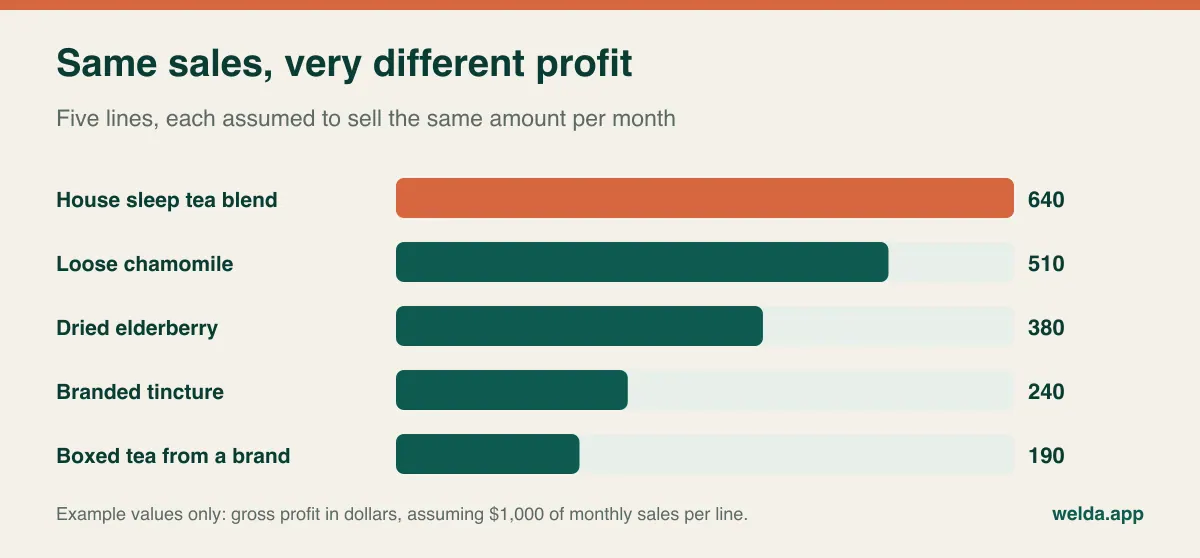
Our guide to reading inventory reports is a good starting point if this kind of analysis is new. Keep in mind that even a good report is only as accurate as what goes into it. If supplier invoices are not entered and waste is not recorded, you are looking at a neat estimate. With Welda Stock, supplier invoices stay on record, per-product margin is visible and supplier debt is tracked from the same invoice. Whichever system you pick, decide who enters invoices, and when, before you buy. A fixed half hour each week is realistic for most small shops.
Alert fatigue in a shop with 600 jars
Low-stock alerts sound ideal until you set a minimum for every record in the shop. Within a couple of weeks the list is so long that nobody opens it. Seasonality makes this worse. Demand for elderberry and warming teas often picks up in autumn, some cooling teas go quiet in winter, and a fixed minimum set in July means little by November.
Look for alerts you can realistically use, and set them up in layers:
- Pull your fastest sellers from the sales report and set minimums for those first.
- Add long-lead or single-source items. A herb that sells slowly but takes weeks to replace still needs watching.
- Review seasonal items at the start of each season, using the same period last year as a guide.
- Keep managing the long tail with a weekly walk along the shelves. Not everything has to be automated.
Welda Stock surfaces items running low with critical-level alerts, and past-period sales reports help with seasonal ordering. In any demo, ask to see the same month last year for a single product. That small report tends to inform buying decisions better than a busy dashboard.
Batches, best-before dates and what a POS can honestly do
Herbal shops sit close to rules that a typical gift shop never has to think about. Dried herbs lose quality, supplements and tinctures carry dates, and recalls do happen. So how much of this should your POS manage?
Weigh this according to your range. If you sell a modest number of dated products, shelf rotation and regular checks usually do the job. If much of your range is dated, look specifically for batch and expiry tracking, and ask how deep it goes. Some systems offer just a text field, while others can alert you before a date and trace which batch went where. That difference matters if a supplier recalls a lot.
We do not list batch or expiry alerts as a Welda Stock feature on our pages. You can record expired or spoiled stock as waste, but if batch tracing is a requirement for your shop, make it your first question in the conversation. Own-label printing is a separate matter as well: check what your scale or label printer produces and how its output connects with the system.
What no POS takes off your hands: scales, tax, health claims, data
The following is a general overview, not legal or tax advice. Rules change and vary by country and business, so confirm the details with your accountant, your local authority or a qualified adviser.
- Scales: In many places, scales used to sell goods by weight must be approved for trade. In the US this is often described as legal for trade, with state or local weights and measures offices involved; in the UK, Trading Standards covers this area. Changing software does not change those duties, and some scale adjustments can affect a seal, so ask your service company first.
- Sales tax and VAT: Foods, supplements, cosmetics and books can each be treated differently depending on where you trade. A herbal shop sells across those categories in one basket, so check how rates are set per item and how they appear on receipts and in your reports.
- Fiscal requirements: Some countries require certified fiscal devices or tax-authority reporting for retail sales. A customer receipt from sales software is not automatically a fiscal document. Ask how any system works alongside your local requirement, and ask us too; we do not claim fiscal certification here.
- Health claims: What you may say about a herb varies a great deal by market, and regulators in many countries watch this closely. Whether a product counts as food, supplement or medicine can affect how it may be sold and described, and packing or labelling your own products may bring additional rules. Be careful with product descriptions and shelf cards, and take advice if you make your own products. No POS system takes on this responsibility.
- Customer data: Where data protection laws such as GDPR apply, purchase records need care. Herbal shops have one sensitive twist: a staff note saying that a customer buys something for a specific condition could amount to health information. Keep that kind of note out of the customer record.
Which kind of system fits which kind of shop
Not every herbal shop needs specialised software. Be honest about what your shop actually is:
| Your shop | Sensible starting point | Watch out for |
|---|---|---|
| Small range, solo owner, mostly packaged | A simple till with a spreadsheet can last a while | Margin work stays manual and gets harder as you grow |
| Hundreds of records, plenty of loose sales, a few staff | Stock and sales software that decodes scale barcodes | Scale fit and product record structure |
| Mostly packaged supplements, little sold loose | A general retail POS may work well | Depth of margin and expiry tools |
| Several locations or a separate stockroom | Software with stock per location | Differences between sites and user permissions |
| Own brand, blending, wholesale to other shops | A system focused on production and batch records | A retail POS alone may not be enough |
| Most sales happen online | A platform with strong e-commerce integration | Stock sync between orders and shelf |
Free tools can also work in a small shop for a time. If they fail one of the three tests at the top of this guide, though, the savings tend to come back as wrong orders and profit you never saw leaving.
Take your own basket to the demo
A vendor's prepared demo nearly always runs smoothly, since it uses data built for the purpose. So bring your reality: fifteen to twenty items from your list, three real labels from your scale and a recent supplier invoice. Send them ahead so the session can be prepared properly.
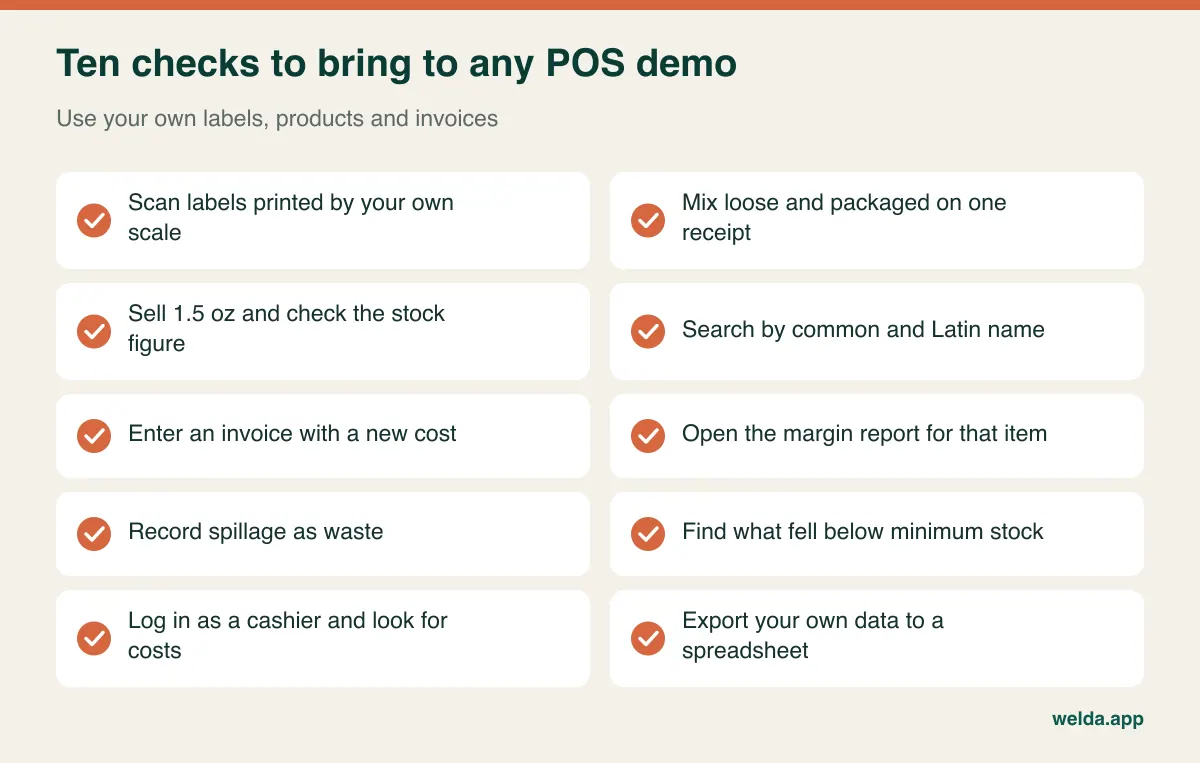
Logging in as a cashier looks like a small item, yet it matters. Your buying prices and margins are among the most valuable information in the business. In Welda Stock you set separate permission levels for cashier, stock manager and administrator. The cashier uses the sales screen, while purchase prices, margins and reports stay with the administrator.
Also ask what happens when the internet goes down. Welda Stock is web-based and works over an internet connection, so if your connection is unreliable, raise that early. Other systems answer this differently, and it is worth getting a clear answer from each one before a busy Saturday raises the question for you.
Reading a quote when the scale is part of the bill
A single figure on a quote can mislead you. One quote includes setup, data import and training; another lists them separately. Cost is usually driven by:
- The number of users and locations, and whether a stockroom is tracked separately
- The scope of importing products and any customer records
- Setting up scales, barcode readers and the till workflow
- Training and support during the move
- Anything recurring over the years, such as licences, payment terms, updates and support
Hidden costs tend to appear as extra users, paid report modules, a second scale or a payment contract you are tied to. Include hardware too: if you do not own a label-printing, trade-approved scale, the larger investment may sit there rather than in the software. Build a simple table, send every vendor the same written questions and work out the three-year total yourself.
With Welda Stock there is a one-time setup fee, and setup, spreadsheet import and team training are part of the quote. The amount depends on your users, locations and products and gets settled in a free consultation, so having those numbers ready speeds things up. If you run outside Türkiye, also ask how your currency and tax setup will be handled; that is a fair question for any vendor working across borders.
Start the switch with your product list
The hard part of changing systems is rarely the software. It is the untidy list. Welda Stock is web-based and setup is usually finished the same day, but no team can interpret your product list correctly if it is a mess. For the detail on importing, see moving from Excel to inventory software.
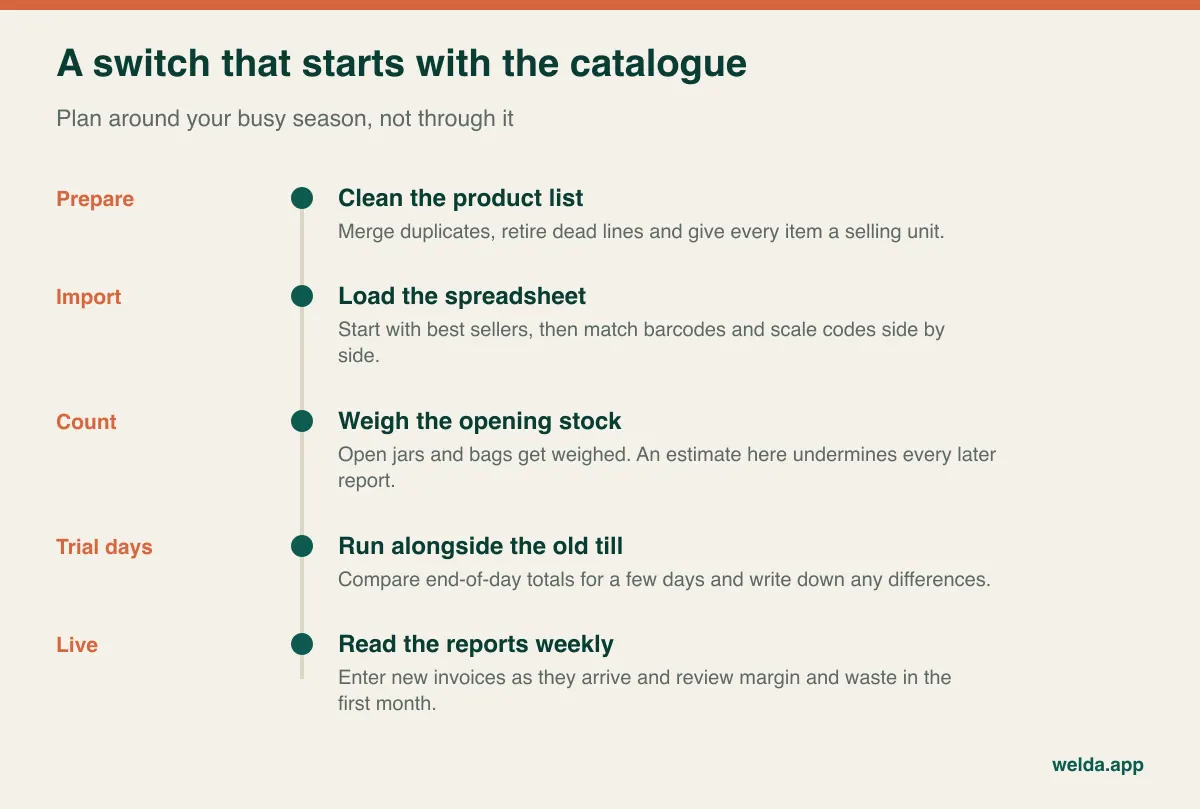
Two risks are specific to herbal shops. The first is opening stock: if you enter guesses for open jars and half-used bags, your first month of margin and waste reports will mean little. If weighing everything is too much, start with your top fifty items and work through the rest in sections over the following weeks. The second is timing. Do not change your till during cold and flu season or the run-up to the holidays, if those are your peaks. Pick a quiet week and give yourself room to make mistakes.
Is Welda Stock right for your herb counter?
Consider Welda Stock as your herbal shop POS software if you want hundreds of items in a single list, weighed sales through scale barcodes, per-product margin as purchase prices change, waste and stock count records, supplier debt in one place, cashiers who cannot see your buying prices and a system that continues to work when you add a location.
The picture changes if your priorities are automated recipes, batch and expiry alerts, offline selling, ounce-based labelling you cannot test first, fiscal device integration, or deep online store syncing. If one of those is a must-have, talk it through with us early, or look at a system that is strong in that area. A few months on the wrong software costs more than finding the right one a little later.
Frequently asked questions
What is the difference between herbal shop POS software and a regular retail POS?
The difference lies in weight and range. A regular POS is usually built for scanning whole units. A herbal shop needs loose and packaged stock side by side, weighed sales and purchase prices that change often. If a general POS handles these well, it may suit you just fine, so judge by the test and not the label.
Do I need a label-printing scale?
Not necessarily, but weighed sales become slower without one. Packaged items are unaffected, while loose items may have to be entered by hand, which tends to fall apart at busy times. If most of your sales are weighed, consider the scale and the software as one purchase.
Do I have to enter hundreds of products one by one?
No. Product, barcode, stock and price lists can be imported in bulk from a spreadsheet, and with Welda Stock that import is part of setup. If your list is untidy, cleaning up names and units first will save more time than the import itself.
Is it worth recording spillage and dust?
Yes. Losses that look trivial on a single weighing can add up to a real stock gap by month end, and without them your margin report looks better than reality. Most small shops do not need to log every scoop; recording the difference per bag or jar at intervals is usually enough.
How do I find out what the software will cost?
Write down your users, locations, product records and hardware, and ask each vendor for a quote on that same scope. For Welda Stock, this happens in a free consultation with no commitment.
Can one system handle teas, supplements and cosmetics under different tax rates?
Ask your accountant which rates apply to which products, then see how the system stores them per item or category during the demo. Never assume two products sitting side by side share a tax treatment.
How should I track my own blends?
The simplest start is a separate record for each blend, reducing ingredients with stock movements each time you make a batch. If blends make up a large share of your sales, a system with a recipe module may suit you better, so settle this before choosing.
A simple way to make the final call
Write down three products: your most-weighed herb, your best-selling packaged item and the blend you believe earns the most. Any system you consider should be able to show you the sale, the stock and the profit for all three. If you would like to try that with Welda Stock, book a free consultation. Tell us about your range and your scale, and we will look together at whether it fits and settle the price in that conversation.