If you run a hardware store, gift shop, stationery store, craft shop, pet supply store or something similar and nobody seems to sell software for your exact trade, here is the short answer: small retail store inventory software built for general retail will probably do the job, provided your goods can be counted and each sellable unit can be told apart by a barcode or a code. It will probably not do the job if you need to track each unit by serial number, if your work runs through repairs, rentals or custom orders, or if your stock has to stay in sync with an online channel. The decision depends far less on what your trade is called than on how your goods behave on the shelf.
This guide is for the owner who has spent a few evenings searching and found mostly grocery systems, restaurant systems and enterprise suites. It gives you a test you can apply to your own store, works through the situations where general systems really struggle in small retail, and ends with a rehearsal you can run before you pay anyone anything.
What software built for your trade actually adds
Vertical software has real value, and it would be wrong to pretend otherwise. But when you take the label off, much of what a trade-specific package offers is a general inventory and point-of-sale core with three things layered on top: a few extra fields on the product record, a screen flow shaped around the daily routine of that trade, and a starter catalog or category list so you are not building from nothing.
Those additions matter in some trades. A paint store mixing custom colors needs formula records. A pharmacy works under rules of its own. A bike shop with a busy service bench needs work orders more than it needs a stock list. Yet a toy store does not need special software to record an age range; a category or a word in the item name holds that perfectly well. A candle and card shop does not have a workflow that a grocery system cannot understand. It has products, a counter and a supplier.
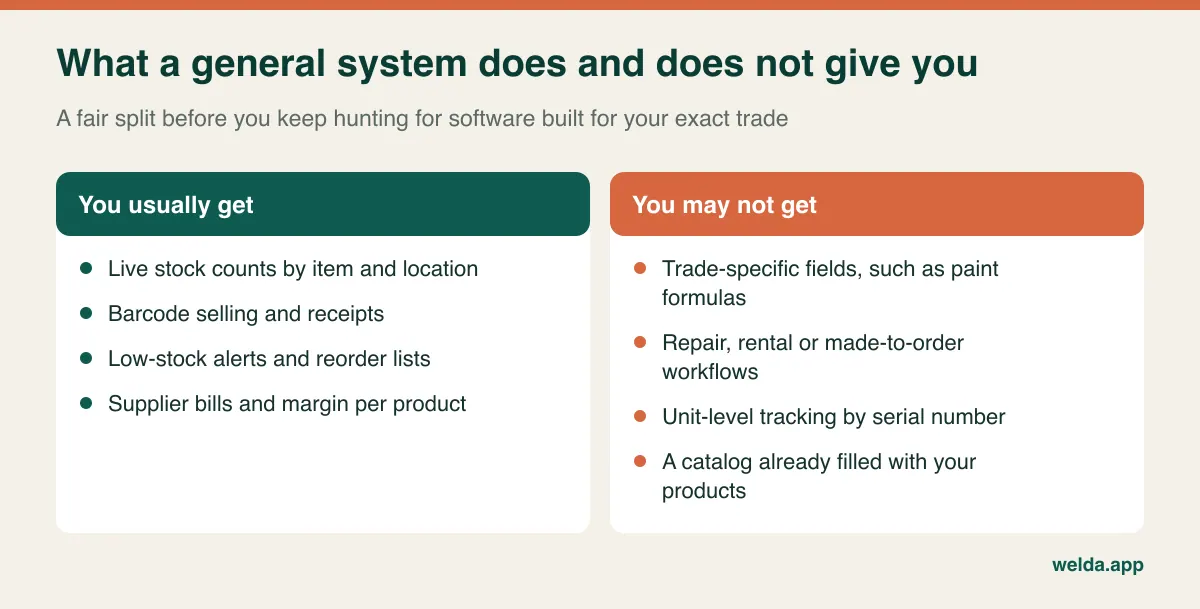
So failing to find software with your trade's name on it tells you very little. It usually means your market is too small for a vendor to build a landing page for it. It does not mean your store is too unusual to run on a general system.
The three-question test: is the gap information, a workflow or an obligation?
Write down the single thing you are most worried a general system cannot do. Be specific. "Handle my products" is not specific enough, but "know which of my lamps came on consignment from a local maker" is. Then ask what kind of gap it is, because the three kinds have very different answers.
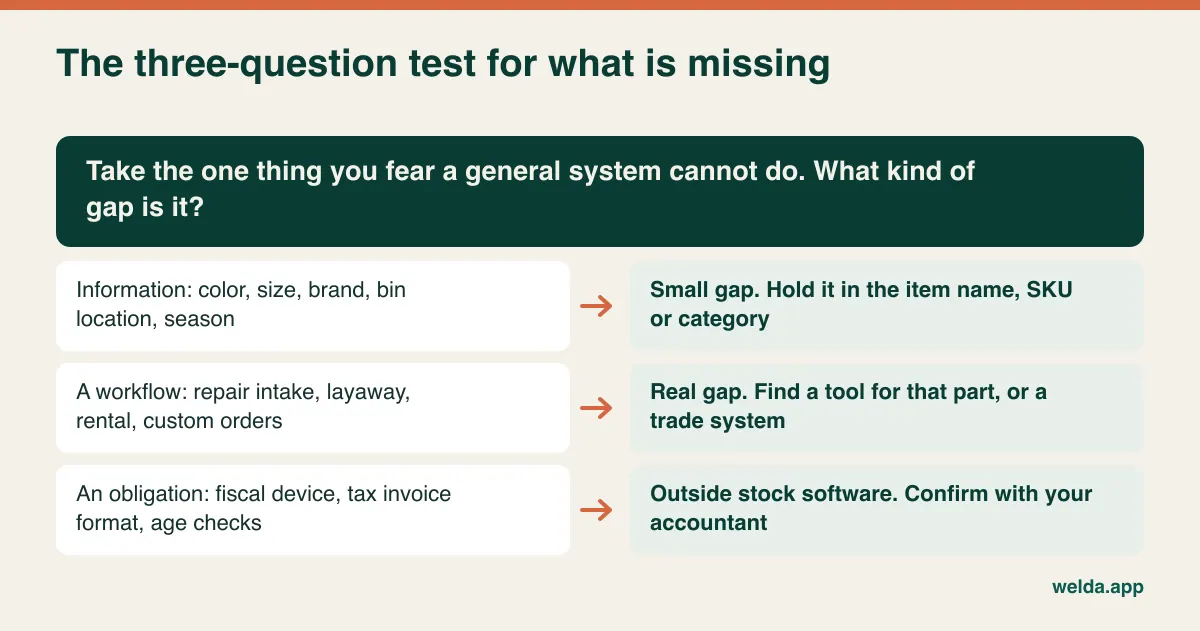
Information gaps are the easy ones. You want to record color, size, finish, brand, season or bin location. These do not need a dedicated field to be useful, because they can live in the item name, the SKU pattern or the category. In a hardware store, a name like "Cabinet hinge 35 mm satin nickel" answers the staff question and the search box at the same time. Dedicated fields are nicer for filtering, but they are rarely worth buying a whole different system to get.
Workflow gaps are real. If a customer brings in a bike for a tune-up, you need intake, parts used, labor and a status. If you cut keys and take framing orders, you are running jobs and not just selling stock. Layaway, rentals and made-to-measure orders also fall here. A general inventory system will not turn into a job tracker because you wrote a clever SKU. In this case you either look for a trade system, or you use a separate tool for the job side and let stock software handle the products that move over the counter.
Obligation gaps belong to someone else. Fiscal devices, tax invoice formats and age verification are dictated by where you operate, and they are not something inventory software settles just by existing. We come back to this in its own section below.
The shelf with no barcodes
This is where small specialty retail differs most from a supermarket. Grocery systems assume that almost everything arrives with a UPC or EAN. A hardware store sells loose fittings out of drawers, a craft shop sells beads and buttons, and a gift shop sells ceramics from a local studio with nothing printed on them. If staff cannot find an item within a few seconds, they will start keying sales into a generic line, and your stock counts will stop meaning anything within a month or two.
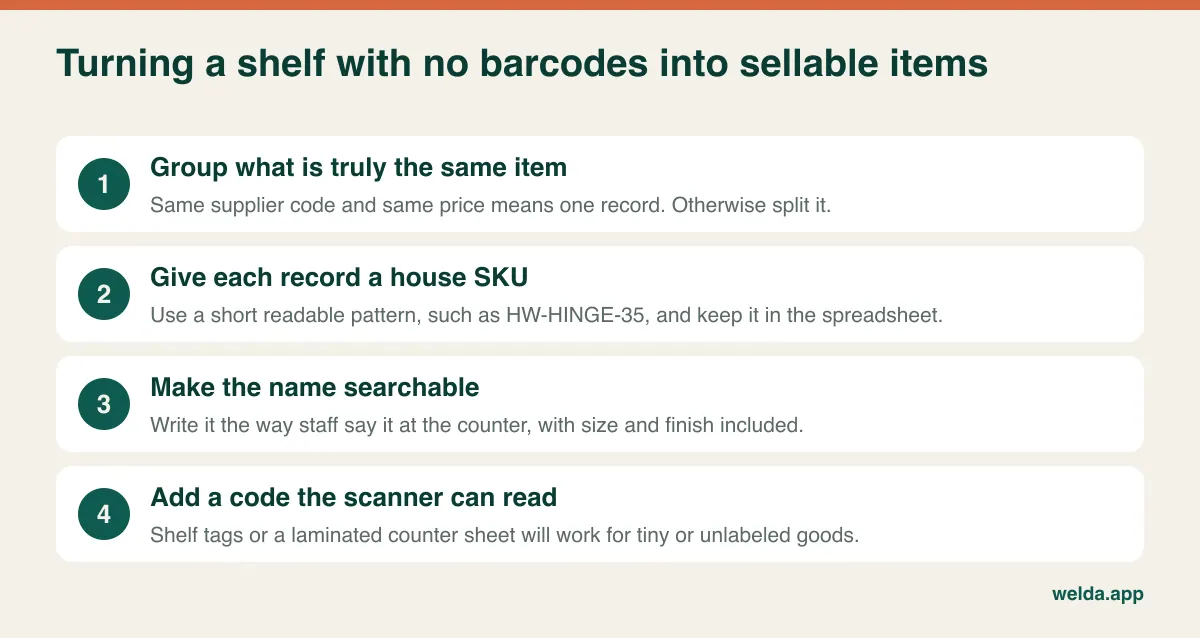
Decide your level of detail first. This decision is easy to skip, and skipping it can undo the project later. You do not have to track every washer. Tracking "M6 washers, box" gives you all the accuracy that a low-value item can justify. Trying to create a record for every size of every screw can make the whole system too tiring to maintain. As a rule of thumb, an item deserves its own record when you would actually reorder it separately or when losing track of it would cost you something you would notice.
Then come the names. Write them as your staff say them at the counter, with the size and finish in the name. "HNG-35-NKL" is fine as a SKU but useless as the only description. In Welda Stock the sales screen finds items by name, SKU or barcode, so a well-written name and a short house code both do useful work, and a code can be scanned once it is printed on a label.
Printing is a separate question. Our product pages do not list label printing as a feature, so talk through how you will produce labels before you commit, and test one sample label against your actual scanner. For tiny goods that cannot take a sticker, one simple option is a laminated sheet of barcodes beside the till, so the cashier scans the line on the sheet rather than the item itself. It looks old-fashioned, but it keeps the line moving.
Variants: the math that catches owners out
General systems usually handle variants in one of two ways: as children of a parent product, or as separate sellable records. Welda Stock uses the second way. Each size and color gets its own SKU and barcode, and a sale reduces only the combination that was scanned. Our clothing store software page shows how that plays out in fashion, and the logic applies equally to shoes, bags, yarn or paint.
The catch is simple arithmetic. As an example, take a shoe shop stocking 40 styles, each in 6 sizes and 2 colors: that is 480 records before you have sold anything. Nobody should type those by hand. Build the list by formula in a spreadsheet and import it. Welda Stock imports products, barcodes, stock and prices from Excel in bulk, and our team helps during setup, but only you can decide whether "navy" and "dark blue" from two suppliers really are the same thing.
Before you start, ask yourself whether all of those records need to exist. A yarn shop may need each color tracked because customers ask for it by name. A stationery store selling mixed-color pens from a single display may be better off with one record per box. The variant decision is a merchandising decision, not a software one.
Slow movers, seasonal stock and why one reorder rule fails
A grocery store's main fear is an empty shelf. A specialty retailer often has the opposite problem: a very wide range, a few units of each, and some items that sell only a handful of times a year. That breadth can be the reason customers come to you rather than to a big-box store. It is also where a lot of your cash is sitting.
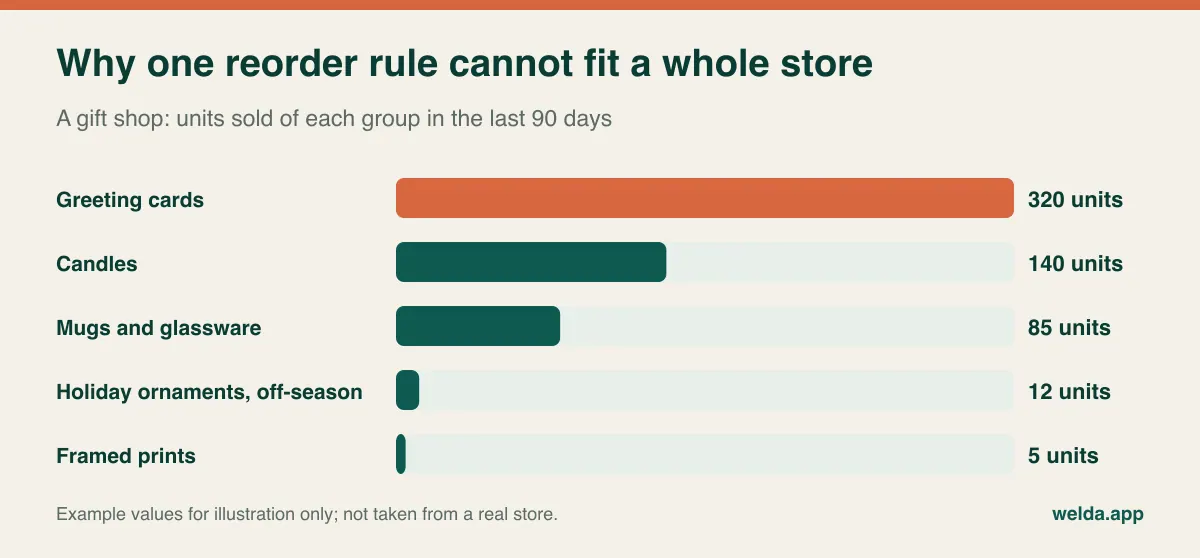
Low-stock alerts are one of the most useful features in any inventory system, and also the easiest to misuse. Set a level on every one of several thousand items and you will get a long list every morning that nobody reads after the first week. The better approach is to use your sales reports to find the items that really move and set levels only on those. For slow movers, decide item by item or category by category: reorder when it runs out, or let it go?
Seasonality adds another layer that is easy to underestimate. A gift shop sells almost nothing of certain ranges for ten months and then needs a deep stock for six weeks. If your alert levels are based on last month's sales, they will be wrong at exactly the moment when they matter. Review seasonal categories by hand before each season, using the same period last year as a reference once you have a year of data. In your first year, keep your old notes, because the software will have no history to offer you.
Eventually you will also need to admit which items should not be on the shelf at all. Reading weekly and monthly sales next to stock on hand gives you a concrete list. Software does not make the call for you, and it cannot know that the odd door handle is what brings contractors back to your store. Our guide on clearing dead stock covers what to do with the list once you have it.
Cases in, singles out: getting cost right
Stationery comes by the dozen, sealant comes by the case, pet food comes by the pallet, and customers buy one. That raises two questions: does stock increase by the right amount, and does your margin report use the right cost? The second question is easy to skip, because freight and supplier discounts can get lost when an invoice line becomes a unit cost.
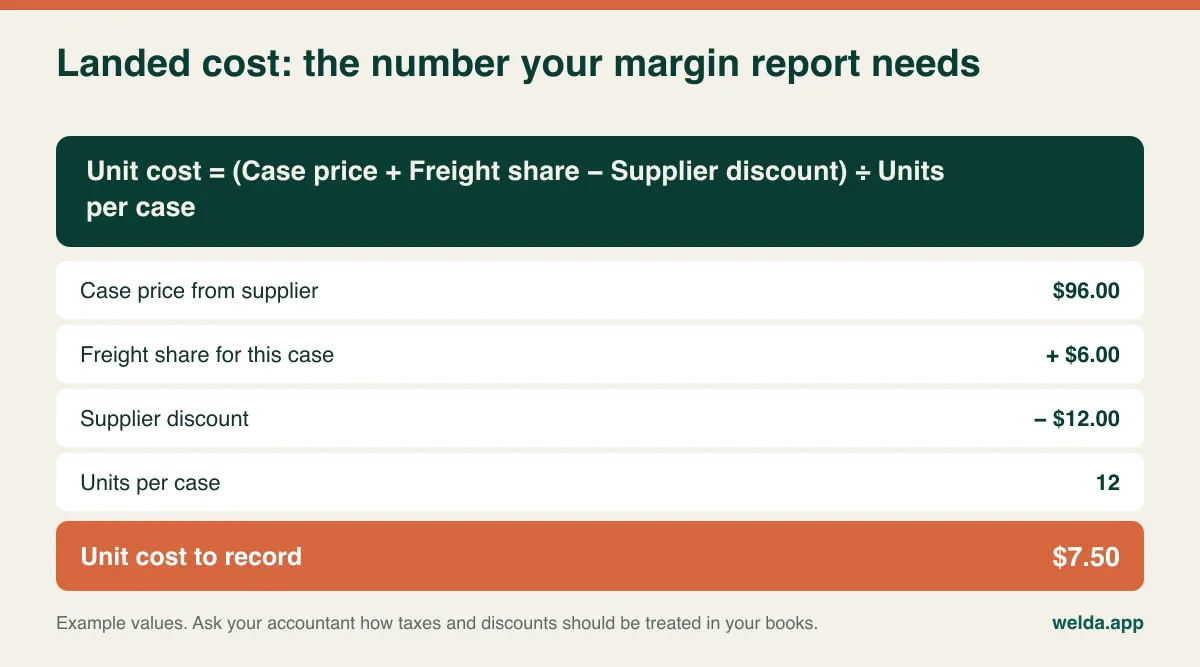
In this example, dividing the case price by twelve gives $8.00, while the real cost is $7.50. On one item that looks trivial, but across several hundred items such differences can change which products look profitable. Agree on one rule for how cost gets entered, write it down and make sure everyone receiving stock follows it.
Systems handle case-to-unit conversion in different ways. Some convert automatically, some treat the case as a separate item, and some just ask you to receive stock in units. Welda Stock's product pages list supplier invoices, debt tracking and margin per product, but do not describe automatic case conversion as a separate feature. If you buy heavily by the case, bring one real invoice to the demo and enter it together, then see how stock and cost change. Do the same with every system you are comparing.
The question most small retailers forget: are you also selling online?
It is easy to leave the online side out of a buying decision until after go-live. Then the shop's single last unit is sold at the counter while the same unit is still showing on a website, and someone has to write an apologetic email. Before you choose anything, be honest about where you stand:
- You rarely or never sell online. Ignore this section. You do not need to pay for sync you will not use.
- You sell a little online, from a small range. You can often keep a separate online allocation: move a set number of units into a distinct location or list and update it by hand. It takes a little discipline but it works at low volume.
- Online is a major part of your sales. Real-time sync between channels is a core requirement, and it should be one of your first filters when shortlisting systems.
Here is where we should be plain about our own product. Welda Stock's pages do not list e-commerce or marketplace integrations. It is built around a physical store: barcode selling, receipts, end-of-day cash reports, customer accounts, supplier bills, multiple branches and warehouses. If your online channel depends on automatic sync, Welda Stock is unlikely to be the right fit, and we would rather say so now than after setup. Unit-level serial number tracking and lot or expiry tracking are not on those pages either, so a phone reseller or a store selling regulated, batch-tracked goods should keep looking.
Tax, fiscal rules and customer data depend on where you are
Rules differ from one country to another, so this section can only offer a general orientation, and none of it is legal or tax advice. What holds nearly everywhere is that inventory software and legal compliance are separate questions, and you should not assume that one takes care of the other.
Some countries require certified cash registers or fiscal devices, and some require specific receipt or electronic invoice formats. Others leave more freedom but still expect records you can stand behind. Sales tax and VAT rules vary by country, and in some places by state or province. Ask your accountant three things before you sign anything: what you must issue to a customer at the time of sale, what you must keep and for how long, and whether the system you are considering is acceptable for those purposes. Welda Stock creates a customer receipt for each sale and can export reports to Excel for your accountant, but our pages do not list fiscal certification, so ask us directly and get the answer in writing.
Customer data deserves some thought as well. If you keep customer accounts, you are storing names, contact details and purchase history. Under GDPR and many similar data protection laws, that brings duties around why you hold the data, how long you keep it and who can see it. A practical minimum for a small shop is to record only what you actually use, give each staff member their own login, and close accounts when people leave. Separate permission levels for cashier, stock manager and owner help with this, and also with till discipline.
Comparing quotes when no two look alike
Quotes for small retail store inventory software rarely line up, because vendors bundle things differently. Before you compare any totals, get these items answered in writing for each vendor.
| Cost driver | What to ask | Why it matters in a small store |
|---|---|---|
| Users | How many can log in at once? What does an extra one involve? | Seasonal staff can change the math |
| Locations | Does a back room or second warehouse count as a location? | Stores with off-site storage may pay more than expected |
| Item count | Is there a limit on records? | Variants can multiply the count quickly |
| Data import | Is it included? Who does the work? | Hand-entry of thousands of items is a real cost |
| Training and support | Is cashier training included? What about help after go-live, and in what language? | The owner often ends up as the only help desk |
| Hardware | Will your current scanner and printer work? | Replacing devices may be an unplanned purchase |
| Billing model | One-time or recurring? What is charged after year one? | Lifetime cost can look very different from the first invoice |
| Exit | Can you take your data out when you leave? | It protects your next decision |
Some of the biggest costs never appear on an invoice: the hours spent cleaning your product list, the evenings spent counting, and the first weeks when checkout runs more slowly. Put your own estimate on those. A cheap system that takes much longer to set up is not necessarily cheap.
With Welda Stock, pricing is tailored to your number of users, locations and products, and we settle it with you in a free consultation. Setup, spreadsheet import and team training are part of the quote, and the model is a one-time setup fee with no hidden or recurring costs. It helps to come prepared with your approximate item count, your number of users and locations, whether you use a scanner or scale, and how you track stock today. Take a look at our small retail store inventory software page if you want the full feature list first, and read our broader guide on how to choose inventory software if you are still early in the search.
A demo script built from your worst items
In a vendor's demo, everything works, because the sample data was chosen to work. Your store's real test is the bin of unlabeled fittings, not the neatly barcoded box. So take over the agenda. Before the call, walk your shop and pick the items that will cause the most trouble, then run these scenarios:
- Sell an unlabeled item by finding it through search, with a line behind you.
- Receive a case from a real invoice and sell one unit.
- Create two variants of one product and sell each one.
- Sell something by length or as a fraction, if you do that.
- Change ten prices at once after a supplier price rise.
- Process a return and check whether stock goes back up.
- Sell on account, then take a partial payment a week later.
- Correct a count difference and find the record of who changed it.
For each one, watch three things. How many steps does it take a cashier, and could your newest part-timer do it on a busy Saturday? When it is finished, are the stock and cash figures right? Go back and check rather than assuming. And when someone makes a mistake, how is it undone, and does the fix leave a trace?
Then ask this question: "What does your system do badly for a store like mine?" A vendor who cannot name anything has either not understood your store or is not being straight with you. We have tried to set a fair example above, and we would expect the same question from you. Fair warning about a limit on our side: Welda Stock is browser-based, so it needs no installation and runs on any computer with a browser, but transactions go through your internet connection. If your connection is unreliable, tell us so, and we will plan the best way of working during setup.
A cutover that does not close the store
The classic mistake is trying to get everything perfect on day one. Counting thousands of items in one weekend while still trading is unrealistic, and doubly so in a store with one or two people. Split the job by sales weight instead.
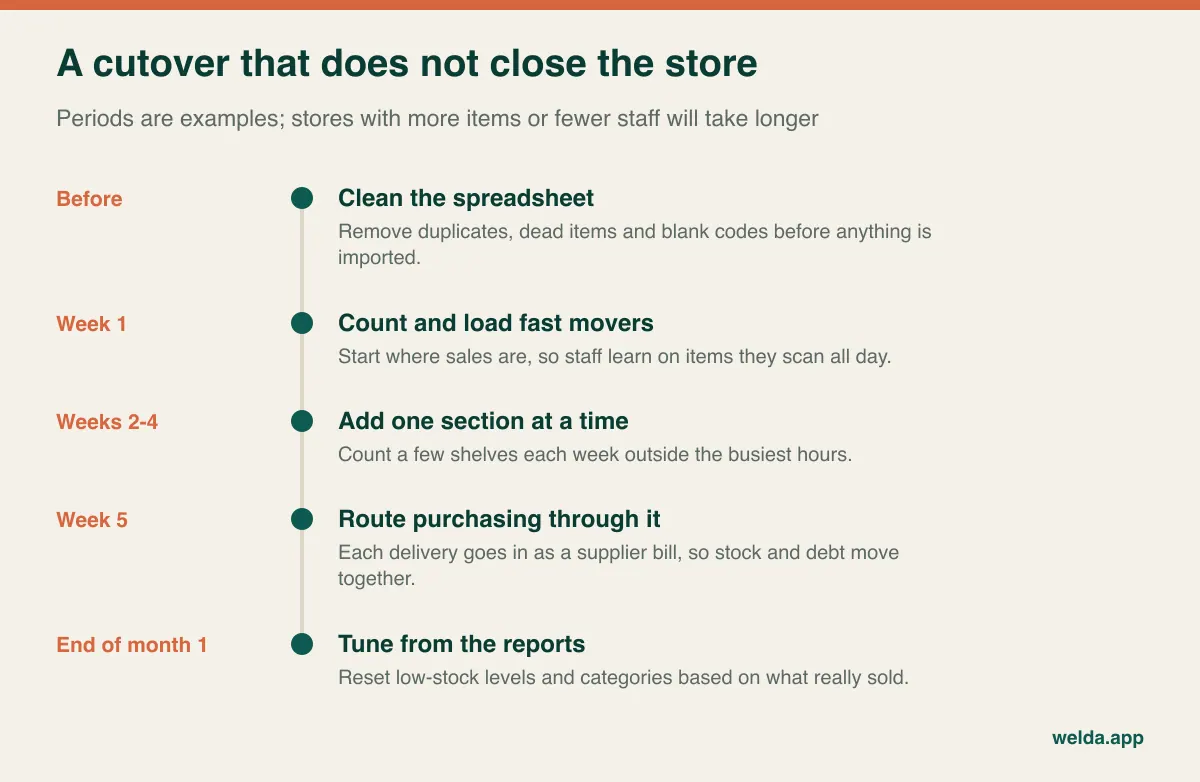
Start with the spreadsheet, and do not skip this. Merge the three spellings of one product, separate out what has not sold in years, and fill in missing codes. Our step-by-step guide on moving from Excel to inventory software has a fuller checklist. Then count in sections, ideally during quiet hours, using the methods in our stock count guide. While the rollout is under way, agree on one rule: counted sections are trusted, uncounted ones are not.
Make one person responsible. Route every delivery through the system as soon as you start, because stock numbers drift away from reality within weeks when purchases are not entered. Keep your old spreadsheet for a month as a read-only backup, and stop updating it so nobody has two sources of truth. At the end of the first month, spend an hour reviewing: are the low-stock levels realistic, do the categories make reports easier to read, and which step do cashiers keep skipping?
If you are tired of searching for software with your trade's name on it, the fastest way forward is to list your eight hardest situations and try them in a live session. You can book a free consultation through our small retail store inventory software page, bring those items along, and see whether Welda Stock fits. If it does not, we will tell you.
Frequently asked questions
Is general inventory software risky if nothing exists for my trade?
Usually not, as long as your goods can be counted and told apart by a barcode or code. The risk starts when you need a separate process, such as serial number tracking, custom orders or repair intake. A rehearsal using your own hardest items will show you which side of that line you are on.
Most of my products have no barcode. Can I still use it?
Yes, with some structure. Give items a house SKU, name them the way staff say them, and consider a barcode sheet at the till for tiny goods. Welda Stock's sales screen works by name, SKU or barcode. Sort out how labels will be produced before you commit.
How many products is too many for a small store system?
The more useful question is how many records you actually need to create. Group low-value items, and be careful with variants. If you have a large catalog, ask each vendor about limits and try the import and search with your real file rather than a sample.
Should I stay on a spreadsheet instead?
If your range is small, you work alone and you can answer "what is left and what makes money" without much trouble, a well-kept spreadsheet may be fine for now. It becomes hard to sustain when several people sell at once, when you need stock to fall as each sale happens, or when you start tracking customer balances.
Can it replace my cash register?
It depends on your country. Welda Stock covers selling, receipts and end-of-day reports, but our pages do not list fiscal certification. Check with your accountant what your jurisdiction requires, then ask us directly how the two would work together in your store.
How much does it cost, and can I see it first?
Pricing depends on your users, locations and products, and we settle it in a free consultation. Before buying, you can go through a free demo with us. There is no commitment.
What language can my staff use?
Welda Stock's interface is available in English, German and Turkish, which helps in mixed teams. Ask about the support language during your consultation so that you know what to expect after go-live.